
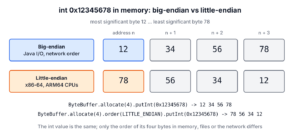
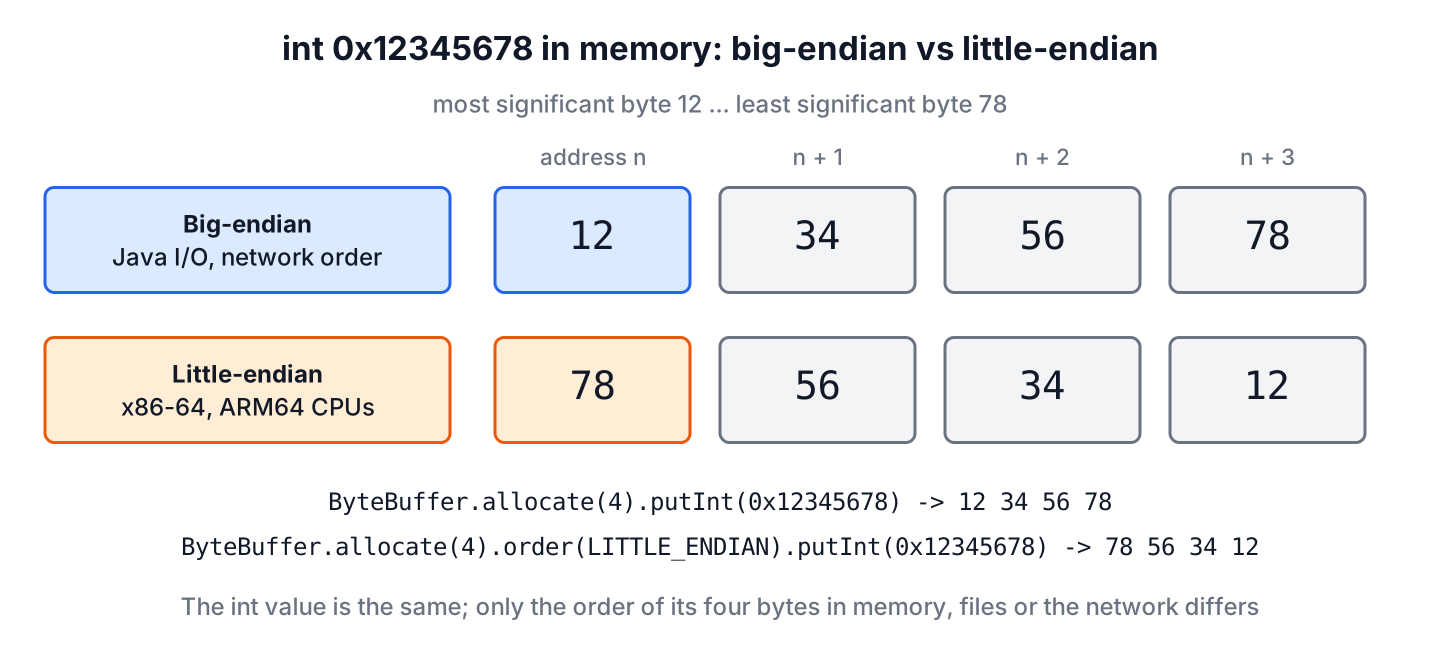
Big-endian and little-endian are the two orders in which a computer stores the bytes of a multi-byte number, where big-endian puts the most significant byte at the lowest address and little-endian puts the least significant byte there. Java uses big-endian wherever its APIs turn numbers into bytes, for example in DataOutputStream, in a new ByteBuffer and in class files, while the x86-64 and ARM64 CPUs that run most JVMs are little-endian.
Byte order matters when we read or write binary data that another program produced, such as WAV, BMP or ZIP files, network protocols, data from C programs or values from hardware devices. Plain Java code that only works with int and long values never sees it.
The following example writes the same int in both byte orders with a ByteBuffer.
int value = 0x12345678;
HexFormat hex = HexFormat.ofDelimiter(" ");

String big = hex.formatHex(ByteBuffer.allocate(4).putInt(value).array());                      // "12 34 56 78"
String little = hex.formatHex(ByteBuffer.allocate(4).order(ByteOrder.LITTLE_ENDIAN).putInt(value).array());   // "78 56 34 12"
ByteOrder cpu = ByteOrder.nativeOrder();                                                       // LITTLE_ENDIAN
Notice that the default ByteBuffer writes big-endian even though the CPU is little-endian. We look at the two byte orders, where Java uses which one, and how to read and convert little-endian data with ByteBuffer, Integer.reverseBytes() and VarHandle, with a WAV file header as the real example.
1. Little Endian vs Big Endian Byte Order
An int takes 4 bytes, and the value 0x12345678 consists of the bytes 12, 34, 56 and 78, from the most significant to the least significant. Memory, files and network packets are sequences of single bytes, so the computer must decide in which order to place them. Big-endian stores the most significant byte first, the same way we write numbers on paper. Little-endian stores the least significant byte first.
The value 0x45679812 at the memory addresses 00 to 03 shows the same pattern.
Address         00  01  02  03
-----------------------------------
Little-endian   12  98  67  45
Big-endian      45  67  98  12
Danny Cohen introduced the two names in 1980, borrowing them from the egg-cracking dispute in Gulliver’s Travels. Neither order is faster in general. Little-endian lets a CPU read the low byte of a number at the same address for any size, and big-endian makes hex dumps easier to read.
Today, almost all general-purpose CPUs are little-endian, while big-endian survives in protocols and some file formats.
| Platform or format | Byte order |
|---|---|
| Intel and AMD x86-64 | Little-endian |
| ARM64, such as Apple silicon, AWS Graviton and Android phones | Little-endian (the hardware supports both, operating systems use little) |
| RISC-V | Little-endian |
| IBM Z mainframes (s390x) | Big-endian |
| Network byte order (TCP/IP headers) | Big-endian |
| Java class files, DataInputStream, DataOutputStream | Big-endian |
| WAV, BMP and ZIP files | Little-endian |
| PNG and JPEG files | Big-endian |
2. Is Java Big-Endian or Little-Endian?
The Java language has no byte order for variables. An int is a 32-bit value, and the shift and bitwise operators work on the value, so value >>> 24 always returns the most significant byte on every CPU. The JVM stores the int in native order internally, but no Java code can read the bytes of a variable from memory.
int number = 0x12345678;
int highByte = number >>> 24;              // 18
int lowByte = number & 0xFF;               // 120
Byte order appears only where Java converts numbers to bytes or back, and the standard APIs use big-endian there unless we ask for something else. DataOutputStream writes the high byte first, DataInputStream reads the high byte first, and a ByteBuffer starts in BIG_ENDIAN order on every platform.
ByteArrayOutputStream bytes = new ByteArrayOutputStream();
DataOutputStream out = new DataOutputStream(bytes);
out.writeInt(0x12345678);
String written = HexFormat.ofDelimiter(" ").formatHex(bytes.toByteArray());   // "12 34 56 78"
Class files follow the same rule. Every class file starts with the magic number CAFEBABE followed by the version, stored high byte first, so the major version 69 of Java 25 appears as 00 45.
$ od -A d -t x1 -N 8 Hello.class
0000000 ca fe ba be 00 00 00 45
As long as Java programs exchange data with other Java programs through these APIs, both sides use big-endian and the CPU does not matter. Problems start when a Java program reads a file written by a C program on an x86-64 machine, which writes its numbers in little-endian order.
3. Reading and Writing Little-Endian Data With ByteBuffer
A ByteBuffer reads and writes numbers in the byte order set by order(). We wrap the bytes, set ByteOrder.LITTLE_ENDIAN once, and every getInt(), getShort() or putLong() call after that uses little-endian.
byte[] data = {0x78, 0x56, 0x34, 0x12};

int asBig = ByteBuffer.wrap(data).getInt();                                   // 2018915346
int asLittle = ByteBuffer.wrap(data).order(ByteOrder.LITTLE_ENDIAN).getInt(); // 305419896
String check = Integer.toHexString(asLittle);                                 // "12345678"
Reading the bytes with the wrong order does not fail, it returns a different number. 0x78563412 is 2,018,915,346, while the intended value 0x12345678 is 305,419,896, so a wrong byte order shows up as large, random-looking values.
One detail catches many developers. The methods slice(), duplicate() and asReadOnlyBuffer() return a new buffer in BIG_ENDIAN order, whatever the order of the original buffer, whereas view buffers such as asIntBuffer() keep it. After slicing, we set the order again.
ByteBuffer source = ByteBuffer.allocate(8).order(ByteOrder.LITTLE_ENDIAN);
ByteOrder sliced = source.slice().order();                    // BIG_ENDIAN
ByteOrder view = source.asIntBuffer().order();                // LITTLE_ENDIAN
ByteOrder fixed = source.slice().order(ByteOrder.LITTLE_ENDIAN).order();   // LITTLE_ENDIAN
4. Converting Between Byte Orders With reverseBytes()
The wrapper classes have a reverseBytes() method that swaps the byte order of a single value. Integer.reverseBytes() turns 0x12345678 into 0x78563412, and Short, Character and Long have the same method for their sizes. The HotSpot JIT compiler turns the call into one CPU instruction on x86-64 and ARM64.
int swapped = Integer.reverseBytes(0x12345678);               // 2018915346
String swappedHex = Integer.toHexString(swapped);             // "78563412"
short swappedShort = Short.reverseBytes((short) 0x1234);      // 13330
We use reverseBytes() when the data already arrives through DataInputStream, which always reads big-endian. Reading the value and reversing its bytes gives the little-endian value without changing the rest of the code.
byte[] littleEndianFile = {0x44, (byte) 0xAC, 0x00, 0x00};
DataInputStream in = new DataInputStream(new ByteArrayInputStream(littleEndianFile));
int rate = Integer.reverseBytes(in.readInt());                // 44100
5. Reading From byte Arrays With a VarHandle
Since Java 9, MethodHandles.byteArrayViewVarHandle() creates a VarHandle that reads and writes int, long or other values at any offset of a byte[] in the byte order we choose. It needs no ByteBuffer object per array, which helps in parsers that handle millions of small messages.
VarHandle intLittle = MethodHandles.byteArrayViewVarHandle(int[].class, ByteOrder.LITTLE_ENDIAN);
byte[] frame = {0x78, 0x56, 0x34, 0x12, 0, 0, 0, 0};

int first = (int) intLittle.get(frame, 0);                    // 305419896
intLittle.set(frame, 4, 44100);
String frameHex = HexFormat.ofDelimiter(" ").formatHex(frame);   // "78 56 34 12 44 ac 00 00"
In real code, we store the VarHandle in a static final field, so the JIT compiler can inline the access. The offset does not need to be a multiple of 4.
6. Reading a WAV File Header
A podcast app lets users upload WAV recordings and must reject files that are not 44.1 kHz or 48 kHz. A WAV file starts with a 44-byte header in the little-endian RIFF format, where the number of channels is a 2-byte value at offset 22 and the sample rate is a 4-byte value at offset 24.
A small helper builds such a header, so we can test the reader without a real recording. It uses a little-endian ByteBuffer for writing, which is the reverse of reading.
static byte[] wavHeader(int sampleRate, short channels, short bitsPerSample) {
    int blockAlign = channels * bitsPerSample / 8;
    return ByteBuffer.allocate(44).order(ByteOrder.LITTLE_ENDIAN)
            .put("RIFF".getBytes(StandardCharsets.US_ASCII)).putInt(36)
            .put("WAVEfmt ".getBytes(StandardCharsets.US_ASCII)).putInt(16)
            .putShort((short) 1).putShort(channels)
            .putInt(sampleRate).putInt(sampleRate * blockAlign)
            .putShort((short) blockAlign).putShort(bitsPerSample)
            .put("data".getBytes(StandardCharsets.US_ASCII)).putInt(0)
            .array();
}
The reader takes the first 44 bytes of the file, checks the RIFF signature, and reads the sample rate with the correct byte order. It throws an exception for files that are too short or not WAV files, instead of returning a wrong number.
static int readSampleRate(Path wavFile) throws IOException {
    try (InputStream in = Files.newInputStream(wavFile)) {
        byte[] header = in.readNBytes(44);
        String riff = new String(header, 0, Math.min(4, header.length), StandardCharsets.US_ASCII);
        if (header.length < 44 || !riff.equals("RIFF")) {
            throw new IOException("Not a WAV file: " + wavFile);
        }
        return ByteBuffer.wrap(header).order(ByteOrder.LITTLE_ENDIAN).getInt(24);
    }
}
byte[] header = wavHeader(44100, (short) 2, (short) 16);
int sampleRate = ByteBuffer.wrap(header).order(ByteOrder.LITTLE_ENDIAN).getInt(24); // 44100
short channels = ByteBuffer.wrap(header).order(ByteOrder.LITTLE_ENDIAN).getShort(22); // 2
int wrongRate = ByteBuffer.wrap(header).getInt(24); // 1152122880
Path upload = Files.write(Path.of("upload.wav"), wavHeader(48000, (short) 1, (short) 16));
int uploadRate = readSampleRate(upload); // 48000The line with wrongRate shows the classic byte order bug. Without order(ByteOrder.LITTLE_ENDIAN), the buffer reads the bytes 44 AC 00 00 as big-endian and returns 1,152,122,880 instead of 44,100, and the app would reject every valid upload.
Network protocols work the other way around. A binary protocol that sends a 2-byte length before each message in network byte order matches DataInputStream, so readUnsignedShort() reads it with no conversion.
byte[] packet = {0x00, 0x05, 'h', 'e', 'l', 'l', 'o'};
DataInputStream socketIn = new DataInputStream(new ByteArrayInputStream(packet));
int length = socketIn.readUnsignedShort();                    // 5
7. Checking the Native Byte Order
ByteOrder.nativeOrder() returns the byte order of the CPU the JVM runs on. We need it only when Java code shares memory with native code, for example through a memory-mapped file that a C program reads at the same time, or a direct buffer passed to a native library.
ByteOrder platform = ByteOrder.nativeOrder();                 // LITTLE_ENDIAN
ByteBuffer shared = ByteBuffer.allocateDirect(16).order(ByteOrder.nativeOrder());
ByteOrder sharedOrder = shared.order();                       // LITTLE_ENDIAN
The Foreign Function and Memory API, final since Java 22 with JEP 454, uses the opposite default from ByteBuffer. Its layouts such as ValueLayout.JAVA_INT use the native order, and JAVA_INT.withOrder(ByteOrder.BIG_ENDIAN) creates a big-endian layout for file formats and protocols.
ByteOrder layoutOrder = ValueLayout.JAVA_INT.order(); // LITTLE_ENDIAN8. Endianness in Java FAQs
Byte order looks like a hardware topic, but the questions about it come from everyday Java code that reads files and sockets.
8.1. Is the JVM big-endian?
Not in memory. The Java APIs that produce bytes are big-endian by default, but the JVM stores values in the native order of the CPU, which is little-endian on x86-64 and ARM64. Java code cannot observe the native order of its variables, so programs behave the same on every platform.
8.2. How do we convert a little-endian byte array to an int?
We wrap it in a ByteBuffer with little-endian order and call getInt(). For a single value from a big-endian source, Integer.reverseBytes() does the same conversion.
byte[] raw = {0x01, 0x00, 0x00, 0x00};
int one = ByteBuffer.wrap(raw).order(ByteOrder.LITTLE_ENDIAN).getInt();   // 1
8.3. Does endianness change the bit order or the shift operators?
No. Endianness is about the order of whole bytes, and the bits inside a byte stay in place. The operators <<, >> and >>> work on values, so they give the same result on every CPU.
8.4. Do strings have a byte order?
UTF-8 has none, because it encodes characters byte by byte. UTF-16 uses 2-byte units, so StandardCharsets.UTF_16 writes a byte order mark FE FF followed by big-endian units, and UTF_16LE writes little-endian units without a mark.
String utf16 = HexFormat.ofDelimiter(" ").formatHex("Hi".getBytes(StandardCharsets.UTF_16));      // "fe ff 00 48 00 69"
String utf16le = HexFormat.ofDelimiter(" ").formatHex("Hi".getBytes(StandardCharsets.UTF_16LE));  // "48 00 69 00"
8.5. What is network byte order?
Network byte order is big-endian. The Internet protocols store multi-byte fields such as ports and lengths with the most significant byte first, which is why DataInputStream and DataOutputStream match them without conversion.
9. Conclusion
Big-endian stores the most significant byte first and little-endian stores the least significant byte first. Most CPUs today are little-endian, while network protocols, Java class files, DataInputStream, DataOutputStream and a new ByteBuffer use big-endian.
Inside a Java program, byte order is invisible. It matters only at the border, when we read a file or a packet written by another program. There, ByteBuffer.order(ByteOrder.LITTLE_ENDIAN), Integer.reverseBytes() and a byte-array VarHandle convert the data, and a wrong order shows up as large, random-looking numbers. The Java tutorial covers primitive types such as byte and int.
10. References
- ByteBuffer Javadoc (Java 25)
- ByteOrder Javadoc
- DataInput Javadoc
- Integer.reverseBytes() Javadoc
- JVM Specification, The class File Format
- RFC 1700, Assigned Numbers (network byte order)
Happy Learning !!
