
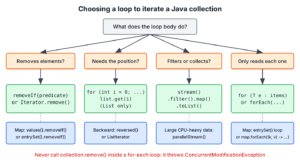
To iterate a collection in Java, we use the enhanced for loop in most cases, forEach() with a lambda for a one-line action, an Iterator when we remove elements on the way, and an index-based for loop only for lists when we need the position. Streams join the list when we filter, transform or collect the elements instead of only visiting them.
The same loops work for List, Set and Deque in the Java Collections Framework, because all of them implement Iterable, and a Map offers the same loops over its entries, keys or values. The following example visits a playlist in five ways.
List<String> songs = List.of("Intro", "Verse", "Chorus");

// 1. Enhanced for loop
for (String song : songs) {
    System.out.println(song);                        // Intro, Verse, Chorus
}
// 2. forEach() with a method reference
songs.forEach(System.out::println);                  // Intro, Verse, Chorus
// 3. Iterator
Iterator<String> it = songs.iterator();
while (it.hasNext()) {
    System.out.println(it.next());                   // Intro, Verse, Chorus
}
// 4. Index-based loop, lists only
for (int i = 0; i < songs.size(); i++) {
    System.out.println(i + " " + songs.get(i));      // 0 Intro, 1 Verse, 2 Chorus
}
// 5. Stream
List<String> loud = songs.stream().map(String::toUpperCase).toList();  // [INTRO, VERSE, CHORUS]
Notice that the first four loops only visit the elements, whereas the stream builds a new list. We pick between these loops with a small decision guide, apply them to lists, sets and maps, remove elements without a ConcurrentModificationException, walk a list backward with reversed(), and look at what makes one loop faster than another.
1. Which Loop to Use to Iterate a Collection in Java
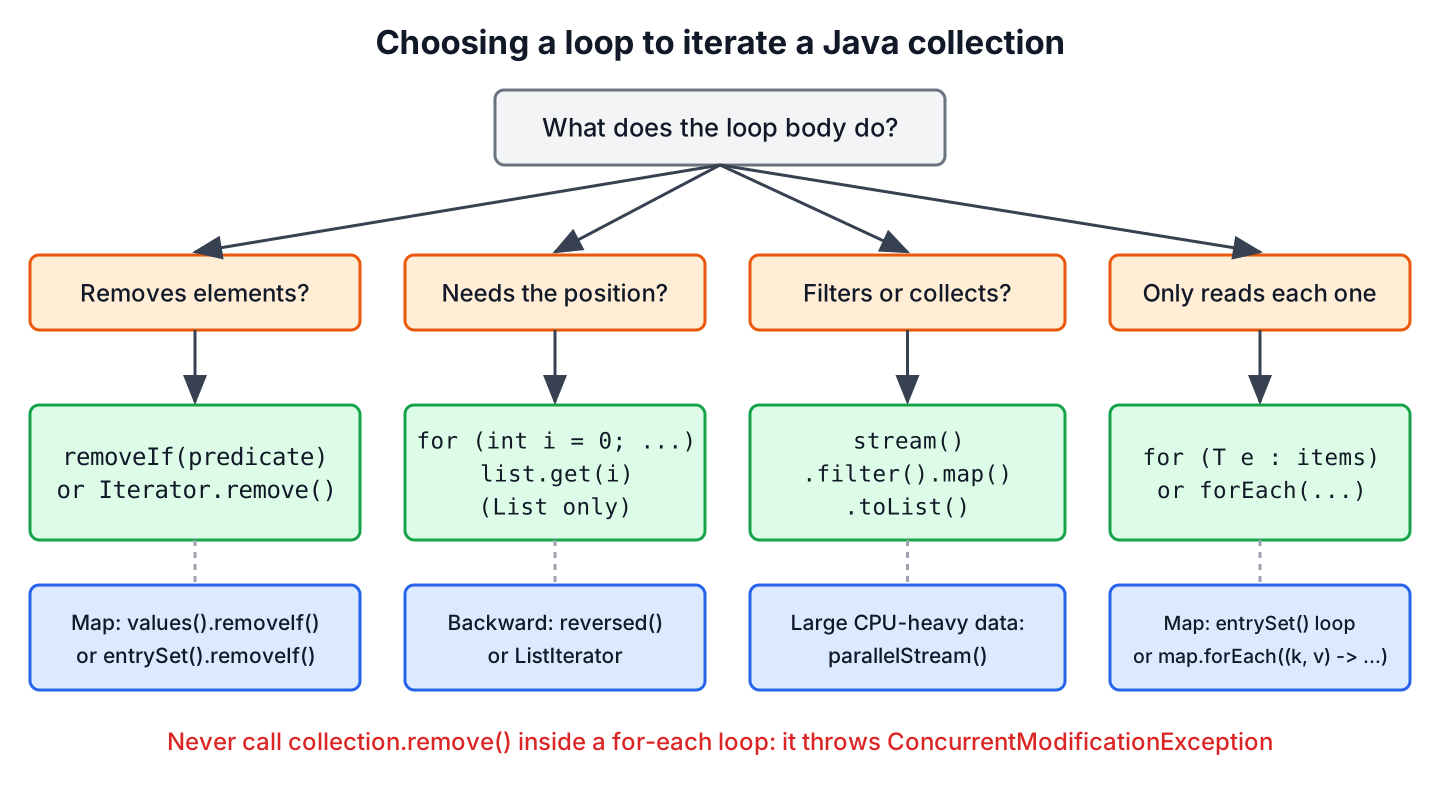
The choice depends on what the loop body does, not on the collection type. If the body only reads each element, the enhanced for loop is the clearest, and it is the default in most code reviews. A loop that removes elements needs an Iterator or removeIf(), and a loop that needs the position of each element needs an index.
| Way | Works on | Can remove elements | Gives the index | Best for |
|---|---|---|---|---|
| Enhanced for | Any Iterable, arrays | No | No | Reading every element, with break or return inside |
| forEach(action) | Any Iterable, Map | No | No | Short one-line actions such as logging |
| Iterator | Any collection | Yes, it.remove() | No | Removing while looping with complex conditions |
| ListIterator | Lists | Yes, plus add() and set() | Yes | Editing a list in place, moving backward |
| Index-based for | List with fast get(i) | With care | Yes | Positions, neighbors such as i and i + 1 |
| Stream | Any collection | No | No | Filtering, mapping and collecting results |
The enhanced for loop and forEach() differ in one practical way. Inside a lambda, we cannot break, return from the enclosing method or assign to local variables, so a loop that stops early or updates a counter reads better as an enhanced for loop.
2. Iterating Over a List
A List supports every way in the table, because it has both an iterator and index access. The compiler turns an enhanced for loop over a list into the Iterator loop from the intro.
Say a music app shows the next three songs after the current one. The index-based loop fits this task, since the loop compares positions, and the enhanced for loop has no position.
List<String> queue = List.of("Intro", "Verse", "Chorus", "Bridge", "Outro");
int current = 1;
List<String> upNext = new ArrayList<>();
for (int i = current + 1; i < queue.size() && upNext.size() < 3; i++) {
    upNext.add(queue.get(i));
}
List<String> shown = upNext;                         // [Chorus, Bridge, Outro]
When we need the index together with a stream, IntStream.range() produces the positions, as shown in the stream with indices tutorial.
List<String> queue = List.of("Intro", "Verse", "Chorus", "Bridge", "Outro");
List<String> numbered = IntStream.range(0, 3).mapToObj(i -> (i + 1) + ". " + queue.get(i)).toList();  // [1. Intro, 2. Verse, 3. Chorus]
2.1. Iterating a List in Reverse Order
Since Java 21, every List has reversed(), which returns a reversed view without copying. Any loop from the table works on that view, so going backward no longer needs an index that counts down from size() – 1.
List<String> queue = List.of("Intro", "Verse", "Chorus", "Bridge", "Outro");
List<String> backwards = queue.reversed();            // [Outro, Bridge, Chorus, Verse, Intro]
String lastSong = queue.getLast();                    // "Outro"
Deque<String> history = new ArrayDeque<>(List.of("a", "b", "c"));
Iterator<String> newestFirst = history.descendingIterator();
String newest = newestFirst.next();                   // "c"
Before Java 21, the usual tools were Collections.reverse(), which changes the list, and a ListIterator created at the end of the list with listIterator(list.size()). The ListIterator is still the right choice when the loop moves in both directions or edits elements on the way.
3. Iterating Over a Set
A Set has no index, so every way except the index-based loop works. The order of the elements comes from the implementation. A HashSet returns elements in an order based on hash codes that can change when the set grows or between Java versions, a LinkedHashSet keeps insertion order, and a TreeSet returns elements sorted.
Set<String> genres = new TreeSet<>(Set.of("rock", "jazz", "pop"));
String sorted = String.join(" ", genres);            // "jazz pop rock"
Set<String> tags = new LinkedHashSet<>(List.of("live", "remix", "live"));
StringJoiner joined = new StringJoiner(",");
for (String tag : tags) {
    joined.add(tag);
}
String inOrder = joined.toString();                  // "live,remix"
When the output must be in a stable order, such as a CSV export or a test assertion, we use a LinkedHashSet or TreeSet, or sort the elements in a stream before we print them.
4. Iterating Over a Map
A Map is not Iterable, so we loop over one of its three views, or call Map.forEach() with a two-argument lambda. When the loop needs both key and value, the entrySet() view is the right one, because looping over keySet() and calling get(key) does a second lookup for every key.
Map<String, Integer> plays = new LinkedHashMap<>();
plays.put("Intro", 12);
plays.put("Verse", 40);
plays.put("Chorus", 95);

StringJoiner report = new StringJoiner(", ");
for (Map.Entry<String, Integer> entry : plays.entrySet()) {
    report.add(entry.getKey() + "=" + entry.getValue());
}
String text = report.toString();                     // "Intro=12, Verse=40, Chorus=95"
The other views and Map.forEach() fit loops that need only one side of the pair or a short action.
Map<String, Integer> plays = new LinkedHashMap<>();
plays.put("Intro", 12);
plays.put("Verse", 40);
plays.put("Chorus", 95);
List<String> hits = new ArrayList<>();
plays.forEach((song, count) -> {
    if (count > 30) hits.add(song);
});
int hitCount = hits.size();                          // 2
int totalPlays = plays.values().stream().mapToInt(Integer::intValue).sum();  // 147
String firstSong = plays.keySet().iterator().next(); // "Intro"
An explicit Iterator over entrySet() calls next() once per pass and keeps the entry in a variable. Calling next() twice in one pass, once for the key and once for the value, reads two different entries and throws NoSuchElementException on maps with an odd number of entries.
Map<String, Integer> plays = new LinkedHashMap<>();
plays.put("Intro", 12);
plays.put("Verse", 40);
plays.put("Chorus", 95);
Iterator<Map.Entry<String, Integer>> entries = plays.entrySet().iterator();
Map.Entry<String, Integer> first = entries.next();   // Intro=12
String key = first.getKey();                          // "Intro"
Integer value = first.getValue();                     // 12
5. Deleting Items During a Loop
Never call remove() on the collection inside an enhanced for loop or forEach(), because the hidden iterator detects the change and throws ConcurrentModificationException. The Java Iterator article explains the modCount check behind the exception.
Say a streaming app builds a play queue and must drop the ads for premium users before playback starts.
List<String> playQueue = new ArrayList<>(List.of("Intro", "Ad 1", "Verse", "Ad 2", "Chorus"));
for (String s : playQueue) if (s.startsWith("Ad")) playQueue.remove(s);  // ConcurrentModificationException
The removeIf() method from Java 8 does the same job in one call, and it is the first choice for a condition we can write as a lambda. An explicit Iterator with it.remove() fits loops that also do other work per element, such as logging what they drop.
List<String> premium = new ArrayList<>(List.of("Intro", "Ad 1", "Verse", "Ad 2", "Chorus"));
boolean changed = premium.removeIf(s -> s.startsWith("Ad"));   // true
String after = String.join(", ", premium);            // "Intro, Verse, Chorus"

List<String> free = new ArrayList<>(List.of("Intro", "Ad 1", "Verse"));
Iterator<String> cursor = free.iterator();
while (cursor.hasNext()) {
    if (cursor.next().startsWith("Ad")) {
        cursor.remove();
    }
}
String cleaned = String.join(", ", free);             // "Intro, Verse"
Maps work the same way through their views. Removing from values(), keySet() or entrySet() removes the matching entries from the map.
Map<String, Integer> counts = new LinkedHashMap<>(Map.of("Intro", 12));
counts.put("Verse", 40);
boolean dropped = counts.values().removeIf(c -> c < 20);       // true
Set<String> remaining = counts.keySet();              // [Verse]
Concurrent collections such as CopyOnWriteArrayList and ConcurrentHashMap never throw ConcurrentModificationException, because their iterators work on a snapshot or tolerate changes. They are built for data shared between threads, not as a workaround for removing elements in a loop.
6. Loop Performance Compared
For an ArrayList, the enhanced for loop, an Iterator, forEach() and the index-based loop all read the same backing array. The JIT compiler inlines the iterator calls in hot code, so the remaining difference is a few checks per element, which disappears next to any real work in the loop body, such as a database call, string formatting or logging.
Two cases do make a large difference.
- An index-based loop over a LinkedList is slow, because each get(i) walks the nodes from the nearest end. The loop costs O(n2) in total, whereas any iterator-based loop over the same list stays O(n).
- A stream has a fixed setup cost for building the pipeline, which matters only for tiny lists in very hot code. A parallelStream() adds thread coordination, so it pays off only for large collections with CPU-heavy work per element.
Benchmarks of loops on a list of a million Integer objects mostly measure memory access and boxing, and results vary by JDK version, CPU and JIT warm-up. When a loop shows up in a profiler, measure the exact code with JMH, which handles warm-up iterations and dead-code elimination, instead of comparing loops with System.nanoTime() in a main() method.
| Collection | Fastest safe choice | Avoid |
|---|---|---|
| ArrayList | Any loop, choose for readability | Nothing in particular |
| LinkedList | Enhanced for, Iterator, forEach() | Index-based for with get(i) |
| HashSet, HashMap | Enhanced for over the set or entrySet() | keySet() plus get(key) |
| Very large data, CPU-heavy work | parallelStream() after measuring | Parallel streams for I/O or tiny lists |
7. Iterating Collections FAQs
Developers ask these questions about looping in Java in searches and code reviews.
7.1. What is the fastest way to iterate a list in Java?
For an ArrayList, all loops perform about the same once the JIT compiler warms up, so we pick the clearest one. For a LinkedList, every iterator-based loop is fast and the index-based loop is slow.
7.2. Is forEach() better than a for loop?
Neither is better in general. The forEach() method is shorter for a single action such as list.forEach(System.out::println). The enhanced for loop supports break, continue, return and checked exceptions, which a lambda does not.
7.3. How do we get the index in an enhanced for loop?
The enhanced for loop has no index. Use an index-based for loop on a list, keep a counter variable, or use IntStream.range(0, list.size()) in a stream.
7.4. Can we use an enhanced for loop on a Map?
Not on the map itself, because Map does not implement Iterable. Loop over map.entrySet(), map.keySet() or map.values(), or call map.forEach((k, v) -> …).
7.5. Why does stream().forEach() print in a different order sometimes?
On a parallel stream, forEach() does not keep the encounter order. Use forEachOrdered() when order matters, or use list.forEach(), which follows the iteration order of the list.
8. Conclusion
The enhanced for loop is the default for reading elements, forEach() suits one-line actions, and the index-based loop is for lists when the position matters. For maps, we loop over entrySet() or call Map.forEach().
To remove elements, we use removeIf() or an explicit Iterator, never the collection’s own remove() inside a for-each loop. Since Java 21, reversed() walks any list backward, and the only loop that is truly slow is an index-based loop over a LinkedList.
9. References
- Java SE 25 API, Iterable
- Java SE 25 API, Collection.removeIf()
- Java SE 25 API, SequencedCollection
- JLS 25, The enhanced for statement
- OpenJDK JMH
Happy Learning !!

Here you explained different-different ways to iterate the elements from a collection.
this article is useful.
thanks for this great article.