
![A grid with the input characters a, 1, space, hash, line feed and b. The dot matches all of them except the line feed. The dot with DOTALL and the class [sS] match all six. The class [a-zA-Z0-9] matches only a, 1 and b.](https://howtodoinjava.com/wp-content/uploads/2026/10/regex-dot-vs-dotall-vs-character-class-300x148.png)
In a regular expression, the dot . matches any single character except a line break. To match any number of characters, we combine the dot with a quantifier, so .* matches zero or more characters and .+ matches one or more. To match only some characters, such as letters or digits, we use a character class like [a-zA-Z0-9]. To include line breaks, we turn on DOTALL mode or use [\s\S].
We use these patterns to accept any value in a part of a pattern we do not care about, to pick the text between two delimiters, and to validate fields that allow only a known set of characters. In Java, the patterns run through the Pattern class or the String.matches() shortcut.
The following example runs each pattern of this article against short strings, and each trailing comment holds the value the line returns.
boolean one = "a".matches(".");                          // true
boolean two = "ab".matches(".");                         // false
boolean many = "abc".matches(".*");                      // true
boolean empty = "".matches(".+");                        // false

boolean lines = "line1\nline2".matches(".*");            // false
boolean dotAll = "line1\nline2".matches("(?s).*");       // true
boolean anyChar = "line1\nline2".matches("[\\s\\S]*");   // true

boolean literalDot = "a.c".matches("a\\.c");             // true
boolean noDot = "abc".matches("a\\.c");                  // false
boolean alnum = "abc123".matches("[a-zA-Z0-9]+");        // true
boolean notInSet = "x".matches("[^abc]");                // true
Notice that a plain .* fails on the two-line text, while (?s).* and [\s\S]* accept it. The patterns work the same way in most regex engines, including JavaScript, Python and grep. Only the doubled backslashes in Java string literals and the names of the flags are specific to Java.
The quick-reference table pairs each need with its regex and the Java string literal we type in code.
| To match | Regex | Java string literal |
|---|---|---|
| Any single character except a line break | . | “.” |
| Any single character, including line breaks | [\s\S], or . with DOTALL | “[\\s\\S]” |
| Any number of characters (zero or more) | .* | “.*” |
| One or more characters | .+ | “.+” |
| 3 characters | .{3} | “.{3}” |
| One character from a set | [abc] | “[abc]” |
| Any character except those in a set | [^abc] | “[^abc]” |
| A letter or a digit | [a-zA-Z0-9] | “[a-zA-Z0-9]” |
| A literal dot | \. | “\\.” |
The sections that follow explain the dot, line breaks, quantifiers and greedy matching. We also cover the mistakes behind most regex bugs, character classes for sets and ranges, and letters outside A-Z.
1. Matching Any Single Character With the Dot
The dot is a metacharacter, which means a character with a special meaning in a regex. It matches one character of any kind, such as a letter, a digit, a space or a symbol like #. The only characters it skips are line terminators.
![A grid with the input characters a, 1, space, hash, line feed and b. The dot matches all of them except the line feed. The dot with DOTALL and the class [\s\S] match all six. The class [a-zA-Z0-9] matches only a, 1 and b.](https://howtodoinjava.com/wp-content/uploads/2026/10/regex-dot-vs-dotall-vs-character-class.png)
The examples use Pattern.matches(regex, input), which returns true only when the whole input matches the regex.
boolean letter = Pattern.matches(".", "a");      // true
boolean digit = Pattern.matches(".", "7");       // true
boolean symbol = Pattern.matches(".", "#");      // true
boolean space = Pattern.matches(".", " ");       // true
boolean twoChars = Pattern.matches(".", "ab");   // false

boolean between = "A1B".matches("A.B");          // true
boolean nothing = "AB".matches("A.B");           // false
The last two lines use String.matches(), which does the same thing as Pattern.matches(). In A.B, the dot stands for one character between “A” and “B”. It never matches “nothing”, so “AB” fails.
2. Matching Any Character Including Line Breaks
By default, the dot does not match line terminators. When the input has more than one line, .* stops at the first line break, and a pattern that should cover the whole text fails. Java treats five characters as line terminators, and the dot skips all of them.
| Character | Escape in Java | Where it comes from |
|---|---|---|
| Line feed | \n | Unix and macOS line break |
| Carriage return | \r | Part of the Windows line break \r\n |
| Next line | \u0085 | Unicode line break |
| Line separator | \u2028 | Unicode line break |
| Paragraph separator | \u2029 | Unicode paragraph break |
Java gives us three ways to make the dot match line breaks too.
- The Pattern.DOTALL flag changes the meaning of the dot for the whole pattern.
- The inline flag (?s) does the same from inside the regex string, which helps when we can only pass a string, for example to String.matches() or String.replaceAll().
- The character class [\s\S] means “any whitespace or any non-whitespace character”, which covers every character in every regex engine.
String text = "line1\nline2";

boolean plain = Pattern.matches(".*", text);                                     // false
boolean flag = Pattern.compile(".*", Pattern.DOTALL).matcher(text).matches();   // true
boolean inline = Pattern.matches("(?s).*", text);                                // true
boolean anyClass = Pattern.matches("[\\s\\S]*", text);                           // true
A real case is a support app that stores each ticket as multi-line text. A rule such as “the ticket mentions a refund anywhere” written as .*refund.* misses every ticket where “refund” appears on the second line. With (?s).*refund.* the rule works, and find() with a plain refund pattern is even simpler, as section 5 shows.
In other languages, the same option has a different name. JavaScript uses the s flag, as in /.*/s, and Python uses re.DOTALL. The [\s\S] class works everywhere without a flag.
3. Matching Any Number of Characters
A quantifier placed after a pattern says how many times that pattern may repeat. Combined with the dot, a quantifier matches a run of characters of any kind. Each quantifier applies only to the item right before it.
| Quantifier | Meaning | Example | Matches |
|---|---|---|---|
| * | Zero or more times | .* | Any text, including an empty string |
| + | One or more times | .+ | Any text with at least one character |
| ? | Zero or one time | colou?r | “color” and “colour” |
| {n} | n times | .{3} | 3 characters |
| {n,m} | Between n and m times | .{2,4} | 2, 3 or 4 characters |
| {n,} | At least n times | .{8,} | 8 or more characters |
The difference between * and + shows up with empty input. A form field validated with .* accepts an empty value, while .+ rejects it.
boolean emptyStar = "".matches(".*");            // true
boolean emptyPlus = "".matches(".+");            // false
boolean three = "abc".matches(".{3}");           // true
boolean five = "abcde".matches(".{2,4}");        // false
boolean hello = "hello".matches("h.{4}");        // true
Length rules with {min,max} have their own article, regex for min and max length.
4. Greedy and Lazy Matching
By default, * and + are greedy. They match as many characters as possible and give back characters only when the rest of the pattern cannot match. Adding ? after the quantifier makes it lazy (also called reluctant), so .*? matches as few characters as possible.
The difference matters when the text contains the closing part of the pattern more than once. In the next example, the greedy <b>.*</b> runs to the last </b> in the text, while the lazy <b>.*?</b> stops at the first one.
String html = "<b>Java</b> and <b>Regex</b>";

Matcher greedy = Pattern.compile("<b>.*</b>").matcher(html);
boolean greedyFound = greedy.find();     // true
String greedyText = greedy.group();      // "<b>Java</b> and <b>Regex</b>"

Matcher lazy = Pattern.compile("<b>.*?</b>").matcher(html);
boolean lazyFound = lazy.find();         // true
String lazyText = lazy.group();          // "<b>Java</b>"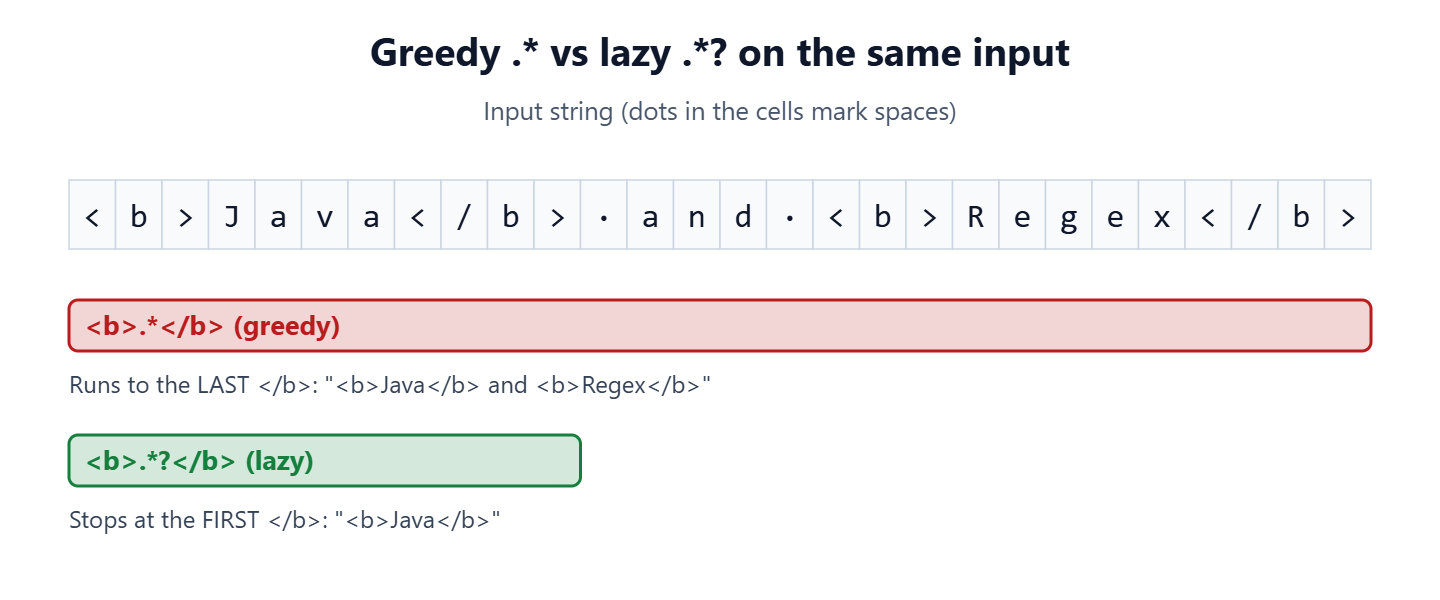
A common use of the lazy quantifier is extracting the text between two delimiters. Say an app logs calls such as “call(a) and (b)” and we need each argument. The pattern \((.*?)\) finds each pair of parentheses, and the group in the middle captures the text inside. The results() method returns every match as a stream.
List<String> callArgs = Pattern.compile("\\((.*?)\\)").matcher("call(a) and (b)").results().map(r -> r.group(1)).toList();   // [a, b]
List<String> noParens = Pattern.compile("\\(([^)]*)\\)").matcher("call(a) and (b)").results().map(r -> r.group(1)).toList();   // [a, b]
The second line uses a negated class [^)]* instead of the lazy dot. It gives the same result, and it can never run past a closing parenthesis, so many developers prefer it for delimited text.
5. matches() vs find() in Java
Many “my regex does not work” questions come from using the wrong method. The methods Matcher.matches(), Pattern.matches() and String.matches() return true only when the pattern matches the entire input. The method Matcher.find() searches for the pattern anywhere inside the input and can be called again to find the next match.
boolean whole = Pattern.compile(".").matcher("ab").matches();   // false
boolean part = Pattern.compile(".").matcher("ab").find();       // true

Matcher m = Pattern.compile("c.t").matcher("the cat sat");
boolean found = m.find();       // true
String word = m.group();        // "cat"
We use matches() to validate a complete value, such as a product code or a user name. We use find() to search inside a longer text, such as a log line. In code that runs often, we compile the Pattern once and store it in a static final field. A Pattern object is thread-safe, while a Matcher object is not, so each thread creates its own Matcher.
6. Matching a Literal Dot
Because the dot matches any character, the regex a.c also matches “abc”, “a-c” and “a c”. To match a real period, as in a file extension or a version number, we escape it with a backslash as \.. In a Java string literal, the backslash itself must be escaped, so the regex \. is written as “\\.”. A dot inside square brackets, [.], is also a literal dot.
boolean anyDot = "abc".matches("a.c");               // true
boolean escaped = "abc".matches("a\\.c");            // false
boolean realDot = "a.c".matches("a\\.c");            // true
boolean inClass = "a.c".matches("a[.]c");            // true

String quoted = Pattern.quote("a.c");                // "\Qa.c\E"
boolean quotedMatch = "abc".matches(quoted);         // false
When the text to match comes from user input, Pattern.quote() is safer than escaping by hand. It wraps the text in \Q and \E, and every character between them is treated as a literal. The list of regex metacharacters shows every other character that needs escaping.
7. Matching a Set or Range of Characters
A character class, written in square brackets, matches one character from a set. A hyphen between two characters defines a range, and a caret ^ right after the opening bracket turns the class into “any character except these”. Java also has predefined classes for common sets, all listed in the Pattern Javadoc.
| Regex | Matches one character that is | Example match |
|---|---|---|
| [abc] | “a”, “b” or “c” | “b” |
| [a-f] | A lowercase letter from “a” to “f” | “e” |
| [a-zA-Z] | An ASCII letter in either case | “B” |
| [0-9] or \d | A digit | “7” |
| [a-zA-Z0-9] | An ASCII letter or digit (alphanumeric) | “k” |
| \w | A letter, a digit or the “_” character | “_” |
| \s | Whitespace, such as a space, a tab or a line break | ” “ |
| [^abc] | Any character except “a”, “b” and “c”, including a line break | “x” |
| [^a-zA-Z0-9\s] | A symbol, i.e. not a letter, digit or whitespace | “@” |
| \p{Punct} | ASCII punctuation, such as !, #, @ or _ | “#” |
A class matches one character. To match a whole word or number, we add a quantifier after the class, for example [a-zA-Z0-9]+ for a value that contains only letters and digits.
boolean inSet = "b".matches("[abc]");                     // true
boolean outOfSet = "d".matches("[abc]");                  // false
boolean negated = "x".matches("[^abc]");                  // true
boolean year = "2026".matches("\\d+");                    // true
boolean userName = "user_42".matches("\\w+");             // true
boolean letters = "abc123".matches("[a-zA-Z0-9]+");       // true
boolean withSpace = "abc 123".matches("[a-zA-Z0-9]+");    // false
boolean symbolOnly = "@".matches("[^a-zA-Z0-9\\s]");      // true
The article regex for alphanumeric characters covers alphanumeric validation in more detail, including length limits. All other pattern articles on the site are grouped in the Java regex tutorial.
8. Matching Letters Outside A-Z
The range [a-zA-Z] and the class \w cover only ASCII letters by default. Names and words in many languages contain letters such as “e” with an acute accent (Unicode U+00E9), which these patterns reject. Java offers two fixes.
- The Unicode property \p{L} matches a letter in any language.
- The Pattern.UNICODE_CHARACTER_CLASS flag, inline (?U), makes \w, \d and \s follow Unicode rules.
String eAcute = "\u00e9";

boolean ascii = eAcute.matches("[a-zA-Z]");                                                   // false
boolean anyLetter = eAcute.matches("\\p{L}");                                                 // true
boolean wordChar = eAcute.matches("\\w");                                                     // false
boolean unicodeWord = Pattern.compile("\\w", Pattern.UNICODE_CHARACTER_CLASS).matcher(eAcute).matches();   // true
A sign-up form for an international shop is the typical case. A name field checked with [a-zA-Z]+ rejects every name with an accented letter, so we switch to \p{L}+ there.
9. Running the Complete Example
The complete project on GitHub prints each expression of this article next to its result, and a JUnit 6 test class checks the same results, including each of the five line terminators that the dot skips. The project uses Java 25 and Maven.
mvn -q compile exec:java
mvn test
10. Regex Match Any Character FAQs
Most follow-up questions about the dot either ask which characters it skips or compare it with older idioms such as (.|\n)*.
10.1. What Does .* Mean in Regex?
The pattern .* means “any character except a line break, zero or more times”. It matches an empty string, a whole line, or the rest of a line after a fixed prefix. With matches(), .* accepts any single-line text, and with DOTALL it accepts any text at all.
10.2. Does the Dot Match a Space?
Yes. The dot matches a space, a tab and every other character except the five line terminators listed in section 2. To exclude whitespace, we use \S, which matches any character that is not whitespace.
boolean dotSpace = " ".matches(".");          // true
boolean nonSpace = " ".matches("\\S");        // false
10.3. Is (.|\n)* the Same as [\s\S]*?
No, not in practice. Both describe any text, but in Java the alternation (.|\n)* recurses once per character, so a long input throws StackOverflowError. The class [\s\S]* or the DOTALL flag handles any length.
String big = "ab\n".repeat(5000);
boolean safe = big.matches("[\\s\\S]*");       // true
boolean risky = big.matches("(.|\\n)*");       // StackOverflowError
10.4. Does the Dot Match an Emoji?
Yes. Java regex works on Unicode code points, so the dot matches an emoji such as U+1F600 as one character, even though it takes two char values (a surrogate pair) in the String.
String smile = new String(Character.toChars(0x1F600));
int length = smile.length();                  // 2
boolean oneChar = smile.matches(".");          // true
10.5. How Do I Match Any Character Except a Few?
We use a negated class. The class [^,] matches any character except a comma, including a line break, so [^,]+ reads one field of a CSV line. To also stop at line breaks, we add them to the class, as in [^,\r\n]+.
11. Conclusion
The dot . matches any single character except a line break, and .* or .+ matches a run of characters. For text with several lines, we use Pattern.DOTALL, the inline flag (?s) or the class [\s\S].
When a match takes too much text, the lazy form .*? or a negated class fixes it. To match only certain characters, we use a character class such as [a-zA-Z0-9], and for a real period we escape the dot as \..
12. References
- Pattern (Java SE 25 API)
- Matcher (Java SE 25 API)
- String.matches() (Java SE 25 API)
- The Dot Matches (Almost) Any Character (regular-expressions.info)
Happy Learning !!

I want to write a regex that matches any of the exact names (case insensitive) i provide. For example: the answer to a question could be any of the following “tom, peter, nancy, bill, novak”. So if the response is “Tom” or “tom” or “tOm” or “PETER” or “Peter”, the validation should come out as true. But if the response is “Tomas” or “peterson” or “billboard”, then the response is invalid.
“^(?i)(tom|peter|nancy|bill|novak)$”