
An OAuth2 authorization server issues access tokens to registered clients. A resource server protects an API by validating those tokens and checking whether each request has the required permission. In Spring Boot, these are separate responsibilities: the recipe API does not issue tokens, and the authorization server does not serve recipes.
This tutorial builds both applications with Spring Boot 4.1.2. It uses client credentials for a backend job and authorization code with PKCE for a user-facing client. The examples show how the same protected API responds to a valid token, a missing token, and a token without the required authority.
1. How the OAuth2 Participants Work Together
The client wants to call a protected endpoint. It first requests an access token from the authorization server. The client then sends the token in the Authorization header when it calls the resource server. The resource server verifies the JWT signature with the authorization server’s public key, validates token claims such as issuer and expiry, and checks the authority required by the endpoint.
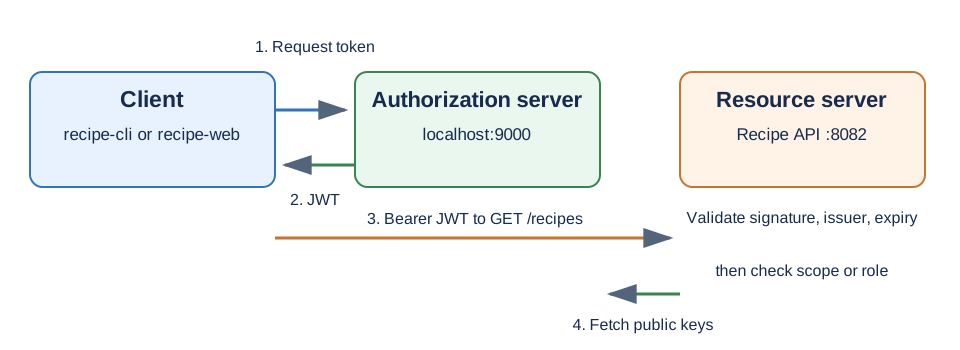
The client requests public data with the recipes.read scope. A user signed in through the browser client can also create a recipe when their token contains the CHEF role. A scope describes permission granted to a client, whereas this role describes the signed-in user’s authority. The backend job has no signed-in user, so its token has no user role.
2. Choose the Grant for the Caller
Use client credentials when the caller is a trusted backend service acting as itself. Use authorization code with PKCE when a user signs in through a public client. These grants produce access tokens through different interactions, even though the resource server validates both in the same way.
| Caller | Grant | User login | Client secret | Recipe API access |
|---|---|---|---|---|
| Backend job, recipe-cli | Client credentials | No | Yes | Read recipes |
| Browser client, recipe-web | Authorization code with PKCE | Yes | No | Read and, for a CHEF user, create recipes |
The recipe-web client uses a code verifier and a derived code challenge. The authorization server binds the later token request to the original authorization request, so intercepting the authorization code alone is insufficient to exchange it for a token. This protection does not replace user authentication; the user still signs in at the authorization server.
3. Create the Two Spring Boot Applications
The source is a Maven parent with auth-server and resource-server modules. Java 17 or later is required. Spring Boot 4.1.2 manages the Spring Security dependencies, so the child modules do not specify individual Spring Security versions.
The authorization server needs Spring Security’s authorization-server starter. The optional JDBC dependencies support the persistence profile discussed later.
<dependency>
  <groupId>org.springframework.boot</groupId>
  <artifactId>spring-boot-starter-security-oauth2-authorization-server</artifactId>
</dependency>
The API needs both the resource-server starter and Spring MVC:
<dependency>
  <groupId>org.springframework.boot</groupId>
  <artifactId>spring-boot-starter-security-oauth2-resource-server</artifactId>
</dependency>
<dependency>
  <groupId>org.springframework.boot</groupId>
  <artifactId>spring-boot-starter-webmvc</artifactId>
</dependency>
The parent pins the Spring Boot version to 4.1.2. Each application has its own main() method and port: the authorization server runs on 9000, and the recipe API runs on 8082. This separation lets the resource server verify tokens without handling user passwords or client secrets.
4. Configure the Authorization Server
The server registers two clients. The backend job authenticates with HTTP Basic at the token endpoint and is allowed to request recipes.read. Its access tokens last ten minutes.
public static RegisteredClient recipeCli(PasswordEncoder encoder) {
  return RegisteredClient.withId(UUID.randomUUID().toString())
      .clientId("recipe-cli")
      .clientSecret(encoder.encode("secret"))
      .clientAuthenticationMethod(ClientAuthenticationMethod.CLIENT_SECRET_BASIC)
      .authorizationGrantType(AuthorizationGrantType.CLIENT_CREDENTIALS)
      .scope("recipes.read")
      .tokenSettings(TokenSettings.builder()
          .accessTokenTimeToLive(Duration.ofMinutes(10))
          .build())
      .build();
}
The browser client has no secret. It requires PKCE and accepts an authorization code only at its registered callback URL. A redirect URI is part of the client registration because the authorization server must know where it can send the code.
public static RegisteredClient recipeWeb() {
  return RegisteredClient.withId(UUID.randomUUID().toString())
      .clientId("recipe-web")
      .clientAuthenticationMethod(ClientAuthenticationMethod.NONE)
      .authorizationGrantType(AuthorizationGrantType.AUTHORIZATION_CODE)
      .redirectUri("http://127.0.0.1:8080/callback")
      .scope(OidcScopes.OPENID)
      .scope("recipes.read")
      .clientSettings(ClientSettings.builder()
          .requireProofKey(true)
          .requireAuthorizationConsent(false)
          .build())
      .build();
}
An InMemoryRegisteredClientRepository stores both registrations for the default profile. The local user store contains lokesh with a CHEF role. During the authorization-code flow, the user signs in on the authorization server; the browser client never receives the user’s password.
The server signs JWTs with an RSA private key and publishes the matching public key at /oauth2/jwks. Its TokenConfig adds a roles claim only when the token comes from the authorization-code grant. The resource server can then distinguish a signed-in user from a backend client. The example creates its keys on startup, so restarting the authorization server invalidates previously issued tokens.
5. Configure the Resource Server and Recipe API
The recipe API identifies the expected token issuer with this property:
server.port=8082
spring.security.oauth2.resourceserver.jwt.issuer-uri=http://localhost:9000
Spring Security uses the issuer metadata to discover the JWK Set endpoint, as described in the Spring Security JWT resource-server reference. It validates the JWT signature and standard time and issuer claims before the request reaches the controller. A token with a valid signature is still insufficient when the requested endpoint requires an authority that the token lacks.
The security filter chain maps GET /recipes to the read scope and POST /recipes to the CHEF role:
@Bean
SecurityFilterChain apiSecurity(HttpSecurity http) {
  http
      .authorizeHttpRequests(auth -> auth
          .requestMatchers(HttpMethod.GET, "/recipes").hasAuthority("SCOPE_recipes.read")
          .requestMatchers(HttpMethod.POST, "/recipes").hasRole("CHEF")
          .anyRequest().authenticated())
      .oauth2ResourceServer(resourceServer -> resourceServer
          .jwt(jwt -> jwt.jwtAuthenticationConverter(jwtAuthenticationConverter())))
      .sessionManagement(session -> session
          .sessionCreationPolicy(SessionCreationPolicy.STATELESS));
  return http.build();
}
By default, Spring Security maps JWT scopes to authorities prefixed with SCOPE_. The custom JwtAuthenticationConverter also maps the example’s roles claim to ROLE_CHEF. That second mapping is needed because hasRole(“CHEF”) checks for ROLE_CHEF, not for a raw string in the JWT.
static DelegatingJwtGrantedAuthoritiesConverter authoritiesConverter() {
  JwtGrantedAuthoritiesConverter scopes = new JwtGrantedAuthoritiesConverter();
  JwtGrantedAuthoritiesConverter roles = new JwtGrantedAuthoritiesConverter();
  roles.setAuthoritiesClaimName("roles");
  roles.setAuthorityPrefix("ROLE_");
  return new DelegatingJwtGrantedAuthoritiesConverter(scopes, roles);
}
The controller returns two recipe names for a read request. A successful create request returns HTTP 201 with the new name and the JWT subject. This response makes it visible which identity the server received.
@GetMapping("/recipes")
List<String> recipes() {
  return List.of("pancakes", "omelette");
}

@PostMapping("/recipes")
@ResponseStatus(HttpStatus.CREATED)
Map<String, String> addRecipe(@RequestBody String name, @AuthenticationPrincipal Jwt jwt) {
  return Map.of("added", name.strip(), "by", jwt.getSubject());
}
6. Run and Test Both Flows
Run mvn test at the parent project first. Then start the two modules in separate terminals:
mvn -pl auth-server spring-boot:run
mvn -pl resource-server spring-boot:run
6.1. Request a Token for the Backend Job
The first command authenticates recipe-cli with its local demo secret and requests the read scope. Copy the access_token value from the JSON response into the second command. The repository’s scripts/client-credentials.sh performs both steps automatically when you want to run the complete sequence.
curl -u recipe-cli:secret \
  -d grant_type=client_credentials \
  -d scope=recipes.read \
  http://localhost:9000/oauth2/token

curl -H "Authorization: Bearer PASTE_ACCESS_TOKEN_HERE" \
  http://localhost:8082/recipes
The API returns ["pancakes","omelette"]. The authorization server test verifies that this token has subject recipe-cli, the recipes.read scope, and no roles claim. A POST /recipes request with the same token is forbidden because the job has no CHEF role.
6.2. Sign In Through the Browser Client
The repository’s scripts/pkce-flow.sh runs an authorization-code exchange using a cookie jar, a code challenge, and a code verifier. It signs the example user in as lokesh/password, exchanges the returned code for a token, then calls the recipe API:
./scripts/pkce-flow.sh
The authorization-server test verifies that this token has subject lokesh, scope recipes.read, and role CHEF. The resource-server test verifies that a token with those authorities can read and create recipes. Unlike a client-credentials token, this token represents an authenticated user.
6.3. Observe Unauthorized and Forbidden Responses
Send a request without a bearer token to see the authentication boundary:
curl -i http://localhost:8082/recipes
The API returns 401 Unauthorized because there is no token to authenticate. A well-formed token without the required authority reaches the authorization check but returns 403 Forbidden. The tests also cover an invalid client secret, an unsupported scope, and a wrong PKCE verifier. These failures happen at the authorization server before a usable token is issued.
7. Replace Demo Settings Before Deployment
The client secret, user password, localhost callback, and generated RSA keys are local demonstration settings. A deployed authorization server needs managed secrets, stable signing keys and a rotation plan. The Spring Security authorization-server reference shows the required components behind the starter. The included jdbc profile demonstrates JdbcRegisteredClientRepository and JdbcOAuth2AuthorizationService with H2, but an in-memory H2 database does not provide durable storage across process restarts.
mvn -pl auth-server spring-boot:run -Dspring-boot.run.profiles=jdbc
For a deployment, use a durable database and protect its client and authorization records. Keep the issuer URL stable, register only approved redirect URIs, and require HTTPS. The resource server should validate the expected audience too when tokens may be issued for multiple APIs; issuer validation alone identifies who issued a token, not every intended recipient.
8. FAQs
8.1. Does the resource server call the authorization server for every API request?
No. For a JWT, the resource server validates the signature locally using a public key it obtains from the authorization server’s JWK Set endpoint. It may fetch or refresh keys, but ordinary JWT validation does not require a token-introspection request for each API call. This also means that revoking a JWT usually needs an additional strategy, such as short token lifetimes or an application-specific revocation mechanism.
8.2. Why does the backend token fail to create a recipe?
The recipe-cli token has SCOPE_recipes.read but no signed-in user and no ROLE_CHEF. The create endpoint requires the role, so Spring Security returns 403 after accepting the token as authentic.
8.3. Why do tokens stop working after restarting the example authorization server?
The example generates a new RSA key pair each time it starts. A token signed with the old private key cannot be verified with the new public key. Persist signing keys and publish old public keys for as long as already issued tokens need to remain valid.
9. Conclusion
Run the two modules separately and give each the responsibility it needs: the authorization server authenticates clients or users and issues tokens; the recipe API validates those tokens and enforces endpoint permissions. Use client credentials for backend callers and authorization code with PKCE when a user signs in. Happy Learning!
The complete runnable example is in the Spring Authorization Server project folder.

5.3. Accessing User Data from Resource ServerOnce we have the access token, we can go to the resource server to fetch protected user data.
Hit the following request:
Could you please tell me where I hit the request?
You can use the cURL or Postman.
Could you please explain the redirect to the 8081 port? Where is oauth configured to listen on that port? It is just default? Where is the oath service on 8081 actually powered up?
As far as I can tell no service is running on 8081 on my machine, I therefore can’t retrieve a token, after having retreived the 6-character grant.
What am I doing wrong?
you can change the server port no
in application.properties
Hi Lokesh, please provide example on oauth2 implementation without login page and custom external authentication provider like PingFed.
It is REST API service security Oauth2 implementation using PingFed external authentication provider.
While accessing URL(http://localhost:8080/api/users/me) in the browser, getting below exception
Can anyone help on this. Thank You
maybe you can change “User user = (User) SecurityContextHolder.getContext().getAuthentication().getPrincipal();” with “Authentication user = SecurityContextHolder.getContext().getAuthentication();” and “String email = user.getName()+ “@howtodoinjava.com”;”
Hi, try changing “/api/v1/**” to “/api/**” in OAuth2ResourceServer
Hi Lokesh, I am able to generate the access token , but not able to access end point with access token. When I am running curl -X GET http://localhost:8080/api/users/me
-H “authorization: Bearer 59ddb16b-6943-42f5-8e2f-3acb23f8e3c1” using generated access token , it is redirecting me to login page again. Could you please help me with this
Hi, did you find the solution? I have the same problem. Regards
Hi , I am able to generate the access token , but I am not able to access the resource using access token. It is directing me to login page in postman
Hi any solution on this ?
Hello Sir,
Actually i have some confusion or query,
I have multi module project like micro services. All module run on separate port.
Now my auth-module run on port 8080. And category module run on port 8081.
So how can i apply authentication mechanism.
I read something like public key private key scenario.
If you have some idea on this or some another way then please guide me.
org.springframework.security.oauth.boot
spring-security-oauth2-autoconfigure
2.1.8.RELEASE
is not working
Hi Lokesh,
I have a few points and doubts please help me to get over it
1) Even with proper request header, I was getting exception about missing grant type which is resolved now as it was expecting below two parameters in the URL, not as headers I checked in the TokenEnd class and worked.
http://localhost:8080/oauth/token?grant_type=authorization_code&code=Ex3g512)If i am using this with H2 DB of spring then on accessing console http://localhost:8080/h2-console asking me the password through login page (same page which we have created for protecting our resource) and after providing proper credential whenever i am trying to open database giving me white page error. May i know the reason.
3)In
OAuth2ResourceServer.javawe have below codehttp .authorizeRequests() .antMatchers("/api/**").authenticated() //this line help us to protect our api .antMatchers("/").permitAll(); //what does this line do actually? 4)In SecurityConfig.java http .antMatcher("/**") //Line 1 .authorizeRequests() .antMatchers("/oauth/authorize**", "/login**", "/error**") .permitAll() .and() .authorizeRequests() .anyRequest().authenticated() .and() .formLogin().permitAll();can you please tell me one by one each line use? And Line 1(should not be
/api?) is not like it will stop each request for authorization?Thanks
Hi Lokesh,
I have one question we used spring boot and after logout from my application and hit the below api then it will return JSON data like as below so I have to implement that, once the user is logout then the user hits the API manually then restrict that API.
Output.
[{"billingRuleId":20,"rowDate":"2019-08-30T05:48:59.200+0000",
"billingRuleName":"BOG""bogPaymentCalcMethodId":1,
"startDate":null,"endDate":null,"enabled":1]
so anyone who has token can hit my api and view the secured data which is not good right so any solution for it?
I am beginner to Spring. I’ve been with this problem for several days and I wouldn’t know how to solve it.
I have two microservices:
1. Microservice authentication : This allows return a `JWT token` to user when it access to path: `/oauth/token`
2. Microservice Account user : This microservice will have a lot of functions but the problem is it:
The user must be register in platform and this microservice call to server oauth to save the new created user.
So, I create the controller to microservice Oauth:
 @PostMapping
    @PreAuthorize("#oauth2.hasScope('server')")
    public UserDto createUser(@Valid @RequestBody UserDto userDto) {
        Usuario savedUser = new Usuario();
		try {
			savedUser = userService.create(this.toUsuario(userDto));
		} catch (ArendheException e) {
			// TODO Auto-generated catch block
			e.printStackTrace();
		}
        return toDto(savedUser);

    }
The WebSecurityConfigureAdapter is:
@Configuration
public class SpringSecurityConfig extends WebSecurityConfigurerAdapter {

	@Autowired
	private UserDetailsService usuarioService;

	@Bean
	public BCryptPasswordEncoder passwordEncoder() {
		return new BCryptPasswordEncoder();
	}

	@Override
	@Autowired
	protected void configure(AuthenticationManagerBuilder auth) throws Exception {
		auth.userDetailsService(this.usuarioService).passwordEncoder(passwordEncoder());
	}

	@Bean("authenticationManager")
	@Override
	protected AuthenticationManager authenticationManager() throws Exception {
		return super.authenticationManager();
	}

	@Override
	public void configure(HttpSecurity http) throws Exception {
		http.authorizeRequests()
		.antMatchers(HttpMethod.POST,"/oauth/**").permitAll()
		.antMatchers(HttpMethod.POST, "/user/**").permitAll()
		.anyRequest().authenticated()
		.and()
		.csrf().disable()
		.sessionManagement().sessionCreationPolicy(SessionCreationPolicy.STATELESS);


	}

}
As you can see, I write two `antMatchers`, the second to create a new user.
The problem is when I test it with *Postman* (path
`localhost:8005/user`with data JSON parsed to POST method). The output is:{ "error": "unauthorized", "error_description": "Full authentication is required to access this resource" }I don’t understand it because I have a
`permitAll`to`/user/** path`.Thanks.
hiii,
Could you please explain me how you have resolved the isssue. I’m getting the same error.
how do resource server verify scope needed to access the resource from access token. how can we specify that the particular resource needs specific scope to be accessed
Hi Lokesh how to generate access token using refresh token after expires the access-token?
just sent the refresh token
How to run Authorization server and Resource server on different ports?
Hi Lokesh – Any idea why i get login error Bad Credentials on the url http://localhost:8080/oauth/authorize?client_id=clientapp&response_type=code&scope=read_profile_info
I used the same credentials as shown in the code
I am to able to access resource via access token i.e if I am trying to pass token via postman it takes me to authentication page & if I pass token via curl it is not giving any output.
I have the same problem, after so much search and try, I solved it. After added @Order(10) on OAuth2AuthorizationServer,@Order(20) on OAuth2ResourceServer, @Order(30) on SecurityConfig, I finally could get resource via access token. in @Order, Lower values have higher priority, so the reason why we can’t get resource via access token must be that SecurityConfig has higher priority than OAuth2ResourceServer
This didn’t resolve my issue. @Anwar Mulla, could you please let me know if you find solution?
Is your issue solved? If yes how?
Did you resolve this error?