
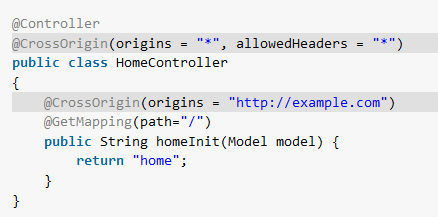
Cross-Origin Resource Sharing (CORS) lets a Spring Boot API tell browsers which other origins may read its responses. Configure the rule on the API, then check both the preflight response and the actual request. A successful request from an API client alone does not establish that a browser will permit the same cross-origin call.
This example uses Spring Boot 4.1.2 and Java 17 or later. A storefront at https://shop.example reads public stock from an API, while an admin application at https://admin.example reads a protected report. The two routes need different CORS rules, and the report still requires authentication after its preflight succeeds.
1. Understand the Browser’s CORS Request
An origin is the scheme, host and port of a page. A page at https://shop.example and an API at https://api.example therefore have different origins. When the page requests stock, the browser includes an Origin header. The API may answer with Access-Control-Allow-Origin for that specific origin:
GET /api/stock/BOOK-42 HTTP/1.1
Origin: https://shop.example

HTTP/1.1 200 OK
Access-Control-Allow-Origin: https://shop.example
Content-Type: application/json

{"sku":"BOOK-42","available":7}
The browser checks the response header before making the response available to page code. The API still processes a same-origin or server-to-server request normally when it has no Origin header. For requests that require a preflight, the browser first sends an OPTIONS request with Origin and Access-Control-Request-Method; a permitted preflight lets it proceed to the actual request. The Spring MVC CORS reference describes how Spring handles both stages.
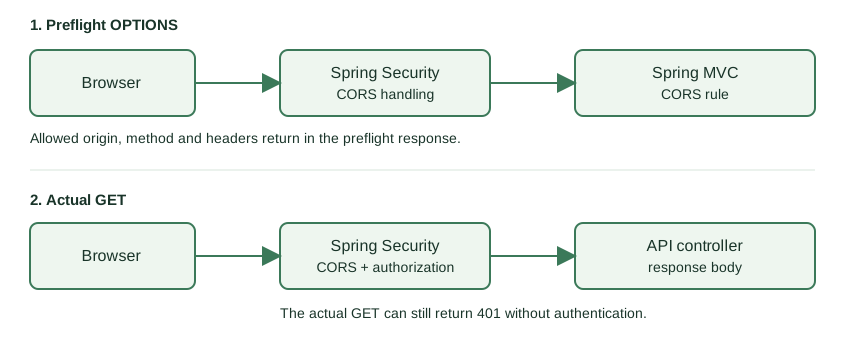
The diagram separates the preflight from the actual GET. Spring Security’s CORS integration examines the preflight before authentication. The actual request still passes the application’s authorization rules.
2. Add Spring MVC, Security and Test Dependencies
The web MVC starter serves the two API routes. The security starter supplies the filter chain used by the protected report, and the MVC test starter exercises the request path and response headers. Spring Boot’s parent manages their versions:
<parent>
  <groupId>org.springframework.boot</groupId>
  <artifactId>spring-boot-starter-parent</artifactId>
  <version>4.1.2</version>
  <relativePath/>
</parent>

<properties><java.version>17</java.version></properties>

<dependencies>
  <dependency><groupId>org.springframework.boot</groupId><artifactId>spring-boot-starter-webmvc</artifactId></dependency>
  <dependency><groupId>org.springframework.boot</groupId><artifactId>spring-boot-starter-security</artifactId></dependency>
  <dependency><groupId>org.springframework.boot</groupId><artifactId>spring-boot-starter-webmvc-test</artifactId><scope>test</scope></dependency>
</dependencies>
The public stock route and the protected report route return simple records. Their fixed values keep the example focused on CORS behavior instead of a database. The complete application and test files are in the linked repository folder.
3. Allow One Origin on One Controller Method
The storefront needs only the stock endpoint. Put @CrossOrigin on that handler method and name the exact frontend origin. This rule does not automatically authorize another route or another origin.
import org.springframework.web.bind.annotation.CrossOrigin;
import org.springframework.web.bind.annotation.GetMapping;
import org.springframework.web.bind.annotation.PathVariable;
import org.springframework.web.bind.annotation.RequestMethod;
import org.springframework.web.bind.annotation.RestController;

@RestController
public class InventoryController {
    public record Stock(String sku, int available) {}
    public record Report(String day, int orders) {}

    @CrossOrigin(origins = "https://shop.example", methods = RequestMethod.GET)
    @GetMapping("/api/stock/{sku}")
    public Stock stock(@PathVariable String sku) {
        return new Stock(sku, 7);
    }

    @GetMapping("/api/reports/{day}")
    public Report report(@PathVariable String day) {
        return new Report(day, 23);
    }
}
For a GET with Origin: https://shop.example, Spring writes Access-Control-Allow-Origin: https://shop.example and returns the stock record. The test also sends Origin: https://other.example to the same endpoint. Spring rejects that request with HTTP 403 and does not send an allow-origin header. The report method has no annotation; its separate path rule comes next.
4. Apply a CORS Rule to a Path Group
When several report endpoints share a policy, place that policy in MVC configuration instead of repeating an annotation on every method. Here WebMvcConfigurer.addCorsMappings() applies to /api/reports/** and allows only the admin origin, GET method and X-Request-Id request header.
import org.springframework.context.annotation.Configuration;
import org.springframework.web.servlet.config.annotation.CorsRegistry;
import org.springframework.web.servlet.config.annotation.WebMvcConfigurer;

@Configuration
public class CorsPolicy implements WebMvcConfigurer {
    @Override
    public void addCorsMappings(CorsRegistry registry) {
        registry.addMapping("/api/reports/**")
                .allowedOrigins("https://admin.example")
                .allowedMethods("GET")
                .allowedHeaders("X-Request-Id");
    }
}
The path group intentionally differs from the annotated stock route. This keeps the scopes easy to compare; Spring can also combine local and global rules when both match the same handler. Test the combined rules before relying on their result.
| Requirement | Configuration | Scope in this example |
|---|---|---|
| One handler has a distinct browser client | @CrossOrigin |
/api/stock/{sku} |
| Several paths share an origin and headers | WebMvcConfigurer |
/api/reports/** |
| A Spring Security filter chain is present | http.cors() |
Processes MVC CORS rules before authorization |
5. Let Preflight Pass Through Spring Security
The report is protected. A browser’s preflight request does not carry the user’s authentication cookie, so Spring Security must process its CORS policy before deciding whether the actual report GET is authenticated. Enable CORS integration in the filter chain; Spring Security can use the MVC rules above because this application has Spring MVC and no separate CorsConfigurationSource bean.
import static org.springframework.security.config.Customizer.withDefaults;

import org.springframework.context.annotation.Bean;
import org.springframework.context.annotation.Configuration;
import org.springframework.security.config.annotation.web.builders.HttpSecurity;
import org.springframework.security.web.SecurityFilterChain;

@Configuration
public class SecurityPolicy {
    @Bean
    SecurityFilterChain filterChain(HttpSecurity http) throws Exception {
        http.cors(withDefaults())
                .authorizeHttpRequests(auth -> auth
                        .requestMatchers("/api/stock/**").permitAll()
                        .anyRequest().authenticated())
                .httpBasic(withDefaults());
        return http.build();
    }
}
The test sends an unauthenticated preflight for the report with admin origin, requested GET method and requested X-Request-Id header. It receives HTTP 200 and the expected allow-origin and allow-headers values. The subsequent unauthenticated GET receives HTTP 401: CORS permits the origin to make the browser request; it does not grant access to a protected resource. The current Spring Security CORS guide documents this ordering. For the authentication and authorization rules in the filter chain, see the Spring Security tutorial.
6. Test Allowed, Rejected and Ordinary Requests
Use MockMvc with the application context so the request passes through the Spring Security filters and MVC handler mappings. A preflight needs both Origin and Access-Control-Request-Method; a regular GET needs only Origin to exercise its CORS response. These two assertions cover the stock success and report preflight paths:
@SpringBootTest
@AutoConfigureMockMvc
class CorsPolicyTest {
    @Autowired MockMvc mvc;

    @Test void allowedStockGet() throws Exception {
        mvc.perform(get("/api/stock/BOOK-42")
                        .header("Origin", "https://shop.example"))
                .andExpect(status().isOk())
                .andExpect(header().string("Access-Control-Allow-Origin", "https://shop.example"))
                .andExpect(jsonPath("$.available").value(7));
    }

    @Test void reportPreflight() throws Exception {
        mvc.perform(options("/api/reports/2026-10-28")
                        .header("Origin", "https://admin.example")
                        .header("Access-Control-Request-Method", "GET")
                        .header("Access-Control-Request-Headers", "X-Request-Id"))
                .andExpect(status().isOk())
                .andExpect(header().string("Access-Control-Allow-Origin", "https://admin.example"))
                .andExpect(header().string("Access-Control-Allow-Headers", "X-Request-Id"));
    }
}
Run mvn test in the project folder. All six tests pass with Spring Boot 4.1.2. The other four test methods check a rejected origin (403 and no allow-origin header), a successful stock preflight, an unauthenticated report GET (401 even though its origin is allowed), and an ordinary stock GET without Origin (200 without a CORS response header).
| Request | Expected result | What it establishes |
|---|---|---|
| Stock GET from shop origin | 200, allow-origin header, stock JSON | The browser may read the public response |
| Stock GET from other origin | 403, no allow-origin header | The origin is outside this route’s rule |
| Report preflight from admin origin | 200, allow-origin and allow-headers | The browser may proceed to the actual GET |
| Report GET without authentication | 401 | CORS does not replace authentication |
Stock GET without Origin |
200, no CORS header | An ordinary HTTP client request is separate from browser CORS |
7. Diagnose a Browser CORS Failure
Begin with the browser’s Network panel. Inspect the OPTIONS request, if one was sent, and read its status and CORS response headers. If it fails before the actual request, check the allowed origin, requested method and requested headers. If preflight succeeds but the actual GET returns 401, fix authentication rather than widening the CORS rule.
OPTIONS /api/reports/2026-10-28 HTTP/1.1
Origin: https://admin.example
Access-Control-Request-Method: GET
Access-Control-Request-Headers: X-Request-Id
The server rule must match the browser’s origin exactly, including its scheme and port. A request sent by a tool such as curl can show the HTTP headers, but it does not enforce the browser’s same-origin policy. Keep this distinction in mind when a request appears to work from an API client but fails in the browser.
8. Frequently Asked Questions
8.1. Can I allow every origin and send cookies?
Do not combine allowCredentials(true) with allowedOrigins("*"). Spring rejects that configuration because a credentialed browser response cannot use a wildcard allow-origin value. Specify trusted origins explicitly. Origin patterns can match dynamic origins, but each matching origin is still a trust decision; avoid an unrestricted pattern for a credentialed API.
8.2. Does enabling CORS disable authentication or CSRF protection?
No. The example’s report preflight succeeds, while its unauthenticated GET returns 401. Its filter chain does not disable CSRF. CORS tells a browser whether page code may access a cross-origin response; authorization and CSRF protection address different requests and risks.
8.3. Why not configure CORS only in application.properties?
Spring MVC’s standard endpoint CORS mechanisms are @CrossOrigin and MVC configuration such as WebMvcConfigurer. A custom property can hold a configurable origin, but application code must bind that value and apply it to a CORS configuration. Merely adding an arbitrary cors.allowed-origins property does not create a rule.
9. Conclusion
Choose a method annotation for one handler and an MVC path mapping when several endpoints share a policy. If Spring Security is active, enable its CORS integration so valid preflight requests are handled before authentication. Then test allowed, rejected, preflight and actual requests as separate cases. Happy Learning!
The complete runnable example is in the Spring Boot CORS configuration project folder.

This is really great. Exactly what I was looking for. Unfortunately, It did not work for what I am working on. I am attempting to implement SOAP using Spring Boot, and when I try and grab the WSDL from my angular project, I get A CORS Policy violation. The WSDL is generated automatically by Spring Boot and made available as an endpoint by a
MessageDispatcherServlet:package com.rioh.endpoints.configuration; import org.springframework.boot.web.servlet.ServletRegistrationBean; import org.springframework.context.ApplicationContext; import org.springframework.context.annotation.Bean; import org.springframework.context.annotation.Configuration; import org.springframework.core.io.ClassPathResource; import org.springframework.web.bind.annotation.CrossOrigin; import org.springframework.web.servlet.config.annotation.CorsRegistry; import org.springframework.web.servlet.config.annotation.WebMvcConfigurer; import org.springframework.ws.config.annotation.EnableWs; import org.springframework.ws.transport.http.MessageDispatcherServlet; import org.springframework.ws.wsdl.wsdl11.DefaultWsdl11Definition; import org.springframework.xml.xsd.SimpleXsdSchema; import org.springframework.xml.xsd.XsdSchema; @Configuration @EnableWs public class RoutesEndpointConfig { @Bean public ServletRegistrationBean messageDispatcherServlet(ApplicationContext context) { MessageDispatcherServlet servlet = new MessageDispatcherServlet(); servlet.setApplicationContext(context); servlet.setTransformWsdlLocations(true); return new ServletRegistrationBean(servlet, "/ws/*"); } @Bean(name = "Routes") public DefaultWsdl11Definition defaultWsdl11DefinitionAddRoute(XsdSchema schema) { DefaultWsdl11Definition defaultWsdl11Definition = new DefaultWsdl11Definition(); defaultWsdl11Definition.setPortTypeName("Routes"); defaultWsdl11Definition.setLocationUri("/ws"); defaultWsdl11Definition.setTargetNamespace("http://www.rioh.Route.webservice"); defaultWsdl11Definition.setSchema(schema); return defaultWsdl11Definition; } @Bean public XsdSchema schema() { return new SimpleXsdSchema(new ClassPathResource("RouteSoapMeta.xsd")); } }Even when using the global CORS configuration, I still get the “Blocked by cors policy” error in my browser when I try and access it from my angular project.
cors is not working for POST method. almost tried all the methods
“WebSecurityConfigurerAdapter”
Have you tested this code.
WebSecurityConfigurerAdapter is deprecated with Spring 5 and Spring Boot 2.0.
Adifferent appraoch has to be used.
which one ? , please explain if you know working solution.
Somehow every code base on Spring Boot 2 Security including the examples on “Spring.io” work only on localhost.
Looks like there is some undocumented code base related to CORS. Because the document approach fails in staging hence cannot be enhanced and promoted to production.
None work in Production or staging environment.
I have tested this code base and various others on code bases on AWS, Azure, Google and other cloud vendors.
Somehow all sample code-bases work excellently on local host.
On staging it is failure.
I have tried two scenarios the application front-end on a different physical instance on Apache httpd and java Rest Services on a different physical instance with Tomcat.
Sorry for asking such a basic question, but to what does “/**” refer in addMapping()? Allowed origins? Allowed headers?
This is a path pattern that used in Apache ant which spring team uses in whole framework.
Ref : SO Thread
Hi,
I’m trying you integrate angular js with spring boot. I’m getting cross origin error at angular js side after the call returns from rest service. Will this snippet add header to the response? It seems it’s not working in my code.
thanks,
jayapriya
I have this problem too. I have no idead how to fix it
In HttpSecurity cors() method does not present To enable CORS support through Spring security?
I got error at http.cors() cors() not defined. Please help.
Hi, greate example and it works perfect, but I have updated my code base to spring 5 and spring boot 2 and that code is shown as deprecated. I have modified the implementation and all works fine but i have a problem when a the originating request is coming from a domain bound to a port like localhost:3001 (example
Hi thanks for your valuable example, i have enables cors for spring security in XML, but i am getting 401 unauthorised problem of preflight request with OPTIONS method. I am using spring security and wildfly server.