

A custom list implementation in Java is our own class that stores elements in a growable array and implements the java.util.List interface, most often by extending AbstractList. We write five methods, namely get(), set(), size(), add(int, E) and remove(int), and AbstractList builds the rest of the List API on top of them.
We write a custom list in a coding interview, where “implement your own ArrayList” is a common task, or when a list needs a rule that ArrayList does not have, such as a fixed growth policy or a size limit.
The following example uses the CustomList class that we build in this article, with the result of each line as a comment.
List<String> fruits = new CustomList<>();
fruits.add("apple");
fruits.add("banana");
fruits.add("cherry");
fruits.add(1, "mango");                         // [apple, mango, banana, cherry]

String first = fruits.get(0);                   // apple
String removed = fruits.remove(2);              // banana
int size = fruits.size();                       // 3
boolean hasMango = fruits.contains("mango");    // true (inherited)
String text = fruits.toString();                // [apple, mango, cherry]

String missing = fruits.get(5);                 // IndexOutOfBoundsException: Index 5 out of bounds for length 3
Notice that we never wrote contains() or toString(). CustomList inherits both from AbstractList, together with the iterator, indexOf(), equals() and subList().
We start with how an array-backed list grows and removes elements, and then write CustomList method by method. After that, we use it with streams and Collections.sort(), look at the bugs that hand-written lists often have, and compare the result with ArrayList.
1. How an Array-Backed List Stores Elements
A Java array has a fixed length, so a list that grows needs two numbers. The capacity is the length of the internal array, and the size is the number of elements the list holds. The slots from size to capacity – 1 are empty and wait for the next add() calls.
As long as the size is smaller than the capacity, add() writes the element into the next free slot. When the array is full, the list creates a bigger array, copies the old elements into it and drops the old array. Our CustomList starts with 16 slots and doubles the capacity each time, so it grows from 16 to 32, 64 and so on.
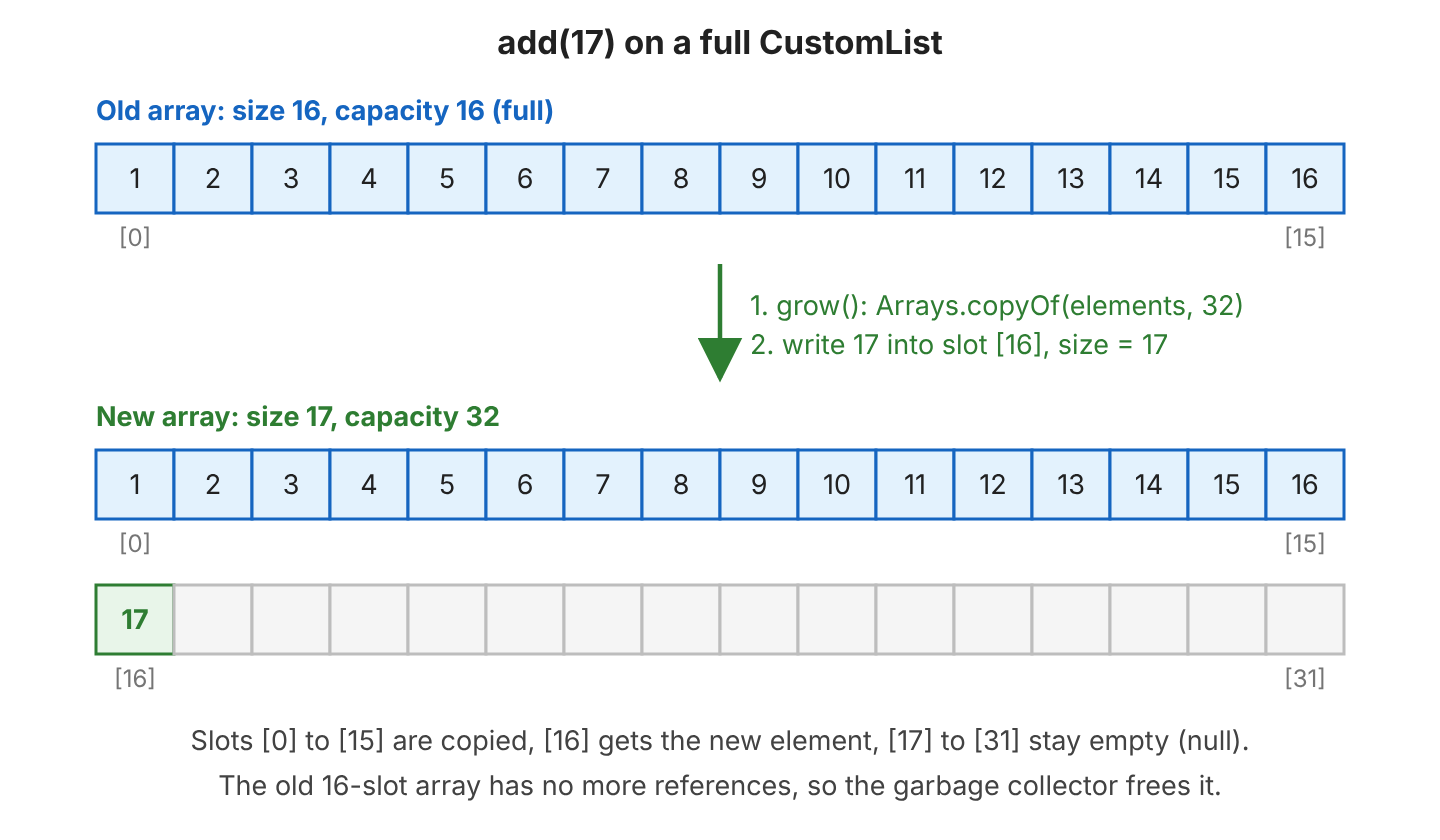
Copying the whole array is slow for a large list, but it happens rarely. Because the capacity doubles, most add() calls only write one slot, so adding at the end takes constant time on average (amortized O(1)). For example, a to-do app that loads 1,000 tasks into a list with 16 slots grows the array only 6 times (to 32, 64, 128, 256, 512 and 1,024 slots).
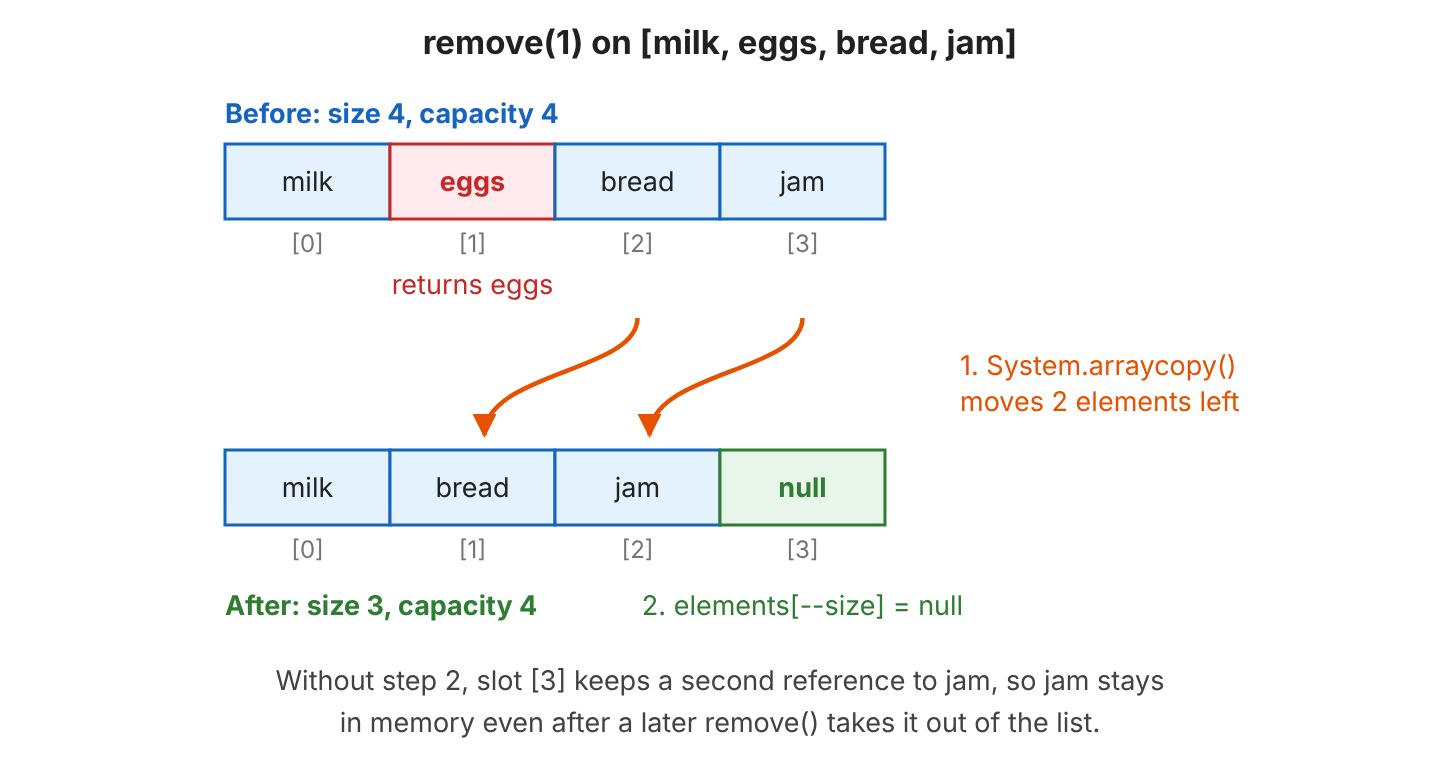
Inserting or removing in the middle is different. All elements after the index move one slot, so add(int, E) and remove(int) take time proportional to the number of moved elements (O(n)). We move them with System.arraycopy(), which copies a range of an array to another position in the same array.
2. Writing CustomList by Extending AbstractList
We could implement the List interface ourselves, but it has 25 abstract methods. The class AbstractList in java.util already implements most of them on top of a few index-based methods, so we write only the methods that touch the array. The AbstractList Javadoc lists what each kind of list must override.
| Kind of list | Methods we override | Without the override |
|---|---|---|
| Read-only list | get(int), size() | |
| Modifiable list (elements can change) | also set(int, E) | set() throws UnsupportedOperationException |
| Variable-size list (elements can be added or removed) | also add(int, E), remove(int) | add() and remove() throw UnsupportedOperationException |
In return, AbstractList gives us add(E), iterator(), listIterator(), contains(), indexOf(), lastIndexOf(), equals(), hashCode(), toString() and subList(), and the Collection interface adds stream() and removeIf(). The inherited add(E) calls our add(size(), e), so appending needs no extra code.
The following example is the complete CustomList class, written for Java 25. We go through it in four parts.
2.1. Fields and Constructors
The class keeps the elements in an Object[] array, because Java cannot create a generic array such as new E[16]. We cast each element back to E in get(). The generics type check still works for callers, since only add() and set() write into the array, and both accept only an E.
public class CustomList<E> extends AbstractList<E> implements RandomAccess {

  private static final int DEFAULT_CAPACITY = 16;

  private Object[] elements;
  private int size;

  public CustomList() {
    this(DEFAULT_CAPACITY);
  }

  public CustomList(int initialCapacity) {
    if (initialCapacity < 0) {
      throw new IllegalArgumentException("Illegal capacity: " + initialCapacity);
    }
    elements = new Object[initialCapacity];
  }

  public CustomList(Collection<? extends E> source) {
    elements = source.toArray();
    if (elements.getClass() != Object[].class) {
      elements = Arrays.copyOf(elements, elements.length, Object[].class);
    }
    size = elements.length;
  }
The RandomAccess marker interface tells algorithms in Collections that get(int) is fast, so they use index loops instead of an iterator. The third constructor copies any collection, e.g. new CustomList<>(List.of(“milk”, “eggs”)). It converts the copy to a plain Object[] because toArray() of some collections returns a typed array such as String[], which would throw an ArrayStoreException when we later store another type in it.
2.2. Reading and Replacing Elements
The methods get() and set() check the index first. The method Objects.checkIndex(index, size) throws an IndexOutOfBoundsException when the index is negative or not smaller than the size. Without the check against size, get(5) on a list with 3 elements would return null from an empty slot instead of failing.
  @Override
  @SuppressWarnings("unchecked")
  public E get(int index) {
    Objects.checkIndex(index, size);
    return (E) elements[index];
  }

  @Override
  public E set(int index, E element) {
    E old = get(index);
    elements[index] = element;
    return old;
  }

  @Override
  public int size() {
    return size;
  }
The method set() returns the old element, as the List contract requires. The call does not change the size, so it does not count as a structural change, which matters for iteration in section 3.2.
List<String> items = new CustomList<>(List.of("milk", "eggs", "bread"));
String old = items.set(1, "butter");            // eggs, items = [milk, butter, bread]
2.3. Adding Elements and Growing the Array
The method add(int, E) accepts any index from 0 to size, both included, and an index equal to size appends at the end. Before writing, it grows the array if no slot is free, and it moves the elements from the index onward one slot to the right.
  @Override
  public void add(int index, E element) {
    if (index < 0 || index > size) {   // index == size appends at the end
      throw new IndexOutOfBoundsException("Index: " + index + ", Size: " + size);
    }
    modCount++;
    if (size == elements.length) {
      grow();
    }
    System.arraycopy(elements, index, elements, index + 1, size - index);
    elements[index] = element;
    size++;
  }

  private void grow() {
    int newCapacity = Math.max(elements.length * 2, 1);
    elements = Arrays.copyOf(elements, newCapacity);
  }
The method Arrays.copyOf() creates the bigger array and copies the old elements into it, as described in resizing an array. The Math.max(…, 1) call covers a list created with capacity 0, because 0 doubled is still 0. The field modCount comes from AbstractList, and we increase it on every change of the size.
List<String> items = new CustomList<>(List.of("milk", "butter", "bread"));
items.add(0, "tea");                            // [tea, milk, butter, bread]
items.add(items.size(), "jam");                 // [tea, milk, butter, bread, jam]
items.add(9, "rice");                           // IndexOutOfBoundsException: Index: 9, Size: 5
The capacity is not part of the List interface, so the demo reads it through a package-private capacity() method. The numbers match the diagram in section 1.
CustomList<Integer> numbers = new CustomList<>();
int before = numbers.capacity();                // 16
for (int i = 1; i <= 16; i++) {
  numbers.add(i);
}
int full = numbers.capacity();                  // 16 (size 16)
numbers.add(17);
int grown = numbers.capacity();                 // 32 (size 17)
numbers.trimToSize();
int trimmed = numbers.capacity();               // 17
2.4. Removing Elements
The method remove(int) moves the elements after the index one slot to the left. After the shift, the last used slot still points to the old last element, so we set it to null. Otherwise the array keeps a reference to an object that the list no longer contains, and the garbage collector cannot free it.
  @Override
  public E remove(int index) {
    E old = get(index);
    modCount++;
    int moved = size - index - 1;
    if (moved > 0) {
      System.arraycopy(elements, index + 1, elements, index, moved);
    }
    elements[--size] = null;   // clear the old last slot for the garbage collector
    return old;
  }

  @Override
  public void clear() {
    modCount++;
    Arrays.fill(elements, 0, size, null);
    size = 0;
  }

  public void trimToSize() {
    modCount++;
    if (size < elements.length) {
      elements = Arrays.copyOf(elements, size);
    }
  }
}
The missing null causes a memory leak in long-running apps. For example, a cache of user sessions removes expired sessions from a list, but the array still points to them, so a server that removes thousands of sessions per hour keeps them all in memory until the slots are overwritten.
The method remove(Object) comes from AbstractCollection. It finds the element with the iterator and calls our remove(int). Notice that the list accepts null elements, as ArrayList does.
List<String> items = new CustomList<>(List.of("milk", "eggs", "bread", "jam"));
String removed = items.remove(1);               // eggs
boolean removedJam = items.remove("jam");       // true, items = [milk, bread]
items.add(null);                                // [milk, bread, null], size 3
items.clear();                                  // [], isEmpty() returns true
3. Using CustomList Like Any Other List
Because CustomList is a real List, every API that accepts a List works with it. We can pass it to Collections.sort(), stream it, loop over it with for-each and compare it with an ArrayList.
3.1. Methods Inherited From AbstractList
A shopping list app is a good test, because it searches and sorts its lists all the time. The inherited methods call our get() and size(), so they work with no extra code.
List<String> shopping = new CustomList<>(List.of("milk", "eggs", "bread", "eggs"));

int first = shopping.indexOf("eggs");                                     // 1
int last = shopping.lastIndexOf("eggs");                                  // 3
List<String> firstTwo = shopping.subList(0, 2);                           // [milk, eggs]
boolean same = shopping.equals(new ArrayList<>(shopping));                // true
long count = shopping.stream().filter(s -> s.startsWith("e")).count();    // 2

Collections.sort(shopping);                                               // [bread, eggs, eggs, milk]
for (String item : shopping) {
  System.out.print(item + " ");                                           // bread eggs eggs milk
}
The method equals() compares the elements in order, so a CustomList equals an ArrayList or a List.of() list with the same elements, and both return the same hashCode(). The method Collections.sort() sorts through set(), so it works only because we wrote set() in section 2.2. The stream() method comes from the Collection interface and uses the iterator.
3.2. Fail-Fast Iteration With modCount
The iterator from AbstractList saves the value of modCount when it starts. On every next() call, it compares the saved value with the current one. If the list changed its size in the meantime, next() throws a ConcurrentModificationException instead of returning a wrong or skipped element. An iterator that compares modCount on each step is called a fail-fast iterator.
So we increase modCount in add(int, E), remove(int) and clear(), and also in trimToSize(), as ArrayList does. A list that forgets the counter lets a loop skip elements without any error. For example, in a copy of CustomList without modCount++, the loop in the next snippet visits milk and bread, skips eggs and finishes normally.
List<String> items = new CustomList<>(List.of("milk", "eggs", "bread"));
for (String item : items) {
  if (item.equals("milk")) {
    items.remove(item);                         // ConcurrentModificationException on the next loop step
  }
}
The safe way to remove elements while looping is removeIf(), or Iterator.remove() when the loop does more than removing. The method removeIf() removes through the iterator, so the iterator knows about each change. We cover more ways in removing elements from a list.
List<String> basket = new CustomList<>(List.of("milk", "eggs", "bread"));
boolean changed = basket.removeIf(item -> item.equals("milk"));   // true, basket = [eggs, bread]
4. Bugs Found in Hand-Written Lists
The earlier version of this article had a CustomList with four problems that show up in many interview answers. The output block at the end of this section shows what the old class printed on Java 25.
| Bug in the old code | What we saw | Fix in CustomList |
|---|---|---|
| remove() copied elements.length – (i + 1) elements and never cleared the last slot | On a full list of 1 to 16, remove(0) printed [2, …, 16, 16] with size 15 | Copy size – index – 1 elements and set the old last slot to null |
| toString() streamed the whole array and skipped null values | A list of milk, null, eggs printed [milk,eggs] with size 3 | Inherit toString() from AbstractList, which reads only the first size elements |
| The exception message used the index twice | get(5) threw Index: 5, Size 5 on a list of 3 elements | Use Objects.checkIndex(index, size) |
| No List interface | The class did not work with Collections.sort() or with methods that accept a List | Extend AbstractList |
The first bug is the most dangerous one. The duplicate 16 is visible only because toString() printed the whole array, but even with a correct toString(), the extra reference in the last slot keeps the object in memory, as explained in section 2.4.
CustomList: [2,3,4,5,6,7,8,9,10,11,12,13,14,15,16,16] size=15
CustomList: [milk,eggs] size=3
java.lang.IndexOutOfBoundsException: Index: 5, Size 5
5. Custom List Implementation vs ArrayList
CustomList behaves like a small ArrayList, so the operation costs are the same. In the JDK 25 source, ArrayList starts with a default capacity of 10 and creates the array only on the first add(). When the array is full, it grows by 50% (oldCapacity >> 1) instead of doubling. A 50% growth wastes less memory, whereas doubling copies the array fewer times.
| Operation | Time | Reason |
|---|---|---|
| get(index), set(index, e) | O(1) | Direct array access |
| add(e) at the end | O(1) amortized | Copies the array only when it is full |
| add(index, e), remove(index) | O(n) | Moves the elements after the index |
| contains(o), indexOf(o) | O(n) | Checks the elements one by one |
In application code, we use ArrayList, which is tested and tuned, and offers more methods such as ensureCapacity(). We write our own list when the task asks for it, or when a list needs a rule of its own. For example, a list of recent searches that never holds more than 10 entries can extend AbstractList the same way and drop the oldest entry in add().
A linked list is the other common interview task. For a list of nodes, we extend AbstractSequentialList instead and write listIterator() and size(), because index access in a linked list is slow. LinkedList in the JDK is built that way, and the ArrayList vs LinkedList comparison shows when each one fits.
6. Conclusion
A custom list in Java keeps its elements in an Object[] array and tracks the size apart from the capacity. When the array is full, it copies the elements into a bigger one, and when an element is removed, it shifts the later elements and clears the old last slot.
By extending AbstractList, we write only get(), set(), size(), add(int, E) and remove(int) and get a full java.util.List with an iterator, equals(), toString() and subList(). Increasing modCount in every method that changes the size makes the iterator fail-fast.
The complete CustomList class and a demo that prints every result in this article are in the Core-Java repository.
7. References
- AbstractList JavaDoc (Java 25)
- List JavaDoc (Java 25)
- ArrayList JavaDoc (Java 25)
- RandomAccess JavaDoc (Java 25)
- System JavaDoc, arraycopy() (Java 25)
Happy Learning !!

Be careful with this code, the method “remove()” leaks memory.
Thanks for the feedback.
Hi, I have a suggestion on the remove method mentioned here. Its an alternative which might (may be marginally) make the program bit faster.
the line which calculates the number of remaining elements after removal, i.e.
could also be written as –
This will reduce the work of copy of array cells which are not populated. As far as I think.