

Hibernate throws GenericJDBCException with the message “Could not prepare statement” when the JDBC driver rejects an SQL statement before it runs, and Hibernate cannot tell what kind of error it is. “Prepare” is the step where the driver checks the SQL against the database, for example whether the table and its columns exist and whether the syntax is valid. GenericJDBCException is only the fallback category, so the real cause is always the driver message in the first pair of brackets.
We meet the error when the schema does not match the entities, when a table or column name is an SQL keyword, when the SQL was written for another database or when the JDBC driver is too old.
The following example runs a query against a SQLite database where the cake_order table was never created.
org.hibernate.exception.GenericJDBCException: Could not prepare statement [[SQLITE_ERROR] SQL error or missing database (no such table: cake_order)] [select co1_0.id,co1_0.customerName,co1_0.flavor,co1_0.pickupDate,co1_0.order_value from cake_order co1_0]
Caused by: org.sqlite.SQLiteException: [SQLITE_ERROR] SQL error or missing database (no such table: cake_order)
Notice that the first bracket holds the driver message (no such table: cake_order), and the second bracket holds the SQL that Hibernate tried to prepare.
Older versions such as Hibernate 4 printed the same text in lower case (“could not prepare statement”). On H2, and with other drivers that report standard SQLStates, the same mistake arrives as SQLGrammarException with the same “Could not prepare statement” text, and the fixes apply to both.
Next, we look at how Hibernate picks the exception class, go through the four causes and fix each of them.
1. Why “Could not prepare statement” Happens
Hibernate never throws the driver’s SQLException as it is. An SQLExceptionConverter turns it into a subclass of JDBCException, which is a Jakarta PersistenceException in Hibernate 7. The converter picks GenericJDBCException only when the dialect, the JDBC exception type and the SQLState all fail to match. The SQLite driver leaves the SQLState empty (null) for prepare errors, so nothing matches there.
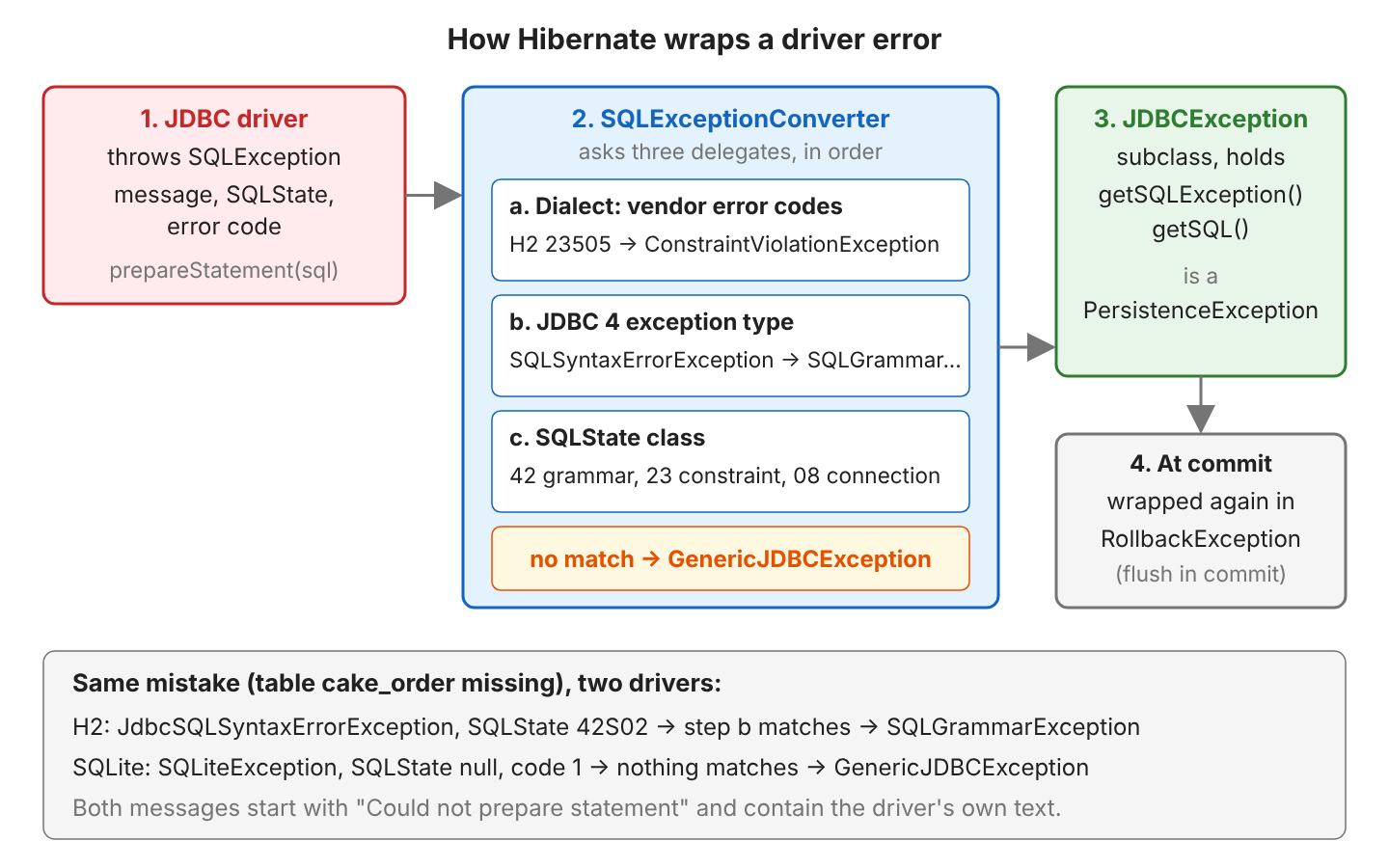
The exception class names a category, and the message names the cause. When Hibernate prepares a statement, each category has its typical causes and fixes.
| Exception | Typical cause when preparing | Fix |
|---|---|---|
| GenericJDBCException | Driver without SQLState (SQLite) or an old driver (“This function is not supported”) | Read the driver message; upgrade the driver |
| SQLGrammarException | Missing table, column or sequence; SQL keyword as a name; SQL for another database | Create the schema, rename or quote, fix the dialect |
| JDBCException | The base class of all of them | Catch it to read getSQLException() and getSQL() |
| RollbackException | Any of these exceptions thrown during the flush at commit | Read its cause |
Our example project is a bakery with a CakeOrder entity that has a customer name, a cake flavor, a pickup date and a value, mapped to the table cake_order. Depending on the database, the same mistakes produce one exception or the other.
1.1. The Table or Column Does Not Exist
The most common cause is a schema that Hibernate did not create and nobody else created either. For example, a developer points the app to a fresh test database and forgets to run the migration scripts. With the schema action NONE, Hibernate sends the SQL to an empty database.
new HibernatePersistenceConfiguration("bakery")
    .managedClasses(CakeOrder.class)
    .schemaToolingAction(Action.NONE)          // no create table
    ...;

List<CakeOrder> orders = em.createQuery("from CakeOrder", CakeOrder.class).getResultList();
// SQLite: GenericJDBCException ... (no such table: cake_order)
// H2:     SQLGrammarException ... Table "CAKE_ORDER" not found
An existing table with an old structure fails the same way, for example when we create cake_order by hand without the pickupDate column.
jakarta.persistence.RollbackException: Error while committing the transaction [Could not prepare statement [Column "PICKUPDATE" not found; SQL statement:
insert into cake_order (customerName,flavor,pickupDate,order_value,id) values (?,?,?,?,?) [42122-252]] ...]
Saving a new order on an empty H2 database fails even earlier on the id sequence, with Sequence “CAKE_ORDER_SEQ” not found for the SQL select next value for cake_order_SEQ.
1.2. A Table or Column Named With an SQL Keyword
Words such as order, user, value, year, key, group and limit are reserved words in H2, so they cannot be used as plain table or column names. For example, a shop app names its main entity Order, which is also an SQL keyword. An entity class named Order maps to a table named Order, and a field named value to a column named value.
@Entity
public class Order {

  @Id
  @GeneratedValue
  private Long id;

  private String customerName;
  private String flavor;
  private LocalDate pickupDate;
  private BigDecimal value;        // also a keyword
}
Hibernate only logs the failed create table as a warning and keeps starting up, so the error that reaches our code comes later, from the INSERT.
WARN ExceptionHandlerLoggedImpl - GenerationTarget encountered exception accepting command : Error executing DDL "create table Order (pickupDate date, value numeric(38,2), id bigint not null, customerName varchar(255), flavor varchar(255), primary key (id))" via JDBC [Syntax error in SQL statement "create table [*]Order (...)"; expected "identifier";]

jakarta.persistence.RollbackException: Error while committing the transaction [Could not prepare statement [Syntax error in SQL statement "insert into [*]Order (customerName,flavor,pickupDate,value,id) values (?,?,?,?,?)"; expected "identifier"; ...]]
On SQLite the same entity throws GenericJDBCException: Could not prepare statement [[SQLITE_ERROR] SQL error or missing database (near “Order”: syntax error)].
1.3. The Dialect Does Not Match the Database
A dialect is the Hibernate class that writes SQL for one database, so a wrong hibernate.dialect setting makes Hibernate send SQL that the real database does not understand. With OracleDialect on H2, the first persist() asks for the next id in Oracle syntax.
Hibernate: select cake_order_SEQ.nextval from dual
org.hibernate.exception.SQLGrammarException: Could not prepare statement [Column "CAKE_ORDER_SEQ.NEXTVAL" not found; ...] [select cake_order_SEQ.nextval from dual]
SQLServerDialect on H2 turns count(*) into count_big(*) and fails with Function “COUNT_BIG” not found. The same happens without a wrong dialect when a native SQL query uses a function of another database, for example MySQL’s DATE_FORMAT in tests that run on H2.
List<?> dates = em.createNativeQuery("select date_format(pickupDate, '%d.%m') from cake_order").getResultList();
// SQLGrammarException: Could not prepare statement [Function "DATE_FORMAT" not found; ...]
H2’s MODE=MySQL does not help here. It accepts some MySQL syntax, but DATE_FORMAT still fails with the same error.
1.4. An Old JDBC Driver
A classic case of the error comes from HSQLDB 1.8, a driver from before JDBC 4. For an entity with GenerationType.IDENTITY, Hibernate prepares the INSERT with “return the generated keys”, and HSQLDB 1.8 does not support that call. Hibernate 7.4 still shows the same error with that driver.
WARN  HHH000511: The 1.8.0 version for [org.hibernate.dialect.HSQLDialect] is no longer supported ... The minimum supported version is 2.6.1.
org.hibernate.exception.GenericJDBCException: Could not prepare statement [This function is not supported] [insert into identity_order (flavor,id) values (?,null)]
Caused by: java.sql.SQLException: This function is not supported
2. How to Fix It
Every fix starts with the driver message, so we read that first, then apply the fix for the cause it names.
2.1. Read the Root SQLException
The first bracket of the message is the driver’s text, and the second bracket is the SQL Hibernate tried to prepare.
![The message GenericJDBCException: Could not prepare statement [ [SQLITE_ERROR] ... (no such table: cake_order) ] [ select co1_0.id,... from cake_order co1_0 ] split into four parts: the class is only the category, "Could not prepare statement" means the driver refused the SQL before it ran, the first bracket is the real cause available via getSQLException().getMessage(), getSQLState() null and getErrorCode() 1, the second bracket is the failing SQL from getSQL(); below, a mapping from driver messages to fixes](https://howtodoinjava.com/wp-content/uploads/2026/10/hibernate-genericjdbcexception-message-genericjdbcexception-could-not-prepare.png)
In code, we walk the cause chain until we reach the JDBCException, which also works when the error is wrapped in RollbackException at commit.
static JDBCException jdbcException(Throwable error) {
  for (Throwable cause = error; cause != null; cause = cause.getCause()) {
    if (cause instanceof JDBCException jdbc) {
      return jdbc;
    }
  }
  return null;
}

JDBCException jdbc = jdbcException(e);
String sql = jdbc.getSQL();                               // insert into Order (customerName,...) values (?,?,?,?,?)
String sqlState = jdbc.getSQLException().getSQLState();   // 42001
int errorCode = jdbc.getSQLException().getErrorCode();    // 42001
The SQLState is a standard five-character code, and the error code is the vendor’s own number. Both are worth logging, because they identify the error even when the message is in another language.
| Database | Message | SQLState | Error code |
|---|---|---|---|
| SQLite | no such table: cake_order | null | 1 |
| H2 | Table “CAKE_ORDER” not found | 42S02 | 42102 |
| H2 | Column “PICKUPDATE” not found | 42S22 | 42122 |
| H2 | Syntax error … expected “identifier” | 42001 | 42001 |
| H2 | Function “DATE_FORMAT” not found | 90022 | 90022 |
| HSQLDB 1.8 | This function is not supported | IM001 | -20 |
2.2. Create or Validate the Schema
For a missing table or column, we let Hibernate create the schema in tests and demos, and use a migration tool such as Flyway or Liquibase in production. With HibernatePersistenceConfiguration, the action is one call, and the classic property does the same.
.schemaToolingAction(Action.CREATE_DROP)           // before: Action.NONE

.property("hibernate.hbm2ddl.auto", "create-drop") // same effect
When the tables come from somewhere else, we use Action.VALIDATE, so a missing column stops the application at startup instead of failing at the first INSERT.
jakarta.persistence.PersistenceException: Unable to build Hibernate SessionFactory  [persistence unit: validate]
Caused by: org.hibernate.tool.schema.spi.SchemaManagementException: Schema validation: missing column [pickupDate] in table [cake_order]
2.3. Rename or Quote Reserved Words
The cleanest fix for a keyword is a name that is not a keyword. @Table and @Column change the SQL names and keep the Java names.
@Entity
@Table(name = "cake_order")          // not "Order"
public class CakeOrder {

  @Column(name = "order_value")      // not "value"
  private BigDecimal value;
}
// insert into cake_order (customerName,flavor,pickupDate,order_value,id) values (?,?,?,?,?)
When renaming is not possible, Hibernate can put the names in double quotes. Hibernate has two settings for quoting, and both work on the Order entity.
.property("hibernate.auto_quote_keyword", "true")
// insert into "Order" (customerName,flavor,pickupDate,"value",id) values (?,?,?,?,?)

.property("hibernate.globally_quoted_identifiers", "true")
// insert into "Order" ("customerName","flavor","pickupDate","value","id") values (?,?,?,?,?)
The setting auto_quote_keyword quotes only the keywords, whereas globally_quoted_identifiers quotes every name, which makes the names case-sensitive in H2. After global quoting, unquoted native SQL fails with SQLGrammarException.
select flavor from cake_order
SQLGrammarException: Could not prepare statement [Table "CAKE_ORDER" not found (candidates are: "cake_order"); ...]
The native query then needs quotes too, as in select “flavor” from “cake_order”.
2.4. Remove the Wrong Dialect and Vendor-Specific SQL
Hibernate 7 detects the dialect from the JDBC connection and logs HHH90000025: OracleDialect does not need to be specified explicitly when we set it anyway. So we delete the hibernate.dialect property unless Hibernate cannot detect the database. In tests that run on an in-memory H2 database instead of the production database, we write queries in HQL, which Hibernate translates for each dialect.
// Before: MySQL only
em.createNativeQuery("select date_format(pickupDate, '%d.%m') from cake_order");

// After: HQL format(), translated for the current database
String day = em.createQuery("select format(c.pickupDate as 'dd.MM') from CakeOrder c", String.class)
    .getSingleResult();     // "10.10"
                            // H2: select formatdatetime(co1_0.pickupDate,'dd.MM') from cake_order co1_0
2.5. Upgrade the JDBC Driver
For the HSQLDB case, the fix is the current driver, whose group id changed from hsqldb to org.hsqldb.
<!-- before: hsqldb:hsqldb:1.8.0.10 -->
<dependency>
  <groupId>org.hsqldb</groupId>
  <artifactId>hsqldb</artifactId>
  <version>2.7.4</version>
</dependency>
With HSQLDB 2.7.4 the same entity is saved with insert into identity_order (flavor,id) values (?,default). The HHH000511 warning from section 1.4 is the hint, because Hibernate prints it when the database version is older than the dialect supports.
3. GenericJDBCException FAQs
3.1. Why Does Hibernate Start Even Though create table Failed?
Because, by default, the schema tool logs each failed DDL statement as a warning and continues, so the real error appears later as “Could not prepare statement”. To stop at the first failed statement, we set hibernate.hbm2ddl.halt_on_error to true.
jakarta.persistence.PersistenceException: Unable to build Hibernate SessionFactory  [persistence unit: halt]
Caused by: org.hibernate.tool.schema.spi.SchemaManagementException: Halting on error : Error executing DDL "drop table if exists Order cascade " via JDBC [Syntax error in SQL statement "drop table if exists [*]Order cascade "; expected "identifier";]
3.2. Which Exception Should I Catch?
We catch PersistenceException and look for the JDBCException in its causes, as in section 2.1. In Hibernate 7, GenericJDBCException, SQLGrammarException and the other JDBCException subclasses extend jakarta.persistence.PersistenceException, and errors from the flush at commit come wrapped in RollbackException, which is also a PersistenceException. Catching GenericJDBCException alone misses the same error on H2.
3.3. Does the Error Mean the Connection Failed?
No. “Could not prepare statement” means the connection worked and the database read the SQL. Connection problems (SQLState class 08) throw JDBCConnectionException instead, and they need a different fix (the URL and the credentials, or the connection pool settings).
4. Conclusion
GenericJDBCException: could not prepare statement tells us only that the driver refused the SQL and gave Hibernate no SQLState to classify it. The cause is in the first bracket of the message, or in getSQLException(), and it is either a table or column that does not exist, an SQL keyword used as a name, SQL written for another database or a driver that is too old. We fix that cause by creating or validating the schema, renaming or quoting the names, removing the wrong dialect, or upgrading the driver.
5. References
- Hibernate ORM 7.4 User Guide: Exception handling
- Hibernate ORM 7.4 User Guide: Quoted identifiers
- Hibernate ORM 7.4 User Guide: Schema generation
- GenericJDBCException JavaDoc (Hibernate 7.4)
- JDBCException JavaDoc (Hibernate 7.4)
- PersistenceException JavaDoc (Jakarta Persistence 3.2)
- SQLException JavaDoc (Java 25)
- H2 Error Codes
- SQLite Keywords
Happy Learning !!

while i am trying to upload jpeg file getting this error,anyone pls help .