
Java is a general-purpose, object-oriented programming language whose compiled code runs on the Java Virtual Machine (JVM), so the same program runs on Windows, Linux and macOS without changes. This introduction to Java covers the language, the platform that runs it and the tools we install to write it.
We use Java to build backend services and REST APIs, Android apps, batch jobs, desktop tools and big data systems. Banks, online shops and travel sites run large parts of their business on it, and the current long-term support release is Java 25.
The following example is a complete Java 25 program. It needs no class declaration, and each comment shows what the line produces.
void main() {
    int version = Runtime.version().feature();      // 25
    IO.println("Hello from Java " + version);        // Hello from Java 25
}
Notice that the program is a single method in a file. We start with what Java is and how source code becomes a running app, compare the JDK, JRE and JVM, and go through the features, versions and typical uses of the language.
1. What Is Java?
The name Java stands for two things. Java is a programming language with a C-like syntax, classes, static types and automatic memory management. Java is also a platform made of the JVM and a large standard library, which runs programs written in that language and in other JVM languages such as Kotlin and Scala.
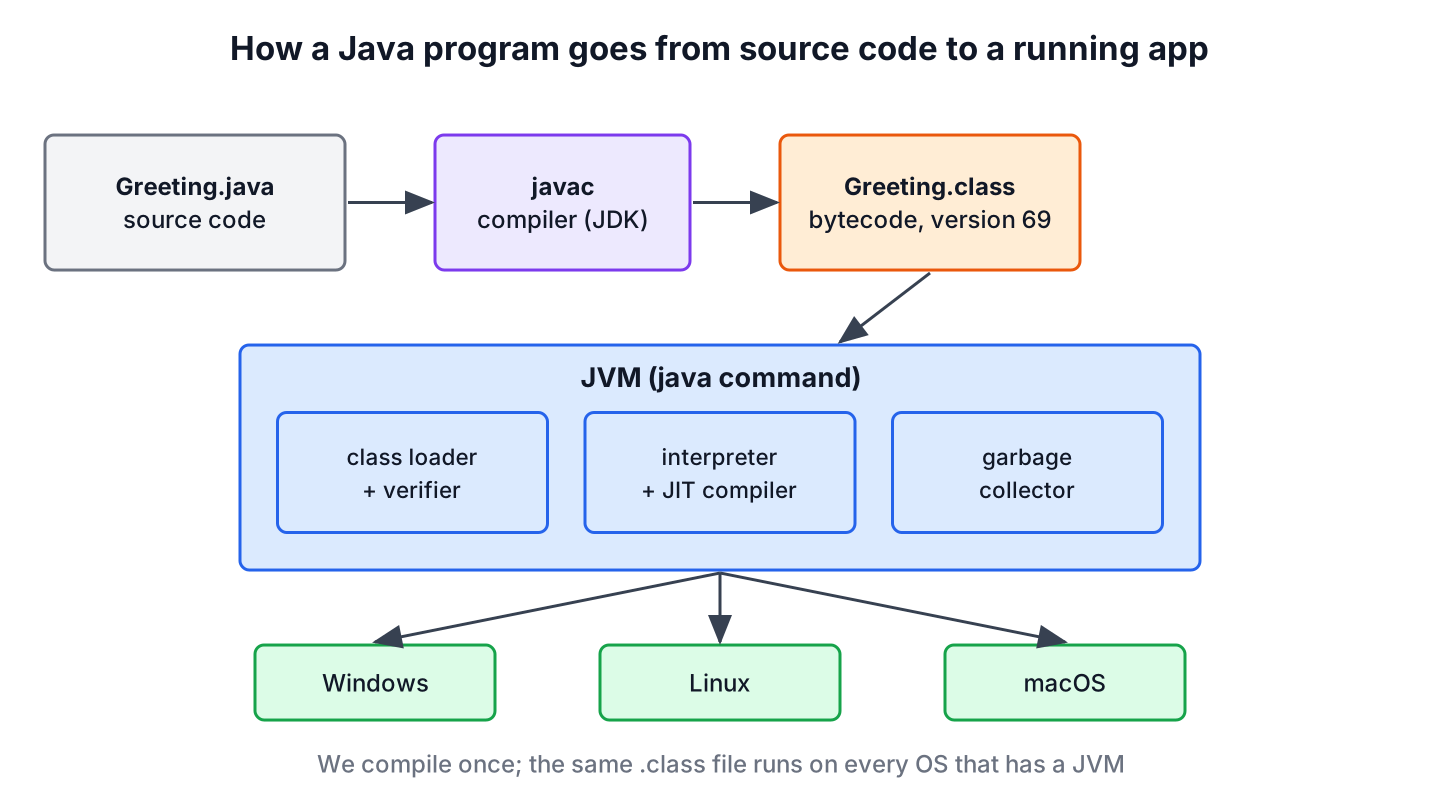
The compiler javac does not produce a Windows or Linux executable. It produces bytecode, a compact instruction set defined by the Java Virtual Machine Specification. The JVM loads that bytecode, checks it, runs it and compiles the busy parts to machine code while the program runs. Sun Microsystems called this idea “write once, run anywhere”.
The comparison with two other popular languages shows where Java sits.
| Question | Java | C++ | Python |
|---|---|---|---|
| What the build produces | Bytecode (.class files) for the JVM | A native executable for one OS and CPU | Nothing to build, the interpreter reads source files |
| How code runs | JVM interpreter plus a JIT compiler | As native machine code on the CPU | CPython interpreter |
| Types | Static, checked by the compiler | Static | Dynamic, checked at runtime |
| Memory | Garbage collector frees unused objects | Manual (new/delete) or smart pointers | Reference counting plus a garbage collector |
| Typical use | Backend services, Android, big data | Games, drivers, embedded systems | Scripts, data science, automation |
2. How a Java Program Runs
Every Java program goes through two steps. First, the compiler turns a .java source file into a .class file with bytecode. Second, the java command starts a JVM, loads the class and calls its main() method.
The following example is the classic program with an explicit class, which works on every Java version. The class is public, so the file must be named Greeting.java.
public class Greeting {
    public static void main(String[] args) {
        System.out.println("Hello, Java");
    }
}
We compile the file with javac and run the class with java, passing the class name without the .class extension. The tool javap shows that a Java 25 compiler writes class file version 69.
javac Greeting.java
java Greeting
javap -v Greeting.class | grep major
Hello, Java
major version: 69Since Java 11, we can also skip the compile step for small programs and run java Greeting.java. The launcher compiles the source in memory and runs it, which is handy for scripts and for learning. The Java Hello World program tutorial shows both ways step by step, together with the errors beginners hit first.
A real project shows why the bytecode step matters. A team develops a booking service on Mac laptops and runs it on Linux servers in production. The build creates one JAR file with the .class files, and that same JAR runs on both, because only the JVM differs between the machines.
3. JDK vs JRE vs JVM
Beginners meet three abbreviations in the first hour, and they nest inside each other. The JVM runs bytecode, the JRE is the JVM plus the standard class library, and the JDK is the JRE plus the development tools such as javac, jar, javadoc and jshell.
| Part | Contains | Who needs it |
|---|---|---|
| JVM | Class loader, bytecode verifier, interpreter, JIT compiler, garbage collector | Every running Java program |
| JRE | JVM plus the standard library (java.base and the other modules) | A machine that only runs Java apps |
| JDK | JRE plus javac, jar, javadoc, jlink, jshell and other tools | Developers and build servers |
Since Java 11, Oracle ships only the JDK, not a separate JRE download. Some vendors, such as Eclipse Temurin, still publish JRE builds for Java 25. To give an app a small runtime, we build one with jlink, which copies only the modules the app needs. The JDK vs JRE vs JVM article goes deeper into each part.
Several vendors build the JDK from the same OpenJDK source code. Common builds are Oracle JDK, Eclipse Temurin, Amazon Corretto, Microsoft Build of OpenJDK and Azul Zulu. They pass the same compatibility tests and differ mainly in license terms, support periods and supported platforms. The guide to install OpenJDK walks through the setup on each operating system.
4. Main Features of the Java Language
Most Java features come from one design goal, namely that large programs written by many developers stay safe and readable for years. Each feature in the list has a concrete effect on the code we write.
- Java is object-oriented, so code lives in classes with fields and methods. Primitive types such as int and double are not objects, which keeps arithmetic fast.
- Java is statically typed. The compiler checks every assignment and method call, so a typo in a method name fails the build instead of the production run.
- Memory is managed by a garbage collector. We create objects with new, and the JVM frees them once no reference points to them, so there is no free() or delete call to forget.
- The JVM compiles hot code to machine code at runtime (JIT compilation), so long-running services reach speeds close to natively compiled code after a warm-up phase.
- Threads are part of the language and the library. Since Java 21, virtual threads let a server handle thousands of blocking requests at once.
- The standard library covers collections, files, networking, HTTP, dates, cryptography and concurrency, so small apps need no third-party libraries.
- Java keeps old code working. A JAR compiled for Java 8 still runs on a Java 25 JVM unless it uses removed or internal APIs.
The next snippet shows the difference between a primitive and an object, and it reads a few facts about the running JVM.
int count = 42;                                     // 42, a primitive, not an object
Integer boxed = count;                              // 42, autoboxed into an Integer object
int feature = Runtime.version().feature();          // 25
String vmName = System.getProperty("java.vm.name"); // "OpenJDK 64-Bit Server VM"
One old selling point no longer applies. Early Java ran untrusted code in a sandbox controlled by the Security Manager. That component is permanently disabled since Java 24, so today a Java app has the same access to files and the network as any other process started by the same user.
5. Java Versions and Release Cadence
Since Java 10, a new feature release ships every six months, in March and September. Every two years, one release becomes a long-term support (LTS) release that vendors patch for many years, and most companies run their production systems on an LTS version.
| Version | Released | Support | What it brought |
|---|---|---|---|
| Java 8 | March 2014 | LTS | Lambdas, streams, the java.time API |
| Java 11 | September 2018 | LTS | HttpClient, running a source file with java, no separate JRE |
| Java 17 | September 2021 | LTS | Sealed classes, plus records and text blocks from Java 15 and 16 |
| Java 21 | September 2023 | LTS | Virtual threads, pattern matching for switch, record patterns |
| Java 25 | September 2025 | LTS | Compact source files, instance main methods, module import declarations, flexible constructor bodies |
| Java 26 | March 2026 | Feature release | Applet API removed |
| Java 27 | September 2026 | Feature release | Current release; the next LTS is planned as Java 29 |
For new projects and for learning, we pick the latest LTS, which is Java 25. The dates come from the Oracle Java SE support roadmap, and the Java 25 features article explains each change of that release. The Java versions series covers the older releases one by one.
6. Where Java Is Used Today
Most Java code runs on servers, where end users never see it. A typical case is an online shop whose order, payment and stock services are Spring Boot applications, each in its own container, talking to each other over HTTP and Kafka.
- Backend services and REST APIs built with Spring Boot, Quarkus, Micronaut or Jakarta EE.
- Android apps, where Java is still supported, although Google recommends Kotlin for new Android code.
- Data and search infrastructure such as Apache Kafka, Apache Cassandra, Elasticsearch and Hadoop, which are written in Java or other JVM languages.
- Developer tools such as IntelliJ IDEA, Eclipse, Jenkins, Maven and Gradle.
- Trading, banking and insurance systems that need predictable performance and long support periods.
Java is a poor fit for small command-line scripts where startup time matters more than throughput, and for code that runs inside a web browser, where JavaScript and WebAssembly are the options.
7. A Short History of Java
James Gosling and a small team at Sun Microsystems started the language in 1991 under the name Oak, for set-top boxes and other consumer devices. Sun renamed it Java, announced it in 1995 and released JDK 1.0 in January 1996.
In its first years, Java was famous for applets, small programs that ran inside a web page. Browsers dropped plugin support long ago, and the Applet API was removed in Java 26. Java found its long-term home on servers instead.
Sun released the JDK source code as the open source OpenJDK project in 2006 and 2007. Oracle bought Sun in January 2010 and leads OpenJDK today, together with companies such as Red Hat, Microsoft, Amazon, SAP and IBM.
8. Introduction to Java FAQs
Oracle JDK and the free OpenJDK builds come with different license terms, which is the first point many newcomers want to clear up.
8.1. Is Java free to use?
Yes, OpenJDK builds such as Eclipse Temurin, Amazon Corretto and Microsoft Build of OpenJDK are free for development and production under the GPL with the Classpath Exception. Oracle JDK has its own license terms, so companies that pick it check whether their use is covered.
8.2. Is Java compiled or interpreted?
Both. The javac compiler turns source code into bytecode before the program runs. The JVM starts by interpreting that bytecode and compiles the frequently used methods to native machine code with its JIT compiler.
8.3. Is Java the same as JavaScript?
No. The names are similar for marketing reasons from 1995, but they are different languages. JavaScript runs in web browsers and in Node.js and is dynamically typed, whereas Java runs on the JVM and is statically typed.
8.4. Which Java version should a beginner learn?
Java 25, the current LTS release. Tutorials for Java 8, 11, 17 or 21 still apply to the basics, and Java 25 adds shortcuts such as a void main() method without a class, which make the first programs shorter.
8.5. Is Java still used in 2026?
Yes. Java runs a large share of enterprise backends, Android apps and data systems, and a new version ships every six months. Spring Boot, Kafka and Elasticsearch are examples of widely used software built with or for Java.
8.6. What should we learn after this introduction?
Install a JDK, run the first program, and work through variables, data types, operators, control flow and classes. The Java tutorial lists these topics in a sensible order.
9. Conclusion
Java is a statically typed, object-oriented language whose bytecode runs on the JVM, so one build runs on every operating system that has a JVM. We write code with the JDK, compile it with javac and run it with java, and the JVM takes care of memory and of compiling hot code to machine code.
New feature releases arrive every six months, and Java 25 is the LTS version to start with. Its compact source files let a first program fit in three lines, while the same language scales up to the large backend systems most Java developers work on.
10. References
- The Java Virtual Machine Specification, Java SE 25
- Oracle Java SE Support Roadmap
- JEP 512, Compact Source Files and Instance Main Methods
- JEP 486, Permanently Disable the Security Manager
- jlink tool reference
Happy Learning !!

Why only one class is public ?answar plz
That’s how Java is designed. It allows for a better structure of classes in packages and easier file parsing for Java Compiler. Also, the public class name should be the same as the file name where this class is. For example, you have
public class Helloand it should be inHello.javafile. Otherwise, you will get an error