
Java printf() writes text to the console after it replaces each format specifier in the format string, such as %s, %d or %.2f, with the next argument formatted the way the specifier describes. The methods String.format() and String.formatted() follow the same rules but return the text as a String instead of printing it.
We use printf-style formatting for numbers with a fixed number of decimals, aligned columns in console reports, zero-padded numbers, hexadecimal values and readable log messages. The format string keeps the layout in one place, so it is easier to read than a chain of string concatenations.
The following example formats the same values in the four common ways.
String name = "Lokesh";
int age = 40;

String sentence = String.format("%s is %d years old", name, age);    // "Lokesh is 40 years old"
String price = String.format("%.2f", 7.5);                           // "7.50"
String row = String.format("|%-8s|%5d|", "tea", 42);                 // "|tea     |   42|"
String same = "%s is %d years old".formatted(name, age);             // "Lokesh is 40 years old"
System.out.printf("%s is %d years old%n", name, age);               // prints Lokesh is 40 years old
Notice that %-8s pads the text on the right and %5d pads the number on the left. We cover the syntax of a format specifier, every common conversion and flag, dates, locales, the exceptions a wrong format string throws, and a receipt printed as an aligned table.
1. Format Specifier Syntax
Every format specifier starts with % and ends with a conversion character, and the parts between them are optional. The Formatter syntax for general, character and numeric types is %[argument_index$][flags][width][.precision]conversion.
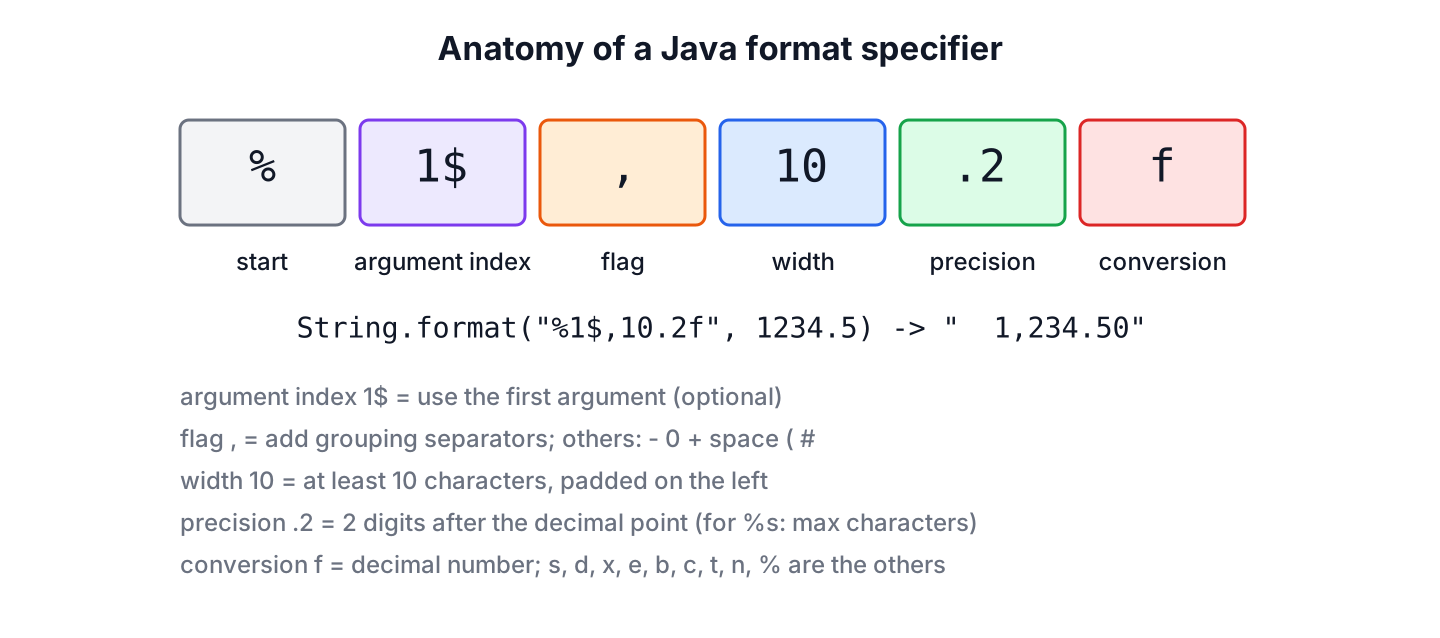
- The argument index, such as 1$, picks an argument by position. Without it, each specifier takes the next argument.
- The flags change the layout, for example – for left alignment or , for grouping separators.
- The width is the minimum number of characters in the output. Shorter values are padded with spaces.
- The precision means the number of digits after the decimal point for %f and %e, and the maximum number of characters for %s.
- The conversion character decides how the argument is formatted, such as d for an integer or s for a string.
String full = String.format("%1$,10.2f", 1234.5); // " 1,234.50"All formatting methods share the same engine, the java.util.Formatter class. PrintStream.printf() and PrintStream.format() are the same method under two names, so System.out.format() prints the same output as System.out.printf().
2. Conversion Characters
The conversion character tells the formatter what type to expect. An uppercase conversion, such as %S or %X, formats the value the same way and converts the result to uppercase.
| Conversion | Argument types | Example | Result |
|---|---|---|---|
| %s, %S | Any object (uses toString()) | String.format(“%S”, “coffee”) | COFFEE |
| %d | byte, short, int, long, BigInteger | String.format(“%d”, 42) | 42 |
| %f | float, double, BigDecimal | String.format(“%f”, 3.5) | 3.500000 |
| %e | float, double, BigDecimal | String.format(“%e”, 12345.678) | 1.234568e+04 |
| %x, %o | Integer types | String.format(“%x”, 255) | ff |
| %c | char, or an int code point | String.format(“%c”, 65) | A |
| %b | Any (null is false, a non-Boolean is true) | String.format(“%b”, null) | false |
| %t, %T | Date and time types | String.format(“%tF”, date) | 2026-10-10 |
| %n | No argument | String.format(“a%nb”) | Line separator of the platform |
| %% | No argument | String.format(“%d%%”, 15) | 15% |
String upper = String.format("%S", "coffee");              // "COFFEE"
String fixed = String.format("%f", 3.5);                    // "3.500000"
String scientific = String.format("%e", 12345.678);         // "1.234568e+04"
String hex = String.format("%x", 255);                      // "ff"
String octal = String.format("%o", 8);                      // "10"
String letter = String.format("%c", 65);                    // "A"
String nullText = String.format("%s", (Object) null);       // "null"
String nullFlag = String.format("%b", (Object) null);       // "false"
String percent = String.format("%d%%", 15);                 // "15%"
The %f conversion prints 6 decimals by default and rounds with HALF_UP rounding, so %.2f turns 2.675 into “2.68”. The %d conversion accepts no floating-point values, and %f accepts no integers, as section 6 shows.
For %n, the formatter inserts the value of System.lineSeparator(), which is \n on Linux and macOS and \r\n on Windows. We use %n in console output and in text files that people open on the same machine, and a plain \n for network protocols and files with a fixed format.
3. Width, Alignment and Flags
The width sets the minimum size of a value. By default, the formatter right-aligns the value and pads it with spaces on the left, and the – flag left-aligns it with spaces on the right. A precision on %s cuts the text to that many characters before padding.
String right = String.format("[%10s]", "tea");             // "[       tea]"
String left = String.format("[%-10s]", "tea");              // "[tea       ]"
String cut = String.format("[%.3s]", "coffee");             // "[cof]"
String cutAndPad = String.format("[%10.3s]", "coffee");     // "[       cof]"
Numbers support more flags, and we can combine several of them in one specifier, such as %,010.2f.
| Flag | Meaning | Example | Result |
|---|---|---|---|
| – | Left-align within the width | %-6d| with 42 | 42 | |
| 0 | Pad numbers with zeros | %05d with 42 | 00042 |
| , | Locale grouping separators | %,d with 1234567 | 1,234,567 |
| + | Always show the sign | %+d with 42 | +42 |
| space | Leading space for positive numbers | % d with 42 | 42 |
| ( | Negative numbers in parentheses | %(d with -42 | (42) |
| # | Alternate form, a prefix for hex and octal | %#x with 255 | 0xff |
String zeros = String.format("%05d", 42);                   // "00042"
String grouped = String.format("%,d", 1234567);             // "1,234,567"
String signed = String.format("%+d", 42);                   // "+42"
String accounting = String.format("%(d", -42);              // "(42)"
String prefixed = String.format("%#x", 255);                // "0xff"
String padded = String.format("%08.2f", -3.14159);          // "-0003.14"
String negativeAmount = String.format("%(,.2f", -1234.5);   // "(1,234.50)"
A shop that prints order numbers as six digits uses %06d, so order 42 appears as 000042 on every label. An accounting report uses %(,.2f to show -1234.5 as (1,234.50), which is the convention accountants expect for negative amounts. For padding without numbers, the guides on left padding and aligning text in columns show more options.
4. Reusing Arguments With the Argument Index
An argument index refers to an argument by its position, starting at 1$. It lets us use one argument several times or change the order of the arguments, which is useful when a translated message puts the words in another order. The < flag reuses the argument of the previous specifier.
String twice = String.format("%1$d times %1$d is %2$d", 3, 9);   // "3 times 3 is 9"
String reordered = String.format("%2$s, %1$s", "Lokesh", "Gupta");  // "Gupta, Lokesh"
String previous = String.format("%s %<S", "tea");                  // "tea TEA"
5. Formatting Dates and Times
The %t conversion followed by a suffix letter formats one field of a date or time. It works with the java.time classes such as LocalDate and LocalDateTime, and with the legacy Date and Calendar classes. Each suffix needs the matching field, so time suffixes fail on a LocalDate, and zone suffixes fail on a LocalDateTime.
LocalDateTime meeting = LocalDateTime.of(2026, 10, 10, 14, 5, 9);

String isoDate = String.format("%tF", meeting);                         // "2026-10-10"
String time = String.format("%tT", meeting);                            // "14:05:09"
String shortTime = String.format("%tR", meeting);                       // "14:05"
String longDate = String.format("%1$tA, %1$tB %1$te, %1$tY", meeting);   // "Saturday, October 10, 2026"
String clock = String.format("%tI:%<tM %<Tp", meeting);                 // "02:05 PM"
String noZone = String.format("%tZ", meeting);                          // IllegalFormatConversionException: Z != java.time.LocalDateTime
The most used suffixes are Y (year), m (month), d (day), H (hour, 24-hour clock), M (minute), S (second), A (day name) and B (month name). F, T and R are shortcuts for ISO date, full time and hours with minutes. For anything beyond a log line, a DateTimeFormatter with a pattern such as dd MMM yyyy is easier to read and can be reused and shared between threads.
6. Format Exceptions and How to Fix Them
The compiler does not check format strings, so a mistake shows up as an exception at runtime. All of these exceptions extend IllegalFormatException, which is an unchecked IllegalArgumentException, and the message names the problem.
| Exception | Cause | Fix |
|---|---|---|
| IllegalFormatConversionException | The argument type does not match the conversion, such as %d with 3.5 | Use %f for decimals, or convert the argument |
| MissingFormatArgumentException | More specifiers than arguments | Pass every argument, or use an argument index |
| UnknownFormatConversionException | An unknown conversion such as %i from C | Use %d; Java has no %i or %u |
| IllegalFormatPrecisionException | A precision on an integer, such as %.2d | Remove the precision or use %f |
| FormatFlagsConversionMismatchException | A flag that the conversion does not support, such as %,s | Use the flag only with numeric conversions |
| MissingFormatWidthException | The – or 0 flag without a width, such as %-d | Add a width, such as %-6d |
String wrongType = String.format("%d", 3.5);        // IllegalFormatConversionException: d != java.lang.Double
String missing = String.format("%s and %s", "tea");   // MissingFormatArgumentException: Format specifier '%s'
String cStyle = String.format("%i", 3);              // UnknownFormatConversionException: Conversion = 'i'
String precision = String.format("%.2d", 5);         // IllegalFormatPrecisionException: 2
Extra arguments do not throw, they are ignored, so a missing specifier shows up only as missing text in the output. IntelliJ IDEA and SpotBugs check format strings against the argument types, which catches most of these mistakes before the code runs.
String extra = String.format("%s", "tea", "coffee"); // "tea"7. printf() vs String.format() vs formatted() vs Formatter
All four use the same specifiers and differ only in where the result goes. String.formatted() was added in Java 15 and reads well with text blocks and chained calls.
| Method | Returns | Typical use |
|---|---|---|
| System.out.printf(format, args) | The PrintStream, prints the text | Console output in small programs and tools |
| String.format(format, args) | String | Building a value for a log, a file or a UI |
| format.formatted(args) | String | Same as String.format(), called on the format string or a text block |
| new Formatter(appendable) | Appends to a StringBuilder, file or stream | Many formatted lines written in a loop |
String.format() and printf() create a new Formatter on every call, so we can call them from many threads at once. A Formatter object that we create ourselves is not thread-safe and must stay in one thread. Formatting is also slower than concatenation, because the format string is parsed on every call, which matters only in hot loops.
StringBuilder report = new StringBuilder();
try (Formatter formatter = new Formatter(report)) {
    formatter.format("%-6s%4d%n", "tea", 3);
    formatter.format("%-6s%4d%n", "milk", 12);
}
List<String> lines = report.toString().lines().toList();   // [tea      3, milk    12]
Java 25 adds the java.lang.IO class for compact source files, with IO.println() and IO.print() but no printf(). In a compact source file, we combine the two, as in IO.println(“%-8s%5d”.formatted(item, qty)).
8. Locale-Sensitive Formatting
Numbers and dates depend on the locale. String.format() and printf() without a locale use the default locale of the JVM, so the same code prints “1,234.50” on a US server and “1.234,50” on a German one. Passing the locale as the first argument fixes the output.
String german = String.format(Locale.GERMANY, "%,.2f", 1234.5);    // "1.234,50"
String us = String.format(Locale.US, "%,.2f", 1234.5);             // "1,234.50"
String machine = String.format(Locale.ROOT, "%.2f", 1234.5);       // "1234.50"
For files, CSV exports, JSON and anything another program parses, we pass Locale.ROOT, so a decimal point never turns into a comma on a server with a different locale. For text that users read, the user’s locale is the right choice.
9. Printing a Receipt as an Aligned Table
A coffee shop app prints a receipt in the terminal of the cash register. Each line has the item name left-aligned in 12 characters, the quantity right-aligned in 5, and the total right-aligned in 10 with two decimals. The same widths in the header and the rows keep the columns straight.
record LineItem(String name, int qty, double unitPrice) {}List<LineItem> items = List.of(
new LineItem("Cappuccino", 2, 3.5),
new LineItem("Croissant", 3, 2.25),
new LineItem("Water", 1, 1.0));
System.out.printf(Locale.ROOT, "%-12s%5s%10s%n", "Item", "Qty", "Total");
double sum = 0;
for (LineItem item : items) {
double lineTotal = item.qty() * item.unitPrice();
sum += lineTotal;
System.out.printf(Locale.ROOT, "%-12s%5d%10.2f%n", item.name(), item.qty(), lineTotal);
}
System.out.printf(Locale.ROOT, "%-12s%5s%10.2f%n", "TOTAL", "", sum);Item Qty Total
Cappuccino 2 7.00
Croissant 3 6.75
Water 1 1.00
TOTAL 14.75For real money, the totals belong in a BigDecimal, and %f formats a BigDecimal without converting it to double. A name longer than 12 characters pushes the other columns to the right, so a receipt printer with a fixed width also needs %-12.12s to cut long names.
10. Java printf FAQs
Line breaks and rounding work differently in printf() than in println() and in string concatenation.
10.1. What is the difference between printf() and println()?
The println() method prints one value as it is and adds a line break. The printf() method formats its arguments with a format string and adds no line break, so we end the format string with %n.
10.2. How do we print a double with 2 decimal places using printf?
We use %.2f. The value is rounded with HALF_UP, so 7.456 prints as 7.46, and %.0f rounds to a whole number.
String twoDecimals = String.format("%.2f", 7.456);    // "7.46"
String noDecimals = String.format("%.0f", 2.5);       // "3"
10.3. How do we print a percent sign with printf?
We write it twice, as %%. A single % followed by a letter starts a format specifier, and a single % at the end of the string throws an UnknownFormatConversionException.
String rate = String.format("%.1f%%", 12.345); // "12.3%"10.4. Should we use %n or \n with printf?
We use %n for console output and text files read on the same machine, because it writes the line separator of the platform. We use \n when a protocol or file format requires a fixed line ending.
10.5. Is printf the right tool for log messages?
Not with a logging framework. SLF4J and Log4j use {} placeholders and format the message only when the log level is enabled, while String.format() always does the work. We keep String.format() for values that are always needed, such as file content or UI text.
11. Conclusion
Java printf(), String.format() and String.formatted() use one format specifier syntax, %[argument_index$][flags][width][.precision]conversion. The conversions %s, %d, %f and %n cover most code, and the width, precision and flags handle alignment, decimals, zero padding and grouping.
The format string is checked only at runtime, so a wrong type or a missing argument throws a subclass of IllegalFormatException. We pass Locale.ROOT for machine-readable output, use %n for console line breaks, and keep a DateTimeFormatter for date patterns. Console output with printf() appears throughout the Java tutorial as well.
12. References
- Formatter Javadoc (Java 25)
- PrintStream.printf() Javadoc
- String.format() Javadoc
- String.formatted() Javadoc
- IO class Javadoc
Happy Learning !!
