
To round a double to 2 decimal places in Java, we wrap it with BigDecimal.valueOf(), call setScale(2, RoundingMode.HALF_UP) and read the result back with doubleValue(). When we only need the rounded number as text, String.format(“%.2f”, value) or a DecimalFormat with the pattern 0.00 gives the same digits as a String.
We round decimals all the time in business code, such as prices and tax amounts on an invoice, averages in a report, or a temperature reading on a dashboard. The same methods work for any number of places, so 2 decimal places is only the most common case.
The following example rounds the same price with the four common methods.
double price = 4.56789;

double exact = BigDecimal.valueOf(price).setScale(2, RoundingMode.HALF_UP).doubleValue();   // 4.57
double quick = Math.round(price * 100.0) / 100.0;                                          // 4.57
String text = String.format("%.2f", price);                                                // "4.57"
String shown = new DecimalFormat("0.00").format(price);                                    // "4.57"
Notice that the first two lines return a double and the last two return a String. The methods agree on 4.56789, but they give different answers for values such as 1.005 and 2.675, and the next sections explain why and which one to pick. We also cover rounding modes, the Math.round() traps, float values and a money example.
1. Round a Double to 2 Decimal Places With BigDecimal
A BigDecimal stores a number as decimal digits plus a scale, which is the number of digits after the decimal point. The method setScale(n, mode) returns a new BigDecimal with n decimal places and applies the given RoundingMode to the digits it drops, so we control both the number of places and the rounding rule.
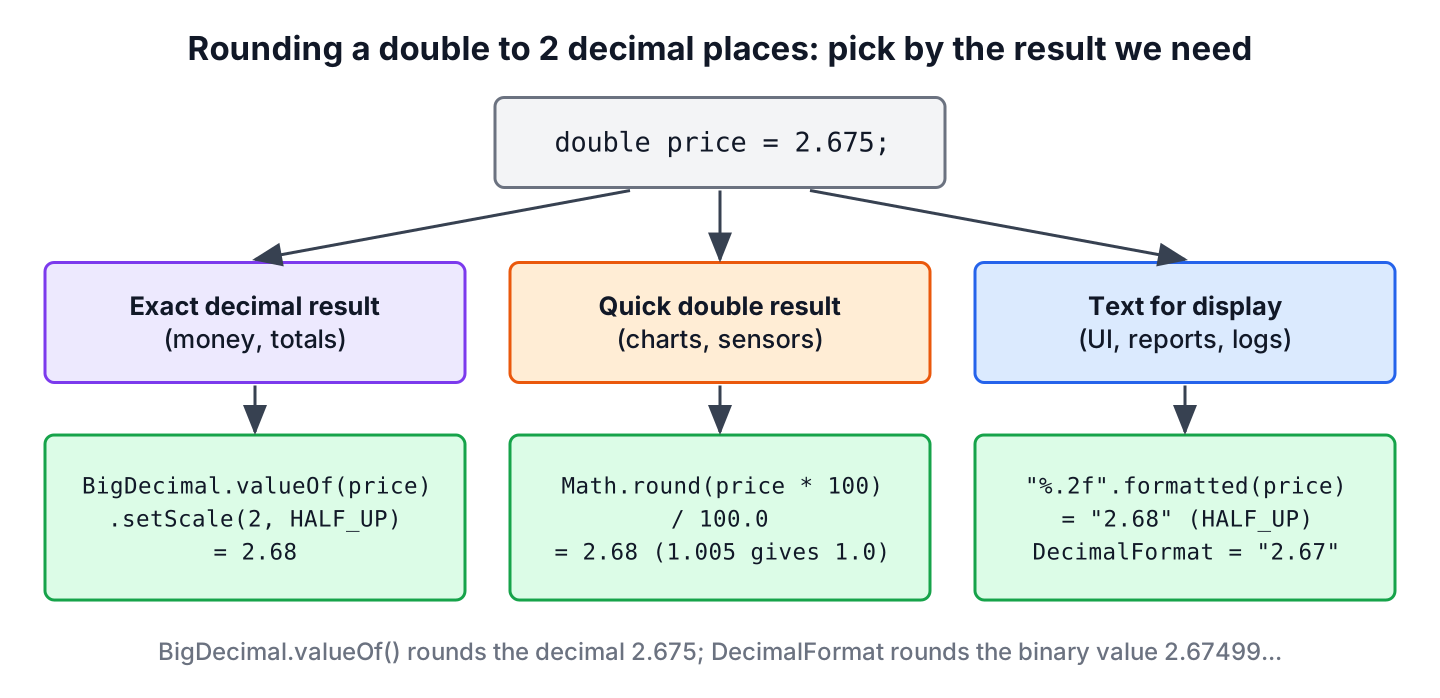
The way we create the BigDecimal decides the result. A double holds a binary fraction, so the literal 2.675 is stored as 2.67499999999999982236431605997495353221893310546875. The constructor new BigDecimal(double) copies that binary value digit by digit, whereas BigDecimal.valueOf(double) goes through Double.toString() and starts from the short decimal text 2.675.
double amount = 2.675;

BigDecimal fromCtor = new BigDecimal(amount).setScale(2, RoundingMode.HALF_UP);       // 2.67
BigDecimal fromValueOf = BigDecimal.valueOf(amount).setScale(2, RoundingMode.HALF_UP); // 2.68
BigDecimal fromText = new BigDecimal("2.675").setScale(2, RoundingMode.HALF_UP);       // 2.68
Always build the BigDecimal with BigDecimal.valueOf(double) or the String constructor, never with new BigDecimal(double). The constructor gives 2.67 because the stored binary value is slightly below 2.675, and the result surprises everyone who reads the code later.
To round to any number of places, we pass the number of places as a parameter. A negative scale rounds to tens or hundreds, so setScale(-2, …) turns 1234.5 into 1200.
static double round(double value, int places) {
    if (Double.isNaN(value) || Double.isInfinite(value)) {
        return value;
    }
    return BigDecimal.valueOf(value)
            .setScale(places, RoundingMode.HALF_UP)
            .doubleValue();
}
double twoPlaces = round(4.56789, 2); // 4.57
double threePlaces = round(4.56789, 3); // 4.568
double zeroPlaces = round(4.56789, 0); // 5.0
double hundreds = round(1234.5, -2); // 1200.0The guard for NaN and infinity matters, because BigDecimal.valueOf() throws a NumberFormatException for both values. Converting back to double also drops trailing zeros, so 1.50 prints as 1.5. If the trailing zero matters, we keep the BigDecimal or format the value as a String, as shown in section 4.
2. Choosing the Rounding Mode
The RoundingMode enum has eight values, and seven of them decide what happens to the dropped digits in different ways. The values that start with HALF round to the nearest neighbor and only differ when the value sits halfway between two neighbors, for example 2.345. The others always move in one direction, either toward zero, away from zero or toward one end of the number line.
We pass each value to new BigDecimal(text).setScale(2, mode) and get these results. The last column shows that negative numbers behave differently for CEILING and FLOOR than for UP and DOWN.
| RoundingMode | Rule | 2.345 | 2.355 | 2.341 | -2.345 |
|---|---|---|---|---|---|
| HALF_UP | Nearest, a tie goes away from zero | 2.35 | 2.36 | 2.34 | -2.35 |
| HALF_EVEN | Nearest, a tie goes to the even digit | 2.34 | 2.36 | 2.34 | -2.34 |
| HALF_DOWN | Nearest, a tie goes toward zero | 2.34 | 2.35 | 2.34 | -2.34 |
| UP | Always away from zero | 2.35 | 2.36 | 2.35 | -2.35 |
| DOWN | Always toward zero (truncate) | 2.34 | 2.35 | 2.34 | -2.34 |
| CEILING | Always toward positive infinity | 2.35 | 2.36 | 2.35 | -2.34 |
| FLOOR | Always toward negative infinity | 2.34 | 2.35 | 2.34 | -2.35 |
The eighth value, UNNECESSARY, rounds nothing and throws an ArithmeticException when digits would be lost. It is useful as an assertion that a value already has the expected number of places.
BigDecimal ok = new BigDecimal("2.50").setScale(2, RoundingMode.UNNECESSARY);    // 2.50
BigDecimal lost = new BigDecimal("2.345").setScale(2, RoundingMode.UNNECESSARY);  // ArithmeticException: Rounding necessary
For a shop, HALF_UP matches the rounding most people learned at school, so receipts and invoices commonly use it. HALF_EVEN, also called banker’s rounding, sends half of the ties up and half down, so the sum of many rounded values does not drift upward. We use it when we round and add thousands of values, such as interest on every account in a bank batch job. A shipping service that bills per started kilogram uses CEILING, because 2.01 kg must cost the same as 3 kg.
3. Round a Double With Math.round()
The quickest way without BigDecimal is to multiply by 100, round to a whole number with Math.round() and divide by 100.0 again. For N places, we multiply and divide by 10 to the power of N. The division must use 100.0 and not 100, otherwise the long result is divided as an integer and we lose the decimals.
static double roundWithMath(double value, int places) {
    double factor = Math.pow(10, places);
    return Math.round(value * factor) / factor;
}
double rounded = roundWithMath(4.56789, 2); // 4.57
double wrongType = Math.round(4.56789 * 100) / 100; // 4.0
double surprise = roundWithMath(1.005, 2); // 1.0The last line shows the main problem. The product 1.005 * 100 is 100.49999999999999 in binary floating point, so it rounds down to 100 and we get 1.0 instead of 1.01. Floating-point values cannot store most decimal fractions, and the multiplication adds its own tiny error.
Two more cases give results that people do not expect.
- Math.round() rounds a tie toward positive infinity, not away from zero, so Math.round(-0.125 * 100) / 100.0 returns -0.12 while String.format(“%.2f”, -0.125) returns “-0.13”.
- The intermediate value must fit in a long. For 1e17 the product overflows, Math.round() returns Long.MAX_VALUE, and the result is 9.223372036854776E16.
double negative = Math.round(-0.125 * 100) / 100.0;   // -0.12
double huge = Math.round(1e17 * 100) / 100.0;          // 9.223372036854776E16
We use the Math.round() approach for values where a difference in the last digit does no harm, such as positions on a chart or a sensor reading. For prices and anything a customer sees on an invoice, we use BigDecimal.
4. Format a Rounded Double for Display
When the rounded value only goes into a label, a log line or a report, we do not need a rounded number at all. We need a String with two decimals, and the format specifier %.2f does that in one call. Since Java 15, String.formatted() does the same as an instance method.
double temperature = 21.456;

String label = String.format("%.2f", temperature);          // "21.46"
String sameLabel = "%.2f".formatted(temperature);           // "21.46"
String padded = String.format("%08.2f", temperature);       // "00021.46"
A DecimalFormat gives more control over the pattern. The 0 character always prints a digit, and # prints a digit only when it is not a leading or trailing zero, so 0.00 keeps “1.50” while #.## prints “1.5”.
String keepZeros = new DecimalFormat("0.00").format(1.5);    // "1.50"
String dropZeros = new DecimalFormat("#.##").format(1.5);    // "1.5"
String grouped = new DecimalFormat("#,##0.00").format(1234567.891);   // "1,234,567.89"
The two formatters do not round the same way. The Formatter behind String.format() uses HALF_UP on the decimal text of the double, whereas DecimalFormat uses HALF_EVEN by default on the exact binary value. The values 0.125 and 2.675 show the difference.
String formatTie = String.format("%.2f", 0.125);                 // "0.13"
String decimalTie = new DecimalFormat("0.00").format(0.125);     // "0.12"
String formatBinary = String.format("%.2f", 2.675);              // "2.68"
String decimalBinary = new DecimalFormat("0.00").format(2.675);  // "2.67"
We can change the rounding of a DecimalFormat with setRoundingMode(), but String.format() always uses HALF_UP.
DecimalFormat df = new DecimalFormat("0.00");
df.setRoundingMode(RoundingMode.HALF_UP);
String halfUp = df.format(0.125);                                // "0.13"
Both formatters use the default locale of the JVM, so a server in Germany prints “21,46” with a comma. If the text goes into a file, a CSV export or a JSON field, we pass Locale.ROOT to get a dot on every machine. For prices shown to users, a currency formatter adds the currency symbol in the right place.
String german = String.format(Locale.GERMANY, "%.2f", 21.456);   // "21,46"
String csvValue = String.format(Locale.ROOT, "%.2f", 21.456);    // "21.46"
5. Round a float to 2 Decimal Places
There is no BigDecimal.valueOf(float) method, so passing a float widens it to a double first. The widened value shows the binary error of the float, for example 1.005f becomes 1.00499999523, and rounding gives 1.00. Converting the float with Float.toString() keeps the short decimal text.
float weight = 1.005f;

BigDecimal widened = BigDecimal.valueOf(weight).setScale(2, RoundingMode.HALF_UP);              // 1.00
BigDecimal fromFloatText = new BigDecimal(Float.toString(weight)).setScale(2, RoundingMode.HALF_UP); // 1.01
float back = fromFloatText.floatValue();                                                        // 1.01
A float has only about 7 significant digits, so from about one million upward it cannot tell two values apart that differ by one cent.
boolean sameFloat = 1_000_000.01f == 1_000_000.00f; // trueWe keep float for graphics and large arrays of measurements, and use double or BigDecimal for everything else.
6. Precision.round() From Apache Commons Math
Projects that already depend on Apache Commons Math can use Precision.round(). It converts the value through Double.toString(), the same way as BigDecimal.valueOf(), and uses HALF_UP when we pass no rounding method. Version 3.6.1 of commons-math3 is the latest release on Maven Central.
double fromLibrary = Precision.round(4.56789, 2);   // 4.57
double tie = Precision.round(2.675, 2);             // 2.68
double hardCase = Precision.round(1.005, 2);        // 1.01
The overload with a third argument takes the old int constants such as BigDecimal.ROUND_HALF_EVEN, which have been deprecated since Java 9. For a different rounding mode, the BigDecimal helper from section 1 is the cleaner choice, and it needs no extra dependency.
7. Comparing the Ways to Round a Double
The right method depends on two questions, namely whether we need a number or a String, and whether the result must be exact in decimal. The values 1.005 and 2.675 are the ones that separate the methods.
| Method | Returns | Rounding | 1.005 to 2 places | 2.675 to 2 places | Use it for |
|---|---|---|---|---|---|
| BigDecimal.valueOf(v).setScale(2, mode) | BigDecimal | Any RoundingMode | 1.01 | 2.68 | Money, totals, anything exact |
| new BigDecimal(v).setScale(2, mode) | BigDecimal | Any RoundingMode | 1.00 | 2.67 | Never, it rounds the binary value |
| Math.round(v * 100) / 100.0 | double | Ties toward positive infinity | 1.0 | 2.68 | Charts, measurements |
| String.format(“%.2f”, v) | String | HALF_UP only | “1.01” | “2.68” | Logs, labels, reports |
| DecimalFormat(“0.00”) | String | HALF_EVEN by default | “1.00” | “2.67” | Patterns, grouping, custom mode |
| Precision.round(v, 2) | double | HALF_UP by default | 1.01 | 2.68 | Code that already uses Commons Math |
We can see that BigDecimal.valueOf() and String.format() give the answer a person expects for both values, whereas the other methods round the binary approximation and lose a cent.
8. Rounding Money in an Invoice
A web shop sells a coffee machine for 19.99 and adds 8.25% sales tax. The tax is 1.649175, which must become 1.65 on the invoice, and the total must be 21.64 to the cent. With double, small errors appear as soon as we add values, so 0.1 + 0.2 already gives 0.30000000000000004.
double driftSum = 0.1 + 0.2; // 0.30000000000000004The safe version keeps every amount as a BigDecimal created from a String, rounds the tax once with setScale(), and adds the rounded values. The result never goes back to double, so the invoice, the database row and the payment request show the same amount.
BigDecimal unitPrice = new BigDecimal("19.99");
BigDecimal taxRate = new BigDecimal("0.0825");

BigDecimal rawTax = unitPrice.multiply(taxRate);                   // 1.649175
BigDecimal tax = rawTax.setScale(2, RoundingMode.HALF_UP);         // 1.65
BigDecimal total = unitPrice.add(tax);                             // 21.64
String receiptLine = String.format(Locale.ROOT, "Total: %.2f", total);   // "Total: 21.64"
String.format() accepts a BigDecimal for %f and formats it without converting it to double. If the shop rounds each line of a large order separately and the sum differs from the rounded total by a cent, the business decides which rule applies, and the code must apply that rule in one place.
9. Rounding to 2 Decimal Places FAQs
Once the rounding itself works, the next questions are about truncation, trailing zeros and the right mode for money.
9.1. Does String.format() round or truncate?
String.format() rounds with HALF_UP, so String.format(“%.2f”, 4.56789) returns “4.57”. To cut off the extra digits without rounding, we use setScale(2, RoundingMode.DOWN).
BigDecimal cut = BigDecimal.valueOf(4.56789).setScale(2, RoundingMode.DOWN); // 4.569.2. How do we always round up to 2 decimal places?
We use RoundingMode.CEILING to move toward positive infinity, or RoundingMode.UP to move away from zero. The two differ only for negative numbers, as the table in section 2 shows.
9.3. Why does the rounded double print 1.5 instead of 1.50?
Because a double has no scale, so Double.toString() drops trailing zeros. A BigDecimal with scale 2 prints 1.50, and so do %.2f and DecimalFormat(“0.00”).
BigDecimal withScale = BigDecimal.valueOf(1.5).setScale(2, RoundingMode.HALF_UP);   // 1.50
double asDouble = withScale.doubleValue();                                          // 1.5
9.4. Why does Math.round(1.005 * 100) / 100.0 return 1.0?
Because 1.005 is stored as a binary value slightly below 1.005, and the multiplication gives 100.49999999999999, which rounds down. BigDecimal.valueOf(1.005) starts from the decimal text and rounds to 1.01.
9.5. Is HALF_EVEN or HALF_UP the right mode for money?
The business rule decides, not Java. Receipts and tax amounts follow the local tax rules, which mostly use HALF_UP, while systems that round many values before adding them often use HALF_EVEN to keep the totals unbiased.
10. Conclusion
To round a double to 2 decimal places, or to any number of places, BigDecimal.valueOf(value).setScale(n, mode) is the reliable method, because it rounds the decimal value we wrote and lets us choose the rounding mode. The constructor new BigDecimal(double) rounds the binary value instead and gives 2.67 for 2.675.
The Math.round() trick is fine for values where the last digit is not critical, but it fails for values such as 1.005 and very large numbers. For display, String.format() and DecimalFormat return text, with HALF_UP and HALF_EVEN rounding respectively and a locale-dependent decimal separator. To read more about the double type itself, the primitive data types guide and the Java tutorial cover the basics.
11. References
- BigDecimal Javadoc (Java 25)
- RoundingMode Javadoc
- Math.round() Javadoc
- DecimalFormat Javadoc
- Formatter Javadoc
- Commons Math 3.6.1 Precision
Happy Learning !!
