
A Java ArrayList is a resizable list backed by an array, so it keeps elements in insertion order, gives fast access by index, and grows when we add more elements than it has room for. It is the default List implementation in modern Java code, and we use it whenever we need an ordered, editable collection such as rows loaded from a database, items in a cart or tracks in a playlist.
The following example is a quick reference for the operations this guide covers, with the result of each line in the comment.
List<String> songs = new ArrayList<>(List.of("Intro", "Rain", "Echo"));
boolean added = songs.add("Glow");              // true, [Intro, Rain, Echo, Glow]
songs.add(1, "Drift");                          // [Intro, Drift, Rain, Echo, Glow]
String second = songs.get(1);                   // "Drift"
String old = songs.set(2, "Storm");             // "Rain", list is [Intro, Drift, Storm, Echo, Glow]
boolean removed = songs.remove("Echo");         // true
int count = songs.size();                       // 4
int position = songs.indexOf("Glow");           // 3
String first = songs.getFirst();                // "Intro" (Java 21)
List<String> middle = songs.subList(1, 3);      // [Drift, Storm]
String shown = middle.toString();               // "[Drift, Storm]"
Notice that indexes start at 0, that set() returns the element it replaced, and that subList() returns a range of the list. We start with how an ArrayList stores elements, move on to creating, reading, sizing, slicing, iterating and sorting it, and finish with thread safety, performance and a table of common list tasks.
1. What Is an ArrayList in Java?
An ArrayList keeps its elements in an ordinary Object[] array called the backing array. The number of slots in that array is the capacity, and the number of elements we added is the size. When an add() call finds the array full, ArrayList creates a larger array, copies every element into it and drops the old one.
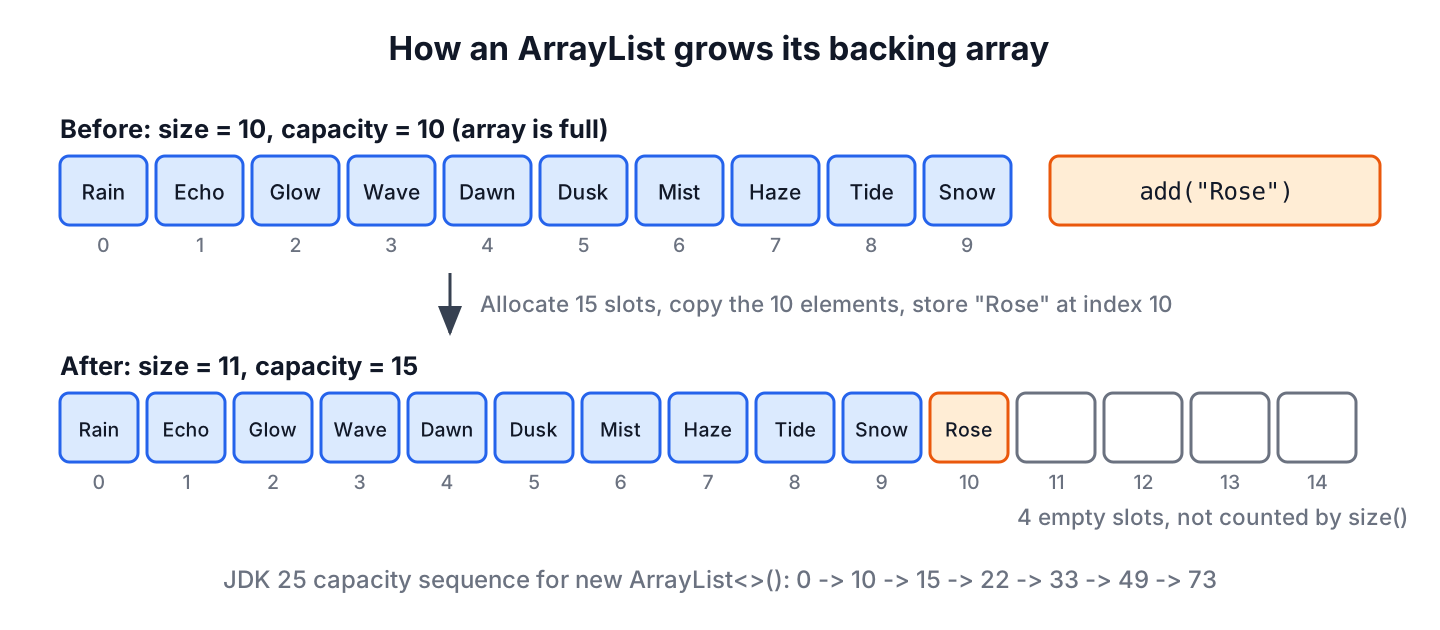
On JDK 25, a list created with new ArrayList<>() allocates 10 slots on the first add() and grows by half each time it fills up, so the capacity goes 10, 15, 22, 33 and so on. The growth formula is an implementation detail. The ArrayList API only promises that adding an element has constant amortized cost, which means that adding n elements takes time proportional to n even with the occasional copy.
Most of the behavior of an ArrayList follows from its backing array.
- Elements keep their insertion order, and each one has an index from 0 to size() – 1.
- Reading or replacing the element at an index takes the same time no matter how long the list is.
- Duplicates and null elements are allowed.
- The list grows on its own, but it never shrinks its array unless we call trimToSize().
- It is not synchronized, and its iterators are fail-fast, i.e. they throw ConcurrentModificationException when the list changes structurally during iteration.
The class extends AbstractList and implements the List interface, which extends SequencedCollection since Java 21, plus the marker interfaces RandomAccess, Cloneable and Serializable. It is part of the Java Collections Framework, so it works with every API that accepts a Collection or a List.
For example, a music app loads a user’s playlist of 300 tracks from the database into an ArrayList. When the user taps track 120, get(119) returns it without walking the list, and new tracks go to the end with add(), which is the cheapest place to insert.
2. Creating an ArrayList
We declare the variable as List and create an ArrayList, so the rest of the code depends only on the interface. The constructors either start empty, reserve room for a known number of elements, or copy another collection.
List<String> empty = new ArrayList<>();                         // [], 10 slots allocated on the first add
List<String> sized = new ArrayList<>(500);                      // [], room for 500 elements before any resize
List<String> fromSet = new ArrayList<>(Set.of("Rain"));         // [Rain]
List<String> filled = new ArrayList<>(List.of("Intro", "Rain")); // [Intro, Rain]
var inferred = new ArrayList<String>();                         // [], type is ArrayList<String>
Wrapping List.of() in the constructor is the shortest way to get an editable list with initial values, because List.of() alone returns an unmodifiable list. The article on list initialization in one line compares every option, and Arrays.asList() vs new ArrayList() explains why Arrays.asList() returns a fixed-size list. When the data starts in an array, we follow the steps for converting an array to a mutable or unmodifiable list.
A stream can also collect into an ArrayList when we need a mutable result.
ArrayList<String> upper = Stream.of("rain", "echo").map(String::toUpperCase).collect(Collectors.toCollection(ArrayList::new)); // [RAIN, ECHO]2.1. Storing Records and Custom Objects
Methods such as contains(), indexOf() and remove(Object) compare elements with equals(). A class that does not override equals() and hashCode() compares references, so contains(new Song(…)) returns false even when a song with the same fields is in the list. A record generates equals() from its components, which makes it a good element type.
record Song(String title, int seconds) {}List<Song> playlist = new ArrayList<>(List.of(new Song("Rain", 215), new Song("Echo", 187)));
boolean found = playlist.contains(new Song("Rain", 215)); // true, records compare fields
int where = playlist.indexOf(new Song("Echo", 187)); // 13. Adding, Replacing and Removing Elements
The write methods either append, insert at an index, replace or remove. Appending is cheap, while inserting or removing near the front shifts every later element by one slot.
List<String> queue = new ArrayList<>(List.of("Intro", "Rain"));
boolean appended = queue.add("Echo");                            // true, [Intro, Rain, Echo]
boolean appendedAll = queue.addAll(List.of("Glow", "Drift"));    // true, [Intro, Rain, Echo, Glow, Drift]
queue.add(0, "Opener");                                          // [Opener, Intro, Rain, Echo, Glow, Drift]
String replaced = queue.set(1, "Prelude");                       // "Intro"
String removedAt = queue.remove(0);                              // "Opener"
boolean removedValue = queue.remove("Glow");                     // true
boolean removedShort = queue.removeIf(s -> s.length() < 5);      // true, removes Rain and Echo
String state = queue.toString();                                 // "[Prelude, Drift]"
Each operation has its own article with more variants, such as adding multiple elements and inserting at an index, replacing elements with set() and replaceAll() and removing elements by index, value or condition. Two methods also have dedicated guides, removeIf() with a predicate and forEach() with lambdas.
On a List<Integer>, remove(1) removes the element at index 1, not the value 1. The compiler picks remove(int index) for an int argument, so we box the value to call remove(Object).
List<Integer> ratings = new ArrayList<>(List.of(5, 3, 1));
Integer atIndex = ratings.remove(1);                             // 3, removed index 1
boolean byValue = ratings.remove(Integer.valueOf(1));            // true, removed the value 1
String left = ratings.toString();                                // "[5]"
To empty a list, we call clear(), which keeps the same list object, so every other reference to it sees an empty list. The guide on checking if an ArrayList is empty covers isEmpty() and compares clear() with removeAll() and creating a new list.
4. Reading Elements with get(), getFirst() and getLast()
Reading by index is the main reason to choose an ArrayList. The element at index i sits in slot i of the backing array, so get(i) does not depend on the list length.
4.1. ArrayList get() Method
The method E get(int index) returns the element at the given position. A valid index is from 0 inclusive to size() exclusive, so a list of 4 elements accepts 0 to 3. Any other index throws IndexOutOfBoundsException with a message such as “Index 4 out of bounds for length 4”.
List<String> tracks = new ArrayList<>(List.of("Intro", "Rain", "Echo", "Glow"));
String opener = tracks.get(0);                                   // "Intro"
String closer = tracks.get(tracks.size() - 1);                   // "Glow"
String missing = tracks.get(4);                                  // IndexOutOfBoundsException
When the index comes from user input, such as a track number in a URL, we check the range before the call and return an empty Optional instead of letting the exception reach the user.
static Optional<String> trackAt(List<String> list, int index) {
    if (index < 0 || index >= list.size()) {
        return Optional.empty();
    }
    return Optional.ofNullable(list.get(index));
}
List<String> tracks = List.of("Intro", "Rain", "Echo", "Glow");
Optional<String> third = trackAt(tracks, 2); // Optional[Echo]
Optional<String> tenth = trackAt(tracks, 9); // Optional.empty4.2. First and Last Elements in Java 21
Java 21 added getFirst(), getLast(), removeFirst(), removeLast(), addFirst(), addLast() and reversed() to every List through the sequenced collections feature (JEP 431). On an empty list, getFirst() and getLast() throw NoSuchElementException instead of returning null.
List<String> tracks = new ArrayList<>(List.of("Intro", "Rain", "Echo", "Glow"));
String head = tracks.getFirst();                                 // "Intro"
String tail = tracks.getLast();                                  // "Glow"
List<String> backwards = tracks.reversed();                      // [Glow, Echo, Rain, Intro], a view
String none = new ArrayList<String>().getFirst();                // NoSuchElementException
4.3. Searching with contains(), indexOf() and lastIndexOf()
The search methods walk the list from one end and compare with equals(), so they take time proportional to the size. The method indexOf() returns the first match, lastIndexOf() returns the last one, and both return -1 when nothing matches.
List<Integer> plays = new ArrayList<>(List.of(1, 2, 2, 3, 4, 4, 4, 5));
boolean hasTwo = plays.contains(2);                              // true
int firstFour = plays.indexOf(4);                                // 4
int lastFour = plays.lastIndexOf(4);                             // 6
int noEight = plays.indexOf(8);                                  // -1
int sortedHit = Collections.binarySearch(plays, 5);              // 7, list must be sorted
For large sorted lists, Collections.binarySearch() finds an element in logarithmic time, but it returns any one of several equal elements. The article on checking if an element exists in an ArrayList adds stream and Set-based lookups.
5. ArrayList size() vs Length and Capacity
An ArrayList has no length field or length() method. The method size() returns the number of elements, including null elements, while the length of the backing array is the capacity, which the class does not expose. Arrays, strings and lists each use a different name for their length.
| Type | How to get the number of elements | Example |
|---|---|---|
| Array | length field | int n = ids.length; |
| String | length() method | int n = title.length(); |
| ArrayList or any Collection | size() method | int n = songs.size(); |
The size changes with structural changes only. Replacing an element keeps it, and clear() resets it to 0 without shrinking the backing array.
List<Integer> counts = new ArrayList<>();
int start = counts.size();                                       // 0
counts.add(10);
counts.add(20);
int afterAdds = counts.size();                                   // 2
counts.set(0, 15);
int afterSet = counts.size();                                    // 2, set() does not change the size
counts.remove(Integer.valueOf(20));
int afterRemove = counts.size();                                 // 1
counts.clear();
boolean nothing = counts.isEmpty();                              // true
5.1. Reserving Room with ensureCapacity()
The method ensureCapacity(int minCapacity) grows the backing array once, so that it can hold at least minCapacity elements without further copies. It is declared on ArrayList, not on List, so the variable needs the ArrayList type.
For example, a reporting job reads 50,000 rows from a CSV file into a list. Starting from the default capacity, the list goes through 22 grow-and-copy steps before it reaches 50,000 slots. When we know the row count before reading, one call reserves the space up front.
ArrayList<String> rows = new ArrayList<>();
rows.ensureCapacity(50_000);                                     // one allocation for 50,000 slots
int stillEmpty = rows.size();                                    // 0, capacity is not size
When the count is known at construction time, new ArrayList<>(50_000) does the same with less code. The method ensureCapacity() fits when the list already exists, for example before appending a second large batch. For a few hundred elements, the default growth is fast enough, and the extra call adds nothing.
5.2. Releasing Unused Slots with trimToSize()
The method trimToSize() replaces the backing array with one whose length equals the current size. We call it on a list that has reached its final size and stays in memory for a long time, such as a lookup table cached at startup.
ArrayList<String> genres = new ArrayList<>(1_000);
genres.addAll(List.of("rock", "jazz", "pop"));
genres.trimToSize();                                             // capacity 1000 reduced to 3
int genreCount = genres.size();                                  // 3
The next add() after a trim has to grow the array again, so trimming a list that keeps changing costs more than it saves.
6. Getting a Range with subList()
The method subList(fromIndex, toIndex) returns a view of the elements from fromIndex inclusive to toIndex exclusive. The view does not copy anything, so changes through the view appear in the original list and the other way round.
List<String> setlist = new ArrayList<>(List.of("Intro", "Rain", "Echo", "Glow", "Drift", "Storm"));
List<String> middle = setlist.subList(2, 4);                     // [Echo, Glow]
List<String> fromTwo = setlist.subList(2, setlist.size());       // [Echo, Glow, Drift, Storm]
String swapped = middle.set(0, "Wave");                          // "Echo", setlist is [Intro, Rain, Wave, Glow, Drift, Storm]
setlist.subList(0, 2).clear();                                   // removes Intro and Rain
String trimmed = setlist.toString();                             // "[Wave, Glow, Drift, Storm]"
Passing size() as the second argument gives everything from an index to the end, and subList(from, to).clear() removes a whole range in one call. Both indexes are checked, so a negative fromIndex, a toIndex larger than the size or fromIndex > toIndex throws an exception.
A view becomes invalid when the original list changes size outside the view. The next call on the view throws ConcurrentModificationException, so we copy the range whenever we keep it longer than a few lines.
List<String> setlist = new ArrayList<>(List.of("Wave", "Glow", "Drift", "Storm"));
List<String> firstTwo = setlist.subList(0, 2);
setlist.add("Sunrise");
int broken = firstTwo.size();                                    // ConcurrentModificationException
List<String> setlist = new ArrayList<>(List.of("Wave", "Glow", "Drift", "Storm"));
List<String> page = List.copyOf(setlist.subList(0, 2)); // [Wave, Glow], independent copy
setlist.add("Sunrise");
String kept = page.toString(); // "[Wave, Glow]"A REST endpoint that returns page 3 of a playlist with 20 tracks per page computes from = 40 and to = Math.min(60, list.size()), and returns List.copyOf(list.subList(from, to)). The Math.min() call keeps the last page from throwing when it has fewer than 20 tracks.
7. Iterating Over an ArrayList
The enhanced for loop is the clearest way to read every element, and forEach() does the same with a lambda. Both are fail-fast, so they throw ConcurrentModificationException when the list changes size during the loop.
List<String> lineup = List.of("Intro", "Rain", "Echo");
StringBuilder line = new StringBuilder();
for (String song : lineup) {
    line.append(song).append(' ');
}
String printed = line.toString().strip();                        // "Intro Rain Echo"
Removing elements inside the enhanced for loop changes the list behind the iterator’s back, and the next step of the loop throws ConcurrentModificationException.
static void removeWhileLooping(List<String> list, String target) {
    for (String song : list) {
        if (song.equals(target)) {
            list.remove(song);
        }
    }
}
List<String> mixes = new ArrayList<>(List.of("Rain", "Echo", "Glow"));
removeWhileLooping(mixes, "Rain"); // ConcurrentModificationException
boolean gone = new ArrayList<>(List.of("Rain", "Echo")).removeIf(s -> s.equals("Rain")); // trueThe safe options are removeIf() or the iterator’s own remove() method. A ListIterator also walks backwards and can replace or insert elements during the loop, and the overview of different ways to iterate an ArrayList compares all loop styles.
List<String> titles = new ArrayList<>(List.of("rain", "echo"));
ListIterator<String> it = titles.listIterator();
while (it.hasNext()) {
    it.set(it.next().toUpperCase());
}
String edited = titles.toString();                               // "[RAIN, ECHO]"
8. Sorting and Processing with Streams
The method sort(Comparator) sorts the list in place, and the factory methods on Comparator build the order from a field without writing a comparator class. Passing null sorts by natural order, which requires elements that implement Comparable.
List<Song> album = new ArrayList<>(List.of(new Song("Rain", 215), new Song("Echo", 187), new Song("Glow", 240)));
album.sort(Comparator.comparing(Song::seconds));
String shortest = album.getFirst().title();                      // "Echo"
album.sort(Comparator.comparing(Song::title).reversed());
String lastByName = album.getFirst().title();                    // "Rain"
The tutorial on sorting an ArrayList in ascending and descending order covers natural order, multiple fields and null handling, and Collections.sort() is the older static form of the same operation.
For filtering and mapping, a stream produces a new list and leaves the source unchanged. Stream.toList() (Java 16) returns an unmodifiable list, so we collect into an ArrayList when the caller needs to edit the result.
List<Song> album = List.of(new Song("Rain", 215), new Song("Echo", 187), new Song("Glow", 240));
List<String> longOnes = album.stream().filter(s -> s.seconds() > 200).map(Song::title).toList();   // [Rain, Glow]
ArrayList<String> editable = album.stream().map(Song::title).collect(Collectors.toCollection(ArrayList::new));   // [Rain, Echo, Glow]
boolean changed = longOnes.add("Wave");                          // UnsupportedOperationException
9. Common ArrayList Tasks
Most day-to-day list work combines the methods above in small recipes. Each recipe has its own article with edge cases and alternatives.
| Task | Typical code | Article |
|---|---|---|
| Compare two lists | list1.equals(list2) | How to compare two lists |
| Assert equal lists ignoring order | assertThat(actual).containsExactlyInAnyOrderElementsOf(expected) | Assert two lists ignoring order |
| Merge two lists | merged.addAll(other) | Merge two ArrayLists |
| Swap two elements | Collections.swap(list, i, j) | Swap two elements |
| Flatten a list of lists | nested.stream().flatMap(List::stream).toList() | Flatten a nested list |
| Remove duplicates | new ArrayList<>(new LinkedHashSet<>(list)) | Remove duplicates from a list |
| Copy or deep copy | new ArrayList<>(list) | ArrayList clone() and deep copy |
| Convert a Set to a List | new ArrayList<>(set) | Convert Set to List and back |
| Save a list to a file | ObjectOutputStream.writeObject(list) | Serialize and deserialize an ArrayList |
10. ArrayList and Thread Safety
An ArrayList is not thread-safe. When one thread adds elements while another reads or adds, the list can lose elements, hold a null where a value was written, or throw an exception, because two threads write the same size field and array slots without coordination.
We either wrap the list with Collections.synchronizedList() or use CopyOnWriteArrayList for lists that are read far more often than written. The article on synchronizing an ArrayList shows both, including why iteration needs an extra lock. The legacy Vector class synchronizes every method, and ArrayList vs Vector explains why new code avoids it.
11. Performance of ArrayList Operations
The cost of each operation follows from the backing array. Index access is constant, appending is constant on average, and anything that shifts or scans elements grows with the size n, as described in Big O notation.
| Operation | Time | Why |
|---|---|---|
| get(i), set(i, e) | O(1) | Direct array slot access. |
| add(e), addLast(e) | O(1) amortized | A resize copies n elements, but resizes are rare. |
| add(i, e), remove(i), addFirst(e) | O(n) | Elements after i shift by one slot. |
| removeLast() | O(1) | No shifting at the end. |
| contains(), indexOf(), remove(Object) | O(n) | Linear scan with equals(). |
| Collections.binarySearch() on a sorted list | O(log n) | Halves the range each step. |
Inserting at the front of a long list is where ArrayList is weakest. Even so, it beats LinkedList in most real workloads because an array is compact in memory, which the comparison of LinkedList vs ArrayList explains in detail.
12. Java ArrayList FAQs
Developers who use ArrayList every day often ask about arrays, primitives, capacity and sorting.
12.1. What Is the Difference Between an Array and an ArrayList?
An array has a fixed length set at creation and can hold primitives, whereas an ArrayList grows as needed and holds only objects. Arrays use the length field and the [] syntax, while lists use size(), get() and the rest of the List API. The full comparison is in array vs ArrayList.
12.2. Can an ArrayList Store Primitive Values Such as int?
No. Generics need reference types, so we use ArrayList<Integer>, and autoboxing converts between int and Integer on add() and get(). For millions of numbers, an int[] or IntStream uses much less memory.
12.3. What Is the Default Capacity of an ArrayList?
The no-argument constructor creates a list with a capacity of ten. On JDK 25, the 10-slot array is allocated at the first add(), so an empty list that never gets elements uses almost no memory.
12.4. Does ArrayList Allow null and Duplicate Elements?
Yes, both. A list can hold null at several positions and the same value many times. When duplicates are not wanted, we use a LinkedHashSet to keep insertion order without repeats.
12.5. How Do We Convert an ArrayList to an Array?
We call toArray() with an array generator, which returns an array of the right type and length.
List<String> picks = new ArrayList<>(List.of("Rain", "Echo"));
String[] asArray = picks.toArray(String[]::new);                 // [Rain, Echo]
12.6. Is an ArrayList Sorted?
No. An ArrayList keeps insertion order and sorts only when we call sort(). For a collection that stays sorted while we add elements, a TreeSet or a PriorityQueue fits better.
13. Conclusion
An ArrayList is a list on top of an array that grows by copying into a larger array. That design makes get(), set() and appending fast, and makes inserting or removing near the front slower as the list grows.
For daily work, we create lists from List.of() or a stream, read with get() or the Java 21 getFirst() and getLast(), and use size() for the element count. We reserve room with the constructor or ensureCapacity() for large imports, and copy subList() views before keeping them. For concurrent access, we switch to a synchronized wrapper or CopyOnWriteArrayList.
14. References
- ArrayList Javadoc (Java 25)
- List Javadoc (Java 25)
- JEP 431, Sequenced Collections
- Stream.toList() Javadoc
Happy Learning !!

arrayList.add(2, “temp”); //[a, b, temp, d, c] : pls correct this it prints //[a, b, temp, c, d]
Thanks Deepika. You are right.