
A nested map in Java is a Map whose values are other maps, such as Map<String, Map<String, Integer>>, so each outer key leads to its own inner map of keys and values. We read a value with two lookups, one in the outer map and one in the inner map.
We use nested maps to group data by two keys, for example the marks of each student per subject, translations per language and message key, or settings per environment, and to hold JSON objects that contain other objects.
The following example builds a nested map of marks with computeIfAbsent() and reads it back safely.
Map<String, Map<String, Integer>> marks = new TreeMap<>();
marks.computeIfAbsent("lokesh", k -> new TreeMap<>()).put("math", 90);
marks.computeIfAbsent("lokesh", k -> new TreeMap<>()).put("art", 75);
marks.computeIfAbsent("alex", k -> new TreeMap<>()).put("math", 82);

String all = marks.toString();                     // "{alex={math=82}, lokesh={art=75, math=90}}"
int math = marks.get("lokesh").get("math");        // 90
int subjects = marks.get("lokesh").size();         // 2
int music = marks.getOrDefault("bob", Map.of()).getOrDefault("music", 0);   // 0
Notice that computeIfAbsent() creates the inner map for a new student on the first call and returns the existing one after that, and the last line reads a missing student without a NullPointerException. We go through creating nested maps with put() and streams, adding, removing and iterating, copying them safely, flattening them, and the simpler designs that often replace them.
1. What Is a Nested Map?
A HashMap maps keys to values of any type, and a map is an object too, so a value can be another map. The outer map and every inner map are independent objects, each with its own entries, so different students can have different subjects.
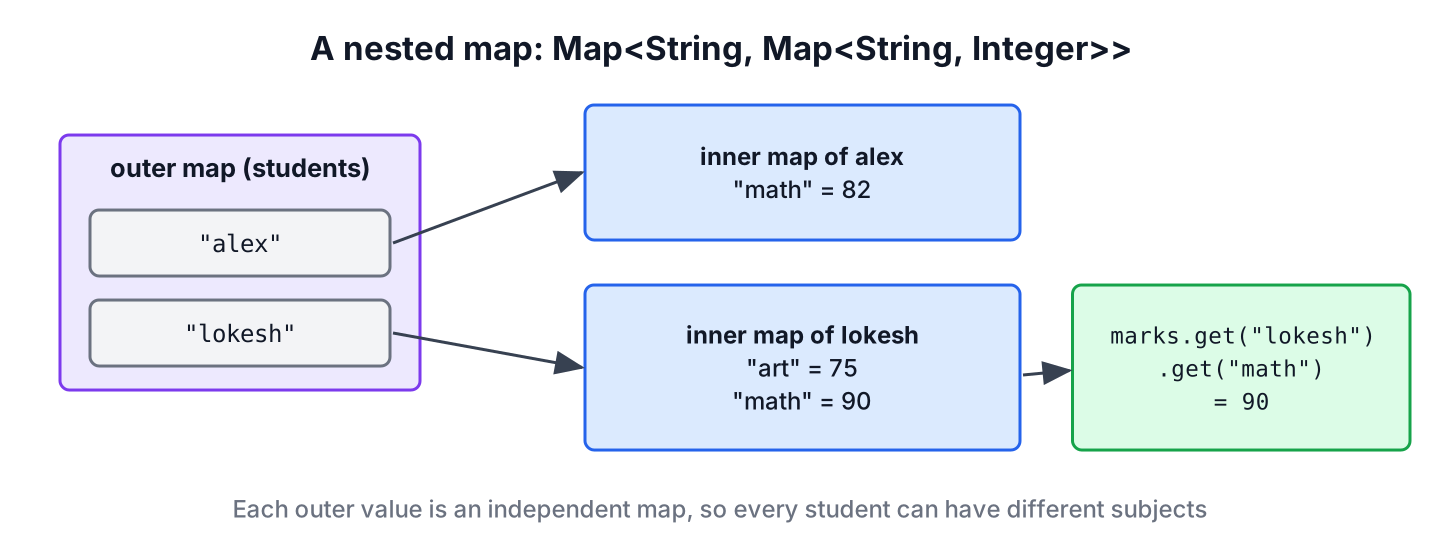
We declare the inner type with the Map interface, as in Map<String, Map<String, Integer>>, instead of HashMap<String, HashMap<String, Integer>>. With the interface type, each inner map can be a HashMap, a TreeMap or an unmodifiable map from Map.of(), and the declaration stays the same.
The examples in this article use TreeMap so that the printed output is sorted and repeatable. A HashMap works the same way, but its iteration order is not defined.
2. When to Use a Nested Map?
A nested map fits data that we look up by two keys, where the set of inner keys differs per outer key and is not known at compile time. For example, a web app with translations stores the texts by language first and by message key second. The German map can contain keys that the French map does not have yet, and the app adds a new language without a code change.
Map<String, Map<String, String>> messages = Map.of(
        "en", Map.of("greeting", "Hello", "bye", "Goodbye"),
        "de", Map.of("greeting", "Hallo"));

String german = messages.get("de").get("greeting");                                // "Hallo"
String fallback = messages.get("de").getOrDefault("bye", messages.get("en").get("bye"));   // "Goodbye"
Nested maps get hard to read once they go deeper than two levels, and the compiler cannot check that an inner key such as “greeting” exists. When the inner keys are fixed fields, such as street and city of an address, a record is the better value type, as section 6 shows.
3. Working with Nested HashMap
Every operation on a nested map starts with the outer map. We get or create the inner map first, and after that we work on the inner map with the normal Map methods.
3.1. Creating Nested Map using Map.put()
The direct way is to build each inner map, fill it and put it into the outer map. For fixed data, Map.of() creates both levels in one expression, but the result is unmodifiable at both levels.
Map<String, Integer> lokeshMarks = new TreeMap<>();
lokeshMarks.put("math", 90);
lokeshMarks.put("art", 75);

Map<String, Map<String, Integer>> byPut = new TreeMap<>();
byPut.put("lokesh", lokeshMarks);
String created = byPut.toString();                 // "{lokesh={art=75, math=90}}"

Map<String, Map<String, Integer>> fixed = Map.of("alex", Map.of("math", 82));
int alexMath = fixed.get("alex").get("math");      // 82
3.2. Creating Nested Map using Streams
When the data comes as a flat list, such as rows from a database or a CSV file, the Collectors.groupingBy() collector builds the outer map, and a downstream Collectors.toMap() builds each inner map. The example uses a record for one row of marks.
record Mark(String student, String subject, int score) {}List<Mark> rows = List.of(
new Mark("lokesh", "math", 90),
new Mark("lokesh", "art", 75),
new Mark("alex", "math", 82),
new Mark("lokesh", "math", 95));
Map<String, Map<String, Integer>> fromRows = rows.stream()
.collect(Collectors.groupingBy(Mark::student, TreeMap::new,
Collectors.toMap(Mark::subject, Mark::score, Integer::max, TreeMap::new)));
String grouped = fromRows.toString(); // "{alex={math=82}, lokesh={art=75, math=95}}"The list has two math marks for lokesh. Without the merge function Integer::max, toMap() throws an IllegalStateException for the duplicate key, so we always decide which value wins. The supplier TreeMap::new picks the map type at both levels.
3.3. Adding Element to Nested Map
To add a value to a nested map, we call computeIfAbsent() on the outer map and put() on the inner map that it returns. The common mistake is outer.get(key).put(…), which throws a NullPointerException when the outer key does not exist yet.
Map<String, Map<String, Integer>> book = new TreeMap<>();
book.get("bob").put("math", 60);                   // NullPointerException, no inner map for bob
Map<String, Map<String, Integer>> gradebook = new TreeMap<>();
gradebook.computeIfAbsent("bob", k -> new TreeMap<>()).put("math", 60);
gradebook.computeIfAbsent("bob", k -> new TreeMap<>()).merge("math", 5, Integer::sum);
int bobMath = gradebook.get("bob").get("math"); // 65The merge() call on the inner map adds 5 points to the existing mark, and it creates the entry when the subject is new. This pair of calls is the pattern for counters by two keys, such as page views per user and per page.
3.4. Removing Element from Nested Map
Removing an inner key is a remove() call on the inner map. After the last inner key is gone, the outer map still holds an empty inner map, which shows up in reports and in size(). The method computeIfPresent() removes the inner key and drops the empty inner map in one step, because returning null from the function removes the outer entry.
Map<String, Map<String, Integer>> scores = new TreeMap<>();
scores.computeIfAbsent("alex", k -> new TreeMap<>()).put("math", 82);
scores.computeIfAbsent("lokesh", k -> new TreeMap<>()).put("art", 75);

scores.computeIfPresent("alex", (student, inner) -> {
    inner.remove("math");
    return inner.isEmpty() ? null : inner;
});
String left = scores.toString();                   // "{lokesh={art=75}}"
Map<String, Integer> removedAll = scores.remove("lokesh");   // {art=75}
3.5. Iterating over Nested HashMap
We iterate with two nested loops, one over the outer entries and one over each inner map. The forEach() method with a BiConsumer is the shortest form, and a stream with flatMap() works well when we compute a single result from all inner values.
Map<String, Map<String, Integer>> report = new TreeMap<>(Map.of(
        "alex", new TreeMap<>(Map.of("math", 82)),
        "lokesh", new TreeMap<>(Map.of("art", 75, "math", 90))));

List<String> lines = new ArrayList<>();
report.forEach((student, subjectMarks) ->
        subjectMarks.forEach((subject, score) -> lines.add(student + "." + subject + "=" + score)));
String printed = lines.toString();                 // "[alex.math=82, lokesh.art=75, lokesh.math=90]"

Map<String, Integer> bestPerStudent = new TreeMap<>();
for (Map.Entry<String, Map<String, Integer>> entry : report.entrySet()) {
    bestPerStudent.put(entry.getKey(), Collections.max(entry.getValue().values()));
}
String bests = bestPerStudent.toString();          // "{alex=82, lokesh=90}"

double average = report.values().stream()
        .flatMap(inner -> inner.values().stream())
        .mapToInt(Integer::intValue)
        .average().orElse(0);
double avg = average;                              // 82.33333333333333
3.6. Reading Values Safely
A chain of get() calls fails with a NullPointerException as soon as the outer key is missing. For typed nested maps, getOrDefault() with an empty map as the default keeps the chain safe. For maps parsed from JSON, typed as Map<String, Object>, the pattern matching form of instanceof from Java 16 checks the type of each level before the cast.
Map<String, Map<String, Integer>> data = Map.of("alex", Map.of("math", 82));
int art = data.getOrDefault("alex", Map.of()).getOrDefault("art", 0);       // 0
Optional<Integer> bob = Optional.ofNullable(data.get("bob")).map(m -> m.get("math"));   // Optional.empty

Map<String, Object> payload = Map.of("user", Map.of("name", "lokesh", "age", 37));
String name = payload.get("user") instanceof Map<?, ?> user
        && user.get("name") instanceof String s ? s : "unknown";
String userName = name;                                                    // "lokesh"
The Jackson JSON to HashMap tutorial shows how to read a JSON document into such a Map<String, Object>.
4. Copying a Nested Map
The copy constructor new HashMap<>(outer) copies only the outer level. After the copy, both maps share the same inner map objects, so a change through the copy also changes the original. A deep copy creates a new inner map for every entry.
Map<String, Map<String, Integer>> original = new TreeMap<>();
original.put("alex", new TreeMap<>(Map.of("math", 82)));

Map<String, Map<String, Integer>> shallow = new TreeMap<>(original);
shallow.get("alex").put("math", 0);
int changed = original.get("alex").get("math");    // 0, the inner map is shared

Map<String, Map<String, Integer>> deep = new TreeMap<>();
original.forEach((k, v) -> deep.put(k, new TreeMap<>(v)));
deep.get("alex").put("math", 99);
int unchanged = original.get("alex").get("math");  // 0, deep copy has its own inner map
To hand a nested map to other code without letting it change anything, we copy both levels with Map.copyOf(). Wrapping only the outer map with Collections.unmodifiableMap() leaves the inner maps writable. The shallow vs deep copy of a HashMap article covers more copy techniques.
Map<String, Map<String, Integer>> source = Map.of("alex", new TreeMap<>(Map.of("math", 82)));
Map<String, Map<String, Integer>> readOnly = source.entrySet().stream()
        .collect(Collectors.toUnmodifiableMap(Map.Entry::getKey, e -> Map.copyOf(e.getValue())));
Integer blocked = readOnly.get("alex").put("math", 1);      // UnsupportedOperationException
5. Flattening a Nested Map
Some tools want flat key-value pairs, for example a properties file, a metrics system or a CSV export. We flatten a nested map by joining the outer and inner keys into one key, such as lokesh.math.
Map<String, Map<String, Integer>> nested = new TreeMap<>(Map.of(
        "alex", Map.of("math", 82),
        "lokesh", Map.of("math", 90)));

Map<String, Integer> flat = nested.entrySet().stream()
        .flatMap(outer -> outer.getValue().entrySet().stream()
                .map(inner -> Map.entry(outer.getKey() + "." + inner.getKey(), inner.getValue())))
        .collect(Collectors.toMap(Map.Entry::getKey, Map.Entry::getValue, (a, b) -> a, TreeMap::new));

String flatText = flat.toString();                 // "{alex.math=82, lokesh.math=90}"
6. Simpler Alternatives to a Nested Map
A nested map is often the first design that comes to mind, but three other designs are shorter and safer in many cases. Each one removes the empty-inner-map and null checks that nested maps need.
- A map with a record key, such as Map<StudentSubject, Integer>, needs one lookup and no inner map. It suits data that we always read with both keys together.
- A map with a record value, such as Map<String, Address>, suits inner keys that are fixed fields. The compiler checks the field names, and each field has its own type.
- The Guava Table type models a two-key map with row and column views, which helps when we also read by the inner key, such as all students for one subject.
- A plain nested map remains the right choice when the inner keys vary per outer key and come from data, as in the translation example.
record StudentSubject(String student, String subject) {}Map<StudentSubject, Integer> byPair = new HashMap<>();
byPair.put(new StudentSubject("lokesh", "math"), 90);
int pairMath = byPair.get(new StudentSubject("lokesh", "math")); // 90
int pairArt = byPair.getOrDefault(new StudentSubject("lokesh", "art"), 0); // 0
Table<String, String, Integer> table = TreeBasedTable.create();
table.put("lokesh", "math", 90);
table.put("alex", "math", 82);
Map<String, Integer> mathColumn = table.column("math"); // {alex=82, lokesh=90}The record generates equals() and hashCode() from both fields, so it makes a correct composite key with one line of code.
7. Nested Map FAQs
Grouped data in nested maps leads to the same handful of questions in code reviews.
7.1. How do we add a key to an inner map that may not exist yet?
We call outer.computeIfAbsent(key, k -> new HashMap<>()).put(innerKey, value). The call creates and stores the inner map on first use, as in section 3.3, and it is shorter than checking containsKey() first.
7.2. How do we sort a nested map by its keys?
We use TreeMap at both levels, either by creating the maps as TreeMap or by passing TreeMap::new as the map supplier to groupingBy() and toMap(). A LinkedHashMap keeps the insertion order instead.
7.3. Is a nested map thread-safe?
Only if both levels are. A ConcurrentHashMap as the outer map with ConcurrentHashMap inner maps, created through computeIfAbsent(), is safe for concurrent reads and writes. A concurrent outer map with plain HashMap inner maps is not.
7.4. Is a nested map bad practice?
No, but it is overused. Two levels with data-driven keys are fine. For fixed fields, a record reads better, and for data that we always read by both keys, a record key gives one lookup and no empty inner maps.
7.5. How do we convert a nested map to JSON?
A JSON library such as Jackson writes a Map<String, Map<String, Integer>> as nested JSON objects without extra configuration, because each map becomes one JSON object.
8. Conclusion
A nested map stores a map as the value of another map, which groups data by two keys. We create the inner maps on demand with computeIfAbsent(), read with getOrDefault() to avoid NullPointerException, remove empty inner maps with computeIfPresent() and iterate with two forEach() calls or a flatMap() stream.
Streams build nested maps from flat rows with groupingBy() and toMap(), as long as we pass a merge function for duplicates. Copies need care, because a plain copy shares the inner maps. When the inner keys are fixed fields or always read together with the outer key, a record or a record key is the simpler design. Any map type from Java Collections works at either level.
9. References
Happy Learning !!
