
Elasticsearch is a search engine that stores JSON documents and finds them by words, ranges and exact values in milliseconds. Spring Boot Elasticsearch support connects an application to an Elasticsearch server through Spring Data Elasticsearch and the official Java API client.
We use Elasticsearch next to the main database when users search free text and filter the results at the same time. For example, a buyer on a used-car marketplace types “leather seats” and narrows the list to one city and a price range.
The following example maps a car listing with @Document in a Spring Boot 4.1 app and searches the listings with a repository and with ElasticsearchOperations.
@Document(indexName = "car-listings")
public class CarListing {

  @Id
  private String id;

  @Field(type = FieldType.Keyword)
  private String make;

  @Field(type = FieldType.Integer)
  private int price;

  @Field(type = FieldType.Text, analyzer = "english")
  private String description;
}
repository.saveAll(CarData.listings()); // 8 documents indexed
List<CarListing> toyotas = repository.findByMake("Toyota"); // [Toyota Corolla 2019, Toyota Camry 2021]
List<CarListing> midPrice = repository.findByPriceBetween(15000, 22000); // [Toyota Corolla 2019, Toyota Camry 2021, Honda Accord 2020]
NativeQuery query = NativeQuery.builder()
.withQuery(q -> q.match(m -> m.field("description").query("hybrid electric")))
.build();
SearchHits<CarListing> hits = operations.search(query, CarListing.class); // [Tesla Model 3 2021, Honda Accord 2020, Toyota Camry 2021]Notice that findByMake() matches the exact keyword value, whereas the match query on the text field description finds listings that contain either of the two words.
In the next sections, we run Elasticsearch in Docker and connect Spring Boot to it with one starter and the spring.elasticsearch.uris property. After that, we search with an ElasticsearchRepository interface or with ElasticsearchOperations and NativeQuery, including full-text queries, aggregations, highlighting and pagination.
1. What Is Elasticsearch?
Elasticsearch is a distributed search and analytics engine built on Apache Lucene. We send it JSON documents over HTTP, and it builds an inverted index, which is a lookup table from each word to the documents that contain it. A relational database scans rows to answer LIKE ‘%leather%’. Elasticsearch looks up the word “leather” and gets the matching ids at once, ranked by relevance.
1.1. Elasticsearch Terms
Most Elasticsearch terms have a rough match in a relational database. The match is not exact, because an index has no joins and no transactions.
| Elasticsearch term | Meaning | Closest relational idea |
|---|---|---|
| Cluster | One or more servers that work together | Database server |
| Node | One running Elasticsearch process | Server instance |
| Index | A named collection of documents, for example car-listings | Table |
| Document | One JSON object with an _id | Row |
| Field | One property of a document, such as price | Column |
| Mapping | The type of each field (keyword, text, integer) | Table schema |
| Shard | A slice of an index; each shard is a Lucene index | Partition |
| Replica | A copy of a shard on another node | Read replica |
| Analyzer | Splits text into terms for the inverted index | No equivalent |
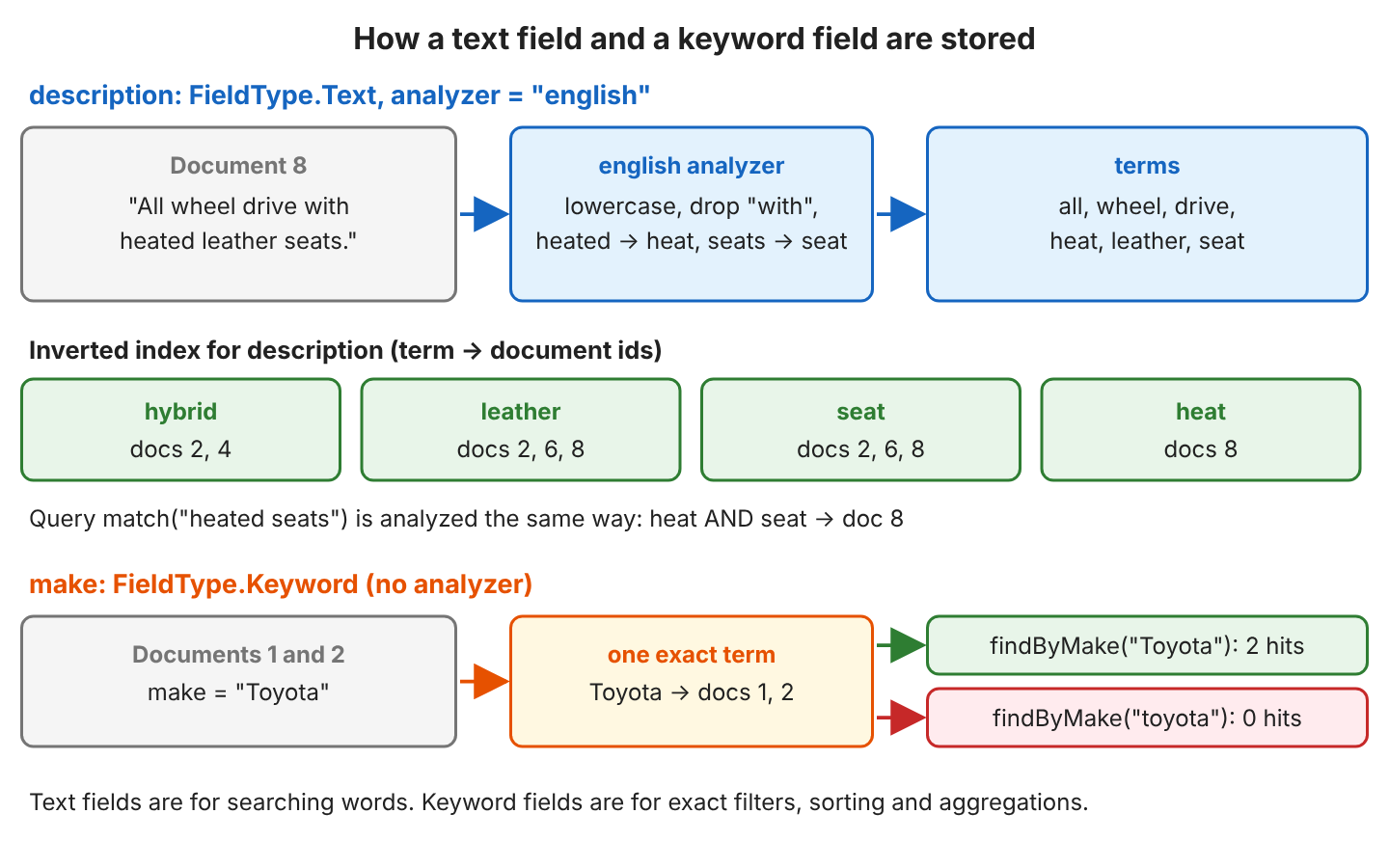
A text field and a keyword field store the same string in two different ways. Text fields are analyzed into words for full-text search; keyword fields keep the whole value as one exact term for filters, sorting and aggregations.
1.2. How Spring Boot Connects to Elasticsearch
A Spring Boot application never opens a socket to Elasticsearch itself. Our code calls Spring Data Elasticsearch, which converts objects to JSON and builds the queries. The Elasticsearch Java API client (package co.elastic.clients) sends them over HTTP to port 9200.
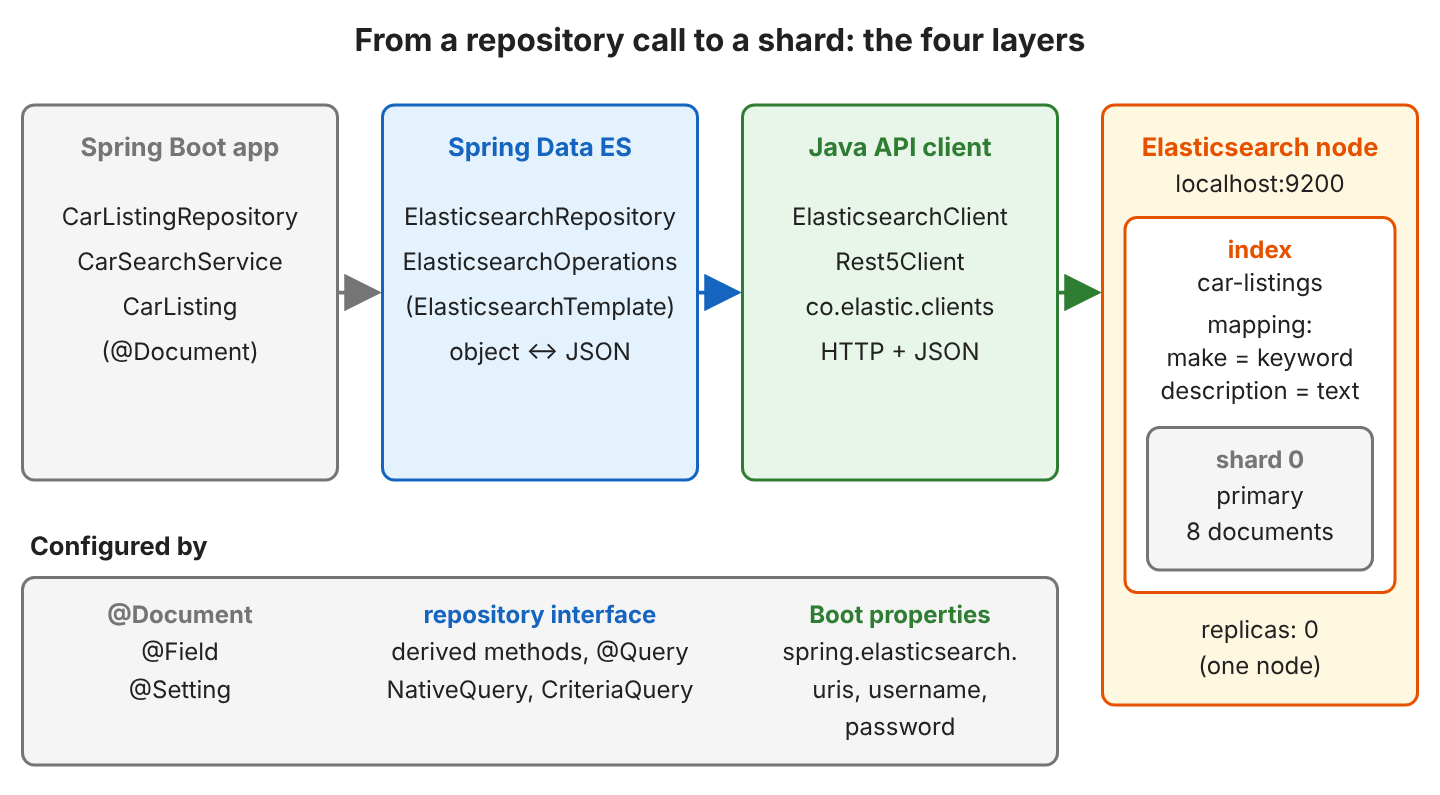
There are four ways to work with Elasticsearch from Spring Boot, from the highest level to the lowest.
| API | What we write | Use it for |
|---|---|---|
| ElasticsearchRepository | An interface with methods such as findByMake() | CRUD and fixed searches |
| ElasticsearchOperations | NativeQuery or CriteriaQuery objects | Dynamic searches, aggregations, highlighting, partial updates |
| ElasticsearchClient | Requests with the Java client builders | Elasticsearch APIs that Spring Data does not wrap |
| Rest5Client | Raw HTTP requests and JSON | Rare cases only |
2. Running Elasticsearch in Docker
The fastest way to get a local server is the official Docker image. Since Elasticsearch 8, security is on by default, so the server accepts only HTTPS with a self-signed certificate and requires a password. For local development we turn it off and run a single node with a small heap (ES_JAVA_OPTS; the image otherwise sizes the heap from the machine memory).
docker run -d --name es-cars -p 9200:9200 \
  -e "discovery.type=single-node" \
  -e "xpack.security.enabled=false" \
  -e "ES_JAVA_OPTS=-Xms512m -Xmx512m" \
  docker.elastic.co/elasticsearch/elasticsearch:9.4.5
Never disable security on a server that other people or applications can reach. With xpack.security.enabled=false, anyone who reaches port 9200 can read and delete every index. FAQ 8.4 connects to a secured server.
Once the node has started (half a minute to a minute on our small sandbox machine), it answers on plain HTTP.
curl http://localhost:9200{
"name" : "bdda01917959",
"cluster_name" : "docker-cluster",
"version" : {
"number" : "9.4.5",
"build_type" : "docker",
"lucene_version" : "10.4.0",
"minimum_wire_compatibility_version" : "8.19.0",
"minimum_index_compatibility_version" : "8.0.0"
},
"tagline" : "You Know, for Search"
}Without xpack.security.enabled=false, the same node rejects both plain HTTP and requests without a password.
$ curl http://localhost:9200
curl: (52) Empty reply from server

$ curl -k https://localhost:9200
{"error":{"root_cause":[{"type":"security_exception","reason":"missing authentication credentials for REST request [/]", ...}],"status":401}
3. Configuring Elasticsearch With Spring Boot
To connect Spring Boot to Elasticsearch, we need three things, namely the starter, the connection properties and a mapped document class. A custom client configuration is optional.
3.1. Maven Dependencies
The spring-boot-starter-data-elasticsearch starter brings in Spring Data Elasticsearch and the Java client, and Spring Boot manages both versions, so we don’t set them ourselves.
<parent>
  <groupId>org.springframework.boot</groupId>
  <artifactId>spring-boot-starter-parent</artifactId>
  <version>4.1.1</version>
</parent>

<dependencies>
  <dependency>
    <groupId>org.springframework.boot</groupId>
    <artifactId>spring-boot-starter-data-elasticsearch</artifactId>
  </dependency>
</dependencies>| Library | Version with Spring Boot 4.1.1 |
|---|---|
| Spring Data Elasticsearch | 6.1.1 |
| Elasticsearch Java client (co.elastic.clients:elasticsearch-java) | 9.4.5 |
| Low-level client (elasticsearch-rest5-client) | 9.4.5 |
| Elasticsearch server used in the tests | 9.4.5 (the tests also pass on 9.5.3) |
We keep the server on the same major version as the client, and the Spring Data Elasticsearch compatibility table lists 9.4.5 for the 6.1 line.
3.2. Connection Properties
Spring Boot auto-configures the Rest5Client, the ElasticsearchClient, the ElasticsearchTemplate and the repositories from the spring.elasticsearch.* properties.
spring.elasticsearch.uris=http://localhost:9200
spring.elasticsearch.connection-timeout=5s
spring.elasticsearch.socket-timeout=30s

# Security on: HTTPS and the elastic user
# spring.elasticsearch.uris=https://localhost:9200
# spring.elasticsearch.username=elastic
# spring.elasticsearch.password=changeme| Property | Default | Meaning |
|---|---|---|
| spring.elasticsearch.uris | http://localhost:9200 | Comma-separated node addresses |
| spring.elasticsearch.username, password | none | Basic authentication |
| spring.elasticsearch.api-key | none | API key instead of a password |
| spring.elasticsearch.connection-timeout | 1s | Time to open a connection |
| spring.elasticsearch.socket-timeout | 30s | Time to wait for a response |
| spring.elasticsearch.restclient.ssl.bundle | none | SSL bundle with the server’s CA certificate |
We raised the connection timeout to 5 seconds because the 1-second default failed with java.net.SocketTimeoutException: 1 SECONDS on our small, busy sandbox machine.
3.3. Mapping the Document Class
@Document names the index, @Setting sets the shard and replica count used when Spring Data creates the index, and each @Field sets the field type in the mapping.
@Document(indexName = "car-listings")
@Setting(shards = 1, replicas = 0)
public class CarListing {

  @Id
  private String id;

  @Field(type = FieldType.Keyword)
  private String make;

  @Field(type = FieldType.Keyword)
  private String model;

  @Field(type = FieldType.Integer)
  private int year;

  @Field(type = FieldType.Integer)
  private int price;

  @Field(type = FieldType.Integer)
  private int mileage;

  @Field(type = FieldType.Text, analyzer = "english")
  private String description;

  @Field(type = FieldType.Keyword)
  private String city;

  // constructors, getters and setters
}
The setting replicas = 0 matters on a single node because Elasticsearch places a replica only on a different node than its primary shard, so an index created with the default of one replica stays yellow on our one-node server. The english analyzer removes stop words such as “with” and reduces “seats” to “seat”.
When the application starts, the repository creates the index with these settings and this mapping if it does not exist yet. We read the mapping back with curl http://localhost:9200/car-listings/_mapping.
{
  "car-listings" : {
    "mappings" : {
      "properties" : {
        "_class" : { "type" : "keyword", "index" : false, "doc_values" : false },
        "city" : { "type" : "keyword" },
        "description" : { "type" : "text", "analyzer" : "english" },
        "make" : { "type" : "keyword" },
        "mileage" : { "type" : "integer" },
        "model" : { "type" : "keyword" },
        "price" : { "type" : "integer" },
        "year" : { "type" : "integer" }
      }
    }
  }
}
The _class field holds the Java class name, which Spring Data uses to read the document back. If we want to create the index ourselves, we turn off index creation with @Document(createIndex = false) and call operations.indexOps(CarListing.class).createWithMapping().
3.4. Customizing the Client With ElasticsearchConfiguration
The properties cover most setups. We extend ElasticsearchConfiguration only when the properties are not enough, for example to trust a self-signed certificate by its SHA-256 fingerprint. In that case, Spring Boot does not create its own client configuration.
@Configuration
public class ManualClientConfig extends ElasticsearchConfiguration {

  @Override
  public ClientConfiguration clientConfiguration() {
    return ClientConfiguration.builder()
        .connectedTo("localhost:9200")
        .usingSsl("720b5799f49478c399369b5f18c3236443f299d1127a31fc1b5755188871008d")
        .withBasicAuth("elastic", "changeme")
        .withConnectTimeout(Duration.ofSeconds(5))
        .withSocketTimeout(Duration.ofSeconds(30))
        .build();
  }
}
The fingerprint comes from the server’s CA certificate (openssl x509 -in http_ca.crt -noout -fingerprint -sha256, without the colons). This class replaces the old AbstractElasticsearchConfiguration, which used the removed RestHighLevelClient (see FAQ 8.6).
4. Indexing and Searching With ElasticsearchRepository
Our example is a used-car marketplace with eight listings, and the ids run from “1” to “8”.
| id | Make | Model | Year | Price | Mileage | City | Description |
|---|---|---|---|---|---|---|---|
| 1 | Toyota | Corolla | 2019 | 15000 | 42000 | Austin | One owner, full service history, new tires. |
| 2 | Toyota | Camry | 2021 | 22000 | 30000 | Denver | Hybrid with leather seats and a backup camera. |
| 3 | Honda | Civic | 2018 | 13500 | 61000 | Austin | Manual gearbox, new brakes, clean title. |
| 4 | Honda | Accord | 2020 | 19500 | 38000 | Seattle | Hybrid with low mileage and a sunroof. |
| 5 | Ford | Focus | 2017 | 9000 | 85000 | Denver | Small city car with a few scratches on the bumper. |
| 6 | Ford | Mustang | 2022 | 34000 | 12000 | Austin | V8 engine, leather seats, like new. |
| 7 | Tesla | Model 3 | 2021 | 27000 | 25000 | Seattle | Electric car with autopilot and a white interior. |
| 8 | BMW | X3 | 2019 | 26000 | 48000 | Denver | All wheel drive with heated leather seats. |
The complete project runs the queries against a real Elasticsearch 9.4.5 node in Testcontainers, and 25 JUnit tests check the results.
4.1. Indexing Documents
An ElasticsearchRepository works like a Spring Data JPA repository. We declare the interface, and Spring Data creates the implementation as a bean.
public interface CarListingRepository extends ElasticsearchRepository<CarListing, String> {
}
We index documents with save() and saveAll(), and when a document with the same id already exists, Elasticsearch replaces it.
repository.saveAll(CarData.listings());                  // 8 documents
long count = repository.count();                         // 8
Optional<CarListing> civic = repository.findById("3");   // Honda Civic 2018 (13500, Austin)
boolean exists = repository.existsById("9");             // false
Each document is stored as JSON in the _source field. curl http://localhost:9200/car-listings/_doc/7 returns it.
{
  "_class" : "com.howtodoinjava.elasticsearch.CarListing",
  "id" : "7",
  "make" : "Tesla",
  "model" : "Model 3",
  "year" : 2021,
  "price" : 27000,
  "mileage" : 25000,
  "description" : "Electric car with autopilot and a white interior.",
  "city" : "Seattle"
}
Repository methods refresh the index after every save and delete, so the next search sees the change, whereas ElasticsearchOperations does not (FAQ 8.1).
4.2. Derived Query Methods
A derived query method is a method whose name describes the query. Spring Data reads the name, for example findByMakeAndCity, and builds the Elasticsearch query from it.
List<CarListing> findByMake(String make);
List<CarListing> findByMakeAndCity(String make, String city);
List<CarListing> findByPriceBetween(int min, int max);
List<CarListing> findByYearGreaterThanEqualOrderByPriceAsc(int year);
List<CarListing> findByDescription(String text);
Page<CarListing> findByCity(String city, Pageable pageable);
long countByCity(String city);
The result depends on the field type. On keyword fields the value must be identical to the stored value, whereas on the text field description every word of the argument must appear.
| Call | Result |
|---|---|
| findByMake(“Toyota”) | Toyota Corolla 2019, Toyota Camry 2021 |
| findByMake(“toyota”) | (empty), because keywords are case-sensitive |
| findByMakeAndCity(“Honda”, “Austin”) | Honda Civic 2018 |
| findByPriceBetween(15000, 22000) | Toyota Corolla 2019, Toyota Camry 2021, Honda Accord 2020 (both ends included) |
| findByYearGreaterThanEqualOrderByPriceAsc(2021) | Toyota Camry 2021, Tesla Model 3 2021, Ford Mustang 2022 |
| findByDescription(“hybrid”) | Honda Accord 2020, Toyota Camry 2021 |
| findByDescription(“leather seat”) | Toyota Camry 2021, Ford Mustang 2022, BMW X3 2019 |
| findByDescription(“leather hybrid”) | Toyota Camry 2021 (both words required) |
| countByCity(“Denver”) | 3 |
The search “leather seat” finds “leather seats” because the english analyzer stems both to “seat”. For a derived method on a text field, Spring Data sends a query_string query with the AND operator.
A Pageable parameter adds pagination and sorting.
Page<CarListing> page = repository.findByCity("Austin", PageRequest.of(0, 2, Sort.by("price")));

List<CarListing> content = page.getContent();   // [Honda Civic 2018, Toyota Corolla 2019]
long total = page.getTotalElements();            // 3
int pages = page.getTotalPages();                // 2
4.3. Writing a Query With @Query
When a method name cannot express the query, we write the query in @Query using Elasticsearch’s Query DSL (the JSON query language of Elasticsearch), where ?0 and ?1 stand for the method parameters.
@Query("""
    {"bool": {
      "must":   [{"match": {"description": "?0"}}],
      "filter": [{"range": {"price": {"lte": ?1}}}]
    }}""")
List<CarListing> searchDescriptionUnderPrice(String text, int maxPrice);
List<CarListing> found = repository.searchDescriptionUnderPrice("leather", 30000); // [Toyota Camry 2021, BMW X3 2019]The Mustang also has leather seats, but its price of 34000 fails the range filter.
4.4. Updating and Deleting Documents
A repository has no partial update. We load the document, change it and save it again, and Elasticsearch replaces the whole document.
CarListing corolla = repository.findById("1").orElseThrow();
corolla.setPrice(14000);
repository.save(corolla);                                // whole document replaced

List<CarListing> cheap = repository.findByPriceBetween(13000, 14500);   // [Honda Civic 2018, Toyota Corolla 2019]
A repository deletes a document by id or by entity. A derived deleteBy method deletes every match and returns the number of deleted documents.
long deleteByYearLessThan(int year);                     // in the repository

repository.deleteById("5");                              // Ford Focus 2017 removed
boolean exists = repository.existsById("5");             // false
long deleted = repository.deleteByYearLessThan(2019);    // 1 (Honda Civic 2018)
long count = repository.count();                         // 6
5. Searching With ElasticsearchOperations
ElasticsearchOperations is the interface of Spring Data’s template; Spring Boot registers an ElasticsearchTemplate bean for it. It is the Elasticsearch counterpart of JdbcTemplate. We build query objects in code and get SearchHits back, which hold the entities, their scores, highlights and aggregations.
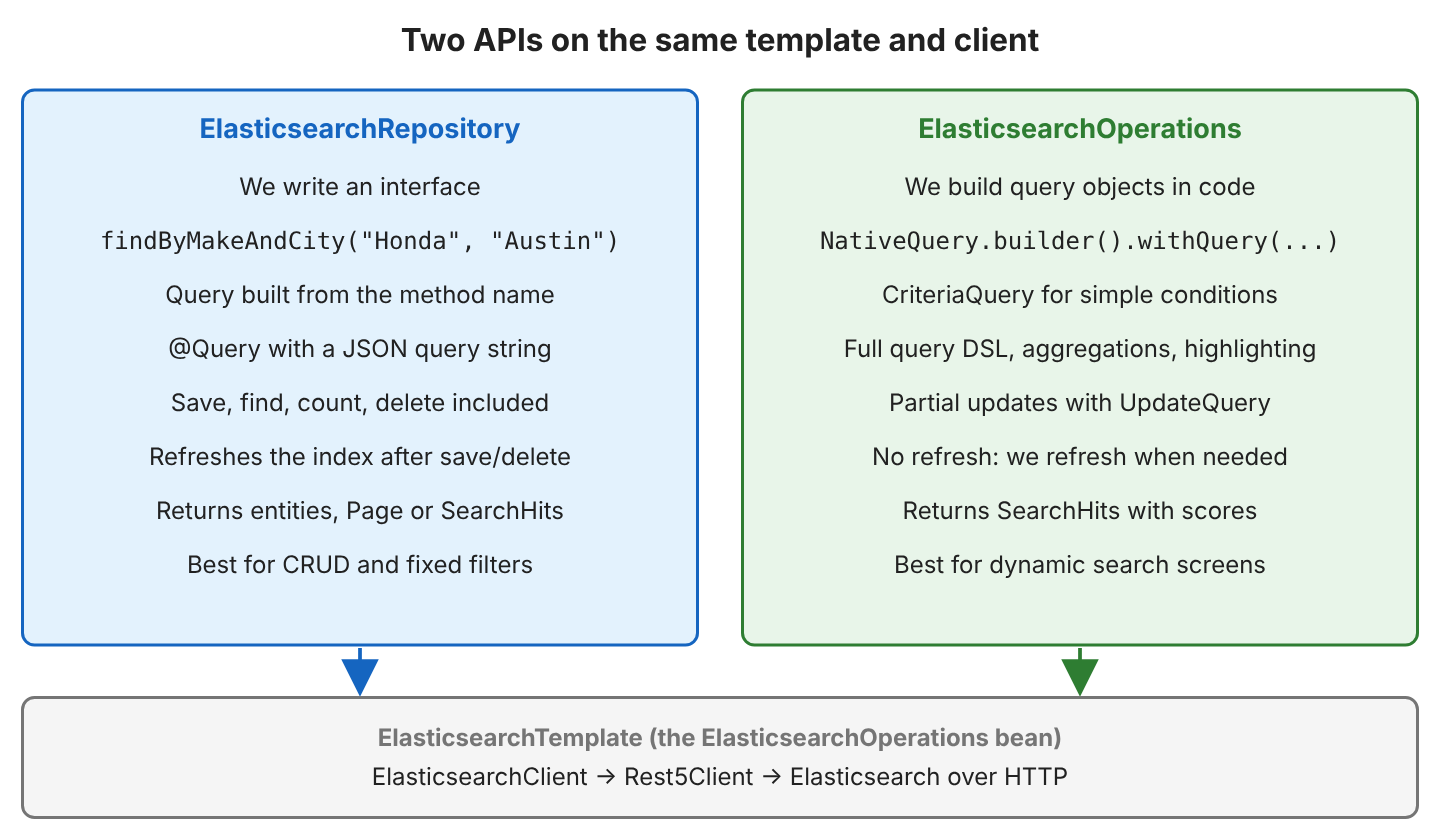
We inject it into a @Service like any other bean.
@Service
public class CarSearchService {

  private final ElasticsearchOperations operations;

  public CarSearchService(ElasticsearchOperations operations) {
    this.operations = operations;
  }
}
5.1. Saving and Reading by Id
The method save() indexes one object, and get() either returns the document with the given id or returns null.
operations.save(new CarListing("9", "Kia", "Rio", 2020, 11000, 50000, "Cheap to run, new battery.", "Austin"));
CarListing kia = operations.get("9", CarListing.class);        // Kia Rio 2020 (11000, Austin)
CarListing missing = operations.get("99", CarListing.class);   // null
5.2. Building a CriteriaQuery
CriteriaQuery is Spring Data’s own query API. It covers simple conditions without knowing the Elasticsearch JSON.
Criteria criteria = new Criteria("make").is("Toyota")
    .and("price").lessThan(20000);

SearchHits<CarListing> hits = operations.search(new CriteriaQuery(criteria), CarListing.class);
// [Toyota Corolla 2019]
5.3. Building a NativeQuery With a Bool Query
NativeQuery accepts any query from the Java client, built with lambdas that follow the JSON structure. A bool query combines several clauses of four kinds.
- The must clauses have to match and add to the relevance score.
- The filter clauses have to match but do not change the score, and Elasticsearch can cache them.
- The should clauses raise the score when they match.
- The must_not clauses exclude documents.
For example, a buyer in Denver searches for “leather” with a budget of 30000. The words go into a match clause under must, and the price and the city go into filter.
NativeQuery query = NativeQuery.builder()
    .withQuery(q -> q.bool(b -> b
        .must(m -> m.match(t -> t.field("description").query("leather")))
        .filter(f -> f.range(r -> r.number(n -> n.field("price").lte(30000.0))))
        .filter(f -> f.term(t -> t.field("city").value("Denver")))))
    .build();

SearchHits<CarListing> hits = operations.search(query, CarListing.class);
long total = hits.getTotalHits();        // 2
// [Toyota Camry 2021, BMW X3 2019]
Put exact conditions such as city and price range in filter, and only the words the user typed in must. That way, the score depends only on the text the user typed.
5.4. Updating Part of a Document
UpdateQuery changes only the fields we send and leaves the other fields as they are.
UpdateQuery update = UpdateQuery.builder("1")
    .withDocument(Document.create().append("price", 14000))
    .build();

UpdateResponse response = operations.update(update, operations.getIndexCoordinatesFor(CarListing.class));
UpdateResponse.Result result = response.getResult();         // UPDATED
CarListing corolla = operations.get("1", CarListing.class);   // Toyota Corolla 2019 (14000, Austin), description unchanged
5.5. Deleting by Id and by Query
The method delete() takes either an id or a DeleteQuery, which wraps any query and deletes every match.
String deletedId = operations.delete("5", CarListing.class);    // "5"

CriteriaQuery seattle = new CriteriaQuery(new Criteria("city").is("Seattle"));
ByQueryResponse response = operations.delete(DeleteQuery.builder(seattle).build(), CarListing.class);
long deleted = response.getDeleted();                           // 2
6. Advanced Search Examples
A real search screen needs more than a derived method can express, for example typo tolerance with fuzziness or a count of listings per make. NativeQuery accepts the full Query DSL, so we use it for every example in this part.
6.1. Full-Text Search and Relevance
A match query analyzes the search text with the field’s analyzer and finds documents that contain the terms. By default, match needs only one of the words (OR). The AND operator needs all of them, and fuzziness allows typos.
q.match(m -> m.field("description").query("hybrid electric"))
// [Tesla Model 3 2021, Honda Accord 2020, Toyota Camry 2021]

q.match(m -> m.field("description").query("heated seats").operator(Operator.And))
// [BMW X3 2019]

q.match(m -> m.field("description").query("hybrd").fuzziness("AUTO"))
// [Toyota Camry 2021, Honda Accord 2020]
The setting fuzziness(“AUTO”) allows one changed letter in words of 3 to 5 characters and two in longer words, so “hybrd” matches “hybrid”. Each hit also carries a score, and hits come sorted by it. All three cars below contain “leather” and “seat”, but the Camry description has 5 analyzed terms and the other two have 6. A match in a shorter field scores higher.
operations.search(query, CarListing.class)
    .forEach(hit -> hit.getScore());
// Toyota Camry 2021   2.0831194
// Ford Mustang 2022   1.934109
// BMW X3 2019         1.934109
6.2. Aggregations
An aggregation computes statistics over the matching documents, like GROUP BY in SQL. A terms aggregation counts documents per value of a keyword field, and when we need only the numbers, withMaxResults(0) skips the hits.
NativeQuery query = NativeQuery.builder()
    .withQuery(q -> q.matchAll(m -> m))
    .withAggregation("by_make", Aggregation.of(a -> a.terms(t -> t.field("make"))))
    .withMaxResults(0)
    .build();

SearchHits<CarListing> hits = operations.search(query, CarListing.class);
ElasticsearchAggregations aggregations = (ElasticsearchAggregations) hits.getAggregations();
Aggregate byMake = aggregations.get("by_make").aggregation().getAggregate();

for (StringTermsBucket bucket : byMake.sterms().buckets().array()) {
  String make = bucket.key().stringValue();   // "Ford", "Honda", "Toyota", "BMW", "Tesla"
  long count = bucket.docCount();             // 2, 2, 2, 1, 1
}
Elasticsearch sorts the buckets by count, then by key. We can also nest aggregations, so an avg inside a terms aggregation gives the average price per city.
.withAggregation("by_city", Aggregation.of(a -> a
    .terms(t -> t.field("city"))
    .aggregations("avg_price", sub -> sub.avg(avg -> avg.field("price")))))

double avgPrice = bucket.aggregations().get("avg_price").avg().value();
// {Austin=20833.333333333332, Denver=19000.0, Seattle=23250.0}
A text field cannot be aggregated, which is one more reason to map make and city as keyword.
6.3. Highlighting Matched Words
Highlighting returns the matching part of a field with the search words wrapped in em tags, so a results page can show why a listing matched. With ElasticsearchOperations, we add a HighlightQuery.
NativeQuery query = NativeQuery.builder()
    .withQuery(q -> q.match(m -> m.field("description").query("leather")))
    .withHighlightQuery(new HighlightQuery(
        new Highlight(List.of(new HighlightField("description"))), CarListing.class))
    .build();

operations.search(query, CarListing.class)
    .forEach(hit -> hit.getHighlightField("description"));
// Hybrid with <em>leather</em> seats and a backup camera.
// V8 engine, <em>leather</em> seats, like new.
// All wheel drive with heated <em>leather</em> seats.
In a repository, the @Highlight annotation does the same, and the method must return SearchHits to carry the fragments.
@Highlight(fields = @HighlightField(name = "description"))
SearchHits<CarListing> searchByDescription(String text);

long total = repository.searchByDescription("leather").getTotalHits();   // 3, same fragments as above
6.4. Pagination and Sorting
The method withPageable() takes a Pageable, which holds the page position and the sort order. SearchHitSupport.searchPageFor() wraps the hits in a SearchPage, a Spring Data Page with the total count.
Pageable pageable = PageRequest.of(1, 3, Sort.by("price").descending());
NativeQuery query = NativeQuery.builder()
    .withQuery(q -> q.matchAll(m -> m))
    .withPageable(pageable)
    .build();

SearchPage<CarListing> page = SearchHitSupport.searchPageFor(operations.search(query, CarListing.class), pageable);
List<CarListing> content = page.getContent();   // [Toyota Camry 2021, Honda Accord 2020, Toyota Corolla 2019]
long total = page.getTotalElements();            // 8
int pages = page.getTotalPages();                // 3
Page numbers start at 0, so page 1 is the second page. By default, from plus size may not exceed 10,000 hits (index.max_result_window), so for deeper result lists we use search_after or a point in time.
6.5. Reading a Large Result Set With Scroll
A normal search returns one page of hits, and one request cannot go past 10,000 hits (index.max_result_window). The scroll API reads a larger result set in chunks. Elasticsearch keeps a search context open between the requests, so each request returns the next chunk of the same result.
Spring Data Elasticsearch uses the scroll API in the method searchForStream() of ElasticsearchOperations, which returns a SearchHitsIterator. It also uses it in repository methods that return a Stream. The page size of the Pageable in the query sets the size of each chunk.
The following example reads all 8 listings in chunks of 3. The iterator holds the scroll context on the server, so we close it with try-with-resources.
Query query = NativeQuery.builder()
    .withQuery(q -> q.matchAll(m -> m))
    .withPageable(PageRequest.of(0, 3))
    .build();

List<CarListing> all = new ArrayList<>();
try (SearchHitsIterator<CarListing> iterator = operations.searchForStream(query, CarListing.class)) {
  while (iterator.hasNext()) {
    all.add(iterator.next().getContent());
  }
}
int total = all.size();   // 8
In a repository, a query method with the return type Stream works the same way. The method findBy() without a criterion returns all documents.
// in CarListingRepository
Stream<CarListing> findBy();

try (Stream<CarListing> stream = repository.findBy()) {
  long count = stream.count();   // 8
}
Scroll fits exports and batch jobs that read every hit once. It does not fit paging in a user interface, because the open context uses server resources until the stream is closed. For that case, we use search_after or a point in time, as mentioned in section 6.4.
7. Testing With Testcontainers
Testcontainers starts a real Elasticsearch node in Docker for the tests. With @ServiceConnection, Spring Boot reads the container’s address and sets the client up without any spring.elasticsearch.uris property. We add the test dependencies.
<dependency>
  <groupId>org.springframework.boot</groupId>
  <artifactId>spring-boot-starter-data-elasticsearch-test</artifactId>
  <scope>test</scope>
</dependency>
<dependency>
  <groupId>org.springframework.boot</groupId>
  <artifactId>spring-boot-testcontainers</artifactId>
  <scope>test</scope>
</dependency>
<dependency>
  <groupId>org.testcontainers</groupId>
  <artifactId>testcontainers-elasticsearch</artifactId>
  <scope>test</scope>
</dependency>
We declare the container as a bean in a test configuration. Each Elasticsearch container needs about 1 to 2 GB of memory, so we limit the heap to 512 MB with ES_JAVA_OPTS.
@TestConfiguration(proxyBeanMethods = false)
public class ElasticsearchTestConfig {

  @Bean
  @ServiceConnection
  ElasticsearchContainer elasticsearchContainer() {
    return new ElasticsearchContainer("docker.elastic.co/elasticsearch/elasticsearch:9.4.5")
        .withEnv("xpack.security.enabled", "false")
        .withEnv("ES_JAVA_OPTS", "-Xms512m -Xmx512m")
        .withEnv("cluster.routing.allocation.disk.threshold_enabled", "false")
        .withStartupTimeout(Duration.ofMinutes(4));
  }
}
FAQ 8.3 explains the disk setting. On our small sandbox machine with two CPUs, the container took between 26 and 66 seconds to start, so we raised the startup timeout. Every test class that imports this configuration shares one Spring context and one container.
@SpringBootTest(properties = "cars.demo.enabled=false")
@Import(ElasticsearchTestConfig.class)
class CarListingRepositoryTest {

  @Autowired
  CarListingRepository repository;

  @BeforeEach
  void loadListings() {
    repository.deleteAll();
    repository.saveAll(CarData.listings());
  }

  @Test
  void derivedQueries() {
    assertThat(repository.findByMake("Toyota")).extracting(CarListing::label)
        .containsExactly("Toyota Corolla 2019", "Toyota Camry 2021");
  }
}
The property cars.demo.enabled=false switches off the example’s startup runner, which loads and prints the listings.
8. Spring Boot Elasticsearch FAQs
Most problems with Elasticsearch in Spring Boot come from the field types and the refresh interval in our code, or from the disk and security settings on the server.
8.1. Why Does My Search Not Find a Document Right After Saving It?
Elasticsearch is near real-time, which means a new document becomes searchable after the next refresh, which runs every second by default. Repository methods refresh after each write, but ElasticsearchOperations.save() does not. For example, a seller publishes a listing through a service that uses ElasticsearchOperations, opens the search page at once and does not see the new listing yet.
operations.save(kiaRio);
long before = operations.count(kiaQuery, CarListing.class);     // 0
operations.indexOps(CarListing.class).refresh();
long after = operations.count(kiaQuery, CarListing.class);      // 1

operations.withRefreshPolicy(RefreshPolicy.IMMEDIATE).save(kiaSoul);
long both = operations.count(kiaQuery, CarListing.class);       // 2
The method get() by id does not need a refresh. A refresh after every write costs indexing speed, so we use it in tests and where a user must see the change at once.
8.2. Why Does a Term Query Return Nothing?
A term query does not analyze its value. On a keyword field it must match the stored value, including case. On a text field it must match one analyzed term, which is lowercase and stemmed.
| Query | Result |
|---|---|
| findByMake(“toyota”) on the keyword field | 0 hits |
| term “Leather” on description | 0 hits |
| term “leather” on description | 3 hits |
| match “Leather” on description | 3 hits |
Use match for text fields and term for keyword fields. For case-insensitive exact matches, add a normalizer with a lowercase filter to the keyword field.
8.3. Why Is the Index Red With No Shard Available?
The index is red because the disk is above its high watermark. By default, the node refuses to place shards when the disk is more than 90% used, so searches fail with no_shard_available_action_exception (HTTP 503). Our first run on a sandbox machine failed this way, and the allocation explain API showed the reason.
"decider" : "disk_threshold",
"decision" : "NO",
"explanation" : "the node is above the high watermark cluster setting [cluster.routing.allocation.disk.watermark.high=90%], having less than the minimum required [25.1gb] free space, actual free: [12.2gb], actual used: [95.1%]"
To fix it, we free disk space or, on a local or test node only, add -e “cluster.routing.allocation.disk.threshold_enabled=false” to docker run.
8.4. How Do I Connect to Elasticsearch With Security Enabled?
We connect over HTTPS with a user and password, and we trust the server’s CA certificate, because a default Elasticsearch 8 or 9 node requires all three. Each missing piece gives a different error at startup.
| Configuration | Error |
|---|---|
| http:// URI | ConnectionClosedException: Connection closed by peer |
| https:// without the CA certificate | SSLHandshakeException: PKIX path building failed |
| https:// and the certificate, no password | TransportException: … status: 401, [es/indices.exists] |
The Docker image creates its CA certificate in /usr/share/elasticsearch/config/certs/http_ca.crt. We copy it out (docker cp es-cars:/usr/share/elasticsearch/config/certs/http_ca.crt .) and register it as a Spring Boot SSL bundle:
spring.elasticsearch.uris=https://localhost:9200
spring.elasticsearch.username=elastic
spring.elasticsearch.password=changeme
spring.ssl.bundle.pem.es.truststore.certificate=file:http_ca.crt
spring.elasticsearch.restclient.ssl.bundle=es
In tests, @Ssl next to @ServiceConnection does the same with the container’s certificate and password.
@Bean
@Ssl
@ServiceConnection
ElasticsearchContainer securedElasticsearch() {
  return new ElasticsearchContainer("docker.elastic.co/elasticsearch/elasticsearch:9.4.5")
      .withEnv("ES_JAVA_OPTS", "-Xms512m -Xmx512m");
}
In one of our runs the elastic user got HTTP 401 for a moment after the container had logged “started”, so the example waits for GET /_security/_authenticate to return 200 before the tests begin.
8.5. Which Elasticsearch Version Works With My Spring Boot Version?
Any server with the same major version as the Java client that Spring Boot manages works. Spring Boot picks the Spring Data Elasticsearch and client versions for us.
| Spring Boot | Spring Data Elasticsearch | Java client it manages |
|---|---|---|
| 4.1.x | 6.1.x | 9.4.5 |
| 4.0.x | 6.0.x | 9.2.1 (4.0.0) |
| 3.5.x | 5.5.x | 8.18.1 |
The server version is part of every response from GET /, and client.info().version().number() reads it in Java.
8.6. What Replaced ElasticsearchRestTemplate and AbstractElasticsearchConfiguration?
Older tutorials use the RestHighLevelClient, which Elasticsearch deprecated in 7.15. Spring Data Elasticsearch 5.0 deprecated the classes built on it, and 5.2 removed them.
| Old (Spring Data Elasticsearch 4.x) | Current (6.1) |
|---|---|
| RestHighLevelClient | ElasticsearchClient (co.elastic.clients) |
| AbstractElasticsearchConfiguration | Spring Boot properties, or ElasticsearchConfiguration |
| ElasticsearchRestTemplate | ElasticsearchTemplate (inject ElasticsearchOperations) |
| NativeSearchQueryBuilder with QueryBuilders | NativeQuery.builder() with lambda builders |
| spring.elasticsearch.rest.uris | spring.elasticsearch.uris |
| TransportClient | removed in Elasticsearch 8 |
8.7. How Do I Log the Requests and Responses Sent to Elasticsearch?
We set the logger co.elastic.clients.transport.rest5_client.low_level.Request to TRACE. At that level, the Rest5Client logs every request as a curl command together with the response, so we can copy the command and run it against the server.
logging.level.co.elastic.clients.transport.rest5_client.low_level.Request=TRACEIn a Logback configuration, the same setting is a logger element.
<logger name="co.elastic.clients.transport.rest5_client.low_level.Request" level="trace"/>TRACE logging writes the body of every request and response, so it slows the application and fills the log. We enable it while we debug a query and switch it off afterwards.
9. Conclusion
Spring Boot 4.1 configures Elasticsearch from three *spring.elasticsearch.** properties and the spring-boot-starter-data-elasticsearch starter, while Spring Data Elasticsearch creates the index from the @Document class. ElasticsearchRepository covers CRUD and derived queries, including @Query methods; ElasticsearchOperations with NativeQuery adds bool queries, partial updates, aggregations, highlighting and paging. The method searchForStream() reads a large result set in chunks with the scroll API. We map searchable text as text and filter values as keyword. Outside a local machine, we keep security on, and we test against a real node with Testcontainers.
10. References
- Spring Data Elasticsearch Reference
- Spring Data Elasticsearch: Versions
- Spring Data Elasticsearch: Elasticsearch Operations
- Spring Data Elasticsearch: Query Methods
- Spring Data Elasticsearch: Object Mapping
- Spring Boot: Elasticsearch
- Elasticsearch Java API Client
- Install Elasticsearch with Docker
- Elasticsearch: Clusters, nodes and shards
- Elasticsearch: Bool query
- Elasticsearch: Terms aggregation
- Elasticsearch: Highlighting
- Elasticsearch: Disk-based shard allocation settings
- Testcontainers Elasticsearch Module
- Spring Data Elasticsearch: Miscellaneous Operations (Scroll)
- Elasticsearch Rest5Client Logging
Happy Learning !!
