
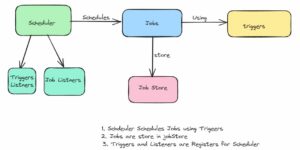
Quartz is a Java job scheduler that runs code at set times or intervals, keeps the schedule in memory or in a database, and can share the work between several instances of an application. Task scheduling means running code that no user request starts, such as a reminder email every morning or a fine calculation every night. A Spring Boot Quartz setup needs one starter: we add spring-boot-starter-quartz, declare JobDetail and Trigger beans, and Spring Boot registers them with an auto-configured Scheduler.
The following example declares a nightly fine job and its cron trigger as Spring beans, and then calls the auto-configured Scheduler from code.
@Bean
JobDetail fineJob() {
  return JobBuilder.newJob(OverdueFineJob.class)
      .withIdentity("overdueFineJob", "library")
      .storeDurably()
      .build();
}

@Bean
Trigger fineTrigger(JobDetail fineJob) {
  return TriggerBuilder.newTrigger()
      .forJob(fineJob)
      .withSchedule(cronSchedule("0 0 2 * * ?"))    // every day at 02:00
      .build();
}
scheduler.triggerJob(JobKey.jobKey("overdueFineJob", "library")); // runs now, result = 2 fines
Date firstRun = scheduler.scheduleJob(reminderJob, oneTimeTrigger); // the first fire time
boolean exists = scheduler.checkExists(JobKey.jobKey("loan-2", "reminders")); // false after the one-time run
int threads = scheduler.getMetaData().getThreadPoolSize(); // 5Notice that the cron expression 0 0 2 ? has six fields and starts with the seconds, unlike a Unix crontab.
Next, we build a library application on Spring Boot 4.1.1 and Quartz 2.5.2 that emails due-date reminders and calculates overdue fines. Along the way, we write jobs that use Spring beans and cover simple and cron triggers, misfires, listeners and job chaining, the JDBC job store with clustering, and the actuator endpoint.
1. What Is Quartz Scheduler?
Quartz is an open-source scheduling library for Java. It separates three things that a plain timer mixes together: the work (a Job), the time it runs (a Trigger), and the place where both are saved (a JobStore). The Scheduler reads the triggers, and when one is due, it runs the job on a thread from its own pool:
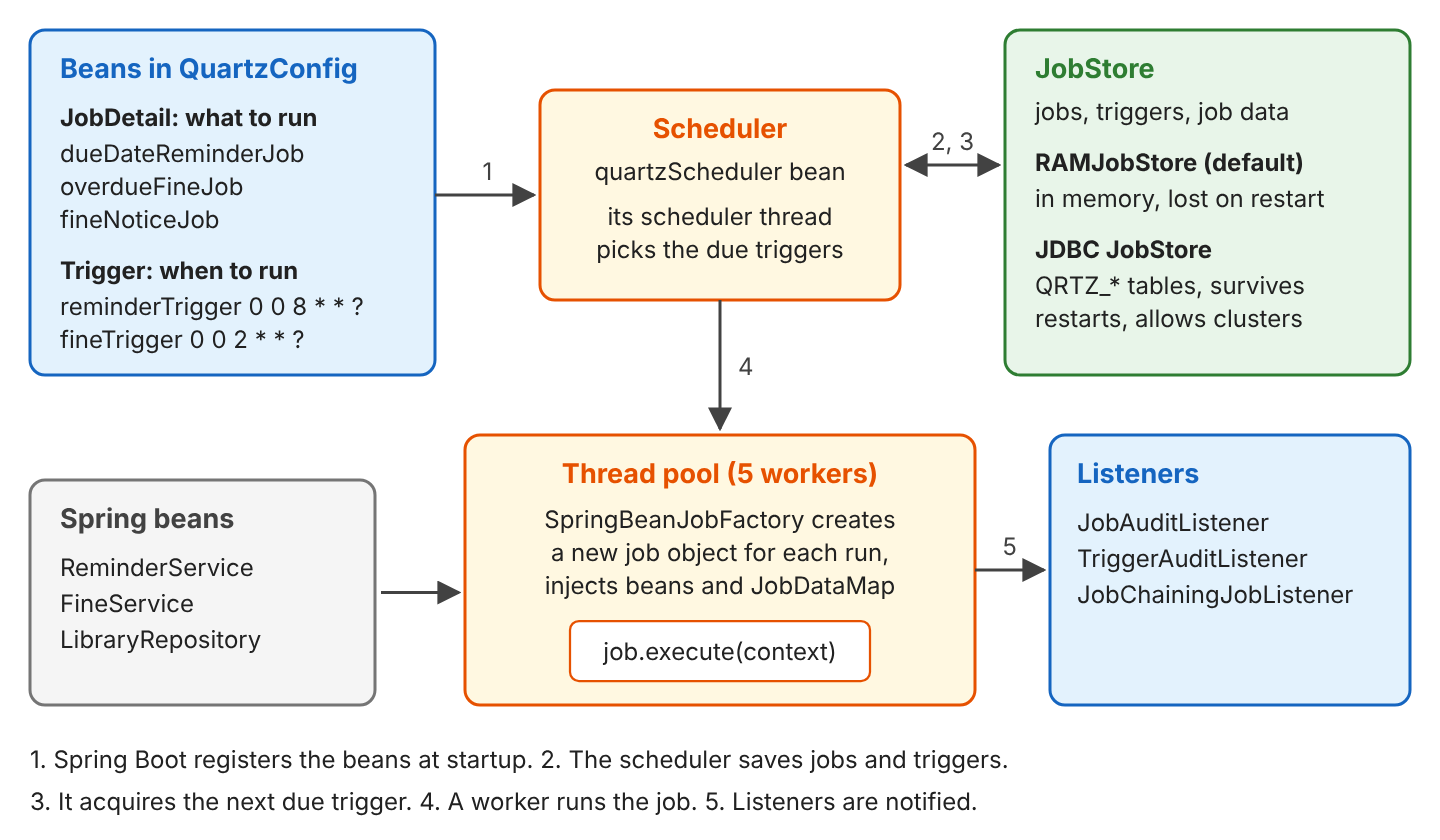
Each Quartz part has one role, and our library application uses all of them.
| Part | What it is | In our library application |
|---|---|---|
| Job | A class with one method, execute(JobExecutionContext): the work to do | OverdueFineJob calculates fines |
| JobDetail | A job class plus a name, a group and a JobDataMap | overdueFineJob in group library |
| Trigger | When a job runs: SimpleTrigger (interval) or CronTrigger (calendar) | fineTrigger, every day at 02:00 |
| JobDataMap | Key-value data the job reads at run time | daysBefore = 1 |
| Scheduler | Registers jobs and triggers and fires them | The quartzScheduler bean |
| JobStore | Saves jobs, triggers and job data | RAMJobStore, then a JDBC store |
| Listeners | Callbacks before and after each run | JobAuditListener, TriggerAuditListener |
Spring already has its own scheduler. The @Scheduled annotation runs a bean method on a fixed rate or a cron expression. Other Java options are JobRunr and db-scheduler, which store jobs in a database, and ShedLock, which adds a database lock to @Scheduled so that only one instance runs a task. Compared with @Scheduled, Quartz adds persistence and clustering, and it can add or change a schedule while the application runs.
| Need | Spring @Scheduled | Quartz |
|---|---|---|
| Setup | @EnableScheduling and an annotated method | Starter, JobDetail and Trigger beans |
| Schedules | cron, fixedRate, fixedDelay | SimpleTrigger, CronTrigger, calendar-interval triggers, excluded days |
| Add or change a schedule at run time | Not with the annotation | scheduleJob(), rescheduleJob(), deleteJob() |
| Survive a restart | No | Yes, with the JDBC job store |
| Several application instances | Every instance runs the task | Clustering runs each trigger once |
| Run missed while the app was down | Lost | Misfire instructions decide |
| Data that changes between runs | Fields of the bean | JobDataMap, saved with the job |
| Actuator endpoint | /actuator/scheduledtasks | /actuator/quartz, can also start a job |
We use @Scheduled for small in-process tasks, and Quartz when jobs must survive restarts or run once in a cluster. Quartz also fits jobs that the application creates at run time, such as a reminder for one loan.
2. Spring Boot Quartz Example
The complete project is a library back end on Spring Boot 4.1.1, Quartz 2.5.2, Java 25 and an H2 database. It “sends” emails by logging them and saving them in a sent\_message table. It starts with five loans, with due dates relative to the day it runs (here, 2026-10-03):
| Loan | Member | Book | Due date | State |
|---|---|---|---|---|
| 1 | anna | Dune | 2026-10-04 | Due tomorrow |
| 2 | ben | Emma | 2026-10-06 | Due in 3 days |
| 3 | carla | Ulysses | 2026-09-29 | 4 days late |
| 4 | dev | Hamlet | 2026-09-23 | 10 days late |
| 5 | eva | Walden | 2026-10-01 | Returned on 2026-10-02 |
The library charges 0.25 per day late, so carla owes 1.00 and dev owes 2.50.
2.1. Maven Dependency
The Quartz starter brings Quartz and Spring’s integration classes. Spring Boot 4.1.1 manages Quartz 2.5.2, so we leave out the version.
<dependency>
  <groupId>org.springframework.boot</groupId>
  <artifactId>spring-boot-starter-quartz</artifactId>
</dependency>
<dependency>
  <groupId>org.springframework.boot</groupId>
  <artifactId>spring-boot-starter-jdbc</artifactId>   <!-- library tables and the JDBC job store -->
</dependency>
The project also uses spring-boot-starter-webmvc and spring-boot-starter-actuator for the endpoints in section 2.5. The repository code uses JdbcClient, and the tests use spring-boot-starter-quartz-test and Awaitility.
2.2. Writing a Job That Uses Spring Beans
A Quartz job implements the org.quartz.Job interface. In Spring, we extend QuartzJobBean instead, which implements Job and passes the call to executeInternal(). The reminder job needs the ReminderService bean and one setting, the number of days before the due date.
@DisallowConcurrentExecution
public class DueDateReminderJob extends QuartzJobBean {

  private final ReminderService reminderService;   // Spring bean, constructor injection
  private int daysBefore = 1;                         // set from the JobDataMap

  public DueDateReminderJob(ReminderService reminderService) {
    this.reminderService = reminderService;
  }

  public void setDaysBefore(int daysBefore) {
    this.daysBefore = daysBefore;
  }

  @Override
  protected void executeInternal(JobExecutionContext context) {
    int sent = reminderService.sendDueDateReminders(daysBefore);
    context.setResult(sent);
  }
}
The job is not a Spring bean, because it has no @Component. Instead, Spring Boot configures Quartz with a SpringBeanJobFactory, which creates the job object for each run in two steps.
- It creates a new instance for every execution through the Spring container, so the constructor gets the ReminderService bean.
- It calls a setter for each key of the JobDataMap: the key daysBefore calls setDaysBefore(). Keys without a setter are ignored.
The startup log shows which factory Quartz uses.
INFO org.quartz.core.QuartzScheduler : JobFactory set to: org.springframework.scheduling.quartz.SpringBeanJobFactory@15c6027d@DisallowConcurrentExecution stops two runs of the same job from overlapping (section 5.3). The call context.setResult() stores a value that listeners can read after the run.
2.3. Registering JobDetail and Trigger Beans
Spring Boot adds every JobDetail, Trigger and Calendar bean to the scheduler at startup. A JobDetail gets a name and a group, which together form its JobKey.
@Bean
JobDetail reminderJob() {
  return JobBuilder.newJob(DueDateReminderJob.class)
      .withIdentity("dueDateReminderJob", "library")
      .usingJobData("daysBefore", 1)
      .storeDurably()
      .build();
}

@Bean
Trigger reminderTrigger(JobDetail reminderJob) {
  return TriggerBuilder.newTrigger()
      .forJob(reminderJob)
      .withIdentity("reminderTrigger", "library")
      .withSchedule(cronSchedule("0 0 8 * * ?"))
      .build();
}
storeDurably() keeps the job in the scheduler even when no trigger points to it. Without it, Quartz deletes a job when its last trigger is done, and addJob() rejects a job without a trigger with “Jobs added with no trigger must be durable.” The scheduler itself needs no code. We only set the size of its thread pool:
spring.quartz.job-store-type=memory
spring.quartz.properties.org.quartz.threadPool.threadCount=5
Every key under spring.quartz.properties goes to Quartz as is. On startup, Quartz prints the thread pool and the job store it uses.
Quartz Scheduler (v2.5.2) 'quartzScheduler' with instanceId 'NON_CLUSTERED'
  Using thread pool 'org.quartz.simpl.SimpleThreadPool' - with 5 threads.
  Using job-store 'org.quartz.simpl.RAMJobStore' - which does not support persistence. and is not clustered.
...
Scheduler quartzScheduler_$_NON_CLUSTERED started.
RAMJobStore keeps everything in memory. It needs no tables, but every job and trigger created at run time is lost when the application stops. Section 7 replaces it with a database.
2.4. Scheduling a Job From Code
Beans cover fixed schedules, but a member can also ask for a reminder about one loan, which needs a job created while the application runs. We inject the Scheduler and call scheduleJob() with a new JobDetail and a one-time SimpleTrigger.
JobDetail job = JobBuilder.newJob(LoanReminderJob.class)
    .withIdentity("loan-" + loanId, "reminders")
    .usingJobData("loanId", loanId)
    .build();

Trigger trigger = TriggerBuilder.newTrigger()
    .withIdentity("loan-" + loanId, "reminders")
    .startAt(Date.from(sendAt))
    .withSchedule(SimpleScheduleBuilder.simpleSchedule()
        .withMisfireHandlingInstructionFireNow())
    .build();

return scheduler.scheduleJob(job, trigger);   // the first fire time
A small controller calls it with a delay in seconds:
curl -X POST "localhost:8080/loans/2/reminder?inSeconds=10"
# {"loanId":2,"sendAt":"2026-10-03T17:40:58.622Z"}
17:40:58.635 [eduler_Worker-3] JobAuditListener : Starting reminders.loan-2
17:40:58.658 [eduler_Worker-3] ReminderService : Email to ben: 'Emma' is due on 2026-10-06
17:40:58.658 [eduler_Worker-3] JobAuditListener : Finished reminders.loan-2 in 23 ms, result=nullThe job is not durable, so Quartz deletes it after its only run, and checkExists() returns false.
2.5. Running Jobs From the Quartz Actuator Endpoint
Spring Boot Actuator has a quartz endpoint that lists jobs and triggers and can start a job. It is not exposed over HTTP by default:
management.endpoints.web.exposure.include=health,quartzcurl localhost:8080/actuator/quartz
# {"jobs":{"groups":["library"]},"triggers":{"groups":["library"]}}
curl localhost:8080/actuator/quartz/jobs
# {"groups":{"library":{"jobs":["dueDateReminderJob","fineNoticeJob","overdueFineJob"]}}}
curl localhost:8080/actuator/quartz/triggers/library/fineTrigger{
"group": "library",
"name": "fineTrigger",
"state": "NORMAL",
"type": "cron",
"startTime": "2026-10-03T17:40:39.000Z",
"nextFireTime": "2026-10-04T02:00:00.000Z",
"priority": 5,
"data": {},
"cron": { "expression": "0 0 2 * * ?", "timeZone": "UTC" }
}A POST with the body {“state”:”running”} starts a job at once, so we can test a nightly job during the day.
curl -X POST localhost:8080/actuator/quartz/jobs/library/overdueFineJob \
     -H "Content-Type: application/json" -d '{"state":"running"}'
# {"className":"com.howtodoinjava.quartz.jobs.OverdueFineJob","group":"library",
#  "name":"overdueFineJob","triggerTime":"2026-10-03T17:40:46.204121267Z"}
The job details hide the JobDataMap values by default.
curl localhost:8080/actuator/quartz/jobs/library/overdueFineJob
# {"className":"com.howtodoinjava.quartz.jobs.OverdueFineJob","data":{"runCount":"******"},
#  "durable":true,"group":"library","name":"overdueFineJob","requestRecovery":false,
#  "triggers":[{"group":"library","name":"fineTrigger","nextFireTime":"2026-10-04T02:00:00.000Z","priority":5}]}
management.endpoint.quartz.show-values=always shows the real values (“daysBefore”:1 for the reminder job). Anyone who can call the endpoint can start any job, so we secure it like any other write operation.
3. Simple Triggers and Cron Triggers
A trigger decides when a job runs, and Quartz has two common types.
- A SimpleTrigger fires at a start time and then repeats a number of times at a fixed interval. Our one-time loan reminder uses it.
- A CronTrigger fires at calendar times described by a cron expression, such as every day at 02:00. Our reminder and fine triggers use it.
| SimpleTrigger | CronTrigger | |
|---|---|---|
| Defined by | Start time, interval, repeat count | Cron expression and time zone |
| Fits | One-time runs, “every 5 seconds” | “02:00 every day”, “weekdays at 08:00” |
| Builder | SimpleScheduleBuilder.simpleSchedule(), repeatSecondlyForever(5) | CronScheduleBuilder.cronSchedule(“0 0 2 ?”) |
| Time zone | Not used, the interval counts from the start time | The JVM default unless set (the actuator showed UTC) |
| Default after a misfire | Depends on the repeat count (section 4) | Fire once now |
3.1. Quartz Cron Expressions
A Quartz cron expression has six or seven fields, namely seconds, minutes, hours, day of month, month, day of week and an optional year. One of the two day fields must be ? (“no specific value”), because Quartz does not support both at once. For example, a library that sends overdue notices on weekdays only uses MON-FRI in the day-of-week field and ? in the day-of-month field.
The last column shows the next fire time after Saturday 2026-10-03 10:15:00, as returned by CronExpression.getNextValidTimeAfter().
| Expression | Meaning | Next fire time |
|---|---|---|
| 0 0 2 ? | Every day at 02:00 | 2026-10-04 02:00 |
| 0 0 8 ? MON-FRI* | Weekdays at 08:00 | 2026-10-05 08:00 |
| 0 0/15 9-17 ? | Every 15 minutes from 09:00 to 17:45 | 2026-10-03 10:30 |
| 0/30 ? | Every 30 seconds | 2026-10-03 10:15:30 |
| 0 0 9 1 ?* | First day of the month at 09:00 | 2026-11-01 09:00 |
| 0 0 12 L ?* | Last day of the month at 12:00 | 2026-10-31 12:00 |
| 0 30 18 LW ?* | Last weekday of the month at 18:30 | 2026-10-30 18:30 |
| 0 0 10 ? 6L* | Last Friday of the month at 10:00 | 2026-10-30 10:00 |
| 0 0 10 ? 2#1* | First Monday of the month at 10:00 | 2026-10-05 10:00 |
| 0 0 9 ? SAT,SUN* | Weekends at 09:00 | 2026-10-04 09:00 |
3.2. Quartz Cron vs Spring and Unix Cron
Expressions copied from a Unix crontab or from @Scheduled often fail or fire on the wrong day. Quartz rejects a five-field Unix expression and an expression with *** in both day fields.
CronExpression unix = new CronExpression("0 8 * * *");           // ParseException: Unexpected end of expression.
CronExpression both = new CronExpression("0 0 8 * * MON-FRI");   // ParseException: Support for specifying both a day-of-week
                                                                 //   AND a day-of-month parameter is not implemented.
boolean valid = CronExpression.isValidExpression("0 0 8 ? * MON-FRI");   // true
The numbers for days of the week also differ. In Quartz, 1 is Sunday and 6 is Friday; in Spring, 0 or 7 is Sunday and 6 is Saturday. Day names such as FRI mean the same in both, so we prefer them.
Date quartzNext = quartz.getNextValidTimeAfter(...);         // "0 0 10 ? * 6" -> FRIDAY
CronExpression spring = CronExpression.parse("0 0 10 * * 6");   // Spring        -> SATURDAY
4. Handling Misfires
A misfire is a fire time that a trigger missed because the scheduler was stopped or in standby, the application was down, or all worker threads were busy. Quartz does not treat a late trigger as a misfire right away. It waits for misfireThreshold, 60 seconds by default, and then applies the trigger’s misfire instruction.
To see every instruction, our test schedules eight triggers that fire every 5 seconds, puts the scheduler in standby across two fire times, and starts it again halfway to the third. The threshold is lowered to 1 second for the test:
// @SpringBootTest(properties = "spring.quartz.properties.org.quartz.jobStore.misfireThreshold=1000")
scheduler.standby();
scheduler.scheduleJob(TriggerBuilder.newTrigger()
    .forJob(job)
    .withIdentity("cron-do-nothing", "misfire")
    .startAt(first)
    .withSchedule(cronSchedule("0/5 * * * * ?").withMisfireHandlingInstructionDoNothing())
    .build());                       // and seven more triggers

await().until(() -> System.currentTimeMillis() >= first.getTime() + 7_500);
scheduler.start();                   // fire times 0 s and 5 s were missed
Missed fire times: 17:44:50.000, 17:44:55.000; resumed at 17:44:57.593
simple-smart-policy runs=0 scheduled=[] next=17:45:00.000
simple-fire-now runs=1 scheduled=[17:44:57.596] next=17:45:02.596
simple-next-with-remaining-count runs=0 scheduled=[] next=17:45:00.000
simple-ignore-misfires runs=2 scheduled=[17:44:55.000, 17:44:50.000] next=17:45:00.000
cron-smart-policy runs=1 scheduled=[17:44:57.596] next=17:45:00.000
cron-fire-and-proceed runs=1 scheduled=[17:44:57.595] next=17:45:00.000
cron-do-nothing runs=0 scheduled=[] next=17:45:00.000
cron-ignore-misfires runs=2 scheduled=[17:44:50.000, 17:44:55.000] next=17:45:00.000In the timeline, the scheduler is in standby during the fire times at 0 s and 5 s.
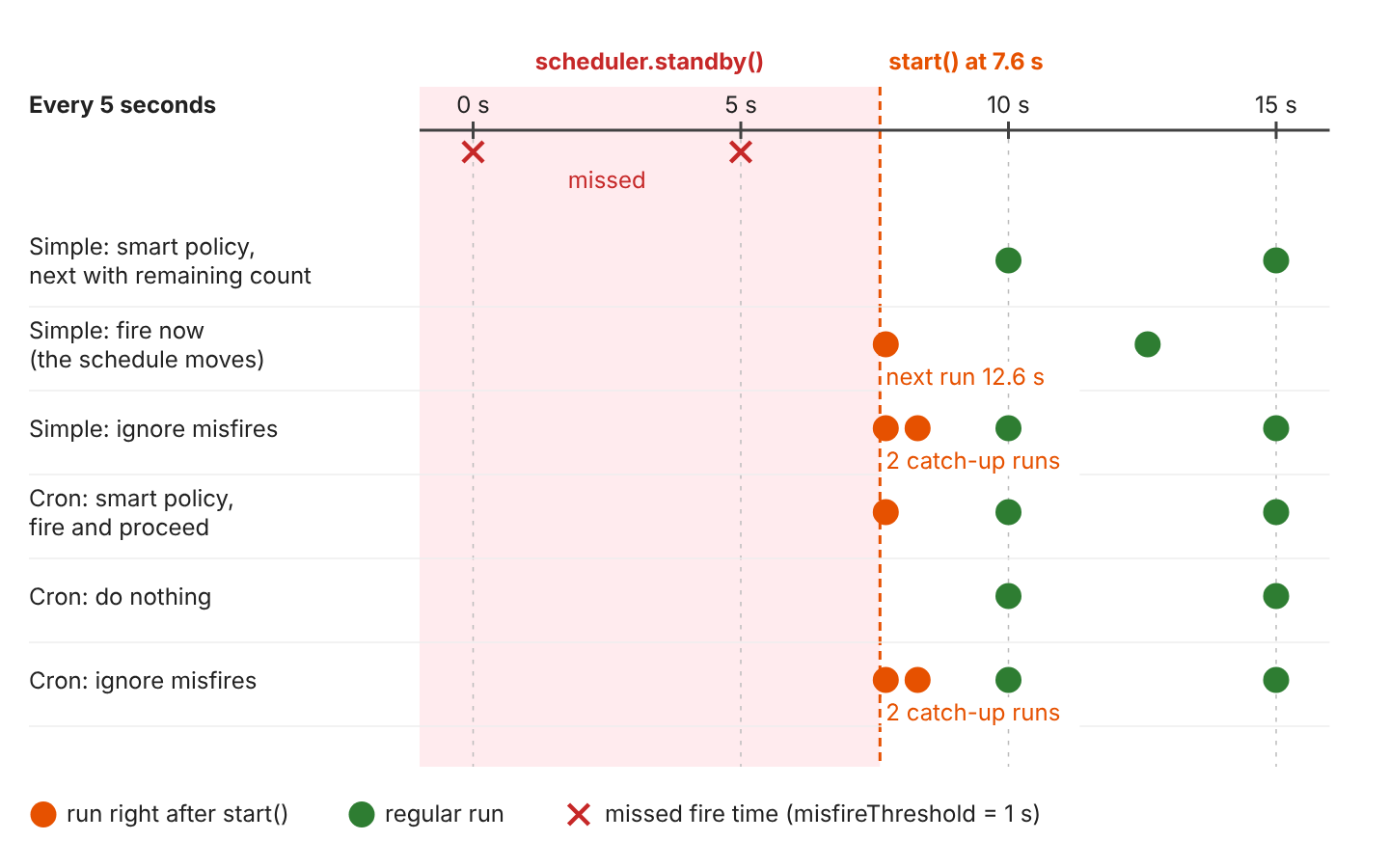
| Builder method | Trigger | Missed runs | Schedule after |
|---|---|---|---|
| none (smart policy) | Simple, repeating forever | Skipped | Unchanged |
| withMisfireHandlingInstructionFireNow() | Simple | One run now | Moves: next run 5 s after the late run |
| withMisfireHandlingInstructionNextWithRemainingCount() | Simple | Skipped | Unchanged |
| withMisfireHandlingInstructionIgnoreMisfires() | Simple or cron | All, one after another | Unchanged |
| none (smart policy) | Cron | One run now | Unchanged |
| withMisfireHandlingInstructionFireAndProceed() | Cron | One run now | Unchanged |
| withMisfireHandlingInstructionDoNothing() | Cron | Skipped | Unchanged |
Pick the instruction from the business rule, not from the default. The nightly fine job uses FireAndProceed, so if 02:00 was missed, the job calculates fines once as soon as possible, never twice. A report that must exist for every hour would use IgnoreMisfires. The triggerMisfired() listener method (section 6.1) was called for every trigger except the two IgnoreMisfires ones.
5. Job Data and Concurrency
A job object lives for one run only, so anything it must remember goes into the JobDataMap, and two runs of the same job can overlap unless we prevent it.
5.1. Passing Data With JobDataMap
Both the JobDetail and the Trigger can carry a JobDataMap. At run time Quartz merges them, and the trigger’s values override the job’s values. triggerJob() accepts a map for a single run, so we can send the 3-day reminders once without changing the job:
scheduler.triggerJob(REMINDER_JOB, new JobDataMap(Map.of("daysBefore", 3)));
// Email to ben: 'Emma' is due on 2026-10-06
int daysBefore = scheduler.getJobDetail(REMINDER_JOB).getJobDataMap().getInt("daysBefore");   // still 1
5.2. Keeping State With @PersistJobDataAfterExecution
Changes to the JobDataMap during a run are thrown away by default. @PersistJobDataAfterExecution saves the job’s map after each successful run. The fine job uses it to count its runs and keep the last total:
@DisallowConcurrentExecution
@PersistJobDataAfterExecution
public class OverdueFineJob extends QuartzJobBean {

  @Override
  protected void executeInternal(JobExecutionContext context) {
    List<Fine> fines = fineService.calculateFines();
    BigDecimal total = fines.stream().map(Fine::amount).reduce(BigDecimal.ZERO, BigDecimal::add);

    JobDataMap data = context.getJobDetail().getJobDataMap();
    data.put("runCount", data.getIntValue("runCount") + 1);   // saved after the run
    data.put("lastTotal", total.toPlainString());              // "3.50"
    context.setResult(fines.size());                           // 2
  }
}
Two test jobs with the same counter code, run three times each, show the difference.
plainCounter results: [1, 1, 1]          // without the annotation
persistentCounter results: [1, 2, 3]     // with @PersistJobDataAfterExecution
The call getIntValue(“runCount”) fails with a NullPointerException when the key is missing, so the JobDetail bean sets usingJobData(“runCount”, 0).
5.3. Preventing Overlapping Runs With @DisallowConcurrentExecution
A job that runs every minute and sometimes takes two minutes would run twice at the same time. @DisallowConcurrentExecution makes Quartz wait until the running copy finishes. We start two test jobs three times each, and every run takes 500 ms.
Max copies at the same time: parallelReport=3, singleReport=1The lock is per JobDetail, not per class, so two JobDetail beans with the same class can still run in parallel. Quartz recommends adding @DisallowConcurrentExecution whenever we use @PersistJobDataAfterExecution, so two runs never save different versions of the map.
6. Job Listeners and Job Chaining
Listeners are callbacks that Quartz calls around each run. We use them for logging, metrics and starting one job after another.
6.1. JobListener and TriggerListener
A JobListener receives events about a job, and a TriggerListener receives events about a trigger. Only the trigger listener can cancel a run.
| Interface | Method | Called when |
|---|---|---|
| JobListener | jobToBeExecuted() | Before the job runs |
| jobWasExecuted(context, exception) | After the run; the exception is null on success | |
| jobExecutionVetoed() | A trigger listener cancelled the run | |
| TriggerListener | triggerFired() | The trigger fired, before the job runs |
| vetoJobExecution() | Returns true to cancel this run | |
| triggerMisfired() | The trigger missed its fire time | |
| triggerComplete() | After the run |
Our JobAuditListener logs each run and its result.
@Override
public void jobWasExecuted(JobExecutionContext context, JobExecutionException error) {
  JobRun run = new JobRun(context.getJobDetail().getKey().toString(), context.getTrigger().getKey().toString(),
      context.getScheduledFireTime(), context.getFireTime(), context.getJobRunTime(), context.getResult(),
      error == null ? null : error.getMessage());
  runs.add(run);                                  // kept in memory for the tests
  if (error == null) {
    log.info("Finished {} in {} ms, result={}", run.job(), run.runTimeMs(), run.result());
  } else {
    log.error("Failed {} in {} ms: {}", run.job(), run.runTimeMs(), run.error());
  }
}
The listeners are Spring beans, and a SchedulerFactoryBeanCustomizer bean adds them to the scheduler that Spring Boot creates.
@Bean
SchedulerFactoryBeanCustomizer listeners(JobAuditListener jobAudit, TriggerAuditListener triggerAudit,
                                         JobChainingJobListener fineChain) {
  return factory -> {
    factory.setGlobalJobListeners(jobAudit, fineChain);
    factory.setGlobalTriggerListeners(triggerAudit);
  };
}
A global listener sees every job. To listen to some jobs only, we call scheduler.getListenerManager().addJobListener(listener, KeyMatcher.keyEquals(jobKey)).
6.2. Chaining Jobs With JobChainingJobListener
After the fines are calculated, the members must get a fine notice. That is a second job, FineNoticeJob, with no trigger of its own. Quartz’s JobChainingJobListener starts it when the first job finishes:
@Bean
JobDetail fineNoticeJob() {
  return JobBuilder.newJob(FineNoticeJob.class)
      .withIdentity("fineNoticeJob", "library")
      .storeDurably()          // no trigger of its own
      .build();
}

@Bean
JobChainingJobListener fineChain() {
  JobChainingJobListener chain = new JobChainingJobListener("fineChain");
  chain.addJobChainLink(FINE_JOB, FINE_NOTICE_JOB);
  return chain;
}
Starting the fine job through the actuator runs both jobs.
17:40:46.219 [eduler_Worker-1] JobAuditListener     : Starting library.overdueFineJob
17:40:47.075 [eduler_Worker-1] JobAuditListener     : Finished library.overdueFineJob in 855 ms, result=2
17:40:47.076 [eduler_Worker-1] JobChainingJobListener : Job 'library.overdueFineJob' will now chain to Job 'library.fineNoticeJob'
17:40:47.100 [eduler_Worker-2] JobAuditListener     : Starting library.fineNoticeJob
17:40:47.275 [eduler_Worker-2] ReminderService      : Email to carla: Fine of 1.00 for 'Ulysses' (4 days late)
17:40:47.288 [eduler_Worker-2] ReminderService      : Email to dev: Fine of 2.50 for 'Hamlet' (10 days late)
17:40:47.288 [eduler_Worker-2] JobAuditListener     : Finished library.fineNoticeJob in 188 ms, result=2
The second job runs on another worker thread after the first one finishes. The chain does not pass the first job’s data, so FineNoticeJob reads today’s fines from the database.
7. Persisting Jobs With the JDBC JobStore
With RAMJobStore, a restart loses the one-time reminders and the fine job’s counter. The JDBC job store saves jobs, triggers and job data in eleven QRTZ_ tables. Spring Boot uses the application’s DataSource and Spring’s LocalDataSourceJobStore, which joins Spring-managed transactions.
7.1. Switching to the JDBC JobStore
Our jdbc profile keeps both the library tables and the Quartz tables in an H2 file database.
spring.datasource.url=jdbc:h2:file:./data/library
spring.sql.init.mode=always
spring.quartz.job-store-type=jdbc
spring.quartz.jdbc.initialize-schema=always
LocalDataSourceJobStore : Using db table-based data access locking (synchronization).
LocalDataSourceJobStore : JobStoreCMT initialized.
Using job-store 'org.springframework.scheduling.quartz.LocalDataSourceJobStore' - which supports persistence. and is not clustered.After we scheduled a one-time reminder for loan 3, the tables held the three bean jobs and the new one.
QRTZ_JOB_DETAILS: [library.dueDateReminderJob, library.fineNoticeJob, library.overdueFineJob, reminders.loan-3]
QRTZ_TRIGGERS: [library.fineTrigger CRON WAITING, library.reminderTrigger CRON WAITING, reminders.loan-3 SIMPLE WAITING]
7.2. What Survives a Restart
Our test starts the application several times on the same database and checks what is still there. The property spring.quartz.jdbc.initialize-schema decides whether Spring Boot runs Quartz’s table script at startup.
| initialize-schema | Runs the Quartz script | Result in our restarts |
|---|---|---|
| embedded (default) | Only for an in-memory database | H2 file database: startup fails with Table “QRTZ_JOB_DETAILS” not found |
| always, H2 | Every start | Jobs kept: the H2 script has no DROP TABLE, its CREATE TABLE statements fail and continue-on-error is true |
| always, PostgreSQL | Every start | All jobs deleted: the script starts with DROP TABLE |
| never | Never | Jobs kept; we create the tables ourselves |
After a restart with never, the loan-3 reminder was still scheduled and runCount was still 1. Spring Boot also does not replace a job that already exists in the database with the bean definition, unless spring.quartz.overwrite-existing-jobs=true, so data saved by @PersistJobDataAfterExecution is kept. In production, we set initialize-schema=never and create the QRTZ_ tables with a migration tool such as Flyway or Liquibase, using the script for our database from the Quartz jar (org/quartz/impl/jdbcjobstore/tables_postgres.sql and others).
A persistent store also catches runs that were due while the application was down. We scheduled a reminder 5 seconds ahead, stopped the application, and started it again after the due time.
LocalDataSourceJobStore : Handling 1 trigger(s) that missed their scheduled fire-time.
TriggerAuditListener    : Misfire: reminders.loan-1 missed its fire time
JobAuditListener        : Starting reminders.loan-1
ReminderService         : Email to anna: 'Dune' is due on 2026-10-04
7.3. Clustering Several Application Instances
When the library application runs on two servers with RAMJobStore, each server has its own scheduler, and every member gets two reminders. With the JDBC store, both instances can form a cluster.
spring.quartz.job-store-type=jdbc
spring.quartz.properties.org.quartz.jobStore.isClustered=true
spring.quartz.properties.org.quartz.scheduler.instanceId=AUTO
The setting instanceId=AUTO gives each node a unique id. In our Testcontainers test, two instances shared a PostgreSQL 18.6 database, and we started a job six times, alternating between the two schedulers.
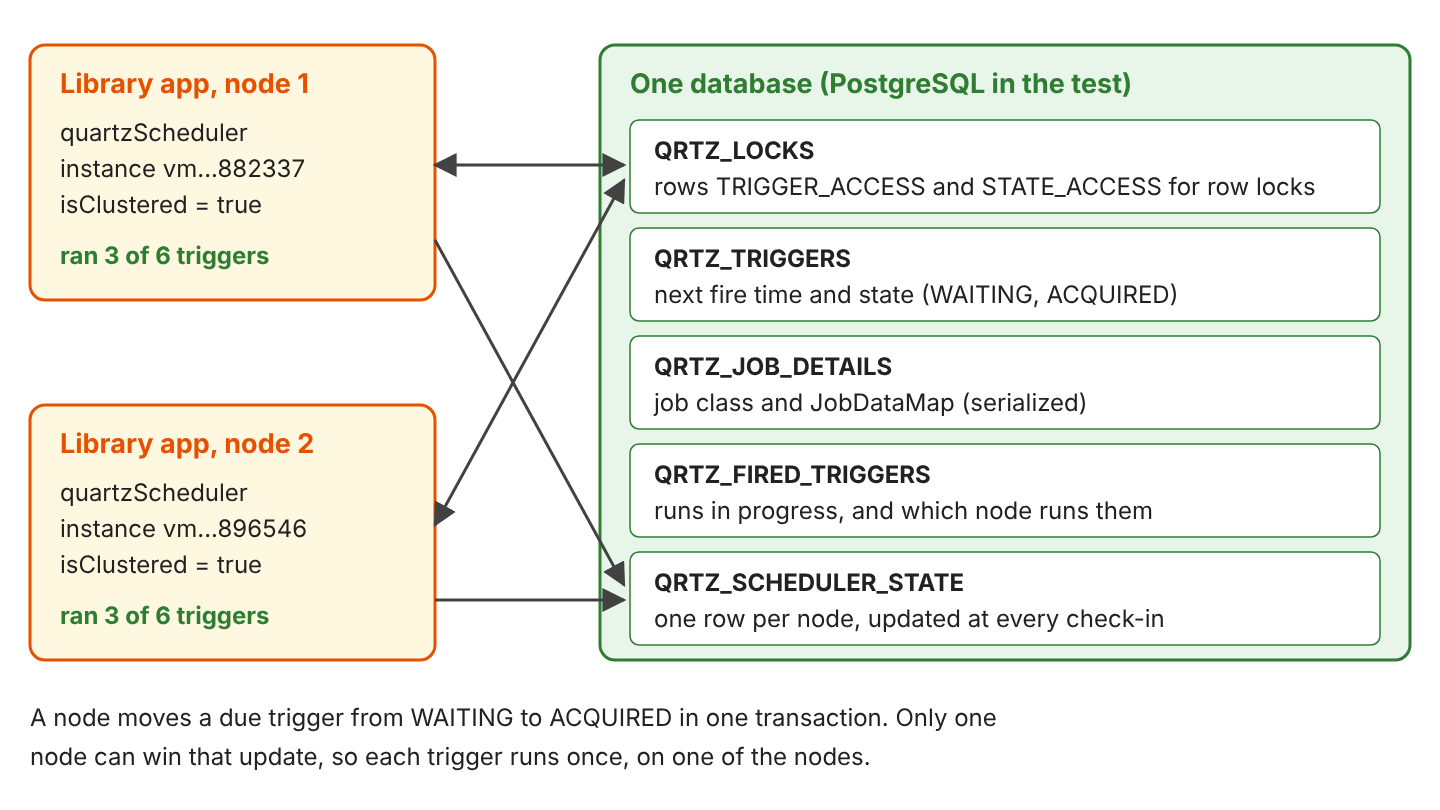
QRTZ_SCHEDULER_STATE: [vm1791049882337, vm1791049896546]
inventoryJob runs: node1=3, node2=3
Each of the six runs happened only once. Quartz does not assign a trigger to a fixed node, so the split between nodes varies; an earlier run on H2 gave 4 and 0. A Quartz cluster works only when the nodes follow three rules.
- The clocks of the servers must be within a second of each other.
- All nodes use the same Quartz properties, except the thread count and the instance id.
- A non-clustered scheduler must never start against the same tables.
8. Quartz Scheduler FAQs
8.1. Why Are Spring Beans Null in a Quartz Job?
The job object was created by Quartz, not by Spring. Quartz’s own job factory calls the no-argument constructor and knows nothing about beans. With a constructor that takes a bean, it cannot create the job at all:
ERROR org.quartz.core.ErrorLogger -- An error occurred instantiating job to be executed. job= 'DEFAULT.reminder'
org.quartz.SchedulerException: Problem instantiating class 'com.howtodoinjava.quartz.jobs.DueDateReminderJob'
  [See nested exception: java.lang.NoSuchMethodException: com.howtodoinjava.quartz.jobs.DueDateReminderJob.<init>()]
Spring Boot’s auto-configuration sets SpringBeanJobFactory (the “JobFactory set to” line in section 2.2), so constructor injection works. The problem comes back when an application creates its own StdSchedulerFactory or SchedulerFactoryBean without setting a Spring job factory. In that setup, we have to inject Spring beans into Quartz jobs ourselves.
8.2. How Do We Test a Quartz Job?
We start the job with triggerJob() and wait for the result with Awaitility, which polls a condition until it is true or a timeout expires. Waiting on a condition keeps the test fast and stable, unlike a fixed pause.
scheduler.triggerJob(REMINDER_JOB);

await().atMost(Duration.ofSeconds(5))
    .until(() -> jobAudit.runsOf("library.dueDateReminderJob").size() == 1);
assertThat(repository.sentMessages()).containsExactly(
    new SentMessage(1, "REMINDER", "anna", "'Dune' is due on " + LocalDate.now().plusDays(1)));
For tests of timing, we use intervals of a few seconds and lower misfireThreshold through @SpringBootTest(properties = …), as in section 4.
8.3. Does the Chained Job Run When the First Job Fails?
Yes. JobChainingJobListener starts the next job in jobWasExecuted() without looking at the exception. In our test, a job that threw JobExecutionException(“database is down”) still started its chained job. To chain only on success, we write a small listener that checks the exception.
@Override
public void jobWasExecuted(JobExecutionContext context, JobExecutionException error) {
  if (error == null && context.getJobDetail().getKey().equals(first)) {
    try {
      context.getScheduler().triggerJob(next);
    } catch (SchedulerException e) {
      getLog().error("Could not start {}", next, e);
    }
  }
}
8.4. Which Driver Delegate Does PostgreSQL Need?
PostgreSQL needs PostgreSQLDelegate. With the default StdJDBCDelegate, the application did not start, because reading the serialized JobDataMap failed with PSQLException: Bad value for type long. We set the delegate class.
spring.quartz.properties.org.quartz.jobStore.driverDelegateClass=org.quartz.impl.jdbcjobstore.PostgreSQLDelegateH2 works with the standard delegate, and other databases have their own JDBC JobStore delegates.
8.5. What Can We Put in a JobDataMap?
With RAMJobStore, any object. With the JDBC store, the map is serialized into QRTZ\_JOB\_DETAILS, so every value must be Serializable. Our Loan record is not, and addJob() failed:
Couldn't store job: Unable to serialize JobDataMap for insertion into database because the value
of property 'loan' is not serializable: com.howtodoinjava.quartz.library.Loan
We store ids and simple values, such as loanId = 2, and load the entity inside the job. Serialized classes also break when the class changes between releases, which ids avoid.
8.6. How Many Threads Does Quartz Use in Spring Boot?
Spring’s SchedulerFactoryBean sets 10 threads when org.quartz.threadPool.threadCount is not configured. Each running job holds one thread for its whole run, so the pool size limits how many jobs run at the same time. When all threads are busy, due triggers wait and may misfire. We set 5 for our three jobs; scheduler.getMetaData().getThreadPoolSize() returns the current value. Quartz uses its own pool, not a Java ThreadPoolExecutor bean from the application.
8.7. What Are the Best Practices for Quartz Jobs in Spring Boot?
Most problems in our tests came from a few settings.
- Give every job and trigger a name and a group, so logs, the actuator and JobKey lookups are readable.
- Keep executeInternal() short and call a Spring service, which we can test without Quartz.
- Add @DisallowConcurrentExecution to jobs that must not overlap, and always together with @PersistJobDataAfterExecution.
- Choose a misfire instruction for every trigger that matters, and test it with a short interval.
- Use the JDBC store for jobs created at run time and for more than one instance; set initialize-schema=never in production.
- Store ids, not objects, in the JobDataMap.
- Make jobs safe to run twice (for example, merge instead of insert, as our fine table does), because a run after a crash can repeat work.
9. Conclusion
Quartz separates what runs (JobDetail), when it runs (Trigger) and where the schedule is kept (JobStore), and Spring Boot wires it with one starter and a few beans. We use cron triggers for calendar times and simple triggers for intervals and one-time jobs, pick a misfire instruction for each trigger, and add listeners for logging and job chains. When jobs must survive restarts or run once across several instances, we switch to the JDBC job store and turn on clustering.
10. References
- Quartz 2.5.x Documentation
- Quartz Tutorial: More About Triggers (misfire instructions)
- Quartz Tutorial: CronTrigger
- Quartz Configuration: RAMJobStore
- Spring Boot Reference: Quartz Scheduler
- Spring Boot Actuator API: Quartz
- Spring Framework Reference: Task Execution and Scheduling
- SpringBeanJobFactory JavaDoc
Happy Learning !!
