
“Unsupported class file major version 69” means that a program tried to read a class file compiled for Java 25 with a JVM or a bytecode library that understands only older class files. Every .class file stores the Java version it was compiled for as a number called the major version, and 69 stands for Java 25. When the JVM itself rejects the file, the same problem shows up as UnsupportedClassVersionError with “class file version 69.0”.
We get this error after moving a build to JDK 25 while something else stays on an older version. Typical cases are an app built on JDK 25 and started on a JDK 21 server or Docker image, and an older tool such as Gradle 8.14, Spring Framework 6.1, JaCoCo 0.8.12 or Mockito 5.17 that reads Java 25 classes.
The following example compiles a class on JDK 25, starts it on JDK 21, and fixes the error by compiling for Java 21 with –release 21.
javac -d out Hello.java                # JDK 25: Hello.class gets major version 69
java -cp out Hello                     # JDK 21: UnsupportedClassVersionError ... (class file version 69.0) ... up to 65.0

javac --release 21 -d out Hello.java   # JDK 25: Hello.class gets major version 65
java -cp out Hello                     # JDK 21: Hello
Notice that a JVM loads class files up to its own version and never a newer one, so we either run the app on JDK 25 or newer, or compile it for the oldest JDK it has to run on. When a tool prints the error instead of the JVM, we upgrade the tool, for example to Gradle 9.1.0 or newer for Java 25. The sections below map each message to its cause and fix it in Maven, Gradle, IntelliJ IDEA, Docker and the tools that parse bytecode.
1. The Error Messages and Who Throws Them
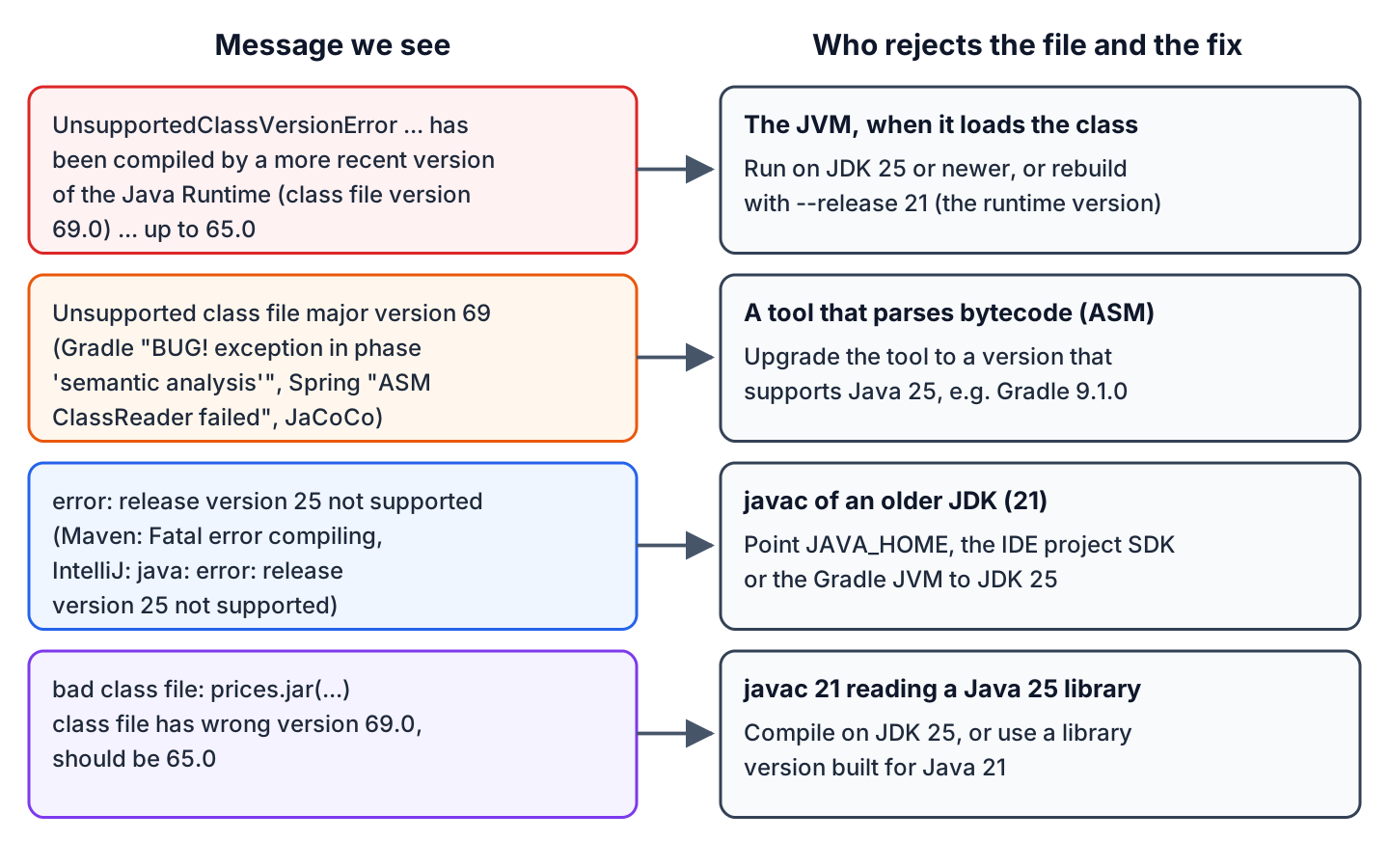
The message depends on which program reads the class file. The JVM throws UnsupportedClassVersionError, whereas build tools and frameworks parse class files with the ASM library, which throws IllegalArgumentException with “Unsupported class file major version 69”. The program that reports the error decides the fix.
1.1. UnsupportedClassVersionError When the App Starts
The JVM checks the major version before it loads a class. JDK 21 accepts major versions up to 65, so it rejects 69. For the main class, the java launcher adds a LinkageError line.
Error: LinkageError occurred while loading main class com.howtodoinjava.classversion.Hello
	java.lang.UnsupportedClassVersionError: com/howtodoinjava/classversion/Hello has been compiled by a more recent version of the Java Runtime (class file version 69.0), this version of the Java Runtime only recognizes class file versions up to 65.0
When the class comes from a dependency JAR, the app starts and fails later, on the first line that uses the class.
Exception in thread "main" java.lang.UnsupportedClassVersionError: fruit/Prices has been compiled by a more recent version of the Java Runtime (class file version 69.0), this version of the Java Runtime only recognizes class file versions up to 65.0
	at java.base/java.lang.ClassLoader.defineClass1(Native Method)
	at java.base/java.lang.ClassLoader.defineClass(ClassLoader.java:1027)
The two numbers identify the cause, because 69.0 is the version of the class file (Java 25) and 65.0 is the highest version the running JVM accepts (Java 21).
1.2. Unsupported Class File Major Version 69 in Gradle, Spring and JaCoCo
Here the JVM is new enough, but a library inside a tool is older than the class file. Gradle compiles build.gradle with Groovy, and the Groovy and ASM versions inside Gradle 8.14 can’t read the class files of the JDK 25 runtime itself, so the build fails before the first task. Compiling our code with –release 21 doesn’t help here, because Gradle fails on the JDK classes, not on ours.
FAILURE: Build failed with an exception.

* What went wrong:
BUG! exception in phase 'semantic analysis' in source unit '_BuildScript_' Unsupported class file major version 69
> Unsupported class file major version 69
Spring Framework scans packages for @Component classes with its own copy of ASM, and Spring Framework 6.1 doesn’t know major version 69.
org.springframework.beans.factory.BeanDefinitionStoreException: Incompatible class format in file [.../FruitService.class]: set system property 'spring.classformat.ignore' to 'true' if you mean to ignore such files during classpath scanning
Caused by: org.springframework.core.type.classreading.ClassFormatException: ASM ClassReader failed to parse class file - probably due to a new Java class file version that is not supported yet. Consider compiling with a lower '-target' or upgrade your framework version. Affected class: file [.../FruitService.class]
Caused by: java.lang.IllegalArgumentException: Unsupported class file major version 69
JaCoCo 0.8.12 prints a stack trace for every class it fails to instrument, the tests still pass, and the report goal fails the build.
java.lang.instrument.IllegalClassFormatException: Error while instrumenting com/howtodoinjava/classversion/PriceServiceTest with JaCoCo 0.8.12.202403310830/dbfb6f2.
...
Caused by: java.lang.IllegalArgumentException: Unsupported class file major version 69
...
[ERROR] Failed to execute goal org.jacoco:jacoco-maven-plugin:0.8.12:report (report) on project unsupported-class-file-version: An error has occurred in JaCoCo report generation. Error while creating report: Error while analyzing .../PriceService$PriceRepository.class with JaCoCo 0.8.12.202403310830/dbfb6f2. Unsupported class file major version 69 -> [Help 1]
“Unsupported class file major version 71” is the same problem with a Java 27 class file. For example, Spring Framework 6.2.6 on JDK 27 fails with IllegalArgumentException: Unsupported class file major version 71.
1.3. Release Version 25 Not Supported When Compiling
The compiler of JDK 21 knows release numbers up to 21, so a build that asks for release 25 stops before any class file exists. IntelliJ IDEA shows the same message as “java: error: release version 25 not supported”.
[ERROR] Failed to execute goal org.apache.maven.plugins:maven-compiler-plugin:3.16.0:compile (default-compile) on project unsupported-class-file-version: Fatal error compiling: error: release version 25 not supported -> [Help 1]With -source 25 -target 25, the message is “invalid source release: 25” instead. Both Maven variants have their own posts, release version not supported and invalid target release.
A fourth variant appears when javac from JDK 21 compiles against a JAR built for Java 25, and reports that the class file has the wrong version.
src/app/Main.java:1: error: cannot access Prices
  bad class file: prices.jar(/fruit/Prices.class)
    class file has wrong version 69.0, should be 65.0
    Please remove or make sure it appears in the correct subdirectory of the classpath.
2. Class File Major Versions Explained
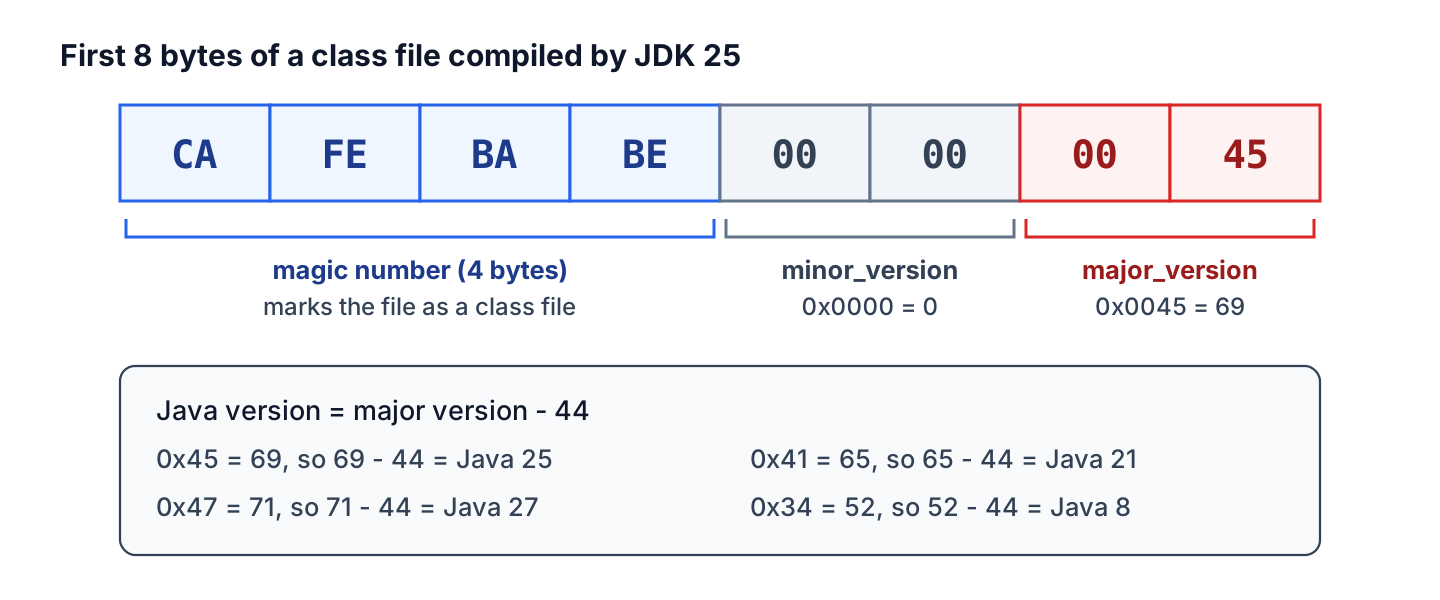
A class file starts with the magic number 0xCAFEBABE, followed by two bytes for minor_version and two bytes for major_version. The javac compiler writes the major version of the release it compiles for, and each Java release adds one.
A JVM accepts every major version up to its own, so JDK 25 runs Java 8 classes while JDK 21 refuses Java 25 classes. ASM knows only the versions that existed at its release.
2.1. Java Version to Class File Version Table
From Java 5 on, the Java version is the major version minus 44. The minor version is 0, except for classes compiled with preview features, which get 65535 (0xFFFF).
| Java version | Major version | Hex | Notes |
|---|---|---|---|
| Java 8 | 52 | 0x34 | LTS |
| Java 9 | 53 | 0x35 | |
| Java 10 | 54 | 0x36 | |
| Java 11 | 55 | 0x37 | LTS |
| Java 12 | 56 | 0x38 | |
| Java 13 | 57 | 0x39 | |
| Java 14 | 58 | 0x3A | |
| Java 15 | 59 | 0x3B | |
| Java 16 | 60 | 0x3C | |
| Java 17 | 61 | 0x3D | LTS |
| Java 18 | 62 | 0x3E | |
| Java 19 | 63 | 0x3F | |
| Java 20 | 64 | 0x40 | |
| Java 21 | 65 | 0x41 | LTS |
| Java 22 | 66 | 0x42 | |
| Java 23 | 67 | 0x43 | |
| Java 24 | 68 | 0x44 | |
| Java 25 | 69 | 0x45 | LTS |
| Java 26 | 70 | 0x46 | |
| Java 27 | 71 | 0x47 | Released September 2026 |
Since Java 20, the JDK has the same table in the enum ClassFileFormatVersion, and latest() returns the highest version the running JVM accepts. The features of each release are in our Java versions and features series.
int latest = ClassFileFormatVersion.latest().major();       // 69 on JDK 25, 65 on JDK 21
int java25 = ClassFileFormatVersion.RELEASE_25.major();     // 69
int java21 = ClassFileFormatVersion.RELEASE_21.major();     // 65
2.2. Reading the Version From a .class or .jar File
The javap tool prints the version with -v, also for a class inside a JAR. Without a JDK, the file and od commands of Linux and macOS read the header bytes.
javap -v target/classes/com/howtodoinjava/classversion/Hello.class | grep major    #   major version: 69
javap -v -cp app.jar com.howtodoinjava.classversion.Hello | grep major              #   major version: 69
file Hello.class                                                                    # Hello.class: compiled Java class data, version 69.0
od -An -tx1 -N8 Hello.class                                                         # ca fe ba be 00 00 00 45
unzip -p app.jar com/example/Hello.class | od -An -tx1 -N8                          # ca fe ba be 00 00 00 45
The javap tool also prints the bytecode of a class. In Java code, the version is two readUnsignedShort() calls after the magic number.
try (InputStream in = Files.newInputStream(Path.of("Hello.class"))) {
  DataInputStream data = new DataInputStream(in);
  int magic = data.readInt();                      // 0xCAFEBABE
  if (magic != 0xCAFEBABE) {
    throw new IllegalArgumentException("Not a class file, magic is 0x" + Integer.toHexString(magic));
  }
  int minor = data.readUnsignedShort();            // 0
  int major = data.readUnsignedShort();            // 69 (Java 25)
}
The ClassFileVersion record in the example project wraps that code and scans whole JARs to find the dependency that breaks a JDK 21 server.
ClassFileVersion hello = ClassFileVersion.read(Path.of("target/classes/com/howtodoinjava/classversion/Hello.class"));   // 69.0 (Java 25)
Map<String, ClassFileVersion> prices = ClassFileVersion.readJar(Path.of("prices.jar"));                                 // {fruit/Prices.class=69.0 (Java 25)}
String newest = ClassFileVersion.newest(prices).orElseThrow().getKey();                                                 // fruit/Prices.class
int supported = ClassFileVersion.highestSupportedByThisJvm();                                                            // 69 on JDK 25
The readJar() method skips META-INF/versions/, because a multi-release JAR keeps newer class files there on purpose and an older JVM never loads them.
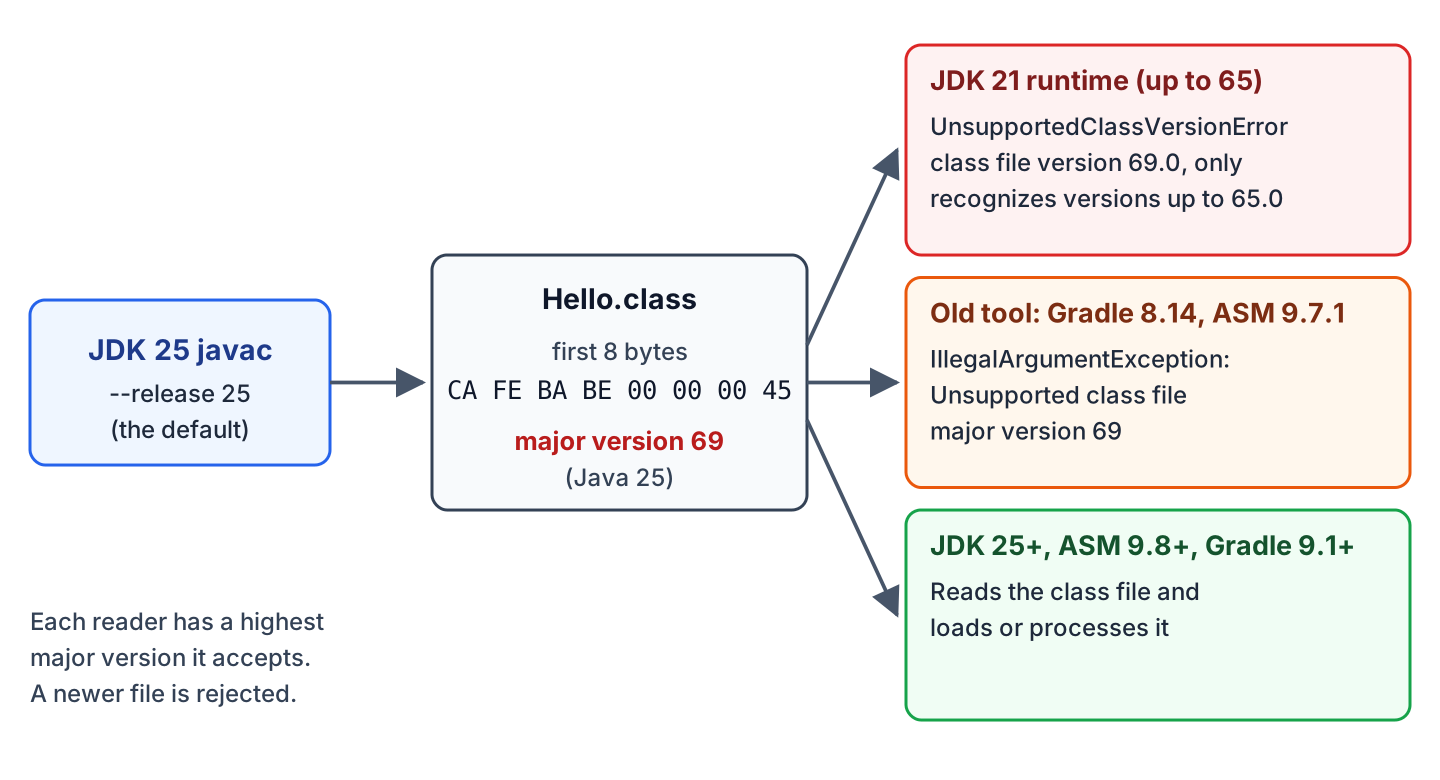
So there are two fixes. We either raise the limit of the program that reads the class (section 3 and section 6), or we lower the version of the class file (section 4 and section 5).
3. Run the App on a JDK That Is New Enough
When we control the runtime, the fix is to install OpenJDK 25 or newer wherever the app runs. After that, we check which JDK starts the app, because it is not always the one we installed.
3.1. JAVA_HOME and PATH Point to Different JDKs
The java command comes from the first JDK on PATH, whereas Maven and the Gradle wrapper use JAVA_HOME. When the two differ, Maven builds Java 25 classes and java -jar starts them on JDK 21.
echo $JAVA_HOME     # /opt/jdk25
java -version       # openjdk version "21.0.12.1" 2026-08-18
mvn -v              # Java version: 25.0.4.1, vendor: Eclipse Adoptium, runtime: /opt/jdk-25.0.4.1+1
which java          # /usr/lib/jvm/java-21-openjdk-amd64/bin/java
On Linux and macOS, we add export PATH=”$JAVA_HOME/bin:$PATH” to the shell profile. On Windows, where java lists every java.exe on the path, and we move %JAVA_HOME%\bin to the top of Path and open a new terminal.
A server with only a JRE has no javac or javap, which is one difference between JDK, JRE and JVM. There we read the version with file or od, as shown in section 2.2.
3.2. Docker Base Image With an Older JRE
In a container, the runtime is whatever the FROM line of the final image contains. A common mistake is a JAR built on JDK 25 with a runtime image that still says eclipse-temurin:21-jre.
$ docker run --rm fruit-old
Error: LinkageError occurred while loading main class com.howtodoinjava.classversion.Hello
	java.lang.UnsupportedClassVersionError: com/howtodoinjava/classversion/Hello has been compiled by a more recent version of the Java Runtime (class file version 69.0), this version of the Java Runtime only recognizes class file versions up to 65.0
The runtime image needs the same or a newer Java version than the build. In a multi-stage Dockerfile, both versions sit next to each other, so a mismatch is visible in review.
# Build stage: JDK 25 compiles the classes (major version 69)
FROM maven:3.9-eclipse-temurin-25 AS build
WORKDIR /src
COPY pom.xml .
COPY src ./src
RUN mvn -B -q package -DskipTests

# Runtime stage: the JRE must be 25 or newer to load major version 69
FROM eclipse-temurin:25-jre
COPY --from=build /src/target/unsupported-class-file-version-1.0.0.jar /app/app.jar
ENTRYPOINT ["java", "-cp", "/app/app.jar", "com.howtodoinjava.classversion.Hello"]
$ docker run --rm fruit-app
Hello from Java 25The official eclipse-temurin tags start with the Java version, so 25-jre stays on Java 25 when updates come out. For a full Spring Boot setup, see creating a Docker image for a Spring Boot app.
4. Compile for the Oldest Java Version We Run On
When the runtime has to stay on JDK 21, for example on a shared application server or for a library with Java 21 users, we build on JDK 25 with –release 21.
The javac –release option sets the language level and the class file version, and it compiles against the Java 21 API. The older -source 21 -target 21 skips the API check, so a call to IO.println(), which JEP 512 added in Java 25, compiles and fails at runtime.
$ javac --release 21 Greet.java
Greet.java:1: error: cannot find symbol
public class Greet { public static void main(String[] a){ IO.println("apple"); } }
                                                          ^
  symbol:   variable IO
  location: class Greet
1 error

$ javac -source 21 -target 21 Greet.java
warning: [options] location of system modules is not set in conjunction with -source 21
  not setting the location of system modules may lead to class files that cannot run on JDK 21
    --release 21 is recommended instead of -source 21 -target 21 because it sets the location of system modules automatically
1 warning

$ java Greet          # on JDK 21
Exception in thread "main" java.lang.NoClassDefFoundError: java/lang/IO
Use –release instead of -source and -target, because only –release catches calls to APIs that the target runtime doesn’t have.
4.1. Maven
In Maven, the maven.compiler.release property sets –release for the maven-compiler-plugin. With the Spring Boot parent POM, we set java.version, and the parent copies it into maven.compiler.release.
<properties>
  <maven.compiler.release>21</maven.compiler.release>
</properties>
$ javap -v target/classes/com/howtodoinjava/classversion/Hello.class | grep major
major version: 65
$ java -cp target/unsupported-class-file-version-1.0.0.jar com.howtodoinjava.classversion.Hello
Hello from Java 21The release can’t be higher than the JDK that runs Maven, so the example project, which compiles for release 25, checks the JDK before compiling with the requireJavaVersion rule of the Maven Enforcer Plugin. More options are in setting the Java version in Maven.
<plugin>
  <groupId>org.apache.maven.plugins</groupId>
  <artifactId>maven-enforcer-plugin</artifactId>
  <version>3.6.3</version>
  <executions>
    <execution>
      <id>require-jdk-25</id>
      <goals>
        <goal>enforce</goal>
      </goals>
      <configuration>
        <rules>
          <requireJavaVersion>
            <version>[25,)</version>
            <message>Build this project with JDK 25 or newer (JAVA_HOME points to an older JDK).</message>
          </requireJavaVersion>
        </rules>
      </configuration>
    </execution>
  </executions>
</plugin>
[ERROR] Rule 0: org.apache.maven.enforcer.rules.version.RequireJavaVersion failed with message:
[ERROR] Build this project with JDK 25 or newer (JAVA_HOME points to an older JDK).4.2. Gradle Toolchains
Gradle separates the JDK that runs Gradle from the JDK that compiles the code. A Java toolchain picks the compiler JDK, and options.release sets –release. The following build compiles with JDK 25 and writes Java 21 class files (major version 65).
plugins {
    id 'java'
}

java {
    toolchain {
        languageVersion = JavaLanguageVersion.of(25)
    }
}

tasks.withType(JavaCompile).configureEach {
    options.release = 21
}
plugins {
java
}
java {
toolchain {
languageVersion = JavaLanguageVersion.of(25)
}
}
tasks.withType<JavaCompile>().configureEach {
options.release = 21
}Without Java 25 features, JavaLanguageVersion.of(21) alone gives the same class files. Gradle finds installed JDKs in the common locations, and org.gradle.java.installations.paths adds other folders.
5. Set the JDK in IntelliJ IDEA
IntelliJ IDEA keeps its own JDK settings, so “java: error: release version 25 not supported” can appear in the IDE while mvn in the terminal works. We reload the Maven or Gradle project first, and if the error stays, we check these settings.
- In File > Project Structure > Project, the SDK must be JDK 25 or newer, and the Language level must not be higher than the SDK.
- In File > Project Structure > Modules, each module can override the language level and, on the Dependencies tab, the SDK.
- In Settings > Build, Execution, Deployment > Compiler > Java Compiler, the project and per-module bytecode versions must not be higher than the runtime.
- In Settings > Build, Execution, Deployment > Build Tools > Gradle, the Gradle JVM runs Gradle itself, so Gradle 8.14 with a Gradle JVM of 25 gives the error from section 1.2.
- In Settings > Build, Execution, Deployment > Build Tools > Maven > Runner, the JRE runs Maven builds started from the IDE.
The JetBrains docs describe the project SDK and the Gradle JVM in detail, and our post on Maven projects in IntelliJ IDEA covers the general setup.
6. Upgrade the Tool That Reads the Bytecode
When the message is “Unsupported class file major version 69” without UnsupportedClassVersionError, the JVM is fine and a tool is too old. Compiling with –release 21 would compile for Java 21 only because of one outdated plugin, so we upgrade the tool. Most of these tools depend on ASM, and ASM 9.8 added Java 25 in March 2025.
The Gradle rows come from the Gradle compatibility matrix, and the last column shows the latest stable releases in October 2026.
| Tool | Reads Java 25 (69) from | Reads Java 27 (71) from | Latest |
|---|---|---|---|
| Gradle (running Gradle and toolchains) | 9.1.0 | 9.8.0 | 9.8.0 |
| ASM | 9.8 | 9.10 | 9.10.1 |
| Spring Framework | 6.2.5 (Spring Boot 3.4.4) | 6.2.13 or 7.0.0 (Spring Boot 3.5.8 or 4.0.0) | 7.0.9 (Spring Boot 4.1.1) |
| JaCoCo | 0.8.14 (0.8.13 experimental) | 0.8.16 snapshot (0.8.15 experimental) | 0.8.15 |
| Mockito (Byte Buddy) | 5.18.0 (Byte Buddy 1.17.5) | 5.18.0 | 5.24.0 |
| Lombok | 1.18.40 | 1.18.48 | 1.18.48 |
| Groovy | 4.0.27 or 5.0.0 | 4.0.33 or 5.0.8 | 6.0.0 |
The other rows follow the release notes of JaCoCo, Lombok, Byte Buddy and Groovy 5. The Spring Framework versions page lists JDK 17 to 25 for 6.2 without a patch number, so the table shows the first 6.2.x releases that read the new class files.
6.1. Gradle
Gradle runs on JAVA_HOME (or the Gradle JVM of the IDE), and Gradle 8.14 runs only up to Java 24. So we upgrade the Gradle wrapper, which downloads the new version on the next build.
./gradlew wrapper --gradle-version 9.8.0     # updates gradle/wrapper/gradle-wrapper.properties
./gradlew build # Downloading https://services.gradle.org/distributions/gradle-9.8.0-bin.zip ... BUILD SUCCESSFULdistributionUrl=https\://services.gradle.org/distributions/gradle-9.8.0-bin.zipIf the old wrapper can’t start on JDK 25, we run the wrapper task once with JAVA_HOME set to JDK 21, or edit distributionUrl by hand. A script that calls a system-wide gradle instead of ./gradlew needs that installation upgraded too, as our Gradle tutorial explains for the wrapper.
6.2. Spring Framework and Spring Boot
Spring Framework 6.2.5 is the first version that scans Java 25 classes, and Spring Boot 3.4.4 is the first Spring Boot release that brings it. On a new project we use Spring Boot 4.1.1, which reads Java 25 and Java 27 classes.
<parent>
  <groupId>org.springframework.boot</groupId>
  <artifactId>spring-boot-starter-parent</artifactId>
  <version>4.1.1</version>
</parent>

<properties>
  <java.version>25</java.version>
</properties>
:: Spring Boot :: (v4.1.1)
... Started FruitApp in 1.05 seconds (process running for 1.524)
FruitService bean: FruitServiceThe system property spring.classformat.ignore=true, which the Spring error suggests, only skips the class during scanning. Our @Component would be missing from the context, so the property is no fix for our own code.
6.3. JaCoCo, Mockito and Lombok
The versions of test and build plugins often sit in a parent POM or a shared build file that was not updated during the JDK upgrade. We set current versions in the pom.xml.
<!-- dependencies -->
<dependency>
  <groupId>org.mockito</groupId>
  <artifactId>mockito-core</artifactId>
  <version>5.24.0</version>
  <scope>test</scope>
</dependency>
<dependency>
  <groupId>org.projectlombok</groupId>
  <artifactId>lombok</artifactId>
  <version>1.18.48</version>
  <scope>provided</scope>
</dependency>

<!-- build/plugins -->
<plugin>
  <groupId>org.jacoco</groupId>
  <artifactId>jacoco-maven-plugin</artifactId>
  <version>0.8.15</version>
</plugin>
An old Mockito fails with a different message. Mockito creates mocks with Byte Buddy, and Byte Buddy 1.15.11 (in Mockito 5.17.0) rejects JDK 25 and reports it inside a long MockitoException.
Exception in thread "main" org.mockito.exceptions.base.MockitoException:
Mockito cannot mock this class: class com.howtodoinjava.classversion.PriceRepository.
...
Caused by: java.lang.IllegalArgumentException: Java 25 (69) is not supported by the current version of Byte Buddy which officially supports Java 24 (68) - update Byte Buddy or set net.bytebuddy.experimental as a VM property
The Byte Buddy version that Maven resolves decides the outcome. For example, AssertJ 3.27.7 depends on Byte Buddy 1.18.3, so with AssertJ declared first, an old Mockito works, and mvn dependency:tree -Dincludes=net.bytebuddy shows the resolved version. The VM property -Dnet.bytebuddy.experimental=true is a temporary workaround, and Mockito 5.18.0 or newer is the fix.
Lombok runs inside javac, so an old Lombok breaks on a new compiler. Lombok 1.18.36 on JDK 25 fails with ExceptionInInitializerError caused by NoSuchFieldException: com.sun.tools.javac.code.TypeTag :: UNKNOWN, much like the NoSuchFieldError JCImport case. See also Could not initialize plugin MockMaker and JaCoCo with JUnit 5.
The maven-compiler-plugin 3.14.0 bundled an old ASM and could fail with “Unsupported class file major version 69” on JDK 25. The issue was fixed in 3.14.1, and the example project uses 3.16.0.
7. Example Project
The example project is a Maven project built with JDK 25 (Temurin 25.0.4.1) and Maven 3.9.16, so all its classes have major version 69. It uses ASM 9.10.1, JaCoCo 0.8.15, Mockito 5.24.0, JUnit 6.1.3 and AssertJ 3.27.7.
- ClassFileVersionTest reads the version of the compiled classes and checks the table from Java 8 to Java 25 against ClassFileFormatVersion.
- OldAsmTest loads ASM 9.7.1 in a separate class loader and asserts “Unsupported class file major version 69”, while ASM 9.10.1 reads the same file.
- PriceServiceTest mocks a Java 25 class with Mockito.
- OlderRuntimeTest starts Hello on JDK 21 and asserts the UnsupportedClassVersionError, when the environment variable JDK21_HOME is set.
JDK21_HOME=/usr/lib/jvm/java-21-openjdk-amd64 mvn verify     # Tests run: 26, Failures: 0, Errors: 0, Skipped: 0
mvn verify -Djacoco.version=0.8.12                           # BUILD FAILURE ... Unsupported class file major version 69
java -cp target/classes com.howtodoinjava.classversion.VersionCheck \
  target/classes/com/howtodoinjava/classversion/Hello.class target/unsupported-class-file-version-1.0.0.jar
Running on Java 25, accepts class files up to major version 69
target/classes/com/howtodoinjava/classversion/Hello.class: 69.0 (Java 25) -> OK
target/unsupported-class-file-version-1.0.0.jar: 5 classes, newest 69.0 (Java 25) in com/howtodoinjava/classversion/ClassFileVersion.class8. Unsupported Class File Major Version FAQs
8.1. What Java Version Is Class File Version 69?
Class file version 69 is Java 25. Version 65 is Java 21, 70 is Java 26 and 71 is Java 27, and the full list is in section 2.1.
8.2. Can Java 21 Run Classes Compiled With Java 25?
No. The JDK 21 JVM accepts class files up to major version 65 and throws UnsupportedClassVersionError for 69. We either run the app on JDK 25 or newer, or recompile it with –release 21, which works only when the code uses no Java 22 to Java 25 features or APIs.
9. Conclusion
“Unsupported class file major version 69” and “class file version 69.0” both mean that something older than Java 25 read a Java 25 class file. The number is the Java version plus 44, and javap -v shows it for any class.
When the JVM complains, we run the app on a newer JDK and check JAVA_HOME, PATH and the Docker base image, or we compile with –release for the older runtime. When a tool complains, the JVM is fine, so we upgrade the tool and keep the Java 25 build.
10. References
- Java Virtual Machine Specification, Chapter 4. The class File Format
- ClassFileFormatVersion Javadoc
- UnsupportedClassVersionError Javadoc
- javac command reference
- Gradle compatibility matrix
- Gradle toolchains for JVM projects
- Maven Compiler Plugin, Setting the –release of the Java Compiler
- ASM versions
- JaCoCo change history
- Byte Buddy release notes
- Spring Framework versions
Happy Learning !!
