
Kubernetes is a system that runs our containers on a group of machines and keeps them running in the state we describe in YAML files. We tell it “run 3 copies of the greeting-api image and give them one address”, and Kubernetes starts the containers, replaces the ones that crash, spreads traffic across them and swaps them for a new version without downtime.
We use Kubernetes when an app runs as several containers on more than one server, for example a REST API that must stay up while its database restarts or a new version ships.
The following example lists the kubectl commands that create a local cluster, deploy the API, and scale, heal, restart and update it.
kind create cluster --name greeting --config kind/kind-config.yaml   # 3 nodes: 1 control plane, 2 workers
kubectl apply -f k8s/                                    # creates the ConfigMap, Secret, StatefulSet, Deployment, Services, Ingress
kubectl get pods                                         # greeting-api-58d4bcbbc5-pr22t   1/1   Running
kubectl scale deployment greeting-api --replicas=3       # 3 API pods
kubectl delete pod greeting-api-7844d44c9d-n2rqp         # a new pod greeting-api-7844d44c9d-xjqzf replaces it
kubectl rollout restart deployment greeting-api          # pods restart and read the changed ConfigMap
kubectl set image deployment/greeting-api greeting-api=greeting-api:1.1   # rolling update to 1.1.0
kubectl rollout undo deployment greeting-api             # back to 1.0.0
Notice that we never start a container ourselves. Each command changes the desired state, and Kubernetes creates or replaces the pods to match it.
This Kubernetes for beginners guide deploys a small Spring Boot API with a PostgreSQL database to a local cluster and shows each Kubernetes building block with its YAML, the kubectl command that applies it, and the real output for nodes, pods, Deployment, Service, Ingress, ConfigMap, Secret, volumes and StatefulSet.
1. What Is Kubernetes?
A container is our application packaged with everything it needs to run, such as a Spring Boot jar plus a Java runtime in one image. Docker runs a container on one machine. That is enough on a laptop, but in production a single container leaves several problems to us.
| Problem | With docker run on one server | With Kubernetes |
|---|---|---|
| The container crashes | It stays down until someone restarts it | Kubernetes restarts it or starts a new one |
| The server dies | The application is down | Pods are started on another node |
| More users arrive | We start more containers by hand | kubectl scale or an autoscaler adds pods |
| A new version ships | Stop old, start new, users see errors | A rolling update replaces pods one by one |
| Settings and passwords | Baked into the image or the server | ConfigMap and Secret objects, injected at start |
| Database files | Lost when the container is removed | A PersistentVolumeClaim keeps them |
Kubernetes works with desired state, which means we describe what should exist, and its controllers keep changing the cluster until it matches the description. We never say “start a container on server 2”. We say “there should be 3 pods with this label”, and Kubernetes decides where and how.
1.1. Kubernetes Architecture
A Kubernetes cluster is a group of machines called nodes. The control plane stores the desired state and decides what runs where. The worker nodes run our containers, which Kubernetes groups in pods.
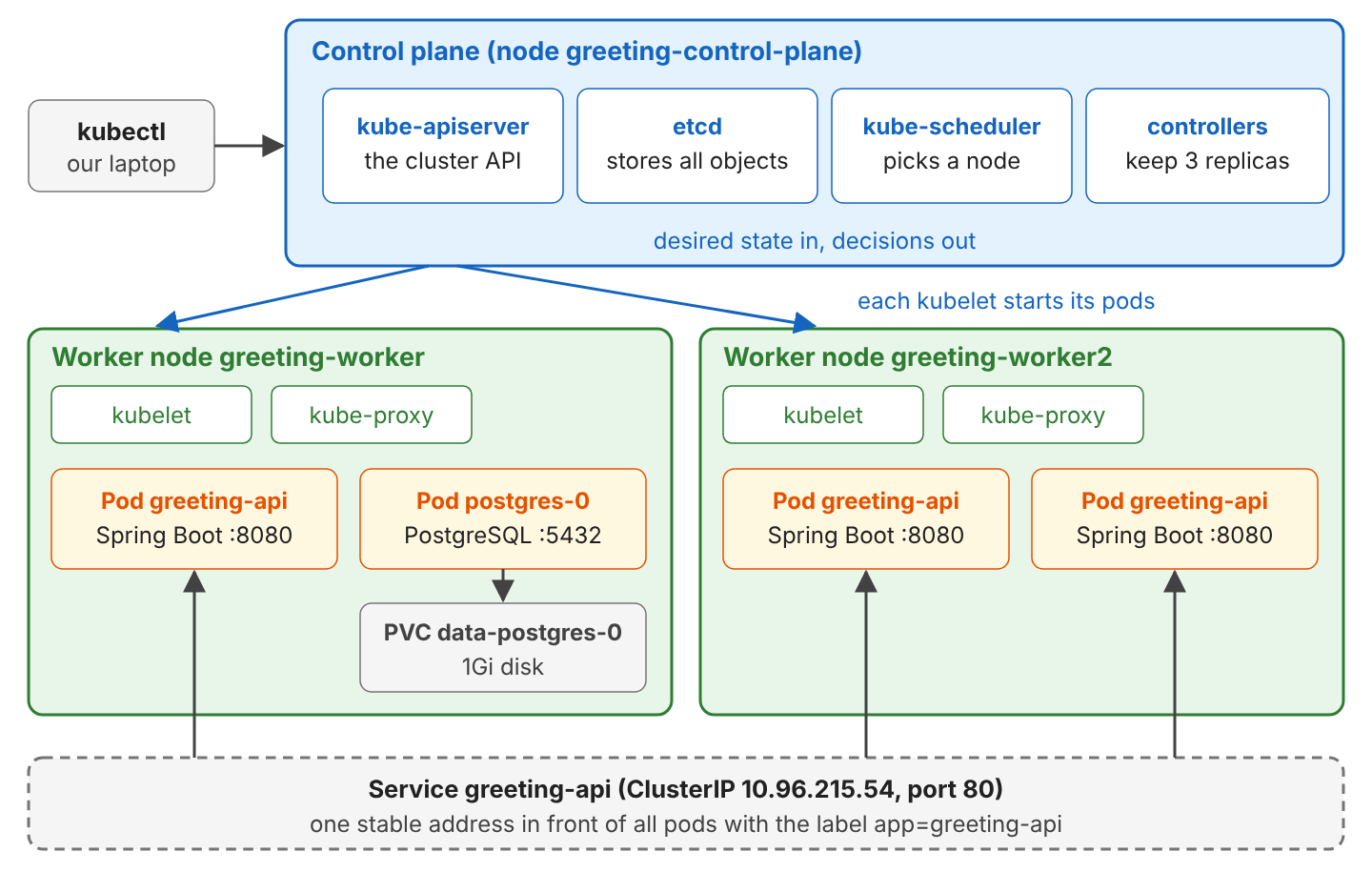
Each part has one job.
- kube-apiserver is the REST API of the cluster. kubectl and every other component talk only to it.
- The etcd store is a key-value database that stores every object we create.
- The kube-scheduler component picks a node for each new pod, based on free CPU and memory.
- The controllers (inside kube-controller-manager) compare desired and actual state, for example “3 replicas wanted, 2 running, so create one”.
- The kubelet is an agent on every node that starts and watches the containers of its pods.
- The kube-proxy component programs the network rules on each node so that a Service address reaches the pods.
1.2. Kubernetes Components at a Glance
A pod is the smallest unit Kubernetes runs. It consists of one or more containers that share an IP address and volumes. We rarely create pods by hand. We create higher-level objects, and they create the pods for us.
| Component | What it does | YAML kind | kubectl command |
|---|---|---|---|
| Node | A machine (VM or server) that runs pods | Node (created by the cluster) | kubectl get nodes |
| Pod | One running instance of our container | Pod | kubectl get pods, kubectl logs, kubectl describe pod |
| Deployment | Keeps N identical, stateless pods running and updates them | Deployment | kubectl scale, kubectl set image, kubectl rollout |
| StatefulSet | Pods with fixed names and their own disk, for databases | StatefulSet | kubectl get statefulset |
| Service | One stable IP and DNS name for a set of pods | Service | kubectl get service, kubectl port-forward |
| Ingress | HTTP routing from outside the cluster to Services | Ingress | kubectl get ingress |
| ConfigMap | Plain settings passed to pods | ConfigMap | kubectl get configmap -o yaml |
| Secret | Passwords and keys passed to pods | Secret | kubectl get secret |
| Volume claim | A request for disk space that outlives the pod | PersistentVolumeClaim | kubectl get pvc |
Every object has the same four top-level fields in YAML, namely apiVersion, kind, metadata (name, labels) and spec (the desired state). The command kubectl apply -f file.yaml sends the file to the API server.
2. Deploying a Spring Boot API to Kubernetes
Our example is greeting-api, a Spring Boot 4.1.1 REST API on Java 25. GET /api/greeting returns a message from a ConfigMap, rejects calls without the API key from a Secret, and counts visits in PostgreSQL 18.6, which runs as a StatefulSet with its own disk.
The complete project contains the app, the Dockerfile, the manifests in k8s/ and 3 JUnit tests that check the API against PostgreSQL with Testcontainers. The cluster ran on kind 0.33.0 with Kubernetes 1.37.0 and kubectl 1.37.1.
2.1. Creating a Local Cluster With kind
kind (Kubernetes in Docker) runs each Kubernetes node as a Docker container, so a full multi-node cluster runs on a laptop. Besides Docker, we need two command-line tools, kubectl (the Kubernetes client) and kind.
curl -LO https://dl.k8s.io/release/v1.37.1/bin/linux/amd64/kubectl
chmod +x kubectl && sudo mv kubectl /usr/local/bin/
go install sigs.k8s.io/kind@v0.33.0      # or download the binary from the kind release page

kubectl version --client                 # Client Version: v1.37.1
kind version                             # kind v0.33.0 go1.24.7 linux/amd64
On macOS and Windows, brew install kubectl kind and choco install kubernetes-cli kind install the same tools. Our cluster has one control plane and two workers, and the extra port mapping sends port 8080 on our machine to port 80 of the control-plane node, where the ingress controller will listen in section 2.8.
kind: Cluster
apiVersion: kind.x-k8s.io/v1alpha4
nodes:
  - role: control-plane
    kubeadmConfigPatches:
      - |
        kind: InitConfiguration
        nodeRegistration:
          kubeletExtraArgs:
            node-labels: "ingress-ready=true"
    extraPortMappings:
      - containerPort: 80
        hostPort: 8080
        protocol: TCP
  - role: worker
  - role: worker
kind create cluster --name greeting --config kind/kind-config.yaml
kubectl get nodesCreating cluster "greeting" ...
...
Set kubectl context to "kind-greeting"
NAME STATUS ROLES AGE VERSION
greeting-control-plane Ready control-plane 32m v1.37.0
greeting-worker Ready <none> 32m v1.37.0
greeting-worker2 Ready <none> 32m v1.37.0Kubernetes 1.35 and later refuse to start on Linux hosts that still use cgroup v1. Docker Desktop and current Linux distributions use cgroup v2. On an older host, use kind/kind-config-cgroupv1.yaml from the project, which sets failCgroupV1: false.
2.2. Building the Spring Boot Image
The application code knows nothing about Kubernetes. It reads two properties and stores one row per visit.
@ConfigurationProperties(prefix = "greeting")
public record GreetingProperties(String message, String apiKey) { }

@GetMapping("/api/greeting")
public ResponseEntity<?> greeting(@RequestHeader(name = "X-API-Key", required = false) String apiKey) {
  if (apiKey == null || !apiKey.equals(properties.apiKey())) {
    return ResponseEntity.status(HttpStatus.UNAUTHORIZED).body(Map.of("error", "missing or wrong X-API-Key"));
  }
  long total = visits.recordVisit(pod);    // insert into visit, then count(*)
  return ResponseEntity.ok(new GreetingResponse(properties.message(), total, pod, version));
}
The field pod holds the host name, which Kubernetes sets to the pod name, so every response tells us which pod answered. Spring Boot’s relaxed binding maps the environment variable GREETING_MESSAGE to greeting.message, so the pods can override every value in application.properties without code changes.
greeting.message=Hello from my laptop
greeting.api-key=local-key
spring.datasource.url=jdbc:postgresql://localhost:5432/greetings
spring.datasource.username=greeting
spring.datasource.password=greeting
management.endpoints.web.exposure.include=health
management.endpoint.health.probes.enabled=true
The image copies the jar onto a Java 25 runtime, as in any Docker image for a Spring Boot app.
FROM eclipse-temurin:25-jre
WORKDIR /app
COPY target/greeting-api.jar app.jar
EXPOSE 8080
ENTRYPOINT ["java", "-jar", "app.jar"]
A kind cluster cannot see the images on our machine, so kind load copies the image into every node.
mvn -DskipTests package
docker build -t greeting-api:1.0 .
kind load docker-image greeting-api:1.0 --name greeting
Image: "greeting-api:1.0" with ID "sha256:03d380d6..." not yet present on node "greeting-worker", loading...
Image: "greeting-api:1.0" with ID "sha256:03d380d6..." not yet present on node "greeting-control-plane", loading...
Image: "greeting-api:1.0" with ID "sha256:03d380d6..." not yet present on node "greeting-worker2", loading...2.3. Passing Configuration With a ConfigMap and a Secret
A ConfigMap holds plain settings as key-value pairs, so the same image can run with a different message in test and production.
apiVersion: v1
kind: ConfigMap
metadata:
  name: greeting-config
data:
  GREETING_MESSAGE: "Hello from Kubernetes"
A Secret has the same shape but is meant for passwords and keys. Under stringData we write plain text, and Kubernetes stores it base64-encoded under data.
apiVersion: v1
kind: Secret
metadata:
  name: greeting-secret
type: Opaque
stringData:
  api-key: "k8s-demo-key"
  db-password: "greeting-pass"
kubectl apply -f k8s/configmap.yaml -f k8s/secret.yaml
kubectl get secret greeting-secret -o jsonpath='{.data.api-key}' # azhzLWRlbW8ta2V5
kubectl get secret greeting-secret -o jsonpath='{.data.api-key}' | base64 -d # k8s-demo-keyBase64 is an encoding, not encryption, so anyone who can read the Secret can decode it. Section 3.1 shows what to do about that. Neither object does anything alone. A pod reads them as environment variables, which section 2.5 sets up.
2.4. Running PostgreSQL as a StatefulSet With a Volume
A container’s file system is deleted with the container. A database needs a disk that survives, which in Kubernetes is a PersistentVolumeClaim (PVC). A PVC is a request such as “1Gi, mounted by one node”, and the cluster fulfills it with a PersistentVolume (PV). In kind, the built-in standard storage class creates the PV as a folder on the node.
A StatefulSet runs pods that need such an identity. Its pods have fixed names (postgres-0, postgres-1), and volumeClaimTemplates gives each of them its own PVC.
apiVersion: apps/v1
kind: StatefulSet
metadata:
  name: postgres
spec:
  serviceName: postgres
  replicas: 1
  selector:
    matchLabels:
      app: postgres
  template:
    metadata:
      labels:
        app: postgres
    spec:
      containers:
        - name: postgres
          image: postgres:18.6
          env:
            - name: POSTGRES_DB
              value: greetings
            - name: POSTGRES_USER
              value: greeting
            - name: POSTGRES_PASSWORD
              valueFrom:
                secretKeyRef:            # value from the Secret
                  name: greeting-secret
                  key: db-password
          volumeMounts:
            - name: data
              mountPath: /var/lib/postgresql
  volumeClaimTemplates:
    - metadata:
        name: data
      spec:
        accessModes: ["ReadWriteOnce"]
        resources:
          requests:
            storage: 1Gi
The same file defines a headless Service (clusterIP: None) named postgres, so the API can connect to postgres:5432 by name.
kubectl apply -f k8s/postgres.yaml
kubectl get statefulset,pods,pvc
NAME READY AGE
statefulset.apps/postgres 1/1 20s
NAME READY STATUS RESTARTS AGE
pod/postgres-0 1/1 Running 0 20s
NAME STATUS VOLUME CAPACITY ACCESS MODES STORAGECLASS
persistentvolumeclaim/data-postgres-0 Bound pvc-ce9b3507-942c-4ce5-9552-c0a3f78c0a8f 1Gi RWO standardThe PVC name is the template name plus the pod name, for example data-postgres-0. When the pod is deleted, the StatefulSet starts a new pod with the same name and attaches the same PVC, so the data stays. We tested it after 15 visits.
kubectl delete pod postgres-0                                  # pod "postgres-0" deleted
kubectl get pods -l app=postgres                               # postgres-0   1/1   Running   16s
curl -s localhost:8080/api/greeting -H 'X-API-Key: k8s-demo-key'
# {"message":"Namaste from Kubernetes","visits":16,"pod":"greeting-api-649c549d96-sml9k","version":"1.1.0"}
The count went on from 15 to 16 because the new postgres-0 mounted the same volume.
2.5. Running the API With a Deployment
A Deployment runs a number of identical pods. Its template is the pod description, and the selector tells the Deployment which pods belong to it by their label app: greeting-api.
apiVersion: apps/v1
kind: Deployment
metadata:
  name: greeting-api
spec:
  replicas: 2
  selector:
    matchLabels:
      app: greeting-api
  template:
    metadata:
      labels:
        app: greeting-api
    spec:
      containers:
        - name: greeting-api
          image: greeting-api:1.0
          imagePullPolicy: IfNotPresent     # use the image loaded by kind
          ports:
            - containerPort: 8080
The env section connects the pod to the ConfigMap and the Secret, and each variable names the object and the key.
          env:
            - name: GREETING_MESSAGE
              valueFrom:
                configMapKeyRef:
                  name: greeting-config
                  key: GREETING_MESSAGE
            - name: GREETING_API_KEY
              valueFrom:
                secretKeyRef:
                  name: greeting-secret
                  key: api-key
            - name: SPRING_DATASOURCE_URL
              value: jdbc:postgresql://postgres:5432/greetings
            - name: SPRING_DATASOURCE_PASSWORD
              valueFrom:
                secretKeyRef:
                  name: greeting-secret
                  key: db-password
Probes tell Kubernetes how the app is doing. Spring Boot Actuator serves them at /actuator/health/liveness and /actuator/health/readiness (see Spring Boot Actuator).
          startupProbe:                 # gives the JVM up to 150 s to start
            httpGet:
              path: /actuator/health/liveness
              port: 8080
            periodSeconds: 5
            failureThreshold: 30
          readinessProbe:               # ready to receive traffic from the Service?
            httpGet:
              path: /actuator/health/readiness
              port: 8080
            periodSeconds: 5
          livenessProbe:                # still alive? if not, restart the container
            httpGet:
              path: /actuator/health/liveness
              port: 8080
            periodSeconds: 10
          lifecycle:
            preStop:                    # keep serving while the Service and Ingress drop this pod
              sleep:
                seconds: 10
          resources:
            requests:
              cpu: 100m
              memory: 256Mi
            limits:
              memory: 512Mi
The three probes answer different questions.
| Probe | Question | When it fails |
|---|---|---|
| startupProbe | Has the app finished starting? | The other probes wait; after 30 failures the container restarts |
| readinessProbe | Can it take requests now? | The pod is removed from the Service, no restart |
| livenessProbe | Is it still working? | The container is restarted |
The requests value is what the scheduler reserves on a node (100m is one tenth of a CPU core), whereas limits.memory is the hard cap, so Kubernetes kills a container that uses more. We explain the preStop hook in section 2.12.
kubectl apply -f k8s/deployment.yaml
kubectl get deployment,replicaset,pods
NAME READY UP-TO-DATE AVAILABLE AGE
deployment.apps/greeting-api 2/2 2 2 4m32s
NAME DESIRED CURRENT READY AGE
replicaset.apps/greeting-api-58d4bcbbc5 2 2 2 4m32s
NAME READY STATUS RESTARTS AGE
pod/greeting-api-58d4bcbbc5-pr22t 1/1 Running 0 4m32s
pod/greeting-api-58d4bcbbc5-xnpkd 1/1 Running 1 (4m17s ago) 4m32s
pod/postgres-0 1/1 Running 0 4m32sThe Deployment created a ReplicaSet, and the ReplicaSet created the pods. That is why pod names have two random parts: the ReplicaSet hash 58d4bcbbc5 and a pod suffix pr22t. Every change to the pod template creates a new ReplicaSet with a new hash, so the next sections show other hashes. The one restart of xnpkd is explained in section 2.10.
2.6. Checking Pods With get, describe and logs
Three commands find the cause of most pod problems. The first one, kubectl get pods -o wide, adds the pod IP and the node.
NAME                            READY   STATUS    RESTARTS   AGE     IP           NODE
greeting-api-7844d44c9d-n2rqp   1/1     Running   0          60s     10.244.2.5   greeting-worker
greeting-api-7844d44c9d-xflml   1/1     Running   0          60s     10.244.1.3   greeting-worker2
postgres-0                      1/1     Running   0          2m49s   10.244.2.3   greeting-worker
The command kubectl describe pod shows the full pod with its probes, environment and events. The events at the end are the first place to look when a pod does not start.
Node:             greeting-worker/172.18.0.2
Controlled By:    ReplicaSet/greeting-api-7844d44c9d
    Environment:
      GREETING_MESSAGE:            <set to the key 'GREETING_MESSAGE' of config map 'greeting-config'>  Optional: false
      GREETING_API_KEY:            <set to the key 'api-key' in secret 'greeting-secret'>               Optional: false
      SPRING_DATASOURCE_URL:       jdbc:postgresql://postgres:5432/greetings
Events:
  Type     Reason     Age                From               Message
  ----     ------     ----               ----               -------
  Normal   Scheduled  63s                default-scheduler  Successfully assigned default/greeting-api-7844d44c9d-n2rqp to greeting-worker
  Normal   Started    62s                kubelet            spec.containers{greeting-api}: Container started
  Warning  Unhealthy  33s (x6 over 58s)  kubelet            spec.containers{greeting-api}: Startup probe failed: Get "http://10.244.2.5:8080/actuator/health/liveness": dial tcp 10.244.2.5:8080: connect: connection refused
The Startup probe failed warnings are expected here, because Spring Boot needed 27 seconds to start on our small 2-CPU sandbox machine, and the startup probe waited for it. kubectl logs prints the console output of the container.
kubectl logs greeting-api-7844d44c9d-n2rqp | grep Started
# ... c.h.k8s.GreetingApiApplication : Started GreetingApiApplication in 27.011 seconds (process running for 32.782)
kubectl logs deployment/greeting-api --tail=20     # Found 2 pods, using pod/greeting-api-...
kubectl logs <pod> --previous                      # log of the container before its last restart
2.7. Reaching the Pods Through a Service
Pod IPs change every time a pod is replaced. A Service gives the pods one stable virtual IP and a DNS name, and spreads requests across all ready pods that match its selector.
apiVersion: v1
kind: Service
metadata:
  name: greeting-api
spec:
  type: ClusterIP
  selector:
    app: greeting-api
  ports:
    - port: 80            # port of the Service
      targetPort: 8080    # port of the container
kubectl apply -f k8s/service.yaml
kubectl get service greeting-api # greeting-api ClusterIP 10.96.215.54 <none> 80/TCPA ClusterIP address works only inside the cluster, where other pods reach the API at http://greeting-api by name. From our machine, kubectl port-forward opens a tunnel for testing.
kubectl port-forward service/greeting-api 8081:80        # keep it running in a second terminal

curl -s localhost:8081/api/greeting -H 'X-API-Key: k8s-demo-key'
# {"message":"Hello from Kubernetes","visits":1,"pod":"greeting-api-7844d44c9d-n2rqp","version":"1.0.0"}
curl -s localhost:8081/api/greeting -H 'X-API-Key: k8s-demo-key'
# {"message":"Hello from Kubernetes","visits":2,"pod":"greeting-api-7844d44c9d-n2rqp","version":"1.0.0"}
curl -s -i localhost:8081/api/greeting
# HTTP/1.1 401
# {"error":"missing or wrong X-API-Key"}
The message came from the ConfigMap and the key from the Secret. Both answers came from the same pod, because port-forward picks one pod and stays with it, as section 3.4 explains.
2.8. Routing Outside Traffic With an Ingress
An Ingress is a set of HTTP routing rules, such as “send /api to the Service greeting-api“. The rules do nothing without an ingress controller, a reverse proxy that runs as a pod and reads them. We use ingress-nginx, the controller most Ingress examples are written for. (The current kind docs suggest cloud-provider-kind instead, which handles Ingress by itself.)
kubectl apply -f https://raw.githubusercontent.com/kubernetes/ingress-nginx/controller-v1.15.1/deploy/static/provider/kind/deploy.yaml
kubectl patch deployment ingress-nginx-controller -n ingress-nginx \
  -p '{"spec":{"template":{"spec":{"nodeSelector":{"ingress-ready":"true"}}}}}'
kubectl wait -n ingress-nginx --for=condition=ready pod -l app.kubernetes.io/component=controller --timeout=180s
The patch is needed on a cluster with workers. The v1.15.1 kind manifest has no nodeSelector, and the controller started on greeting-worker2, where port 80 is not mapped to our machine (curl got no answer, status 000). The patch moves it to the node labeled ingress-ready=true.
NAME                                       READY   STATUS    RESTARTS   AGE   IP           NODE
ingress-nginx-controller-7756f6b94-5l57j   1/1     Running   0          16s   10.244.0.5   greeting-control-plane
The Ingress itself is short. The setting pathType: Prefix matches /api and every path under it.
apiVersion: networking.k8s.io/v1
kind: Ingress
metadata:
  name: greeting-ingress
spec:
  ingressClassName: nginx
  rules:
    - http:
        paths:
          - path: /api
            pathType: Prefix
            backend:
              service:
                name: greeting-api
                port:
                  number: 80
kubectl apply -f k8s/ingress.yaml
kubectl get ingress # greeting-ingress nginx * localhost 80
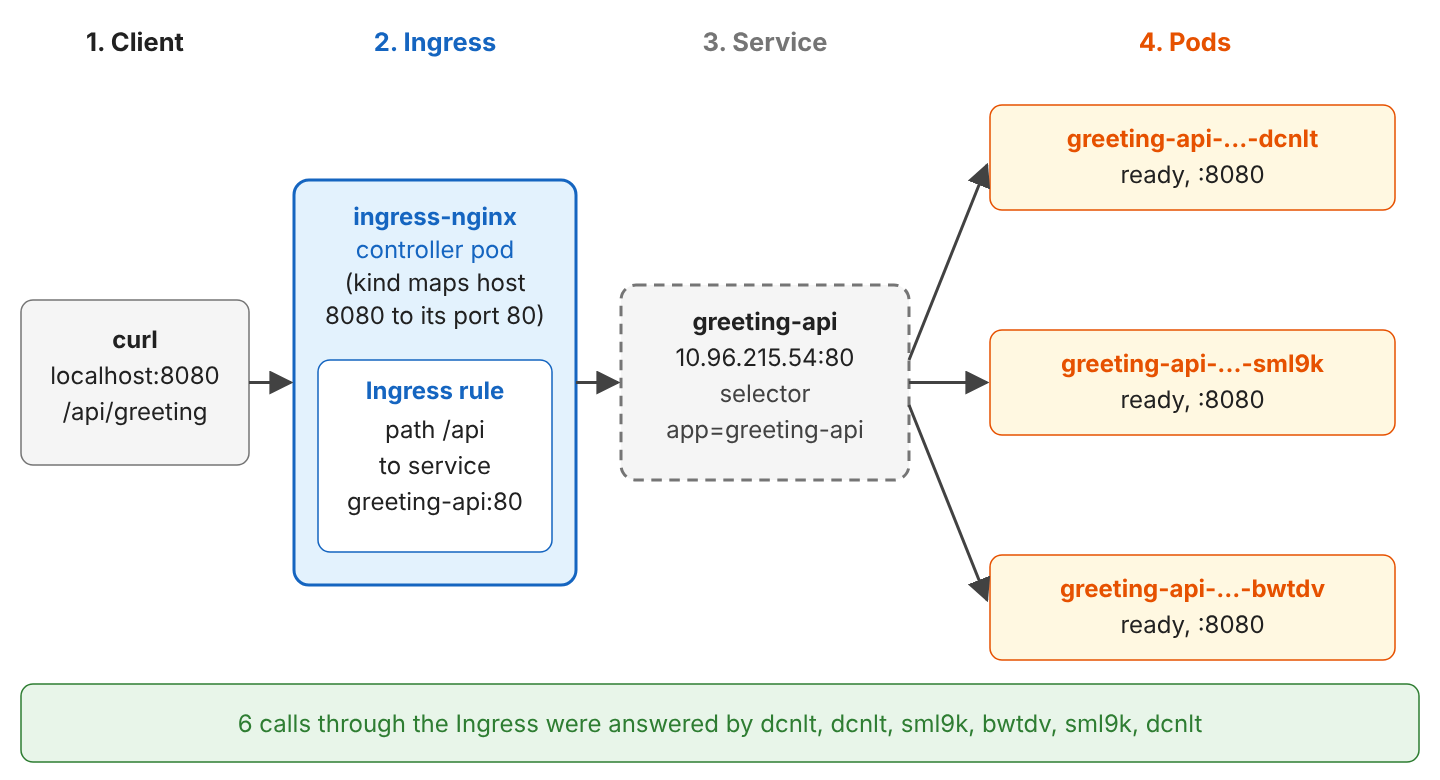
for i in 1 2 3 4 5 6; do curl -s localhost:8080/api/greeting -H 'X-API-Key: k8s-demo-key'; echo; done{"message":"Namaste from Kubernetes","visits":10,"pod":"greeting-api-649c549d96-dcnlt","version":"1.1.0"}
{"message":"Namaste from Kubernetes","visits":11,"pod":"greeting-api-649c549d96-dcnlt","version":"1.1.0"}
{"message":"Namaste from Kubernetes","visits":12,"pod":"greeting-api-649c549d96-sml9k","version":"1.1.0"}
{"message":"Namaste from Kubernetes","visits":13,"pod":"greeting-api-649c549d96-bwtdv","version":"1.1.0"}
{"message":"Namaste from Kubernetes","visits":14,"pod":"greeting-api-649c549d96-sml9k","version":"1.1.0"}
{"message":"Namaste from Kubernetes","visits":15,"pod":"greeting-api-649c549d96-dcnlt","version":"1.1.0"}We ran the loop after the steps in sections 2.9 to 2.12, so the cluster runs 3 pods of version 1.1.0 with a new message, and the requests spread over all three pods. A path without a rule, such as /hello, returns HTTP/1.1 404 Not Found from nginx. The ingress controller reads the pod list of the Service and sends each request to one of the pods.
ingress-nginx was retired in March 2026, and v1.15.1 is the last release and gets no more security fixes. ingress-nginx still works for learning on kind. For a new production cluster, pick an implementation of the Gateway API, the successor of Ingress.
2.9. Scaling the Deployment
Scaling changes one number in the desired state. The ReplicaSet notices that 2 pods exist but 3 are wanted, and the scheduler places the new pod.
kubectl scale deployment greeting-api --replicas=3
kubectl get pods -l app=greeting-api -o wide
NAME READY STATUS RESTARTS AGE IP NODE
greeting-api-7844d44c9d-8wpt4 1/1 Running 0 52s 10.244.1.4 greeting-worker2
greeting-api-7844d44c9d-n2rqp 1/1 Running 0 2m8s 10.244.2.5 greeting-worker
greeting-api-7844d44c9d-xflml 1/1 Running 0 2m8s 10.244.1.3 greeting-worker2The Service picked up the new pod by its label without any change. Its EndpointSlice, the list of ready pod addresses behind a Service, grew to three IPs.
kubectl get endpointslices -l kubernetes.io/service-name=greeting-api
# greeting-api-szmd5   IPv4   8080   10.244.2.5,10.244.1.3,10.244.1.4
2.10. Self-Healing After a Pod Is Deleted
We delete a pod by hand, as if its node had crashed. The ReplicaSet sees 2 pods instead of 3 and creates a replacement at once.
kubectl delete pod greeting-api-7844d44c9d-n2rqp
kubectl get pods -l app=greeting-api
NAME READY STATUS RESTARTS AGE
greeting-api-7844d44c9d-8wpt4 1/1 Running 0 58s
greeting-api-7844d44c9d-xflml 1/1 Running 0 2m14s
greeting-api-7844d44c9d-xjqzf 0/1 Running 0 2s104s Normal SuccessfulCreate replicaset/greeting-api-7844d44c9d Created pod: greeting-api-7844d44c9d-8wpt4
48s Normal SuccessfulCreate replicaset/greeting-api-7844d44c9d Created pod: greeting-api-7844d44c9d-xjqzfThe new pod gets a new name and IP. Kubernetes replaces pods and does not repair them, so nothing important may live only inside a pod. The same mechanism restarts a container that crashes. In a fresh cluster, kubectl apply -f k8s/ started the API before PostgreSQL was up. One pod failed with Connection to postgres:5432 refused, Kubernetes restarted it, and the second start worked.
NAME                            READY   STATUS    RESTARTS      AGE
greeting-api-58d4bcbbc5-pr22t   1/1     Running   0             76s
greeting-api-58d4bcbbc5-xnpkd   1/1     Running   1 (61s ago)   76s
postgres-0                      1/1     Running   0             76s
2.11. Changing the ConfigMap
We change the message in the ConfigMap and call the API again.
kubectl patch configmap greeting-config -p '{"data":{"GREETING_MESSAGE":"Namaste from Kubernetes"}}'
curl -s localhost:8081/api/greeting -H 'X-API-Key: k8s-demo-key'
# {"message":"Hello from Kubernetes","visits":3,"pod":"greeting-api-7844d44c9d-xflml","version":"1.0.0"}
The old message is still there. Environment variables are read once, when the container starts, so a changed ConfigMap reaches the app only after the pods restart. The command kubectl rollout restart replaces the pods one by one.
kubectl rollout restart deployment greeting-api
kubectl rollout status deployment greeting-api      # deployment "greeting-api" successfully rolled out
curl -s localhost:8081/api/greeting -H 'X-API-Key: k8s-demo-key'
# {"message":"Namaste from Kubernetes","visits":4,"pod":"greeting-api-59d9495747-f4hls","version":"1.0.0"}
A ConfigMap mounted as a volume behaves differently. Its files are updated inside the running pod. In a test pod with both forms, the file /config/GREETING_MESSAGE showed the new value within 5 seconds, while printenv GREETING_MESSAGE still printed the old one. The app must re-read the file to use it. The Kubernetes docs say the delay can be as long as the kubelet sync period plus its cache delay, so it is not instant on every cluster.
2.12. Rolling Update and Rollback
A new version is a new image. We changed <version> in pom.xml to 1.1.0 (the API returns it in the version field), built greeting-api:1.1, loaded it into kind and changed the image of the Deployment.
docker build -t greeting-api:1.1 . && kind load docker-image greeting-api:1.1 --name greeting
kubectl set image deployment/greeting-api greeting-api=greeting-api:1.1
kubectl get replicaset -l app=greeting-api
NAME DESIRED CURRENT READY AGE
greeting-api-59d9495747 3 3 3 3m17s
greeting-api-649c549d96 1 1 0 9s
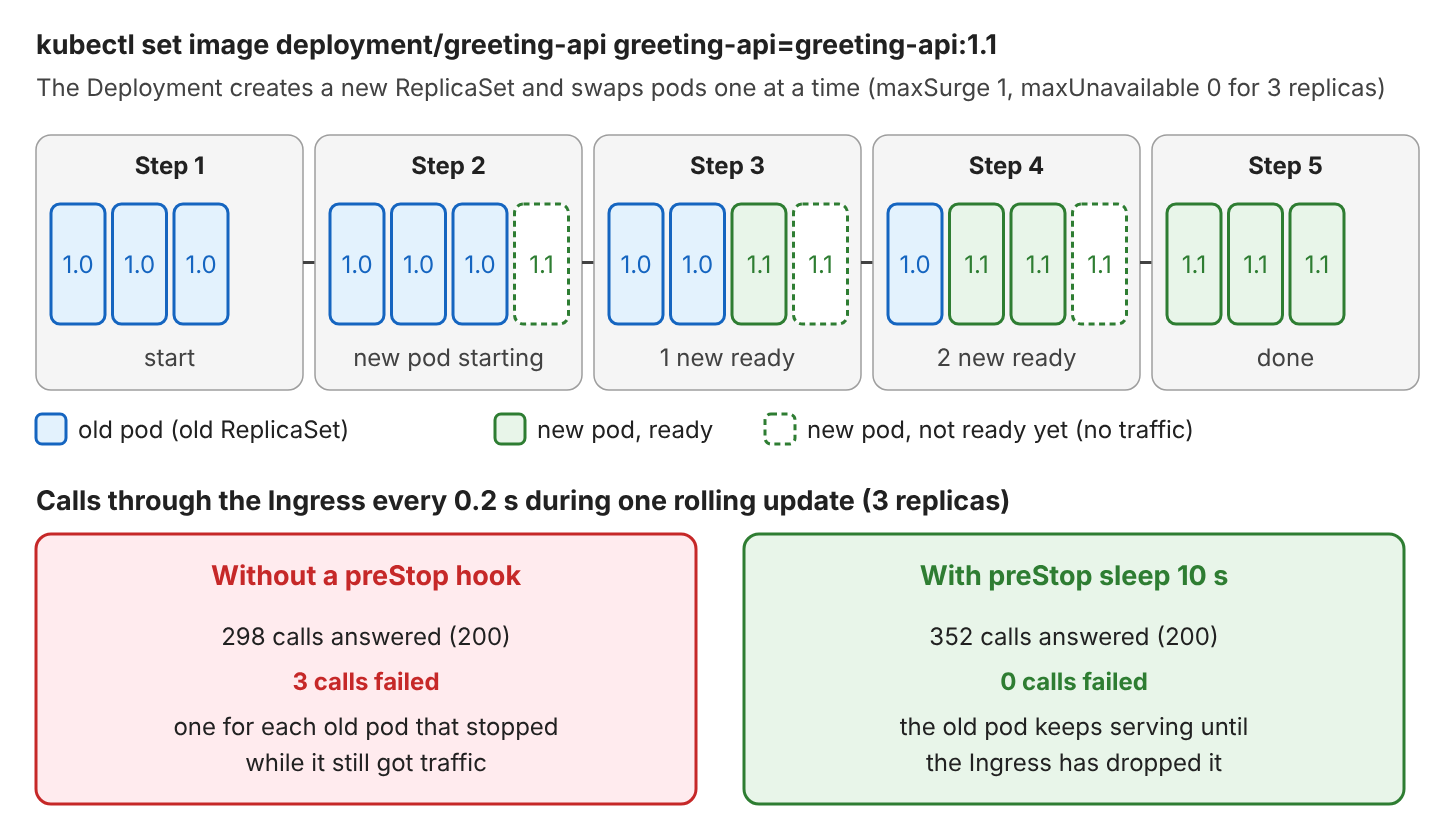
greeting-api-7844d44c9d 0 0 0 6m31sThe Deployment created a second ReplicaSet for 1.1 and moves pods over one at a time. With the default maxSurge and maxUnavailable of 25%, a 3-replica Deployment adds at most 1 extra pod and never drops below 3 ready pods. kubectl rollout status waits until it is done, and kubectl rollout undo goes back to the previous ReplicaSet.
kubectl rollout status deployment greeting-api     # deployment "greeting-api" successfully rolled out
kubectl rollout history deployment greeting-api    # REVISION 1, 2, 3
kubectl rollout undo deployment greeting-api       # deployment.apps/greeting-api rolled back
Our first version of the Deployment had no preStop hook. During a rolling update, we called the API through the Ingress every 0.2 seconds. 3 of 301 calls failed, one for each old pod that stopped while the ingress controller still sent it requests. Removing a pod from the Service and stopping its container happen at the same time. The Spring Boot docs recommend a short preStop sleep, so the pod keeps serving until the routing has caught up. With sleep: seconds: 10, the same test had no failures.
3. Kubernetes FAQs
3.1. Is a Kubernetes Secret Encrypted?
No, not by default. The data field holds base64 text, and kubectl apply also stores the whole file in an annotation. Our Secret showed the API key in plain text.
data:
  api-key: azhzLWRlbW8ta2V5
  db-password: Z3JlZXRpbmctcGFzcw==
metadata:
  annotations:
    kubectl.kubernetes.io/last-applied-configuration: |
      {"apiVersion":"v1","kind":"Secret",...,"stringData":{"api-key":"k8s-demo-key","db-password":"greeting-pass"},"type":"Opaque"}
We limit who may read Secrets with RBAC (role-based access control) and turn on encryption at rest in etcd. Real secret values never go into Git. In production, a tool such as an external secrets operator or a sealed secret fills the Secret from a vault.
3.2. What Is the Difference Between a Deployment and a StatefulSet?
Both keep a number of pods running. They differ in how much each pod matters.
| Deployment | StatefulSet | |
|---|---|---|
| Pod names | Random: greeting-api-649c549d96-sml9k | Fixed: postgres-0, postgres-1 |
| Storage | Shared or none | One PVC per pod, kept after deletion |
| Start and stop order | Any order, in parallel | One by one, in order |
| Network name | Through the Service only | Each pod has its own DNS name: postgres-0.postgres |
| Typical use | REST APIs, web apps | Databases, Kafka, ZooKeeper |
For a Spring Boot API, we almost always use a Deployment, and many teams run the database outside the cluster (for example, a managed PostgreSQL) and keep only stateless apps in Kubernetes.
3.3. Why Does My Spring Boot Pod Restart During Startup?
In most cases, the livenessProbe fails while the JVM is still starting. Our first Deployment used livenessProbe with initialDelaySeconds: 30 and no startupProbe. On the 2-CPU sandbox, startup took 32 seconds, and the events showed two failed liveness checks, one short of a restart.
Warning Unhealthy 27s (x2 over 37s) kubelet Liveness probe failed: Get "http://10.244.1.2:8080/actuator/health/liveness": dial tcp 10.244.1.2:8080: connect: connection refusedA startupProbe fixes this without slowing down the liveness check later.
3.4. Why Does kubectl port-forward Stop Working?
Because kubectl port-forward service/greeting-api picks one pod when it starts and tunnels to that pod only. When that pod is deleted, for example by a rollout, the tunnel breaks.
E1003 17:43:19.617180 portforward.go:549] "An error occurred forwarding" err="error forwarding port 8080 to pod 820892ca..., uid : network namespace for sandbox \"820892ca...\" is closed"
error: lost connection to pod
We start port-forward again. It is a debugging tool. Real traffic goes through a Service of type LoadBalancer or an Ingress.
3.5. Why Did kubectl apply Reset My Replica Count?
The YAML file is the desired state. We scaled to 3 with kubectl scale, but deployment.yaml says replicas: 2, so the next kubectl apply set it back. kubectl diff shows this before applying.
-  replicas: 3
+  replicas: 2
We change the YAML file and apply it, instead of mixing imperative commands with files. The same rule applies to kubectl set image and kubectl patch, which we used here only to show each feature in one line.
3.6. Do I Need Kubernetes for Every Java Application?
No. Kubernetes adds a lot to learn and to operate, such as YAML for every object and a cluster that someone must upgrade and secure. It also needs more CPU and memory per application. For one or two services, a managed platform that runs containers for us, or a VM with Docker Compose, is often enough. Kubernetes is useful when a team runs many services that all need scaling and rolling updates done the same way.
4. Conclusion
Kubernetes runs our containers from a description of the desired state. Nodes run pods, a Deployment keeps identical API pods running, scales them and replaces them version by version, and a StatefulSet gives a database pod a fixed name and its own PersistentVolumeClaim.
A Service puts one address in front of the pods, an Ingress routes outside HTTP traffic to it, and ConfigMap and Secret pass settings and passwords in as environment variables. With kind, the whole setup runs on a laptop in a few minutes, which is the best place to break pods on purpose and watch Kubernetes fix them. The microservices tutorials build on these basics.
5. References
- Kubernetes Components
- Kubernetes Pods
- Persistent Volumes
- Configure Liveness, Readiness and Startup Probes
- Container Lifecycle Hooks
- kind Quick Start
- kubectl Quick Reference
- Spring Boot: Kubernetes Probes
Happy Learning !!
