

Spring Boot renders JSP pages with embedded Tomcat when we add the tomcat-embed-jasper and JSTL dependencies, use war packaging, and set spring.mvc.view.prefix and spring.mvc.view.suffix to the folder and the extension of the pages. A JSP (Jakarta Server Pages) file is an HTML page with small pieces of Java and tag-library code in it. Tomcat compiles the file into a servlet the first time a browser requests the page.
We use a Spring Boot JSP setup mostly when we move an older Spring MVC app to Spring Boot and the team already has many JSP pages. For a new app, Thymeleaf is the better choice, as we compare in section 9.
The following example is the complete setup for a Spring Boot 4.1.1 app. Two properties tell Spring MVC where the pages are, and a controller returns a view name that Spring turns into a file path.
# folder of the pages, inside src/main/webapp
spring.mvc.view.prefix=/WEB-INF/jsp/
# view name "recipes" becomes /WEB-INF/jsp/recipes.jsp
spring.mvc.view.suffix=.jsp
@GetMapping("/recipes")
public String list(Model model) {
model.addAttribute("recipes", recipeService.findAll());
return "recipes"; // renders /WEB-INF/jsp/recipes.jsp
}Notice that the controller never names the file. The prefix and the suffix are added for it. In the rest of the post we add the dependencies, build a list page and a form page, see why an executable jar does not work, and test the rendered HTML.
1. How Spring Boot Serves a JSP Page
Every request to a Spring MVC app goes first to the DispatcherServlet. It finds the controller method mapped to the URL and calls it. The method puts data into the model and returns a view name, which is a plain string such as “recipes”.
A view resolver turns that string into a page. For JSP, Spring Boot registers an InternalResourceViewResolver, which builds the path prefix + view name + suffix and forwards the request to that path. Jasper, the JSP compiler inside Tomcat, compiles the .jsp file into a servlet and runs it with the model data, which writes the HTML to the browser.
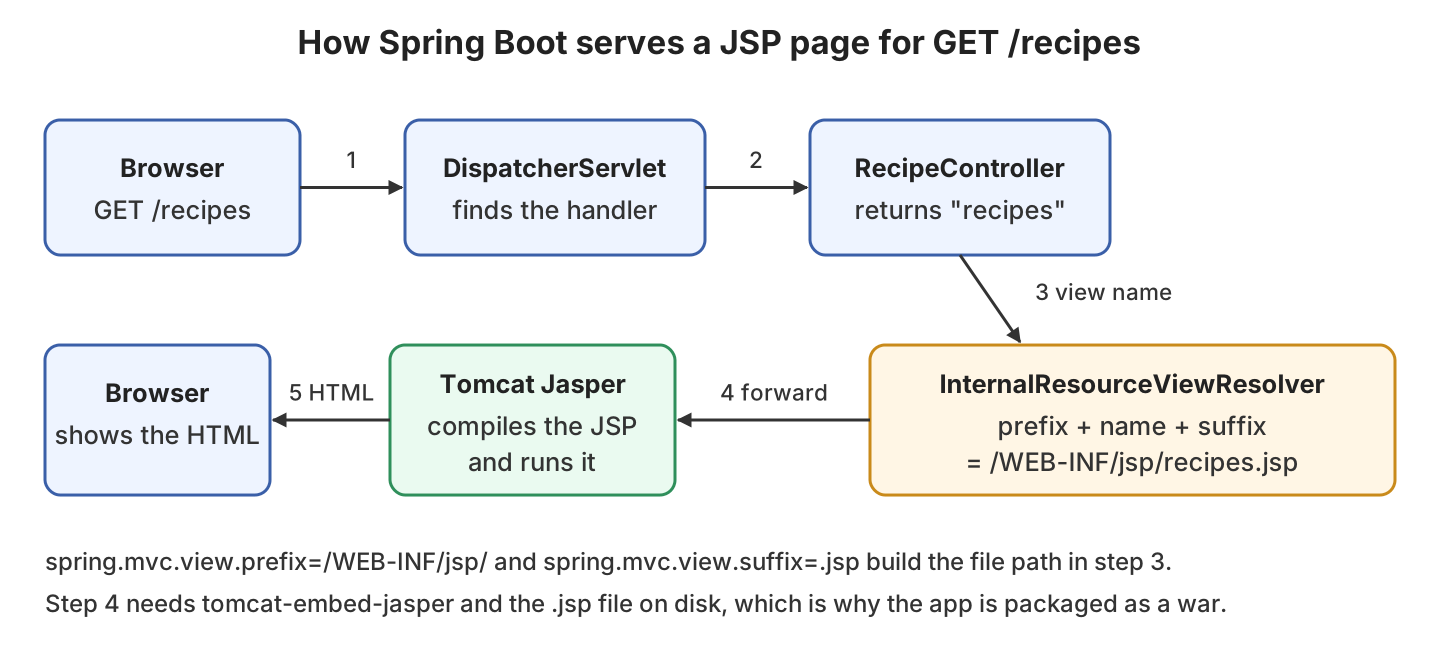
2. Maven Dependencies and War Packaging
The Spring Boot web starter contains Tomcat, but not the Jasper compiler and not the JSTL tag library, so we add both. The example uses Spring Boot 4.1.1 with Java 25, Tomcat 11.0.24 and JSTL 3.0, and the full project is in the spring-boot-jsp folder on GitHub.
| Dependency | What it does | Scope |
|---|---|---|
| spring-boot-starter-webmvc | Spring MVC and embedded Tomcat. The Spring Boot 3 name spring-boot-starter-web still works in 4. | compile |
| tomcat-embed-jasper | Compiles .jsp files into servlets at runtime. | provided |
| jakarta.servlet.jsp.jstl-api | The JSTL tag interfaces, such as c:forEach. | compile |
| jakarta.servlet.jsp.jstl (groupId org.glassfish.web) | The JSTL implementation that runs the tags. | compile |
Spring Boot manages the version of tomcat-embed-jasper, so we leave it out. The two JSTL artifacts are not managed, so we set their versions.
<packaging>war</packaging>
<dependencies>
<dependency>
<groupId>org.springframework.boot</groupId>
<artifactId>spring-boot-starter-webmvc</artifactId>
</dependency>
<dependency>
<groupId>org.apache.tomcat.embed</groupId>
<artifactId>tomcat-embed-jasper</artifactId>
<scope>provided</scope>
</dependency>
<dependency>
<groupId>jakarta.servlet.jsp.jstl</groupId>
<artifactId>jakarta.servlet.jsp.jstl-api</artifactId>
<version>3.0.2</version>
</dependency>
<dependency>
<groupId>org.glassfish.web</groupId>
<artifactId>jakarta.servlet.jsp.jstl</artifactId>
<version>3.0.1</version>
</dependency>
</dependencies>The packaging must be war, because JSPs are not supported in an executable jar. The provided scope keeps the Jasper compiler out of WEB-INF/lib, because a standalone Tomcat server has its own copy. The Spring Boot Maven plugin still packs it into WEB-INF/lib-provided, so java -jar works too.
3. Project Structure
The JSP files go under src/main/webapp/WEB-INF/jsp, next to src/main/java and src/main/resources. The war plugin copies everything in src/main/webapp to the root of the war. Tomcat never serves the WEB-INF folder, so a user cannot open a .jsp file by typing its path.
CSS files go under src/main/resources/static, which Spring Boot serves at the root URL, so static/css/style.css is available as /css/style.css.
4. Application Class
A war needs a class that the servlet container can start, because nobody calls main() when Tomcat deploys the file. We extend SpringBootServletInitializer and name our application class in configure(). The main() method stays, so mvn spring-boot:run and java -jar keep working.
@SpringBootApplication
public class App extends SpringBootServletInitializer {
@Override
protected SpringApplicationBuilder configure(SpringApplicationBuilder builder) {
return builder.sources(App.class);
}
public static void main(String[] args) {
SpringApplication.run(App.class, args);
}
}5. JSP View Resolver Configuration
Spring Boot registers an InternalResourceViewResolver by default, and the two properties from the intro set its prefix and suffix. When JSTL is on the classpath, the resolver creates a JstlView for each page, so the tags in our pages work.
We can also register the resolver in Java with registry.jsp(“/WEB-INF/jsp/”, “.jsp”) in the configureViewResolvers() method of a WebMvcConfigurer. We do not add @EnableWebMvc to that class, because the annotation turns off the Spring Boot MVC auto-configuration, including the error page and the static file handling.
6. Controller and JSP Pages
The following example is a small recipe book. A Recipe record holds a name and the cooking time in minutes, and RecipeService keeps the recipes in a list in memory. The controller lists the recipes, shows an empty form and saves the form data.
6.1. Controller
The controller is a regular @Controller class, not a @RestController. A @RestController writes the return value into the response body, so it would send the text “recipes” to the browser instead of rendering the page.
@Controller
public class RecipeController {
private final RecipeService recipeService; // set in the constructor
@GetMapping("/recipes")
public String list(Model model) {
  model.addAttribute("recipes", recipeService.findAll());
  return "recipes";                 // renders /WEB-INF/jsp/recipes.jsp
}
@GetMapping("/recipes/new")
public String form() {
return "recipe-form"; // renders /WEB-INF/jsp/recipe-form.jsp
}
@PostMapping("/recipes")
public String add(@RequestParam String name, @RequestParam int minutes) {
recipeService.add(new Recipe(name.strip(), minutes));
return "redirect:/recipes"; // browser loads the list again
}
}The @PostMapping method returns “redirect:/recipes” instead of a view name. Spring sends a 302 response, and the browser loads the list with a new GET request, so a refresh of the page does not submit the form a second time.
6.2. The List Page
The list page loops over the recipes model attribute with the JSTL c:forEach tag, and recipe.name inside the loop calls the record method name(). The taglib line declares the c prefix with the JSTL 3.0 URI jakarta.tags.core. The old URI http://java.sun.com/jsp/jstl/core still works for pages copied from an older app.
<%@ page contentType="text/html;charset=UTF-8" %>
<%@ taglib prefix="c" uri="jakarta.tags.core" %>
<!DOCTYPE html>
<html>
<head>
  <title>Recipes</title>
  <link href="/css/style.css" rel="stylesheet">
</head>
<body>
  <h1>Recipes</h1>
  <table>
    <tr><th>Name</th><th>Minutes</th></tr>
    <c:forEach items="@{recipes}" var="recipe">
      <tr>
        <td><c:out value="@{recipe.name}"/></td>
        <td>@{recipe.minutes}</td>
      </tr>
    </c:forEach>
  </table>
</body>
</html>
The c:out tag escapes HTML characters in the value. We use it for every value a user typed, such as the recipe name, so a name like <script> is shown as text and never runs.
6.3. The Form Page
The form page is plain HTML with no JSTL in it. The field names name and minutes match the @RequestParam names in the controller, and the required attributes stop the browser from sending an empty form.
<%@ page contentType="text/html;charset=UTF-8" %>
<!DOCTYPE html>
<html>
<body>
  <h1>Add a recipe</h1>
  <form action="/recipes" method="post">
    <label>Name <input type="text" name="name" required></label>
    <label>Minutes <input type="number" name="minutes" min="1" required></label>
    <button type="submit">Save</button>
  </form>
</body>
</html>
When we open http://localhost:8080/recipes, the response has one table row per recipe, such as <td>Pancakes</td>, and no JSTL tags left in it.
7. Why the Executable Jar Does Not Work
With jar packaging every JSP view returns 404. The war plugin copies src/main/webapp into the archive, so the WEB-INF/jsp folder is in the war. The jar plugin packs only target/classes, so the .jsp files are not in the jar at all, and Tomcat has nothing to compile.
java -jar target/spring-boot-jsp-1.0.0.jar
curl -i http://localhost:8080/recipes
HTTP/1.1 404
{"timestamp":"2026-10-05T18:19:39.511Z","status":404,"error":"Not Found","path":"/recipes"}| Packaging | Where the .jsp files end up | Result |
|---|---|---|
| jar | Not in the archive. | 404 Not Found for every JSP view. |
| war with java -jar | WEB-INF/jsp inside the war. | Pages render with embedded Tomcat. |
| war on a standalone Tomcat | WEB-INF/jsp inside the exploded war. | Pages render with Tomcat’s own Jasper. |
The jar can still look fine on our laptop, because Spring Boot uses a src/main/webapp folder in the current directory as the web root when it finds one. On a server without that folder, the same jar fails. A JSP app always uses war packaging, even when we start it with java -jar.
8. Running the App
During development we start the app with mvn spring-boot:run. The plugin serves the JSP files from src/main/webapp, so a changed page shows up after a browser refresh without a restart. For a release we build the war and either run it with java -jar or deploy it on a Tomcat 11 server.
mvn spring-boot:run

mvn clean package
java -jar target/spring-boot-jsp-1.0.0.war
9. JSP or Thymeleaf?
The Spring Boot reference advises against JSP when another template engine is an option, and Thymeleaf is the most common replacement. A Spring Boot Thymeleaf example needs one starter and no packaging change.
| Question | JSP | Thymeleaf |
|---|---|---|
| Dependencies | tomcat-embed-jasper plus two JSTL artifacts. | spring-boot-starter-thymeleaf only. |
| Packaging | war only. | jar or war. |
| Where the pages go | src/main/webapp/WEB-INF/jsp. | src/main/resources/templates. |
| Rendering in a MockMvc test | Not rendered, the test sees only the forward. | Rendered, the test can check the HTML. |
| Custom error page | error.jsp does not replace the default error view. | templates/error.html does. |
We pick JSP when many pages already exist and the target is a Tomcat server, and Thymeleaf for everything else.
10. Testing the Rendered Page
A MockMvc test does not run Tomcat, so it never compiles the JSP and can only check the forwarded URL. To check the real HTML, we start the app on a random port and fetch the page with RestTestClient, which comes with spring-boot-starter-webmvc-test.
@SpringBootTest(webEnvironment = WebEnvironment.RANDOM_PORT)
class RecipePagesTest {

  @LocalServerPort
  int port;

  @Test
  void listPageRendersRecipesFromJsp() {
    RestTestClient client = RestTestClient.bindToServer()
        .baseUrl("http://localhost:" + port).build();

    String html = client.get().uri("/recipes")
        .exchange()
        .expectStatus().isOk()
        .expectBody(String.class).returnResult().getResponseBody();

    assertThat(html).contains("<td>Pancakes</td>");   // rendered by c:forEach
    assertThat(html).doesNotContain("c:forEach");     // no raw tag left
  }
}
The second test in the project posts the form, expects the 302 redirect and finds the new row in the list.
Tests run: 2, Failures: 0, Errors: 0, Skipped: 011. Spring Boot JSP FAQs
11.1. Why Does Every JSP View Return 404?
In most cases the app was packaged as a jar, so the .jsp files are not in it, as section 7 explains. Change the packaging to war and rebuild. If the packaging is already war, check that the prefix matches the real folder name, including the slash at both ends.
11.2. What Causes the ClassNotFoundException for jakarta.servlet.jsp.jstl.core.Config?
The pom still has the old javax.servlet:jstl:1.2 dependency, which uses the javax packages. Spring Boot 3 and 4 run on Jakarta EE, so the JSTL classes must come from the two jakarta.servlet.jsp.jstl artifacts shown in section 2. Replace the javax dependency with the two Jakarta ones, and change the taglib URI in the pages to jakarta.tags.core.
12. Conclusion
Serving JSP pages from Spring Boot takes four changes. We add tomcat-embed-jasper and the two Jakarta JSTL artifacts, switch the packaging to war, extend SpringBootServletInitializer, and set the two view properties. The pages go in src/main/webapp/WEB-INF/jsp, and a controller returns only the view name.
The executable jar fails because the .jsp files are not in it, so we run the war with java -jar or deploy it on Tomcat. For new apps, Thymeleaf avoids most of these steps.
13. References
- Spring Boot reference, JSP limitations
- Spring Boot reference, traditional war deployment
- Spring Framework reference, JSP and JSTL views
- Jakarta Standard Tag Library 3.0 specification
- Tomcat 11 Jasper how-to
Happy Learning !!

Thank you so much man!
Hi Lokesh
Is there any way we can configure JSP Tiles with Spring boot 3.2.0
Seems like it is not possible , would you please share some example ??
Hi Jai, Tiles have been retired and reached End of Life. It is good time to move to a new UI framework. Seems Spring also decided to drop its support without any announcement. [Link]
Thanks for that , wondering if you know any good fit for view layer ? which would work well with Spring boot 3.2.0 ?
Spring recommends thymleaf and it integrates as well. Even migration may not be that difficult if you have Spring MVC style form/data-bindings. BUT if you have stateless REST APIs then using a dedicated and mature UI framework (such as Angular or React) makes more sense to me. These frameworks have way more large community support and ready-made components to use.
you are using spring parent version 1.0 not 3.X
Perhaps you are referring to version of parent module. The parent refers to version 3.1.x.
is it possible to run .html with internal resolver
HI,
Using src/main/webapp/WEB-INF/jsp/welcome.jsp is discouraged if you want to deploy via a jar package.
“Do not use the src/main/webapp folder if your application will be packaged as a jar. Although this folder is a common standard, it will only work with war packaging and it will be silently ignored by most build tools if you generate a jar.”
Reference: https://docs.spring.io/spring-boot/docs/1.1.4.RELEASE/reference/htmlsingle/#using-boot-structuring-your-code
Whitelabel Error Page
This application has no explicit mapping for /error, so you are seeing this as a fallback.
Sun Jan 26 12:22:18 IST 2020
There was an unexpected error (type=Internal Server Error, status=500).
The absolute uri: http://www.springframework.org/tags cannot be resolved in either web.xml or the jar files deployed with this application
Worth mentioning, this project as a standalone would not work as Versions of dependency items are missing in pom.xml. After a little research I found it is depending upon a ‘spring-boot-starter-parent’ project as baseline. My guess is, version of dependencies are being controlled from the parent project. As Ankit has mentioned above, we need a tool to download the dependencies from parent project i.e.
mvn eclipse:eclipse -DwtpVersion=2.0command.org.springframework.boot
spring-boot-starter-parent
2.1.5.RELEASE
Thank you it’s working on my machine
for all those who don’t able to import this in your STS .plz try the below steps.
1) unzip the file and copy the unzipped file to your work-space(i.e the drive) u have chosen for STS.
2)open the unzipped folder (normally in windows) and got to POM file. Now click on the address bar .and copy it.
ur address bar should look something like this.
D:\SPRING BOOT 4\WORKSPACE SPRING BOOT\spring-boot-demo-jsp-example\spring-boot-demo
note: the address at last must be showing \spring-boot-demo
3)now open cmd and browse to the specific drive (if it is other than C drive) abd paste the copied address and press enter
4) NOw the important part … Type the command Exactly like I have written.
mvn eclipse:eclipse -DwtpVersion=2.0
and press enter if everything is right it will start downloading the required files and Build Success will be shown.
Now just open ur STS and try to import the file u will be able to import it. :)
Thanks for sharing it.
As a fix ,in pom.xml, for spring-boot-starter-tomcat remove tag. It is needed only if its not a spring boot application. It is failing because there is no explicit tomcat server.
After fixing this issue also example is not working properly.
Suppose I am hiiting localhost:8080/next
then response is
2019-02-14 16:29:20.601 DEBUG 2436 — [nio-8080-exec-4] s.w.s.m.m.a.RequestMappingHandlerMapping : Looking up handler method for path /WEB-INF/view/next.jsp
2019-02-14 16:29:20.602 DEBUG 2436 — [nio-8080-exec-4] s.w.s.m.m.a.RequestMappingHandlerMapping : Did not find handler method for [/WEB-INF/view/next.jsp]
basically is not treating it a request to get static resource.
If you create a method in controller with @Requestparam(/WEB-INF/view/next.jsp) then it gets detected.
Lokesh could you help us on this.
I cannot get this to work. I downloaded your source and imported it as a project into Intellij Idea. When I try to run it, I get the following exception:
java.lang.IllegalStateException: ApplicationEventMulticaster not initialized – call ‘refresh’ before multicasting events via the context: org.springframework.context.annotation.AnnotationConfigApplicationContext@1e4a7dd4: startup date [Tue Jul 10 21:12:36 PDT 2018]; root of context hierarchy
Try this: https://stackoverflow.com/questions/44686432/java-lang-illegalstateexception-applicationeventmulticaster-not-initialized-c/45450371#45450371
I downloaded the attached example and imported in eclipse as maven project and it worked perfectly.
Thanks
When I run this code using “mvn spring-boot:run”, then application is running fine. But when I converted the same application into executable jar file, (changed war to jar in pom.xml) and executed the jar file then this error is coming,
Could you please resolve this issue. I need this very urgent, in my project as well I’m encountering the same issue. Here is email id, “tshravan2012@gmail.com”. Thanks a lot for your time.
Hmmm, mvn spring-boot:run works while idea spring-boot doesn’t. This is a problem
Your example doesn’t work.
I encountered next error: “.. Caused by: java.lang.ClassNotFoundException: javax.servlet.Filter”
which shows me that it caused by explicit dependency for tomcat with provided: https://stackoverflow.com/questions/30374316/spring-boot-java-lang-noclassdeffounderror-javax-servlet-filter
I wonder why should i have that dependency at all if spring uses tomcat embedded by default. So i removed it, but now i obtained: “Whitelabel Error Page”
you must run the app with mvn clean spring-boot:run command
I have followed you tutorial to add view layer to my existing spring boot rest application. Following is the method i am trying to use a home page view(home.jsp). I am not getting the jsp page render, instead I am getting a string ‘home’ when i ran the project. Please help me in fixing issue, I am new to spring boot.
@RequestMapping(value = “/dashboard”)
@ResponseBody
public String getMyMessage() {
return “home”;
}
my MvcConfiguration class is:
import org.springframework.context.annotation.Configuration;
import org.springframework.web.servlet.config.annotation.EnableWebMvc;
import org.springframework.web.servlet.config.annotation.ViewResolverRegistry;
import org.springframework.web.servlet.config.annotation.WebMvcConfigurerAdapter;
import org.springframework.web.servlet.view.InternalResourceViewResolver;
import org.springframework.web.servlet.view.JstlView;
@Configuration
@EnableWebMvc
public class MvcConfiguration extends WebMvcConfigurerAdapter{
@Override
public void configureViewResolvers(ViewResolverRegistry registry) {
InternalResourceViewResolver resolver = new InternalResourceViewResolver();
resolver.setPrefix(“/WEB-INF/views/”);
resolver.setSuffix(“.jsp”);
resolver.setViewClass(JstlView.class);
registry.viewResolver(resolver);
}
}
@Neelam Panwar, You need to remove @ResponseBody annotation from your getMyMessage() method. That is for render a JSON object or a string. If you want to return a JSP view. you just need to remove that.