
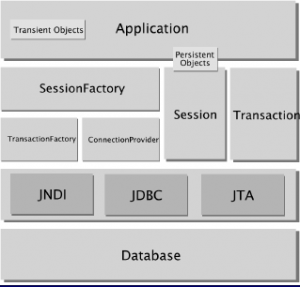
Hibernate is an object-relational mapping (ORM) framework for Java that stores Java objects as rows in database tables and writes the SQL for each operation. A Hibernate hello world app needs only one entity class and a configuration that points to the database.
We use Hibernate when an app keeps its data in a relational database and we want to work with Java objects instead of writing JDBC code by hand. We mark a class with @Entity, tell Hibernate where the database is, and call methods such as persist(), find(), merge() and remove().
The following example maps a Note entity, then saves, reads, updates and deletes one note with Hibernate 7.4 on Java 25, using an in-memory H2 database.
@Entity
public class Note {

  @Id
  @GeneratedValue(strategy = GenerationType.IDENTITY)
  private Long id;

  @Column(nullable = false, length = 100)
  private String title;

  private String text;

  @Column(name = "created_on")
  private LocalDate createdOn;
}
SessionFactory sessionFactory = new HibernatePersistenceConfiguration("notes")
.managedClass(Note.class)
.jdbcUrl("jdbc:h2:mem:notes")
.jdbcCredentials("sa", "")
.schemaToolingAction(Action.CREATE_DROP) // create table Note (...)
.showSql(true, false, false)
.createEntityManagerFactory();
Note groceries = new Note("Groceries", "Milk, eggs, bread", LocalDate.of(2026, 10, 3));
// 1. Save
sessionFactory.runInTransaction(em -> em.persist(groceries));
// insert into Note (created_on,text,title,id) values (?,?,?,default)
Long id = groceries.getId(); // id = 1
// 2. Read
Note note = sessionFactory.callInTransaction(em -> em.find(Note.class, id));
// select n1_0.id,n1_0.created_on,n1_0.text,n1_0.title from Note n1_0 where n1_0.id=?
// 3. Update
sessionFactory.runInTransaction(em -> em.find(Note.class, id).setText("Milk, eggs, bread, coffee"));
// update Note set created_on=?,text=?,title=? where id=?
// 4. Delete
sessionFactory.runInTransaction(em -> em.remove(em.find(Note.class, id)));
// delete from Note where id=?Notice that we write no SQL ourselves. Each comment shows the statement that Hibernate generated for the call.
Next, we see what Hibernate is and how it relates to Jakarta Persistence. After that, we build the notes app step by step from the Maven dependencies to the delete, and finish with the other configuration files and the common errors.
1. What Is Hibernate?
Java works with objects, and a relational database works with tables and rows. Without a framework, we write the SQL ourselves and copy every column into a field by hand with JDBC. An ORM does the copying for us, so we describe once how a class maps to a table, and Hibernate creates the SQL for each operation.
Say our notes app grows to 20 entity classes. With JDBC, each class needs its own INSERT, SELECT, UPDATE and DELETE strings plus the code that copies each column, and a new field means editing all four statements. With Hibernate, we add the field to the class, and Hibernate changes the SQL for us.
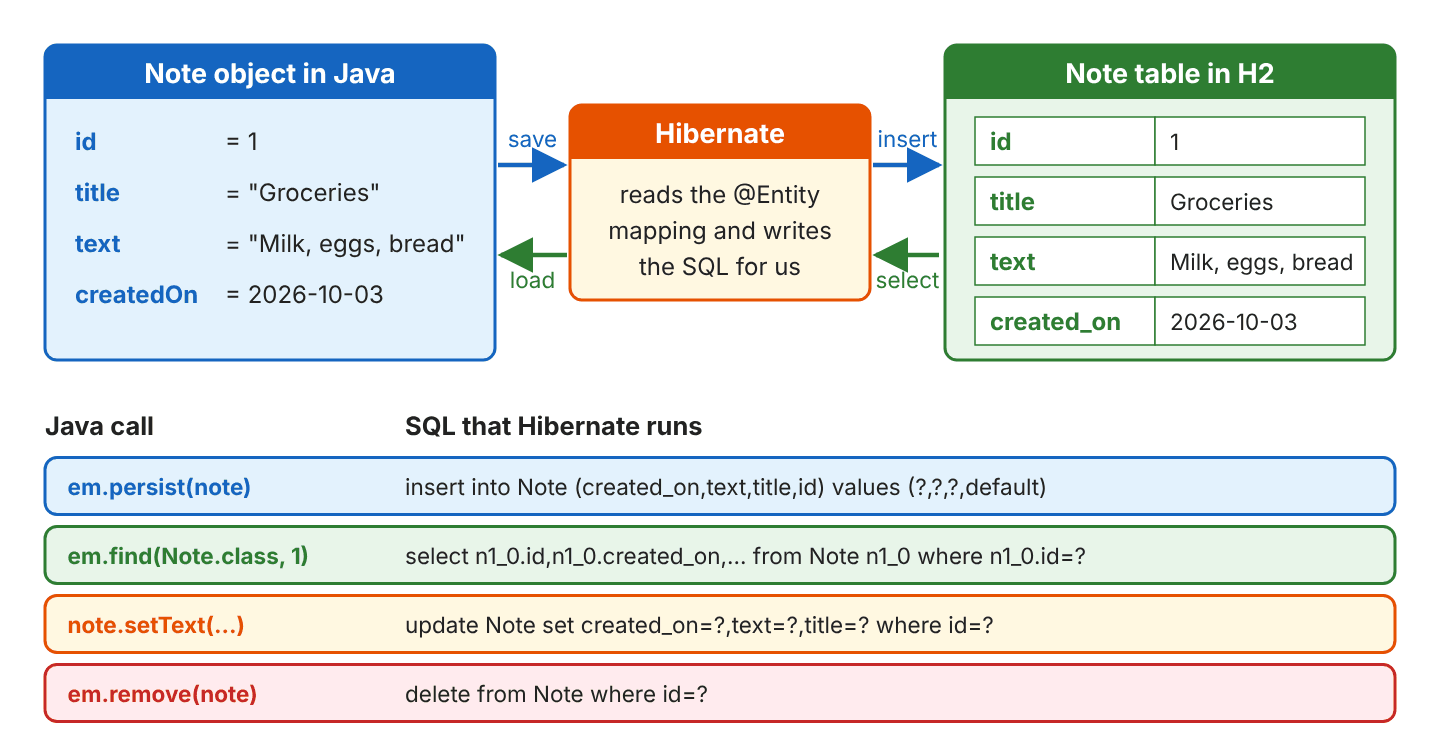
Hibernate is also an implementation of Jakarta Persistence (formerly the Java Persistence API, JPA). Jakarta Persistence is a specification (a standard set of interfaces and annotations in the jakarta.persistence package), and Hibernate implements it and adds its own API in org.hibernate. The JPA names and the Hibernate names map one to one.
| Concept | Jakarta Persistence (JPA) | Hibernate native API |
|---|---|---|
| Object created once per database | EntityManagerFactory | SessionFactory |
| Object for one unit of work | EntityManager | Session |
| Run code in a transaction | runInTransaction(), callInTransaction() | inTransaction(), fromTransaction() |
| Configuration file | META-INF/persistence.xml | hibernate.cfg.xml, hibernate.properties |
| Annotations | @Entity, @Id, @Column | The same, plus extras in org.hibernate.annotations |
In Hibernate 7, a SessionFactory is an EntityManagerFactory and a Session is an EntityManager. We can call the JPA methods and the Hibernate methods on the same objects. In this example, we use the JPA methods because they also work with other providers, and section 2.10 shows the Session versions.
2. Hibernate Hello World Example
Our example is a personal notes app. Each note has an id, a title, a text and the date it was created. The complete project is in the GitHub repository.
2.1. Project Structure
The project is a standard Maven project with three Java classes. The configuration files in orange are optional alternatives to the Java configuration, and we cover them in section 3.
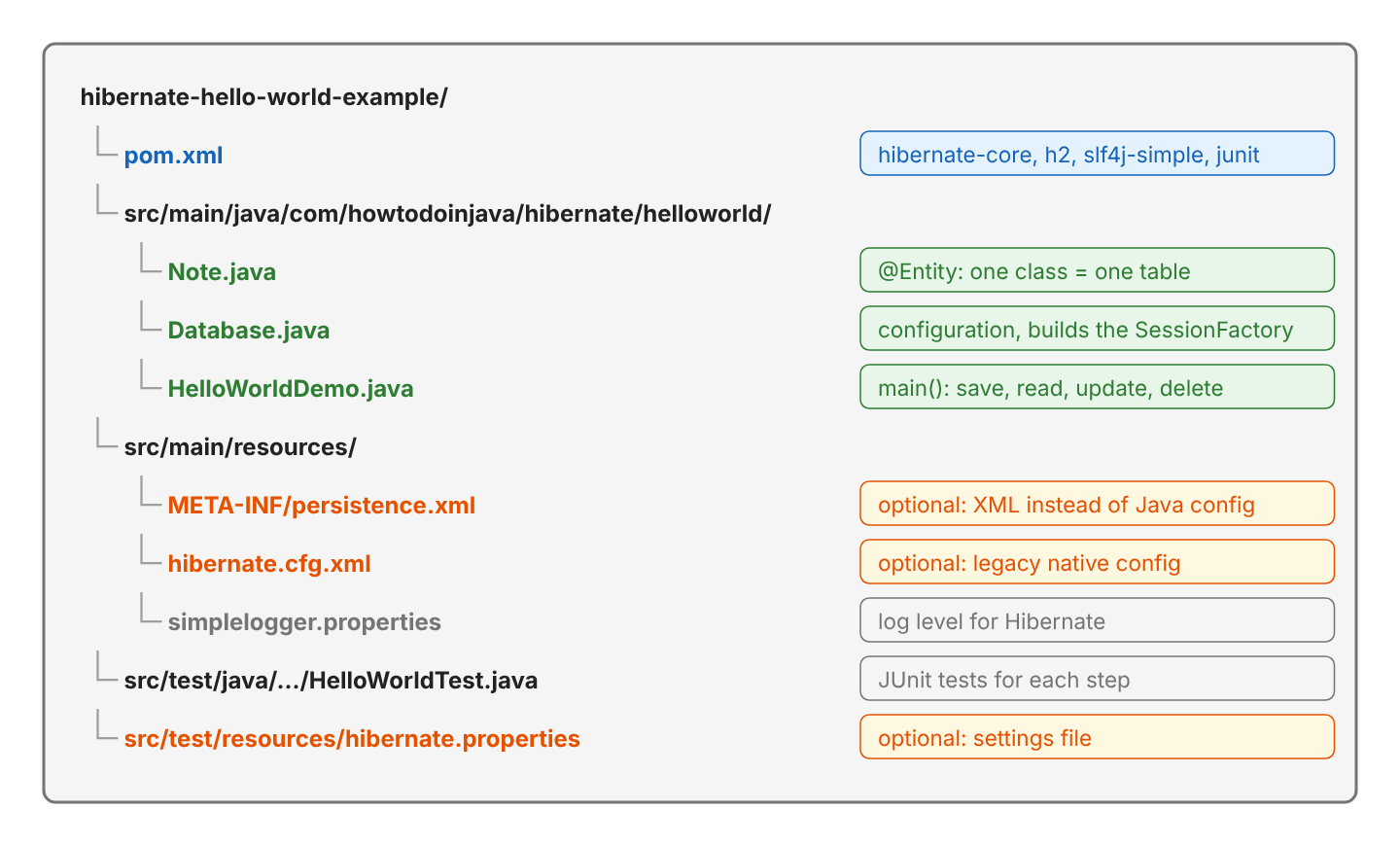
2.2. Maven Dependencies
To use Hibernate, we need only hibernate-core and the JDBC driver of our database. The hibernate-core artifact brings the Jakarta Persistence API (jakarta.persistence-api 3.2.0) with it, so we do not add that one ourselves.
<properties>
  <maven.compiler.release>25</maven.compiler.release>
</properties>

<dependencies>
  <dependency>
    <groupId>org.hibernate.orm</groupId>
    <artifactId>hibernate-core</artifactId>
    <version>7.4.11.Final</version>
  </dependency>
  <dependency>
    <groupId>com.h2database</groupId>
    <artifactId>h2</artifactId>
    <version>2.5.252</version>
  </dependency>
  <!-- optional: lets us set the Hibernate log level -->
  <dependency>
    <groupId>org.slf4j</groupId>
    <artifactId>slf4j-simple</artifactId>
    <version>2.0.20</version>
  </dependency>
</dependencies>
The group id is org.hibernate.orm since Hibernate 6. Older tutorials with org.hibernate and a 5.x version pull in an old Hibernate that uses javax.persistence imports.
2.3. Mapping the Note Entity
An entity is a Java class whose objects Hibernate stores as rows of a table. Annotations on the class and its fields describe the mapping.
@Entity
public class Note {

  @Id
  @GeneratedValue(strategy = GenerationType.IDENTITY)
  private Long id;

  @Column(nullable = false, length = 100)
  private String title;

  private String text;

  @Column(name = "created_on")
  private LocalDate createdOn;

  protected Note() {
  }

  public Note(String title, String text, LocalDate createdOn) {
    this.title = title;
    this.text = text;
    this.createdOn = createdOn;
  }

  // getters and setters
}
Each annotation adds one piece of information, and a field without an annotation, like text, is still mapped to a column with the field’s name.
| Annotation | What it tells Hibernate |
|---|---|
| @Entity | Store objects of this class in a table named after the class (Note) |
| @Id | This field is the primary key |
| @GeneratedValue(strategy = IDENTITY) | The database generates the key with an identity column |
| @Column(nullable = false, length = 100) | Column is NOT NULL and varchar(100) |
| @Column(name = “created_on”) | Use this column name instead of the field name |
The entity needs a constructor without arguments (public or protected), because Hibernate creates the object first and fills its fields afterwards when it loads a row. Hibernate maps LocalDate to a SQL date column without extra annotations, and it generates the Note table from the class.
create table Note (created_on date, id bigint generated by default as identity, title varchar(100) not null, text varchar(255), primary key (id))2.4. Configuring Hibernate in Java Code
Hibernate 7 implements PersistenceConfiguration, the Java configuration API added in Jakarta Persistence 3.2. Its Hibernate subclass HibernatePersistenceConfiguration sets everything in code, so the project needs no XML file.
public static SessionFactory create(boolean showSql) {
  return new HibernatePersistenceConfiguration("notes")
      .managedClass(Note.class)
      .jdbcUrl("jdbc:h2:mem:notes")
      .jdbcCredentials("sa", "")
      .schemaToolingAction(Action.CREATE_DROP)
      .showSql(showSql, false, false)
      .createEntityManagerFactory();
}
Every call in Database.create() sets one setting.
| Method | Setting |
|---|---|
| new HibernatePersistenceConfiguration(“notes”) | Name of the persistence unit (any name) |
| managedClass(Note.class) | Register each entity class |
| jdbcUrl(…) | The database; jdbc:h2:mem:notes is an H2 database in memory |
| jdbcCredentials(“sa”, “”) | User name and password |
| schemaToolingAction(Action.CREATE_DROP) | Create the tables at startup and drop them on close (Action is in org.hibernate.tool.schema) |
| showSql(true, false, false) | Print the SQL; the other two flags format and color it |
| createEntityManagerFactory() | Build and return the SessionFactory |
We set no JDBC driver class and no SQL dialect, because the H2 driver registers itself from its jar, and Hibernate 7 detects the database and its version from the connection.
2.5. Building the SessionFactory
The SessionFactory is the object that holds the mapping metadata built from our configuration and the connection pool. It is expensive to build and safe to share between threads, so an application builds one SessionFactory at startup and closes it at shutdown. For each unit of work, such as saving one note, we open a short-lived Session inside a transaction. A transaction groups database changes so that they are either saved together on commit or undone together on rollback.
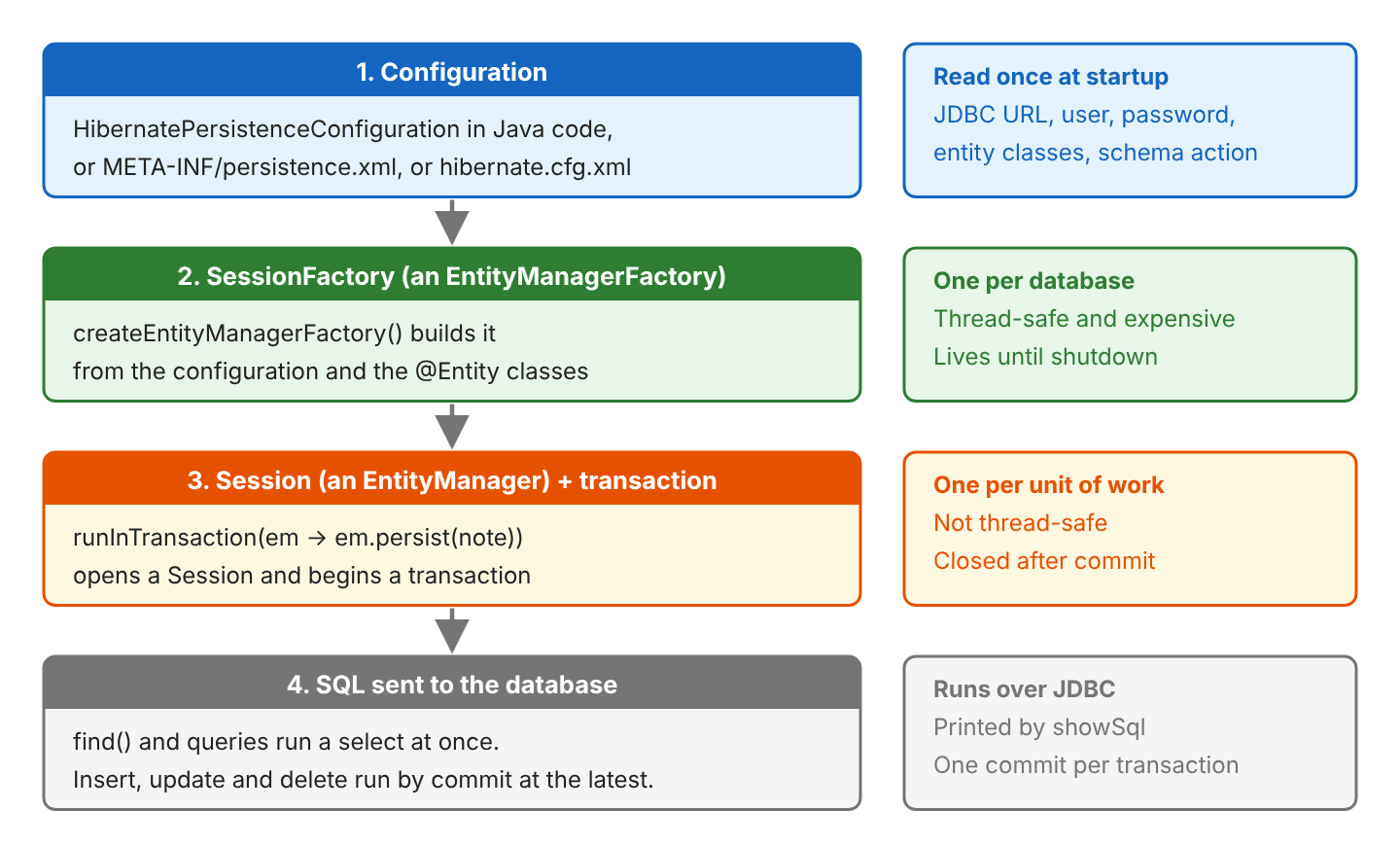
SessionFactory implements AutoCloseable, so a try-with-resources block closes it, and with CREATE_DROP Hibernate drops the table on close.
try (SessionFactory sessionFactory = Database.create(true)) {
  // save, read, update and delete notes
}
// drop table if exists Note cascade
The transaction methods open the Session (an EntityManager), begin the transaction, run our lambda, commit, and close the Session. If the lambda throws an exception, they roll back instead of committing.
| Method | Lambda receives | Returns a value |
|---|---|---|
| runInTransaction(em -> …) | EntityManager | No |
| callInTransaction(em -> …) | EntityManager | Yes |
| inTransaction(session -> …) | Session | No |
| fromTransaction(session -> …) | Session | Yes |
2.6. Saving a Note
We create the object with new and pass it to em.persist(). Hibernate inserts the row and writes the generated key into the id field.
Long id = sessionFactory.callInTransaction(em -> {
  Note groceries = new Note("Groceries", "Milk, eggs, bread", LocalDate.of(2026, 10, 3));
  em.persist(groceries);       // insert into Note (created_on,text,title,id) values (?,?,?,default)
  em.persist(new Note("Ideas", "Learn Hibernate", LocalDate.of(2026, 10, 3)));
  return groceries.getId();    // id = 1
});
The ? marks are JDBC parameters, so Hibernate sends the values separately from the SQL text, which also protects against SQL injection.
2.7. Reading Notes
The method em.find() loads one entity by its primary key, and a query loads many. The query string is written in HQL, which uses the entity and field names, not the table and column names.
Note note = sessionFactory.callInTransaction(em -> em.find(Note.class, id));
// select n1_0.id,n1_0.created_on,n1_0.text,n1_0.title from Note n1_0 where n1_0.id=?
// Note[id=1, title=Groceries, text=Milk, eggs, bread, createdOn=2026-10-03]

List<Note> notes = sessionFactory.callInTransaction(em ->
    em.createQuery("from Note order by title", Note.class).getResultList());
// select n1_0.id,n1_0.created_on,n1_0.text,n1_0.title from Note n1_0 order by n1_0.title
// [Note[id=1, title=Groceries, ...], Note[id=2, title=Ideas, ...]]
When no row has that id, find() returns null.
2.8. Updating a Note
There is no update method to call, because an entity loaded inside a transaction is a managed entity. Hibernate keeps a copy of its loaded state and compares the object with that copy at commit, which is called dirty checking. When a field of a managed entity changed, Hibernate runs the UPDATE by itself at commit.
sessionFactory.runInTransaction(em -> {
  Note loaded = em.find(Note.class, id);        // select ... from Note n1_0 where n1_0.id=?
  loaded.setText("Milk, eggs, bread, coffee");
});                                             // update Note set created_on=?,text=?,title=? where id=?
For example, when a user edits the text of a note, our service loads the note, calls setText() and returns, and Hibernate writes the change when the transaction commits.
An object we loaded in an earlier transaction is detached, which means no open Session tracks it, so changing it runs no SQL. The method em.merge() copies its state onto a managed copy.
Note detached = sessionFactory.callInTransaction(em -> em.find(Note.class, id));
detached.setTitle("Shopping");                             // no SQL, nobody tracks it

sessionFactory.runInTransaction(em -> em.merge(detached));
// select n1_0.id,n1_0.created_on,n1_0.text,n1_0.title from Note n1_0 where n1_0.id=?
// update Note set created_on=?,text=?,title=? where id=?
2.9. Deleting a Note
The method em.remove() accepts only a managed entity, so we load the note in the same transaction first.
sessionFactory.runInTransaction(em -> em.remove(em.find(Note.class, id)));
// select n1_0.id,n1_0.created_on,n1_0.text,n1_0.title from Note n1_0 where n1_0.id=?
// delete from Note where id=?

Note deleted = sessionFactory.callInTransaction(em -> em.find(Note.class, id));   // deleted = null
2.10. Using the Session API Instead of EntityManager
The same operations are available through the Hibernate Session API. We keep the same SessionFactory, and only the lambda receives a Session, which offers the JPA methods plus a few Hibernate extras.
Long todoId = sessionFactory.fromTransaction(session -> {
  Note todo = new Note("Todo", "Call the bank", LocalDate.of(2026, 10, 4));
  session.persist(todo);       // insert into Note (created_on,text,title,id) values (?,?,?,default)
  return todo.getId();         // 3
});

sessionFactory.inTransaction(session -> session.find(Note.class, todoId));
// select n1_0.id,n1_0.created_on,n1_0.text,n1_0.title from Note n1_0 where n1_0.id=?
2.11. Running the Example
The HelloWorldDemo class runs each step of the example and prints the SQL, and the JUnit tests check the results.
mvn -q compile exec:java   # runs HelloWorldDemo
mvn test                   # 23 JUnit tests
== 1. Build the SessionFactory (creates the table) ==
Hibernate: drop table if exists Note cascade
Hibernate: create table Note (created_on date, id bigint generated by default as identity, title varchar(100) not null, text varchar(255), primary key (id))
== 2. Save two notes ==
Hibernate: insert into Note (created_on,text,title,id) values (?,?,?,default)
Hibernate: insert into Note (created_on,text,title,id) values (?,?,?,default)
generated id = 1
== 3. Read a note by id ==
Hibernate: select n1_0.id,n1_0.created_on,n1_0.text,n1_0.title from Note n1_0 where n1_0.id=?
Note[id=1, title=Groceries, text=Milk, eggs, bread, createdOn=2026-10-03]
...
== 7. Delete the note ==
Hibernate: select n1_0.id,n1_0.created_on,n1_0.text,n1_0.title from Note n1_0 where n1_0.id=?
Hibernate: delete from Note where id=?
...
== 9. Close the SessionFactory (drops the table) ==
Hibernate: drop table if exists Note cascade3. Other Ways to Configure Hibernate
Java configuration is the newest option, but many existing projects keep the same settings in a file instead, and Hibernate 7.4 still reads the three classic configuration files.
3.1. persistence.xml
The file persistence.xml is the standard Jakarta Persistence file. It must be at META-INF/persistence.xml on the classpath (in Maven, src/main/resources/META-INF/), and the name of the persistence unit connects it to the code.
<?xml version="1.0" encoding="UTF-8"?>
<persistence xmlns="https://jakarta.ee/xml/ns/persistence" version="3.2">
  <persistence-unit name="notes">
    <class>com.howtodoinjava.hibernate.helloworld.Note</class>
    <properties>
      <property name="jakarta.persistence.jdbc.url" value="jdbc:h2:mem:notes-xml"/>
      <property name="jakarta.persistence.jdbc.user" value="sa"/>
      <property name="jakarta.persistence.jdbc.password" value=""/>
      <property name="jakarta.persistence.schema-generation.database.action" value="drop-and-create"/>
      <property name="hibernate.show_sql" value="true"/>
    </properties>
  </persistence-unit>
</persistence>
EntityManagerFactory emf = Persistence.createEntityManagerFactory("notes");
emf.runInTransaction(em -> em.persist(note)); // insert into Note ...3.2. hibernate.properties
Hibernate reads a file named hibernate.properties from the root of the classpath without any setting in code. The file lets us keep passwords and URLs out of the Java code.
jakarta.persistence.jdbc.url=jdbc:h2:mem:notes-props
jakarta.persistence.jdbc.user=sa
jakarta.persistence.jdbc.password=
EntityManagerFactory emf = new HibernatePersistenceConfiguration("notes-props")
.managedClass(Note.class)
.schemaToolingAction(Action.CREATE_DROP)
.createEntityManagerFactory(); // connects to jdbc:h2:mem:notes-propsA setting made in code wins over the same setting in the file, so the SessionFactory from section 2.4 still connected to jdbc:h2:mem:notes while this file was on the classpath.
3.3. hibernate.cfg.xml
The file hibernate.cfg.xml is Hibernate’s own configuration file from the versions before JPA. It is still supported in Hibernate 7.4. The user guide lists it as a configuration source, and the class org.hibernate.cfg.Configuration that reads it is not deprecated. The DTD for the file ships inside hibernate-core.
<?xml version="1.0" encoding="UTF-8"?>
<!DOCTYPE hibernate-configuration PUBLIC
    "-//Hibernate/Hibernate Configuration DTD 3.0//EN"
    "http://www.hibernate.org/dtd/hibernate-configuration-3.0.dtd">
<hibernate-configuration>
  <session-factory>
    <property name="hibernate.connection.url">jdbc:h2:mem:notes-cfg</property>
    <property name="hibernate.connection.username">sa</property>
    <property name="hibernate.connection.password"></property>
    <property name="hibernate.hbm2ddl.auto">create-drop</property>
    <property name="hibernate.show_sql">true</property>
    <mapping class="com.howtodoinjava.hibernate.helloworld.Note"/>
  </session-factory>
</hibernate-configuration>
SessionFactory sessionFactory = new Configuration().configure().buildSessionFactory();
sessionFactory.inTransaction(session -> session.persist(note)); // insert into Note ...When we call configure() without arguments, it loads hibernate.cfg.xml from the classpath root.
The three files and the Java configuration all end in the same factory, so the choice depends on where we want to keep the settings.
| Option | Where the settings live | Bootstrap call | Use it when |
|---|---|---|---|
| HibernatePersistenceConfiguration | Java code | createEntityManagerFactory() | New projects, tests |
| persistence.xml | META-INF/persistence.xml | Persistence.createEntityManagerFactory(“notes”) | Portable JPA code, Jakarta EE servers |
| hibernate.properties | Classpath root | Any of the others | Keep URLs and passwords out of code |
| hibernate.cfg.xml | Classpath root | new Configuration().configure() | Existing projects that already use it |
4. Hibernate Hello World FAQs
4.1. What Replaced Session.save() in Hibernate 7?
The method Session.persist() replaced it. Hibernate 7 removed Session.save() and the other methods that older tutorials use, so code that calls them no longer compiles.
| Removed in Hibernate 7 | Use instead |
|---|---|
| session.save(note) | session.persist(note) |
| session.update(note) | session.merge(note) |
| session.saveOrUpdate(note) | persist() for a new object, merge() for a detached one |
| session.load(Note.class, id) | session.getReference(Note.class, id) |
The javax.persistence imports changed to jakarta.persistence in Hibernate 6.
4.2. Why Is My Entity Not Saved to the Database?
In most cases, the transaction is missing. The method persist() only puts the object in the persistence context, the set of objects the Session tracks. Without a transaction, nothing is written and no error appears.
// Wrong: no transaction, the row is never inserted
try (EntityManager em = sessionFactory.createEntityManager()) {
  em.persist(note);
}

// Right: commit writes the row
sessionFactory.runInTransaction(em -> em.persist(note));
When we call em.flush() in the wrong version, the exception shows the reason.
jakarta.persistence.TransactionRequiredException: No active transaction4.3. Why Does Hibernate Not Recognize My Entity Class?
In most cases, the class is not registered. Every entity must be registered in the configuration, and persisting a class that is missing fails with an IllegalArgumentException.
java.lang.IllegalArgumentException: Unknown entity type 'com.howtodoinjava.hibernate.helloworld.Note' ('Note' does not belong to this persistence unit)We register the class with the method or element that matches our configuration.
- In Java configuration, we call managedClass(Note.class).
- In persistence.xml, we add a <class> element.
- In hibernate.cfg.xml, we add a <mapping class> element.
The class also needs @Entity from jakarta.persistence, not from an old javax.persistence jar.
4.4. Why Is My Table Gone After the Program Ends?
The table is gone because Action.CREATE_DROP drops the tables when the SessionFactory closes, which suits a demo or a test but not data we want to keep. The schema action decides what Hibernate does with the tables at startup and on close.
| Action | hibernate.hbm2ddl.auto value | At startup | On close |
|---|---|---|---|
| CREATE_DROP | create-drop | Drop and create the tables | Drop the tables |
| CREATE | create | Drop and create the tables | Keep the tables |
| UPDATE | update | Add missing tables and columns | Keep the tables |
| VALIDATE | validate | Check the tables, fail if they do not match | Keep the tables |
| NONE | none | Nothing | Nothing |
VALIDATE against an empty database stops the startup with Schema validation: missing table [Note]. For a real application, we create the tables with a migration tool such as Flyway or Liquibase and use VALIDATE or NONE.
5. Conclusion
A Hibernate application starts with the hibernate-core and JDBC driver dependencies and an @Entity class. A configuration in Java code or in a file builds one SessionFactory for the whole app.
Each unit of work runs in a transaction. The method persist() inserts a row, find() and queries select rows, remove() deletes a row, and changes to managed entities become an UPDATE at commit. From here, the next step is association mappings between entities, and the other Hibernate tutorials build on the same project setup.
6. References
- Hibernate ORM 7.4 Introduction: Hello, Hibernate
- Hibernate ORM 7.4 Introduction: Configuration using Hibernate properties file
- Hibernate ORM 7.4 User Guide: Native Bootstrapping
- Hibernate ORM 7.0 Migration Guide
- PersistenceConfiguration JavaDoc (Jakarta Persistence 3.2)
- Jakarta Persistence 3.2 Specification
- H2 Database Engine
Happy Learning !!
