
Spring Security is the Spring project that checks who calls our application and what each caller may do. We call these two checks authentication and authorization. Spring Security runs both checks on every request before our controller code, so a caller without access never gets in.
We use Spring Security to put a login in front of a web app or a REST API, and to keep pages such as an admin report away from users without the right role. Spring Security also blocks common attacks such as CSRF.
The following example adds Spring Security to a Spring Boot 4.1.1 app. We add one starter, and from then on every endpoint asks for a user name and a password.
<dependency>
  <groupId>org.springframework.boot</groupId>
  <artifactId>spring-boot-starter-security</artifactId>
</dependency>
At startup, Spring Boot 4.1.1 creates one user named user and prints a new random password for that user on every start.
WARN 22267 --- [main] .s.a.UserDetailsServiceAutoConfiguration :

Using generated security password: 15211aee-991d-4cdc-95df-6e913e4aa625

This generated password is for development use only. Your security configuration must be updated before running your application in production.
curl -i http://localhost:8080/hello
# HTTP/1.1 401
# WWW-Authenticate: Basic realm="Realm", charset="UTF-8"
curl -u user:15211aee-991d-4cdc-95df-6e913e4aa625 http://localhost:8080/hello
# Hello, Spring SecurityTo choose our own rules, we declare a SecurityFilterChain bean. Our bean allows every URL under /public without a login and requires the role ADMIN for URLs under /admin. All other URLs need a login.
@Bean
SecurityFilterChain securityFilterChain(HttpSecurity http) throws Exception {
  http
      .authorizeHttpRequests(auth -> auth
          .requestMatchers("/public/**", "/error").permitAll()  // no login needed
          .requestMatchers("/admin/**").hasRole("ADMIN")         // only users with role ADMIN
          .anyRequest().authenticated())                         // any logged-in user
      .formLogin(Customizer.withDefaults())                      // login page for browsers
      .httpBasic(Customizer.withDefaults());                     // Authorization header for curl
  return http.build();
}
Next, we see how the filter chain checks each request and build a tested playlist API on Spring Boot 4.1.1. Section 4 then lists every Spring Security article on this site by topic, in reading order.
1. What Is Spring Security?
Take a music streaming app. Anyone can see the top songs. A user must log in to see their own playlists, and the usage report is for admins. Spring Security does these checks for us, so our controller code never runs for a caller who has no access.
Spring Security gives us these features.
- Authentication checks who the caller is, for example with a login form, HTTP Basic, OAuth2 or a JWT token.
- Authorization checks what the caller may do, for example “admins may open /admin/report, other users may not”.
- Protection against common attacks adds a CSRF check and safe HTTP response headers.
The current versions are Spring Security 7.1.1 and Spring Boot 4.1.1. The Spring Boot 4.1.1 starter adds Spring Security 7.1.1 as a dependency, so we do not write a version number.
1.1. Authentication vs Authorization
The two words look alike, but they ask two different questions. Authentication asks “who are you?”, and authorization asks “may you do this?” The first check always runs first. Spring Security can’t check a role before it knows the user.
Our example has two users. The user lokesh has the role USER, and admin has the roles USER and ADMIN (a role is a named permission that we give to a user). The diagram shows what happens when each user calls /admin/report.
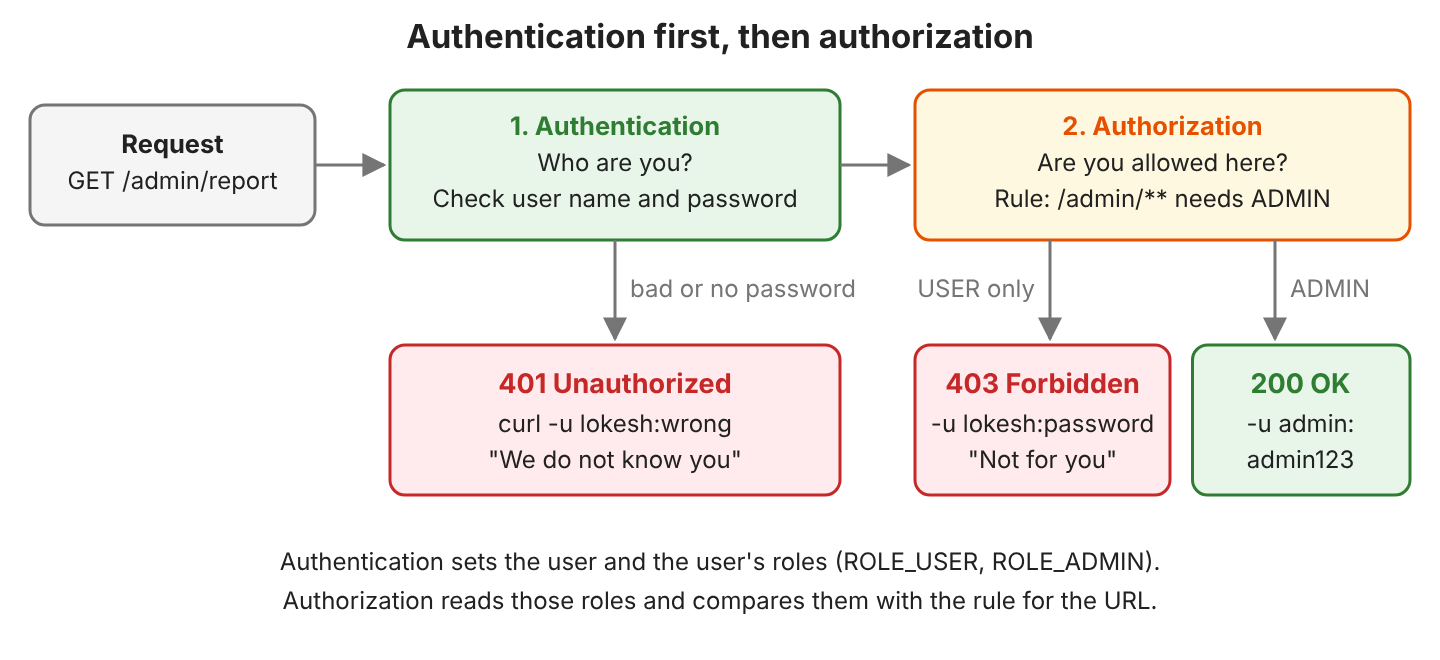
The two HTTP status codes are the quickest way to tell the two checks apart.
| Authentication | Authorization | |
|---|---|---|
| Question | Who are you? | Are you allowed here? |
| Input | User name and password, a token, or a session cookie | The user’s roles and the rule for the URL |
| Failure in our example | 401 Unauthorized | 403 Forbidden |
| Spring Security parts | AuthenticationManager, UserDetailsService, PasswordEncoder | authorizeHttpRequests(), hasRole(), @PreAuthorize |
Two more terms show up in every Spring Security article. The principal is the logged-in user, and our controller gets it as a Principal parameter. An authority is one right that the user has. A role is an authority whose name starts with ROLE_, so hasRole(“ADMIN”) checks the authority ROLE_ADMIN.
1.2. What Spring Boot Secures by Default
We started a small app with the security starter and one controller method, /hello. We wrote no security code. Spring Boot set up these defaults for us.
- Every endpoint needs a login, including the /error page.
- Spring Boot creates one user, user, with a random password from the startup log.
- A REST client without a password gets 401 and a WWW-Authenticate header.
- A browser without a password gets a redirect to a generated login page at /login.
- The generated login page and a logout page at /logout are ready to use.
- POST, PUT and DELETE requests need a CSRF token, which section 5.2 explains.
- Every response gets security headers, such as X-Frame-Options: DENY.
A REST client and a browser get different responses, and Spring Security tells them apart by the Accept: text/html header.
HTTP/1.1 401
WWW-Authenticate: Basic realm="Realm", charset="UTF-8"
X-Content-Type-Options: nosniff
X-XSS-Protection: 0
Cache-Control: no-cache, no-store, max-age=0, must-revalidate
Pragma: no-cache
Expires: 0
X-Frame-Options: DENY
HTTP/1.1 302
Location: http://localhost:8080/loginThe generated password is for local tests. For a quick fixed user, we can set spring.security.user.name and spring.security.user.password in application.properties. A real app declares its own users, as section 3.3 shows. In both cases, Spring Boot stops printing the generated password.
2. How Spring Security Works
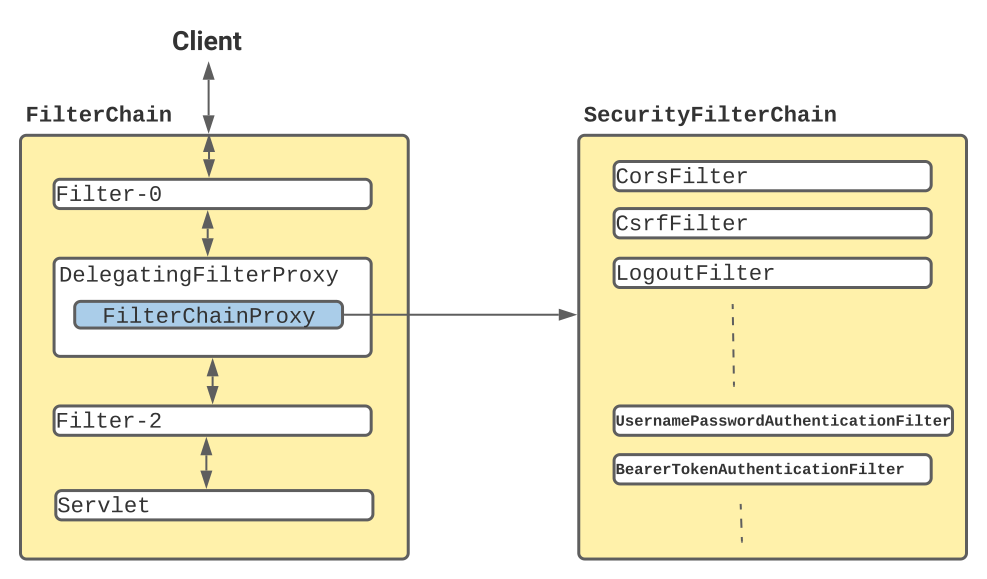
Spring Security is built on servlet filters. A filter is a class that gets each HTTP request before the controller does. A filter can let the request pass, or stop it with an error. In Spring Boot, we can also write a filter of our own.
Spring Security does not add its filters to Tomcat one by one. Spring Security adds one filter to Tomcat, and that filter calls Spring Security’s own list of filters. A request goes through five steps.
- Tomcat calls DelegatingFilterProxy. Spring Boot registers this filter under the name springSecurityFilterChain.
- DelegatingFilterProxy passes the request to FilterChainProxy, a Spring bean.
- FilterChainProxy picks the first SecurityFilterChain whose URL pattern matches the request, and most apps have one chain.
- The filters of that chain run in a fixed order.
- When all filters let the request pass, the DispatcherServlet calls our controller.
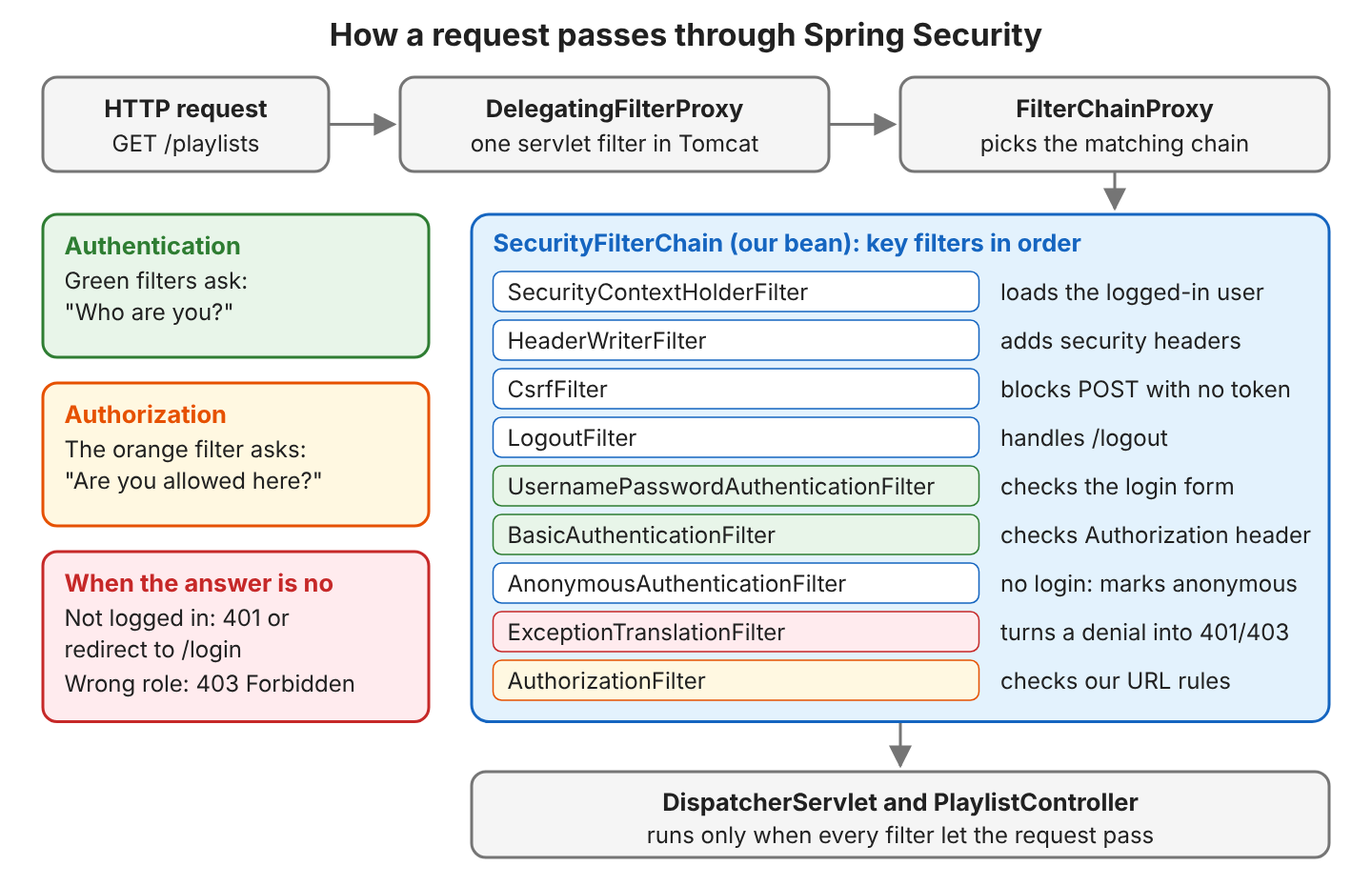
With form login and HTTP Basic turned on, our SecurityFilterChain in Spring Security 7.1.1 has 16 filters. Ten of them come up in daily work, and they run in the order of the table.
| Filter | What the filter does in our example |
|---|---|
| SecurityContextHolderFilter | Loads the logged-in user from the HTTP session, if there is one |
| HeaderWriterFilter | Adds X-Frame-Options, Cache-Control and other security headers |
| CsrfFilter | Rejects a POST, PUT or DELETE request that has no valid CSRF token |
| LogoutFilter | Logs the user out on POST /logout |
| UsernamePasswordAuthenticationFilter | Reads the user name and password from the login form |
| DefaultLoginPageGeneratingFilter | Serves the generated page at /login |
| BasicAuthenticationFilter | Reads the Authorization: Basic … header that curl -u sends |
| AnonymousAuthenticationFilter | Marks a caller without a login as “anonymous” |
| ExceptionTranslationFilter | Turns a denied request into 401, 403 or a redirect to /login |
| AuthorizationFilter | Compares the user’s roles with the rules in authorizeHttpRequests() |
Spring Security keeps the logged-in user in the SecurityContext. After a good login, a login filter puts an Authentication object there. Later filters and our own code read the user from it, and Spring MVC passes the same user to a controller method with a Principal parameter.
3. Spring Security Example With Spring Boot 4
The following example is a small playlist API. It has three kinds of endpoints.
- GET /public/top-songs is open to everyone.
- GET /playlists and POST /playlists need any logged-in user.
- GET /admin/report needs the role ADMIN.
The project uses Spring Boot 4.1.1, Spring Security 7.1.1 and Java 25. The complete project on GitHub has 24 JUnit tests for the status codes and outputs of the playlist API. We run the tests with mvn test and start the application with mvn spring-boot:run.
3.1. Adding the Dependencies
Spring Boot 4 split its starters into smaller ones, so a web app needs spring-boot-starter-webmvc for the controllers. The test starters add MockMvc and the Spring Security test helpers.
<dependency>
  <groupId>org.springframework.boot</groupId>
  <artifactId>spring-boot-starter-webmvc</artifactId>
</dependency>
<dependency>
  <groupId>org.springframework.boot</groupId>
  <artifactId>spring-boot-starter-security</artifactId>
</dependency>

<dependency>
  <groupId>org.springframework.boot</groupId>
  <artifactId>spring-boot-starter-webmvc-test</artifactId>
  <scope>test</scope>
</dependency>
<dependency>
  <groupId>org.springframework.boot</groupId>
  <artifactId>spring-boot-starter-security-test</artifactId>
  <scope>test</scope>
</dependency>
In Spring Boot 3, the web starter was spring-boot-starter-web. That name still works in Spring Boot 4.1.1, but the old starter is deprecated, and spring-boot-starter-webmvc replaces it.
3.2. Writing the SecurityFilterChain Bean
We declare the rules in a SecurityFilterChain bean inside a @Configuration class. When Spring Boot finds our bean, it stops creating its default chain. The bean is the same one shown at the top of this page.
@Bean
SecurityFilterChain securityFilterChain(HttpSecurity http) throws Exception {
  http
      .authorizeHttpRequests(auth -> auth
          .requestMatchers("/public/**", "/error").permitAll()  // no login needed
          .requestMatchers("/admin/**").hasRole("ADMIN")         // only users with role ADMIN
          .anyRequest().authenticated())                         // any logged-in user
      .formLogin(Customizer.withDefaults())                      // login page for browsers
      .httpBasic(Customizer.withDefaults());                     // Authorization header for curl
  return http.build();
}
Spring Security reads the rules from top to bottom and uses the first one that matches the URL. So we put the narrow rules first and anyRequest() last.
Each method of HttpSecurity takes a lambda in which we configure one feature, such as the URL rules or the login form. Customizer.withDefaults() turns a feature on with its default settings.
Spring Security 7 accepts this lambda style and nothing else. The old chained style with .and() and no-argument methods such as http.formLogin() is gone. Old tutorials that use those methods don’t compile on Spring Boot 4.
We also permit /error, the page Spring Boot shows when a request fails. Without the /error rule, a failed request can return a confusing 401, as section 5.2 shows.
3.3. Adding Users and a Password Encoder
Spring Security asks a UserDetailsService for a user by name. Our example keeps two users in memory. A real app loads users from a database with JdbcUserDetailsManager or its own UserDetailsService.
@Bean
UserDetailsService userDetailsService(PasswordEncoder passwordEncoder) {
  UserDetails lokesh = User.withUsername("lokesh")
      .password(passwordEncoder.encode("password"))
      .roles("USER")
      .build();
  UserDetails admin = User.withUsername("admin")
      .password(passwordEncoder.encode("admin123"))
      .roles("USER", "ADMIN")
      .build();
  return new InMemoryUserDetailsManager(lokesh, admin);
}

@Bean
PasswordEncoder passwordEncoder() {
  return PasswordEncoderFactories.createDelegatingPasswordEncoder();   // bcrypt by default
}
A PasswordEncoder turns a password into a hash. A hash is a one-way value, so we can check a password against it, but we can’t turn it back into the password. We never store plain-text passwords.
Hashing matters on the day a database backup leaks. The attacker finds hashes, not passwords. The delegating encoder writes the algorithm name in front of the hash.
String hash = passwordEncoder.encode("password");
// {bcrypt}$2a$10$oTkKQt9FxwTEPR7NEj04jeSa6juSaVxTFFSYcPgiZlLDCFWkSX48.

boolean matches = passwordEncoder.matches("password", hash);   // true
The hash changes on every call, because bcrypt adds a random salt. The {bcrypt} prefix lets us move to a newer algorithm later. Old hashes keep working, because the prefix tells Spring Security how to check each one.
3.4. Calling the Endpoints With curl
We started the application with mvn spring-boot:run and called each endpoint with curl. The -u option sends the user name and password as an HTTP Basic header.
| Request | Status | Response body |
|---|---|---|
| curl localhost:8080/public/top-songs | 200 | Top songs: Yellow, Halo, Hello |
| curl localhost:8080/playlists | 401 | {“status”:401,”error”:”Unauthorized”,…} |
| curl -u lokesh:password localhost:8080/playlists | 200 | Playlists of lokesh: Morning Run, Focus |
| curl -u lokesh:wrong localhost:8080/playlists | 401 | {“status”:401,”error”:”Unauthorized”,…} |
| curl -u lokesh:password localhost:8080/admin/report | 403 | {“status”:403,”error”:”Forbidden”,…} |
| curl -u admin:admin123 localhost:8080/admin/report | 200 | Users: 2, Playlists: 4 |
| curl -u lokesh:password -X POST -d “Road Trip” localhost:8080/playlists | 403 | {“status”:403,”error”:”Forbidden”,…} |
Many developers do not expect the result in the last row. The user and the password are correct, but the POST request has no CSRF token, and section 5.2 explains the reason and the fix.
3.5. Testing Spring Security With MockMvc
spring-boot-starter-security-test adds the spring-security-test library, which provides request helpers for MockMvc. MockMvc sends fake HTTP requests through the whole filter chain without a server. The test class needs two annotations.
@SpringBootTest
@AutoConfigureMockMvc
class CustomSecurityTest {

  @Autowired MockMvc mvc;
  // tests below
}
In Spring Boot 4, @AutoConfigureMockMvc is in the package org.springframework.boot.webmvc.test.autoconfigure. Each helper sets up one kind of caller.
// 1. HTTP Basic with a real user and password
mvc.perform(get("/playlists").with(httpBasic("lokesh", "password")))
    .andExpect(status().isOk());                                  // 200

mvc.perform(get("/admin/report").with(httpBasic("lokesh", "password")))
    .andExpect(status().isForbidden());                           // 403

// 2. A fake logged-in user, no password check
@Test
@WithMockUser(username = "lokesh", roles = "USER")
void mockUserSkipsThePassword() throws Exception {
  mvc.perform(get("/playlists"))
      .andExpect(content().string("Playlists of lokesh: Morning Run, Focus"));
}

// 3. A POST request with a valid CSRF token
mvc.perform(post("/playlists").content("Road Trip").with(httpBasic("lokesh", "password")).with(csrf()))
    .andExpect(status().isOk());                                  // 200

// 4. The login form
mvc.perform(formLogin().user("lokesh").password("password"))
    .andExpect(redirectedUrl("/"))
    .andExpect(authenticated().withUsername("lokesh").withRoles("USER"));
@WithMockUser is the quickest choice for controller tests, where the test does not care about passwords. We use httpBasic() or formLogin() when the test must check the real users and passwords.
4. Spring Security Tutorials on HowToDoInJava
Each article in this section covers one topic in depth. Some older articles were written for Spring Security 5 or 6, and their ideas still apply. When an article uses .and() or a no-argument method such as http.csrf(), we rewrite that code in the lambda style from section 3.2 on Spring Boot 4.
4.1. Where to Start
If we are new to Spring Security, we can read these articles in this order. They start with the config class and then cover the two login types.
- Spring Security @EnableWebSecurity Example explains the annotation that older configuration classes carry.
- Spring Security Form Login Example builds a custom login page.
- Basic Auth with Spring Security secures an API with HTTP Basic.
- Securing Spring Boot REST API with Basic Auth applies HTTP Basic to a REST API.
4.2. Login and Authentication
These articles show where users come from and how the app checks their passwords or tokens.
- Spring Security Database-backed Form Login loads users from a database table.
- Custom Authentication Providers in Spring Security adds our own login check.
- Spring Custom Token Authentication Example logs in with a token in a request header.
- Spring Security One-Time Token Login Example sends a single-use login link.
- Spring Security Two-Factor Auth (2FA) with JWT Token adds a second login step.
- Spring Security Siteminder Pre-authentication Example accepts a login that a proxy server checked before the request reached the application.
- Java Hashing using MD5, SHA, PBKDF2, Bcrypt and Scrypt explains password hashing in plain Java.
4.3. OAuth2, JWT and Keycloak
OAuth2 lets users log in with an account from another site, such as GitHub or Google. JWT is a signed token that many REST APIs use in place of a session.
- Intro to JWT (JSON Web Token) explains the parts of a token.
- Login/Logout using Spring Boot Security 3 and JWT Auth builds JWT login with a Vue.js front end.
- OAuth2 Social Login with Spring Boot Security logs in with GitHub and Facebook accounts.
- Spring Boot OAuth2 Authorization and Resource Servers issues and checks OAuth2 tokens.
- OAuth2 Login with Keycloak and Spring Boot Security 3 uses Keycloak as the login server.
- Getting Started with Keycloak on Docker runs Keycloak on our own machine.
- Spring Boot Role-Based Authentication with AWS Cognito uses Amazon Cognito for users and roles.
4.4. Roles and Authorization
We can write access rules for URLs, as in our example, or for single methods of a service class.
- Spring Boot Security Role-based Authorization Example protects URLs by role.
- Spring Method Security with @PreAuthorize and @Secured checks roles on service methods.
- Spring Method Security with Protect-Pointcut secures many methods with one pointcut expression.
- Spring Boot Role Based Security with JAX-RS Annotations uses @RolesAllowed on Jersey resources.
- Spring View Layer Security using JSP Taglibs hides parts of a JSP page by role.
4.5. CORS, HTTPS and REST API Security
A browser blocks calls from one site to another unless the server allows them. This rule is called CORS (Cross-Origin Resource Sharing). These articles also cover HTTPS and basic tips for REST APIs.
- Spring Boot CORS Configuration Examples allows calls from a front end on another domain.
- Java CORS Filter Example shows CORS with a plain servlet filter.
- Spring Boot SSL (HTTPS) Example turns on HTTPS with a certificate.
- REST API Security Guide lists the security basics for any REST API.
4.6. Testing, Debugging and Configuration Changes
When a rule does not work as expected, the debug log shows which filter rejected the request.
- Test Spring Security Auth with JUnit tests secured service methods.
- Spring Boot, Keycloak and TestContainer Example tests OAuth2 login against a real Keycloak in Docker.
- Enable Debug Logging for Spring Security prints each filter decision.
- Spring Security Context Propagation to Threads keeps the logged-in user in async code.
- Spring Security Interview Questions and Answers is a review of the main ideas.
5. Spring Security FAQs
5.1. Why Does Every Endpoint Return 401 After Adding Spring Security?
Because the starter secures every URL by default, as section 1.2 shows, a request without a user name and password gets 401. To log in during local tests, we use user and the password from the startup log. To open some URLs to everyone, we declare a SecurityFilterChain bean with permitAll() rules.
5.2. Why Does a POST Request Return 403 Forbidden?
The usual cause is CSRF protection. CSRF (cross-site request forgery) is an attack where another site makes the user’s browser send a request to our app. The browser adds the user’s session cookie on its own. For example, a user is logged in to our playlist app in one tab and opens a harmful page in another tab. That page sends a hidden form to POST /playlists.
So Spring Security wants a secret CSRF token on every POST, PUT and DELETE request. A request with no token gets 403, even with the right password.
A server-rendered HTML form gets the token as a hidden field from Thymeleaf, and in a MockMvc test we add .with(csrf()). In our project, the test shows the difference.
mvc.perform(post("/playlists").content("Road Trip").with(httpBasic("lokesh", "password")))
    .andExpect(status().isForbidden());                           // 403, no token

mvc.perform(post("/playlists").content("Road Trip").with(httpBasic("lokesh", "password")).with(csrf()))
    .andExpect(content().string("Created playlist 'Road Trip' for lokesh"));
A stateless REST API, such as an API that accepts JWT tokens and no cookies, has no session cookie to steal, so it often turns CSRF off with http.csrf(csrf -> csrf.disable()).
We keep CSRF on whenever the browser sends a session cookie. Turning CSRF off is safe only for a service that non-browser clients call.
The same POST request can return 401 instead of 403, as we saw before we added /error to the permitAll() rule. CsrfFilter runs before the login filters, so Spring Security rejects the request before it reads the password, and Spring Boot then forwards the request to /error. The /error page also needs a login, and the request has none, so the final status is 401. Permitting /error shows the real 403.
5.3. What Replaced WebSecurityConfigurerAdapter?
Old code extended WebSecurityConfigurerAdapter and overrode configure(HttpSecurity http). Spring Security 5.7 marked that class as deprecated, and version 6 took it out. Today we declare a SecurityFilterChain bean, as in section 3.2. Each old configure() method has a bean-based replacement without WebSecurityConfigurerAdapter.
5.4. Do We Still Need @EnableWebSecurity in Spring Boot?
No. Spring Boot turns web security on when the starter is on the classpath, so our example has no @EnableWebSecurity annotation, and all 24 tests pass. A Spring application without Spring Boot still needs the annotation.
5.5. How Do We Turn Spring Security Off?
In most cases we don’t need to, because a smaller change is enough. For local work, a permitAll() rule for the URLs we test often does the job, and for a test of a controller alone, @WithMockUser gives a logged-in user.
When we must, we can disable Spring Security in Spring Boot for one profile.
6. Conclusion
Spring Security checks each request in a chain of servlet filters before our controller runs. The login filters find out who the caller is. AuthorizationFilter then checks the caller’s roles against our URL rules.
With the starter alone, Spring Boot secures every URL and prints a password for the user user. Our own SecurityFilterChain bean replaces the default rules, and a UserDetailsService with a PasswordEncoder replaces the default user. With spring-security-test, we check each rule in a MockMvc test. For the next step, the articles in section 4 cover database users, JWT, OAuth2 and method security.
7. References
- Spring Security Reference: Getting Started
- Spring Security Reference: Architecture
- Spring Security Reference: Authorize HTTP Requests
- Spring Security Reference: Password Storage
- Spring Security Reference: Testing with MockMvc
- Spring Boot Reference: Spring Security
Happy Learning !!
