
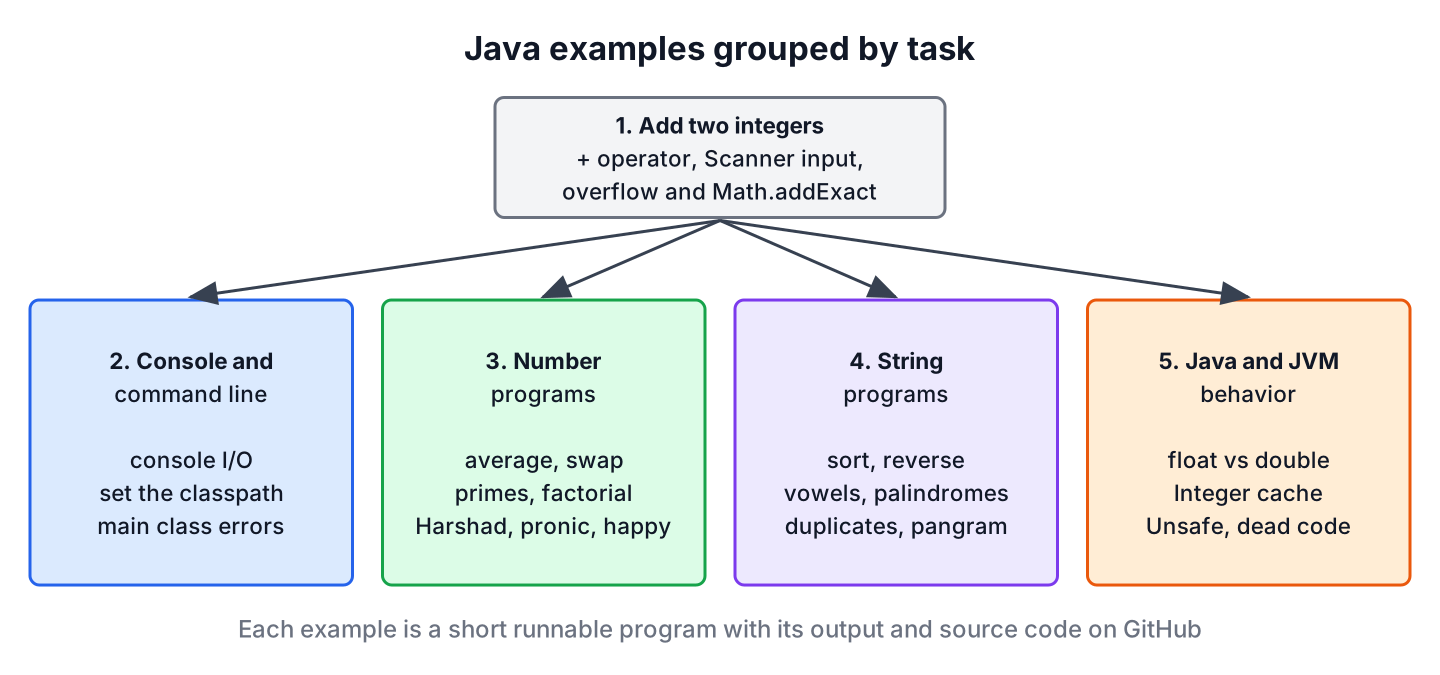
Java examples are small, complete programs that solve one task each, such as adding two numbers, checking a prime number or reversing a string, so we can run them, read the output and change them while learning the language. This page groups all our example programs by task and starts with the first program most beginners write, adding two integers.
We use these programs to practice syntax and the standard library, to prepare for coding interviews, and as starting points for real code. The following example adds two integers and shows the one detail that beginner programs often miss, which is overflow.
int apples = 10;
int pears = 20;
int total = apples + pears;                       // 30
int wrapped = Integer.MAX_VALUE + 1;              // -2147483648, int overflow
long widened = (long) Integer.MAX_VALUE + 1;      // 2147483648
int checked = Math.addExact(apples, pears);       // 30, throws ArithmeticException on overflow
Notice that the plain + operator wraps around without any error when the result does not fit into an int. After the addition program and its input version, the collection lists the console and command-line examples, number programs, string programs and programs about JVM behavior, each with what it teaches.
1. Java Program to Add Two Integers
Adding two numbers teaches variables, the int type, operators and printing. An int holds values from -2,147,483,648 to 2,147,483,647, and the + operator on two int values gives an int result.
int first = 15;
int second = 27;
int sum = first + second;                        // 42
String message = "Sum: " + sum;                  // "Sum: 42"
String wrong = "Sum: " + first + second;         // "Sum: 1527", string concatenation
The last line is a frequent beginner mistake. Java evaluates + from left to right, so once the left side is a String, each further + appends text. Parentheses fix it, as in “Sum: ” + (first + second).
1.1. Adding Two Numbers Entered by the User
A program that reads the numbers from the keyboard wraps System.in in a Scanner. The safe version checks each token with hasNextInt() before reading it, so input such as ten leads to a message instead of an InputMismatchException. To keep the snippet runnable, the scanner reads from a string with the typed text.
Scanner input = new Scanner("15 abc 27");          // new Scanner(System.in) in a real program
int firstNumber = input.hasNextInt() ? input.nextInt() : 0;   // 15
boolean secondValid = input.hasNextInt();                     // false, "abc" is not a number
String rejected = input.next();                               // "abc"
int secondNumber = input.hasNextInt() ? input.nextInt() : 0;  // 27
int userSum = firstNumber + secondNumber;                     // 42
In a full program, the rejected token leads to a prompt such as Please enter a whole number and a new read inside a loop. The guide to reading input from the console shows that loop and the other ways to read user input. Since Java 25, a beginner program also fits in a few lines without a class declaration, as the Java hello world guide explains.
void main() {
    try {
        int a = Integer.parseInt(IO.readln("First number: ").strip());
        int b = Integer.parseInt(IO.readln("Second number: ").strip());
        IO.println("Sum: " + Math.addExact(a, b));
    } catch (NumberFormatException | ArithmeticException e) {
        IO.println("Please enter two whole numbers in the int range");
    }
}
1.2. Integer Overflow When Adding
When the true sum is larger than Integer.MAX_VALUE, the + operator keeps only the lowest 32 bits and the result wraps around to a negative number, without any error. Say a download manager adds the sizes of two files in bytes. Two files of 1.5 GB each add up to 3,221,225,472 bytes, which an int cannot hold.
int videoBytes = 1_610_612_736;                              // 1.5 GB
int intTotal = videoBytes + videoBytes;                      // -1073741824, wrapped around
long longTotal = (long) videoBytes + videoBytes;             // 3221225472
int exactTotal = Math.addExact(videoBytes, videoBytes);      // ArithmeticException: integer overflow
We use long for values that can grow past two billion, such as byte counts and timestamps in milliseconds, and Math.addExact() when an overflow must stop the program instead of producing a wrong number. The article on exact arithmetic methods covers subtractExact(), multiplyExact() and the rest, and BigInteger handles numbers of any size.
2. Console and Command-Line Programs
The console and command-line examples deal with what happens around the code, such as reading and writing text in a terminal, starting a program with its libraries and fixing the first error message beginners see.
| Task | Example | What it teaches |
|---|---|---|
| Read and write text in the terminal | Console input and output | System.out, System.err, the Console class and password input |
| Start a program with its libraries | Set the classpath from the command line | -cp, CLASSPATH, wildcards and quoting per OS |
| Fix a failed start | Could not find or load main class | Package names, the classpath and the launcher |
3. Number Programs
Number programs practice loops, the remainder operator % and integer division, which coding interviews often test early. Many of them check a special property of a number, and each article compares a plain loop with a stream-based version where that helps.
| Task | Example | What it teaches |
|---|---|---|
| Average of N numbers | Calculate the average of N numbers | Integer vs floating-point division, streams |
| Swap two variables | Swap two numbers | Temporary variable, arithmetic and XOR swaps |
| Primes up to N | Prime numbers from 2 to N | Trial division, the sieve of Eratosthenes |
| Factorial | Calculate a factorial | Loops, recursion, BigInteger |
| FizzBuzz | FizzBuzz solution | Conditions and the % operator |
| Missing number in a series | Find the missing number | Sum formula and XOR |
| Disarium number | Disarium number | Digits and powers by position |
| Happy number | Happy and unhappy numbers | Cycle detection with a Set |
| Harshad number | Harshad number | Digit sums and divisibility |
| Pronic number | Pronic number | Products of consecutive integers |
| Deficient number | Deficient number | Divisor sums |
4. String Programs
String programs train the methods of String, StringBuilder and Character, and they show how often a short stream pipeline replaces a loop. They are also common warm-up questions in Java interviews.
| Task | Example | What it teaches |
|---|---|---|
| Sort strings | Sort a string array alphabetically | Arrays.sort(), comparators, case order |
| Reverse a string | Reverse a string | StringBuilder.reverse() and loops |
| Reverse with recursion | Reverse a string using recursion | Base case and recursive call |
| Reverse the words | Reverse words in a string | Splitting and joining |
| Count vowels and consonants | Count vowels and consonants | Character checks, streams |
| Palindrome string | Check a palindrome string | Two pointers |
| Palindrome number and string | Palindrome with a stack, a queue and loops | Several solutions compared |
| Remove extra spaces | Remove extra whitespaces | Regular expressions, strip() |
| Duplicate words | Find duplicate words | Map counts, grouping |
| Duplicate characters | Find duplicate characters | Frequency maps |
| Pangram check | Check if a string contains all letters | Sets and character ranges |
| Good and bad strings | Good string, bad string puzzle | Character rules in a loop |
5. Programs About Java and JVM Behavior
The last group explains results that surprise developers with a few years of experience, such as two equal numbers that are not ==, or code that the compiler refuses as unreachable. Each one is short to run and teaches a rule of the language or the JVM.
| Task | Example | What it teaches |
|---|---|---|
| Compare decimal numbers | Compare float and double correctly | Tolerances, Double.compare(), BigDecimal |
| 127 == 127 but not 128 | Wrapper class cache | The Integer cache and equals() |
| Low-level memory access | sun.misc.Unsafe and its replacements | VarHandle and the FFM API |
| Unreachable code | Dead code and unreachable code | Compiler flow analysis |
| Objects without new | Create an object without new | Reflection, cloning, deserialization |
| Loop in a linked list | Detect a loop in a linked list | Fast and slow pointers |
| A small game | Hi-Lo guessing game | Random numbers and a game loop |
6. Java Examples FAQs
Beginners who work through these programs ask how to run them, where to start and how to vary the classic tasks.
6.1. How do we add two numbers in Java without the + operator?
We use bitwise operators. The XOR operator adds the bits without the carry, and AND shifted left by one gives the carry, so we repeat both steps until the carry is zero.
static int addWithoutPlus(int a, int b) {
    while (b != 0) {
        int carry = (a & b) << 1;
        a = a ^ b;
        b = carry;
    }
    return a;
}
int bitSum = addWithoutPlus(15, 27); // 426.2. How do we run one of these examples?
We save the code in a file such as AddNumbers.java and start it with java AddNumbers.java. Since Java 11, the launcher compiles a single source file in memory, so no separate javac step is needed for small programs.
6.3. Which examples should a beginner start with?
We start with adding two integers and reading console input, continue with number programs such as the average, swapping and primes, and move on to the string programs after that. The Java tutorial covers the language basics that these programs use.
6.4. Should the sum of two int values be stored in a long?
Only when the sum can exceed about 2.1 billion. Casting one operand first, as in (long) a + b, makes the addition itself happen in long, whereas long sum = a + b; adds two int values and overflows before the assignment.
7. Conclusion
Small programs are the fastest way to learn how Java behaves, and the addition example already shows two lessons, string concatenation with + and silent int overflow, with long and Math.addExact() as the fixes.
The groups on this page move from the console and the command line to number and string programs and to JVM behavior.
8. References
- Learn Java, dev.java
- Math.addExact() Javadoc
- Scanner Javadoc
- JLS 25, Integer Operations
- JEP 512, Compact Source Files and Instance Main Methods
Happy Learning !!
