
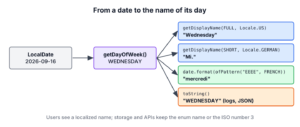
To get the day name from a date in Java, we call getDisplayName(TextStyle, Locale) on the DayOfWeek of a date, which returns a localized name such as “Wednesday”, “Wed” or “Mittwoch”. A DateTimeFormatter with the pattern EEEE prints the same name as part of a longer date text.
Day names appear in calendar headers, booking confirmations, “open Mon to Sat” labels and emails written in the language of each customer. The name must follow the user’s locale, not the default locale of the server.
The following example prints the day name of September 16, 2026 in three lengths and two languages.
LocalDate date = LocalDate.of(2026, 9, 16);
DayOfWeek day = date.getDayOfWeek();                                            // WEDNESDAY
String full = day.getDisplayName(TextStyle.FULL, Locale.US);                    // "Wednesday"
String shortName = day.getDisplayName(TextStyle.SHORT, Locale.US);              // "Wed"
String narrow = day.getDisplayName(TextStyle.NARROW, Locale.US);                // "W"
String french = day.getDisplayName(TextStyle.FULL, Locale.FRENCH);              // "mercredi"
String withDate = date.format(DateTimeFormatter.ofPattern("EEEE, d MMMM uuuu", Locale.US));   // "Wednesday, 16 September 2026"
Notice that the French name starts with a lowercase letter, because the locale data follows the spelling rules of each language. We go through the text styles, the formatter patterns, listing all names in the right order, and parsing a name back into a DayOfWeek.
1. Day Names With getDisplayName() and TextStyle
The method getDisplayName() takes a TextStyle, which sets the length of the text, and a Locale, which sets the language. The texts come from the Unicode CLDR data that the JDK uses by default since Java 9.
Each length has a standard and a standalone form. The standard form is meant for a day name inside a date, and the standalone form for a name on its own, such as a column header. In English both forms are equal, whereas German drops the period in the short standalone form.
| TextStyle | Locale.US | Locale.GERMAN | Locale.FRENCH |
|---|---|---|---|
| FULL | Wednesday | Mittwoch | mercredi |
| FULL_STANDALONE | Wednesday | Mittwoch | mercredi |
| SHORT | Wed | Mi. | mer. |
| SHORT_STANDALONE | Wed | Mi | mer. |
| NARROW | W | M | M |
| NARROW_STANDALONE | W | M | M |
The narrow names are not unique, for example Tuesday and Thursday are both T in English, so we use them only where the position in the row makes the day clear, such as a small calendar widget.
String germanShort = DayOfWeek.WEDNESDAY.getDisplayName(TextStyle.SHORT, Locale.GERMAN);               // "Mi."
String germanHeader = DayOfWeek.WEDNESDAY.getDisplayName(TextStyle.SHORT_STANDALONE, Locale.GERMAN);   // "Mi"
String dutch = DayOfWeek.WEDNESDAY.getDisplayName(TextStyle.FULL, Locale.forLanguageTag("nl"));         // "woensdag"
2. Day Names With DateTimeFormatter Patterns
When the day name is part of a longer text, a DateTimeFormatter pattern is shorter than building the string by hand. The letter E prints the standard form and the letter c prints the standalone form, and the number of letters sets the length.
| Pattern | Locale.US | Locale.GERMAN | Same as |
|---|---|---|---|
| EEEE | Wednesday | Mittwoch | TextStyle.FULL |
| EEE | Wed | Mi. | TextStyle.SHORT |
| EEEEE | W | M | TextStyle.NARROW |
| ccc | Wed | Mi | TextStyle.SHORT_STANDALONE |
LocalDate date = LocalDate.of(2026, 9, 16);
String header = date.format(DateTimeFormatter.ofPattern("EEE dd.MM.", Locale.GERMAN));      // "Mi. 16.09."
String usFull = date.format(DateTimeFormatter.ofLocalizedDate(FormatStyle.FULL).withLocale(Locale.US));          // "Wednesday, September 16, 2026"
String germanFull = date.format(DateTimeFormatter.ofLocalizedDate(FormatStyle.FULL).withLocale(Locale.GERMANY)); // "Mittwoch, 16. September 2026"
The style FormatStyle.FULL includes the day name and puts it where each language expects it, which is the better choice for whole dates in a user interface. The localized date format article covers these styles.
3. Why toString() Prints WEDNESDAY
The method toString() of an enum returns the constant name, so printing a DayOfWeek or concatenating it into a string gives WEDNESDAY in uppercase, in every locale. The constant name is good for logs, JSON and database columns, because it never changes with the language.
DayOfWeek day = LocalDate.of(2026, 9, 16).getDayOfWeek();
String forLogs = day.toString();                                     // "WEDNESDAY"
String forUsers = day.getDisplayName(TextStyle.FULL, Locale.UK);     // "Wednesday"
int isoNumber = day.getValue();                                      // 3
We show users the result of getDisplayName() and store or send the enum name or its ISO number. Turning WEDNESDAY into “Wednesday” with string methods works only for English and breaks for every other language.
4. Printing All Day Names for a Calendar Header
A booking calendar shows a header row with seven short day names. The row must start on Sunday for US users and on Monday for German users, so we start from WeekFields.getFirstDayOfWeek() and add one day at a time with plus(), which wraps from Sunday to Monday.
static List<String> headerRow(Locale locale) {
    DayOfWeek first = WeekFields.of(locale).getFirstDayOfWeek();
    return IntStream.range(0, 7)
            .mapToObj(i -> first.plus(i).getDisplayName(TextStyle.SHORT_STANDALONE, locale))
            .toList();
}
List<String> usRow = headerRow(Locale.US); // [Sun, Mon, Tue, Wed, Thu, Fri, Sat]
List<String> germanRow = headerRow(Locale.GERMANY); // [Mo, Di, Mi, Do, Fr, Sa, So]The loop uses plus(i) instead of DayOfWeek.values(), because values() always starts with MONDAY. Each locale’s week start is explained in first and last day of the week.
5. Converting a Day Name Back to DayOfWeek
Text such as “Wed” or “mittwoch” comes back to us from forms, CSV files and chat bots. The method DayOfWeek.valueOf() accepts only the uppercase constant name, so for localized text we parse with a formatter and read the result with DayOfWeek.from().
DayOfWeek fromConstant = DayOfWeek.valueOf("WEDNESDAY");                                                   // WEDNESDAY
DayOfWeek fromFrench = DayOfWeek.from(DateTimeFormatter.ofPattern("EEEE", Locale.FRENCH).parse("mercredi")); // WEDNESDAY
DayOfWeek wrongCase = DayOfWeek.valueOf("Wednesday");                                                      // IllegalArgumentException
DayOfWeek wrongLength = DayOfWeek.from(DateTimeFormatter.ofPattern("EEE", Locale.US).parse("Wednesday"));  // DateTimeParseException
A formatter is case-sensitive by default, and EEE matches only the short name. A small method that builds a case-insensitive formatter with parseCaseInsensitive() and tries the full name before the short name accepts both forms and returns an Optional for unknown text.
static Optional<DayOfWeek> parseDayName(String text, Locale locale) {
    if (text == null || text.isBlank()) {
        return Optional.empty();
    }
    for (String pattern : List.of("EEEE", "EEE")) {
        DateTimeFormatter format = new DateTimeFormatterBuilder()
                .parseCaseInsensitive().appendPattern(pattern).toFormatter(locale);
        try {
            return Optional.of(DayOfWeek.from(format.parse(text.strip())));
        } catch (DateTimeParseException e) {
            // try the next pattern
        }
    }
    return Optional.empty();
}
Optional<DayOfWeek> german = parseDayName("mittwoch", Locale.GERMAN); // Optional[WEDNESDAY]
Optional<DayOfWeek> shortUs = parseDayName(" WED ", Locale.US); // Optional[WEDNESDAY]
Optional<DayOfWeek> unknown = parseDayName("someday", Locale.US); // Optional.empty6. Day Names From DateFormatSymbols in Legacy Code
Code written before Java 8 reads day names from java.text.DateFormatSymbols. Its getWeekdays() array has eight elements, an empty string at index 0 followed by Sunday to Saturday at the indexes of the Calendar constants, so Calendar.WEDNESDAY is index 4.
String[] weekdays = DateFormatSymbols.getInstance(Locale.US).getWeekdays();
int length = weekdays.length;                                                         // 8
String legacyName = weekdays[Calendar.WEDNESDAY];                                     // "Wednesday"
String modernName = DayOfWeek.WEDNESDAY.getDisplayName(TextStyle.FULL, Locale.US);    // "Wednesday"
When we touch such code, we convert the Date or Calendar to a LocalDate and use getDisplayName(), which removes the off-by-one indexes. Getting a DayOfWeek from a java.util.Date is shown in finding the day of the week.
7. Day Name FAQs
Short names, the wrong language and today’s name are the usual follow-up questions after the first getDisplayName() call.
7.1. How do I get the day name from a date in Java?
We call date.getDayOfWeek().getDisplayName(TextStyle.FULL, locale). For a LocalDate of September 16, 2026 and Locale.US, it returns “Wednesday”.
7.2. How do I get a three-letter day name such as Mon or Tue?
We use TextStyle.SHORT or the pattern EEE. The result has three letters in English, but other languages use other lengths, such as “Mi.” in German and “mer.” in French, so we do not cut the full name to three characters.
7.3. Why does my day name print in the wrong language?
The code uses Locale.getDefault() or a formatter without a locale, so the name follows the machine’s language. Passing the user’s locale on every call fixes it; getting the current user locale shows where to find it in a web app.
7.4. How do I get the name of today’s day?
We call LocalDate.now(zone).getDayOfWeek().getDisplayName(TextStyle.FULL, locale). We include the zone, because at midnight UTC it is still the previous day in New York.
8. Conclusion
The method getDisplayName() turns a DayOfWeek into a localized name, and the TextStyle picks the full, short or narrow form. Inside a longer date text, the patterns EEEE and EEE or a FormatStyle.FULL formatter do the same job.
We keep the enum name or the ISO number for storage and logs, always pass a locale for display, and parse names back with a case-insensitive formatter. More recipes are in the Java date and time guide.
9. References
- DayOfWeek.getDisplayName() (Java SE 25 API)
- TextStyle (Java SE 25 API)
- DateTimeFormatter (Java SE 25 API)
- JEP 252, Use CLDR Locale Data by Default
Happy Learning !!
