
To get the day of week from a date in Java, we call getDayOfWeek() on a LocalDate, which returns a DayOfWeek enum constant such as THURSDAY, and getValue() on that constant returns its number from 1 for Monday to 7 for Sunday. The same method exists on LocalDateTime, ZonedDateTime and OffsetDateTime.
Apps check the day of the week for opening hours, delivery slots, weekend prices and calendar views. Because the result is an enum and not a number or a text, a switch or an EnumSet can test it without typos.
The following example finds the day of the week for June 18, 2026 and reads its number and its English and German names.
LocalDate deliveryDate = LocalDate.of(2026, 6, 18);
DayOfWeek day = deliveryDate.getDayOfWeek();                       // THURSDAY
int isoNumber = day.getValue();                                    // 4
String english = day.getDisplayName(TextStyle.FULL, Locale.US);    // "Thursday"
String german = day.getDisplayName(TextStyle.FULL, Locale.GERMAN); // "Donnerstag"
Notice that the number 4 follows ISO-8601, where the week starts on Monday, whereas the legacy Calendar class calls the same Thursday 5. We start with the enum and move on to time zones, string input, the different numbering schemes and java.util.Date, and close with a delivery schedule.
1. The DayOfWeek Enum
The enum java.time.DayOfWeek has seven constants from MONDAY to SUNDAY. Like every enum, it is immutable and thread-safe, and its constants can be compared with ==.
Each constant has two numbers, and mixing them up is a common bug. The method getValue() returns the ISO number from 1 to 7, whereas ordinal() returns the position in the enum from 0 to 6. The factory method DayOfWeek.of() takes the ISO number and throws a DateTimeException for anything outside 1 to 7.
DayOfWeek friday = DayOfWeek.of(5);                  // FRIDAY
int value = friday.getValue();                       // 5
int position = friday.ordinal();                     // 4
DayOfWeek afterSunday = DayOfWeek.SUNDAY.plus(1);    // MONDAY
DayOfWeek beforeMonday = DayOfWeek.MONDAY.minus(1);  // SUNDAY
DayOfWeek parsed = DayOfWeek.valueOf("FRIDAY");      // FRIDAY
DayOfWeek invalid = DayOfWeek.of(0);                 // DateTimeException: Invalid value for DayOfWeek: 0
The methods plus() and minus() wrap around the week, so we never need modulo arithmetic to find the next or the previous day. The method valueOf() accepts only the uppercase constant name; for text such as “Fri” or “vendredi”, see displaying the day name, which also parses localized names.
2. Day of Week From LocalDate, LocalDateTime and ZonedDateTime
All date classes in java.time that contain a date have a getDayOfWeek() method. When a method accepts any TemporalAccessor, the static method DayOfWeek.from() does the same job, and the field ChronoField.DAY_OF_WEEK returns the ISO number as an int.
LocalDateTime pickup = LocalDateTime.of(2026, 6, 18, 9, 30);
DayOfWeek fromDateTime = pickup.getDayOfWeek();                       // THURSDAY
ZonedDateTime meeting = ZonedDateTime.of(2026, 6, 21, 10, 0, 0, 0, ZoneId.of("Europe/Paris"));
DayOfWeek fromZoned = meeting.getDayOfWeek();                         // SUNDAY
DayOfWeek fromAnyTemporal = DayOfWeek.from(pickup);                   // THURSDAY
int fieldValue = pickup.get(ChronoField.DAY_OF_WEEK);                 // 4
Because a LocalTime holds no date, DayOfWeek.from(LocalTime.NOON) throws a DateTimeException. An Instant has no day of the week either, because it is a point on the UTC timeline without a calendar.
2.1. Why the Time Zone Changes the Day
An Instant becomes a weekday only after we pick a time zone. Say a shop in Los Angeles stores an order time as an Instant and promises “free shipping on Thursday orders”. The order placed at 19:30 local time on Thursday is already Friday in UTC, so the server must use the shop’s zone.
Instant orderTime = Instant.parse("2026-06-19T02:30:00Z");
DayOfWeek inUtc = orderTime.atZone(ZoneOffset.UTC).getDayOfWeek();                       // FRIDAY
DayOfWeek inLosAngeles = orderTime.atZone(ZoneId.of("America/Los_Angeles")).getDayOfWeek(); // THURSDAY
DayOfWeek today = LocalDate.now(ZoneId.of("Asia/Kolkata")).getDayOfWeek();              // today's day in India
We always pass a ZoneId when we get the day of the week from an instant or from now(), because the JVM default zone of a server is often UTC. The Instant to ZonedDateTime conversion explains atZone() in more detail.
3. Day of Week From a String
A date that arrives as text, for example from a form field or a CSV file, is parsed into a LocalDate first. ISO strings such as 2026-06-18 need no formatter, and other layouts need a DateTimeFormatter with a pattern.
DayOfWeek isoText = LocalDate.parse("2026-06-18").getDayOfWeek();                              // THURSDAY
DateTimeFormatter dayFirst = DateTimeFormatter.ofPattern("dd/MM/uuuu");
DayOfWeek customText = LocalDate.parse("21/06/2026", dayFirst).getDayOfWeek();                // SUNDAY
DayOfWeek badText = LocalDate.parse("2026-13-01").getDayOfWeek();                             // DateTimeParseException
User input can be wrong, so we wrap the parsing in a method that returns an Optional instead of throwing. Parsing rules and formatter patterns are covered in parsing a string to LocalDate.
static Optional<DayOfWeek> dayOfWeek(String text, DateTimeFormatter format) {
    if (text == null) {
        return Optional.empty();
    }
    try {
        return Optional.of(LocalDate.parse(text.strip(), format).getDayOfWeek());
    } catch (DateTimeParseException e) {
        return Optional.empty();
    }
}
DateTimeFormatter format = DateTimeFormatter.ofPattern("dd/MM/uuuu");
Optional<DayOfWeek> valid = dayOfWeek(" 18/06/2026 ", format); // Optional[THURSDAY]
Optional<DayOfWeek> invalid = dayOfWeek("2026-06-18", format); // Optional.empty4. Day Numbers in DayOfWeek, Calendar and Locales
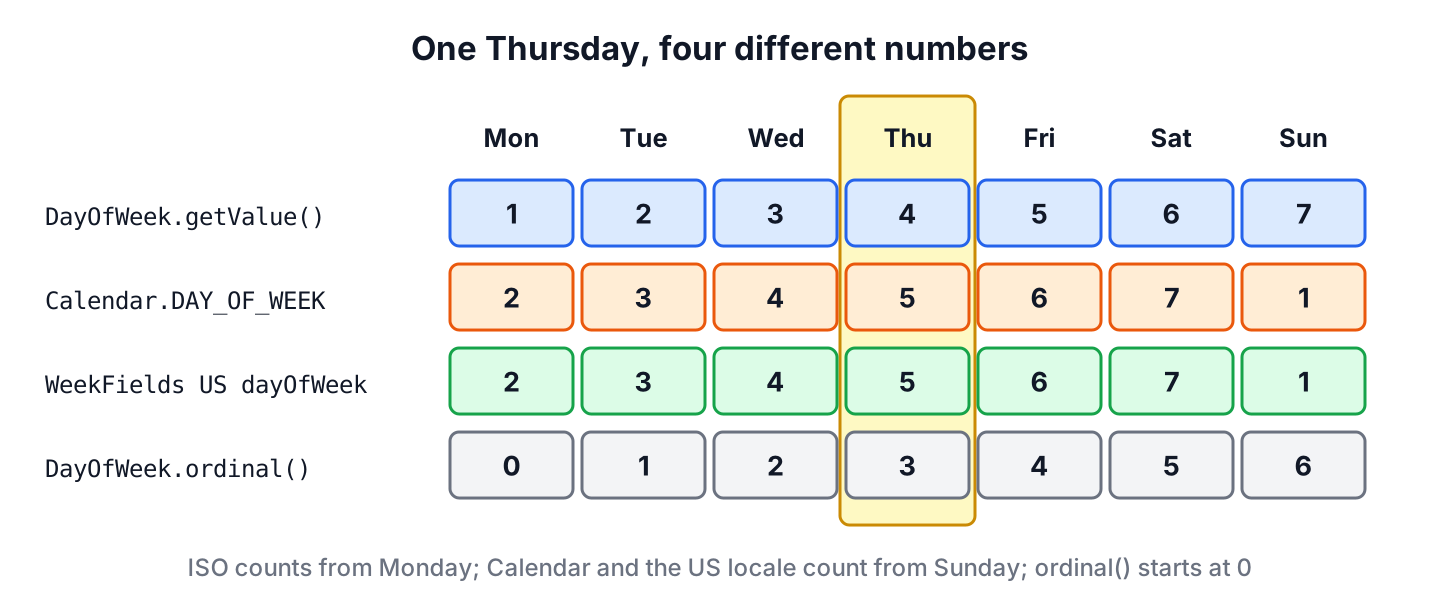
Java has three numbering schemes for the days of the week, and each one gives the same Thursday a different number. The ISO scheme of DayOfWeek counts from Monday, the legacy Calendar.DAY_OF_WEEK field counts from Sunday, and WeekFields counts from the first day of the week of a locale.
LocalDate thursday = LocalDate.of(2026, 6, 18);
int iso = thursday.getDayOfWeek().getValue();                                       // 4
int us = thursday.get(WeekFields.of(Locale.US).dayOfWeek());                        // 5
int uk = thursday.get(WeekFields.of(Locale.UK).dayOfWeek());                        // 4
String usPattern = thursday.format(DateTimeFormatter.ofPattern("e", Locale.US));    // "5"
int legacy = new GregorianCalendar(2026, Calendar.JUNE, 18).get(Calendar.DAY_OF_WEEK);   // 5
The pattern letter e in a DateTimeFormatter prints the localized number, which is why the US formatter prints 5. When we store a day of the week in a database or send it in an API, the enum name such as THURSDAY or the ISO number is the safe choice, because neither depends on the locale of the machine.
5. Getting the Day of Week From a java.util.Date
Old APIs and JDBC drivers still hand us java.util.Date values. We convert the Date to an Instant, turn that into a LocalDate in an explicit zone, and read the day of the week from the result.
Date legacyDate = Date.from(Instant.parse("2026-06-18T10:00:00Z"));
LocalDate converted = legacyDate.toInstant().atZone(ZoneId.of("UTC")).toLocalDate();   // 2026-06-18
DayOfWeek fromLegacy = converted.getDayOfWeek();                                        // THURSDAY
When old code already has a Calendar number from 1 (Sunday) to 7 (Saturday), a small formula maps it to the enum. The expression (calendarDay + 5) % 7 + 1 turns Sunday 1 into 7 and Thursday 5 into 4.
int calendarDay = Calendar.SUNDAY;                       // 1
DayOfWeek mapped = DayOfWeek.of((calendarDay + 5) % 7 + 1);   // SUNDAY
More conversions between the old and the new classes are in converting LocalDate to Date.
6. Using the Day of Week in a Delivery Schedule
A grocery delivery app delivers until 20:00 on weekdays, until 14:00 on Saturday and not at all on Sunday. A switch expression over DayOfWeek covers all seven constants, so the compiler reports an error when a day is missing from the cases.
static Optional<LocalTime> lastSlot(LocalDate date) {
    return switch (date.getDayOfWeek()) {
        case MONDAY, TUESDAY, WEDNESDAY, THURSDAY, FRIDAY -> Optional.of(LocalTime.of(20, 0));
        case SATURDAY -> Optional.of(LocalTime.of(14, 0));
        case SUNDAY -> Optional.empty();
    };
}
Optional<LocalTime> thursdaySlot = lastSlot(LocalDate.of(2026, 6, 18)); // Optional[20:00]
Optional<LocalTime> saturdaySlot = lastSlot(LocalDate.of(2026, 6, 20)); // Optional[14:00]
Optional<LocalTime> sundaySlot = lastSlot(LocalDate.of(2026, 6, 21)); // Optional.empty
LocalDate nextMonday = LocalDate.of(2026, 6, 21).with(TemporalAdjusters.next(DayOfWeek.MONDAY)); // 2026-06-22The last line finds the next delivery day after a Sunday with TemporalAdjusters.next(). For a list of days, an EnumSet<DayOfWeek> keeps the days in week order and checks membership fast, as checking for a weekend shows.
7. Day of Week From a Date FAQs
The number of Sunday and the localized day name cause most of the confusion after the first getDayOfWeek() call.
7.1. How do I get the day name instead of the enum constant?
We call getDisplayName(TextStyle.FULL, locale) on the DayOfWeek, which returns “Thursday” for Locale.US. The toString() of the enum returns the constant name in uppercase. Short names, other languages and formatter patterns are covered in the day name article linked in section 1.
7.2. Is Sunday 1 or 7 in Java?
The answer depends on the API. In DayOfWeek, Sunday is 7, because ISO-8601 starts the week on Monday. In Calendar, Sunday is 1, and with WeekFields.of(Locale.US) Sunday is also 1.
7.3. How do I get the current day of the week?
We call LocalDate.now(zone).getDayOfWeek() with the zone of the user or the business, for example ZoneId.of(“Europe/Berlin”). When we leave out the zone, now() falls back to the JVM default zone.
7.4. How do I find the first or last day of the week for a date?
We use TemporalAdjusters.previousOrSame(DayOfWeek.MONDAY) and nextOrSame(DayOfWeek.SUNDAY), or WeekFields when the week start depends on the locale. Both are explained in first and last day of week, month or year.
8. Conclusion
The method getDayOfWeek() returns a DayOfWeek constant for any date-based java.time object. We read the ISO number with getValue(), never with ordinal(), and we remember that Calendar and US locale numbers start on Sunday.
An instant or now() needs an explicit time zone before it has a weekday, and text needs parsing into a LocalDate first. Legacy Date values convert through toInstant(). Other date and time topics are listed in the Java date and time guide.
9. References
- DayOfWeek (Java SE 25 API)
- WeekFields (Java SE 25 API)
- Calendar.DAY_OF_WEEK (Java SE 25 API)
- DateTimeFormatter (Java SE 25 API)
Happy Learning !!
