
In Java, we get the year, month and day from a date with the getYear(), getMonthValue() and getDayOfMonth() methods of LocalDate, which return plain int values such as 2026, 10 and 10. The same getters exist on LocalDateTime, ZonedDateTime and OffsetDateTime, and the month counts from 1 for January.
We read the date parts to build folder names such as 2026/10, to group sales by month, to check birthdays and anniversaries, and to fill the separate day, month and year fields of a form or a legacy API.
The following example reads every part of a shipping date.
LocalDate shipped = LocalDate.of(2026, 10, 10);
int year = shipped.getYear();                   // 2026
int month = shipped.getMonthValue();            // 10
Month monthEnum = shipped.getMonth();           // OCTOBER
int day = shipped.getDayOfMonth();              // 10
DayOfWeek weekday = shipped.getDayOfWeek();     // SATURDAY
We can see that getMonth() returns the Month enum, not a number. The sections cover the other getters, month names, the zone that decides the date of a moment, generic access with ChronoField, input from a java.util.Date or a String, and the partial-date classes YearMonth and MonthDay.
1. Getters for the Parts of a LocalDate
A LocalDate stores the year, the month and the day of the month. All the other values, such as the day of the week or the length of the month, come from these three fields, and each has its own getter.
| Method | Return type | Result for 2026-10-10 |
|---|---|---|
| getYear() | int | 2026 |
| getMonthValue() | int, 1 to 12 | 10 |
| getMonth() | Month | OCTOBER |
| getDayOfMonth() | int, 1 to 31 | 10 |
| getDayOfYear() | int, 1 to 366 | 283 |
| getDayOfWeek() | DayOfWeek | SATURDAY |
| lengthOfMonth() | int | 31 |
| isLeapYear() | boolean | false |
LocalDate shipped = LocalDate.of(2026, 10, 10);
int dayOfYear = shipped.getDayOfYear();        // 283
int daysInMonth = shipped.lengthOfMonth();     // 31
boolean leap = shipped.isLeapYear();           // false
int weekdayNumber = shipped.getDayOfWeek().getValue();   // 6, Monday is 1
Unlike the old Calendar class, the java.time getters return the numbers people use, so January is 1 and Monday is 1. We never add or subtract 1 when reading them. For the name of a weekday, displaying the name of a weekday shows the locale options.
2. Month as a Number, an Enum or a Name
The Month enum from getMonth() is safer than a number in switch statements and method parameters, because the compiler rejects invalid values. Its getValue() returns the number, and getDisplayName() returns the name in a language of our choice.
Month october = LocalDate.of(2026, 10, 10).getMonth();
int number = october.getValue();                                    // 10
String full = october.getDisplayName(TextStyle.FULL, Locale.US);     // "October"
String brief = october.getDisplayName(TextStyle.SHORT, Locale.US);   // "Oct"
String german = october.getDisplayName(TextStyle.FULL, Locale.GERMAN);   // "Oktober"
Month invalid = Month.of(13);                                       // DateTimeException: Invalid value for MonthOfYear: 13
We always pass a Locale, because the default locale of a server is often not the language of the user. The reverse direction, from a month name to a number, is in converting between month name and number.
3. The Date Parts of a Moment Depend on the Zone
LocalDateTime, ZonedDateTime and OffsetDateTime have the same date getters as LocalDate, plus getHour(), getMinute() and getSecond(). An Instant has none of them, because it is a point on the UTC timeline without a calendar.
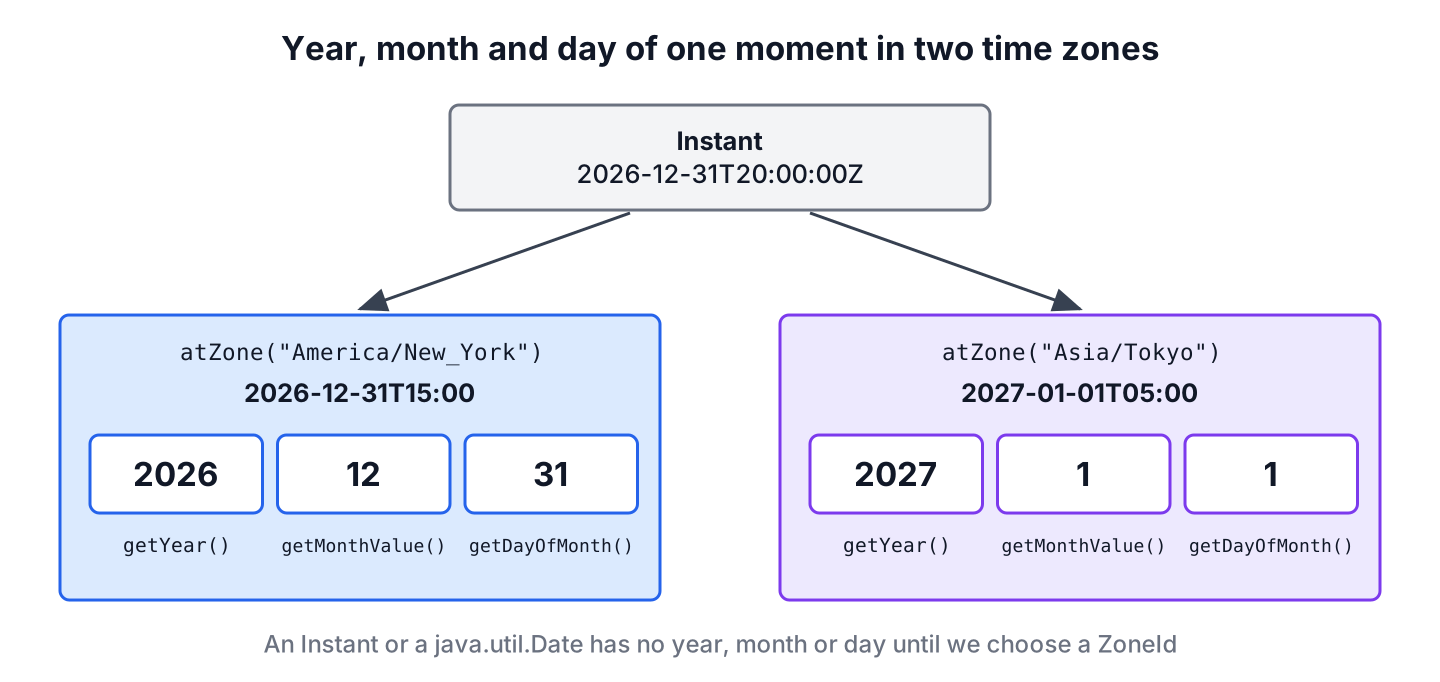
To read the date parts of an Instant, we attach a zone with atZone(). The zone decides the answer, so a New Year’s Eve moment belongs to 2026 in New York and to 2027 in Tokyo.
Instant moment = Instant.parse("2026-12-31T20:00:00Z");
int yearInNewYork = moment.atZone(ZoneId.of("America/New_York")).getYear();   // 2026
int yearInTokyo = moment.atZone(ZoneId.of("Asia/Tokyo")).getYear();           // 2027
int dayInTokyo = moment.atZone(ZoneId.of("Asia/Tokyo")).getDayOfMonth();      // 1
LocalDateTime local = LocalDateTime.of(2026, 10, 10, 18, 45);
int hour = local.getHour();                                                   // 18
The same rule applies to “today”. The call LocalDate.now() uses the JVM default zone, so a server in UTC and a user in India can disagree about the date for 5.5 hours of every day. We pass the user’s zone, as in LocalDate.now(ZoneId.of(“Asia/Kolkata”)).
4. Reading Any Field With get(ChronoField)
Every java.time type implements TemporalAccessor, whose get() method takes a ChronoField constant. We use it in generic code that receives some date type and needs one field, for example a formatter or a validation helper.
LocalDate date = LocalDate.of(2026, 10, 10);
int y = date.get(ChronoField.YEAR);                         // 2026
int m = date.get(ChronoField.MONTH_OF_YEAR);                // 10
int d = date.get(ChronoField.DAY_OF_MONTH);                 // 10
long epochDay = date.getLong(ChronoField.EPOCH_DAY);        // 20736
int week = date.get(IsoFields.WEEK_OF_WEEK_BASED_YEAR);     // 41
A type that has no such field throws an exception, so generic code checks with isSupported() first. An Instant supports only the seconds and fractions of a second, not the year.
Instant fixed = Instant.parse("2026-10-10T08:00:00Z");
boolean hasYear = fixed.isSupported(ChronoField.YEAR);      // false
int fails = fixed.get(ChronoField.YEAR);                    // UnsupportedTemporalTypeException: Unsupported field: Year
5. Year, Month and Day From a java.util.Date or a String
Old APIs still return a java.util.Date, which has no usable getters. Its getYear() is deprecated and returns the year minus 1900, so we convert the Date to a LocalDate in a known zone and read the parts there.
Date legacy = Date.from(Instant.parse("2026-10-09T20:00:00Z"));
LocalDate converted = LocalDate.ofInstant(legacy.toInstant(), ZoneId.of("Asia/Kolkata"));   // 2026-10-10
int legacyYear = converted.getYear();                         // 2026
int legacyMonth = converted.getMonthValue();                  // 10
int legacyDay = converted.getDayOfMonth();                    // 10
The zone choice is the part that goes wrong, which converting Date to LocalDate explains in detail. For a java.sql.Date from JDBC, toLocalDate() needs no zone.
For text, we parse it into a LocalDate instead of splitting the string. The ISO parser rejects an impossible date such as 2026-02-30, which split(“-“) would accept without complaint. A formatter from ofPattern() moves such a day to February 28 unless we add withResolverStyle(ResolverStyle.STRICT).
LocalDate parsed = LocalDate.parse("10/10/2026", DateTimeFormatter.ofPattern("dd/MM/uuuu"));
int parsedMonth = parsed.getMonthValue();                     // 10
LocalDate wrong = LocalDate.parse("2026-02-30");              // DateTimeParseException: Text '2026-02-30' could not be parsed: Invalid date 'FEBRUARY 30'
Patterns for other layouts are in parsing a String to LocalDate.
6. YearMonth and MonthDay for Partial Dates
Sometimes we need only two of the three parts. A YearMonth holds a year and a month, such as a billing period, and a MonthDay holds a month and a day, such as a birthday that repeats every year.
Say an accounting app stores invoices in folders by year and month and sends birthday greetings to customers. The invoice date gives the folder through YearMonth.from(), and the birth date becomes a MonthDay that we check against each year.
LocalDate invoiceDate = LocalDate.of(2026, 10, 10);
YearMonth period = YearMonth.from(invoiceDate);                              // 2026-10
String folder = "invoices/%d/%02d".formatted(period.getYear(), period.getMonthValue());   // "invoices/2026/10"
LocalDate periodEnd = period.atEndOfMonth();                                 // 2026-10-31
MonthDay birthday = MonthDay.from(LocalDate.of(1992, 2, 29));                // --02-29
boolean validIn2027 = birthday.isValidYear(2027);                            // false
LocalDate greetOn = birthday.atYear(2027);                                   // 2027-02-28
A February 29 birthday falls on February 28 in years that are not leap years, because atYear() moves an invalid day to the last valid day of the month. A business that greets on March 1 instead uses isValidYear() and picks the date itself.
7. Year, Month and Day FAQs
Calendar months and week numbers are where older code and java.time disagree most, so they come up right after the basic getters.
7.1. How do we get the current year in Java?
We call Year.now(zone).getValue() or LocalDate.now(zone).getYear(). The zone matters around midnight on December 31, when two zones are in different years.
7.2. Why does Calendar.MONTH return 9 for October?
Because Calendar counts months from 0, so January is 0 and December is 11. Old code added 1 to fix that. When we move such code to LocalDate, we remove the + 1, because getMonthValue() already returns 10 for October.
7.3. How do we get the last day of the month?
We call date.lengthOfMonth() for the number, which is 28 to 31, or date.with(TemporalAdjusters.lastDayOfMonth()) for the date itself. More adjusters are in first and last day of a week, month or year.
7.4. How do we get a two-digit year?
We format the date with the pattern yy, which prints 26 for 2026, or compute date.getYear() % 100 for a number. We never store two-digit years, because parsing them back needs a guess about the century.
7.5. How do we get the week number of a date?
We read date.get(IsoFields.WEEK_OF_WEEK_BASED_YEAR), which returns 41 for 2026-10-10 under ISO-8601 rules. US-style week numbers use WeekFields.of(Locale.US).weekOfYear() and can differ from the ISO number.
8. Conclusion
The getters getYear(), getMonthValue() and getDayOfMonth() give the date parts as numbers, with January as 1. The enum from getMonth() and getDayOfWeek() gives names in any language through getDisplayName(), and get(ChronoField) reads any field in generic code.
A moment such as an Instant or a legacy Date has no date parts until we pick a zone, so we convert it with an explicit ZoneId first. For values with only some parts, YearMonth and MonthDay fit better than a full date. The Java date and time guides list related topics.
9. References
- LocalDate (Java SE 25 API)
- Month (Java SE 25 API)
- ChronoField (Java SE 25 API)
- YearMonth (Java SE 25 API)
- MonthDay (Java SE 25 API)
Happy Learning !!
