

To get the current locale in Java, we call Locale.getDefault(), which returns the default locale of the JVM, and in a web application we read the user’s locale from the request with request.getLocale() or, in Spring, with LocaleContextHolder.getLocale(). The first one describes the machine that runs the code, and the second one describes the person who sent the request.
We need the current locale to format dates, numbers and prices, and to pick the language of messages, for example, to show 14.03.2026 to a German user and 3/14/26 to an American one.
The following example reads the default locale and its parts on a machine set to US English.
Locale current = Locale.getDefault();                          // en_US on a US machine
String language = current.getLanguage();                       // "en"
String country = current.getCountry();                         // "US"
String name = current.getDisplayName(Locale.US);               // "English (United States)"
Locale forFormatting = Locale.getDefault(Locale.Category.FORMAT);   // en_US
Notice that getDefault() never returns null, because the JVM always sets a default at startup. The sections cover where the JVM default comes from and its two categories, the user locale in Servlet and Spring applications, and how to pass that locale to the formatting code.
1. JVM Default Locale vs User Locale
Java has no single “current locale”. A desktop app or a command-line tool runs for one person, so the JVM default is the user’s locale. A web server runs for thousands of users, so its JVM default only describes the server, and each request brings its own locale in the Accept-Language header.
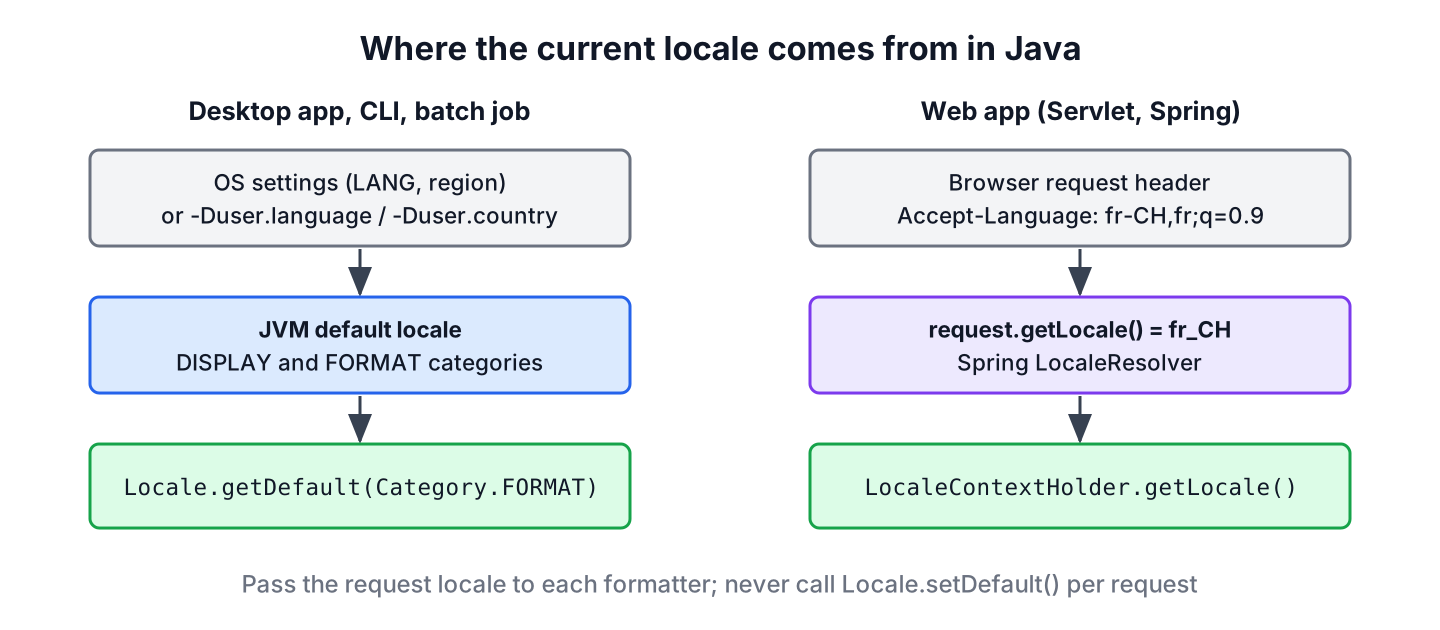
| App type | Where the locale comes from | Method |
|---|---|---|
| Desktop, CLI, batch job | Operating system settings or -Duser.language | Locale.getDefault() |
| Servlet application | Accept-Language header of the request | request.getLocale() |
| Spring MVC or Spring Boot | LocaleResolver (header, cookie or session) | LocaleContextHolder.getLocale() or a Locale parameter |
2. Get the Default Locale in Desktop Applications
When the JVM starts, it builds the default Locale from the operating system. On Windows and macOS it uses the region and language settings of the user, and on Linux the LANG and LC_* environment variables. The JVM stores the result in the system properties user.language and user.country, which we can read like any other system property.
String langProperty = System.getProperty("user.language");      // "en"
String countryProperty = System.getProperty("user.country");    // "US"
We can override the default at startup with the same properties, which is useful on servers and in CI builds that must produce the same output everywhere.
java -Duser.language=de -Duser.country=DE -jar app.jar2.1. DISPLAY and FORMAT Categories
Since Java 7, the default locale has two categories. Locale.Category.DISPLAY controls the language of menus, messages and display names, and Locale.Category.FORMAT controls how we format dates, numbers and currencies. Both have the same value unless we set them separately, with Locale.setDefault(category, locale) or with the startup properties user.language.format and user.country.format.
Locale display = Locale.getDefault(Locale.Category.DISPLAY);   // en_US
Locale format = Locale.getDefault(Locale.Category.FORMAT);     // en_US
When we format text for people, we read getDefault(Locale.Category.FORMAT) rather than getDefault(), because a user can keep an English interface with German date and number formats. The classes DateTimeFormatter and NumberFormat and the method String.format() already use the FORMAT category when we do not pass a locale.
3. Get User Locale in Web Applications
A browser sends the user’s preferred languages in the Accept-Language header, such as fr-CH,fr;q=0.9,en;q=0.8. The servlet container parses the header, and ServletRequest.getLocale() returns the first, preferred locale. The method getLocales() returns all of them in order of preference. If the request has no Accept-Language header, both methods return the default locale of the server.
public String welcomeDate(HttpServletRequest request) {
    Locale userLocale = request.getLocale();
    return LocalDate.of(2026, 3, 14)
            .format(DateTimeFormatter.ofLocalizedDate(FormatStyle.LONG).withLocale(userLocale));
}
We can check the parsing in a unit test with MockHttpServletRequest from spring-test, which handles the header the same way.
MockHttpServletRequest request = new MockHttpServletRequest();
request.addHeader("Accept-Language", "fr-CH,fr;q=0.9,en;q=0.8");
Locale preferred = request.getLocale();                        // fr_CH
List<Locale> all = Collections.list(request.getLocales());     // [fr_CH, fr, en]
3.1. Current Locale in Spring
In Spring MVC and Spring Boot, a LocaleResolver bean decides the locale of each request. The default, AcceptHeaderLocaleResolver, reads the header, and other resolvers read a cookie or the HTTP session, so users can pick a language on the page. Spring stores the result for the current thread in LocaleContextHolder, and it also passes a Locale parameter to controller methods.
@GetMapping("/welcome")
public String welcome(Locale locale) {
    return "Today is " + LocalDate.of(2026, 3, 14)
            .format(DateTimeFormatter.ofLocalizedDate(FormatStyle.FULL).withLocale(locale));
}
public String priceLabel(BigDecimal price) {
Locale locale = LocaleContextHolder.getLocale();
return NumberFormat.getCurrencyInstance(locale).format(price);
}Outside a request, such as in a scheduled job, LocaleContextHolder.getLocale() returns the JVM default. Tests can set a locale for the current thread and reset it afterwards. The resolver setup and translated messages are covered in Spring Boot REST i18n.
LocaleContextHolder.setLocale(Locale.GERMANY);
Locale inTest = LocaleContextHolder.getLocale();               // de_DE
LocaleContextHolder.resetLocaleContext();
Locale afterReset = LocaleContextHolder.getLocale();           // en_US, the JVM default
4. Passing the Current Locale to Formatting Code
Say an online shop runs on one server in Frankfurt and sells to customers in the US, Germany and India. The server’s default locale is de_DE, so if the formatting code relied on the default, every customer would see German prices and dates.
We therefore read the locale once per request and pass it down as a method argument. We do not call Locale.setDefault() inside a request, because the default is shared by all threads and would change the output for other users at the same time.
static String orderSummary(BigDecimal total, LocalDate delivery, Locale locale) {
    String price = NumberFormat.getCurrencyInstance(locale).format(total);
    String date = delivery.format(DateTimeFormatter.ofLocalizedDate(FormatStyle.MEDIUM).withLocale(locale));
    return price + ", delivery " + date;
}
String us = orderSummary(new BigDecimal("49.90"), LocalDate.of(2026, 3, 14), Locale.US); // "$49.90, delivery Mar 14, 2026"
String de = orderSummary(new BigDecimal("49.90"), LocalDate.of(2026, 3, 14), Locale.GERMANY); // "49,90 €, delivery 14.03.2026"
String in = orderSummary(new BigDecimal("49.90"), LocalDate.of(2026, 3, 14), Locale.of("en", "IN")); // "₹49.90, delivery 14 Mar 2026"Because each of these locales has a region, NumberFormat also picks the matching currency, so the same number becomes dollars, euros and rupees. In a real shop, the currency of the price comes from the order, as Localized Currency Formatting shows, and the date styles are explained in Localized Date Time Formats.
5. Current Locale FAQs
Container defaults, null checks, time zones and the operating system setting come up when code moves from a desktop to a server or a container.
5.1. Why does Locale.getDefault() return en_US or en in Docker?
Minimal container images set no language, so the JVM falls back to English. On JDK 25 for Linux, an image without LANG gives en_US, and LANG=C.UTF-8 gives en without a country. We set -Duser.language and -Duser.country in the start command when the output must not depend on the image.
5.2. Can request.getLocale() return null?
No. The Servlet specification requires the server’s default locale when the request has no Accept-Language header, so the method always returns a locale. The value can still be a language our app does not support, so we match it against our supported locales, as shown in Java Locale.
5.3. Does the locale tell us the user’s time zone?
No. A locale such as en_US covers several time zones, and the request headers contain no time zone. We store the user’s ZoneId in the profile, or read it in the browser with Intl.DateTimeFormat().resolvedOptions().timeZone.
5.4. How do we get the locale of the operating system if the JVM was started with -Duser.language?
The JVM keeps only the final value, so the operating system setting is not available through Locale. On Linux, we can read the LANG environment variable with System.getenv(“LANG”), which returns null when it is not set.
6. Conclusion
For a desktop app or a tool, Locale.getDefault() and getDefault(Locale.Category.FORMAT) return the user’s locale, which the JVM takes from the operating system or from -Duser.language and -Duser.country.
For a web app, the current locale belongs to the request. We read it with request.getLocale(), a Locale controller parameter or LocaleContextHolder.getLocale(), pass it to every formatter and leave the JVM default alone. Formatting guides for dates, numbers and currencies are collected in our date and time tutorial.
7. References
- Locale.getDefault() (Java SE 25 API)
- Locale.Category (Java SE 25 API)
- ServletRequest.getLocale() (Jakarta Servlet 6.1)
- Spring Framework, Locale resolvers
Happy Learning !!
