

Thymeleaf is a server-side Java template engine that turns HTML files with th:* attributes into the final HTML page, using the data that a Spring MVC controller puts into the model. A Spring Boot Thymeleaf setup needs the Thymeleaf starter next to the Spring MVC starter, and Spring Boot configures the template engine and the view resolver for us.
We use Thymeleaf when the server renders the pages, for example admin screens, internal tools, sign-up forms and email bodies.
The following example is a part of a playlist page. The controller adds a list of songs to the model and returns the view name songs/list, and the template prints one table row per song.
<!-- controller: model.addAttribute("songs", songs); return "songs/list"; -->
<h1 th:text="#{playlist.heading(*{songs.size()})}">Playlist</h1>             <!-- <h1>My playlist (3 songs)</h1> -->
<tr th:each="song, stat : *{songs}" th:classappend="*{stat.odd} ? 'odd'">  <!-- <tr class="odd"> for rows 1 and 3 -->
  <td><a th:href="@{/songs/{id}(id=*{song.id})}" th:text="*{song.title}">Title</a></td>  <!-- <a href="/songs/1">So What</a> -->

  <td th:text="*{#numbers.formatInteger(song.plays, 1, 'COMMA')}">1,000</td>              <!-- <td>1,250,400</td> -->
</tr>
Notice that each tag keeps its static text, such as “Playlist” or “Title”. Thymeleaf replaces that text at render time, so designers and developers work on the same file. The *{…} expressions read the model attributes by name, and section 4 shows how they relate to the dollar form of the same expressions.
Next, we build the playlist app step by step, from setup and expressions to forms with Bean Validation, fragments, i18n, formatting, MockMvcTester tests and the common errors.
1. How Spring Boot Renders a Thymeleaf Template
A Thymeleaf page goes through the normal Spring MVC request flow. The controller method fills a Model and returns a view name, never HTML. The ThymeleafViewResolver adds a prefix and a suffix to that name and loads the file, and the SpringTemplateEngine evaluates the th:* attributes against the model.
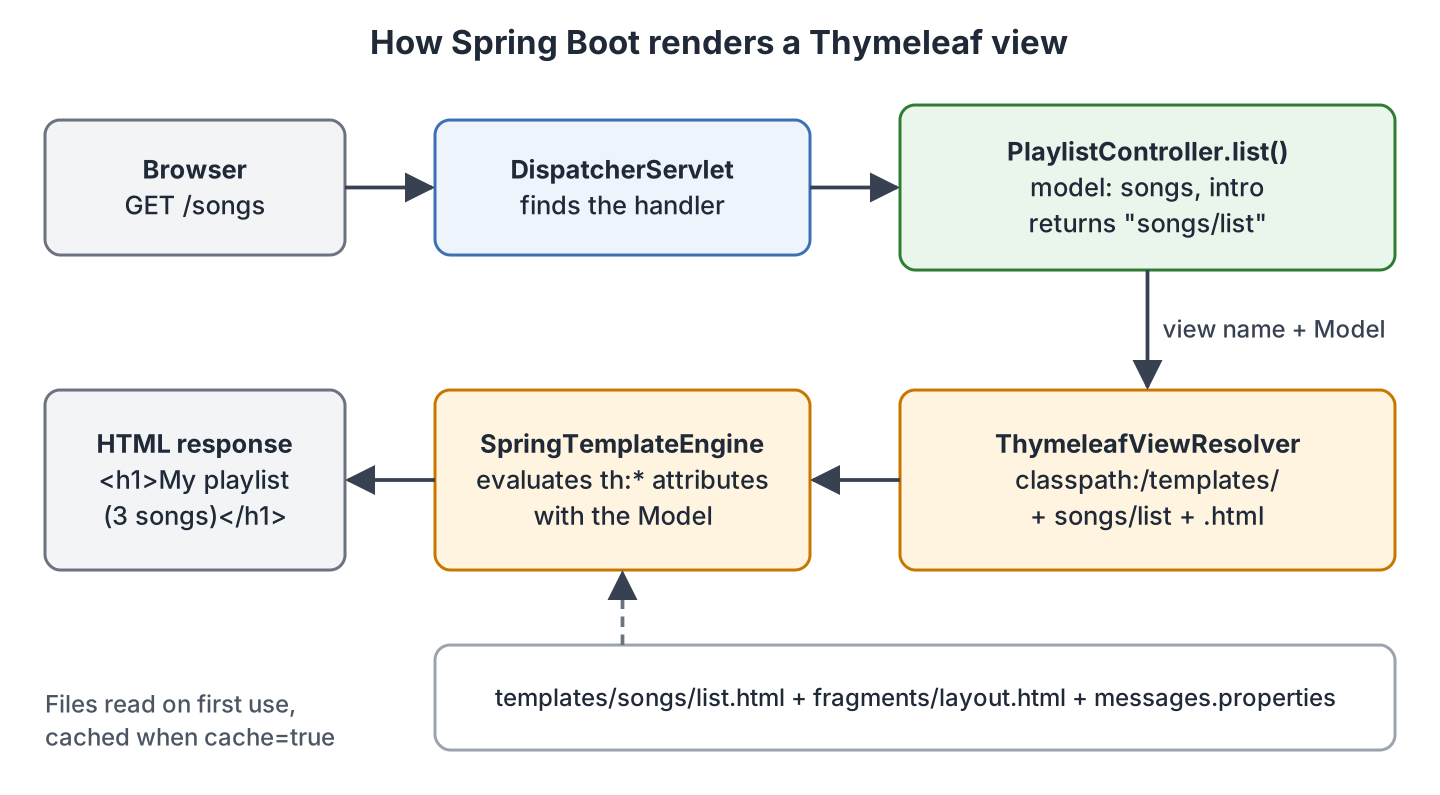
Thymeleaf calls its pages natural templates, because a plain browser ignores the unknown th:* attributes and shows the static text. Unlike JSP, the templates work inside an executable jar. The view template engines for Spring comparison helps if we still need to pick one.
Spring Boot sets these defaults through the spring.thymeleaf.* properties.
| Property | Default | What it controls |
|---|---|---|
| spring.thymeleaf.prefix | classpath:/templates/ | Folder of the templates |
| spring.thymeleaf.suffix | .html | File extension added to the view name |
| spring.thymeleaf.mode | HTML | Template mode |
| spring.thymeleaf.encoding | UTF-8 | Encoding of the template files |
| spring.thymeleaf.cache | true | Keeps parsed templates in memory |
| spring.thymeleaf.check-template-location | true | Warns at startup when the template folder is missing |
2. Spring Boot Thymeleaf Example Setup
The following example is a small playlist app built with Spring Boot 4.1.1, Thymeleaf 3.1.5 (managed by Spring Boot) and Java 25. It lists songs, shows one song, filters by genre and adds songs through a validated form. The complete project is on GitHub.
2.1. Maven Dependencies
In Spring Boot 4, spring-boot-starter-thymeleaf brings only Thymeleaf and its auto-configuration, without Spring MVC, so we add spring-boot-starter-webmvc next to it. The validation starter is for the form in section 6.
<dependency>
  <groupId>org.springframework.boot</groupId>
  <artifactId>spring-boot-starter-webmvc</artifactId>      <!-- Spring MVC + Tomcat -->
</dependency>
<dependency>
  <groupId>org.springframework.boot</groupId>
  <artifactId>spring-boot-starter-thymeleaf</artifactId>   <!-- Thymeleaf 3.1.5 -->
</dependency>
<dependency>
  <groupId>org.springframework.boot</groupId>
  <artifactId>spring-boot-starter-validation</artifactId>  <!-- Bean Validation -->
</dependency>
<dependency>
  <groupId>org.springframework.boot</groupId>
  <artifactId>spring-boot-devtools</artifactId>            <!-- dev only -->
  <scope>runtime</scope>
  <optional>true</optional>
</dependency>
<dependency>
  <groupId>org.springframework.boot</groupId>
  <artifactId>spring-boot-starter-webmvc-test</artifactId> <!-- MockMvc, MockMvcTester -->
  <scope>test</scope>
</dependency>
2.2. Where the Files Go
Templates go to src/main/resources/templates, and CSS, images and JavaScript go to src/main/resources/static. The view name songs/list maps to templates/songs/list.html.
src/main/java/com/howtodoinjava/playlist/
  PlaylistController.java     controller with the four handler methods
  SongService.java            in-memory songs
  Song.java                   record shown on the pages
  SongForm.java               form object with Bean Validation annotations

src/main/resources/
  templates/songs/list.html, detail.html, form.html
  templates/fragments/layout.html
  static/css/style.css
  messages.properties, messages_de.properties
  application-dev.properties
2.3. Turning Off the Template Cache During Development
By default, Thymeleaf parses each template once and keeps it in memory, so template edits don’t show up until a restart. During development we set spring.thymeleaf.cache to false, and Thymeleaf reads the file on every request.
spring.thymeleaf.cache=falseWe run mvn spring-boot:run -Dspring-boot.run.profiles=dev, so the property applies only to the dev profile. Spring Boot DevTools sets the same property for us and turns itself off in a packaged jar started with java -jar, so production keeps the cache.
3. Passing Data From the Controller to the Template
A Thymeleaf page needs a @Controller class. A @RestController writes the returned String into the response body, so the browser shows “songs/list” as plain text, which is the main difference between @Controller and @RestController. Each model.addAttribute(name, value) call creates a variable that the template reads by its name.
@GetMapping
public String list(@RequestParam(required = false) String genre, Model model) {

  List<Song> songs = songService.findAll(genre);               // all songs when genre is null
  model.addAttribute("songs", songs);                          // read as songs in the template
  model.addAttribute("genre", genre);
  model.addAttribute("intro", "Songs for a <b>Friday</b> evening");
  return "songs/list";                                         // templates/songs/list.html
}
The class has @RequestMapping(“/songs”), so the method answers GET /songs and GET /songs?genre=JAZZ. @GetMapping and @RequestParam work as in a REST controller. The Song type is a Java record, and Thymeleaf reads its components like getters, e.g. song.title.
4. Thymeleaf Expression Syntax
Every th:* attribute takes an expression. Thymeleaf has five kinds of expressions, and each starts with its own symbol. In a Spring Boot application, the variable and selection expressions use the Spring Expression Language (SpEL), so method calls, operators and the ternary operator all work inside them.
| Expression | Syntax | Example | Renders |
|---|---|---|---|
| Variable | a dollar sign followed by {…} | [VAR: song.title] | a model attribute, e.g. So What |
| Selection | *{…} | *{song.title} | the same value when no object is selected |
| Message | #{…} | #{song.title} | text from messages.properties, e.g. Title |
| Link (URL) | @{…} | @{/songs/{id}(id=1)} | /songs/1 with the context path |
| Fragment | ~{…} | ~{fragments/layout :: header} | a piece of another template |
The selection expression *{…} evaluates on the object selected with th:object. When no object is selected, the dollar and the asterisk forms do the same thing. The playlist templates use the asterisk form outside forms, whereas many other tutorials show the dollar form for the same lines.
Thymeleaf also gives us utility objects that start with #, such as #temporals for java.time values, #numbers, #strings, #lists and #fields for form errors. Thymeleaf 3.1 ships #temporals in the core library, so LocalDate needs no extra dependency.
5. Displaying Data in a Thymeleaf Template
Most of a page is read-only data such as text, tables, conditional blocks and links. Each of them has its own attribute, and all of them read the model attributes from section 3.
5.1. Escaped Text With th:text and Raw HTML With th:utext
The attribute th:text replaces the body of the tag with the value and escapes HTML characters such as < and >. The attribute th:utext (unescaped text) writes the value as it is, so tags in the value become real HTML.
<p class="intro" th:utext="*{intro}">Intro with HTML</p>
<p class="intro-escaped" th:text="*{intro}">Intro as text</p>
<p class="intro">Songs for a <b>Friday</b> evening</p>
<p class="intro-escaped">Songs for a <b>Friday</b> evening</p>Use th:utext only for HTML that our own code produces, never for text that a user typed. If a song comment contains a <script> tag and the page prints it with th:utext, every visitor’s browser runs that script.
5.2. Looping With th:each and the Iteration Status
The attribute th:each repeats its tag once for every element of a collection, such as a List, a Set, a Map or an array. An optional second variable after the comma holds the iteration status.
<tr th:each="song, stat : *{songs}" th:classappend="*{stat.odd} ? 'odd'">
  <td th:text="*{stat.count}">1</td>
  <td><a th:href="@{/songs/{id}(id=*{song.id})}" th:text="*{song.title}">Title</a></td>
</tr>
<tr class="odd">
<td>1</td>
<td><a href="/songs/1">So What</a></td>
</tr>
<tr>
<td>2</td>
<td><a href="/songs/2">Yellow</a></td>
</tr>The status variable has the following properties. If we leave out the second variable, Thymeleaf still creates one named after the loop variable plus Stat, here songStat.
| Property | Value for the first of 3 songs |
|---|---|
| index | 0 (starts at 0) |
| count | 1 (starts at 1) |
| size | 3 |
| current | the current Song |
| even / odd | false / true (based on count) |
| first / last | true / false |
5.3. Conditions With th:if, th:unless and th:switch
The attribute th:if renders its tag only when the condition is true, and th:unless renders it only when the condition is false. Besides booleans, th:if treats null, the number 0 and the strings “false”, “off” and “no” as false, and any other object as true.
<p class="added" th:if="*{added}" th:text="#{song.added(*{added})}">Song added</p>
<p th:if="*{songs.isEmpty()}" th:text="#{playlist.empty}">No songs</p>
<table th:unless="*{songs.isEmpty()}"> ... </table>

<td th:switch="*{song.genre}">
  <span th:case="'JAZZ'" class="tag jazz">Jazz</span>
  <span th:case="'ROCK'" class="tag rock">Rock</span>
  <span th:case="*" class="tag">Other</span>
</td>
For GET /songs?genre=metal, the page shows “No songs match this filter.” and no table tag. The added attribute is the flash attribute that the form handler in section 6.1 sets after a save. It is missing on a normal visit, so it evaluates to null and the paragraph is skipped. In th:switch, ‘JAZZ’ is a string literal and * is the default case.
5.4. Links With th:href and URL Parameters
The link expression @{…} builds URLs and puts the context path in front of a URL that starts with /, so links keep working when the app runs under /playlist. Parameters go in parentheses at the end. A parameter whose name appears in braces in the path fills that path variable, and any other parameter becomes a query parameter.
| Template | Rendered href |
|---|---|
| th:href=”@{/css/style.css}” | /css/style.css |
| th:href=”@{/songs/{id}(id=*{song.id})}” | /songs/1 |
| th:href=”@{/songs(genre=’JAZZ’)}” | /songs?genre=JAZZ |
| th:href=”@{/songs(genre=*{song.genre})}” | /songs?genre=JAZZ (value from the model) |
Several parameters are separated by commas, e.g. @{/songs(genre=’ROCK’,page=2)} renders /songs?genre=ROCK&page=2.
6. Forms With th:object and Bean Validation Errors
A form page shows the fields with their current values, and after a failed submit it shows the typed values again with an error next to each wrong field. Spring MVC and Thymeleaf handle both through a form-backing object (a plain Java class whose fields match the form inputs).

6.1. The Form Object and the Controller
The class SongForm has Bean Validation annotations on its fields (getters and setters not shown). The @DateTimeFormat annotation binds the yyyy-MM-dd value of an input type=”date” to a LocalDate.
@NotBlank @Size(max = 40)   private String title;
@NotBlank                   private String artist;
@NotNull @Min(30) @Max(1200)
                            private Integer durationSeconds;
@NotNull @PastOrPresent
@DateTimeFormat(iso = DateTimeFormat.ISO.DATE)
                            private LocalDate released;
@NotBlank                   private String genre = "POP";
The GET handler puts an empty SongForm into the model as song. The POST handler validates it with @Valid, and the BindingResult parameter right after it collects the errors instead of throwing an exception.
@GetMapping("/new")
public String newSong(Model model) {
  model.addAttribute("song", new SongForm());   // empty form
  return "songs/form";
}

@PostMapping
public String create(@Valid @ModelAttribute("song") SongForm form, BindingResult result,
                     RedirectAttributes redirect) {
  if (result.hasErrors()) {
    return "songs/form";                        // same view, errors and values kept
  }
  Song saved = songService.add(form);
  redirect.addFlashAttribute("added", saved.title());
  return "redirect:/songs";                     // 302, then GET /songs
}
The name in @ModelAttribute(“song”) must match the template, because Spring stores the errors under that name. The Bean Validation annotations in Spring post lists the other constraints.
6.2. The Form Template With th:field and th:errors
The attribute th:object on the form tag selects the form object with a variable expression. Inside the form, th:field=”*{title}” generates the id, name and value attributes of the input, and th:errors prints the messages for that field.
<form th:action="@{/songs}" th:object="[VAR: song]" method="post">
  <p class="summary" th:if="*{#fields.hasAnyErrors()}" th:text="#{form.errors(*{#fields.errors('*').size()})}">2 errors</p>

  <input type="text" th:field="*{title}" th:errorclass="invalid">
  <span class="error" th:if="*{#fields.hasErrors('title')}" th:errors="*{title}">Title error</span>

  <input type="number" th:field="*{durationSeconds}" th:errorclass="invalid">
  <span class="error" th:errors="*{durationSeconds}">Length error</span>

  <input type="date" th:field="*{released}" th:errorclass="invalid">
  <span class="error" th:errors="*{released}">Date error</span>

  <select th:field="*{genre}">
    <option value="POP">Pop</option>
    <option value="ROCK">Rock</option>
  </select>
  <button type="submit" th:text="#{form.save}">Save</button>
</form>
In a Spring Boot application, th:object accepts only a variable expression, which is the dollar form. The asterisk form throws a TemplateProcessingException, as we see in section 12.3.
When we submit an empty title, a length of 5 and a release date in 2099, the form comes back with the typed values and three messages.
<p class="summary">Please fix 3 errors.</p>
<input type="text" id="title" name="title" value="" class="invalid">
<span class="error">Please enter a song title.</span>
<input type="number" id="durationSeconds" name="durationSeconds" value="5" class="invalid">
<span class="error">must be greater than or equal to 30</span>
<input type="date" id="released" name="released" value="2099-01-01" class="invalid">
<span class="error">must be a date in the past or in the present</span>
<select id="genre" name="genre">
  <option value="POP" selected="selected">Pop</option>
Notice that th:errorclass adds the invalid CSS class only to inputs with errors, and th:field marks the matching option as selected. The dropdown example fills the options from the model instead of hard-coding them.
6.3. Custom Error Messages and the #fields Object
The first message in the output comes from messages.properties, and the other two are the Hibernate Validator defaults. Spring MVC looks up error codes in the order Constraint.object.field, Constraint.field, Constraint.type and Constraint, so the key NotBlank.song.title replaces the default message only for the title field of the song object.
NotBlank.song.title=Please enter a song title.The #fields object answers questions about the errors of the selected object. We call it inside th:object, as in the form above.
| Expression | Result for the failed submit |
|---|---|
| *{#fields.hasErrors(‘title’)} | true |
| *{#fields.hasErrors(‘artist’)} | false |
| *{#fields.hasAnyErrors()} | true |
| *{#fields.errors(‘*’).size()} | 3 |
| th:errors=”*{title}” | the title messages, joined with <br /> when there are several |
After a successful submit, the list page shows the flash attribute once, as “Added “Hello” to the playlist.” A refresh sends a new GET /songs and adds no second song.
7. Reusing Page Parts With Fragments
Every page in the app needs the same head, navigation and footer, and copying them means editing three files for every menu change. Instead, we mark a part of a template with th:fragment and include it elsewhere with th:replace or th:insert.
<head th:fragment="head(title)">
  <meta charset="UTF-8">
  <title th:text="*{title}">Playlist</title>
  <link rel="stylesheet" th:href="@{/css/style.css}">
</head>

<header th:fragment="header">
  <nav>
    <a th:href="@{/songs}" th:text="#{nav.songs}">Songs</a>
    <a th:href="@{/songs/new}" th:text="#{nav.add}">Add a song</a>
  </nav>
</header>

<p th:fragment="copy">Playlist demo, 2026</p>
The head fragment takes a parameter, so each page passes its own title.
<head th:replace="~{fragments/layout :: head(#{page.songs})}">       <!-- <title>Songs</title> -->
<head th:replace="~{fragments/layout :: head(*{song.title})}">       <!-- <title>So What</title> -->
<header th:replace="~{fragments/layout :: header}"></header>         <!-- <header><nav>...</nav></header> -->
<footer th:insert="~{fragments/layout :: copy}"></footer>            <!-- <footer><p>Playlist demo, 2026</p></footer> -->
The difference between the two attributes is the host tag. The attribute th:replace removes the host tag and puts the fragment tag in its place, whereas th:insert keeps the host tag and puts the fragment inside it.

When every page has the same skeleton and only the main content changes, the Thymeleaf Layout Dialect fits better. A page declares which layout decorates it, and the layout defines the slots. Spring Boot manages its version (4.0.1) and registers the dialect when the thymeleaf-layout-dialect jar is on the classpath. The playlist app uses plain fragments.
8. Static Resources With Thymeleaf
By default, Spring Boot serves static content from the /static, /public, /resources and /META-INF/resources folders on the classpath. The file src/main/resources/static/css/style.css is served at /css/style.css, without a controller.
<link rel="stylesheet" th:href="@{/css/style.css}"> <!-- href="/css/style.css" -->We link static files with @{…} because it adds the context path. The same goes for th:src, which the Thymeleaf images tutorial covers, including images stored in a database.
9. Internationalization With messages.properties
Spring Boot creates a MessageSource bean when it finds messages.properties at the root of the classpath. Thymeleaf reads the keys with #{key}, and arguments in parentheses fill the {0}, {1} placeholders.
# messages.properties
playlist.heading=My playlist ({0} songs)

# messages_de.properties
playlist.heading=Meine Playlist ({0} Lieder)
<h1 th:text="#{playlist.heading(*{songs.size()})}">Playlist</h1>
<!-- Accept-Language: en -> <h1>My playlist (3 songs)</h1> -->
<!-- Accept-Language: de -> <h1>Meine Playlist (3 Lieder)</h1> -->By default, Spring MVC takes the locale from the Accept-Language header, and a key missing from messages_de.properties falls back to messages.properties. For a ?lang=de link, we register a LocaleChangeInterceptor and a cookie or session based LocaleResolver in a WebMvcConfigurer, as the Spring MVC i18n guide shows.
10. Formatting Dates and Numbers
A controller should pass a LocalDate or a long to the template, not a pre-formatted String, so each page picks its own format with #temporals and #numbers.
| Expression in the template | Value | Output |
|---|---|---|
| *{#temporals.format(song.released, ‘dd MMM yyyy’)} | 1959-08-17 | 17 Aug 1959 |
| *{#temporals.format(song.released, ‘MMMM d, yyyy’)} | 1959-08-17 | August 17, 1959 |
| *{#numbers.formatInteger(song.plays, 1, ‘COMMA’)} | 1250400 | 1,250,400 |
A song length in seconds needs two expressions joined with +. The second argument of formatInteger() is the minimum number of digits, so the seconds always print with two digits.
<td th:text="*{song.durationSeconds / 60} + ':' + *{#numbers.formatInteger(song.durationSeconds % 60, 2)}">3:00</td> <!-- 562 seconds -> <td>9:22</td> -->The patterns follow DateTimeFormatter, and month names follow the request locale. For example, with Accept-Language: de the list page shows “26 Juni 2000” instead of “26 Jun 2000”. The Temporals Javadoc lists the other methods, such as day(), monthName() and createNow().
11. Testing Thymeleaf Views With MockMvcTester
A @WebMvcTest test starts only the web layer, including Thymeleaf and the message source, so the templates render for real without a server. MockMvcTester, added in Spring Framework 6.2, wraps MockMvc in AssertJ assertions, and @WebMvcTest provides it as a bean. The test slice doesn’t create @Service beans, so we add the in-memory SongService with @Import.
@WebMvcTest(PlaylistController.class)
@Import(SongService.class)
class PlaylistControllerTest {

  @Autowired
  MockMvcTester mvc;

  @Test
  void listShowsViewNameModelAndRows() {
    MvcTestResult result = mvc.get().uri("/songs").exchange();

    assertThat(result).hasStatusOk().hasViewName("songs/list");       // passes
    assertThat(result).model().containsKeys("songs", "intro");        // passes
    assertThat(result).model().extractingByKey("songs")
        .asInstanceOf(LIST).hasSize(3);                               // passes
    assertThat(result).bodyText()
        .contains("<h1>My playlist (3 songs)</h1>")
        .contains("<a href=\"/songs/2\">Yellow</a>")
        .contains("<td>26 Jun 2000</td>");                            // passes
  }
}
The bodyText() assertion checks the rendered HTML, so a broken template fails the test. For the form, extractingBindingResult() checks the errors and flash() checks the redirect attributes.
MvcTestResult invalid = mvc.post().uri("/songs")
    .param("title", " ").param("artist", "Adele")
    .param("durationSeconds", "5").param("released", "2099-01-01").param("genre", "POP")
    .exchange();
assertThat(invalid).hasStatusOk().hasViewName("songs/form");           // passes
assertThat(invalid).model().extractingBindingResult("song")
    .hasErrorsCount(3)
    .hasFieldErrors("title", "durationSeconds", "released");          // passes

MvcTestResult valid = mvc.post().uri("/songs")
    .param("title", "Hello").param("artist", "Adele")
    .param("durationSeconds", "295").param("released", "2015-10-23").param("genre", "POP")
    .exchange();
assertThat(valid).hasStatus3xxRedirection().hasRedirectedUrl("/songs"); // passes
assertThat(valid).flash().containsEntry("added", "Hello");             // passes
The @WebMvcTest slice also provides the classic MockMvc bean, so the same test class can inject it with @Autowired and use perform() and andExpect(). The MockMvc example uses that style with a mocked service instead of the real one.
@Autowired
MockMvc mockMvc;

mockMvc.perform(post("/songs").param("title", "").param("artist", "Adele")
        .param("durationSeconds", "200").param("released", "2015-10-23").param("genre", "POP"))
    .andExpect(view().name("songs/form"))                                     // passes
    .andExpect(model().attributeHasFieldErrorCode("song", "title", "NotBlank")); // passes
12. Common Thymeleaf Errors and Their Fixes
Thymeleaf errors appear at render time, after the controller method has returned. Spring MVC wraps them in a ServletException, so we read the root cause at the bottom of the stack trace.
12.1. Template Not Found (TemplateInputException)
When the view name doesn’t match a file under templates/, Thymeleaf throws a TemplateInputException. Here the controller returns songs/lists, but the file is songs/list.html.
org.thymeleaf.exceptions.TemplateInputException: Error resolving template [songs/lists], template might not exist or might not be accessible by any of the configured Template ResolversWe compare the view name with the path under templates/, including the subfolder and the case of each letter, because class path lookups inside a jar are case-sensitive.
12.2. Typo in a Property Name (SpelEvaluationException)
A typo in a property name throws a TemplateProcessingException with the template, line and column, caused by a SpelEvaluationException that names the class.
org.thymeleaf.exceptions.TemplateProcessingException: Exception evaluating SpringEL expression: "song.titel" (template: "broken/typo" - line 4, col 5)
Caused by: org.springframework.expression.spel.SpelEvaluationException: EL1008E: Property or field 'titel' cannot be found on object of type 'com.howtodoinjava.playlist.Song' - maybe not public or not valid?
The fix is the correct name, song.title. The hint “maybe not public” in the message exists because SpEL reads properties through public getters or record accessors, not through private fields.
12.3. Asterisk Form in th:object
A template with th:object=”*{song}” fails at render time with the following message.
org.thymeleaf.exceptions.TemplateProcessingException: The expression used for object selection is *{song}, which is not valid: only variable expressions ([VAR: ...]) are allowed in '{th:object,data-th-object}' attributes in Spring-enabled environments. (template: "broken/selection" - line 4, col 6)We write th:object with the variable expression, as in the form of section 6.2.
12.4. Loop Variable Not Found Inside th:object
Inside a th:object block, the asterisk form looks up names on the selected object. A loop variable such as tag is not a property of Song, so *{tag} fails with EL1008E even though the loop defines it.
org.springframework.expression.spel.SpelEvaluationException: EL1008E: Property or field 'tag' cannot be found on object of type 'com.howtodoinjava.playlist.Song' - maybe not public or not valid?Inside a selected object, we read loop variables and other model attributes with the variable expression, e.g. th:text=”[VAR: tag]”, and keep *{…} for the fields of the selected object.
13. Conclusion
Thymeleaf in Spring Boot 4 needs the Thymeleaf and WebMVC starters, a templates folder and a @Controller that returns a view name. Inside the templates, th:text, th:each, th:if and @{…} cover most read-only pages, and th:object, th:field and th:errors work with @Valid and BindingResult for forms.
Fragments keep the layout in one file, messages.properties holds the text per language, and MockMvcTester tests catch a broken template before production. For a bigger example with a database, see the Spring Boot CRUD app with Thymeleaf and the other Spring MVC tutorials.
14. References
- Using Thymeleaf, tutorial for 3.1
- Thymeleaf + Spring, tutorial for 3.1
- Spring Boot reference, Servlet Web Applications
- Spring Boot reference, Internationalization
- Spring Boot reference, Common Application Properties
- Spring Framework reference, MockMvc with AssertJ
Happy Learning !!
