
An authorization server is the OAuth2 component that authenticates clients and issues access tokens to them. In Spring, Spring Authorization Server is the Spring Security module that issues OAuth2 access tokens and OpenID Connect ID tokens to client applications, so our APIs check a signed token instead of a password on every request. Since Spring Security 7.0, Spring Authorization Server ships as part of Spring Security, and Spring Boot 4 has a starter for it.
We use Spring Authorization Server when we want to run our own token server in Java, for example for service-to-service calls between microservices, or to log users in to our own web or mobile app. Spring Authorization Server is the code-first alternative to running a separate identity product such as Keycloak.
The following example asks a Spring Authorization Server for an access token for the client recipe-cli and calls a REST API with that token.
# 1. Ask the authorization server for a token (client_credentials grant)
curl -s -u recipe-cli:secret -d grant_type=client_credentials -d scope=recipes.read http://localhost:9000/oauth2/token
# {"access_token":"eyJraWQiOiJyZWNpcGUta2V5LTIi...","scope":"recipes.read","token_type":"Bearer","expires_in":599}

# 2. Call the resource server with the token
curl -s -H "Authorization: Bearer eyJraWQiOiJyZWNpcGUta2V5LTIi..." http://localhost:8082/recipes
# ["pancakes","omelette"]
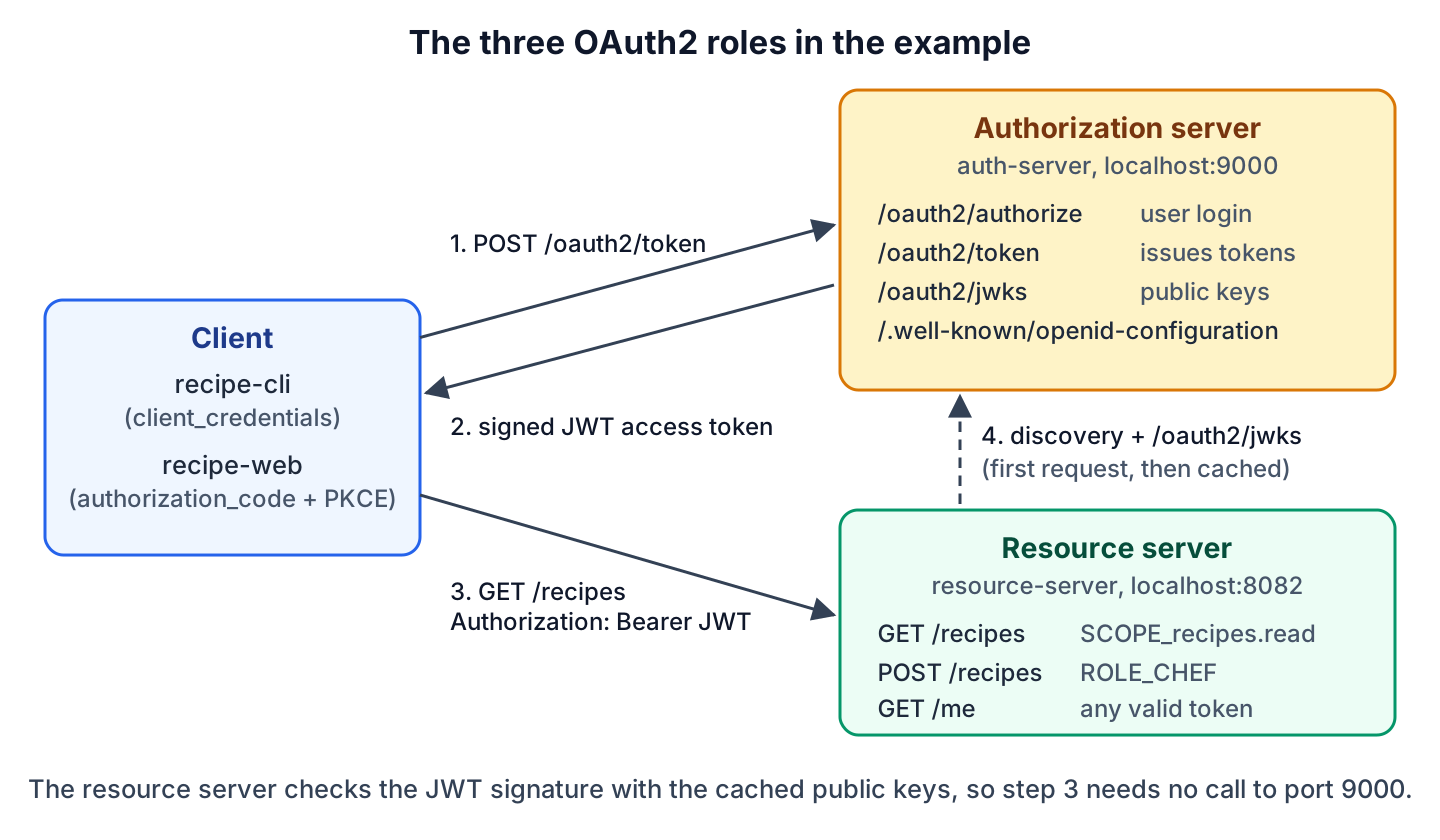
Notice that the API on port 8082 never asks the authorization server whether the token is valid. The API verifies the token signature with the public keys that the authorization server publishes at /oauth2/jwks.
In the next sections, we build both servers with Spring Boot 4.1, register clients for the client_credentials and authorization_code grants (with PKCE), read the protocol endpoints, add a custom claim, rotate the signing key, store the clients in a database and test the setup with MockMvc.
1. What Is Spring Authorization Server?
OAuth2 splits security between separate roles. An authorization server checks who the caller is and issues short-lived tokens. A resource server is an API that accepts those tokens. A client is the app that gets a token and sends it with each request. Spring Authorization Server implements only the first role, and the other two roles come from other Spring Security modules.
| Role | What it does | Spring Boot 4.1 starter | In our example |
|---|---|---|---|
| Authorization server | Authenticates clients and users, issues signed tokens | spring-boot-starter-security-oauth2-authorization-server | auth-server on port 9000 |
| Resource server | Validates the bearer token on each request, returns data | spring-boot-starter-security-oauth2-resource-server | resource-server (recipe API) on port 8082 |
| Client | Gets a token and sends it in the Authorization header | spring-boot-starter-security-oauth2-client, or any HTTP client | recipe-cli (curl) and recipe-web (browser app) |
| Resource owner | The user who logs in and allows the client to act for them | none | the user lokesh |
Say a recipe website has a nightly import job and a web app for chefs, and both call the same recipe API. The job gets a token for itself, and the web app gets a token for the chef who logged in, so the API never sees a password. Logging users in through Google or GitHub is the client role, covered in OAuth2 social login.
1.1. Which Dependency to Use
Spring Authorization Server was a separate project up to version 1.5. In September 2025, the Spring team moved it into Spring Security 7.0, so the artifact keeps its name and its version follows Spring Security. Spring Boot 4.0 also renamed the starter. The old starter name still works in Spring Boot 4, but its POM marks it as deprecated.
| Setup | Dependency | Version |
|---|---|---|
| Spring Boot 4.0 and 4.1 | org.springframework.boot:spring-boot-starter-security-oauth2-authorization-server | Managed by Spring Boot (Spring Security 7.1.1 in Spring Boot 4.1.1) |
| Spring Boot 4, old name | org.springframework.boot:spring-boot-starter-oauth2-authorization-server | Deprecated alias of the starter above |
| Spring Boot 3.x | org.springframework.boot:spring-boot-starter-oauth2-authorization-server | Spring Authorization Server 1.x |
| Spring Framework without Spring Boot | org.springframework.security:spring-security-oauth2-authorization-server | 7.1.1 |
2. Spring Authorization Server Example with Spring Boot 4.1
The following example is a Maven build with two Spring Boot 4.1.1 applications on Java 25, using Spring Security 7.1.1. The auth-server module is the authorization server on port 9000. It knows one user (lokesh, role CHEF) and two clients. The resource-server module is a recipe API on port 8082, which returns a list of recipes. The complete project is on GitHub.
The auth-server needs one starter. Next to Spring Security and Spring MVC, it brings the Nimbus JOSE + JWT library that signs the tokens.
<dependency>
  <groupId>org.springframework.boot</groupId>
  <artifactId>spring-boot-starter-security-oauth2-authorization-server</artifactId>
</dependency>
The issuer is the URL that goes into the iss claim of every token and into every endpoint URL of the metadata documents. We set it explicitly, because the resource server compares the iss claim with its own configuration.
server.port=9000
spring.security.oauth2.authorizationserver.issuer=http://localhost:9000
With the starter on the classpath and a RegisteredClientRepository bean, Spring Boot configures the rest. We can override each of these beans with our own.
- Two SecurityFilterChain beans. The first one serves the protocol endpoints and enables OpenID Connect 1.0. The second one protects everything else with a form login page.
- A JWKSource with one RSA key pair that is generated at every start.
- A JwtDecoder and an AuthorizationServerSettings bean with the default endpoint paths.
The generated key changes on every restart, so every token issued before the restart fails validation afterward. That is fine for a demo, and in section 6 we replace the default bean with our own JWKSource that supports key rotation.
2.1. Users of the Authorization Server
The authorization server logs users in for the authorization_code grant, so it needs a UserDetailsService. We encode the password with the delegating password encoder, which stores the bcrypt hash with a {bcrypt} prefix. The same PasswordEncoder bean also checks the client secrets.
@Bean
PasswordEncoder passwordEncoder() {
  return PasswordEncoderFactories.createDelegatingPasswordEncoder();
}

@Bean
UserDetailsService userDetailsService(PasswordEncoder encoder) {
  return new InMemoryUserDetailsManager(
      User.withUsername("lokesh")
          .password(encoder.encode("password"))
          .roles("CHEF")
          .build());
}
3. Registering Clients with RegisteredClient
A client must be registered before it can ask for a token. In Spring Authorization Server, a registered client is a RegisteredClient object, and the server loads clients by their client ID from a RegisteredClientRepository. The registration decides which grant types the client may use, how it proves its identity, which scopes it may ask for and where the server may redirect the user.
We register two clients, one per grant type. The machine client uses client_credentials, and the browser app uses authorization_code with PKCE.
| Setting | recipe-cli | recipe-web |
|---|---|---|
| Typical caller | Backend job, another microservice | Single-page app, mobile app |
| Grant type | client_credentials | authorization_code |
| Client authentication | client_secret_basic (ID and secret in HTTP Basic) | none (public client, PKCE instead) |
| Token subject (sub) | The client, recipe-cli | The user, lokesh |
| Scopes | recipes.read | openid, recipes.read |
| Access token lifetime | 10 minutes (set in TokenSettings) | 5 minutes (default) |
3.1. A Client for the client_credentials Grant
The client_credentials grant is for calls without a user. The client sends its ID and secret to /oauth2/token and gets an access token for itself. We store the secret encoded, so a leaked client table does not reveal it.
RegisteredClient recipeCli = RegisteredClient.withId(UUID.randomUUID().toString())
    .clientId("recipe-cli")
    .clientSecret(encoder.encode("secret"))                      // {bcrypt}$2a$10$...
    .clientAuthenticationMethod(ClientAuthenticationMethod.CLIENT_SECRET_BASIC)
    .authorizationGrantType(AuthorizationGrantType.CLIENT_CREDENTIALS)
    .scope("recipes.read")
    .tokenSettings(TokenSettings.builder()
        .accessTokenTimeToLive(Duration.ofMinutes(10))           // expires_in = 599
        .build())
    .build();
3.2. A Public Client for authorization_code with PKCE
A browser app cannot keep a secret, because anybody can read its JavaScript, so it is called a public client. Instead of a secret, it uses PKCE (Proof Key for Code Exchange). The client sends only the SHA-256 hash of a random code_verifier (the code_challenge) with the login request. Later, it sends the original verifier with the code. An attacker who steals the code from the redirect cannot use it without the verifier.
RegisteredClient recipeWeb = RegisteredClient.withId(UUID.randomUUID().toString())
    .clientId("recipe-web")
    .clientAuthenticationMethod(ClientAuthenticationMethod.NONE)    // public client
    .authorizationGrantType(AuthorizationGrantType.AUTHORIZATION_CODE)
    .redirectUri("http://127.0.0.1:8080/callback")
    .scope(OidcScopes.OPENID)                                       // also returns an id_token
    .scope("recipes.read")
    .clientSettings(ClientSettings.builder()
        .requireProofKey(true)                                      // PKCE is mandatory
        .requireAuthorizationConsent(false)                         // no consent page
        .build())
    .build();
The server compares a requested redirect URI with the registered one character by character. For a loopback IP address such as 127.0.0.1, it accepts any port, as the OAuth 2.1 draft requires for native apps that pick a free port at runtime. A request without a code_challenge for this client gets error=invalid_request back on the redirect URI.
For local development, we keep both clients in memory. Section 8 replaces this bean with a database-backed repository.
@Bean
@Profile("!jdbc")
RegisteredClientRepository registeredClientRepository(PasswordEncoder encoder) {

  return new InMemoryRegisteredClientRepository(

      RecipeClients.recipeCli(encoder),
      RecipeClients.recipeWeb());
}
Spring Boot can also register clients from properties under the spring.security.oauth2.authorizationserver.client prefix. Those properties only feed the in-memory repository, so we use the Java form, which works with every repository.
4. The Protocol Endpoints
Spring Authorization Server serves the standard OAuth2 and OpenID Connect endpoints under fixed default paths. A client only needs the issuer URL, because it can read every other URL from the discovery document.
| Endpoint | Method | Purpose |
|---|---|---|
| /.well-known/openid-configuration | GET | OpenID Connect discovery document with all endpoint URLs |
| /.well-known/oauth-authorization-server | GET | The same metadata in the OAuth2 format (RFC 8414) |
| /oauth2/authorize | GET | Starts the authorization_code flow, shows the login page |
| /oauth2/token | POST | Issues access tokens, ID tokens and refresh tokens |
| /oauth2/jwks | GET | Public keys for validating token signatures (JWK Set) |
| /oauth2/introspect | POST | Tells a client whether a token is still active |
| /oauth2/revoke | POST | Revokes an access token or a refresh token |
| /userinfo | GET | Claims about the logged-in user (OpenID Connect) |
The discovery document of our server lists the issuer, the endpoint URLs and the supported features. We can see that password is missing from grant_types_supported, and S256 is the only PKCE method. The scopes_supported list names only openid, because the server does not publish the custom scopes of our clients.
curl -s http://localhost:9000/.well-known/openid-configuration{
"issuer": "http://localhost:9000",
"authorization_endpoint": "http://localhost:9000/oauth2/authorize",
"token_endpoint": "http://localhost:9000/oauth2/token",
"jwks_uri": "http://localhost:9000/oauth2/jwks",
"userinfo_endpoint": "http://localhost:9000/userinfo",
"grant_types_supported": [
"authorization_code",
"client_credentials",
"refresh_token",
"urn:ietf:params:oauth:grant-type:token-exchange"
],
"code_challenge_methods_supported": [ "S256" ],
"id_token_signing_alg_values_supported": [ "RS256" ],
"scopes_supported": [ "openid" ]
}The JWK Set endpoint returns only the public part of each key. Every key has a key ID (kid), and every token names its signing key in the kid header, so a resource server picks the right key even when the set holds several keys.
{"keys":[
  {"kty":"RSA","e":"AQAB","kid":"recipe-key-2","n":"0MgD8ITG_QnND_8NJQ1l..."},
  {"kty":"RSA","e":"AQAB","kid":"recipe-key-1","n":"7TaBwXTy3a-IBf-2hfMB..."}
]}
5. Getting Tokens with curl
With the clients registered, we start both applications from the project root, each in its own terminal, and request tokens from the command line.
mvn -pl auth-server spring-boot:run        # port 9000
mvn -pl resource-server spring-boot:run    # port 8082
Both flows end at the same /oauth2/token endpoint, but they prove different things. The client_credentials grant proves the identity of the client, while the authorization_code grant also proves that a user logged in.
5.1. Token for the client_credentials Grant
The client sends its ID and secret as HTTP Basic credentials and asks for the scopes it needs. The response is a JSON object with the token and its lifetime in seconds.
curl -s -u recipe-cli:secret \
  -d grant_type=client_credentials \
  -d scope=recipes.read \
http://localhost:9000/oauth2/token{"access_token":"eyJraWQiOiJyZWNpcGUta2V5LTIiLCJhbGciOiJSUzI1NiJ9.eyJzdWIiOiJyZWNpcGUtY2xpIiwiYXVkIjoicmVjaXBlLWNsaSIs...","scope":"recipes.read","token_type":"Bearer","expires_in":599}The access token is a JWT. Its header and payload are Base64URL-encoded JSON, followed by the signature. Anybody can decode the header and the payload, so a JWT must never carry secrets.
TOKEN="eyJraWQiOiJyZWNpcGUta2V5LTIi..."      # paste the access_token value
echo "$TOKEN" | python3 -c "
import base64, json, sys
for part in sys.stdin.read().strip().split('.')[:2]:
    print(json.dumps(json.loads(base64.urlsafe_b64decode(part + '=' * (-len(part) % 4))), indent=2))"
{
"kid": "recipe-key-2",
"alg": "RS256"
}
{
"sub": "recipe-cli",
"aud": "recipe-cli",
"nbf": 1791139668,
"scope": [
"recipes.read"
],
"iss": "http://localhost:9000",
"exp": 1791140268,
"iat": 1791139668,
"jti": "d6970467-41da-4454-ab0e-b83a332a56b5"
}Each claim answers one question that the resource server asks before it trusts the token.
| Claim | Value | Meaning |
|---|---|---|
| kid (header) | recipe-key-2 | Which public key from /oauth2/jwks verifies the signature |
| sub | recipe-cli | Who the token is for. With no user involved, it is the client ID. |
| aud | recipe-cli | The audience. Spring Authorization Server sets it to the client ID. |
| scope | [“recipes.read”] | What the client may do. The resource server turns it into SCOPE_recipes.read. |
| iss | http://localhost:9000 | Who issued the token. Must match the issuer configured in the resource server. |
| iat, nbf, exp | Epoch seconds | Issued at, not valid before, expires at (600 seconds later) |
| jti | A UUID | Unique token ID |
A client gets only the scopes it asks for. If we leave out the scope parameter, the token has no scope, and GET /recipes answers 403. When the client sends a wrong secret or a scope that is not registered, the token endpoint returns an error code from the OAuth2 spec instead of a token.
curl -s -u recipe-cli:wrong -d grant_type=client_credentials http://localhost:9000/oauth2/token
# HTTP 401   {"error":"invalid_client"}

curl -s -u recipe-cli:secret -d grant_type=client_credentials -d scope=recipes.delete http://localhost:9000/oauth2/token
# HTTP 400   {"error":"invalid_scope"}
5.2. Token for the authorization_code Grant with PKCE
The authorization_code grant needs a user, so it runs through the browser. The client sends the user to /oauth2/authorize, where the user logs in, and the server redirects back with a one-time code. After that, the client exchanges the code for tokens at /oauth2/token.
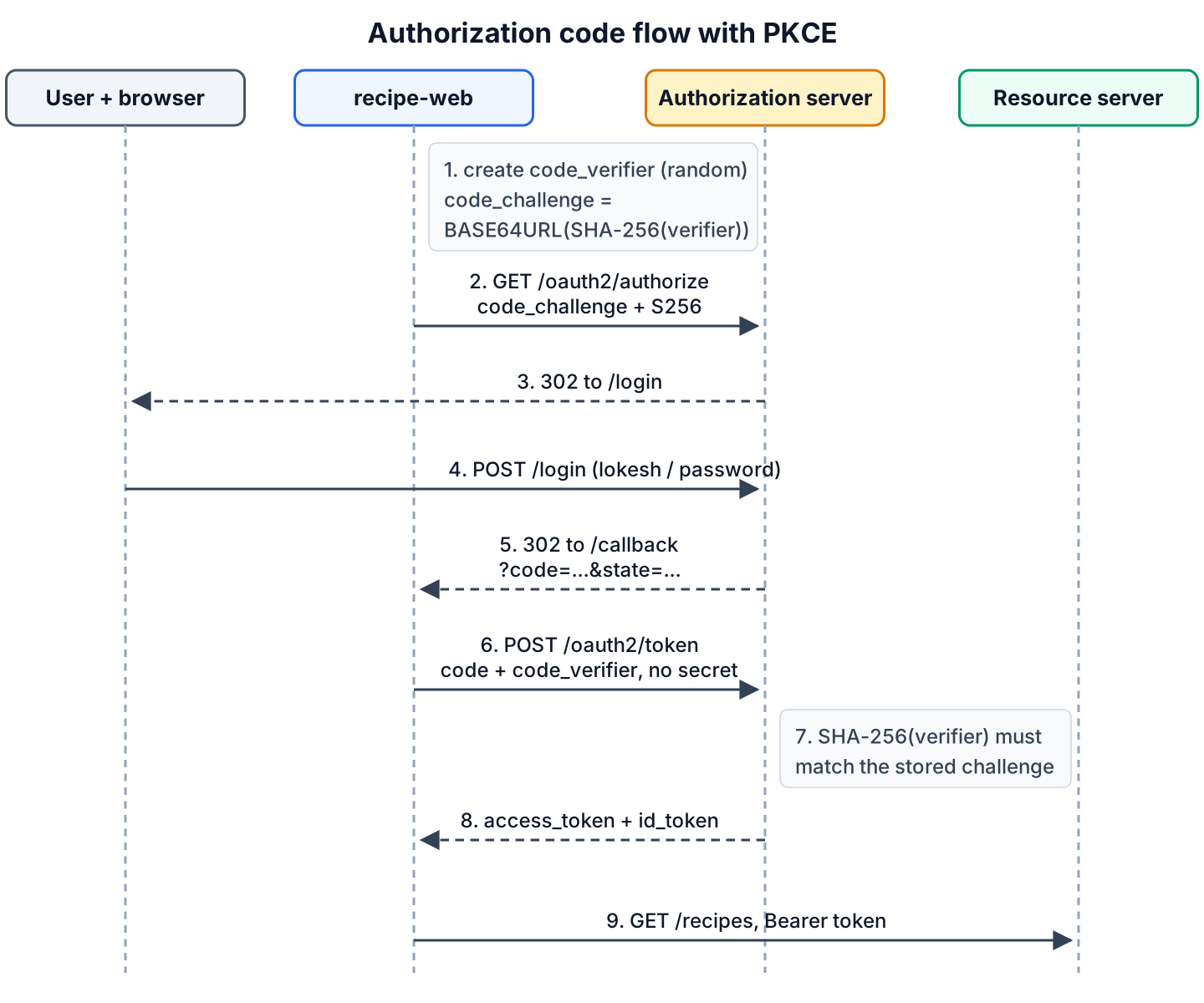
First, we create the PKCE pair. The verifier is a random string of 43 to 128 characters, and the challenge is the Base64URL-encoded SHA-256 hash of the verifier.
VERIFIER=$(openssl rand -base64 48 | tr '+/' '-_' | tr -d '=\n' | cut -c1-64)
CHALLENGE=$(printf '%s' "$VERIFIER" | openssl dgst -sha256 -binary | openssl base64 | tr '+/' '-_' | tr -d '=\n')
echo "$CHALLENGE"     # f5uMB1PU_KTMaXN-IWciM8T7zcKI39hOH33rdd0t-20
Next, we open the authorization URL in a browser. The authorization server shows its login page, and after we log in as lokesh / password, it redirects to the client’s redirect URI. Nothing runs on port 8080, so the browser shows an error page, but the address bar holds the code.
http://localhost:9000/oauth2/authorize?response_type=code&client_id=recipe-web
  &redirect_uri=http://127.0.0.1:8080/callback&scope=openid%20recipes.read
  &state=abc123&code_challenge=f5uMB1PU_KTMaXN-IWciM8T7zcKI39hOH33rdd0t-20&code_challenge_method=S256

302 Location: http://127.0.0.1:8080/callback?code=vRZeCLWg6Jl19i3a2A7j4u-gOk-bV35f...&state=abc123
Finally, the client exchanges the code. A public client sends its client_id and the verifier, but no secret.
curl -s http://localhost:9000/oauth2/token \
  -d grant_type=authorization_code \
  -d client_id=recipe-web \
  -d code=vRZeCLWg6Jl19i3a2A7j4u-gOk-bV35f... \
  -d redirect_uri=http://127.0.0.1:8080/callback \
  -d code_verifier="$VERIFIER"
{"access_token":"eyJraWQiOiJyZWNpcGUta2V5LTIi...","scope":"openid recipes.read","id_token":"eyJraWQiOiJyZWNpcGUta2V5LTIi...","token_type":"Bearer","expires_in":299}We can see an id_token next to the access token, because the client asked for the openid scope. The ID token tells the client who logged in, whereas the access token is for the API. There is no refresh token, because Spring Authorization Server does not issue refresh tokens to public clients.
The decoded access token carries the user as sub and the custom roles claim, which we add in section 7.
{
  "sub": "lokesh",
  "aud": "recipe-web",
  "nbf": 1791139726,
  "scope": [
    "openid",
    "recipes.read"
  ],
  "roles": [
    "CHEF"
  ],
  "iss": "http://localhost:9000",
  "exp": 1791140026,
  "iat": 1791139726,
  "jti": "0e6c31a8-3e01-493b-8bd3-56d3ab36686c"
}
An authorization code works only once. When we send the same code again, the server answers {“error”:”invalid_grant”} and also invalidates the tokens that it issued for that code. A wrong code_verifier gets the same invalid_grant error. The repository has a pkce-flow.sh script that runs the whole flow with curl, including the login form.
6. JWT Signing Keys and Key Rotation
The authorization server signs every token with an RSA private key, and resource servers verify the signature with the matching public key from /oauth2/jwks. The keys come from a JWKSource bean. Spring Boot’s default bean holds a single generated key, so it gives us no way to change keys in a planned way.
Key rotation means replacing the signing key without rejecting tokens that are still valid. We do it in a fixed order.
- Publish the new public key in the JWK Set next to the old one.
- Start signing new tokens with the new private key, and keep the old key as public only.
- Remove the old public key after the longest token lifetime has passed.

In our example, recipe-key-2 is the current key pair, and recipe-key-1 is the previous key with only its public half. Because both keys match RS256, the default NimbusJwtEncoder refuses to choose and throws “Failed to select a key since there are multiple for the signing algorithm”. We define our own JwtEncoder bean that picks the key with a private part, and Spring Authorization Server uses that bean for all tokens.
@Bean
JWKSource<SecurityContext> jwkSource() {
  RSAKey current = generateRsaKey("recipe-key-2");                  // public + private
  RSAKey previous = generateRsaKey("recipe-key-1").toPublicJWK();  // public only
  return new ImmutableJWKSet<>(new JWKSet(List.of(current, previous)));
}

@Bean
JwtEncoder jwtEncoder(JWKSource<SecurityContext> jwkSource) {
  NimbusJwtEncoder encoder = new NimbusJwtEncoder(jwkSource);
  encoder.setJwkSelector(keys -> keys.stream()
      .filter(JWK::isPrivate)                                       // only recipe-key-2
      .findFirst()
      .orElseThrow());
  return encoder;
}
The generateRsaKey() helper creates a 2048-bit RSA key pair with KeyPairGenerator and sets the key ID. Our example generates both keys at startup to stay self-contained, so its tokens still fail validation after a restart. For production, we load both keys from a keystore or a secrets vault instead of generating them, so all instances of the authorization server share the same keys and keep them across restarts.
Resource servers handle the rotation on their side. When a token arrives with a kid that is not in the cached key set, the Spring Security JwtDecoder downloads the JWK Set again before it rejects the token.
7. Adding Custom Claims with OAuth2TokenCustomizer
By default, an access token contains only the standard claims, so a resource server knows the user name but not the user’s roles. An OAuth2TokenCustomizer bean runs before the server signs each token and can add or change claims. For JWTs, its type parameter is JwtEncodingContext, which gives access to the token type, the grant type, the logged-in user and the claims builder.
Our customizer adds a roles claim to access tokens of the authorization_code grant. A client_credentials token has no user, so the customizer leaves it unchanged.
@Bean
OAuth2TokenCustomizer<JwtEncodingContext> rolesClaimCustomizer() {
  return context -> {
    boolean accessToken = OAuth2TokenType.ACCESS_TOKEN.equals(context.getTokenType());
    boolean userGrant = AuthorizationGrantType.AUTHORIZATION_CODE
        .equals(context.getAuthorizationGrantType());
    if (!accessToken || !userGrant) {
      return;                                                 // id_token, client_credentials
    }
    Authentication user = context.getPrincipal();             // lokesh
    Set<String> roles = AuthorityUtils.authorityListToSet(user.getAuthorities()).stream()
        .filter(authority -> authority.startsWith("ROLE_"))   // drops FACTOR_PASSWORD
        .map(authority -> authority.substring("ROLE_".length()))
        .collect(Collectors.toSet());                         // [CHEF]
    context.getClaims().claim("roles", roles);
  };
}
The ROLE_ filter matters in Spring Security 7. After a form login, the user’s authorities are [ROLE_CHEF, FACTOR_PASSWORD], because Spring Security 7 adds a factor authority for multi-factor authentication. Without the filter, the token would carry FACTOR_PASSWORD as a role.
We keep custom claims small, because every API request carries every claim. Roles changed in the database apply only after the current token expires.
8. Storing Clients in a Database
InMemoryRegisteredClientRepository loses every change on restart and cannot be shared by two instances of the authorization server. The Spring Boot reference recommends it only for development. For production, we use JdbcRegisteredClientRepository, which stores clients in the oauth2_registered_client table.
| InMemoryRegisteredClientRepository | JdbcRegisteredClientRepository | |
|---|---|---|
| Storage | A map in the JVM | Table oauth2_registered_client |
| Survives a restart | No | Yes |
| Several server instances | No, each has its own copy | Yes, all read the same table |
| Add a client at runtime | Lost on restart | save() writes a row |
| Typical use | Tests, local development | Production |
The issued codes and tokens are a second kind of state. By default, they are stored in an InMemoryOAuth2AuthorizationService, so a restart in the middle of a login flow loses the authorization code. We store them with JdbcOAuth2AuthorizationService in the same database. In the example, both beans are active only with the jdbc Spring profile and an H2 database, which need two more dependencies in the auth-server module.
<dependency>
  <groupId>org.springframework.boot</groupId>
  <artifactId>spring-boot-starter-jdbc</artifactId>
</dependency>
<dependency>
  <groupId>com.h2database</groupId>
  <artifactId>h2</artifactId>
  <scope>runtime</scope>
</dependency>
@Bean
RegisteredClientRepository registeredClientRepository(JdbcOperations jdbcOperations) {
return new JdbcRegisteredClientRepository(jdbcOperations);
}
@Bean
OAuth2AuthorizationService authorizationService(JdbcOperations jdbcOperations,
RegisteredClientRepository clients) {
return new JdbcOAuth2AuthorizationService(jdbcOperations, clients);
}
@Bean
ApplicationRunner seedClients(RegisteredClientRepository clients, PasswordEncoder encoder) {
return args -> {
saveIfMissing(clients, RecipeClients.recipeCli(encoder));
saveIfMissing(clients, RecipeClients.recipeWeb());
};
}
private static void saveIfMissing(RegisteredClientRepository clients, RegisteredClient client) {
if (clients.findByClientId(client.getClientId()) == null) { // insert only once
clients.save(client);
}
}The table definitions ship inside the spring-security-oauth2-authorization-server JAR. For H2, Spring Boot runs them at startup when we point spring.sql.init.schema-locations at them. For other databases, we copy the scripts into a Flyway or Liquibase migration and adjust the column types.
spring.datasource.url=jdbc:h2:mem:authdb
spring.sql.init.schema-locations=\
  classpath:org/springframework/security/oauth2/server/authorization/client/oauth2-registered-client-schema.sql,\
  classpath:org/springframework/security/oauth2/server/authorization/oauth2-authorization-schema.sql
The rest of the application does not change, because the token endpoint calls findByClientId() on whichever repository bean exists.
9. Validating the Token in a Resource Server
The resource server is the recipe API. It needs the resource server starter and the issuer URL. On the first request with a token, Spring Boot reads the discovery document from the issuer, downloads the keys from its jwks_uri and caches them.
<dependency>
  <groupId>org.springframework.boot</groupId>
  <artifactId>spring-boot-starter-security-oauth2-resource-server</artifactId>
</dependency>
<dependency>
  <groupId>org.springframework.boot</groupId>
  <artifactId>spring-boot-starter-webmvc</artifactId>
</dependency>
server.port=8082
spring.security.oauth2.resourceserver.jwt.issuer-uri=http://localhost:9000For each request, the JWT support of Spring Security verifies the signature and checks the iss, exp and nbf claims. By default, it turns each entry of the scope claim into an authority with the SCOPE_ prefix. Our tokens also carry roles, so we add a second converter that maps them to ROLE_ authorities, which hasRole() understands.
@Bean
SecurityFilterChain apiSecurity(HttpSecurity http) {
  http
      .authorizeHttpRequests(auth -> auth
          .requestMatchers(HttpMethod.GET, "/recipes").hasAuthority("SCOPE_recipes.read")
          .requestMatchers(HttpMethod.POST, "/recipes").hasRole("CHEF")
          .anyRequest().authenticated())
      .oauth2ResourceServer(resourceServer -> resourceServer
          .jwt(jwt -> jwt.jwtAuthenticationConverter(jwtAuthenticationConverter())))
      .sessionManagement(session -> session
          .sessionCreationPolicy(SessionCreationPolicy.STATELESS));
  return http.build();
}

static DelegatingJwtGrantedAuthoritiesConverter authoritiesConverter() {
  JwtGrantedAuthoritiesConverter scopes = new JwtGrantedAuthoritiesConverter();   // SCOPE_recipes.read
  JwtGrantedAuthoritiesConverter roles = new JwtGrantedAuthoritiesConverter();
  roles.setAuthoritiesClaimName("roles");
  roles.setAuthorityPrefix("ROLE_");                                              // ROLE_CHEF
  return new DelegatingJwtGrantedAuthoritiesConverter(scopes, roles);
}
The jwtAuthenticationConverter() method wraps authoritiesConverter() in a JwtAuthenticationConverter. In the controller, the validated token is available as a Jwt through @AuthenticationPrincipal, which is how POST /recipes reads the user name from sub. The same rules from role-based authorization apply, except that the authorities come from the token.
The responses show each rule at work. The recipe-cli token has the scope but no role, and the recipe-web token of lokesh has both.
| Request | Result |
|---|---|
| GET /recipes, no token | 401, WWW-Authenticate: Bearer resource_metadata=”http://localhost:8082/.well-known/oauth-protected-resource” |
| GET /recipes, token abc.def.ghi | 401, Bearer error=”invalid_token”, error_description=”… Malformed token” |
| GET /recipes, recipe-cli token | 200, [“pancakes”,”omelette”] |
| POST /recipes “waffles”, recipe-cli token | 403, Bearer error=”insufficient_scope” |
| POST /recipes “waffles”, lokesh token | 201, {“by”:”lokesh”,”added”:”waffles”} |
| GET /me, lokesh token | 200, {“roles”:[“CHEF”],”sub”:”lokesh”,”aud”:[“recipe-web”]} |
In Spring Security 7, the 401 response also carries a resource_metadata parameter. It points to the OAuth 2.0 Protected Resource Metadata document, from which a client can find out which authorization server issues tokens for this API.
10. Testing the Authorization Server
The authorization server endpoints are ordinary Spring MVC endpoints behind a filter chain, so MockMvc can call them in a @SpringBootTest without starting Tomcat. Spring Boot 4 moved @AutoConfigureMockMvc to the spring-boot-starter-webmvc-test module, and the security request helpers come from spring-security-test.
The first test requests a client_credentials token and decodes it with the JwtDecoder bean of the authorization server, which verifies the signature with the same keys.
MvcResult result = mvc.perform(post("/oauth2/token")
        .with(httpBasic("recipe-cli", "secret"))
        .param("grant_type", "client_credentials")
        .param("scope", "recipes.read"))
    .andExpect(status().isOk())
    .andExpect(jsonPath("$.token_type").value("Bearer"))
    .andExpect(jsonPath("$.expires_in").value(599))
    .andReturn();

String token = JsonPath.read(result.getResponse().getContentAsString(), "$.access_token");
Jwt jwt = jwtDecoder.decode(token);

assertThat(jwt.getHeaders()).containsEntry("kid", "recipe-key-2");
assertThat(jwt.getSubject()).isEqualTo("recipe-cli");
assertThat(jwt.hasClaim("roles")).isFalse();
The PKCE test logs in through the real form login. The auth_time claim of the ID token comes from the issue time of the FACTOR_PASSWORD authority, which only a real login adds, so the user() post-processor fails here with “authenticationTime cannot be null”. The authorization request must use queryParam() instead of param(), since the authorization endpoint reads its parameters from the query string of a GET request.
MvcResult login = mvc.perform(formLogin().user("lokesh").password("password")).andReturn();
MockHttpSession session = (MockHttpSession) login.getRequest().getSession(false);

MvcResult authorize = mvc.perform(get("/oauth2/authorize")
        .session(session)
        .queryParam("response_type", "code")
        .queryParam("client_id", "recipe-web")
        .queryParam("redirect_uri", "http://127.0.0.1:8080/callback")
        .queryParam("scope", "openid recipes.read")
        .queryParam("code_challenge", s256(verifier))
        .queryParam("code_challenge_method", "S256"))
    .andExpect(status().is3xxRedirection())
    .andReturn();
String code = UriComponentsBuilder.fromUriString(authorize.getResponse().getRedirectedUrl())
    .build().getQueryParams().getFirst("code");

mvc.perform(post("/oauth2/token")
        .param("grant_type", "authorization_code")
        .param("client_id", "recipe-web")
        .param("code", code)
        .param("redirect_uri", "http://127.0.0.1:8080/callback")
        .param("code_verifier", verifier))
    .andExpect(status().isOk())
    .andExpect(jsonPath("$.id_token").exists())
    .andExpect(jsonPath("$.refresh_token").doesNotExist());
The resource server tests don’t need a running authorization server. The jwt() request post-processor puts a ready Jwt into the security context, and we pass our own authorities converter so the test maps the claims the same way the app does.
mvc.perform(post("/recipes")
        .with(jwt()
            .jwt(token -> token.subject("lokesh").claim("roles", List.of("CHEF")))
            .authorities(SecurityConfig.authoritiesConverter()))
        .content("waffles"))
    .andExpect(status().isCreated())
    .andExpect(jsonPath("$.by").value("lokesh"));
The example project has 16 tests. Besides the happy paths, they cover a wrong secret, an unknown scope, a wrong verifier, a missing PKCE challenge, the JDBC profile and the 401 and 403 cases of the API.
11. Spring Authorization Server FAQs
11.1. Is Spring Authorization Server Deprecated?
No. The standalone Spring Authorization Server project ended with the 1.5 line, and its code continues inside Spring Security 7, with the same Maven artifact ID and nearly the same packages. For a new project on Spring Boot 4, we use the spring-boot-starter-security-oauth2-authorization-server starter. The deprecation note on the old starter name refers to the starter name only.
11.2. Spring Authorization Server or Keycloak?
We pick Spring Authorization Server when we want the token server inside our own Spring Boot code, with our own login page, claims and database tables. We pick Keycloak when we want a ready product with an admin console, user registration, social login and federation, at the cost of running and upgrading a separate server. Our Keycloak on Docker guide shows that setup. The resource server code from section 9 works with both, since only the issuer URL changes.
11.3. Does Spring Authorization Server Support the Password Grant?
No. The resource owner password grant is not implemented, and the discovery document does not list it. The OAuth 2.1 draft removes it, because the client would see the user’s password. For users, we use authorization_code with PKCE. For machines, we use client_credentials.
11.4. Can We Revoke a JWT Access Token?
Partly. The /oauth2/revoke endpoint marks the token as revoked in the authorization service, and after that /oauth2/introspect reports it as inactive. A resource server that validates JWTs by signature does not ask the authorization server, so it accepts the token until exp.
curl -s -u recipe-cli:secret -d token="$TOKEN" http://localhost:9000/oauth2/revoke       # HTTP 200
curl -s -u recipe-cli:secret -d token="$TOKEN" http://localhost:9000/oauth2/introspect   # {"active":false}
curl -s -H "Authorization: Bearer $TOKEN" http://localhost:8082/recipes                  # ["pancakes","omelette"]
To reduce the effect of a leaked token, we keep access tokens short-lived. When a token must stop working at once, we switch the client to opaque tokens with TokenSettings.accessTokenFormat(OAuth2TokenFormat.REFERENCE) and configure introspection on the resource server, which costs one HTTP call per request.
12. Conclusion
Spring Authorization Server is part of Spring Security 7, and on Spring Boot 4.1, one starter plus a RegisteredClientRepository bean gives us a working OAuth2 and OpenID Connect server. The client_credentials grant covers calls between services, and authorization_code with PKCE covers user logins from browser and mobile apps without a client secret.
For production, we replace the defaults that only suit a demo.
- The generated signing key becomes a stored key pair with a planned rotation.
- The in-memory client list becomes JdbcRegisteredClientRepository.
- The issued codes and tokens go to JdbcOAuth2AuthorizationService.
- An OAuth2TokenCustomizer adds the claims our APIs need, such as roles.
On the API side, a resource server needs only the issuer URL. It validates every token against the published keys and maps scopes and roles to authorities.
13. References
- Spring Security Reference: OAuth2 Authorization Server
- Spring Security Reference: Core Model and Components
- Spring Security Reference: Protocol Endpoints
- Spring Boot Reference: OAuth2
- Spring Security Reference: OAuth 2.0 Resource Server JWT
- Spring Blog: Spring Authorization Server moving to Spring Security 7.0
- RFC 6749: The OAuth 2.0 Authorization Framework
- RFC 7636: Proof Key for Code Exchange (PKCE)
- RFC 7517: JSON Web Key (JWK)
Happy Learning !!
