
An AI agent is a software system that works toward a goal by choosing actions, carrying them out, and using their results to decide what to do next. The user supplies the goal without having to specify every step.
Modern language-based agents use a large language model (LLM) to interpret requests and decide which actions to take. The surrounding application provides tools, which are operations the model can request. It also retains useful information and controls what the agent is allowed to do. The model is one component of the agent; it is not the entire system.
For Java developers, these actions usually involve familiar operations: calling an API, searching documents, reading files, or invoking a service method. The difference is that the model can choose which operation is needed as the task progresses.
1. What Makes an AI Agent Autonomous?
Autonomy means the agent can choose its next action within the permissions and limits set by the application. It does not mean unrestricted access or guaranteed success. An agent may complete a task independently, ask for missing information, or pause for human approval.
A chat interface alone does not tell us whether a system is an agent. A chatbot may only generate answers, or it may provide access to an agent that searches information and performs tasks. The useful distinction is whether the system can select and carry out actions as it works toward a goal.
The term AI agent also predates LLMs. Rule-based agents can react to conditions without a language model. This article focuses on LLM-based agents used in Java applications.
2. How the Agent Loop Works
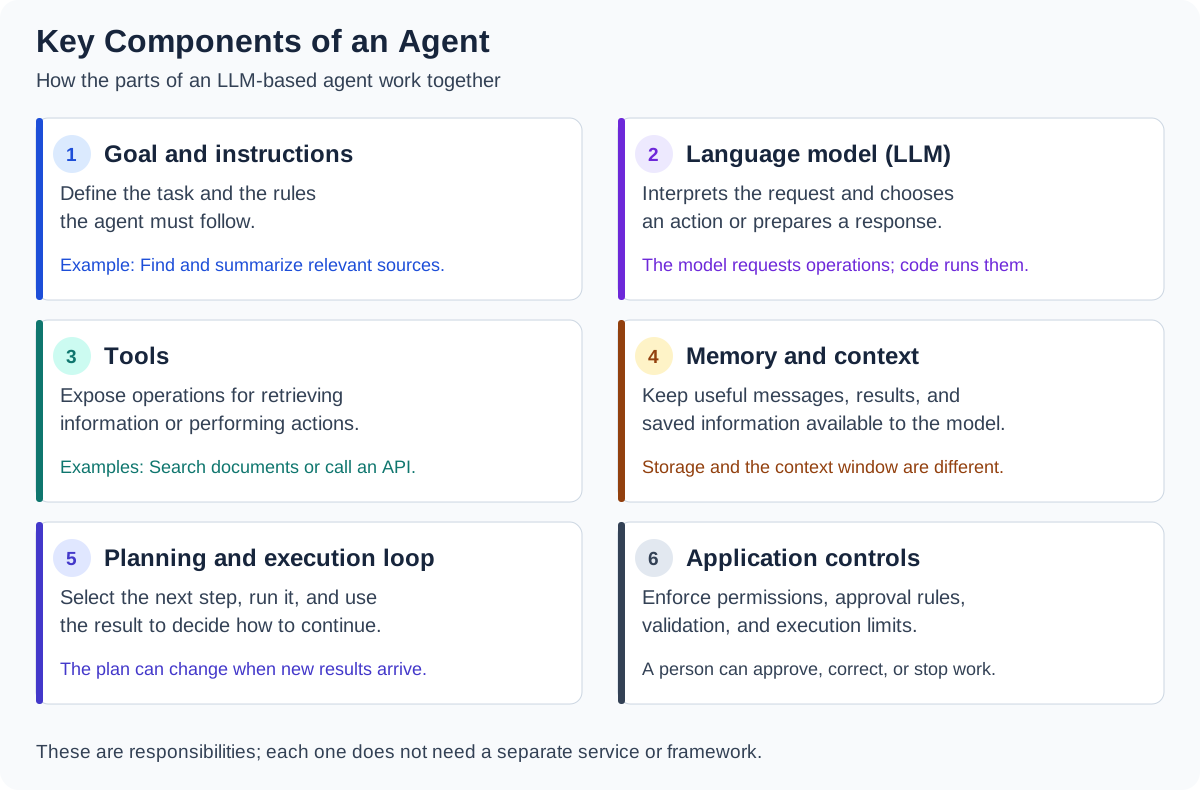
The following components support an LLM-based agent. The application brings them together so the model can act on the user’s goal and use the results.
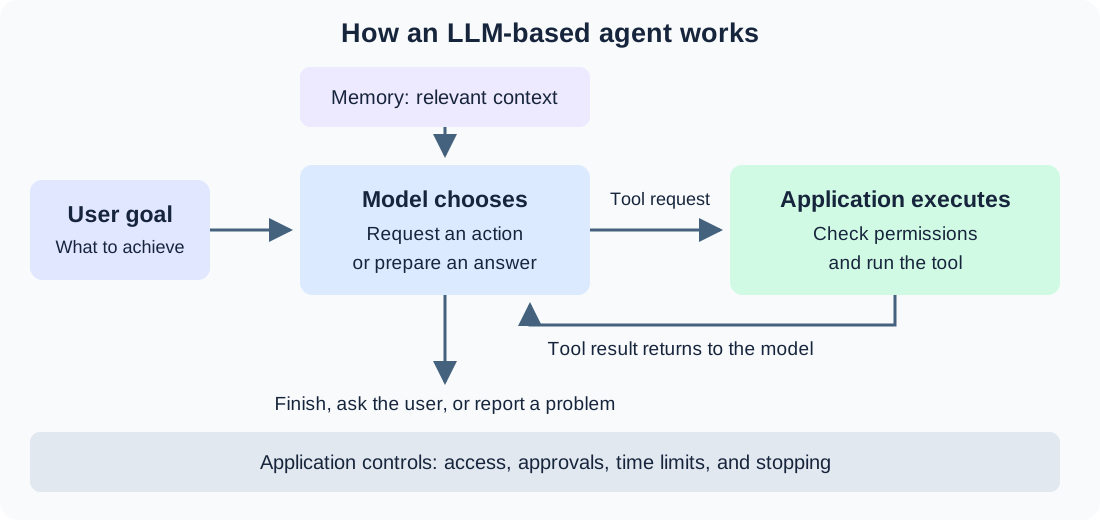
An agent typically repeats four steps:
- Read the available information. The model receives the user’s goal, application instructions, and relevant context.
- Choose the next action. The model decides whether it needs more information, should request an operation, or can provide an answer.
- Execute the action. The application runs the requested tool after applying its checks.
- Use the result. The application sends the result back to the model, which decides how to continue.
This repeated exchange is the agent loop. A failed search may lead to a different query. A useful result may be enough to finish the task. The user does not need to prompt the agent after every operation.
The loop must also have stopping conditions. It can end with a completed result, a request for clarification, an approval request, or a reported failure. Developers should impose limits on execution time and tool calls.
3. What Tools Do
A tool is an operation the application makes available to the model. It has a name, a description, and defined inputs. Tools can retrieve information or change something outside the model.
| Tool purpose | Example operation | Result supplied to the model |
|---|---|---|
| Retrieve information | Search documentation | Matching passages and links |
| Read current data | Call a service API | The service’s response |
| Perform an action | Create a calendar event | Confirmation or an error |
The model requests a tool call and supplies arguments. The application executes the operation. Credentials, access checks, and business rules belong in application code.
Spring AI is a Java framework for integrating models with application code. Its @Tool annotation exposes a method as a tool:
class DocumentationTools {

    @Tool(description = "Search the Java project documentation")
    String searchDocs(String query) {
        // Sample result; a real method would search a document index.
        return "Set app.timeout in application.yml.";
    }
}
Spring AI’s ChatClient sends requests to the model. Here, chatModel is an already configured model connection that supports tool calling:
String answer = ChatClient.create(chatModel)
    .prompt()
    .user("Find how this project's timeout is configured.")
    .tools(new DocumentationTools())
    .call()
    .content();
The .tools(…) call registers the operation. If the model requests it, Spring AI invokes searchDocs() and returns its result to the model. A single .call() can involve several model requests before .content() returns the final text. See the Spring AI tool documentation for execution details.
These conceptual snippets omit imports and configuration, return sample data, and do not configure conversation memory.
4. Why Agents Need Memory
An agent needs access to information obtained earlier in a task. Otherwise, the next model request may lose the result of the previous operation. The application keeps relevant information and includes it in later requests.
Memory can serve different purposes:
| Scope | Information retained | Why it matters |
|---|---|---|
| Current task | Tool results and completed steps | Helps the agent continue without repeating work |
| Conversation | Earlier questions and answers | Gives meaning to follow-up requests |
| Across conversations | Saved preferences or task summaries | Provides context in a later session |
The context window is the amount of information a model can process in one request. It is not permanent storage. The application may save more information than it can include at once, so it must select what the model needs.
Spring AI provides ChatMemory for managing conversation messages. A memory advisor connects those messages to model requests. This requires configuration beyond the tool snippet above; see the Spring AI memory documentation.
Memory does not require a vector database. Messages can be stored in ordinary databases, while relevant documents can be retrieved separately. Retrieval-augmented generation (RAG) supplies retrieved information to a model; it can support an agent, but it is not the same thing as memory. Our RAG guide explains that process.
5. How Agents Plan
Planning means deciding which actions are needed to achieve the goal. An agent may prepare a list of steps before starting, or choose one action at a time as results become available.
For a documentation question, the agent might search for a configuration setting, read the matching section, and summarize the instructions. If the search returns no useful results, it may change the query. The result of one action influences the next action.
Developers still define the available tools and constraints. The model chooses among those operations; it does not automatically gain new capabilities because it has proposed a plan.
Planning also differs from following a fixed workflow. In a workflow, application code determines the sequence or branches. In an agent, the model makes some of those decisions during execution. Anthropic’s architectural guide explains this distinction and its trade-offs.
6. Where Human Oversight Fits
An agent can make an incorrect decision even when its tools work correctly. The application must check whether an operation is allowed before executing it.
- Permissions: Restrict the files, records, and services each user can access.
- Approval: Pause before actions that require confirmation, such as sending a message or making a payment.
- Validation: Check tool arguments and enforce business rules in code.
- Failure handling: Limit retries, record failures, and let the agent report that it could not complete the task.
Instructions such as “ask before sending” help guide the model, but the application must enforce the approval requirement. Autonomy can then apply to permitted steps while a person retains control over consequential actions.
7. When Should We Use an Agent?
An agent is useful when a task requires different operations depending on what the system discovers. Research, troubleshooting, and software maintenance often involve this kind of decision-making.
If the required sequence is already known, a regular Java workflow may be easier to test and maintain. If the user only needs a summary of supplied text, a single model request may be enough. Additional model calls increase latency and cost, so the flexibility should serve a real requirement.
8. Common Types of AI Agents
AI agents are also classified by how they choose actions. The traditional categories described in IBM’s overview cover more than LLM-based agents, and their capabilities can overlap. For example, a goal-based agent can also learn from feedback.
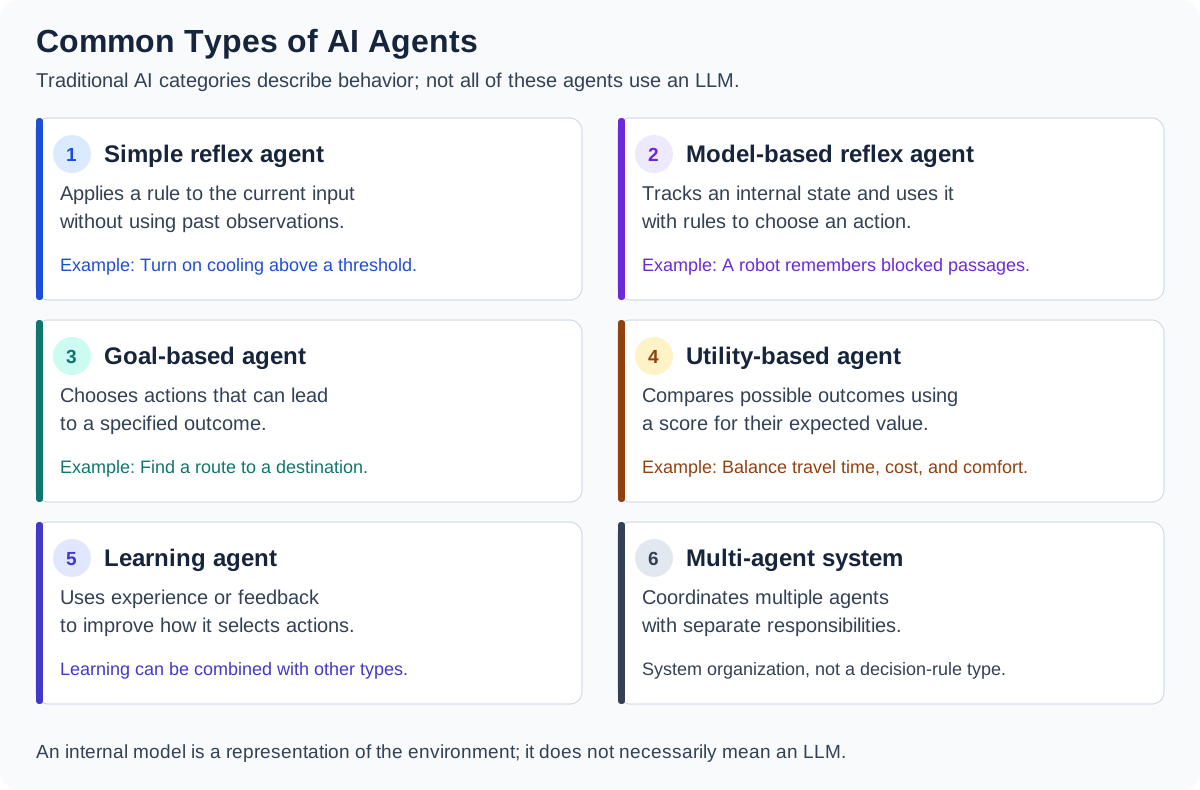
A multi-agent system uses several agents with separate responsibilities, such as research and review. It describes how agents are organized rather than how an individual agent makes decisions. Adding conversation memory to an LLM agent also does not mean that the model retrains itself after each interaction.
9. Conclusion
An LLM-based agent combines a model’s decisions with operations implemented by the application. Tools let it retrieve information and perform actions, memory makes earlier information available, and planning determines how it proceeds. Java code remains responsible for execution, permissions, and stopping conditions.
Happy Learning!
