Imagine we run a small business and every month we download the bank statement to categorize the transactions, which later go to our CA for the accounts and the tax filing. If you have ever done this, you know how it goes. You read each line, and because you know the business, you mark it as rent, software, travel, salary or whatever it is. When a line is not clear, you check the invoice or ask the person who made the payment. It is not difficult, but with a few hundred lines every month it eats up a full day, and that is why at some point we want software to do it for us.
The simplest thing software can do is match keywords. If the line says NORTHGRID POWER, mark it as electricity. If it says MAILKITE, mark it as software. This works nicely for all the regular payments we make every month. The trouble starts with the lines the program has never seen. Say we bought something from a new shop, or we transferred money to a person and the only thing written in the reference is SEPT. Was that a salary, a refund, or somebody’s expense claim? A keyword rule cannot know, so those lines come back to us, every single month.
At this point you may think, why not hand everything to an LLM? It can read that line and make a sensible guess, and that is true. But it is slow compared to a simple lookup, we pay for a model call on every line, and sometimes it gives a wrong answer with full confidence. If we blindly accept whatever it says, wrong entries go straight into the books, and we find out only when the CA asks. So we will do something in between. Rules will handle the merchants we already know, the LLM will handle the rest, and whenever the model is not sure, we will ask a person, just like we did when we were doing it by hand.
In this tutorial, we will build exactly that in Python with a local model in Ollama. We will test it on 60 sample transactions, compare rules alone, the LLM alone and the two together, and finally see what goes wrong when we let one finished month teach the system new rules for the next month.
1. How the Pipeline Works
Before we write any code, let us think about what happens when the system gets a line wrong, because that decides the whole design.
Suppose the system is not sure about a line and puts it aside for us to look at. That costs us a minute, and we are used to it, because we did the same when we checked an invoice by hand. Now suppose the system picks a wrong category and nobody looks at it. That entry goes into the books, the CA files the return with it, and we may never find out. The second mistake is far more expensive than the first. So throughout this article, the number we care about most is not how many lines the system handled on its own, but how many wrong answers slipped through without a person seeing them.
Once we look at it this way, the design almost writes itself.
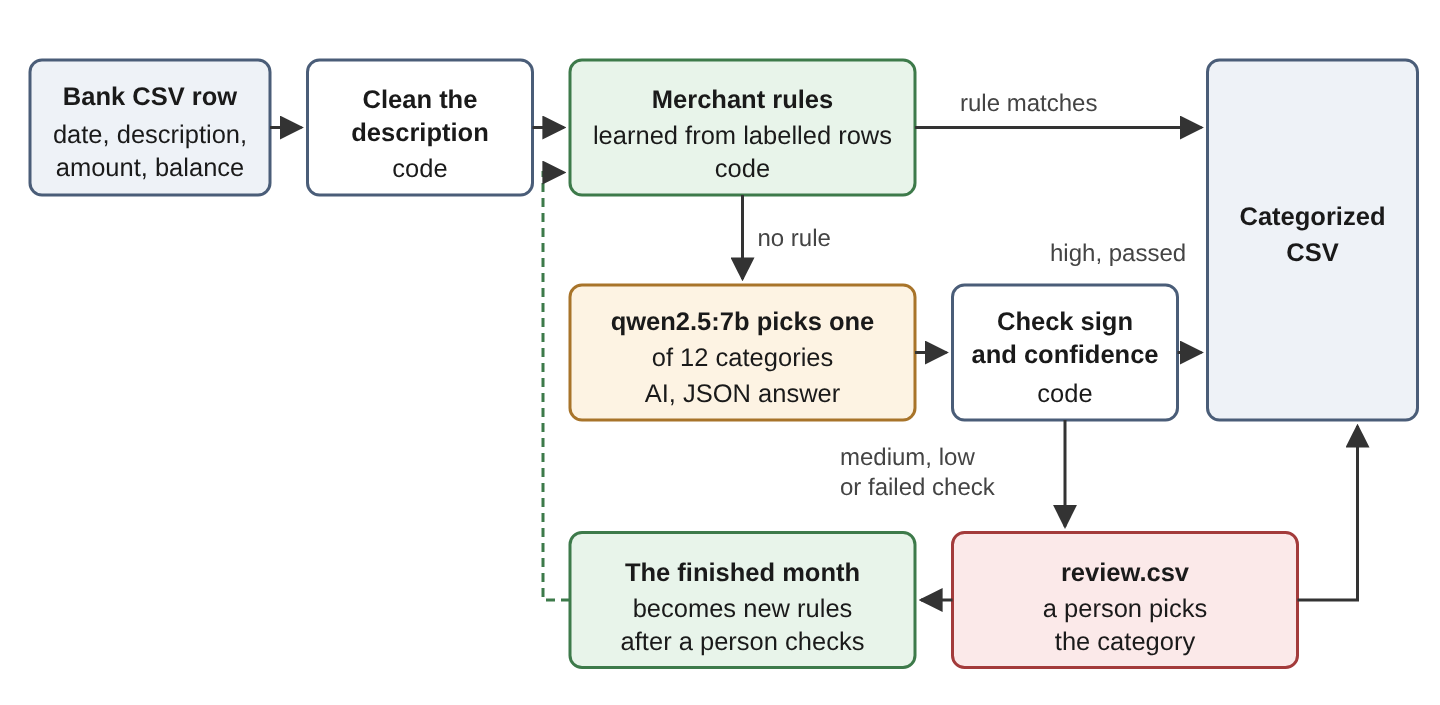
- First, the code cleans up each description and checks it against the merchant rules. These are the lines we already know, and they never need the model.
- Only the lines that no rule matched go to the LLM. We do not let it answer in free text. It has to pick a category from our fixed list and tell us how confident it is.
- Then the code checks that answer. If the model was confident and the answer passes our checks, we accept it. Otherwise the line goes to a review file for a person.
- At the end of the month, the finished lines become new rules, so next month the model has less to do. As we will see later, this last step needs some care.
2. Setting Up the Project
For this tutorial we will use a small, made-up UK business account, and the whole project is in the Python-Examples repository on GitHub. It needs Python 3.12 or later, and we ran it on Python 3.13 with ollama 0.6.3, pydantic 2.14.1, pandas 3.1.0 and Faker 40.43.0. The last one only makes up the fictional names in the sample data.
The model is qwen2.5:7b, running in Ollama 0.40.11 on the same machine, so no transaction ever leaves our computer. Every number you see in this article comes from our own runs with this model. If you use a different model or version, your answers will differ a bit, and that is normal. If Ollama is new to you, the Run LLMs Locally tutorial walks through the installation. Once it is installed, we pull the model and install the packages.
ollama pull qwen2.5:7b

python3 -m venv .venv
source .venv/bin/activate
pip install ollama==0.6.3 pydantic==2.14.1 pandas==3.1.0 Faker==40.43.0
The same packages are listed in the repository’s requirements.txt, so pip install -r requirements.txt does the job as well.
2.1. Three Months of Sample Transactions
To test the system properly we need transactions where we already know the right answer. The script generate_transactions.py creates three CSV files for us, and each file has the columns id, date, description, amount, balance and label. The label column is the correct category, the one a person would have given. We use the three months for different purposes.
- July and August have 64 rows between them and we treat them as already categorized. This is our history, saved as data/history.csv. The rules and the examples for the model both come from here.
- September has 60 rows and is our test month, saved as data/test.csv. We hide its labels from the system, let the system categorize the month, and then compare the answers with the labels to see how well it did.
- October has 44 rows, saved as data/next.csv, and only comes in at the end, when we check how much the rules grow after one finished month.
One small thing about the descriptions. They use the prefixes a UK bank statement uses. CARD is a card payment, DD is a direct debit, FPS is a bank transfer and BGC is money paid in.
2.2. A Fixed Category List With Definitions
If we let the model name categories on its own, one month it will say Office supplies and the next month Stationery, and our books will be a mess. So we decide the list up front, and the model may only answer with one of these 12 categories.
Each category also gets a one-line definition. The name Office supplies alone does not tell the model whether postage belongs there, and a definition settles it. In the definitions you will see HMRC, which is the UK tax authority, VAT, which is the tax on sales, and PAYE, which is the income tax an employer deducts from salaries. Here is categories.py.
"""The fixed category list for a small business account."""

CATEGORIES = {
    "Office supplies": "stationery, printing, postage and small office equipment",
    "Software": "software subscriptions, apps, cloud services and domains",
    "Travel": "trains, taxis, fuel, parking and hotels for business trips",
    "Meals": "coffee, meals and catering for staff or clients",
    "Utilities": "electricity, water, gas, broadband and phone bills",
    "Rent": "rent for the office or a workspace",
    "Payroll": "salary and wage payments to employees",
    "Bank fees": "account fees, payment fees and interest charged by the bank",
    "Taxes": "payments to HMRC such as VAT, PAYE and corporation tax",
    "Sales income": "money from customers for our invoices or card sales",
    "Refunds": "money we return to a customer, or a supplier returns to us",
    "Other": "anything else, or rows without enough information "
             "(cash, cheques, transfers between our own accounts)",
}

# Categories that only make sense for one direction of money
MONEY_IN_ONLY = {"Sales income"}
MONEY_OUT_ONLY = {
    "Office supplies", "Software", "Travel", "Meals", "Utilities",
    "Rent", "Payroll", "Bank fees", "Taxes",
}
The definitions go into the prompt in section 5. The two sets at the bottom are for a check we add in section 6. Sales income only makes sense when money comes in, and the nine categories in the other set only make sense when money goes out. Refunds and Other can go either way, so they are in neither set.
3. Cleaning the Description and Finding the Merchant Name
Look at a real line from the statement, such as CARD 4411 PAPERLY*ORDER 8891. Next month the same shop shows up as CARD 4411 PAPERLY*ORDER 9102, with a different order number. If we want a rule that says Paperly is office supplies, we need something stable to match on, and the raw description is not it.
So we reduce every description in two steps, and both functions live in bankcat.py, where all the pipeline code is. The clean_description() function makes the text uppercase, hides the card digits so they never reach the model, and squeezes extra spaces. Then merchant_key() cuts the cleaned text down to the part that names the merchant, by throwing away payment references, order ids, web addresses, city names and anything with a digit in it. The load_transactions() function reads a CSV file and adds these as new columns. Each step works on a pandas DataFrame, and if pandas is new to you, Python Pandas 101 covers the basics.
import re

import pandas as pd

CITIES = r"\b(LONDON|LEEDS|MANCHESTER|BRISTOL)\b"


def clean_description(text: str) -> str:
    """Uppercases the text, masks the card number and collapses spaces."""
    text = text.upper().strip()
    text = re.sub(r"\bCARD \d{4}\b", "CARD", text)
    return re.sub(r"\s+", " ", text)


def merchant_key(clean: str) -> str:
    """Reduces a cleaned description to the part that names the merchant."""
    key = re.sub(r"\bREF\b.*$", "", clean)          # payment references
    key = re.sub(r"\*.*$", "", key)                 # order ids after '*'
    key = re.sub(r"\.(COM|CO\.UK|IO)\b", "", key)   # web addresses
    key = re.sub(CITIES, "", key)
    key = re.sub(r"\b\w*\d\w*\b", "", key)          # anything with digits
    return re.sub(r"\s+", " ", key).strip()


def load_transactions(path: str) -> pd.DataFrame:
    df = pd.read_csv(path, dtype={"description": str})
    df["date"] = pd.to_datetime(df["date"], format="%d/%m/%Y")
    df["amount"] = df["amount"].astype(float)
    df["clean"] = df["description"].map(clean_description)
    df["key"] = df["clean"].map(merchant_key)
    df["direction"] = df["amount"].map(lambda a: "in" if a > 0 else "out")
    return df
We read the file with read_csv() and tell to_datetime() the date format, because UK dates have the day first. Here is what merchant_key() makes of three September lines.
CARD 4411 PAPERLY*ORDER 8891     -> CARD PAPERLY
FPS TO L PERRY REF SALARY SEP    -> FPS TO L PERRY
CARD 4411 MAILKITE.COM           -> CARD MAILKITE
Every payment to the same merchant now gets the same key, no matter what the order id or the reference says. Note that only the rules use this key. The model still gets the full cleaned description, because a reference like REF SALARY SEP is a useful hint for it.
4. Categorizing Known Merchants With Rules
Now that every line has a merchant key, we can teach the program the merchants we already know. We do not write these rules by hand. We learn them from July and August, where every row already has a category.
The learn_rules() function counts, for each merchant key and money direction, which categories it had in the history. A key becomes a rule when it appeared at least twice (that is the min_rows=2 default) and always had the same category. The apply_rules() function then uses those rules on a new month.
from collections import Counter, defaultdict


def learn_rules(labelled: pd.DataFrame, min_rows: int = 2) -> pd.DataFrame:
    """Keeps a (key, direction) pair when it repeats and always had one category."""
    seen = defaultdict(Counter)
    for row in labelled.itertuples():
        seen[(row.key, row.direction)][row.label] += 1
    rules = []
    for (key, direction), counts in seen.items():
        if len(counts) == 1 and sum(counts.values()) >= min_rows:
            rules.append((key, direction, next(iter(counts))))
    return pd.DataFrame(rules, columns=["pattern", "direction", "category"])


def apply_rules(df: pd.DataFrame, rules: pd.DataFrame) -> pd.Series:
    """Returns the rule category per row, or None; the longest pattern wins."""
    table = sorted(rules.itertuples(), key=lambda r: -len(r.pattern))

    def match(row):
        for rule in table:
            same_start = row.key == rule.pattern or row.key.startswith(rule.pattern + " ")
            if same_start and row.direction == rule.direction:
                return rule.category
        return None

    return df.apply(match, axis=1)
A rule is simply a merchant key, which we call the pattern, a direction and a category. Here are the first five of the 25 rules that learn_rules() builds from our history.
              pattern direction        category
   DD NORTHGRID POWER       out       Utilities
          DD MAILKITE       out        Software
CARD NORTHLINE TRAINS       out          Travel
 CARD BLUE CUP COFFEE       out           Meals
         CARD PAPERLY       out Office supplies
When apply_rules() looks at a row, it accepts a rule if the direction is the same and the row’s key is either equal to the pattern or starts with the pattern followed by a space. When several rules match, the longest pattern wins, because it is the most specific one.
The direction matters more than it looks. Take the line CARD 4411 NORTHLINE TRAINS REFUND. Its key starts with CARD NORTHLINE TRAINS, which is our Travel rule. But the refund is money coming in and the rule is for money going out, so the rule does not apply and the row goes to the model instead. That is exactly what we want, because a refund is not a travel expense.
From the 64 history rows we got 25 rules. On the 60 September rows they matched 31, and every one of those 31 was correct. That leaves 29 rows, almost half the month, for something smarter than a lookup.
5. Asking the LLM About the Remaining Transactions
For those 29 rows we turn to the model. If we want to use its answers in code, we need three things. The answer must come in a fixed shape, the prompt must explain what each category means, and the settings must keep the answers repeatable. Let us take them one by one.
5.1. Restricting the Answer With a JSON Schema
If we simply ask the model what a transaction is, it will reply with something like “This looks like a software expense”. That is fine for a person, but code cannot do much with it. What we want is one category from our list and a confidence level, in a form that code can read directly. Two terms describe how we get there.
- JSON schema: a JSON document that describes the allowed fields of a JSON object and the allowed values of each field.
- Structured output: the model’s reply is restricted to JSON that matches a given schema. Ollama supports it through the format argument of a chat call.
We describe the answer as a Pydantic model, which is a Python class with typed fields.
from typing import Literal

from pydantic import BaseModel, Field

Category = Literal[
    "Office supplies", "Software", "Travel", "Meals", "Utilities", "Rent",
    "Payroll", "Bank fees", "Taxes", "Sales income", "Refunds", "Other",
]


class Categorization(BaseModel):
    category: Category
    confidence: Literal["high", "medium", "low"]
    reason: str = Field(description="At most 12 words")
Pydantic’s model_json_schema() method turns this class into a JSON schema. Each Literal type becomes an enum, which is a list of the only allowed values. So the model can only answer with one of our 12 categories and one of the three confidence levels, and nothing else. The Ollama structured outputs page shows how the format argument uses the schema.
5.2. Giving the Model Definitions and Solved Examples
The schema fixes the shape of the answer but not its meaning. The model still has to know what each category covers and what we mean by high confidence. The system prompt tells it both, and it also tells the model to answer Other with low confidence when the description does not say enough, instead of guessing.
import json

from categories import CATEGORIES


def system_prompt() -> str:
    lines = [f"- {name}: {meaning}" for name, meaning in CATEGORIES.items()]
    return (
        "You categorize transactions from a small UK business bank account.\n"
        "Pick exactly one category from this list:\n" + "\n".join(lines) + "\n\n"
        "A negative amount is money out, a positive amount is money in.\n"
        "Confidence: high when the description clearly shows the category, "
        "medium when it is likely but not certain, low when you are guessing.\n"
        "If the description does not say enough, answer Other with low confidence.\n"
        "Reply with JSON only."
    )


def row_text(clean: str, amount: float) -> str:
    direction = "money in" if amount > 0 else "money out"
    return f"Description: {clean}\nAmount: {amount:.2f} GBP ({direction})"
The row_text() function writes the money direction in words next to the amount, so the model does not have to work it out from the sign.
Definitions alone still leave room for guessing, so we also show the model a few solved rows before the real one. This technique has a name.
- Few-shot prompting: putting a few solved examples into the prompt, so the model sees the expected input and answer instead of only a description of them.
The build_messages() function builds the conversation. First the system prompt, then the solved examples, then the row we want categorized.
def build_messages(clean: str, amount: float, examples: list[dict]) -> list[dict]:
    messages = [{"role": "system", "content": system_prompt()}]
    for ex in examples:
        answer = {"category": ex["category"], "confidence": "high",
                  "reason": ex["reason"]}
        messages.append({"role": "user", "content": row_text(ex["clean"], ex["amount"])})
        messages.append({"role": "assistant", "content": json.dumps(answer)})
    messages.append({"role": "user", "content": row_text(clean, amount)})
    return messages
Each example is a pair of messages, a history transaction as the user message and its expected JSON answer as the assistant message. The pick_examples() function takes the first history row of six categories and pairs each with a reason we wrote ourselves.
EXAMPLE_REASONS = {
    "Office supplies": "order from an office supplies shop",
    "Meals": "card payment at a cafe",
    "Payroll": "salary reference on a transfer to a person",
    "Sales income": "customer pays one of our invoices",
    "Bank fees": "monthly fee charged by the bank",
    "Utilities": "direct debit to an electricity supplier",
}


def pick_examples(history: pd.DataFrame) -> list[dict]:
    """Takes the first history row for each category in EXAMPLE_REASONS."""
    examples = []
    for category, reason in EXAMPLE_REASONS.items():
        row = history[history["label"] == category].iloc[0]
        examples.append({"clean": row["clean"],
                         "amount": float(row["amount"]),
                         "category": category,
                         "reason": reason})
    return examples
The reasons are specific on purpose. In our first attempt all six examples had the same generic reason, and the model’s first answer copied that reason word for word.
5.3. Sending One Transaction per Call
Now we can call the model. We send one transaction per call and pass the schema in the format argument.
import os
import time

from ollama import Client

MODEL = "qwen2.5:7b"
TIMEOUT = float(os.environ.get("OLLAMA_TIMEOUT", "300"))
client = Client(host="http://localhost:11434", timeout=TIMEOUT)


def classify(clean: str, amount: float, examples: list[dict]):
    """Returns the answer and the call's timing and token counts."""
    start = time.perf_counter()
    response = client.chat(
        model=MODEL,
        messages=build_messages(clean, amount, examples),
        format=Categorization.model_json_schema(),
        options={"temperature": 0, "num_predict": 80},
    )
    answer = Categorization.model_validate_json(response.message.content)
    return answer, stats(response, start)
Two options in this call keep the answers predictable.
- temperature: controls how much the output varies. A value of 0 makes the answers as repeatable as the model allows.
- num_predict: caps the length of the reply, here at 80 tokens, so a reply that never ends cannot block the server.
Even with a schema, we validate the reply. The model_validate_json() call raises a ValidationError if the reply does not match the schema, and section 7 shows how we handle that. The stats() helper in the repository collects the timing and token counts. To give you an idea of the output, for CARD GREENFORK CATERING the model answered Meals with high confidence.
6. Checking the Answer and Sending Unsure Rows for Review
The schema guarantees the format of an answer, not that the answer makes sense. Nothing in it stops the model from calling a payment from a customer Rent. So before we accept an answer, the code checks it, and anything doubtful goes to a person.
The direction of the money is a fact we already know, so it makes a cheap check. The check_answer() function uses the two sets from categories.py to list what is wrong with an answer, and route() decides what happens to the row.
from categories import CATEGORIES, MONEY_IN_ONLY, MONEY_OUT_ONLY


def check_answer(category: str, amount: float) -> list[str]:
    problems = []
    if category not in CATEGORIES:
        problems.append("unknown category")
    if amount < 0 and category in MONEY_IN_ONLY:
        problems.append(f"{category} on money out")
    if amount > 0 and category in MONEY_OUT_ONLY:
        problems.append(f"{category} on money in")
    return problems


def route(confidence: str, problems: list[str]) -> str:
    """Accepts only clean, high-confidence answers; a person reviews the rest."""
    return "accept" if confidence == "high" and not problems else "review"
A model answer is accepted only when it has high confidence and passes every check. Everything else goes to a person. The unknown category check cannot fire as long as the schema and CATEGORIES agree, but it catches the day someone edits one list and forgets the other.
Rows that are not accepted go to review.csv, with an empty corrected_category column for the reviewer to fill in. In our September run, 8 rows ended up there. Here are two of them from the review file that run_experiment.py writes, trimmed a little. That script calls the model’s answer suggested.
id,description,amount,suggested,confidence,reason
17,CARD 4411 KEYSTONE LOCKSMITHS,-95.0,Office supplies,medium,possible payment for small office equipment or services
48,CARD 4411 LUMEN COWORK DAY PASS,-25.0,Rent,medium,"likely a payment for a coworking space, but could be a one-off pass"
The locksmith row shows why this step matters. Office supplies is the wrong category, but the model said medium, so a person sees the row before it reaches the books. For the coworking day pass, the model’s own reason tells us it was torn between Rent and a one-off pass.
7. Running a Full Month
We now have rules, model calls and checks. The categorize_month() function ties them together. It applies the rules, sends only the unmatched rows to the model, routes each answer, and writes two CSV files, one with the accepted rows and one for review.
from pydantic import ValidationError


def categorize_month(path: str, rules: pd.DataFrame, examples: list[dict]) -> None:
    """Writes categorized.csv (accepted rows) and review.csv (rows for a person)."""
    df = load_transactions(path)
    df["category"] = apply_rules(df, rules)
    df["confidence"], df["reason"], df["routed"] = "rule", "", "accept"

    for row in df[df["category"].isna()].itertuples():
        try:
            answer, _ = classify(row.clean, row.amount, examples)
        except ValidationError:
            df.loc[row.Index, ["confidence", "reason", "routed"]] = [
                "none", "invalid model reply", "review"]
            continue
        problems = check_answer(answer.category, row.amount)
        df.loc[row.Index, ["category", "confidence", "reason", "routed"]] = [
            answer.category, answer.confidence, answer.reason,
            route(answer.confidence, problems)]

    cols = ["id", "date", "description", "amount", "category", "confidence", "reason"]
    df.loc[df["routed"] == "accept", cols].to_csv("categorized.csv", index=False)
    review = df.loc[df["routed"] == "review", cols].assign(corrected_category="")
    review.to_csv("review.csv", index=False)
The rows a rule decided start as accepted, with the word rule as their confidence. If a model reply does not match the schema, the loop catches the ValidationError and sends that row to review instead of stopping the whole month.
The function needs the rules and the few-shot examples, and both come from the categorized history. The main() function in bankcat.py builds them and takes the statement file from the command line. It learns the rules from history, or reads data/rules.csv once we have saved rules there.
def main() -> None:
    import sys
    from pathlib import Path

    history = load_transactions("data/history.csv")
    rules_file = Path("data/rules.csv")
    rules = pd.read_csv(rules_file) if rules_file.exists() else learn_rules(history)
    categorize_month(sys.argv[1], rules, pick_examples(history))
We run it on one statement with python bankcat.py data/next.csv, and categorized.csv and review.csv appear in the current folder. The first file goes to the books, and the second one is for us to look at.
8. How Well Does It Work
To see whether all this is worth it, run_experiment.py runs four setups on the 60 September rows. Rules only, the LLM only, rules plus the LLM, and rules plus the LLM with 20 rows per model call. It scores each setup with two numbers.
- Accuracy on decided rows: of the rows accepted without a person, the share whose category matches the label.
- Wrong accepted: the number of wrong categories that no person saw.
Here is how its summarize() function counts them, condensed, for the rules plus LLM setup.
decided = test["routed"] == "accept"           # accepted without a person
correct = test["final"] == test["label"]       # matches the label
auto = int(decided.sum())                      # 52
auto_right = int((decided & correct).sum())    # 51
accuracy = round(100 * auto_right / auto, 1)   # 98.1
The comments show the values from our run, 52 rows accepted without a person and 51 of them right. One detail here. The rules plus LLM setup did not call the model again. Its 29 model rows were already answered in the LLM-only run, and at temperature 0 the same row gets the same answer, so the script reuses those answers. Here are all four setups.
| Setup | Decided automatically | Accuracy on decided | Sent to review | Wrong accepted | Model calls |
|---|---|---|---|---|---|
| Rules only | 31 (51.7%) | 100.0% | 29 (48.3%) | 0 | 0 |
| LLM only, 1 row per call | 46 (76.7%) | 97.8% | 14 (23.3%) | 1 | 60 |
| Rules + LLM | 52 (86.7%) | 98.1% | 8 (13.3%) | 1 | 29 |
| Rules + LLM, 20 rows per call | 50 (83.3%) | 88.0% | 10 (16.7%) | 6 | 2 |
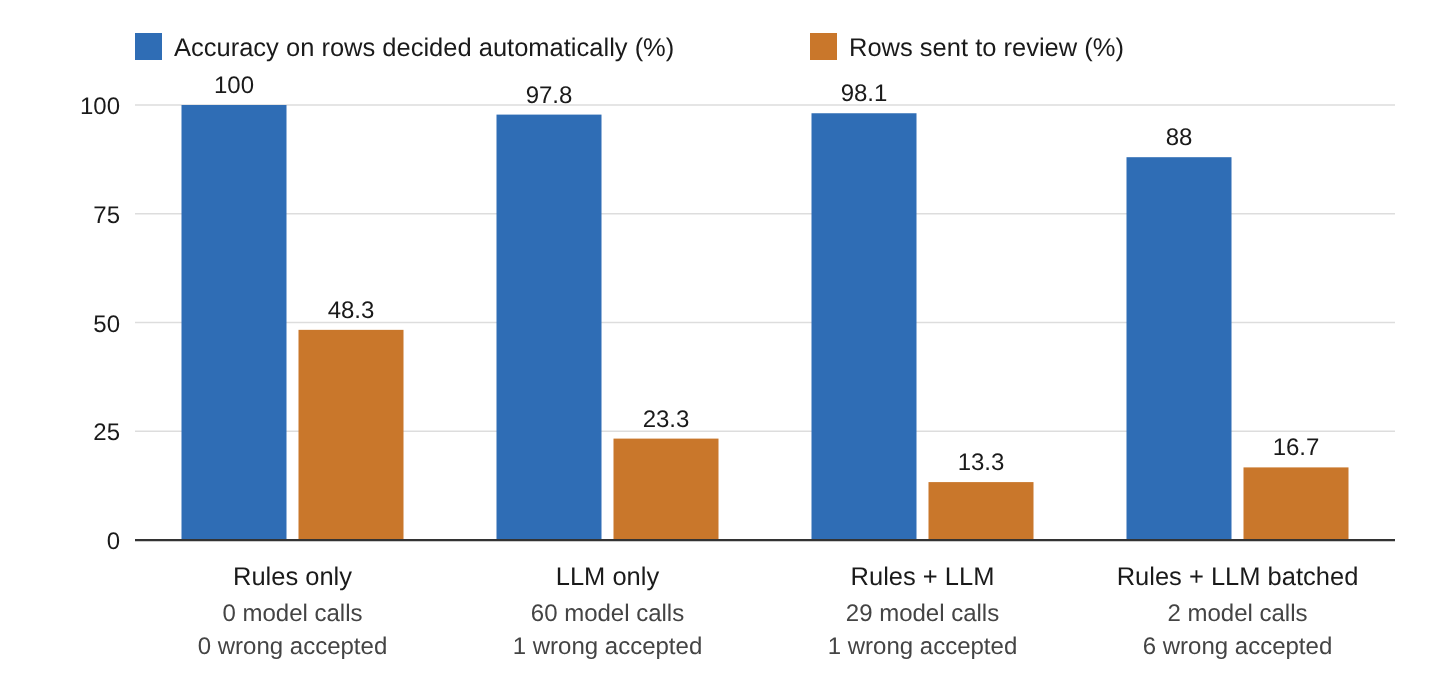
The rules were never wrong, but they left almost half the rows for a person. The model alone did better, 46 rows decided and only one wrong. But it also marked known merchants such as BLUE CUP COFFEE LONDON as medium confidence, so they went to review even though a rule would have handled them with no effort. Together, the two decided 52 rows with one wrong, sent only 8 rows to review, and needed 29 model calls instead of 60. That one wrong answer is a MailKite row, and we will meet it again in the next section.
We do not compare run times here, because the calls ran on a shared CPU server while other jobs were using it. The number of model calls is the fairer measure of cost.
Two more things came out of this run that you should know before you build your own.
Check the model’s confidence on your own data before you route on it. Our routing depends on the confidence level meaning something. In the LLM-only run, high answers were right on 45 of 46 rows and medium answers on 8 of 10. The 4 low answers were all Other, for cash, a cheque, a savings transfer and an expense claim, exactly as the prompt asked. So the signal was useful here. But a confidence level the model reports about itself is not a measured probability. The only way to know whether it means anything for your transactions is to test it on a month you labelled yourself, the way we did.
Send one transaction per call. It is tempting to send many rows at once to save calls. The batched setup sent 20 rows per call through classify_batch() in the repository, so the 29 rows needed only 2 calls. But on those 29 rows the batched answers were right only 62.1% of the time, against 93.1% for one row per call. One batch answered row ids it never received and skipped row 50. FPS TO M PATEL REF SEPT got Taxes, which was the category of the HMRC row just before it. The direction check caught 3 of the wrong answers, but 6 passed and were accepted. Unless your code can match every batched answer to its row and check it, one transaction per call is the safer choice.
9. Learning New Rules From a Finished Month
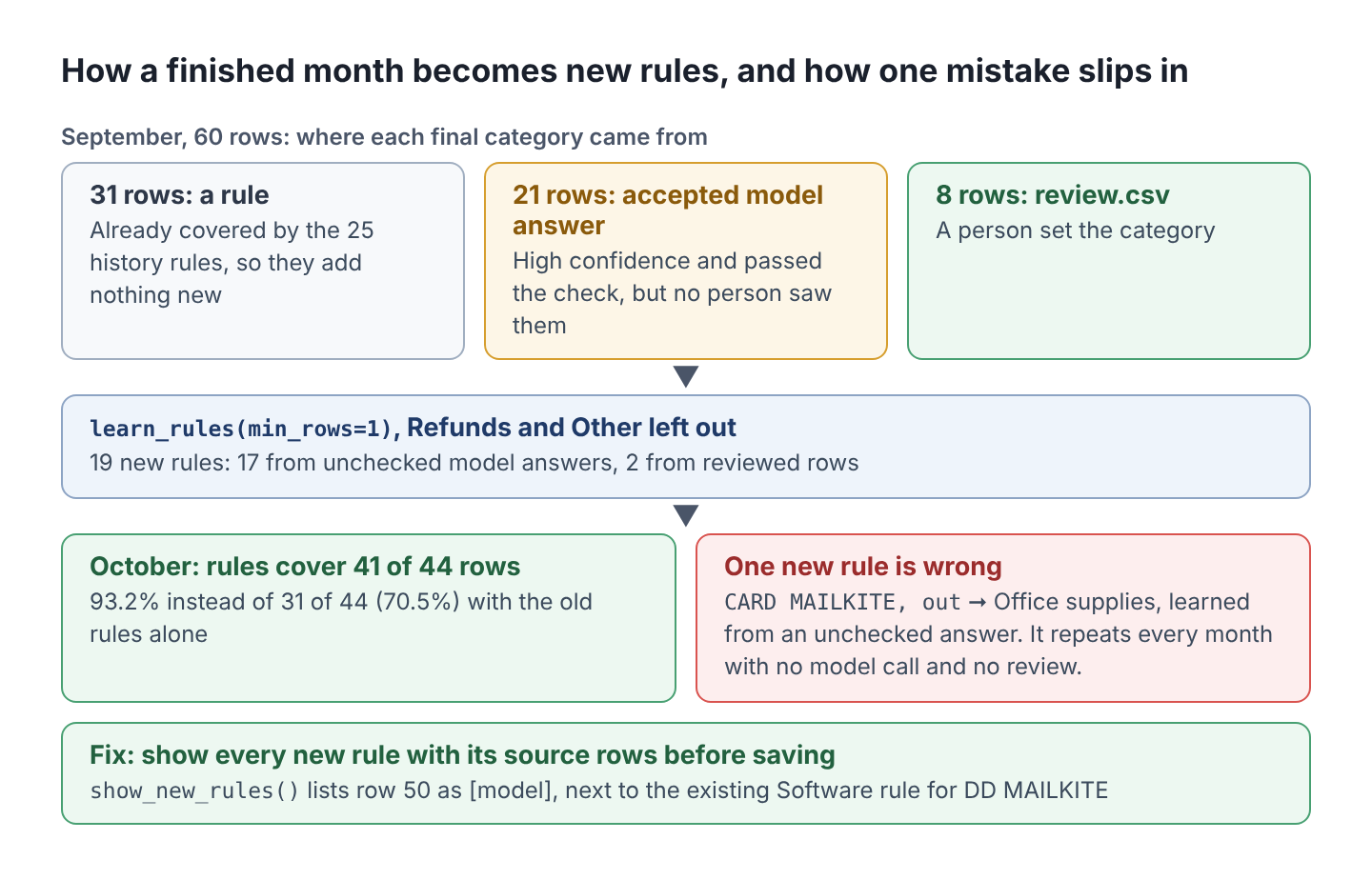
Once September is finished, every row has a category from one of three sources. A rule decided 31 rows, accepted model answers covered 21, and the reviewer filled in the 8 rows in review.csv. Each of these rows tells us something about a merchant, so it makes sense to turn the finished month into new rules. Next month the rules will cover more rows and the model will see fewer.
The script learn_from_review.py does this. It reads three files. The first is predictions.csv, which run_experiment.py writes with the final category and the source of every September row. The second is the filled-in review.csv, and the third is the current rules.csv. In our run the script also plays the reviewer and fills the empty corrected_category cells from the labels. Its finished_month() function combines the first two files into the finished month and records where each row’s category came from.
def finished_month(predictions: pd.DataFrame, review: pd.DataFrame) -> pd.DataFrame:
    """September with its final category: rule, accepted model answer or review."""
    month = load_transactions("data/test.csv").drop(columns="label")
    final = predictions.set_index("id")["final"]
    source = predictions.set_index("id")["source"].map({"rule": "rule", "llm": "model"})
    corrected = review.set_index("id")["corrected_category"]
    month["label"] = month["id"].map(final)
    month["source"] = month["id"].map(source)
    reviewed = month["id"].isin(corrected.index)
    month.loc[reviewed, "label"] = month["id"].map(corrected)
    month.loc[reviewed, "source"] = "review"
    return month
The core lines of its main() function then learn rules from this month and add them to the old ones, which it loaded from rules.csv as old_rules.
ONE_OFF = {"Refunds", "Other"}   # never turned into merchant rules

september = finished_month(predictions, review)
repeatable = september[~september["label"].isin(ONE_OFF)]
month_rules = learn_rules(repeatable, min_rows=1)
new_rules = (pd.concat([old_rules, month_rules])
             .drop_duplicates(subset=["pattern", "direction"], keep="first"))
The ONE_OFF set leaves out Refunds and Other, because a single cheque says nothing about next month. With min_rows=1, one September row is enough for a rule, a lower bar than in section 4. When a new rule has the same pattern and direction as an old one, keep=”first” keeps the old rule.
This step added 19 rules, and with them the rules covered 41 of the 44 October rows (93.2%) instead of 31 of 44 (70.5%). That is the saving we were after.
9.1. The Catch, a Wrong Answer Becomes a Wrong Rule
Here is the part that needs care. Of those 19 new rules, 17 came from model answers that no person had checked, and only 2 came from reviewed rows. And one of those 17 was wrong.
The model had called CARD 4411 MAILKITE.COM, a software subscription, Office supplies with high confidence, so the row never reached review. The finished_month() function kept that answer, and learn_rules() turned it into the rule CARD MAILKITE, out, Office supplies. In October, that rule repeated the mistake, with no model call and no review.
A rule learned from an unchecked answer repeats its mistake every month. A wrong model answer costs us once, but a wrong rule costs us again every month until someone notices it. Here is the whole path from September to that wrong rule.
9.2. Showing New Rules to a Person Before Saving Them
The fix is to bring a person back in, but only for the new rules, not for every row. Before saving, the script prints each new rule with the rows it came from and where each row’s category came from.
def show_new_rules(added: pd.DataFrame, month: pd.DataFrame) -> None:
    """Prints each new rule with the rows it came from, for a person to check."""
    for rule in added.itertuples():
        print(f"{rule.pattern} ({rule.direction}) -> {rule.category}")
        rows = month[(month["key"] == rule.pattern)
                     & (month["direction"] == rule.direction)]
        for row in rows.itertuples():
            print(f"    row {row.id}: {row.description} [{row.source}]")
In our run, the MailKite rule was listed with row 50 marked as model, right next to the existing Software rule for DD MAILKITE. Seen side by side, the two rules disagree about the same merchant, and that is easy to spot. The script writes to data/rules_after_review.csv, so nothing changes until someone copies it over rules.csv.
10. Conclusion
In this article, we built a pipeline that categorizes bank transactions the way a careful person would. Merchant rules handle the merchants we already know, the LLM handles the rest and has to answer in a fixed schema, and the code accepts a model answer only when it is confident and passes a check. Everything else goes to a person. On our 60 transactions this decided 52 rows with one mistake and only 29 model calls.
When you build this for your own account, learn the rules from months you have already categorized, send one transaction per call, and test the model’s confidence levels on a labelled month before you trust them. And when a finished month becomes new rules, look at every rule that came from an unreviewed model answer, because a wrong one repeats every month.
Nothing here depends on Ollama. With a hosted model, as in OpenAI API with Python, only the classify() call changes, but remember that the transactions then leave your machine.
