

An agent skill refers to a folder of instructions for one repeating task, which the agent loads only when that task comes up. Its entry file is SKILL.md. The file has two parts, a YAML frontmatter block with a name and a description, and a Markdown body with the instructions. The format is the open Agent Skills specification.
So the description is the most important part of a skill, because agents use the description to decide whether to load the skill and read any of its instructions. A skill with perfect instructions and a vague description never runs.
We write a skill when a task repeats and takes several steps, such as writing release notes or reviewing a pull request. The following example is the smallest useful one. Claude Code reads .claude/skills and Codex reads .agents/skills, so the folder depends on the agent, and section 1.1 lists the rest.
---
name: release-notes
description: Writes release notes from the git commits since the last tag. Use when the user asks for release notes or a changelog entry.
---

1. Run `git log --oneline` from the last tag to HEAD.
2. Group the commits under Added, Fixed and Changed.
3. Write one line per commit in the past tense.
Three things make this example work.
- The description says what the skill does and when to use it, and that one line is what the agent matches a task against before it loads anything else.
- The body starts with numbered steps instead of background, so the agent runs the steps in order rather than working out what our paragraphs mean.
- The steps name one way to do the job, so the agent uses the method we allow instead of looking for another solution of its own.
The sections below cover the file format, then how to write each of these three parts, then a release-notes skill we build and test.
1. Why a Skill Instead of a Longer Prompt
Without skills we have two options. Either we retype the instructions in every prompt, or we put them in a file that the agent reads at the start of every session. Problem with the second one is that the agent reads that file even in sessions that never need it.
A skill is the third option. It holds the instructions for one task along with the files that task needs, and the agent opens it only when the task comes up. Twenty installed skills cost about as much context as one paragraph, because the agent holds only their names and descriptions until one of them matches.
Let’s say a team ships a library every two weeks and the release notes always follow the same format. Without a skill, somebody pastes that format into a prompt every time. With a skill, the team commits the format once and every developer’s agent follows it.
1.1. Which Tools Read a SKILL.md
Support is wide. The folder names are not the same in every tool, and that is the one thing to check before you write anything. The table lists the folders and the extra frontmatter fields of six coding agents, taken from each tool’s own documentation on 17 October 2026.
| Tool | Project folders | Personal folders | Additions to the open format |
|---|---|---|---|
| Claude Code | .claude/skills, nested .claude/skills in subfolders, plugin folders | ~/.claude/skills | Fields such as when_to_use, disable-model-invocation, user-invocable, paths, context, hooks and model. A custom command file and a skill with the same name both create one slash command, and the skill wins. |
| Codex | .agents/skills in every folder from the working directory up to the repository root | $HOME/.agents/skills | Optional agents/openai.yaml with policy.allow_implicit_invocation and tool dependencies. The skill list is limited to 2% of the context window. |
| GitHub Copilot and VS Code | .github/skills, .claude/skills, .agents/skills | ~/.copilot/skills, ~/.agents/skills, and in VS Code also ~/.claude/skills | Fields argument-hint, user-invocable, disable-model-invocation and context. Skills work in the Copilot cloud agent, code review, the CLI, and agent mode in VS Code and JetBrains IDEs. |
| Cursor | .agents/skills, .cursor/skills, and for compatibility .claude/skills and .codex/skills | ~/.agents/skills, ~/.cursor/skills | Fields paths, disable-model-invocation, icon and color. The built-in command /migrate-to-skills converts eligible rules to skills. |
| Gemini CLI | .gemini/skills, .agents/skills | ~/.gemini/skills, ~/.agents/skills | The model calls the tool activate_skill, and the user confirms the skill name and folder before the body loads. |
| OpenCode | .opencode/skills, .claude/skills, .agents/skills | ~/.config/opencode/skills, ~/.claude/skills, ~/.agents/skills | Keys such as opencode/slash inside metadata, and allow, ask or deny rules for skills in opencode.json. |
Several tools read .agents/skills, and several also read .claude/skills, so one folder can serve more than one agent. The Agent Skills site lists other clients, including JetBrains Junie, Amp, Goose, Roo Code, Kiro, Factory, Spring AI and Mistral Vibe. Note that a tool ignores or rejects a field it doesn’t know, so a skill meant for more than one tool uses the open fields only.
2. The SKILL.md File Format
The folders differ between tools, but the file itself does not. The format fixes three things and leaves everything else open.
- The file is named SKILL.md.
- It starts with a YAML frontmatter block.
- The Markdown body after the frontmatter has no restrictions at all.
Everything else in the folder is optional and follows conventions the specification recommends.
2.1. The Skill Folder
A skill folder holds SKILL.md and up to three more folders. The folder name has to match the name field in the frontmatter. A mismatch is the most common reason a skill loads nowhere and doesn’t give you an error.
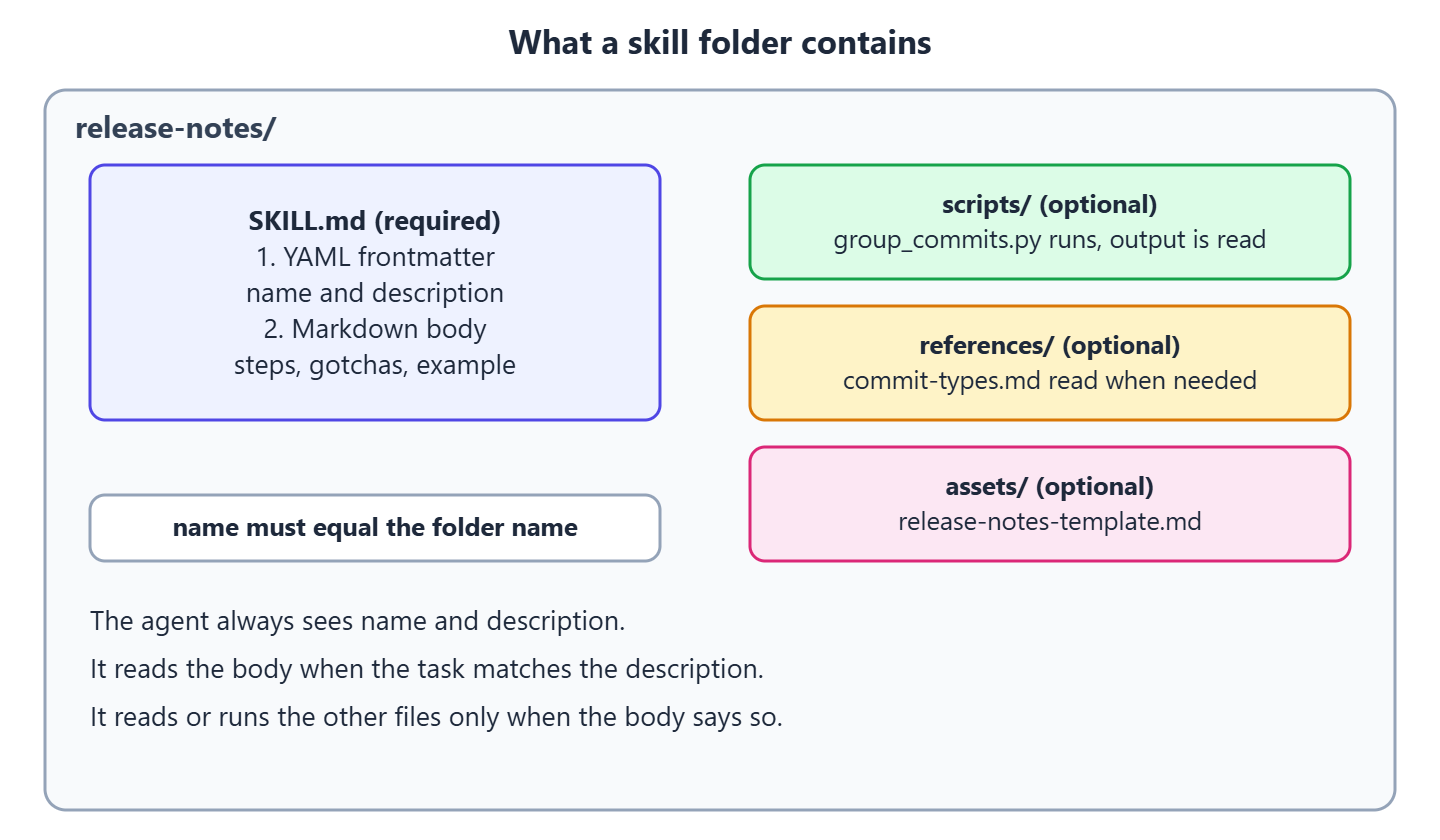
release-notes/
  SKILL.md          required, frontmatter and instructions
  scripts/          optional, code the agent can run
  references/       optional, documents the agent reads when needed
  assets/           optional, templates, images and data files
Two rules govern the paths inside SKILL.md.
- Every path is relative to the skill folder, such as scripts/group_commits.py.
- References stay one level deep. So SKILL.md links to a file, and that file does not link on to further files.
2.2. Frontmatter Fields
The frontmatter sits between two lines that contain nothing but three hyphens. The format defines six fields, and only name and description are required.
| Field | Required | Rule | Purpose |
|---|---|---|---|
| name | Yes | 1 to 64 characters. Lowercase letters, digits and single hyphens. No hyphen at the start or the end. Same as the folder name. | Identifies the skill and becomes the command name in many tools. |
| description | Yes | 1 to 1,024 characters, not empty. | Says what the skill does and when to use it. The agent matches the task against this text. |
| license | No | A license name or the name of a bundled license file. | States the terms for sharing the skill. |
| compatibility | No | 1 to 500 characters. | States environment needs such as git, Python 3.10 or network access. |
| metadata | No | A map from string keys to string values. | Holds extra properties such as author and version. Keys should be unique to avoid conflicts. |
| allowed-tools | No | A space-separated string. Experimental. | Lists tools that are approved without a prompt, such as Read. Support differs between agents. |
Tools add fields of their own, as the table in section 1.1 shows. Claude Code ignores a field it doesn’t know. Uploading a skill to claude.ai, and the Skills API that installs one over HTTP, both reject it instead. So a skill you plan to share uses the six open fields only.
2.3. Rules for the name Field
The specification puts five rules on the name field. A name that breaks any of them gets the skill rejected, and the error message doesn’t always say which rule broke.
- The name is 1 to 64 characters long.
- It holds lowercase letters, digits and hyphens only. No uppercase, and no underscore.
- It does not start or end with a hyphen.
- It has no two hyphens in a row.
- It matches the folder name exactly.
name: pdf-processing     # valid
name: code-review        # valid
name: PDF-Processing     # invalid, uppercase letters
name: -pdf               # invalid, starts with a hyphen
name: pdf--processing    # invalid, consecutive hyphens
name: release_notes      # invalid, underscore
2.4. The Markdown Body
Everything after the frontmatter is the body, and the agent loads all of it the moment the skill activates. The specification recommends three things in it, which are step-by-step instructions, examples of inputs and outputs, and the edge cases that catch people out. Section 5 covers how to write each of those.
3. How an Agent Loads a Skill
The agent loads the whole body at activation. So the question is what the agent holds before that, and the answer is progressive disclosure. The agent reads information in stages and opens more detail only when the task needs it, which is why most installed skills stay closed and cost almost nothing. The specification names three levels.
- Level 1, the metadata. The name and description of every installed skill, loaded at startup. A typical description costs about 100 tokens.
- Level 2, the body. The whole Markdown body of one skill, loaded when the task matches its description. The specification recommends keeping the body under 5,000 tokens and 500 lines.
- Level 3, the files. Anything in scripts/, references/ and assets/, read only when the body points the agent at it.

Claude Code and Codex both cap the Level 1 text, so a long description can be cut before the agent ever sees the end of it. The table lists what each tool allows.
| Limit | Value | Source |
|---|---|---|
| Description length | 1,024 characters | Agent Skills specification |
| Description plus when_to_use in the skill list | 1,536 characters per skill, and the whole list uses 1% of the context window | Claude Code |
| Skill list at startup | 2% of the context window, or 8,000 characters when the size is unknown. Descriptions are shortened first. | Codex |
| Body after compaction | The first 5,000 tokens of each invoked skill, within a shared budget of 25,000 tokens | Claude Code |
The last row of the table is about compaction, where a long conversation is summarized to free up context. An invoked skill keeps only its first 5,000 tokens through that summary. Tools shorten descriptions first when the list grows, so we put the main use case at the start of the description.
4. Skill, AGENTS.md, CLAUDE.md and Custom Commands
All these four mechanisms give an agent instructions, and they differ in when the agent reads them.
- An instruction file is read at the start of a session, so it suits the rules that apply to every task.
- A skill is read when a task matches it, so it suits a procedure that only some tasks need.
- A custom command is read when you type its name.
4.1. When Each One Loads
AGENTS.md is a README for agents. It sits at the root of a repository and tells any coding agent how to work in that repository, such as the build command, the test command and the code style. It is plain Markdown with no required fields. The agent reads the nearest AGENTS.md in the directory tree, and an instruction in the chat overrides the file.
CLAUDE.md does the same job in Claude Code, which also reads an AGENTS.md when the repository has one, through an @AGENTS.md import in the memory file.
| Property | SKILL.md | AGENTS.md | CLAUDE.md | Custom command | Prompt |
|---|---|---|---|---|---|
| Loaded | On demand, when the task matches or the user invokes it | At the start of a session | At the start of every session | When the user types the slash command | When the user sends it |
| Content | Frontmatter plus Markdown, with optional scripts, references and assets | Markdown, no required fields | Markdown, imports with @path | One Markdown prompt file | Free text |
| Best for | A repeated multi-step procedure | Build commands, test commands, code style | The same as AGENTS.md, for Claude Code | A prompt the user starts by hand | A one-time request |
| Size advice | 500 lines or fewer for the body | Not set by the format | Under 200 lines per file | Short | Short |
| Read by | Tools listed in section 1.1 | Codex, Cursor, Copilot, Amp, Zed, Warp, opencode and others on agents.md | Claude Code | Claude Code, Copilot prompt files, Cursor commands | Every agent |
In Claude Code, the file .claude/commands/deploy.md and the skill .claude/skills/deploy/SKILL.md both produce the command /deploy, and the skill takes precedence. Cursor converts eligible rules into skills with its /migrate-to-skills command, and sets disable-model-invocation to true so the converted skills stay manual.
4.2. Choosing Between Them
In practice the choice depends on how often you need the instruction and how many steps it takes. So work through these questions in order, and stop at the first one that fits. The order matters, because an instruction that every task needs belongs in an instruction file even when it also takes five steps.
- Does the instruction apply to every task in the repository, such as the build command or the code style? Put it in AGENTS.md or CLAUDE.md.
- Will you need it again in a later session, and does it take five or more steps? Write a skill.
- Is it a one-off, or something you always want to start by hand? A prompt or a custom command is enough. A hook, which is a script the tool runs automatically on an event such as before a command executes, covers the cases where nothing should depend on the model deciding.

5. Writing a Good SKILL.md
The format is settled, so the rest is a series of choices. The subsections below run in the order those choices matter, starting with the description, because the description decides whether the skill runs at all.
5.1. The description Field
The agent matches the task against the description and nothing else. So a description carries three pieces, and the format allows 1,024 characters for all of them. The good example below uses 315.
- What the skill does.
- When to use it.
- When not to use it.
# Bad, says nothing about when to use it
description: Helps with releases.

# Good, says what, when and when not
description: Writes release notes for a git repository from its commit history since the last tag, grouped into Added, Fixed and Changed sections. Use when the user asks for release notes, a changelog entry, or a summary of what changed since the last release or tag. Do not use for commit messages or pull request descriptions.
Write the action in the third person, then put the trigger in a second sentence, the way the good example does. Note that the negative clause matters as much as the positive one. A skill that fires on every mention of the word release is worse than a skill that never fires.
5.2. Scope
One skill covers one task. A skill that needs two descriptions to explain itself is two skills. The trigger is the clearest test, so if the two halves of a skill fire on different requests, split the skill. If a sentence in the body applies to only half the cases, that sentence belongs somewhere else.
5.3. Steps, Gotchas and Examples
Numbered steps beat prose, because the agent follows steps in order and you can point at step 4 when something goes wrong. Some steps leave the agent room to choose the wording, and some have to run exactly as written.
Flexible, the agent chooses the wording:
  3. Write one line per commit in the past tense.

Fragile, the agent must not improvise:
  1. Run `python3 scripts/group_commits.py --repo . --format json` and read its output.
     Do not read the git log directly; the script decides which commits are skipped.
A gotcha is any place where the agent would otherwise guess wrong, and one line is usually enough. An example of the finished output teaches more than a paragraph describing it. So the body of a good skill ends with the shape of what the agent should produce.
5.4. Size Limits
The specification recommends a body under 500 lines and 5,000 tokens. Two habits keep a skill under those limits.
- Cut the background the agent already knows.
- Move the detail that only some runs need into references/, which section 5.6 covers.
5.5. Scripts for Deterministic Work
Some work has exactly one correct result, and a model that works it out again on every run will get it wrong eventually. Parsing commit messages is one of them. A regular expression either matches or it doesn’t. An agent reading raw git output can decide that chore: bump pytest belongs under Changed, and nothing in the skill catches that.
So we put that work in a script, and the step calls the script. A script in scripts/ can declare its own dependencies with PEP 723, which is a comment block at the top of the file. The package manager uv reads that block and builds a throwaway environment from it.
# /// script
# requires-python = ">=3.10"
# dependencies = ["pyyaml>=6,<7"]
# ///
import yaml

fields = yaml.safe_load("name: release-notes\nmetadata:\n  version: '1.0'")
version = fields["metadata"]["version"]   # '1.0'
print(version)
uv run read_version.py # 1.0The script runs with no installation step and no virtual environment of our own. If uv isn’t available, the alternative is pip install and a python3 call, and the skill says which one it expects.
5.6. References Loaded on Demand
A reference file is Level 3, so the file costs nothing until the body sends the agent to it. That only works if the body says when to go, which means a condition rather than a list.
Read references/commit-types.md only when the user asks why a commit is missing.
Read references/api-errors.md if the API returns a status other than 200.
5.7. A Bad and a Good SKILL.md
The two files below are the same skill written twice. Both come from the example project in section 6, where the bad version sits in bad-skill/release-helper. The good version uses Conventional Commits, a message format written as type(scope): text, for example fix(loans): return 404 for unknown member.
---
name: Release_Helper
description: Helps with releases.
---

Releases are an important part of software development. A release is a version of the software that is shipped to users. You should always try to write good release notes, because users like to know what changed. Be careful and make sure the notes are correct.

You can use git log, or git shortlog, or the GitHub API, or a changelog generator, or write the notes by hand. Pick whichever you prefer.

Write good notes.
---
name: release-notes
description: Writes release notes for a git repository from its commit history since the last tag, grouped into Added, Fixed and Changed sections. Use when the user asks for release notes, a changelog entry, or a summary of what changed since the last release or tag. Do not use for commit messages or pull request descriptions.
license: Apache-2.0
compatibility: Requires git and Python 3.10 or newer.
metadata:
author: example-org
version: "1.0"
---
# Release notes
## Steps
1. Run the helper script and pass the path of the repository. The script finds the last tag, reads the commits after it and groups them by Conventional Commit type.
```bash
python3 scripts/group_commits.py --repo <repository path> --format json
```
2. Read the JSON. The key `skipped` lists commits that do not follow the Conventional Commit format. Mention them to the user and do not guess their type.
3. Fill in `assets/release-notes-template.md` with the grouped commits. Write one line per commit, in the past tense, without the commit type prefix.
4. If the JSON contains a commit with `"breaking": true`, put it first under a "Breaking changes" heading.
5. Show the result to the user and ask for the version number if the repository has no tag yet.
## Gotchas
- Merge commits are already excluded by the script. Do not add them back.
- The type `chore` and the type `docs` are left out of the notes on purpose. Read `references/commit-types.md` only when the user asks why a commit is missing.
- Never edit `CHANGELOG.md` unless the user asks for it.
## Example
Input commits since tag v1.2.0:
```text
feat(search): add author filter
fix(loans): return 404 for unknown member
chore: bump pytest
```
Output:
```markdown
## 1.3.0 - 2026-10-17
### Added
- Add author filter to search.
### Fixed
- Return 404 for unknown member in loans.
```| Problem in the bad version | Fix in the good version |
|---|---|
| The name has uppercase letters and a low line character, and it differs from the folder name. | The name is release-notes and matches the folder. |
| The description has 20 characters and gives no trigger. | The description says what, when and when not. |
| The body explains what a release is, which the agent already knows. | The body starts with steps. |
| Five tools are offered as equal options. | One script is the default. |
| “Write good notes” cannot be checked. | A template, an example and a list of gotchas define a good result. |
6. A Release Notes Skill, End to End
The example project runs the good skill from end to end. It holds the skill, a helper script, a validator and a small git repository to run against. Everything ran on Python 3.13.16 and uv 0.13.1, and the scripts use the standard library only.
The demo repository comes from make_demo_repo.py, a script in the project that creates seven commits and tags the first one v1.2.0.
feat: add catalog search          <- tagged v1.2.0
feat(search): add author filter
fix(loans): return 404 for unknown member
perf(catalog): cache the genre list
chore: bump pytest
Update readme
refactor(api)!: rename borrow to checkout
6.1. The Helper Script
The script finds the last tag, reads the commits after the tag, and groups them by type. Two helpers do the git work, and both fail loudly instead of returning an empty result.
def git(repo, *args):
    result = subprocess.run(
        ["git", "-C", repo, *args], capture_output=True, text=True
    )

    if result.returncode != 0:
        print(f"Error: git {' '.join(args)} failed in {repo}: {result.stderr.strip()}",
              file=sys.stderr)
        sys.exit(2)

    return result.stdout.strip()


def last_tag(repo):
    result = subprocess.run(
        ["git", "-C", repo, "describe", "--tags", "--abbrev=0"],
        capture_output=True, text=True,
    )

    return result.stdout.strip() if result.returncode == 0 else None
The grouping itself is one regular expression and one dictionary. The full file is in the GitHub folder linked at the end.
SECTIONS = {"feat": "added", "fix": "fixed", "perf": "changed", "refactor": "changed"}
PATTERN = re.compile(r"^(?P<type>[a-z]+)(\((?P<scope>[^)]+)\))?(?P<bang>!)?: (?P<text>.+)$")


def collect(repo, since):
    rev_range = f"{since}..HEAD" if since else "HEAD"
    raw = git(repo, "log", rev_range, "--no-merges", "--pretty=format:%h%x1f%s%x1f%b%x1e")
    grouped = {"added": [], "fixed": [], "changed": [], "breaking": [], "skipped": []}
    for entry in filter(None, raw.split("\x1e")):
        short, subject, body = (entry.strip("\n").split("\x1f") + ["", ""])[:3]
        match = PATTERN.match(subject)
        if not match:
            grouped["skipped"].append({"hash": short, "subject": subject})
            continue
        breaking = bool(match["bang"]) or "BREAKING CHANGE" in body
        item = {"hash": short, "scope": match["scope"], "text": match["text"], "breaking": breaking}
        if breaking:
            grouped["breaking"].append(item)
        section = SECTIONS.get(match["type"])
        if section and not breaking:
            grouped[section].append(item)
    return grouped
Only feat, fix, perf and refactor map to a section. Every other type, including chore, docs, test and ci, is dropped on purpose. A commit that does not parse at all goes into a skipped list, and the agent reports that list.
6.2. Running the Steps
Step 1 of the skill calls the script with –format json, because JSON is what the agent reads. Note that the commit hashes differ on every run, because the demo repository is created fresh each time.
python3 make_demo_repo.py /tmp/bookshelf
python3 release-notes/scripts/group_commits.py --repo /tmp/bookshelf --format markdown
{
"since": "v1.2.0",
"added": [ { "hash": "b3e8851", "scope": "search", "text": "add author filter" } ],
"fixed": [ { "hash": "19b1101", "scope": "loans", "text": "return 404 for unknown member" } ],
"changed": [ { "hash": "517d6a8", "scope": "catalog", "text": "cache the genre list" } ],
"breaking": [ { "hash": "ddc0883", "scope": "api", "text": "rename borrow to checkout" } ],
"skipped": [ { "hash": "e1d03ba", "subject": "Update readme" } ]
}The same call with –format markdown prints the grouped commits as sections, which is useful while you test the script by hand.
Created /tmp/bookshelf
### Breaking changes
- rename borrow to checkout (c5fe964)

### Added
- add author filter (2b2eab6)

### Fixed
- return 404 for unknown member (2b072a4)

### Changed
- cache the genre list (e84ddc0)
Neither output is the finished release notes. Step 3 fills assets/release-notes-template.md, a file in the skill folder that supplies the version number, the date and the final wording.
## {version} - {date}

### Breaking changes
{breaking}

### Added
{added}

### Fixed
{fixed}

### Changed
{changed}
That split between the script and the agent is the part to copy. The script decides which commits count. The agent rewrites the text and fills the template. So the two parts fail in different ways, and you can tell which one broke.

The script reports every commit it couldn’t parse.
python3 release-notes/scripts/group_commits.py --repo /tmp/bookshelf | python3 -c "import json,sys; print(json.load(sys.stdin)['skipped'])"[{'hash': '278d8a1', 'subject': 'Update readme'}]A missing repository exits with code 2 and prints the git error.
python3 release-notes/scripts/group_commits.py --repo /tmp/nope # exit code 2Error: git log HEAD --no-merges --pretty=format:%h%x1f%s%x1f%b%x1e failed in /tmp/nope: fatal: cannot change to '/tmp/nope': No such file or directory7. Validating a SKILL.md With Python
A broken skill gives you no error message to explain why, which is the reason to check it mechanically. The validator in the example project reads a skill folder and reports errors and warnings. It parses the frontmatter by hand instead of using a YAML library, which is why it needs nothing installed.
| Check | Level | Rule |
|---|---|---|
| SKILL.md exists and starts with frontmatter | Error | The first line is three hyphens |
| name format | Error | Up to 64 characters, lowercase letters, digits and single hyphens |
| name equals the folder name | Error | Required by the specification |
| description length | Error | 1 to 1,024 characters |
| compatibility length | Error | Up to 500 characters |
| Referenced files exist | Error | Each path under scripts/, references/ or assets/ in the body |
| description says when to use the skill | Warning | Contains a phrase such as “Use when” |
| Body size | Warning | 500 lines or fewer, about 5,000 tokens or fewer |
| Unknown frontmatter field | Warning | Not one of the six open fields |
NAME_PATTERN = re.compile(r"^[a-z0-9]+(-[a-z0-9]+)*$")
WHEN_HINT = re.compile(r"\b(use (this skill )?when|use for|use if|when the user)\b", re.IGNORECASE)


def check_name_and_description(fields, folder_name):
    errors, warnings = [], []
    name = fields.get("name", "")
    if not NAME_PATTERN.match(name) or len(name) > 64:
        errors.append(f"name '{name}' must use lowercase letters, digits and single hyphens, up to 64 characters")
    if name != folder_name:
        errors.append(f"name '{name}' does not match the folder name '{folder_name}'")
    description = fields.get("description", "")
    if not description or len(description) > 1024:
        errors.append(f"description has {len(description)} characters, it must have 1 to 1024")
    else:
        if len(description) < 40:
            warnings.append(f"description has only {len(description)} characters, add what the skill does and when to use it")
        if not WHEN_HINT.search(description):
            warnings.append("description does not say when to use the skill")
    return errors, warnings
Run the validator against the good skill and the two broken ones.
python3 validate_skill.py release-notes bad-skill/release-helper bad-skill/changelog--toolrelease-notes
SKILL.md: 1874 bytes, 43 body lines, about 348 tokens, description 315 chars
OK
bad-skill/release-helper
SKILL.md: 483 bytes, 6 body lines, about 104 tokens, description 20 chars
ERROR name 'Release_Helper' must use lowercase letters, digits and single hyphens, up to 64 characters
ERROR name 'Release_Helper' does not match the folder name 'release-helper'
WARNING description has only 20 characters, add what the skill does and when to use it
WARNING description does not say when to use the skill
bad-skill/changelog--tool
SKILL.md: 218 bytes, 2 body lines, about 20 tokens, description 79 chars
ERROR name 'changelog--tool' must use lowercase letters, digits and single hyphens, up to 64 characters
ERROR referenced file 'scripts/make_changelog.py' does not exist
ERROR referenced file 'references/style.md' does not exist
WARNING unknown frontmatter field 'colour' (agents may ignore it or reject it)The second broken skill, bad-skill/changelog–tool, is the subtler failure.
---
name: changelog--tool
description: Creates changelog entries from commits. Use when the user asks for a changelog.
colour: blue
---

Run `scripts/make_changelog.py` and read [the style guide](references/style.md).
The description is fine. Problem with this one is the rest of the file, which breaks three things at once.
- The name changelog–tool has two hyphens in a row.
- colour is not one of the six defined fields.
- Both referenced files, the script and the style guide, are missing.
So the agent loads the skill and then fails on the first step.
The specification also ships skills-ref, a reference implementation that catches the same name errors. It is a reference library rather than a released tool, so we treat it as a second opinion and keep our own validator for anything that gates a build.
uvx --from "git+https://github.com/agentskills/agentskills#subdirectory=skills-ref" skills-ref validate release-notes            # Valid skill: release-notes
uvx --from "git+https://github.com/agentskills/agentskills#subdirectory=skills-ref" skills-ref validate bad-skill/release-helper
Validation failed for bad-skill/release-helper:
- Skill name 'Release_Helper' must be lowercase
- Skill name 'Release_Helper' contains invalid characters. Only letters, digits, and hyphens are allowed.
- Directory name 'release-helper' must match skill name 'Release_Helper'8. Testing a Skill
Validation proves the file is well formed. It does not prove the skill works. A skill can fail by not loading when it should, or by loading and producing the wrong thing, and each of those needs its own test.
8.1. Testing Whether the Skill Triggers
Triggering is a property of the description, so we test it with queries rather than code. Keep a list of queries that should load the skill and a list that should not. Then run each query in a fresh session and record whether the agent used the skill.
[
  { "query": "we tagged v1.3.0 yesterday, can you write the release notes for the bookshelf repo", "should_trigger": true },
  { "query": "what changed since the last tag? need something for the blog post", "should_trigger": true },
  { "query": "draft a changelog entry for everything merged since v1.2.0", "should_trigger": true },
  { "query": "write a commit message for my staged changes", "should_trigger": false },
  { "query": "write a pull request description for this branch", "should_trigger": false },
  { "query": "bump the version in pyproject.toml to 1.3.0", "should_trigger": false }
]
Three runs per query is enough to see a pattern, because the same query doesn’t always resolve the same way. Two rules decide whether a query passes.
- A should-trigger query passes when the skill loaded in at least two of the three runs.
- A should-not query passes when the skill loaded in fewer than two.
| Query | Should trigger | Loaded in | Verdict |
|---|---|---|---|
| we tagged v1.3.0 yesterday, can you write the release notes | Yes | 3 of 3 | Pass |
| what changed since the last tag? | Yes | 3 of 3 | Pass |
| draft a changelog entry for everything merged since v1.2.0 | Yes | 2 of 3 | Pass |
| write a commit message for my staged changes | No | 0 of 3 | Pass |
| write a pull request description for this branch | No | 1 of 3 | Pass |
| bump the version in pyproject.toml to 1.3.0 | No | 0 of 3 | Pass |
In Claude Code you can see the result in the transcript, where an activated skill appears as a tool call naming it. A failing should-trigger query means the description is missing a phrase that people use. A failing should-not query means the description is too broad.
8.2. Testing the Output Against a Baseline
The second test runs the task itself. We give the agent the prompt twice, once with the skill installed and once without it, then compare both runs against a list of assertions written in advance.
{
  "skill_name": "release-notes",
  "evals": [
    {
      "id": 1,
      "prompt": "Write the release notes for the bookshelf repo since the last tag.",
      "expected_output": "Markdown notes with Breaking changes, Added, Fixed and Changed sections and a list of commits that were skipped.",
      "files": [],
      "assertions": [
        "The notes contain a Breaking changes section with the commit that renames borrow to checkout",
        "The commit 'chore: bump pytest' does not appear in the notes",
        "The commit 'Update readme' is reported as skipped"
      ]
    }
  ]
}
Grading is manual, because the assertions are about meaning rather than exact text. Note that the baseline run does real work here. An assertion the agent passes without the skill isn’t testing the skill.
9. Common SKILL.md Mistakes
Nearly every mistake below comes back to a description that doesn’t describe, or a body that explains instead of instructing.
| Mistake | Result | Fix |
|---|---|---|
| A description such as “Helps with PDFs” | The skill does not trigger, or it triggers on unrelated tasks | State what the skill does, when to use it and when not to |
| The key use case at the end of a long description | Tools shorten the description and cut the use case | Put the main use case first |
| A name that differs from the folder name or has uppercase letters | The tool rejects or ignores the skill | Run a validator in continuous integration |
| Explaining what the agent already knows | The body is long and the output does not improve | Keep only project-specific facts, defaults and gotchas |
| A menu of equal options | The agent tries several and wastes steps | Pick one default and mention alternatives in one line |
| A skill that covers a whole domain | Imprecise activation and conflicting steps | Split it into one skill per task |
| Reference files without a loading condition | The agent never reads them or reads all of them | Name the file and the condition in the body |
| A script that waits for input | The run hangs | Take every input from flags, and print a clear error when one is missing |
| Tool-specific frontmatter in a shared skill | Some tools reject the file | Keep to the six open fields, or maintain one copy per tool |
| Never testing triggers or outputs | The skill works in the demo and fails later | Keep a query file and an evals file in the skill folder |
10. Versioning and Sharing Skills
A skill that several people use is code, so it lives in the repository and goes through review like anything else there. Three habits keep a shared skill working.
- Constrain the script dependencies. A PEP 723 block with pyyaml>=6,<7 keeps a breaking release out while still taking fixes. Pin an exact version only when a build has to be reproducible to the patch.
- Record the version in metadata and change it when the steps change, so a reader can tell which version produced an old output.
- Keep one copy of the folder and link the rest. Let’s say a team supports two agents. The skill lives in .agents/skills, and a symbolic link puts it in the Claude Code folder too.
ln -s ../../.agents/skills/release-notes .claude/skills/release-notesThe link points from the Claude Code folder to the real folder. So there is one file to edit, and both agents read it.
11. SKILL.md FAQs
These are the questions that come up once the first skill is written and the second one is being planned.
11.1. What Is a SKILL.md File?
SKILL.md is the entry file of an agent skill. It holds YAML frontmatter with a name and a description, then a Markdown body with the instructions. The agent reads the frontmatter at startup and the body only when the task matches.
11.2. Are Skills Just Prompts?
No. A prompt is sent once and then it is gone. A skill sits in the repository, loads itself when the task matches, and can carry scripts, references and templates that the agent runs or reads.
11.3. When Should We Create a Skill?
When the task repeats, takes five or more steps, and you’d otherwise retype the steps. A one-off task is a prompt, and a rule that applies to every task belongs in AGENTS.md.
11.4. Where Do We Put a SKILL.md File?
In a folder named after the skill, inside .claude/skills for Claude Code or .agents/skills for Codex and several others. The table in section 1.1 has the folder for each tool.
11.5. Does One Skill Work in Claude Code, Codex and Cursor?
Yes, as long as it uses the six open frontmatter fields and sits in a folder each tool reads. A tool-specific field such as disable-model-invocation is ignored by the tools that don’t know it, and rejected by the claude.ai upload.
11.6. How Long Should a SKILL.md Be?
Under 500 lines and 5,000 tokens for the body, per the specification. Most working skills are far shorter. Anything longer usually has reference material in it that belongs in references/.
11.7. Do We Need to Code to Write a Skill?
No. A skill with instructions alone is valid and useful. A script is worth adding when a step has exactly one correct answer and you don’t want the agent deriving it on every run.
11.8. Is SKILL.md the Same as AGENTS.md?
No. AGENTS.md is read at the start of every session and holds rules for the whole repository. A skill is read only when its description matches the task, and it can bring files with it.
12. Conclusion
A skill earns its place when a task repeats often enough that retyping the steps is the slow part. The description decides whether the skill ever runs. So it needs what the skill does, when to use it and when not to, with the main use case first, because tools shorten long descriptions.
The body decides whether the result is right. Numbered steps, a gotcha wherever the agent would guess, one example of the finished output, and a script wherever the answer is exact rather than a judgement. Keep the body under 500 lines and move the rest into references/.
Validate the file before you trust it, then test the two failure modes separately. A skill that doesn’t load is a description problem, and a skill that loads and produces the wrong thing is a body problem.
13. References
- Agent Skills specification
- Claude Code skills documentation
- AGENTS.md
- PEP 723
- Conventional Commits
- uv
Happy Learning !!
