

ZonedDateTime.format() converts a ZonedDateTime to a String with a DateTimeFormatter, and the formatter decides how the zone appears in the text, either as an offset such as -04:00, a zone ID such as America/New_York or a zone name such as EDT. To format ZonedDateTime values without a pattern, we call toString(), which prints the ISO form with all three parts of the value.
We format a ZonedDateTime to a string when a moment must show its zone, for example the closing time of an online auction shown to bidders in several countries, or a timestamp in a JSON response that another service reads.
The following example prints an auction closing time three ways, with an ISO constant, with a custom pattern and with toString().
ZonedDateTime auctionEnd = ZonedDateTime.of(2026, 3, 14, 19, 35, 55, 0, ZoneId.of("America/New_York"));
String iso = auctionEnd.format(DateTimeFormatter.ISO_OFFSET_DATE_TIME);       // "2026-03-14T19:35:55-04:00"
DateTimeFormatter invite = DateTimeFormatter.ofPattern("EEE, MMM d, uuuu h:mm a z", Locale.US);
String text = auctionEnd.format(invite);                                      // "Sat, Mar 14, 2026 7:35 PM EDT"
String asIs = auctionEnd.toString();                                          // "2026-03-14T19:35:55-04:00[America/New_York]"
Notice that New York is already on daylight saving time on March 14, 2026, so the offset is -04:00 and the zone name is EDT. We start with the predefined formatters and move on to the zone letters in custom patterns, localized styles, formatting in another zone, and the errors that show up most often.
1. Predefined ISO and RFC Formatters
The class DateTimeFormatter has constants for the standard formats, and most of them accept a ZonedDateTime. They differ in which parts of the value they print, so we choose by what the reader of the text needs.
ZonedDateTime auctionEnd = ZonedDateTime.of(2026, 3, 14, 19, 35, 55, 0, ZoneId.of("America/New_York"));
String zoned = auctionEnd.format(DateTimeFormatter.ISO_ZONED_DATE_TIME);       // "2026-03-14T19:35:55-04:00[America/New_York]"
String offset = auctionEnd.format(DateTimeFormatter.ISO_OFFSET_DATE_TIME);     // "2026-03-14T19:35:55-04:00"
String instant = auctionEnd.format(DateTimeFormatter.ISO_INSTANT);             // "2026-03-14T23:35:55Z"
String local = auctionEnd.format(DateTimeFormatter.ISO_LOCAL_DATE_TIME);       // "2026-03-14T19:35:55"
String http = auctionEnd.format(DateTimeFormatter.RFC_1123_DATE_TIME);         // "Sat, 14 Mar 2026 19:35:55 -0400"
String compact = auctionEnd.format(DateTimeFormatter.BASIC_ISO_DATE); // "20260314-0400"| Formatter | Keeps | Typical use |
|---|---|---|
| ISO_ZONED_DATE_TIME, toString() | Local time, offset, zone ID | Java-to-Java data that must keep the region, such as a scheduled job |
| ISO_OFFSET_DATE_TIME | Local time and offset | JSON and REST APIs (RFC 3339) |
| ISO_INSTANT | The moment in UTC | Logs, event timestamps, database columns |
| ISO_LOCAL_DATE_TIME | Local time only | Display where the zone is known from context |
| RFC_1123_DATE_TIME | Local time and offset, English names | HTTP headers such as Last-Modified |
ISO_DATE_TIME prints the same text as ISO_ZONED_DATE_TIME for a ZonedDateTime, because it adds the offset and the zone ID whenever the value has them. The zone ID in brackets is a Java extension that many non-Java parsers reject, so for APIs we send ISO_OFFSET_DATE_TIME or ISO_INSTANT.
2. Format ZonedDateTime With Custom Patterns
For text that people read, we build a formatter with DateTimeFormatter.ofPattern(). The date and time letters work as for LocalDateTime, and a ZonedDateTime also accepts the zone and offset letters.
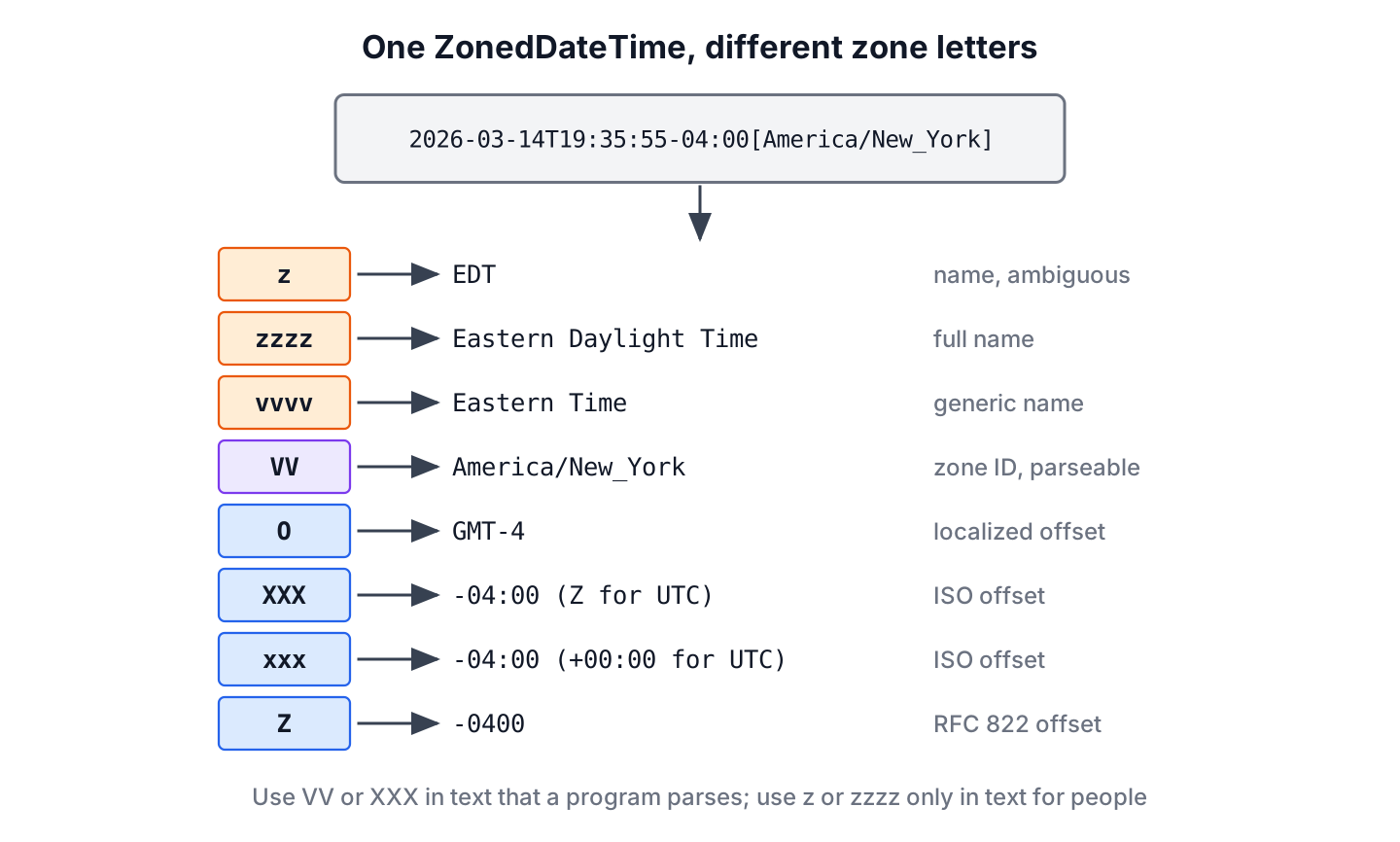
ZonedDateTime auctionEnd = ZonedDateTime.of(2026, 3, 14, 19, 35, 55, 0, ZoneId.of("America/New_York"));
String shortName = auctionEnd.format(DateTimeFormatter.ofPattern("z", Locale.US));       // "EDT"
String longName = auctionEnd.format(DateTimeFormatter.ofPattern("zzzz", Locale.US));     // "Eastern Daylight Time"
String generic = auctionEnd.format(DateTimeFormatter.ofPattern("vvvv", Locale.US));      // "Eastern Time"
String zoneId = auctionEnd.format(DateTimeFormatter.ofPattern("VV"));                    // "America/New_York"
String gmt = auctionEnd.format(DateTimeFormatter.ofPattern("O"));                        // "GMT-4"
String isoOffset = auctionEnd.format(DateTimeFormatter.ofPattern("XXX"));                // "-04:00"
String noColon = auctionEnd.format(DateTimeFormatter.ofPattern("Z"));                    // "-0400"
Zone names such as EDT are friendly to read, but they are not unique, because IST and CST each stand for several zones. We use VV or XXX in any text that a program parses later, and keep z or zzzz for messages to people. The full letter table is in the DateTimeFormatter guide.
A compact US style with a 24-hour clock uses the pattern MM/dd/uuuu – HH:mm:ss z.
DateTimeFormatter usStyle = DateTimeFormatter.ofPattern("MM/dd/uuuu - HH:mm:ss z", Locale.US);
String formatted = ZonedDateTime.of(2026, 3, 14, 19, 35, 55, 0, ZoneId.of("America/New_York")).format(usStyle);   // "03/14/2026 - 19:35:55 EDT"
2.1. Printing UTC as Z or +00:00
For a value in UTC, the offset letters print different texts. XXX prints the letter Z for a zero offset, whereas xxx prints +00:00, so we pick the letter that the receiving system expects.
ZonedDateTime utc = ZonedDateTime.of(2026, 3, 14, 23, 35, 55, 0, ZoneOffset.UTC);
String zulu = utc.format(DateTimeFormatter.ofPattern("uuuu-MM-dd'T'HH:mm:ssXXX"));      // "2026-03-14T23:35:55Z"
String numeric = utc.format(DateTimeFormatter.ofPattern("uuuu-MM-dd'T'HH:mm:ssxxx"));   // "2026-03-14T23:35:55+00:00"
String fourDigit = utc.format(DateTimeFormatter.ofPattern("uuuu-MM-dd'T'HH:mm:ssZ"));   // "2026-03-14T23:35:55+0000"
The UTC parsing article covers the reverse direction, reading these strings back into a date-time object.
3. Localized Formats With FormatStyle
Instead of a pattern, DateTimeFormatter.ofLocalizedDateTime() takes a FormatStyle and lets the locale decide the layout. FULL and LONG include the zone name, which is why they work with ZonedDateTime but not with LocalDateTime.
ZonedDateTime auctionEnd = ZonedDateTime.of(2026, 3, 14, 19, 35, 55, 0, ZoneId.of("America/New_York"));
String fullUs = auctionEnd.format(DateTimeFormatter.ofLocalizedDateTime(FormatStyle.FULL).withLocale(Locale.US));     // Saturday, March 14, 2026, 7:35:55 PM Eastern Daylight Time (U+202F before PM)
String longFr = auctionEnd.format(DateTimeFormatter.ofLocalizedDateTime(FormatStyle.LONG).withLocale(Locale.FRANCE)); // "14 mars 2026, 19:35:55 EDT"
String fullLocal = auctionEnd.toLocalDateTime().format(DateTimeFormatter.ofLocalizedDateTime(FormatStyle.FULL));      // DateTimeException: Unable to extract ZoneId
Since Java 20, the US styles put a narrow no-break space (U+202F) before PM, so the first string looks normal on screen but is not equal to a hand-typed string; the 12-hour time format article explains the change. Localized styles fit user interfaces, and the localized date formats article shows more locales.
4. Formatting the Same Moment in Another Time Zone
Say an online auction run from New York closes at 7:35 PM local time, and the item page shows the closing time to bidders in London, Kolkata and Tokyo. Each bidder needs that moment on their own clock. We call withZoneSameInstant() to move the same instant into the bidder’s zone, and the formatter prints the new local time.
ZonedDateTime auctionEnd = ZonedDateTime.of(2026, 3, 14, 19, 35, 0, 0, ZoneId.of("America/New_York"));
DateTimeFormatter forBidder = DateTimeFormatter.ofPattern("EEE, MMM d, h:mm a z", Locale.US);
String london = auctionEnd.withZoneSameInstant(ZoneId.of("Europe/London")).format(forBidder);   // "Sat, Mar 14, 11:35 PM GMT"
String kolkata = auctionEnd.withZoneSameInstant(ZoneId.of("Asia/Kolkata")).format(forBidder);  // "Sun, Mar 15, 5:05 AM IST"
String tokyo = auctionEnd.withZoneSameInstant(ZoneId.of("Asia/Tokyo")).format(forBidder);      // "Sun, Mar 15, 8:35 AM JST"
The date changes as well, so we always print the day next to the time. The same conversion works with DateTimeFormatter.withZone(), which converts the moment to the formatter’s zone before printing.
ZonedDateTime auctionEnd = ZonedDateTime.of(2026, 3, 14, 19, 35, 0, 0, ZoneId.of("America/New_York"));
DateTimeFormatter tokyoFormatter = DateTimeFormatter.ofPattern("uuuu-MM-dd HH:mm z", Locale.US).withZone(ZoneId.of("Asia/Tokyo"));
String inTokyo = auctionEnd.format(tokyoFormatter);   // "2026-03-15 08:35 JST"
We prefer withZoneSameInstant() in application code because the conversion is visible where it happens. The time zone conversion article has more cases, and the zone ID list shows the valid names.
5. Errors When Formatting Zoned Values
Three errors come up often, and the first two throw exceptions.
- A LocalDateTime has no zone, so a pattern with z, VV or XXX throws DateTimeException. We attach the zone with atZone() first.
- An Instant has no calendar fields, so a pattern with a year or a month throws UnsupportedTemporalTypeException unless the formatter has a zone from withZone().
- A quoted ‘Z’ in the pattern prints the letter Z for any zone, so New York time is labeled as UTC without an error.
ZonedDateTime auctionEnd = ZonedDateTime.of(2026, 3, 14, 19, 35, 55, 0, ZoneId.of("America/New_York"));
String noZone = auctionEnd.toLocalDateTime().format(DateTimeFormatter.ofPattern("HH:mm z"));         // DateTimeException: Unable to extract ZoneId
String fromInstant = DateTimeFormatter.ofPattern("uuuu-MM-dd HH:mm").format(auctionEnd.toInstant()); // UnsupportedTemporalTypeException: Unsupported field: Year
String wrongLabel = auctionEnd.format(DateTimeFormatter.ofPattern("uuuu-MM-dd'T'HH:mm:ss'Z'"));      // "2026-03-14T19:35:55Z", not UTC
String correct = auctionEnd.format(DateTimeFormatter.ISO_INSTANT);                                   // "2026-03-14T23:35:55Z"
The quoted ‘Z’ mistake is the hardest to find, because the output looks like valid UTC. When we need UTC text, we use ISO_INSTANT or convert with withZoneSameInstant(ZoneOffset.UTC) before formatting.
6. ZonedDateTime Formatting FAQs
Milliseconds, JSON output and the zone ID in brackets cause most of the follow-up questions.
6.1. How do we format a ZonedDateTime with milliseconds?
We add .SSS after the seconds. The ISO constants print the fraction only when it is not zero, so a fixed pattern gives a stable length.
ZonedDateTime withMillis = ZonedDateTime.of(2026, 3, 14, 19, 35, 55, 123_000_000, ZoneId.of("America/New_York"));
String millis = withMillis.format(DateTimeFormatter.ofPattern("uuuu-MM-dd'T'HH:mm:ss.SSSXXX"));   // "2026-03-14T19:35:55.123-04:00"
6.2. How do we remove the [zone] part from the output?
We format with ISO_OFFSET_DATE_TIME or call toOffsetDateTime().toString(). Both print the local time and the offset and drop the zone ID.
6.3. How do we convert the formatted string back to a ZonedDateTime?
We parse it with the same formatter, which works when the pattern keeps the zone ID or the offset. The ZonedDateTime parse article covers patterns, ambiguous zone names and strings without a zone.
6.4. How does Jackson format a ZonedDateTime in JSON?
Jackson 3 (3.2), which Spring Boot 4 uses, supports java.time without an extra module and writes an ISO offset date-time such as 2026-03-14T19:35:55-04:00 without the zone ID. Jackson 2 (2.22) needs the jackson-datatype-jsr310 module, and a plain ObjectMapper with that module writes a number of seconds, such as 1773531355.000000000, until we turn off WRITE_DATES_AS_TIMESTAMPS. The Jackson dates article shows the settings.
7. Conclusion
ZonedDateTime.format() takes a DateTimeFormatter, and the zone part of the output depends on the formatter. ISO_OFFSET_DATE_TIME and ISO_INSTANT suit APIs and logs, while custom patterns with z or zzzz and localized styles suit text for people.
To show the time in another zone, we convert with withZoneSameInstant() and print the date next to the time. Everything else the class offers is in the ZonedDateTime class guide, and the Java date and time tutorial groups all formatting articles in one place.
8. References
- ZonedDateTime.format() (Java SE 25 API)
- DateTimeFormatter (Java SE 25 API)
- RFC 3339, Date and Time on the Internet
Happy Learning !!
