
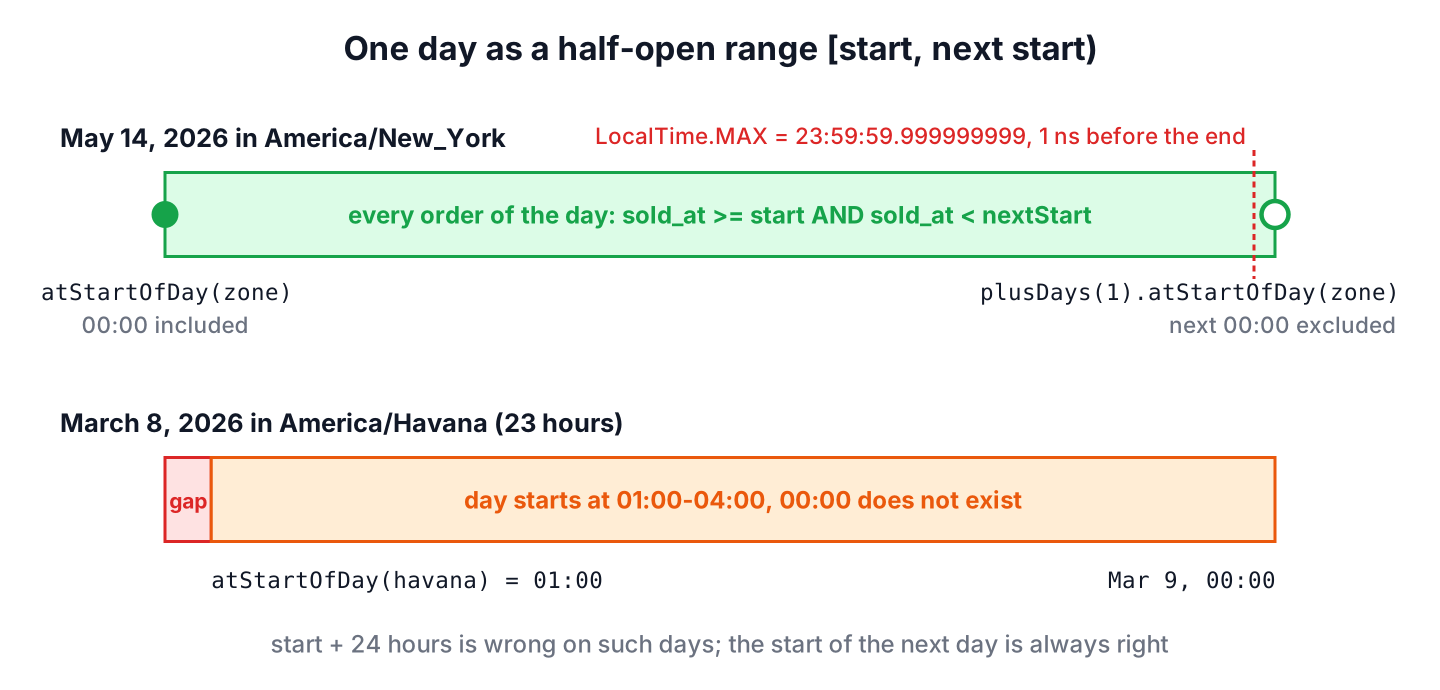
The start and end of day in Java come from date.atStartOfDay(zone) and from the start of the next day, date.plusDays(1).atStartOfDay(zone), which we use as an exclusive upper limit. When we need the last moment of the day as a value, date.atTime(LocalTime.MAX) gives 23:59:59.999999999.
We need the start and the end of a day to select all orders or log entries of one calendar day, for example in a daily report, and to check whether a timestamp falls on a given date.
The following example gets both limits of May 14, 2026 for a store in New York, with and without a zone.
LocalDate day = LocalDate.of(2026, 5, 14);
ZoneId store = ZoneId.of("America/New_York");
LocalDateTime localStart = day.atStartOfDay();                         // 2026-05-14T00:00
ZonedDateTime start = day.atStartOfDay(store);                         // 2026-05-14T00:00-04:00[America/New_York]
ZonedDateTime nextStart = day.plusDays(1).atStartOfDay(store);         // 2026-05-15T00:00-04:00[America/New_York]
LocalDateTime lastMoment = day.atTime(LocalTime.MAX);                  // 2026-05-14T23:59:59.999999999
Notice that the zoned start carries an offset, so it is a real moment that we can compare with timestamps. We look at the constants and methods for both limits, the days that do not start at midnight, why LocalTime.MAX is risky in database queries, and how a daily report selects one day with a half-open range.
1. Day Boundary Constants and Methods
Theoretically, the start of any day is midnight, 00:00, and the end of the day is the time 23:59:59.999999999 right before the next midnight. The class LocalTime has constants for both values.
- LocalTime.MIN and LocalTime.MIDNIGHT are both 00:00, the time at the start of the day.
- LocalTime.MAX is 23:59:59.999999999, the last time of the day that LocalTime can represent.
- LocalTime.NOON is 12:00, which is handy for date-only values that should never shift to another day.
The method LocalDate.atStartOfDay() combines a date with the time of midnight, and its overload with a ZoneId returns the first valid moment of the day in that zone. Java has no matching atEndOfDay() method, so we build the end of the day ourselves.
| We need | Call | Result |
|---|---|---|
| Start, no zone | date.atStartOfDay() | LocalDateTime 00:00 |
| Start in a zone | date.atStartOfDay(zone) | ZonedDateTime, first valid time |
| Start of a date-time we already have | dateTime.truncatedTo(ChronoUnit.DAYS) | Same type, time set to 00:00 |
| Exclusive end in a zone | date.plusDays(1).atStartOfDay(zone) | ZonedDateTime |
| Last moment as a value | date.atTime(LocalTime.MAX) | LocalDateTime 23:59:59.999999999 |
2. Getting the Start of Day
For a date without a zone, atStartOfDay() and atTime(LocalTime.MIN) give the same LocalDateTime. For a moment we can compare and store, we pass the zone of the business rule, such as the store’s zone, rather than ZoneId.systemDefault().
LocalDate day = LocalDate.of(2026, 5, 14);
LocalDateTime startOfDay1 = day.atStartOfDay();                           // 2026-05-14T00:00
LocalDateTime startOfDay2 = day.atTime(LocalTime.MIN);                    // 2026-05-14T00:00
LocalDateTime startOfDay3 = LocalTime.MIN.atDate(day);                    // 2026-05-14T00:00
ZonedDateTime startInParis = day.atStartOfDay(ZoneId.of("Europe/Paris"));  // 2026-05-14T00:00+02:00[Europe/Paris]
Instant startInUtc = day.atStartOfDay(ZoneOffset.UTC).toInstant();        // 2026-05-14T00:00:00Z
When we already have a timestamp and want the start of its day, truncatedTo(ChronoUnit.DAYS) sets the time to 00:00 and keeps the date and the zone. An Instant supports it too, but it always cuts at midnight UTC, so for a local day we convert to the zone first.
ZonedDateTime orderTime = ZonedDateTime.of(2026, 5, 14, 15, 42, 10, 0, ZoneId.of("America/New_York"));
ZonedDateTime orderDayStart = orderTime.truncatedTo(ChronoUnit.DAYS);             // 2026-05-14T00:00-04:00[America/New_York]
Instant utcDayStart = orderTime.toInstant().truncatedTo(ChronoUnit.DAYS);         // 2026-05-14T00:00:00Z
2.1. Days That Do Not Start at Midnight
A few zones switch to daylight saving time at midnight, so 00:00 does not exist on that day. Cuba moves its clocks from 00:00 to 01:00 on March 8, 2026, and a few other zones, such as Egypt and Chile, have similar rules. On such a day, atStartOfDay(zone) returns 01:00, and the day lasts 23 hours.
ZoneId havana = ZoneId.of("America/Havana");
ZonedDateTime havanaStart = LocalDate.of(2026, 3, 8).atStartOfDay(havana);                     // 2026-03-08T01:00-04:00[America/Havana]
ZonedDateTime havanaNext = LocalDate.of(2026, 3, 9).atStartOfDay(havana);                      // 2026-03-09T00:00-04:00[America/Havana]
Duration dayLength = Duration.between(havanaStart, havanaNext);                                 // PT23H
LocalTime truncatedStart = ZonedDateTime.of(2026, 3, 8, 10, 0, 0, 0, havana).truncatedTo(ChronoUnit.DAYS).toLocalTime();   // 01:00
We never assume that a day starts at 00:00 or lasts 24 hours once a zone is involved. Code that computes the end of a day as the start plus 24 hours is wrong on these days, whereas the start of the next day is always right.
3. Getting the End of Day
Similar to the start of the day, we can use the LocalTime.MAX constant to find the last moment of a date. It works with and without a zone.
LocalDate day = LocalDate.of(2026, 5, 14);
LocalDateTime endOfDay = day.atTime(LocalTime.MAX);                                     // 2026-05-14T23:59:59.999999999
LocalDateTime endOfDay2 = LocalTime.MAX.atDate(day);                                    // 2026-05-14T23:59:59.999999999
ZonedDateTime endInParis = day.atTime(LocalTime.MAX).atZone(ZoneId.of("Europe/Paris"));  // 2026-05-14T23:59:59.999999999+02:00[Europe/Paris]
LocalDateTime endToSecond = day.atTime(23, 59, 59);                                     // 2026-05-14T23:59:59
A value of 23:59:59.999999999 has two problems. A database column with microsecond precision cannot store the nanoseconds, and MySQL rounds the extra digits, so the value can turn into 00:00:00 of the next day. The version with whole seconds, 23:59:59, has the opposite problem, because it misses everything in the last second, such as an order at 23:59:59.400.
So we use LocalTime.MAX only to print or display the end of a day. For comparisons and queries, the next section uses the start of the next day instead.
4. Selecting One Day With a Half-Open Range
A half-open range includes its start and excludes its end, written as [start, nextStart). Every moment of the day matches, whatever the precision of the timestamps, and two neighboring days never overlap or leave a gap.
Say a chain of stores prints a daily sales report for each store in the store’s own zone. The orders are saved with a TIMESTAMP WITH TIME ZONE column, and the report for May 14 must contain every order from that local day in New York, including one at 23:59:59.999.
static boolean isOnDay(Instant timestamp, LocalDate day, ZoneId zone) {
    Instant from = day.atStartOfDay(zone).toInstant();
    Instant until = day.plusDays(1).atStartOfDay(zone).toInstant();
    return !timestamp.isBefore(from) && timestamp.isBefore(until);
}
LocalDate reportDay = LocalDate.of(2026, 5, 14);
ZoneId newYork = ZoneId.of("America/New_York");
boolean lateOrder = isOnDay(Instant.parse("2026-05-15T03:59:59.999Z"), reportDay, newYork); // true
boolean nextDayOrder = isOnDay(Instant.parse("2026-05-15T04:00:00Z"), reportDay, newYork); // false
OffsetDateTime fromParam = reportDay.atStartOfDay(newYork).toOffsetDateTime(); // 2026-05-14T00:00-04:00
OffsetDateTime untilParam = reportDay.plusDays(1).atStartOfDay(newYork).toOffsetDateTime(); // 2026-05-15T00:00-04:00The two OffsetDateTime values go into the query as parameters with setObject(). The SQL uses the same half-open shape, with >= for the start and < for the end, instead of BETWEEN, which includes both limits.
SELECT store_id, SUM(amount)
FROM orders
WHERE sold_at >= ? AND sold_at < ?
GROUP BY store_id;
Notice that the store’s zone decides which UTC instants belong to the day. For a store in Paris, the same May 14 starts six hours earlier in UTC, so each store gets its own pair of limits. The steps for converting between time zones explain the rest of the zone math.
5. Start and End of Day FAQs
Search suggestions and developer forums show the same four questions about day limits again and again.
5.1. Is atStartOfDay() Always Midnight?
Without a zone, yes, because LocalDate.atStartOfDay() returns a LocalDateTime at 00:00. With a zone, almost always, but on a day when the clocks jump at midnight, atStartOfDay(zone) returns the first valid time, such as 01:00 in Havana on March 8, 2026.
5.2. How Do We Get the Start of Today in a Specific Time Zone?
We read today’s date in that zone and take its start, both with the same ZoneId. Using the server’s date with the user’s zone gives the wrong day around midnight.
ZoneId tokyo = ZoneId.of("Asia/Tokyo");
ZonedDateTime todayStart = LocalDate.now(tokyo).atStartOfDay(tokyo);   // start of today in Tokyo
5.3. How Do We Get the Start of the Day as Epoch Milliseconds?
We convert the zoned start to an Instant and call toEpochMilli(), which gives a number for APIs and caches.
long startMillis = LocalDate.of(2026, 5, 14).atStartOfDay(ZoneId.of("America/New_York")).toInstant().toEpochMilli(); // 17787312000005.4. Should We Use 23:59:59 or LocalTime.MAX in a Query?
Neither. The value 23:59:59 misses the last second of the day, and LocalTime.MAX can round up to the next day in the database. A half-open range with < on the next day’s start is exact, as section 4 shows.
6. Conclusion
The start of a day in Java is atStartOfDay() for a LocalDateTime and atStartOfDay(zone) for a moment in a zone, and truncatedTo(ChronoUnit.DAYS) finds the start of the day of an existing date-time. The zoned version is not always 00:00, because a few zones skip midnight when daylight saving time starts.
For the end of the day, LocalTime.MAX is fine for display, but filters and queries work best with the start of the next day as an exclusive limit. More date arithmetic, such as adding days to a date, is listed on our Java date and time overview.
7. References
- LocalDate (Java SE 25 API)
- LocalTime (Java SE 25 API)
- ZonedDateTime (Java SE 25 API)
- Fractional Seconds in Time Values (MySQL 8.4 Reference Manual)
Happy Learning !!
