
A Java StopWatch reads System.nanoTime() when we start it and reports the elapsed time when we ask for it, as a Duration or as a number in a chosen unit. The JDK has no stopwatch class, so we use Guava’s Stopwatch, the StopWatch from Apache Commons Lang or Spring, or a small class of our own built on java.time.Duration.
We use a stopwatch to time the steps of a request or a batch job and to log the slow ones, without repeating the start and end subtraction in every method.
The following example measures the same loop with Guava and with Commons Lang. The elapsed values differ on every run, so the comments describe them.
Stopwatch guava = Stopwatch.createStarted();
long total = sumOfSquares(1_000_000);              // 333333833333500000
Duration guavaTime = guava.stop().elapsed();       // elapsed time of the loop, from Guava
StopWatch commons = StopWatch.createStarted();
long again = sumOfSquares(1_000_000);              // 333333833333500000
commons.stop();
Duration commonsTime = commons.getDuration();      // elapsed time of the loop, from Commons Lang
Both classes start running with createStarted() and return a java.time.Duration. We compare the options first, look at Guava, Commons Lang and Spring in turn, and finish with our own stopwatch that times the steps of a checkout.
1. What a StopWatch Measures
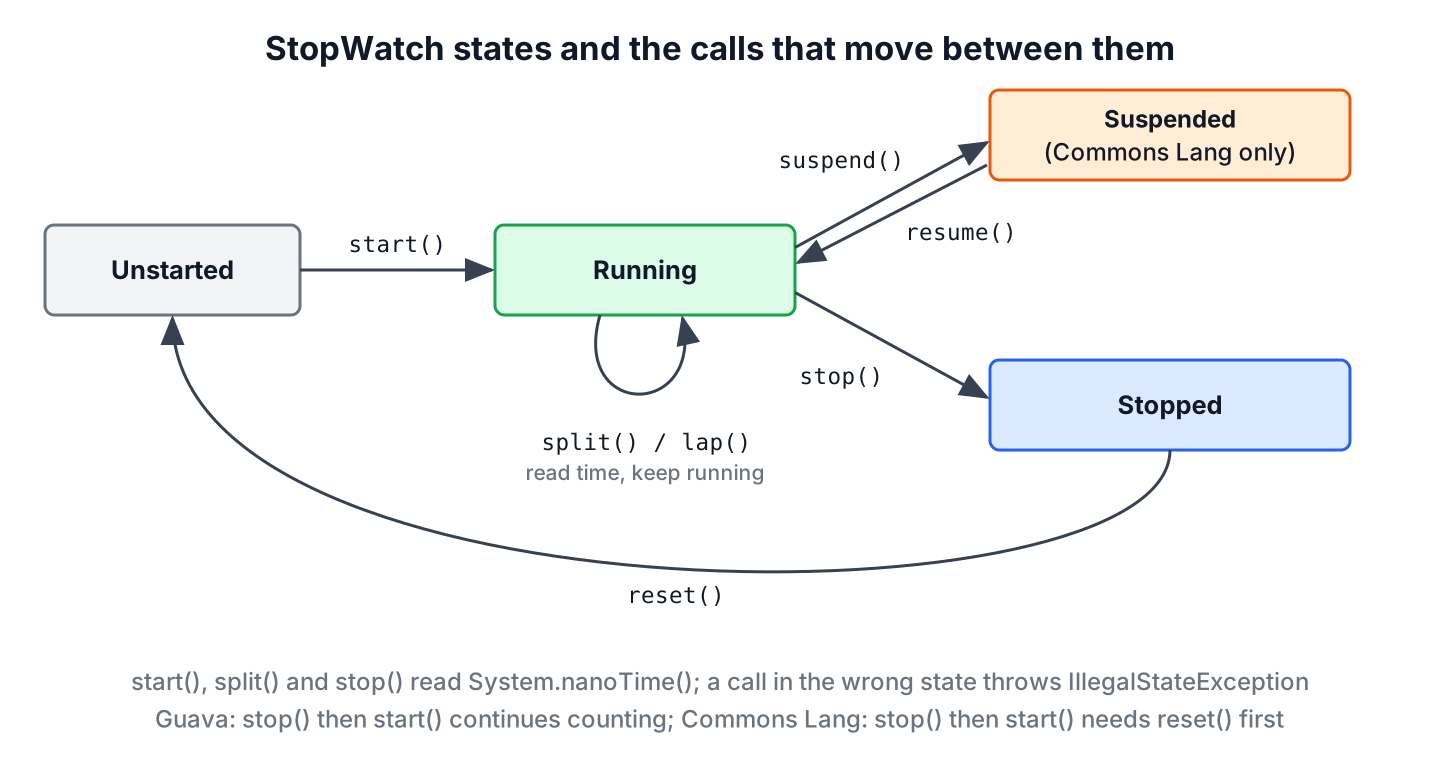
A stopwatch stores the nanoTime() value at start() and subtracts it from a later reading at stop() or at a split. The System.nanoTime() clock only moves forward, so the result stays correct even when the system time is corrected during the measurement. All three libraries in this article use it.
The work we time in the examples is a plain loop that sums squares.
static long sumOfSquares(int n) {
    long sum = 0;
    for (int i = 1; i <= n; i++) {
        sum += (long) i * i;
    }
    return sum;
}
The three library classes differ in their extras. The table shows the versions on Maven Central in October 2026.
| Feature | Guava Stopwatch | Commons Lang StopWatch | Spring StopWatch |
|---|---|---|---|
| Maven artifact | com.google.guava:guava:33.7.2-jre | org.apache.commons:commons-lang3:3.21.0 | org.springframework:spring-core:7.0.9 |
| Elapsed as Duration | elapsed() | getDuration() | No, getTotalTime(TimeUnit) |
| Splits or named tasks | No | split(), split(String) | start(String) per task |
| Suspend and resume | Stop and start again | suspend(), resume() | No |
| Fake time source for tests | Ticker | No | No |
| Thread-safe | No | No | No |
None of these classes is thread-safe, so each thread or each request needs its own stopwatch instance. When we only need one measurement, two nanoTime() calls are enough, as the article on measuring elapsed time in Java shows.
2. Guava Stopwatch
The Stopwatch class from Guava has a small API. We create it with createStarted() or createUnstarted(), and read the time with elapsed(), which returns a Duration, or with elapsed(TimeUnit), which returns a long. Calling stop() and start() again continues the count, and reset() sets it back to zero.
<dependency>
    <groupId>com.google.guava</groupId>
    <artifactId>guava</artifactId>
    <version>33.7.2-jre</version>
</dependency>
Guava reads the time through a Ticker, and we can pass our own ticker to createStarted(). A test moves the time forward by any amount and checks exact values, without running slow code.
class FakeTicker extends Ticker {
    private long nanos;

    void advance(Duration amount) {
        nanos += amount.toNanos();
    }

    @Override
    public long read() {
        return nanos;
    }
}
FakeTicker ticker = new FakeTicker();
Stopwatch watch = Stopwatch.createStarted(ticker);
ticker.advance(Duration.ofMillis(1250));
Duration elapsed = watch.elapsed(); // PT1.25S
long millis = watch.elapsed(TimeUnit.MILLISECONDS); // 1250
String text = watch.toString(); // "1.250 s"
boolean running = watch.stop().isRunning(); // false
Stopwatch twice = watch.stop(); // IllegalStateException: This stopwatch is already stopped.The toString() method picks a readable unit, such as ms or s, which suits log messages. Guava throws an IllegalStateException when we stop a stopped watch or start a running one.
3. Apache Commons Lang StopWatch
The StopWatch class in Commons Lang has more features. It records split times while the watch keeps running, it can pause with suspend() and continue with resume(), and since version 3.16.0 it returns a Duration from getDuration().
<dependency>
    <groupId>org.apache.commons</groupId>
    <artifactId>commons-lang3</artifactId>
    <version>3.21.0</version>
</dependency>
For example, a CSV import reads the file, pauses while it waits for a user to confirm the column mapping, and saves the rows. The time spent waiting for the user must not count, so we suspend the watch.
StopWatch importWatch = StopWatch.createStarted();
long readStep = sumOfSquares(500_000);                     // 41666791666750000
importWatch.split("read file");
importWatch.suspend();                                     // waiting for the user does not count
importWatch.resume();
long saveStep = sumOfSquares(500_000);                     // 41666791666750000
importWatch.split("save rows");
importWatch.stop();
int splitCount = importWatch.getSplits().size();          // 2
String firstLabel = importWatch.getSplits().get(0).getLabel();   // "read file"
Duration total = importWatch.getDuration();               // total time without the suspended part
String formatted = importWatch.formatTime();              // total time as HH:mm:ss.SSS text
Labeled splits with split(String) and getSplits() came in version 3.20.0. Version 3.18.0 added run(Runnable) and get(Supplier), which start or resume the watch for one call and suspend it afterwards, so the times of several calls add up. The class checks the order of calls and throws an IllegalStateException when a call does not fit the state. Unlike Guava, a stopped Commons Lang watch needs reset() before the next start().
StopWatch fresh = new StopWatch();
fresh.stop();                                              // IllegalStateException: Stopwatch is not running.
StopWatch timedCall = new StopWatch();
long result = timedCall.get(() -> sumOfSquares(1_000));   // 333833500
boolean suspended = timedCall.isSuspended();              // true
Duration callTime = timedCall.getDuration();             // time spent inside the call
Many tutorials call getTime(), which still returns milliseconds as a long. The methods getStartTime(), getStopTime() and getSplitTime() are deprecated in favor of getStartInstant(), getStopInstant() and getSplitDuration().
4. Spring StopWatch for Named Tasks
Spring Framework ships org.springframework.util.StopWatch in spring-core, so every Spring Boot application already has it. Each start(name) and stop() pair records one named task, and prettyPrint() prints a table with the share of each task. Spring meant the class for development and proof-of-concept work, not as a production metric.
var springWatch = new org.springframework.util.StopWatch("import");
springWatch.start("read file");
long fileStep = sumOfSquares(200_000);                     // 2666686666700000
springWatch.stop();
springWatch.start("save rows");
long rowStep = sumOfSquares(400_000);                      // 21333413333400000
springWatch.stop();
int taskCount = springWatch.getTaskCount();               // 2
String lastTask = springWatch.getLastTaskName();          // "save rows"
double totalMillis = springWatch.getTotalTime(TimeUnit.MILLISECONDS);   // total of both tasks in milliseconds
String table = springWatch.prettyPrint(TimeUnit.MILLISECONDS);         // one line per task with time and percent
The full class name avoids a clash when Commons Lang is also on the classpath. For production metrics in a Spring Boot application, a Micrometer Timer records the same durations and exports them to the monitoring system.
5. Implementing a Custom StopWatch With java.time
When we do not want a library dependency, a stopwatch takes about 50 lines. Our version reads the time from a LongSupplier, which is System::nanoTime in production and a fake counter in tests. It returns Duration values and records named laps.
final class SimpleStopwatch {
    private final LongSupplier ticker;
    private final Map<String, Duration> laps = new LinkedHashMap<>();
    private long startNanos;
    private long lastLapNanos;
    private long stoppedNanos;
    private boolean running;

    SimpleStopwatch(LongSupplier ticker) {
        this.ticker = ticker;
    }

    static SimpleStopwatch createStarted() {
        SimpleStopwatch watch = new SimpleStopwatch(System::nanoTime);
        watch.start();
        return watch;
    }

    void start() {
        if (running) {
            throw new IllegalStateException("Stopwatch is already running");
        }
        startNanos = ticker.getAsLong();
        lastLapNanos = startNanos;
        running = true;
    }

    void stop() {
        if (!running) {
            throw new IllegalStateException("Stopwatch is not running");
        }
        stoppedNanos += ticker.getAsLong() - startNanos;
        running = false;
    }

    Duration lap(String name) {
        if (!running) {
            throw new IllegalStateException("Stopwatch is not running");
        }
        long now = ticker.getAsLong();
        Duration lap = Duration.ofNanos(now - lastLapNanos);
        lastLapNanos = now;
        laps.put(name, lap);
        return lap;
    }

    Duration elapsed() {
        long current = running ? ticker.getAsLong() - startNanos : 0;
        return Duration.ofNanos(stoppedNanos + current);
    }

    Map<String, Duration> laps() {
        return Collections.unmodifiableMap(laps);
    }
}
The class throws an IllegalStateException when a call does not fit the state, instead of printing a message that a caller can miss. It keeps nanoseconds until the end, and it reads nanoTime() instead of Instant.now(), which follows the wall clock.
For example, an online shop times the three steps of a checkout and logs every step that takes longer than 500 milliseconds. A fake ticker in the test makes the payment step take 850 milliseconds.
AtomicLong fakeNanos = new AtomicLong();
SimpleStopwatch checkout = new SimpleStopwatch(fakeNanos::get);
checkout.start();
fakeNanos.set(120_000_000L);
Duration validate = checkout.lap("validate cart");        // PT0.12S
fakeNanos.set(970_000_000L);
Duration payment = checkout.lap("charge payment");        // PT0.85S
fakeNanos.set(1_000_000_000L);
Duration email = checkout.lap("send email");              // PT0.03S
checkout.stop();
Duration checkoutTime = checkout.elapsed();               // PT1S
List<String> slowSteps = checkout.laps().entrySet().stream().filter(e -> e.getValue().toMillis() > 500).map(Map.Entry::getKey).toList();   // [charge payment]
In production, SimpleStopwatch.createStarted() uses the real nanoTime() clock, and the same filter finds the slow steps of real requests.
6. Java StopWatch FAQs
Choosing a stopwatch class and sharing it between threads raise most of the questions.
6.1. Is there a StopWatch class in the JDK?
No. The JDK has System.nanoTime() and Duration, but no stopwatch class. Guava, Commons Lang and Spring each provide one, or we write a small class as in section 5.
6.2. Which StopWatch should we pick?
In a Spring Boot application, Spring’s StopWatch is already on the classpath and fits quick checks of named tasks. Commons Lang fits code that needs splits and suspend. Guava fits code that already uses Guava and wants a fake Ticker in tests.
6.3. Can a StopWatch be shared between threads?
No. None of the classes in this article synchronizes its fields, so two threads that call start() and stop() on one instance corrupt the result. We create one stopwatch per thread or per request.
6.4. Should we use a StopWatch for benchmarks?
No. A stopwatch measures one run, including JIT compilation and garbage collection pauses. To compare the speed of two methods, we use JMH, which runs warm-up iterations and reports averages.
6.5. How do we print the elapsed time as hh:mm:ss?
We take the Duration from the stopwatch and format its parts, as shown in formatting milliseconds to hh:mm:ss. Commons Lang also has formatTime(), which prints HH:mm:ss.SSS.
7. Conclusion
A Java StopWatch wraps two System.nanoTime() readings and returns the difference as a Duration. Guava’s Stopwatch is small and testable with a Ticker, Commons Lang adds splits and suspend, and Spring’s StopWatch prints a table of named tasks.
When no library fits, a short class with a LongSupplier time source does the job, and a fake counter makes its tests exact. For more ways to work with times and durations, see the Java date and time guides.
8. References
- Guava Stopwatch API
- Apache Commons Lang StopWatch API
- Spring Framework StopWatch API
- System.nanoTime() (Java SE 25 API)
Happy Learning !!
