

A Map in Java stores key-value pairs, where each key is unique and points to one value. Map is an interface in java.util, so it only lists the methods, and we create a map with an implementation class such as HashMap, or with the factory method Map.of() for a fixed set of entries. A Map belongs to the Java Collections framework, but it does not extend the Collection interface.
We use a map whenever we look up a value by a key, for example a person’s age by name or the number of times each word appears in a text.
The following example shows the Map operations we use every day, with the result of each line as a comment.
// 1. Create a map and add entries
Map<String, Integer> ages = new HashMap<>();
ages.put("Lokesh", 37);                         // returns null (no old value)
ages.put("John", 40);                           // returns null
Integer old = ages.put("Lokesh", 38);           // old = 37 (value replaced)

// 2. Read entries
Integer age = ages.get("John");                 // age = 40
Integer missing = ages.get("Alex");             // missing = null
int alexAge = ages.getOrDefault("Alex", 0);     // alexAge = 0
boolean found = ages.containsKey("John");       // found = true

// 3. Update values in one call
Map<String, Integer> counts = new HashMap<>();
for (String fruit : List.of("apple", "banana", "apple")) {
  counts.merge(fruit, 1, Integer::sum);
}                                               // counts = {banana=1, apple=2}

Map<String, List<String>> skills = new HashMap<>();
skills.computeIfAbsent("Lokesh", k -> new ArrayList<>()).add("Java");
skills.computeIfAbsent("Lokesh", k -> new ArrayList<>()).add("Spring");
                                                // skills = {Lokesh=[Java, Spring]}

// 4. Iterate over the entries
for (Map.Entry<String, Integer> entry : ages.entrySet()) {
  System.out.println(entry.getKey() + " = " + entry.getValue());
}                                               // John = 40, Lokesh = 38
ages.forEach((name, a) -> System.out.println(name + " -> " + a));
                                                // John -> 40, Lokesh -> 38

// 5. Create a fixed (unmodifiable) map
Map<String, Integer> prices = Map.of("apple", 5, "banana", 3);
int applePrice = prices.get("apple");           // 5
Integer added = prices.put("cherry", 7);        // UnsupportedOperationException
Notice that put() returns the old value of the key, and that the map from Map.of() throws an exception on any change.
Next, we look at how the Map interfaces and classes fit together, compare HashMap, LinkedHashMap, TreeMap, ConcurrentHashMap, EnumMap, Hashtable and Map.of() in one table, and use a short guide to pick one. The second half lists all our Map tutorials by topic, in a reading order that starts with the HashMap basics, moves on to the common operations, and ends with the other implementations.
1. What Is a Map in Java?
A Map stores entries, where an entry (Map.Entry) is one key together with its value. We look up a value by its key, so a shop app that keeps a map from product name to price finds the price of “apple” with one get() call. The Map interface only names the operations, such as put() and get(), and each implementation class decides how it stores the entries and in which order they come back. The class also decides whether several threads (independent paths of execution in one program) can use the map at the same time.
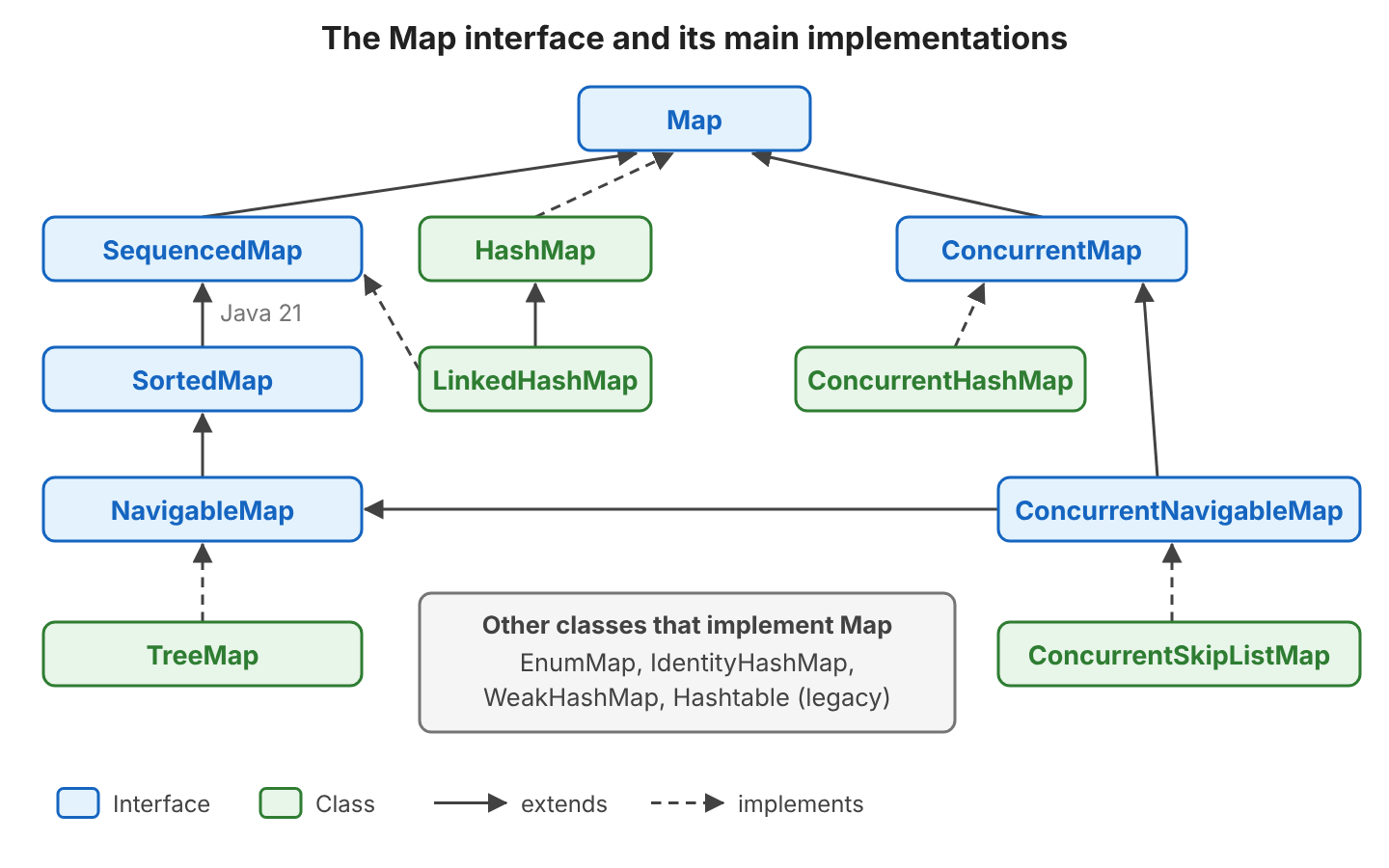
Every Map follows the same basic rules.
- A key appears at most once. When we call put() with a key that is already in the map, the map replaces the old value, and put() returns the old value.
- The same value can appear under many keys.
- The method get() returns null when the key is missing, but a key can also hold a stored null value. The methods getOrDefault() and containsKey() help us tell the two cases apart.
- Keys must implement equals() and hashCode() correctly. Sorted maps use compareTo() instead. The map calls these methods to find a key again. So a key object must not change while it is inside a map.
- Since Java 21, LinkedHashMap and TreeMap also implement SequencedMap, one of the sequenced collections. A SequencedMap is a map with a defined first and last entry, and it adds firstEntry(), lastEntry(), putFirst() and reversed().
We use a small set of methods most of the time, grouped here by what they do. Each result comes from the ages map in the quick reference, which holds John = 40 and Lokesh = 38.
| Group | Method | Result |
|---|---|---|
| Add or replace | ages.put(“Lokesh”, 39) | 38 (the old value) |
| Add only if absent | ages.putIfAbsent(“John”, 50) | 40 (John keeps 40) |
| Read | ages.get(“John”) | 40 |
| Read with a default | ages.getOrDefault(“Alex”, 0) | 0 |
| Check | ages.containsKey(“John”) | true |
| Remove | ages.remove(“Alex”) | null (nothing removed) |
| Size | ages.size() | 2 |
| Combine values | counts.merge(“apple”, 1, Integer::sum) | adds 1 to the count |
| Create on first use | skills.computeIfAbsent(key, k -> new ArrayList<>()) | the existing or new list |
| Views | keySet(), values(), entrySet() | live views that change when the map changes |
2. HashMap vs LinkedHashMap vs TreeMap and Other Maps
The map classes differ in iteration order, which is the order in which a loop returns the entries, and in thread safety, which means several threads can update the map without corrupting it. They also differ in whether they accept null keys and values.
| Map | Iteration order | null key | null value | Thread-safe | Typical use |
|---|---|---|---|---|---|
| HashMap | No order | Yes (one) | Yes | No | The default choice for lookups and caches |
| LinkedHashMap | Insertion order (or access order) | Yes (one) | Yes | No | Predictable output, LRU caches |
| TreeMap | Sorted by key | No (NullPointerException) | Yes | No | Sorted keys, range queries such as headMap() |
| ConcurrentHashMap | No order | No | No | Yes, without locking the whole map | Shared caches and counters in multi-threaded code |
| EnumMap | Order of the enum constants | No | Yes | No | Keys are enum constants |
| Hashtable | No order | No | No | Yes, every method is synchronized | Legacy code only |
| Map.of() | No order, changes between JVM runs | No | No | Yes (unmodifiable) | Constants, test data, fixed lookup tables |
Iteration order is the difference we notice first. We added the keys banana, apple, cherry and date to each map, in that order, and each map returned them in its own order.
HashMap                [banana, date, apple, cherry]
LinkedHashMap          [banana, apple, cherry, date]
TreeMap                [apple, banana, cherry, date]
ConcurrentHashMap      [banana, date, apple, cherry]
Hashtable              [apple, banana, date, cherry]
ConcurrentSkipListMap  [apple, banana, cherry, date]
HashMap and ConcurrentHashMap return the keys in hash-bucket order. A bucket is a slot in the map’s internal array, and the key’s hash code picks the slot, so the order looks random and can change when the map grows. When the output order matters, we use LinkedHashMap for insertion order or TreeMap for sorted keys. For example, a report endpoint that builds its JSON from a HashMap can list the columns in a different order after someone adds a new column.
The null rules cause the most surprises at runtime, because some maps accept null while others throw NullPointerException.
new HashMap<>().put(null, 1);                                // OK
Object treeKey = new TreeMap<>().put(null, 1);               // NullPointerException
Object chmValue = new ConcurrentHashMap<>().put("x", null);  // NullPointerException
Map<String, Integer> nullOf = Map.of("a", null);             // NullPointerException
boolean hasNull = Map.of("a", 1).containsKey(null);          // NullPointerException
Map<String, Integer> dup = Map.of("a", 1, "a", 2);           // IllegalArgumentException: duplicate key: a
3. Performance of Map Operations
Lookups and loops cost different amounts of time in each implementation. The get and containsKey columns give the cost of one lookup, and the next column gives the cost of moving to the next entry in a loop. O(1) means constant time, so the cost stays the same however big the map grows. Hash-based maps answer a lookup in constant time on average, whereas the tree-based maps need O(log n) comparisons for each lookup.
| Map Class | get | containsKey | next |
|---|---|---|---|
| HashMap | O(1) | O(1) | O(h/n) |
| LinkedHashMap | O(1) | O(1) | O(1) |
| IdentityHashMap | O(1) | O(1) | O(h/n) |
| EnumMap | O(1) | O(1) | O(1) |
| TreeMap | O(log n) | O(log n) | O(log n) |
| ConcurrentHashMap | O(1) | O(1) | O(h/n) |
| ConcurrentSkipListMap | O(log n) | O(log n) | O(1) |
Here n is the number of entries and h is the table capacity, which is the number of buckets. A HashMap with a large capacity and few entries loops slowly, because the iterator must visit every bucket, including the empty ones. LinkedHashMap follows its linked list instead, so it visits only real entries.
4. Which Map Implementation to Pick
Raw speed rarely decides which Map class we pick. The choice depends more on what the application needs, such as an order, null handling, fixed content, or several threads sharing the map. Four questions lead to the right class in most cases.
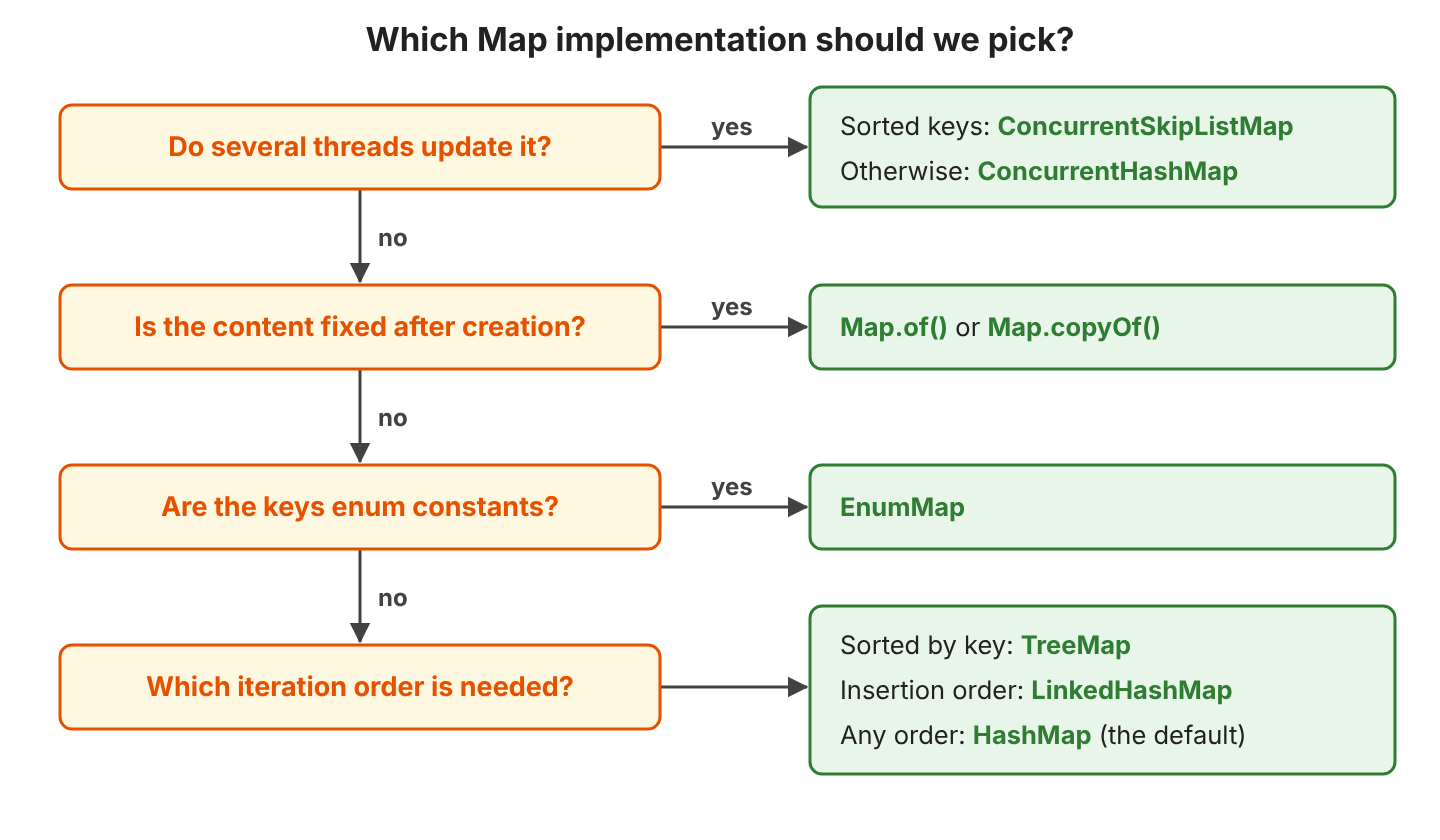
The decision flow turns into one rule per class, starting with the default.
- Use HashMap by default. Declare the variable as Map<K, V>. That way we can change the class later without touching the code that uses the variable.
- Use LinkedHashMap when the output must follow the insertion order, for example in a JSON response or a report.
- Use TreeMap for sorted keys or range queries. A range query returns part of the map, for example all keys below a given key. ConcurrentSkipListMap is the thread-safe sorted map.
- Use ConcurrentHashMap when several threads read and write the same map. Hashtable and Collections.synchronizedMap() lock the whole map on every call, so the threads wait for each other.
- Use EnumMap whenever the keys are enum constants. EnumMap stores the values in an array, indexed by each constant’s position in the enum.
- Use Map.of(), Map.ofEntries() or Map.copyOf() for data that never changes after creation.
5. Java Map Tutorials
We grouped the tutorials by topic. A beginner can read the first group in order and then pick topics from the other groups as needed.
5.1. HashMap Basics
HashMap is the class we use most, so the basics start with HashMap and how it stores entries.
- Complete Guide to Java HashMap
- HashMap Initialization, Load Factor and Initial Capacity
- How HashMap Works Internally
- Java hashCode() and equals() Methods
- Designing a Good Custom Key for HashMap
- Java HashMap Interview Questions
5.2. Creating and Updating Maps
After the basics, we learn to create a map and change its content, including fixed maps that cannot change after creation.
- Creating Immutable and Unmodifiable Maps
- How to Create an Immutable Map
- Creating Nested Maps
- Map computeIfAbsent()
- How to Join or Merge Two Maps
- How to Clone a HashMap: Shallow and Deep Copy
5.3. Reading, Comparing and Iterating
Reading a map means more than calling get(). We also loop over a map, compare two maps, take part of a map or search the values.
- Iterate over a HashMap: Performance Comparison
- How to Compare Two Maps
- Get SubMap From Map
- Find the Smallest and Largest Value in a Map
- Creating a Java Map with Case-Insensitive Keys
5.4. Other Map Implementations
Each class in this group changes one behavior of HashMap, such as the order of the entries or the way the map compares keys. The class WeakHashMap also changes how long an entry stays in the map.
- Java LinkedHashMap
- Java TreeMap
- Java EnumMap
- Java IdentityHashMap compares keys with == instead of equals().
- Java WeakHashMap removes an entry once no other code uses its key.
- Java Hashtable is the old (legacy) synchronized map. Only one thread can call its methods at a time.
5.5. Thread-Safe Maps
A plain HashMap can lose updates when several threads write to it at the same time. The concurrent maps in java.util.concurrent handle parallel updates correctly. For example, a web app that counts page views per URL in a shared HashMap can lose increments under load, whereas ConcurrentHashMap.merge() counts every view.
- Guide to Java ConcurrentMap
- ConcurrentHashMap vs Collections.synchronizedMap()
- Improving Performance of ConcurrentHashMap
- Java ConcurrentSkipListMap
5.6. Sorting, Filtering and Converting Maps
Most tutorials in this group use the Stream API, which has been part of Java since Java 8.
- Sort a Map by Keys
- Sort a Map by Values
- Filter a Map by Keys and Values
- Filter a Map by a List of Keys
- Collecting Stream Items into a Map with Collectors.toMap()
- Convert a List to Map
- Convert a Map to Array, List or Set
- Inverting a Map
- Convert an Object to Map
- Jackson: Convert JSON to and from a Map
- Gson: Serialize and Deserialize a Map
5.7. Map Comparisons
Two map questions come up most often in interviews. One compares HashMap with the sorted TreeMap, and the other compares HashMap with the older Hashtable.
6. Java Map FAQs
These are the questions developers ask most often in searches and interviews.
6.1. Can a Java Map Have Duplicate Keys?
No. A second put() with the same key replaces the value, and Map.of() goes further and throws IllegalArgumentException for duplicate keys. To store several values for one key, we map the key to a List.
ages.put("Lokesh", 37);
ages.put("Lokesh", 38);                         // ages = {Lokesh=38}

Map<String, List<String>> skills = new HashMap<>();
skills.computeIfAbsent("Lokesh", k -> new ArrayList<>()).add("Java");
skills.computeIfAbsent("Lokesh", k -> new ArrayList<>()).add("Spring");
                                                // skills = {Lokesh=[Java, Spring]}
6.2. Does HashMap Keep the Insertion Order?
No. HashMap returns entries in bucket order, as the output in section 2 shows, whereas LinkedHashMap keeps the insertion order. Since Java 21, LinkedHashMap can also return the first and last entries in one call.
LinkedHashMap<String, Integer> prices = new LinkedHashMap<>();
prices.put("banana", 3);
prices.put("apple", 5);
prices.putFirst("cherry", 7);                               // prices = {cherry=7, banana=3, apple=5}
Map.Entry<String, Integer> first = prices.firstEntry();     // cherry=7
Map.Entry<String, Integer> last = prices.lastEntry();       // apple=5
SequencedMap<String, Integer> reversed = prices.reversed(); // {apple=5, banana=3, cherry=7}
6.3. What Is the Difference Between Map and HashMap?
Map is the interface that defines the operations, and HashMap is one class that implements it. We declare variables and method parameters with the type Map and create the object with a concrete class, as in Map<String, Integer> ages = new HashMap<>();. To switch to TreeMap later, we change only that one line.
6.4. Can a Map Key Be null?
The answer depends on the implementation. HashMap and LinkedHashMap accept one null key, whereas TreeMap, EnumMap, ConcurrentHashMap, Hashtable and Map.of() throw NullPointerException, as the table in section 2 lists. Code that avoids null keys keeps working when we switch to another implementation.
7. Conclusion
A Java Map stores unique keys, each with one value. HashMap covers most needs. LinkedHashMap and TreeMap add an order, whereas ConcurrentHashMap adds thread safety. EnumMap is a compact map for enum keys that stores the values in an array, and Map.of() creates fixed maps. The Java Map tutorials cover each class and operation in detail.
8. References
- Map Javadoc (Java 25)
- HashMap Javadoc (Java 25)
- ConcurrentHashMap Javadoc (Java 25)
- SequencedMap Javadoc (Java 25)
- JEP 431: Sequenced Collections
- Collections Framework Overview
Happy Learning !!
