

We configure Spring Boot logging with the logging.* properties in application.properties, without any XML file. The same properties set log levels, log files, file rotation, line patterns and JSON output. By default, Spring Boot uses Logback as the logging library, which every starter brings in through spring-boot-starter-logging, and Spring Boot applies the properties when the application starts.
We use the logging.* properties to see the DEBUG lines of our own code while we track down a bug, or to keep a log file on a server that we can read after a crash.
The following example sets the levels, a log file and a shorter console pattern for a small playlist app.
# WARN and above from libraries (Spring, Tomcat)
logging.level.root=warn
# DEBUG and above from our own packages
logging.level.com.howtodoinjava=debug
# Also write to logs/playlist.log (a new file every 10MB)
logging.file.name=logs/playlist.log
# Shorter console lines: time, level, logger, message
logging.pattern.console=%d{HH:mm:ss} %-5level %logger{20} - %msg%n
# Or one JSON object per line for log tools (Spring Boot 3.4+)
#logging.structured.format.console=ecs
04:04:27 DEBUG c.h.l.p.PlaylistService - Adding 'Yesterday' to playlist 'road-trip'
04:04:27 INFO c.h.l.p.PlaylistService - Playlist 'road-trip' now has 1 songs
04:04:27 WARN c.h.l.p.PlaylistService - 'Yesterday' is already in playlist 'road-trip'
04:04:27 DEBUG c.h.l.p.PlayerService - Loading playlist 'gym'
04:04:27 ERROR c.h.l.p.PlayerService - Cannot play 'gym': the playlist is emptyNotice that the DEBUG lines from our own code appear, whereas the INFO startup lines from Tomcat and Spring are gone.
Next, we look at log levels and how a logger gets its level, log files and rotation, log groups, patterns and colors, JSON logs, runtime level changes with Actuator, YAML and profiles, and the cases where a logback-spring.xml file is the better choice.
1. How Logging Works in Spring Boot
Our classes do not call Logback. Instead, our code calls the SLF4J API, which is a facade (a small set of interfaces that hides the real logging library). Spring Boot puts Logback behind SLF4J, so the logging.* properties configure Logback for us. A logger is the object we call to write a message, and by convention we name it after the full class name.
private static final Logger log = LoggerFactory.getLogger(PlaylistService.class);

log.trace("Checking song '{}'", song);                            // hidden by default
log.debug("Adding '{}' to playlist '{}'", song, playlist);        // hidden by default
log.info("Playlist '{}' now has {} songs", playlist, songs.size());
log.warn("'{}' is already in playlist '{}'", song, playlist);
log.error("Cannot play '{}': the playlist is empty", playlist);
The following example is a small playlist REST API built with Spring Boot 4.1.1 and Java 25. It has two endpoints that call the services. The endpoint POST /playlists/{name}/songs?title=… adds a song to a playlist, and POST /playlists/{name}/play plays a playlist.
1.1. Default Output Without Any Configuration
We start with an almost empty application.properties that contains only spring.application.name=playlist, and the same requests print four lines on the console.
2026-10-04T04:03:57.912+05:30  INFO 17780 ---  [           main] o.s.boot.tomcat.TomcatWebServer          : Tomcat started on port 18081 (http) with context path '/'
2026-10-04T04:03:58.976+05:30  INFO 17780 ---  [io-18081-exec-2] c.h.logging.playlist.PlaylistService     : Playlist 'road-trip' now has 1 songs
2026-10-04T04:03:59.044+05:30  WARN 17780 ---  [io-18081-exec-4] c.h.logging.playlist.PlaylistService     : 'Yesterday' is already in playlist 'road-trip'
2026-10-04T04:03:59.081+05:30 ERROR 17780 ---  [io-18081-exec-4] c.h.logging.player.PlayerService         : Cannot play 'gym': the playlist is empty
Without any configuration, Spring Boot logs INFO and above, to the console only. Spring Boot writes no log file and skips the TRACE and DEBUG statements. Each line of the default output has eight parts.
| Part | Example | Notes |
|---|---|---|
| Date and time | 2026-10-04T04:03:58.976+05:30 | ISO-8601 date with milliseconds. logging.pattern.dateformat changes the format |
| Level | INFO | Padded to 5 characters |
| Process ID | 17780 | The process ID (PID) of the running JVM |
| Separator | — | Marks the start of the context part |
| Application name | Comes from spring.application.name. logging.include-application-name=false hides the name | |
| Thread | [io-18081-exec-2] | The thread that wrote the line, cut to 15 characters on the console |
| Logger name | c.h.logging.playlist.PlaylistService | Package parts are shortened so the name fits in 40 characters |
| Message | Playlist ‘road-trip’ now has 1 songs | The text after the colon |
1.2. Log Levels in Spring Boot
Every log message has a log level that shows how important it is, and every logger has a minimum level that it prints. A logger prints only the messages at its level or above, so a logger set to WARN prints WARN and ERROR messages and ignores INFO and DEBUG.
| Level | Typical use | Printed by default? |
|---|---|---|
| TRACE | Every small step, for example each loop pass | No |
| DEBUG | Values that help while developing or debugging | No |
| INFO | Normal events: application started, order saved | Yes |
| WARN | Something unexpected that the application handled | Yes |
| ERROR | An operation that failed | Yes |
| FATAL | Logback has no FATAL level. Spring Boot maps FATAL to ERROR | Yes |
| OFF | Turns a logger off completely | No output |
Level names in the properties for Spring Boot logging levels are not case-sensitive, so warn and WARN both work.
2. Setting Log Levels in application.properties
The property has the form logging.level.<logger name>=<level>, where the logger name is a package name or a full class name. The special name root stands for every logger that has no level of its own. Say the playlist API returns a wrong song count in production. We switch our own package to DEBUG to see each added song, while Spring and Tomcat stay at WARN.
# Everything: WARN and above
logging.level.root=warn
# Our packages and all classes below them: DEBUG and above
logging.level.com.howtodoinjava=debug
Loggers form a tree that follows the package names, so com.howtodoinjava is a parent of com.howtodoinjava.logging.playlist. A logger without its own level takes the level of its nearest parent package. The root logger is the parent of all loggers.
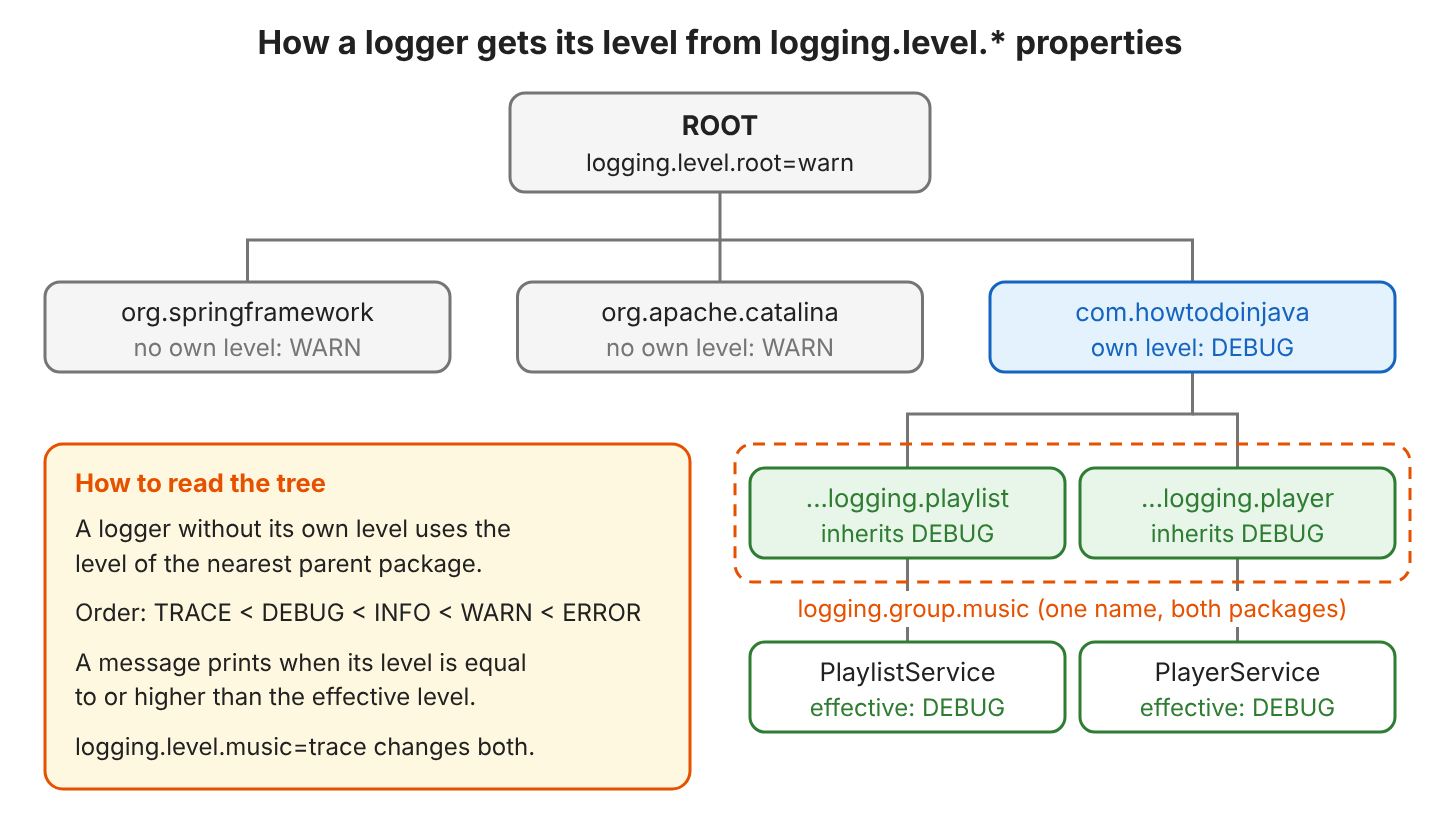
With root=warn and com.howtodoinjava=debug, the playlist requests print our DEBUG lines, and the Tomcat lines are gone.
2026-10-04T04:04:12.550+05:30 DEBUG 18200 ---  [io-18082-exec-3] c.h.logging.playlist.PlaylistService     : Adding 'Yesterday' to playlist 'road-trip'
2026-10-04T04:04:12.551+05:30  INFO 18200 ---  [io-18082-exec-3] c.h.logging.playlist.PlaylistService     : Playlist 'road-trip' now has 1 songs
2026-10-04T04:04:12.623+05:30 DEBUG 18200 ---  [io-18082-exec-6] c.h.logging.player.PlayerService         : Loading playlist 'gym'
2026-10-04T04:04:12.623+05:30 ERROR 18200 ---  [io-18082-exec-6] c.h.logging.player.PlayerService         : Cannot play 'gym': the playlist is empty
We can also set any logging.level.* property from the command line or from an environment variable, so we do not need to edit the file. For the variable name, we write the property in upper case and replace the dots with underscores.
java -jar playlist.jar --logging.level.com.howtodoinjava=trace
LOGGING_LEVEL_COM_HOWTODOINJAVA=trace java -jar playlist.jar
Both commands print the TRACE line Checking song ‘Yesterday’.
3. Writing Logs to a File
By default, Spring Boot writes no log file. It writes one only when we set either logging.file.name or logging.file.path.
| logging.file.name | logging.file.path | Result |
|---|---|---|
| not set | not set | Console only |
| logs/playlist.log | not set | Writes logs/playlist.log |
| not set | /var/log/playlist | Writes spring.log in that folder |
| set | set | Uses logging.file.name and ignores the path |
A relative name such as logs/playlist.log starts from the working directory (the folder where we start the JVM). The file uses the same levels as the console, but unlike the console, it shows the full thread name.
2026-10-04T04:04:12.550+05:30 DEBUG 18200 ---  [http-nio-18082-exec-3] c.h.logging.playlist.PlaylistService     : Adding 'Yesterday' to playlist 'road-trip'
2026-10-04T04:04:12.623+05:30 ERROR 18200 ---  [http-nio-18082-exec-6] c.h.logging.player.PlayerService         : Cannot play 'gym': the playlist is empty
3.1. Log File Rotation With logging.logback.rollingpolicy
Rotation means that Logback closes the full log file, compresses it into an archive and starts a new file. Spring Boot rotates the log file by default, and the logging.logback.rollingpolicy.* properties change when and how the rotation happens.
| Property | Default | Meaning |
|---|---|---|
| max-file-size | 10MB | Rotate when the file reaches this size |
| max-history | 7 | Number of archive periods to keep (days, with the default daily file name) |
| total-size-cap | 0B (no limit) | When all archives together pass this size, the oldest archives are deleted |
| file-name-pattern | <log file>.%d{yyyy-MM-dd}.%i.gz | Archive file name. %i counts the archives within one day |
| clean-history-on-start | false | Deletes old archives when the application starts |
logging.file.name=logs/playlist.log
logging.logback.rollingpolicy.max-file-size=10MB
logging.logback.rollingpolicy.max-history=7
logging.logback.rollingpolicy.total-size-cap=100MB
logging.logback.rollingpolicy.file-name-pattern=logs/playlist-%d{yyyy-MM-dd}.%i.log.gz
When we set max-file-size=1KB and add twelve songs, Logback creates four archives and keeps writing to playlist.log.
playlist-2026-10-04.0.log.gz
playlist-2026-10-04.1.log.gz
playlist-2026-10-04.2.log.gz
playlist-2026-10-04.3.log.gz
playlist.log
Log4j2 has its own logging.log4j2.rollingpolicy.* properties, which apply after we switch from Logback to Log4j2.
3.2. Different Levels for Console and File
Two settings decide what reaches each output. The logger level first decides which messages are logged at all, and then a threshold filters what each output receives, so the file can keep the DEBUG lines while the console shows only problems.
logging.threshold.console=warn2026-10-04T04:09:13.707+05:30 WARN 24738 --- [io-18090-exec-4] c.h.logging.playlist.PlaylistService : 'Yesterday' is already in playlist 'road-trip'
2026-10-04T04:09:13.767+05:30 ERROR 24738 --- [io-18090-exec-5] c.h.logging.player.PlayerService : Cannot play 'gym': the playlist is emptyThe log file still gets every DEBUG line. To filter the file output in the same way, we set logging.threshold.file.
4. Log Groups With logging.group
A log group is one name for several loggers, so we can change the level of all those loggers in one line. For example, the playlist and player packages belong to one feature, so we raise both to TRACE together when a playback bug shows up. We define the group once and then use the group name like a logger name.
logging.group.music=com.howtodoinjava.logging.playlist,com.howtodoinjava.logging.player
logging.level.music=trace
2026-10-04T04:05:00.133+05:30 TRACE 19333 --- [io-18087-exec-1] c.h.logging.playlist.PlaylistService : Checking song 'Yesterday'Spring Boot also has two built-in groups, web and sql, which we can use without declaring them.
| Group | Loggers | Typical use |
|---|---|---|
| web | org.springframework.core.codec, org.springframework.http, org.springframework.web, org.springframework.boot.actuate.endpoint.web, org.springframework.boot.web.servlet.ServletContextInitializerBeans | logging.level.web=debug logs how Spring MVC handles each request |
| sql | org.springframework.jdbc.core, org.hibernate.SQL, org.jooq.tools.LoggerListener | logging.level.sql=debug prints the SQL statements |
5. Custom Log Patterns and Colored Output
A pattern is a template for one log line, built from Logback conversion words (placeholders that start with %, such as %msg for the message). The property logging.pattern.console sets the pattern for the console, and logging.pattern.file sets the pattern for the log file.
logging.pattern.console=%d{HH:mm:ss} %-5level %logger{20} - %msg%n04:04:27 INFO c.h.l.p.PlaylistService - Playlist 'road-trip' now has 1 songs
04:04:27 ERROR c.h.l.p.PlayerService - Cannot play 'gym': the playlist is emptyMost patterns need only six of the Logback conversion words.
| Conversion word | Prints | Example |
|---|---|---|
| %d{HH:mm:ss} | Date and time in the given format | 04:04:27 |
| %-5level | Level, left-aligned in 5 characters | INFO |
| %logger{20} | Logger name, shortened to about 20 characters | c.h.l.p.PlayerService |
| %thread | Thread name | http-nio-8080-exec-1 |
| %msg | The message | Cannot play ‘gym’ |
| %n | Line break |
When we want to change only one part of the default pattern, Spring Boot has smaller properties. For example, logging.pattern.dateformat changes the date, and logging.pattern.level changes the level.
5.1. Colored Log Output
Spring Boot colors the console output when the terminal supports ANSI colors (special codes that most terminals show as colors). The spring.output.ansi.enabled property controls how Spring Boot checks for color support.
- The value detect (default) colors the output only when the console supports colors.
- The value always forces colors, for example for a CI log viewer that shows colors.
- The value never turns colors off.
The default pattern shows ERROR and FATAL in red and WARN in yellow, whereas INFO, DEBUG and TRACE are green. In our own pattern, the %clr conversion word adds the same level color, and with a color name in braces, %clr uses that fixed color instead.
spring.output.ansi.enabled=always
logging.pattern.console=%clr(%-5level) %clr(%logger{20}){cyan} - %msg%n
The fixed values include the colors red, green, yellow, blue, cyan and magenta, plus their bright_ variants. Background colors such as bg_red and styles such as bold and faint also work in Spring Boot log patterns.
6. Structured Logging in JSON
Structured logging writes each log event as one JSON object per line instead of plain text, so log tools such as Elasticsearch or Graylog can read each field without a parsing rule. Spring Boot 3.4 and later support structured logging with one property and no extra dependency.
logging.structured.format.console=ecs{"@timestamp":"2026-10-03T22:34:43.195420012Z","log":{"level":"ERROR","logger":"com.howtodoinjava.logging.player.PlayerService"},"process":{"pid":18928,"thread":{"name":"http-nio-18084-exec-6"}},"service":{"name":"playlist","version":"1.0-SNAPSHOT","node":{}},"message":"Cannot play 'gym': the playlist is empty","ecs":{"version":"8.11"}}The property logging.structured.format.file does the same for the log file, so we can keep readable text on the console and JSON in the file. Spring Boot has three built-in formats, and each one targets a different log tool.
| Value | Format | Read by |
|---|---|---|
| ecs | Elastic Common Schema | Elasticsearch, Kibana |
| logstash | Logstash JSON (logger_name, level_value) | Logstash, many log shippers |
| gelf | Graylog Extended Log Format | Graylog |
The logging.structured.json.* properties change the JSON fields without any code. In the snippet, we remove three fields and add a team field.
logging.structured.format.console=ecs
logging.structured.json.exclude=process,service,ecs
logging.structured.json.add.team=music
{"@timestamp":"2026-10-03T22:42:25.675398834Z","log":{"level":"ERROR","logger":"com.howtodoinjava.logging.player.PlayerService"},"message":"Cannot play 'gym': the playlist is empty","team":"music"}Custom JSON formats and MDC fields (extra values, such as a request ID, that Logback adds to each log line) are the next step in structured logging.
7. Changing Log Levels at Runtime With Actuator
A level in application.properties changes only after a restart, but sometimes a problem happens only in production and we need more log lines right away. The loggers endpoint of Spring Boot Actuator changes a level inside the running application. First, we add the Actuator starter and expose the endpoint.
<dependency>
  <groupId>org.springframework.boot</groupId>
  <artifactId>spring-boot-starter-actuator</artifactId>
</dependency>management.endpoints.web.exposure.include=health,loggerscurl localhost:8080/actuator/loggers/com.howtodoinjava.logging.playlist.PlaylistService
# {"effectiveLevel":"DEBUG"}
curl -X POST localhost:8080/actuator/loggers/com.howtodoinjava.logging.playlist \
-H 'Content-Type: application/json' -d '{"configuredLevel":"TRACE"}'
# HTTP 204, the next request logs "Checking song 'Help'" at TRACE
curl -X POST localhost:8080/actuator/loggers/com.howtodoinjava.logging.playlist \
-H 'Content-Type: application/json' -d '{}'
# HTTP 204, the package inherits DEBUG again
curl localhost:8080/actuator/loggers/music
# {"members":["com.howtodoinjava.logging.playlist","com.howtodoinjava.logging.player"]}The calls use two fields. The field configuredLevel is the level set on that logger, and effectiveLevel is the level the logger uses after inheriting from its parents. A POST to a group name such as /actuator/loggers/music changes all loggers in the group. The change is lost when the application restarts, and anyone who can call the endpoint can flood the logs. So we keep the endpoint behind Spring Security in production.
8. YAML and Profile-Specific Logging
In application.yml, the same keys are nested under each other, and a package name with dots stays one key, such as com.howtodoinjava.
logging:
  level:
    root: warn
    com.howtodoinjava: debug
  group:
    music: com.howtodoinjava.logging.playlist,com.howtodoinjava.logging.player
  pattern:
    console: "%d{HH:mm:ss} %-5level %logger{20} - %msg%n"
The pattern needs quotes in YAML because the value starts with %, and the output is the same as with the properties file. The same nesting works for every other key when we configure logging in application.yml.
When each environment needs different logging, we put the logging properties in a profile file such as application-prod.properties. When the Spring profile prod is active, Spring Boot reads the profile file on top of application.properties.
# Production: only warnings and errors from our code, JSON lines on the console
logging.level.com.howtodoinjava=warn
logging.structured.format.console=ecs
{"@timestamp":"2026-10-03T22:34:53.243534863Z","log":{"level":"WARN","logger":"com.howtodoinjava.logging.playlist.PlaylistService"},"process":{"pid":19261,"thread":{"name":"http-nio-18086-exec-5"}},"service":{"name":"playlist","version":"1.0-SNAPSHOT","node":{}},"message":"'Yesterday' is already in playlist 'road-trip'","ecs":{"version":"8.11"}}The DEBUG and INFO lines are gone, while Spring Boot still writes logs/playlist.log from application.properties as plain text. For profile-specific logging with different appenders, we use <springProfile> blocks in logback-spring.xml instead, as section 9 shows.
9. When to Switch to logback-spring.xml
The logging.* properties cover one console and one file. We need a Logback XML file when we want more outputs or more rules. Five cases come up again and again in production apps.
- A second file, such as a file that receives only errors.
- An async appender (an appender is a Logback output, such as a file or the console), so a slow disk does not block request threads.
- Filters by a marker (a tag on a log statement) or by an MDC value, or a different level per output and package.
- Sending logs to syslog, Kafka or a remote server.
- <springProfile> blocks that change the appenders per profile.
We name the file logback-spring.xml and put it in src/main/resources. The -spring suffix matters because with it, Spring Boot loads the file itself and adds the <springProfile> and <springProperty> tags, whereas Logback loads a plain logback.xml earlier on its own, so that file cannot use those tags. Our file includes Spring Boot’s base.xml, which keeps the default console and file output, so the logging.level.* properties still apply. The following example adds one extra file that receives only errors.
<configuration>
  <include resource="org/springframework/boot/logging/logback/base.xml"/>

  <appender name="ERRORS" class="ch.qos.logback.core.FileAppender">
    <file>logs/errors.log</file>
    <filter class="ch.qos.logback.classic.filter.ThresholdFilter">
      <level>ERROR</level>
    </filter>
    <encoder>
      <pattern>%d{HH:mm:ss} %-5level %logger{20} - %msg%n</pattern>
    </encoder>
  </appender>

  <logger name="com.howtodoinjava">
    <appender-ref ref="ERRORS"/>
  </logger>
</configuration>
04:08:52 ERROR c.h.l.p.PlayerService - Cannot play 'gym': the playlist is emptyA complete Logback or Log4j2 XML configuration adds more appenders to the same structure.
10. Spring Boot Logging FAQs
10.1. Why Does logging.file Not Create a Log File?
Old tutorials use property names that Spring Boot 2.x replaced. Spring Boot 4 ignores the old names without printing a warning, so the log file is never created.
| Old property (ignored) | Current property |
|---|---|
| logging.file | logging.file.name |
| logging.path | logging.file.path |
| logging.file.max-size | logging.logback.rollingpolicy.max-file-size |
| logging.file.max-history | logging.logback.rollingpolicy.max-history |
| logging.pattern.rolling-file-name | logging.logback.rollingpolicy.file-name-pattern |
10.2. How Do I Turn Off Console Logging?
Spring Boot 4.0 and later have the logging.console.enabled property, which turns the console output off while the log file still gets all lines.
logging.file.name=logs/playlist.log
logging.console.enabled=false
In older versions, logging.threshold.console=off has the same effect.
10.3. How Do I Log the SQL Statements?
We set the built-in sql group to debug. The group includes org.hibernate.SQL for JPA and org.springframework.jdbc.core for JdbcTemplate.
logging.level.sql=debug10.4. How Do I Test the Log Output?
Spring Boot’s OutputCaptureExtension captures everything written to System.out, so a JUnit test can check the log lines. In the example project, AppRunner.start() starts the application with extra properties, and the exercise() method sends the playlist calls.
@Test
void logGroupSetsLevelForBothPackages(CapturedOutput output) {
  try (var context = AppRunner.start("logging.level.music=trace")) {
    exercise(context);
  }
  assertThat(output.getOut())
      .containsPattern("TRACE .*c\\.h\\.logging\\.playlist\\.PlaylistService\\s+: Checking song 'Yesterday'");
}
Spring Boot copies the logging.pattern.* and logging.threshold.* values into JVM system properties and does not overwrite them on a second start. So a test class that starts the application several times with different logging properties must restore the system properties after each test, which the example does with the RestoreSystemProperties extension.
11. Conclusion
For most applications, a few logging.* lines in application.properties are the whole logging setup. We set logging.level.root and a level for our package, then set logging.file.name and keep the default rotation settings. When a log tool reads the file, we add logging.structured.format.file=ecs. Actuator changes levels without a restart, and we need a logback-spring.xml file only for extra outputs and filters.
The complete example on GitHub checks each configuration with 16 JUnit tests (mvn test), and mvn spring-boot:run starts the playlist API.
12. References
- Spring Boot Reference: Logging
- Spring Boot Reference: Loggers endpoint
- Spring Boot How-to: Logging
- Spring Boot Common Application Properties
- Logback Manual: Layouts
Happy Learning !!

I have externalized the properties file using
@PropertySource(“file Path”)
now the logs are not generated in the given path
logging.file.path=/test/logs
Before externalizing the property file logs were generated in the given path
Can anyone help ??
Thanks for this tutorial.
Main help here is that when we use @Slf4j we can setup a property like below example:
logging.level.PACKAGE_ROOT = debug
Hi,
I am doing a spring boot based maven project. There I implemented log4j and I am using Console Appender. I am configuring all logging code in the application.properties file. My requirement is I want to give the Buffersize and BufferIo, How to write this code please tell me. Already I wrote these things-
#Log4j Level Order/Priority=> Trace < Debug < Info < Warn < Error < Fatal
logging.level.root=Info

logging.level.org.springframework.security=ERROR
logging.level.org.springframework.web=ERROR
logging.level.org.hibernate=ERROR

#immediateFlush-To set if console stream being flushed with each logging output request.
logging.console.immediateFlush=true

#encoding- Over-ride the default character-encoding scheme.
logging.console.encoding=UTF-8

#target- Either System.out or System.err. The default is System.out.
logging.console.target=System.out

#pattern.console- To change logging pattern in console we need to use logging.pattern.console property.
logging.pattern.console=%d{yyyy-MMM-dd HH:mm:ss.SSS} %-5level [%thread] %logger{15} - %msg%n
Thanks & Regards,
Prakash Kumar Behera
Hi,
I don’t want console logs.
So I have added
LOG_FOLDER=** in application.conf
logging.pattern.console=OFF in application.properties
It is working. I mean no two logs(console,file). But does logging.pattern.console take the value OFF?
is it really possible to call getClass() in this ?
Hello Lokesh Gupta,
Could you please help me to figure out how to configure “RollingFileAppender” in application.properties file
Thanks,
SHameer
Spring boot aims to provide logging support with minimum configuration, so it provides that by making many things defaults and limited. It uses internally base.xml file. This
base.xmlfile includes file-appender.xml. It has below configuration –<appender name="FILE" class="ch.qos.logback.core.rolling.RollingFileAppender"> <encoder> <pattern>${FILE_LOG_PATTERN}</pattern> </encoder> <file>${LOG_FILE}</file> <rollingPolicy class="ch.qos.logback.core.rolling.FixedWindowRollingPolicy"> <fileNamePattern>${LOG_FILE}.%i</fileNamePattern> </rollingPolicy> <triggeringPolicy class="ch.qos.logback.core.rolling.SizeBasedTriggeringPolicy"> <MaxFileSize>10MB</MaxFileSize> </triggeringPolicy> </appender>You inject above properties using
application.propertiesfile-logging.file=c:/users/howtodoinjava/application-debug.log logging.pattern.file=%d{yyyy-MM-dd HH:mm:ss} [%thread] %-5level %logger{36} - %msg%nThat’s all is possible with default logging configuration within
application.properties. If you want to customize more, the you need to override the logging config in separatelogback.xmlfile. To do so, configure config location inapplication.propertiesfile and then customize config.e.g.
<configuration>
  <appender name="FILE" class="ch.qos.logback.core.rolling.RollingFileAppender">
    <file>${LOG_FILE}</file>
    <rollingPolicy class="ch.qos.logback.core.rolling.TimeBasedRollingPolicy">
      <!-- daily rollover -->
      <fileNamePattern>${LOG_FILE}.%d{yyyy-MM-dd}.log</fileNamePattern>

      <!-- keep 30 days' worth of history capped at 3GB total size -->
      <maxHistory>30</maxHistory>
      <totalSizeCap>3GB</totalSizeCap>

    </rollingPolicy>

    <encoder>
      <pattern>${FILE_LOG_PATTERN}</pattern>
    </encoder>
  </appender>

  <root level="DEBUG">
    <appender-ref ref="FILE" />
  </root>
</configuration>