

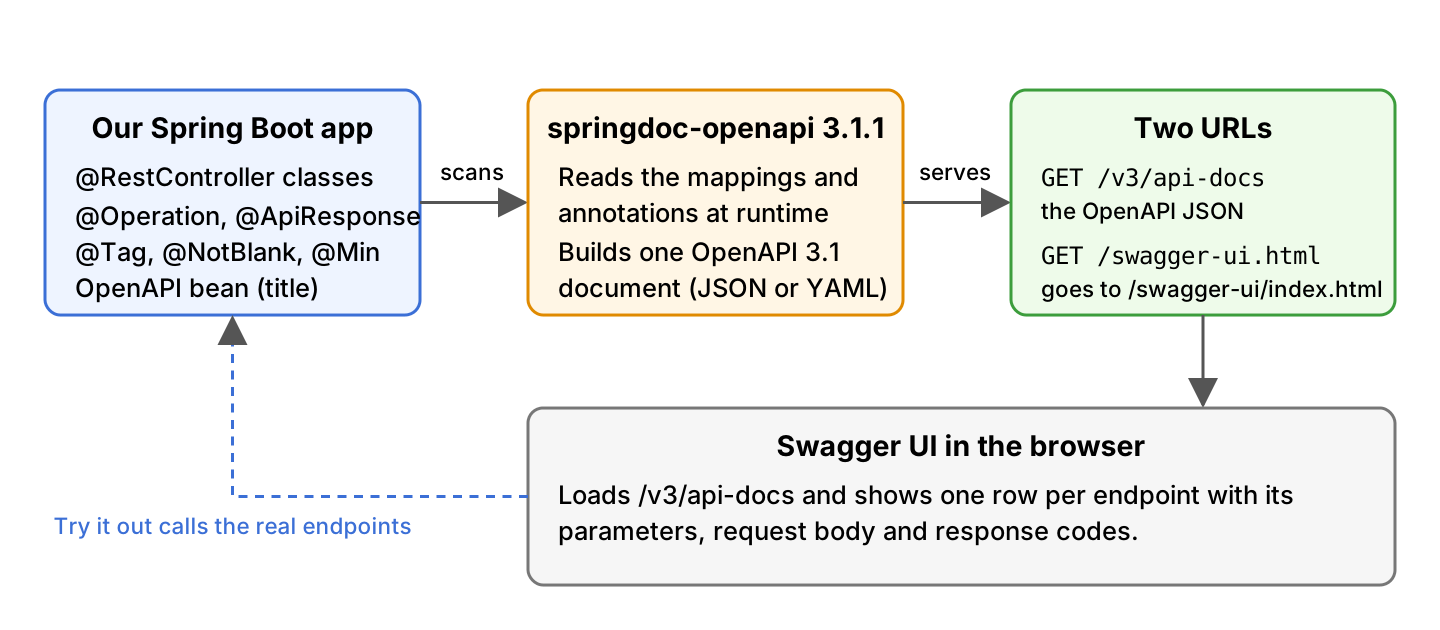
Springdoc OpenAPI is a library that reads the controllers of a Spring Boot app at runtime and generates the REST API documentation for them in the OpenAPI 3 format. It publishes the result as a JSON document at /v3/api-docs and, with Swagger UI, as a web page at /swagger-ui.html where we can read and call every endpoint.
We use springdoc-openapi to give the frontend team and the API clients a description of our endpoints that is always up to date, without writing the document by hand. Tools that generate client code read the same JSON.
The following example adds springdoc-openapi 3.1.1 to a Spring Boot 4.1.1 app. One dependency is enough, and no configuration is needed.
<dependency>
  <groupId>org.springdoc</groupId>
  <artifactId>springdoc-openapi-starter-webmvc-ui</artifactId>
  <version>3.1.1</version>
</dependency>

<!-- http://localhost:8080/v3/api-docs       the OpenAPI document as JSON -->
<!-- http://localhost:8080/swagger-ui.html   the Swagger UI page -->
Notice that the two URLs work on the first start, because springdoc builds the document from the @RequestMapping annotations that our controllers already have. In the rest of the post we add descriptions with the Swagger annotations and change the paths with springdoc.* properties. After that we split the endpoints into groups, add a security scheme, switch the docs off in production and fix the 404 that many readers hit on /swagger-ui.html.
1. What Is Springdoc OpenAPI?
The OpenAPI Specification is a standard format that describes an HTTP API, so both people and tools can read which endpoints exist, what they accept and what they return. The description is one JSON or YAML document. Springdoc-openapi writes that document for a Spring Boot app, and Swagger UI is the web page that turns the document into clickable documentation.
Springdoc works at runtime. When the first request for the document arrives, it reads the annotations on our controller classes and the configuration beans of the running app, and it keeps the result in memory. Nothing is generated at build time, so the document always matches the code that is running.
Each springdoc major version matches one Spring Boot major version. A wrong pair is a common reason for a 404 on the docs URLs, as we will see in section 10.1.
| springdoc-openapi | Spring Boot | Annotations package |
|---|---|---|
| 3.x (3.1.1 is current) | 4.x | io.swagger.v3.oas.annotations |
| 2.x (2.9.1 is the last) | 3.x | io.swagger.v3.oas.annotations |
| 1.x (1.8.0 is the last) | 2.x and 1.x | io.swagger.v3.oas.annotations |
Springdoc replaced Springfox, which had its last release in 2020 and does not run on Spring Boot 3 or 4. Springdoc is a community project, not part of the Spring portfolio, but it is the library that the Spring Initializr offers under the name “SpringDoc OpenAPI”.
2. Adding the Starter Dependency
Springdoc ships one starter per web stack, and each starter comes with or without the Swagger UI. Pick the -ui starter for a normal app. It includes everything the -api starter has, and the UI uses no resources until someone opens the page.
| Starter | Web stack | Swagger UI included |
|---|---|---|
| springdoc-openapi-starter-webmvc-ui | Spring MVC (servlet) | Yes |
| springdoc-openapi-starter-webmvc-api | Spring MVC (servlet) | No, only /v3/api-docs |
| springdoc-openapi-starter-webflux-ui | Spring WebFlux | Yes |
| springdoc-openapi-starter-webflux-api | Spring WebFlux | No, only /v3/api-docs |
The example in this post is a Spring Boot REST API built with the spring-boot-starter-webmvc starter of Spring Boot 4.1.1, Java 25 and springdoc-openapi 3.1.1. The validation starter is there because we want the @NotBlank and @Min rules to show up in the generated schema.
<parent>
  <groupId>org.springframework.boot</groupId>
  <artifactId>spring-boot-starter-parent</artifactId>
  <version>4.1.1</version>
</parent>

<dependencies>
  <dependency>
    <groupId>org.springframework.boot</groupId>
    <artifactId>spring-boot-starter-webmvc</artifactId>
  </dependency>
  <dependency>
    <groupId>org.springframework.boot</groupId>
    <artifactId>spring-boot-starter-validation</artifactId>
  </dependency>
  <dependency>
    <groupId>org.springdoc</groupId>
    <artifactId>springdoc-openapi-starter-webmvc-ui</artifactId>
    <version>3.1.1</version>
  </dependency>
</dependencies>
In Gradle the same starter is one line.
implementation 'org.springdoc:springdoc-openapi-starter-webmvc-ui:3.1.1'The starter brings the swagger-annotations jar with it, so @Operation, @ApiResponse and the other annotations from section 5 need no extra dependency.
3. The Default URLs
After the app starts, springdoc answers on three URLs. Springdoc builds one document, and the YAML URL and the Swagger UI page show that same document in two other forms.
| URL | What we get |
|---|---|
| /v3/api-docs | The OpenAPI document as JSON |
| /v3/api-docs.yaml | The same document as YAML |
| /swagger-ui.html | A 302 redirect to /swagger-ui/index.html, the Swagger UI page |
All three paths come after the context path of the app, so with server.servlet.context-path=/app the JSON is at /app/v3/api-docs. The curl calls show the responses of the example app.
curl -i localhost:8080/swagger-ui.html
# HTTP/1.1 302
# Location: /swagger-ui/index.html

curl localhost:8080/v3/api-docs.yaml
# openapi: 3.1.0
# info:
#   title: Recipe API
#   description: Recipes and their preparation time
#   ...
#   version: 1.0.0
# ...
# paths:
#   /recipes:
#     get:
#       tags:
#       - Recipes
#       summary: List all recipes
The Swagger UI page is served at /swagger-ui/index.html, and /swagger-ui.html is only a redirect to it. A security rule or a proxy that allows only /swagger-ui.html breaks the page, because the browser loads the page and its scripts from /swagger-ui/.
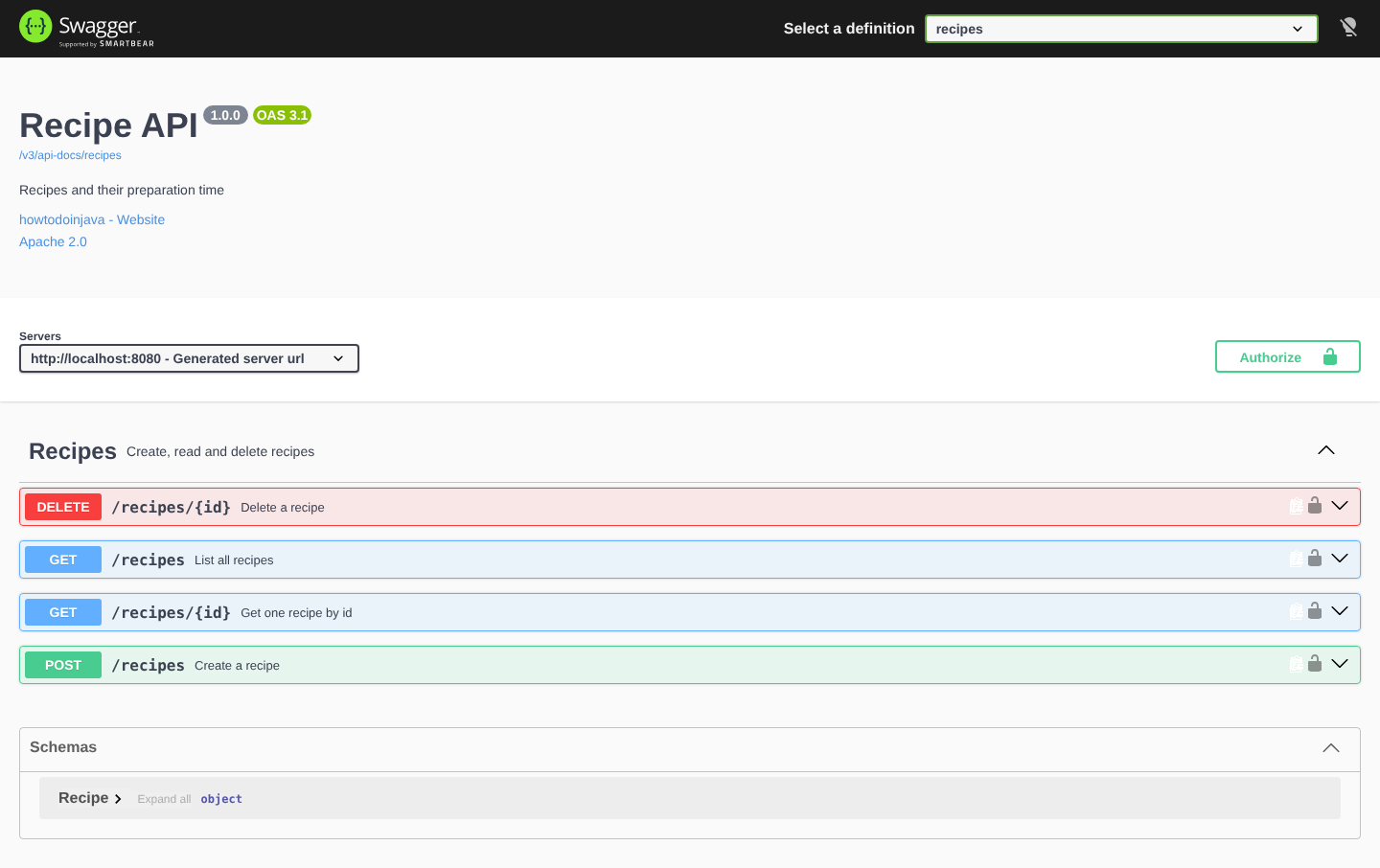
Springdoc also prints two warnings at startup that remind us that both endpoints are open to everyone by default. We switch them off for production in section 8.
WARN o.s.core.events.SpringDocAppInitializer : SpringDoc /v3/api-docs endpoint is enabled by default. To disable it in production, set the property 'springdoc.api-docs.enabled=false'
WARN o.s.core.events.SpringDocAppInitializer : SpringDoc /swagger-ui.html endpoint is enabled by default. To disable it in production, set the property 'springdoc.swagger-ui.enabled=false'
4. Springdoc Properties
Every springdoc setting is a property with the springdoc. prefix in application.properties, so we need no Java configuration for the paths or for the look of the page. The properties for the page start with springdoc.swagger-ui. and have the same names as the Swagger UI configuration options. We can write each name in kebab-case or in camelCase, so both try-it-out-enabled and tryItOutEnabled work.
| Property | Default | What it does |
|---|---|---|
| springdoc.api-docs.path | /v3/api-docs | Path of the OpenAPI JSON. The YAML is at the same path plus .yaml. |
| springdoc.api-docs.enabled | true | Set false to switch off the JSON and YAML endpoints. |
| springdoc.swagger-ui.path | /swagger-ui.html | Path that redirects to the Swagger UI page. |
| springdoc.swagger-ui.enabled | true | Set false to switch off the Swagger UI. |
| springdoc.packages-to-scan | all packages | Comma separated list of packages whose controllers are documented. |
| springdoc.paths-to-match | /* | Comma separated list of URL patterns to document, such as /api/**. |
| springdoc.paths-to-exclude | none | URL patterns to leave out of the document. |
| springdoc.default-produces-media-type | */* | Media type written for responses when the handler has no produces attribute. |
| springdoc.override-with-generic-response | true | Adds the status codes of @ControllerAdvice handlers to every operation. |
| springdoc.show-actuator | false | Set true to document the Actuator endpoints too. |
| springdoc.writer-with-default-pretty-printer | false | Pretty prints the JSON at /v3/api-docs. |
| springdoc.swagger-ui.operations-sorter | none | alpha sorts by path, method sorts by HTTP method. |
| springdoc.swagger-ui.tags-sorter | none | alpha sorts the tags by name. |
| springdoc.swagger-ui.try-it-out-enabled | false | Opens every operation with the Try it out form already active. |
| springdoc.swagger-ui.disable-swagger-default-url | false | Hides the Petstore demo URL from the definition box. |
| springdoc.swagger-ui.urls-primary-name | first group | Group that the definition box shows when the page loads. |
The example app sets the values that most teams change. The first two lines repeat the defaults so the paths are visible in one place.
# OpenAPI JSON (default /v3/api-docs) and Swagger UI (default /swagger-ui.html)
springdoc.api-docs.path=/v3/api-docs
springdoc.swagger-ui.path=/swagger-ui.html

# Response media type when a handler has no produces attribute (default */*)
springdoc.default-produces-media-type=application/json

# Swagger UI look and feel
springdoc.swagger-ui.operations-sorter=method
springdoc.swagger-ui.tags-sorter=alpha
springdoc.swagger-ui.try-it-out-enabled=true
springdoc.swagger-ui.disable-swagger-default-url=true
# Group shown first in the Select a definition box
springdoc.swagger-ui.urls-primary-name=recipes

# Pretty-print the JSON at /v3/api-docs
springdoc.writer-with-default-pretty-printer=true
The springdoc.swagger-ui.path property changes only the redirect URL, not the page itself. With springdoc.swagger-ui.path=/docs, a request to /docs answers with the same 302 to /swagger-ui/index.html, and the old /swagger-ui.html returns 404. Moving the JSON works the same way. After springdoc.api-docs.path=/api-docs, the document is at /api-docs and /api-docs.yaml.
5. Describing the Endpoints with Swagger Annotations
Springdoc fills the document with what it can read from the Spring annotations, which is the path, the HTTP method, the parameters and the request and response types. It cannot know what an endpoint is for or when it returns 404, so we add that text with the annotations from the io.swagger.v3.oas.annotations package.
| Annotation | Placed on | Adds to the document |
|---|---|---|
| @Tag | Controller class | A group name and description. Swagger UI shows one section per tag. |
| @Operation | Handler method | The summary and description of one endpoint. |
| @ApiResponse | Handler method | One response code with its description and body. Repeat it for each code. |
| @Parameter | Method parameter | Description and example of a path, query or header parameter. |
| @Schema | Field or record component | Description, example and read-only flag of a model property. |
| @Hidden | Class, method or parameter | Leaves the element out of the document. |
The following example is a recipe API. A Recipe is a record with an id, a name and the preparation time in minutes, and RecipeStore keeps the recipes in a map. The controller has four endpoints, and the two that take an id can answer 404.
public record Recipe(
    @Schema(description = "Generated by the server", accessMode = Schema.AccessMode.READ_ONLY)
    Long id,
    @NotBlank @Schema(example = "Pancakes") String name,
    @Min(1) @Schema(example = "20") int prepMinutes) {
}
@RestController
@RequestMapping("/recipes")
@Tag(name = "Recipes", description = "Create, read and delete recipes")
public class RecipeController {
@GetMapping
@Operation(summary = "List all recipes")
public List<Recipe> findAll() {
return store.findAll();
}
@GetMapping("/{id}")
@Operation(summary = "Get one recipe by id")
@ApiResponse(responseCode = "200", description = "The recipe")
@ApiResponse(responseCode = "404", description = "No recipe with this id", content = @Content)
public Recipe findById(
@Parameter(description = "Id of the recipe", example = "1") @PathVariable Long id) {
return store.findById(id);
}
@PostMapping
@ResponseStatus(HttpStatus.CREATED)
@Operation(summary = "Create a recipe")
@ApiResponse(responseCode = "201", description = "Created")
@ApiResponse(responseCode = "400", description = "Name is blank or prepMinutes is below 1", content = @Content)
public Recipe create(@Valid @RequestBody Recipe recipe) {
return store.save(recipe);
}
@DeleteMapping("/{id}")
@ResponseStatus(HttpStatus.NO_CONTENT)
@Operation(summary = "Delete a recipe")
public void delete(@PathVariable Long id) {
store.delete(id);
}
}The content = @Content part on the 404 and 400 responses tells springdoc that these responses have no Recipe body. Without it, springdoc copies the return type of the method into every response, so the 404 would be documented with a Recipe body. The @ResponseStatus on create() is what makes 201 the success code. The @ApiResponse for 201 only adds the description text.
The generated JSON for GET /recipes/{id} has the summary, the parameter with its example, and the two responses we declared.
"/recipes/{id}": {
  "get": {
    "tags": [ "Recipes" ],
    "summary": "Get one recipe by id",
    "operationId": "findById",
    "parameters": [ {
      "name": "id",
      "in": "path",
      "description": "Id of the recipe",
      "required": true,
      "schema": { "type": "integer", "format": "int64" },
      "example": 1
    } ],
    "responses": {
      "404": { "description": "No recipe with this id", "content": { } },
      "200": {
        "description": "The recipe",
        "content": {
          "application/json": { "schema": { "$ref": "#/components/schemas/Recipe" } }
        }
      }
    }
  }
}
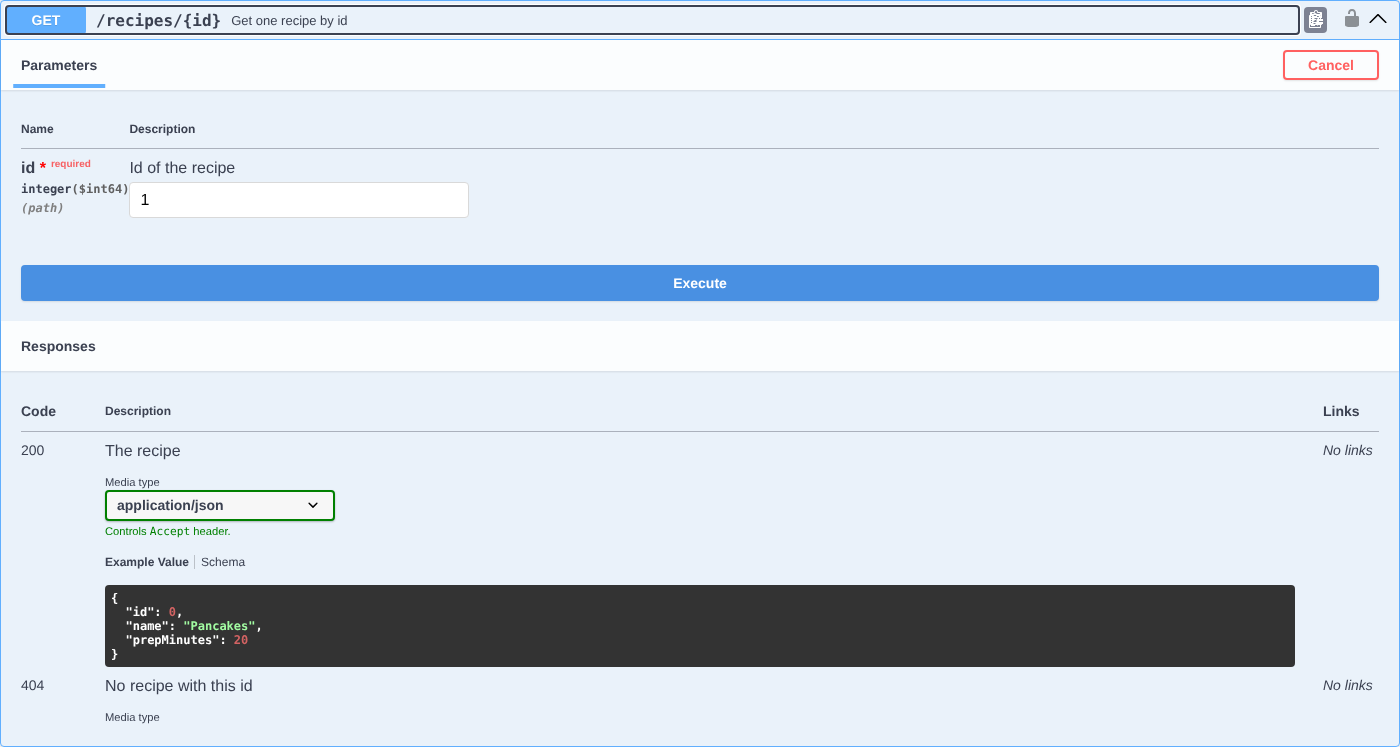
Swagger UI renders the same operation as a form. The example = “1” from @Parameter is already typed into the id field, and the Execute button sends a real request to the running app.
5.1. Validation Annotations in the Schema
Springdoc reads the Bean Validation annotations on the model and turns them into schema rules, so the client sees the limits before the first request fails. In the Recipe schema of the example, each annotation shows up as one rule.
- The @NotBlank on name becomes a minLength of 1, and name goes into the required list.
- The @Min(1) on prepMinutes becomes a minimum of 1.
- The @Schema on id adds the description and the readOnly flag.
"Recipe": {
  "type": "object",
  "properties": {
    "id": { "type": "integer", "format": "int64", "description": "Generated by the server", "readOnly": true },
    "name": { "type": "string", "example": "Pancakes", "minLength": 1 },
    "prepMinutes": { "type": "integer", "format": "int32", "example": 20, "minimum": 1 }
  },
  "required": [ "name" ]
}
Notice that prepMinutes is not in the required list. Only @NotNull, @NotBlank and @NotEmpty make a property required, whereas @Min and @Max only add a range.
5.2. Error Responses from a Controller Advice
Most apps return their error codes from one place, a @RestControllerAdvice class with @ExceptionHandler methods. Springdoc reads the @ResponseStatus on every handler method in that class and adds the status code to every operation in the document, because any endpoint may throw the exception.
@RestControllerAdvice
public class GlobalExceptionHandler {

  @ResponseStatus(HttpStatus.NOT_FOUND)
  @ExceptionHandler(RecipeNotFoundException.class)
  public Map<String, String> notFound(RecipeNotFoundException e) {
    return Map.of("error", e.getMessage());
  }
}
With the RecipeNotFoundException handler in place, even GET /recipes lists a 404 response, which is wrong for a list endpoint that never throws it. The springdoc.override-with-generic-response property turns the copying off. After that, the 404 stays only on the operations where an @ApiResponse declares it.
springdoc.override-with-generic-response=false5.3. Hiding Endpoints and Controllers
Some endpoints are internal, such as a health check that a load balancer calls, and we do not want them in the public document. We can hide them one by one, or by package and path.
The @Hidden annotation works on a controller class, a handler method or a @ControllerAdvice exception handler, and springdoc leaves the annotated element out of the document. In the example, /admin/ping exists and answers “pong”, but it is not in /v3/api-docs.
@Hidden
@GetMapping("/ping")
public String ping() {
  return "pong";
}
For a whole area of the app, the two properties springdoc.packages-to-scan and springdoc.paths-to-match need less work. They say what to include, and everything else is left out.
# Only controllers in these packages
springdoc.packages-to-scan=com.howtodoinjava.demo.web

# Only endpoints under these paths
springdoc.paths-to-match=/recipes/**, /admin/**
6. API Title, Version and Security Scheme
The document starts with an info block that holds the title, version, description, contact and license of the API. Springdoc has no way to guess these values, so without our input the title is “OpenAPI definition” and the version is “v0”. We set them in an OpenAPI bean, which is also where we describe how clients log in to the API.
The following example declares a security scheme named bearerAuth for APIs where the client sends a token in the Authorization header. The call addSecurityItem() applies the scheme to every operation. Swagger UI then shows the Authorize button, and after we paste a token there, every Try it out request carries the header.
@Bean
public OpenAPI recipeOpenApi() {
  return new OpenAPI()
      .info(new Info()
          .title("Recipe API")
          .version("1.0.0")
          .description("Recipes and their preparation time")
          .contact(new Contact().name("howtodoinjava").url("https://howtodoinjava.com"))
          .license(new License().name("Apache 2.0").url("https://www.apache.org/licenses/LICENSE-2.0")))
      .components(new Components().addSecuritySchemes("bearerAuth",
          new SecurityScheme()
              .type(SecurityScheme.Type.HTTP)
              .scheme("bearer")
              .bearerFormat("JWT")))
      .addSecurityItem(new SecurityRequirement().addList("bearerAuth"));
}
The bean only documents the security. It does not protect anything, so the real checks still come from Spring Security. Other login methods need a different scheme. For an API that uses basic auth, the scheme is .type(SecurityScheme.Type.HTTP).scheme(“basic”), and for an API key in a header it is .type(SecurityScheme.Type.APIKEY).in(SecurityScheme.In.HEADER).name(“X-API-KEY”).
"info": {
  "title": "Recipe API",
  "description": "Recipes and their preparation time",
  "contact": { "name": "howtodoinjava", "url": "https://howtodoinjava.com" },
  "license": { "name": "Apache 2.0", "url": "https://www.apache.org/licenses/LICENSE-2.0" },
  "version": "1.0.0"
},
"security": [ { "bearerAuth": [ ] } ],
"components": {
  "securitySchemes": {
    "bearerAuth": { "type": "http", "scheme": "bearer", "bearerFormat": "JWT" }
  }
}
The same info can come from the @OpenAPIDefinition and @SecurityScheme annotations on the application class. We prefer the bean, because we can compute the values in Java, for example read the version from the build.
7. Grouping Endpoints with GroupedOpenApi
A larger app often has endpoints for two audiences, for example the public recipe endpoints and the admin endpoints for the support team. One GroupedOpenApi bean per audience splits the document into groups. Each group gets its own URL under /v3/api-docs/{group} and its own entry in the “Select a definition” box at the top of the Swagger UI page.
@Bean
public GroupedOpenApi recipesGroup() {
  return GroupedOpenApi.builder()
      .group("recipes")
      .pathsToMatch("/recipes/**")
      .build();
}

@Bean
public GroupedOpenApi adminGroup() {
  return GroupedOpenApi.builder()
      .group("admin")
      .pathsToMatch("/admin/**")
      .build();
}
The builder also has packagesToScan() and pathsToExclude(), and we can combine them with pathsToMatch() in one group. With the two groups above, the example app answers on three document URLs.
curl localhost:8080/v3/api-docs/recipes   # paths: /recipes, /recipes/{id}
curl localhost:8080/v3/api-docs/admin     # paths: /admin/stats
curl localhost:8080/v3/api-docs           # all paths, used when no group is selected
As soon as one GroupedOpenApi bean exists, Swagger UI lists only the groups, and an endpoint that matches no group is not shown on the page until we add a group for it. The plain /v3/api-docs still contains everything.
8. Disabling the Docs in Production
The document lists every endpoint and every model with all their fields, which is more than we want to show on a public server. Two properties switch the doc endpoints off. We put them in a Spring profile named prod, so the docs stay on for developers and go off in production.
springdoc.api-docs.enabled=false
springdoc.swagger-ui.enabled=false
With the prod profile active, both URLs answer 404 and the API itself keeps working.
java -jar target/springdoc-openapi-1.0.0.jar --spring.profiles.active=prod

curl -i localhost:8080/v3/api-docs       # HTTP/1.1 404
curl -i localhost:8080/swagger-ui.html   # HTTP/1.1 404
curl -i localhost:8080/recipes           # HTTP/1.1 200
When a few people must still reach the docs in production, keep both properties at true and let Spring Security require a role for the /v3/api-docs/ and /swagger-ui/ patterns instead.
9. Testing the Generated Document
A test that reads /v3/api-docs catches a renamed endpoint or a deleted @ApiResponse before the clients do. With spring-boot-starter-webmvc-test, the MockMvcTester of Spring Boot 4 calls the endpoint without a running server. Jackson 3 parses the JSON, so the JsonMapper and JsonNode imports come from the tools.jackson.databind package, not from com.fasterxml.
@SpringBootTest
@AutoConfigureMockMvc
class ApiDocsTest {

  @Autowired
  MockMvcTester mvc;

  private final JsonMapper mapper = JsonMapper.builder().build();

  @Test
  void apiDocsDescribesTheRecipeEndpoints() {
    MvcTestResult result = mvc.get().uri("/v3/api-docs").exchange();
    assertThat(result).hasStatusOk();

    JsonNode docs = mapper.readTree(result.getResponse().getContentAsByteArray());
    assertThat(docs.get("openapi").asString()).startsWith("3.1");
    assertThat(docs.at("/info/title").asString()).isEqualTo("Recipe API");
    assertThat(docs.at("/paths/~1recipes/get/summary").asString()).isEqualTo("List all recipes");
    assertThat(docs.at("/paths/~1recipes~1{id}/get/responses/404/description").asString())
        .isEqualTo("No recipe with this id");
  }

  @Test
  void swaggerUiRedirectsToIndexHtml() {
    MvcTestResult result = mvc.get().uri("/swagger-ui.html").exchange();

    assertThat(result).hasStatus(302).hasRedirectedUrl("/swagger-ui/index.html");
  }
}
The at() method takes a JSON pointer, which is a path to one value in the document. In a pointer, ~1 stands for a slash, so /paths/~1recipes points at the key “/recipes”. The full project has thirteen such tests, including one with the prod profile that checks that both URLs answer 404.
10. Springdoc OpenAPI FAQs
10.1. Why Does /swagger-ui.html Return 404?
The page is missing for one of five reasons, and the fix is different for each. Check them in this order.
| Cause | How to see it | Fix |
|---|---|---|
| The -api starter is on the classpath instead of -ui | /v3/api-docs works, the UI does not | Use springdoc-openapi-starter-webmvc-ui |
| Springdoc 2.x or 1.x on Spring Boot 4 | The app fails at startup with a missing class, or both URLs answer 404 | Use springdoc 3.x with Spring Boot 4, 2.x with Spring Boot 3 |
| Spring Security blocks the page | The browser shows the login page or 401/403 | Permit /swagger-ui/ and /v3/api-docs/ |
| A custom springdoc.swagger-ui.path or enabled=false | The property is in application.properties or a profile | Open the custom path, or set enabled=true |
| A context path is set | The API works on /app/recipes | Open /app/swagger-ui.html |
A sixth case is a WebFlux app with the webmvc starter, or the other way round. The starter must match the web stack, as the table in section 2 shows.
10.2. Can We Use springdoc Without Spring Boot?
Yes, but with more setup. Spring Boot registers the springdoc beans for us, and without it we do that ourselves. In a Spring MVC app without Spring Boot, we add springdoc-openapi-starter-webmvc-ui plus the spring-boot-autoconfigure jar, and we import the springdoc auto-configuration classes in our own @Configuration, as the springdoc FAQ describes. For a new project, Spring Boot is the simpler choice.
10.3. Does springdoc Document Spring Data Pageable Parameters?
Yes. When a handler method takes a Pageable parameter annotated with @ParameterObject, springdoc documents it as the three query parameters page, size and sort. The pagination and sorting post shows such an endpoint. The property springdoc.model-converters.pageable-converter.enabled=false switches the conversion off.
10.4. Why Does the App Fail to Start After Upgrading to Spring Boot 4?
The springdoc-openapi version is too old. Version 2.x was compiled against Spring Boot 3, and Spring Boot 4 moved the class WebMvcProperties to a new package. With springdoc-openapi 2.8.17 on Spring Boot 4.1.1, the app stops at startup with this error.
ERROR o.s.boot.SpringApplication : Application run failed
Caused by: org.springframework.boot.autoconfigure.condition.OnBeanCondition$BeanTypeDeductionException: Failed to deduce bean type for org.springdoc.webmvc.ui.SwaggerConfig.swaggerWelcome
Caused by: java.lang.NoClassDefFoundError: org/springframework/boot/autoconfigure/web/servlet/WebMvcProperties
We fix it by upgrading to springdoc-openapi 3.x, as the version table in section 1 shows.
10.5. Does Swagger UI Work With Spring Security?
Yes, but Spring Security protects the docs URLs like every other URL, so Swagger UI returns 401 until we permit them. We add the docs paths to permitAll() and keep the API itself protected.
@Bean
public SecurityFilterChain securityFilterChain(HttpSecurity http) throws Exception {
  http
      .authorizeHttpRequests(auth -> auth
          .requestMatchers("/v3/api-docs/**", "/v3/api-docs.yaml",
              "/swagger-ui.html", "/swagger-ui/**").permitAll()
          .anyRequest().authenticated())
      .httpBasic(Customizer.withDefaults());
  return http.build();
}
The pattern /v3/api-docs/** covers /v3/api-docs and /v3/api-docs/swagger-config, which Swagger UI loads first. It does not cover /v3/api-docs.yaml, so the YAML URL needs its own entry. With this configuration, the docs URLs return 200 or 302, and a request to the API without credentials returns 401.
10.6. How Do We Migrate From Springfox to springdoc-openapi?
Springfox uses @EnableSwagger2 and a Docket bean. It has had no release since 3.0.0 in July 2020 and was built for the javax.servlet API, whereas Spring Boot 3 and 4 use the jakarta.servlet API. So a Spring Boot 3 or 4 project moves to springdoc-openapi in four steps, which the springdoc-openapi migration guide describes.
- Remove the Springfox dependencies and add springdoc-openapi-starter-webmvc-ui.
- Replace the Swagger 2 annotations with the Swagger 3 annotations from the table.
- Remove the Docket bean. If it selected packages or paths, set springdoc.packages-to-scan or springdoc.paths-to-match instead. Several Docket beans become GroupedOpenApi beans.
- Move the API title and version from the ApiInfo object into an OpenAPI bean, as in section 6.
Most annotations have a direct replacement, but the attribute names change, for example code becomes responseCode in @ApiResponse.
| Springfox (Swagger 2) | springdoc-openapi (Swagger 3) |
|---|---|
| @Api | @Tag |
| @ApiOperation(value = “foo”, notes = “bar”) | @Operation(summary = “foo”, description = “bar”) |
| @ApiResponse(code = 404, message = “foo”) | @ApiResponse(responseCode = “404”, description = “foo”) |
| @ApiParam | @Parameter |
| @ApiImplicitParam | @Parameter |
| @ApiImplicitParams | @Parameters |
| @ApiModel | @Schema |
| @ApiModelProperty | @Schema |
| @ApiModelProperty(allowEmptyValue = true) | @Schema(nullable = true) |
| @ApiIgnore | @Hidden, @Operation(hidden = true) or @Parameter(hidden = true) |
The URLs change too. Springfox served the document at /v2/api-docs, and springdoc-openapi serves it at /v3/api-docs, so API gateways and client generators that read the old URL need the new one.
11. Conclusion
Springdoc-openapi takes a few minutes to set up and gets us to a documented REST API. One starter gives us the JSON at /v3/api-docs and the Swagger UI at /swagger-ui.html. The Swagger annotations and the OpenAPI bean fill in what springdoc cannot guess, and the springdoc.* properties control the paths and the page.
We must keep in mind that the generated documentation is based on the annotations and the properties. These can be added or removed accidentally, and the document goes out of date with them. A test that reads /v3/api-docs, as in section 9, keeps the code and the document in sync.
A different approach is Spring REST Docs, which creates the documentation from the unit tests. If a test fails, the documentation for that endpoint is not created, so the tests and the documentation always agree.
12. References
- springdoc-openapi documentation
- OpenAPI Specification
- Swagger UI configuration options
- Swagger annotations Javadoc
- Spring Boot profiles
- MockMvcTester in Spring Framework
Happy Learning !!
