
Java is a general-purpose, object-oriented programming language whose code is compiled into bytecode that runs on any machine with a Java Virtual Machine (JVM). This Java tutorial teaches it with Java 25, the current long-term support release.
Java is one of the most popular programming languages for developing all kinds of desktop applications, web applications and mobile apps. Today we mostly use it for back-end services and REST APIs built with Spring Boot, and for Android apps.
The following example is a complete Java 25 program. We save it as Hello.java and run it with the command java Hello.java.
void main() {
    IO.println("Hello, Java!");   // Hello, Java!
}
Notice that the file has no class, and main() has no static keyword and no parameters. Java 25 allows this short form for small programs, and the classic public static void main(String[] args) form still works everywhere.
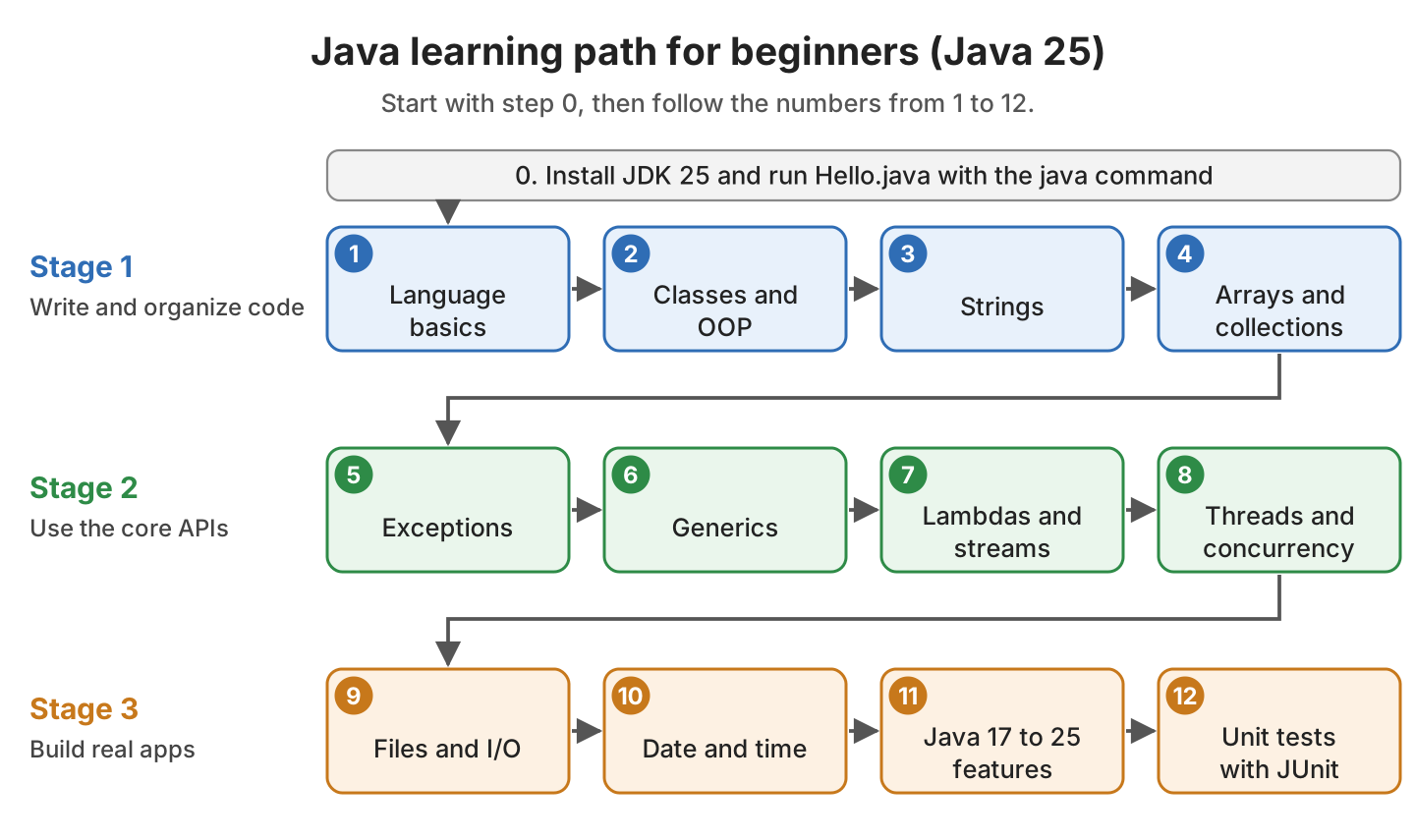
In the next sections, we install JDK 25 and run our first program in both forms. After that, a learning path in 12 steps links to the best tutorials for each topic, from language basics to unit tests.
1. What Is Java and Which Version Should We Learn?
We write Java code in .java files. The javac compiler turns each file into a .class file that contains bytecode. Bytecode is a set of instructions for the JVM, not for a specific CPU, so the same .class file runs on every operating system that has a JVM.
We get all the tools in one download, the Java Development Kit (JDK). To get started, we need only three of its commands. The difference between JDK, JRE and JVM matters later.
| Tool | What it does | Example |
|---|---|---|
| javac | Compiles .java source files into .class files | javac HelloWorld.java |
| java | Starts the JVM and runs a class, or runs a source file without a separate compile step | java Hello.java |
| jshell | Runs single Java statements in an interactive console | jshell |
A new Java version comes out every six months, in March and in September. Every two years, one of them is a long-term support (LTS) release, which gets security fixes for many years. Java 25 (September 2025) is the latest LTS release, and the next planned LTS release is Java 29 in September 2027.
Beginners should learn on Java 25, because most new projects and frameworks such as Spring Boot 4 support it. Java 26 and Java 27 add new features, but each of them gets updates for six months only.
2. Installing JDK 25
Before we write any code, we need a JDK on our machine. Several vendors build the JDK from the same OpenJDK code, so our code runs the same on all of them. Eclipse Temurin is free and a good default for learning.
We install it in four steps.
- Download the JDK 25 installer for our operating system from the Temurin releases page.
- Run the installer. On Windows, select the options that set JAVA_HOME and add Java to the PATH (the list of folders where the terminal looks for commands).
- Open a new terminal window, so that it reads the new PATH.
- Check the versions of the java and javac commands.
$ java -version
openjdk version "25.0.4.1" 2026-08-18 LTS
OpenJDK Runtime Environment Temurin-25.0.4.1+1 (build 25.0.4.1+1-LTS)
OpenJDK 64-Bit Server VM Temurin-25.0.4.1+1 (build 25.0.4.1+1-LTS, mixed mode, sharing)

$ javac -version
javac 25.0.4.1
If the terminal prints an older version or “command not found”, the PATH still points to another JDK or to none. The guide for installing OpenJDK on Linux, macOS and Windows shows how to set JAVA_HOME and PATH on each system.
We do not need an IDE to start, because a text editor and the java command are enough. An IDE helps once a program has several classes, or when we need a debugger.
3. Writing and Running Our First Java Program
Java 25 gives us two ways to write a program. The short form is for learning and small scripts, whereas the classic form is what we see in every Maven or Spring Boot project, so we learn both.
| Feature | Compact source file (Java 25) | Classic class |
|---|---|---|
| Class declaration | Not needed; the compiler creates the class for us | public class HelloWorld { … } |
| main() method | void main(), an instance method without parameters | public static void main(String[] args) |
| Imports | The common packages, such as java.util, are imported for us | Only java.lang; everything else needs an import |
| Run | java Hello.java | javac HelloWorld.java, then java HelloWorld |
The example code uses JDK 25.0.4.1, Maven 3.9.16 and JUnit 6.1.3, and it is in the java-tutorial folder on GitHub.
3.1. A Compact Source File With an Instance Main Method
A compact source file is a .java file with methods and fields but no class around them. The compiler puts them into a class that it creates for us. The main() method needs neither the static keyword nor the String[] args parameter. Both features became final in Java 25 with JEP 512.
Java 25 also adds the java.lang.IO class for console programs. The method IO.println() prints a line, and IO.readln() prints a prompt and reads the line that the user types. When there is no input left, IO.readln() returns null, so we check for it.
The following example asks for a name and prints a greeting. It uses List without an import statement, because a compact source file imports the common Java packages for us.
void main() {
    String input = IO.readln("Your name: ");
    String name = (input == null || input.isBlank()) ? "stranger" : input.strip();

    List<String> topics = List.of("basics", "OOP", "collections");
    IO.println("Hello, " + name + "! Start with " + topics.getFirst() + ".");
}
The java command compiles the file in memory and runs it, so no .class file is written. In the first run, we pipe “Lokesh” into the program, so the name does not show after the prompt. In the second run, the input is empty, and the program prints “stranger” instead of failing with a NullPointerException.
$ echo Lokesh | java Greeting.java
Your name: Hello, Lokesh! Start with basics.

$ java Greeting.java < /dev/null
Your name: Hello, stranger! Start with basics.
3.2. The Classic Class With public static void main()
In real projects, every program starts from a class with a public static void main(String[] args) method. The JVM calls this main() method without creating an object first, which is why it is static. The args array holds the command-line arguments.
The following example is the classic Hello World program. The file name must match the public class name, so we save it as HelloWorld.java.
public class HelloWorld {
    public static void main(String[] args) {
        System.out.println("Hello, Java!");
    }
}
This time we compile and run in two steps. The javac command writes HelloWorld.class, and the java command takes the class name without the .class extension.
$ javac HelloWorld.java
$ java HelloWorld
Hello, Java!
3.3. Moving the Code Into a Maven Project With a JUnit Test
Once a program has more than one class, we use a build tool. Maven downloads the libraries we need, and it compiles and tests our code with one command. We can create a Java project with Maven from the command line or from the IDE, and it keeps the code in src/main/java and the tests in src/test/java.
The following example moves the greeting logic into a Greeter class, so that a test can check it.
public String greet(String name) {
    if (name == null || name.isBlank()) {
        return "Hello, stranger!";
    }
    return "Hello, " + name.strip() + "!";
}
A JUnit test is a method annotated with @Test that calls our code and compares the result with the expected value. If the values differ, assertEquals() fails the test, and Maven reports the failure.
@Test
void greetsByName() {
    assertEquals("Hello, Lokesh!", greeter.greet("Lokesh"));
}
We run the tests with mvn test. The GreeterTest class on GitHub also checks a name with extra spaces and three kinds of missing names, so Maven reports 5 tests for it.
[INFO] Tests run: 5, Failures: 0, Errors: 0, Skipped: 0 -- in com.howtodoinjava.tutorial.GreeterTest
[INFO] BUILD SUCCESS
4. Java Tutorial Learning Path in 12 Steps
Beginners often get stuck because they do not know what to learn next. We learn the topics in the order shown in the diagram, because each step uses the one before it. For example, streams make sense only after we know collections and lambdas.
4.1. Language Basics and Flow Control
Start with syntax and the basic building blocks of the Java language. Variables hold values of a data type such as int or boolean, and flow control statements such as if-else and loops decide which code runs.
- Java Variables
- Java Data Types with Examples
- Java Operators
- Java Flow Control Statements
- Java Naming Conventions
4.2. Classes, Objects and OOP
A class describes the fields and the methods of a kind of object, such as a Book with a title and a price. Object-oriented programming (OOP) adds four ideas on top of classes, namely encapsulation, inheritance, polymorphism and abstraction.
- Java OOP Concepts with Examples
- Java Class and Object
- Java Constructors
- Java Inheritance
- Difference between Interface and Abstract Class
- Java hashCode() and equals() Methods
4.3. Working With Strings
Java stores text in String objects. A String is immutable, so methods such as toUpperCase() return a new String and never change the original one. Knowing this early explains why we use StringBuilder to join strings in a loop.
- Java String Tutorial
- Why are Strings Immutable in Java?
- Java String Concatenation Performance
- Java String split()
4.4. Arrays and Collections
Arrays are the most basic container of multiple elements. Apart from the array, Java supports more advanced collection types. A List keeps elements in order, and a Map stores key-value pairs such as “apple” -> 5.
- Java Array
- Java Collection Tutorials
- Java ArrayList Guide
- Complete Guide to Java HashMap
- Sorting Arrays, Lists and Maps in Java
4.5. Handling Exceptions
An exception is an object that Java throws when something goes wrong, such as a missing file. We catch it with try-catch to recover, or declare it with throws to let the caller decide.
- Java try catch finally
- Java Checked vs Unchecked Exceptions
- Java try-with-resources
- How to Fix and Avoid NullPointerException
- Java Exception Handling Best Practices
4.6. Generics
Generics let a class or a method work with a type that we choose, as in List<String>. The compiler checks that we put only strings into a List<String>, so we see the mistake at compile time instead of a ClassCastException at runtime.
4.7. Lambdas and Streams
A lambda expression is a short way to pass a piece of code to a method, such as name -> name.length(). The Stream API uses lambdas to filter and transform the elements of a collection in a few lines.
- Lambda Expressions in Java
- Functional Interfaces in Java
- Java Method References
- Java Stream API Examples for Beginners
4.8. Threads and Concurrency
A thread runs code in parallel with other threads, so a server can handle many requests at the same time. Since Java 21, virtual threads are cheap enough to start one thread for each request.
- Guide to Java Concurrency
- How to Create and Start a New Thread
- Guide to ExecutorService in Java
- Java Virtual Threads
4.9. Files and I/O
Learn the most basic read-and-write operations on files in Java. The Files class from java.nio.file reads a small file in one call, whereas we read a large file line by line, so it never has to fit in memory.
4.10. Date and Time
The java.time package has a separate class for each kind of value, such as LocalDate for a birthday and ZonedDateTime when the time zone matters. New code uses java.time instead of the old java.util.Date class.
- Java Date and Time Tutorial
- Get Current Date and Time in Java
- Java DateTimeFormatter
- Number of Days between Two Dates
4.11. Modern Java Features From Java 17 to Java 25
Recent Java versions make everyday code shorter. For example, a record replaces a data class full of getters, and a text block holds a multi-line string. The Java 25 features article covers the newest changes, including the compact source files from section 3.1.
- Java 21 Features (LTS)
- Java Record Type
- Sealed Classes and Interfaces
- Java Switch Expressions
- Record Patterns and Pattern Matching
- Java Text Blocks
- Java var Keyword
4.12. Unit Testing With JUnit
A unit test checks one class or method on its own, like the GreeterTest in section 3.3. JUnit 6 is the current version, and it requires Java 17 or newer.
- JUnit 6 Tutorial with Examples
- JUnit 6 Maven Dependency
- JUnit @ParameterizedTest
- Unit Testing Best Practices
5. Conclusion
We learn Java on JDK 25, the current LTS release. A compact source file with void main() is enough for a first program, and java Hello.java runs it in one step.
Real projects still use a class with public static void main(String[] args), built with Maven and tested with JUnit. After that, the learning path takes us from language basics to unit testing, one step at a time.
6. References
- JEP 512 Compact Source Files and Instance Main Methods
- JDK 25 project page
- Java SE 25 documentation
- The java command
- Oracle Java SE Support Roadmap
- Learn Java at dev.java
- Maven in 5 Minutes
- JUnit User Guide
Happy Learning !!
